Aspnetcore: ActionContext.RouteData.Routers empty causes ArgumentOutOfRangeException in UrlHelper (Regression from 2.1)
Describe the bug
- ActionContext.RouteData.Routers is empty collection with CompabilityVersion.Version_2_2
- UrlHelper uses direct access to zero-element, instead calling .First() or .FirstOrDefault() with emergency return of ie. NullRouter
protected IRouter Router => ActionContext.RouteData.Routers[0]; - This causes ArgumentOutOfRangeException while using UrlHelper
To Reproduce
Steps to reproduce the behavior:
- Using this version of ASP.NET Core '2.2'
- Run this code:
Generate new WebApi project
In Startup.cs
public void ConfigureServices(IServiceCollection services)
{
    services.AddRouting(opt => opt.LowercaseUrls = true);


    services.AddSingleton<IActionContextAccessor, ActionContextAccessor>();
    services.AddScoped<IUrlHelper>(implementationFactory =>
    {
        var actionContext = implementationFactory.GetService<IActionContextAccessor>().ActionContext;
        return new UrlHelper(actionContext);
    });

    services.AddMvc()
        .SetCompatibilityVersion(CompatibilityVersion.Version_2_2);
}
TestController.cs
using Microsoft.AspNetCore.Mvc;

[Route("api/test")]
public class TestController : Controller
{

    protected IUrlHelper UrlHelper {get;set;}

    public TestController(IUrlHelper urlHelper)
    {
        UrlHelper = urlHelper;
    }

    [HttpGet]
    public IActionResult ListAsync()
    {
        var res = UrlHelper.Action(nameof(ListAsync));
        return Ok(res);
    }
}
- Execute action GET /api/test
- See error:
ArgumentOutOfRangeException: Index was out of range. Must be non-negative and less than the size of the collection.
 Parameter name: index
System.Collections.Generic.List<T>.get_Item(int index)
Microsoft.AspNetCore.Mvc.Routing.UrlHelper.get_Router()
Microsoft.AspNetCore.Mvc.Routing.UrlHelper.GetVirtualPathData(string routeName, RouteValueDictionary values)
Microsoft.AspNetCore.Mvc.Routing.UrlHelper.Action(UrlActionContext actionContext)
Microsoft.AspNetCore.Mvc.UrlHelperExtensions.Action(IUrlHelper helper, string action, string controller, object values, string protocol, string host, string fragment)
Microsoft.AspNetCore.Mvc.UrlHelperExtensions.Action(IUrlHelper helper, string action)
TestController.ListAsync() in TestController.cs
        var res = UrlHelper.Action(nameof(ListAsync));
- Switch CompabilityVersion to
CompatibilityVersion.Version_2_1 - Watch action run as expected
Expected behavior
Action should return /api/test
No ArgumentOutOfRangeException should be thrown
Additional context
 WueF
WueF
All 17 comments
UrlHelper relies on IRouter and will not work when endpoint routing is enabled. There is an EndpointRoutingUrlHelper that is used for backwards compatibility reasons but is internal.
Instead of injecting UrlHelper, you should change your code to use LinkGenerator. It is designed to be resolved from DI and is registered by default in 2.2
Use LinkGenerator.GetPathByAction: https://docs.microsoft.com/en-us/aspnet/core/fundamentals/routing?view=aspnetcore-2.2#url-generation
@rynowak Do you think we should improve the exception UrlHelper throws when there is no router? Something like: "No router could be found. Use LinkGenerator instead."
 JamesNK
on 17 Dec 2018
JamesNK
on 17 Dec 2018
Hi
I'm going to close this issue as answered. If more people report this error we'll look into improving the exception message to be more descriptive.
JamesNK
on 19 Dec 2018
@JamesNK Hi, thanks for clarification. Indeed it's enough for me and I suppose issue indeed can be closed, unless ArgumentOutOfRangeException isn't ugly in this context.
Maybe just suggestion/question: Maybe it's worth to update https://docs.microsoft.com/en-us/aspnet/core/migration/21-to-22?view=aspnetcore-2.2&tabs=visual-studio with notification that some routing has to be updated, and calls to IUrlHelper replaced with LinkGenerator?
WueF
on 19 Dec 2018
Using UrlHelper is fine when it is resolved from DI, like the Url property on Razor pages is. This problem comes up when you construct it yourself.
JamesNK
on 11 Jan 2019
On my side, I create LinkGenetor like this:
C#
LinkGenerator linkGenerator = httpContext.RequestServices.GetRequiredService<LinkGenerator>();
work fine
 daikoz
on 13 Jan 2019
daikoz
on 13 Jan 2019
Can anyone expand on why ControllerContext.RouteData.Routers would be empty in 2.2? I don't understand the need for this. I was using it in 2.1 to find the route template that the currently executing action is firing on. This because I'm using one action for many routes and doing logic based on the route template that triggered the call. Is there a suitable replacement to discover the route template?
I was doing:
C#
var route = ControllerContext.RouteData.Routers.SingleOrDefault(r => r is Route) as Route;
but now this returns null
 brittonbeckham
on 5 Feb 2019
brittonbeckham
on 5 Feb 2019
Because ASP.NET Core 2.2 uses endpoint routing instead of IRouter.
I think it would be good to add a friendly error message here. A number of people are running into this issue.
JamesNK
on 5 Feb 2019
Fair enough, but is there still a way to determine the route template that matched and triggered the action?
brittonbeckham
on 5 Feb 2019
Looks like I can do this:
C#
services.AddMvc(options => options.EnableEndpointRouting = false)
    .SetCompatibilityVersion(CompatibilityVersion.Version_2_2);
but looking for a better understanding of how to get route templates from the Action.
brittonbeckham
on 5 Feb 2019
I'm confused about what you're trying to do. With endpoint routing there is a new LinkGenerator class with extension methods to get a link for an action.
https://docs.microsoft.com/en-us/aspnet/core/fundamentals/routing?view=aspnetcore-2.2#url-generation
JamesNK
on 5 Feb 2019
I'm setting up a proxy action to handle and pass through requests from a client to a set of backend services. I have a dynamic list of routes that are loaded during startup from a config file:
```C#
void ConfigurePassThroughRouteMap(IRouteBuilder routeBuilder, ProxyConfiguration proxyConfig)
{
//set routes
int i = 1;
foreach (var route in proxyConfig.Routes)
{
routeBuilder.MapRoute($"Route{i}", route.RouteTemplate, defaults: new { controller = "Proxy", action = "DefaultHandler" });
Debug.WriteLine($"Adding Route: Route{i} as {route.RouteTemplate}");
i++;
}
}
Then, any dynamic route template requested from the service will map to the `DefaultHandler` Action on the `ProxyController`. The logic in that Action first looks to determine which route template trigger the Action in order to look it up in the config and get additional information about how to pass the request along to another service. It also does some magic using the Route parameters to map them over to the pass-through request to the other service:

```C#
public async Task<IActionResult> DefaultHandler()
{
    //determine the route template that triggered this action
    var route = ControllerContext.RouteData.Routers.SingleOrDefault(r => r is Route) as Route;
    if (route == null)
        return NotFound("Proxy route not registered");

    //find the route map definition from the appsettings
    var proxiedRoute = _proxyConfig.Routes.SingleOrDefault(r => r.RouteTemplate.Equals(route.RouteTemplate, StringComparison.InvariantCultureIgnoreCase));
    if (proxiedRoute == null)
        return NotFound($"No matching pass-through map for {route.RouteTemplate}");

    //copy route parameters over to new route
    var mappedRoute = proxiedRoute.MappedRoute;
    foreach (var param in route.ParsedTemplate.Parameters)
    {
        var routeParam = $"{{{param.Name}}}";
        var routeParamValue = ControllerContext.RouteData.Values[param.Name];
        if (!mappedRoute.Contains(routeParam))
            throw new InvalidOperationException($"The route template parameter {{{param.Name}}} has no corresponding mapped route parameter");

        mappedRoute = mappedRoute.Replace(routeParam, routeParamValue.ToString());
    }

    //add querystring params
    mappedRoute += Request.QueryString;

    //get the request body
    string requestBody = null;
    using (var reader = new StreamReader(Request.Body))
        requestBody = reader.ReadToEnd();

    //assumption: we think we are getting json in the request body here, so we'll convert it to a generic object for easier handling down the road
    object requestData = null;
    if (!string.IsNullOrEmpty(requestBody))
        requestData = JsonConvert.DeserializeObject(requestBody);

    //initalize proxy abstraction
    var proxyClient = new IsdcProxyHttpClient(_httpClientFactory.CreateClient(proxiedRoute.Service));

    //perform proxied call
    return await proxyClient.HandleProxiedRequestAndComposeResult(Request.Method, mappedRoute, requestData);
}
In summary, I really need to access route template data and parameters, not knowing beforehand exactly which route and set of parameters triggered the Action. Any help would be greatly appreciated. Also, great job on Json.NET!
brittonbeckham
on 5 Feb 2019
Endpoint routing will register the matched endpoint on the HttpContext. From that you can get its pattern. RoutePattern has replaced RouteTemplate in the new routing framework and it is easy to convert between the two.
    var routeEndpoint = ControllerContext.HttpContext.GetEndpoint() as RouteEndpoint;
    var routePattern = routeEndpoint.RoutePattern;
Is that what you are looking for?
JamesNK
on 5 Feb 2019
GetEndpoint() appears to be an extensions method that I can't find... what library is this in?
brittonbeckham
on 6 Feb 2019
Microsoft.AspNetCore.Http.Endpoints.EndpointHttpContextExtensions.GetEndpoint
JamesNK
on 6 Feb 2019
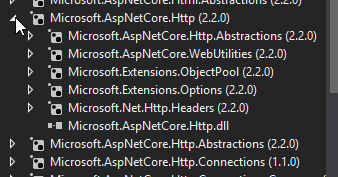
I swear I am not dumb, but I have looked everywhere and cannot find these objects. Google'd it as well and found the code in the github repos, but for whatever reason, my project doesn't recognize these objects and ReSharper doesn't auto-find either.


brittonbeckham
on 7 Feb 2019
Hmmm, it must be new in .NET Core 3.0. I've been thinking about 3.0 for so long that my head is no longer in 2.2 land. Sorry about that.
The code inside GetEndpoint is very simple. Put this logic in your app to get the endpoint:
JamesNK
on 7 Feb 2019
Perfect! Thanks. I'll take a look at how this works and see if it is a suitable replacement for what I was doing.
brittonbeckham
on 7 Feb 2019
Related issues
 markrendle
·
3Comments
markrendle
·
3Comments
 rbanks54
·
3Comments
rbanks54
·
3Comments
 bgribaudo
·
3Comments
bgribaudo
·
3Comments
 farhadibehnam
·
3Comments
farhadibehnam
·
3Comments
 ipinak
·
3Comments
ipinak
·
3Comments
Most helpful comment
UrlHelperrelies onIRouterand will not work when endpoint routing is enabled. There is anEndpointRoutingUrlHelperthat is used for backwards compatibility reasons but is internal.Instead of injecting
UrlHelper, you should change your code to useLinkGenerator. It is designed to be resolved from DI and is registered by default in 2.2Use
LinkGenerator.GetPathByAction: https://docs.microsoft.com/en-us/aspnet/core/fundamentals/routing?view=aspnetcore-2.2#url-generation@rynowak Do you think we should improve the exception
UrlHelperthrows when there is no router? Something like: "No router could be found. Use LinkGenerator instead."