Aspnetcore: Why does SelectList no longer support a constructor which takes a list of disabled items?
In Asp.Net MVC the SelectList has a constructor overload of the form:
public SelectList(
    IEnumerable items,
    object selectedValue,
    IEnumerable disabledValues)
However, in Asp.Net Core MVC, there is no longer a constructor which takes disabled items as a parameter:
public SelectList(
        IEnumerable items,
        string dataValueField,
        string dataTextField,
        object selectedValue,
        string dataGroupField)
Was this a conscious decision or would you accept a pull request to support this use case?
 Postlagerkarte
All 18 comments
Thanks for contacting us. @dougbu, do you remember details about this?
 mkArtakMSFT
on 1 Mar 2018
mkArtakMSFT
on 1 Mar 2018
@mkArtakMSFT I don't remember the details but suspect we decided not to provide a second way to disable items and groups in the select list. This choice also reduced the set of MultiSelectList and SelectList constructors to a more reasonable (though still large) count (5 per class).
The recommended alternative is to set SelectListItem.Disabled and / or SelectListGroup.Disabled in the enumeration the MultiSelectList or SelectList returns. This was not as easy (it required .ToArray() or similar) in ASP.NET MVC 5.x.y because that MultiSelectList implementation dynamically creates the items every time it's enumerated.
 dougbu
on 1 Mar 2018
dougbu
on 1 Mar 2018
I have this use case in mind:
<select asp-items="@(new SelectList(Model.Currencies , "Id", "Code", Model.Currencies.Where(x=>!x.IsActive))></select>
It seems far more complicated to archive this with the suggested alternative.
Would you mind giving an example how the recommended approach would look if used in razor?
Postlagerkarte
on 1 Mar 2018
c#
@{
    var selectList = new SelectList(Model.Currencies, nameof(Currency.Id), nameof(Currency.Code));
    var i = 0;
    foreach (var item in selectList)
    {
        var currency = Model.Currencies[i++];
        item.Disabled = !currency.IsActive;
    }
}
<select asp-items="@selectList"></select>
Or, add the select list to your view model and initialize it in the action.
dougbu
on 1 Mar 2018
Iterating the selectList does not give access to the model properties but only to the SelectListItem doesn't it?
So in the above example the line with item.Disabled = !item.IsActive would not compile.
Postlagerkarte
on 1 Mar 2018
Sorry for coding in GitHub 😺. I've updated the suggestion above.
dougbu
on 2 Mar 2018
@danroth27 the above approach relies on knowing the following:
- Repeated enumeration of a
MultiSelectListorSelectListinstance will always return the sameSelectListItems andSelectListGroups. - A
MultiSelectListandSelectListis enumerated in exactly the same order as theitemspassed to the constructor.
In your estimation, is this well-enough documented? If not, should we file an issue in the Docs repo or improve IntelliSense (doc comments) for these classes?
dougbu
on 2 Mar 2018
I kind of feel that the approach is not useable in razor when you have several select boxes on the screen.
The benefit of using the asp-items tag helper is greatly reduced because suddenly there is all this noise of the SelectListcreation above the select tag.
Compare that to the proposition to add IEnumerable disabledValues to the constructor of the SelectList and MultiSelectList :
<select asp-items="@(new SelectList(Model.Currencies , "Id", "Code", Model.Currencies.Where(x=>!x.IsActive))></select>
Furthermore, if the SelectList constructor would provide this functionality there is no need to know about the internal behavior and I am pretty sure most developers would discover the functionality without the need to consult the documentation.
I understand that you are reluctant to offer too many choices in constructors because this could also lead to confusion. However compared with the tradeoffs it might make sense to reconsider the decision.
Postlagerkarte
on 2 Mar 2018
@Postlagerkarte, we do agree that this would provide value, but we're not sure how big the impact will be. To make sure we don't ignore this proposal, we're going to park this enhancement request in our backlog in a hope that we'll hear more feedback from other customers about this. So it'll take couple of months for us to review this again and see what is the status. If more people will show interest in this ask, we will reconsider it.
mkArtakMSFT
on 2 Mar 2018
Being new here, what is the recommended way to "show interest" for this enhancement request?
+1?
Posting in this thread?
 Jpsy
on 5 Apr 2018
Jpsy
on 5 Apr 2018
Hi @Jpsy. +1 would do it.
mkArtakMSFT
on 5 Apr 2018
@Postlagerkarte IMHO you are mixing concerns by putting the logic in the view. I would move it up to the viewmodel itself. This way, you also gain testability and keep the view itself clean.
public IEnumerable<SelectListItem> Currencies
{
    get
    {
        return _currencies
            .Select(c => new SelectListItem
            {
                Text = c.Code,
                Value = c.Id,
                Disabled = !c.IsActive,
                Selected = c.Id == this.SelectedCurrency
            }
    }
}
<select asp-items="@Model.Currencies"></select>
 BennieCopeland
on 29 May 2018
BennieCopeland
on 29 May 2018
@BennieCopeland Sure, you can put the logic into the viewmodel. However there are also good reasons not to do it - maybe you don't care about testability, maybe you just find it easier to reason about the code if the logic is in the cshtml.
Adding the overload to constructor enables those scenarios but is not forcing you to use it.
Postlagerkarte
on 30 May 2018
I'm currently in a scenario in a .Net Core 2.1 web app where I'm creating a drop down list that is grouped and also shows disabled items (in theory anyways):
c#
return new SelectList(
    items: dbSet
        .AsNoTracking()
        .OrderBy(x => x.Company.Name)
        .ThenBy(x => x.Name)
        .Select(materialType => new SelectListItem
        {
            Value = materialType.Id.ToString(),
            Text = materialType.Name,
            Group = new SelectListGroup
            {
                Name = materialType.Company.Name
            },
            Disabled = !materialType.IsActive
        }),
    dataValueField: "Value",
    dataTextField: "Text",
    selectedValue: null,
    dataGroupField: "Group.Name");
The Disabled property is just ignored.
Having to code around this one property when all the others seem to work fine seems odd.
 RyanTaite
on 4 Oct 2018
RyanTaite
on 4 Oct 2018
The
Disabledproperty is just ignored.
@RyanTaite SelectList isn't needed here and is losing information because the Disabled properties are not surfaced in the SelectListItems that SelectList creates. Suggest the following instead:
c#
return dbSet
    .AsNoTracking()
    .OrderBy(x => x.Company.Name)
    .ThenBy(x => x.Name)
    .Select(materialType => new SelectListItem
    {
        Value = materialType.Id.ToString(),
        Text = materialType.Name,
        Group = new SelectListGroup
        {
            Name = materialType.Company.Name,
        },
        Disabled = !materialType.IsActive,
    }
    .ToArray();
dougbu
on 5 Oct 2018
@dougbu Unfortunately, that seems to break the grouping:
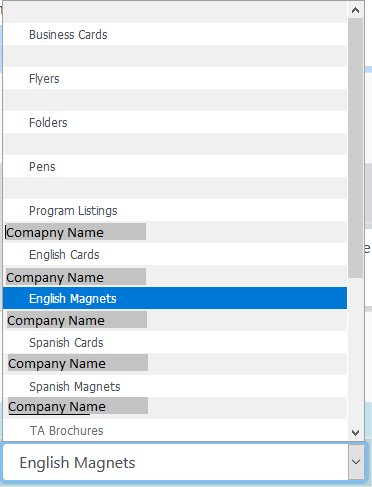
So while the Disabled setting is now being respected (see TA Brochures in the picture) each item is being treated as if it was in it's own group
RyanTaite
on 5 Oct 2018
@RyanTaite the SelectListGroups are compared work reference equality, not by Name because multiple groups may have the same name. If you want less-granular grouping, create the SelectListGroups first e.g.
``` c#
var groups = dbSet
.AsNoTracking()
.Select(materialType => materialType.Company.Name)
.Distinct()
.Select(name => new SelectListGroup { Name = name })
.ToDictionary(group => group.Name, StringComparer.Ordinal);
return dbSet
.AsNoTracking()
.OrderBy(x => x.Company.Name)
.ThenBy(x => x.Name)
.Select(materialType => new SelectListItem
{
Value = materialType.Id.ToString(),
Text = materialType.Name,
Group = groups[materialType.Company.Name],
Disabled = !materialType.IsActive,
}
.ToArray();
```
dougbu
on 5 Oct 2018
Thanks @dougbu! That did it for me.
I had to throw in an null check at SelectListGroup { Name = name ?? "" } and groups[materialType.Company.Name ?? ""], but other than than it's working now.
RyanTaite
on 5 Oct 2018
Related issues
 ermithun
·
3Comments
ermithun
·
3Comments
 Kevenvz
·
3Comments
Kevenvz
·
3Comments
 UweKeim
·
3Comments
UweKeim
·
3Comments
 markrendle
·
3Comments
markrendle
·
3Comments
 aurokk
·
3Comments
aurokk
·
3Comments
Most helpful comment
@RyanTaite the
SelectListGroups are compared work reference equality, not byNamebecause multiple groups may have the same name. If you want less-granular grouping, create theSelectListGroups first e.g.``` c#
var groups = dbSet
.AsNoTracking()
.Select(materialType => materialType.Company.Name)
.Distinct()
.Select(name => new SelectListGroup { Name = name })
.ToDictionary(group => group.Name, StringComparer.Ordinal);
return dbSet
.AsNoTracking()
.OrderBy(x => x.Company.Name)
.ThenBy(x => x.Name)
.Select(materialType => new SelectListItem
{
Value = materialType.Id.ToString(),
Text = materialType.Name,
Group = groups[materialType.Company.Name],
Disabled = !materialType.IsActive,
}
.ToArray();
```