Aspnetcore: How to inject external startup assemblies in .net core 2.1?
What am I trying to do:
I am trying to load extra hostingstartupassemblies through use of the ASPNETCORE_HOSTINGSTARTUPASSEMBLIES environment variable.
Previously
In .net core 2.0 this worked fine, and the file would be grabbed from the local (implicit) runtime store. On linux this was located in /usr/share/dotnet/*.
Problem description
The current documentation at https://docs.microsoft.com/en-us/aspnet/core/fundamentals/host/platform-specific-configuration?view=aspnetcore-2.1&tabs=linux#class-library shows how this works with .net core 2.0. You add a deps.json file to the /usr/share/dotnet/additionalDependencies folder, and the binary to /usr/share/dotnet/store/x64/etc, and it will be ready for inclusion. This works exactly as described for .net core 2.0
This way when you use the ASPNETCORE_HOSTINGSTARTUPASSEMBLIES environment variable, the binary is loaded from disk and injected in the application without any problems.
With .net core 2.1+ the runtime store was deprecated and replaced by the shared library. The current instructions don't work with a clean install of the .net core 2.1, so I'm stuck on how to load my assemblies during runtime. Is there any way I can still invoke the runtime store, or is there a better way to inject external startup assemblies during runtime?
Issues:
- The web app logs "Cannot find assembly [myname.dll]"
- There is no runtime package store
- There is no additionalDeps folder
Note: compile-time is not an option for me, this would have been easy with a NuGet package.
dotnet --info
.NET Core SDK (reflecting any global.json):
Version: 2.1.403
Commit: 04e15494b6
Runtime Environment:
OS Name: centos
OS Version: 7
OS Platform: Linux
RID: centos.7-x64
Base Path: /usr/share/dotnet/sdk/2.1.403/
Host (useful for support):
Version: 2.1.5
Commit: 290303f510
.NET Core SDKs installed:
2.1.403 [/usr/share/dotnet/sdk]
.NET Core runtimes installed:
Microsoft.AspNetCore.All 2.1.5 [/usr/share/dotnet/shared/Microsoft.AspNetCore.All]
Microsoft.AspNetCore.App 2.1.5 [/usr/share/dotnet/shared/Microsoft.AspNetCore.App]
Microsoft.NETCore.App 2.1.5 [/usr/share/dotnet/shared/Microsoft.NETCore.App]
 las3r
las3r
All 16 comments
@JunTaoLuo ?
 Tratcher
on 12 Oct 2018
Tratcher
on 12 Oct 2018
@las3r can you provide a repro for what's not working? Even though we are now delivering Microsoft.AspNetCore.App/.All through the shared framework, the runtime store mechanisms still exist to support hosting startup scenarios. If upgrading to 2.1 isn't working, it would be a regression.
 JunTaoLuo
on 12 Oct 2018
JunTaoLuo
on 12 Oct 2018
The problem is that no runtime store is available at all. The referenced folders are not being created when installing the aspnetcore-runtime-2.1 and dotnet-sdk-2.1:
/usr/share/dotnet/additionalDependencies
/usr/share/dotnet/store
In the past these WERE created, hence my though that it's just unsupported now.
I will doublecheck once again with a clean install and let you know my exact setup and folder structure and files here once I have results.
las3r
on 13 Oct 2018
@JunTaoLuo It does seem to load the assembly now, which is a great thing. I'm now however receiving "other" issues.
Oct 13 01:05:10  System.InvalidOperationException: Startup assembly MyCustomAssembly failed to execute. See the inner exception for more details. ---> System.IO.FileLoadException: Could not load file or assembly 'Microsoft.AspNetCore.Hosting.Abstractions, Version=2.1.1.0, Culture=neutral, PublicKeyToken=adb9793829ddae60'. The located assembly's manifest definition does not match the assembly reference. (Exception from HRESULT: 0x80131040)
Oct 13 01:05:10  at System.ModuleHandle.ResolveType(RuntimeModule module, Int32 typeToken, IntPtr* typeInstArgs, Int32 typeInstCount, IntPtr* methodInstArgs, Int32 methodInstCount, ObjectHandleOnStack type)
Oct 13 01:05:10  at System.ModuleHandle.ResolveTypeHandleInternal(RuntimeModule module, Int32 typeToken, RuntimeTypeHandle[] typeInstantiationContext, RuntimeTypeHandle[] methodInstantiationContext)
Oct 13 01:05:10  at System.Reflection.RuntimeModule.ResolveType(Int32 metadataToken, Type[] genericTypeArguments, Type[] genericMethodArguments)
Oct 13 01:05:10  at System.Reflection.CustomAttribute.FilterCustomAttributeRecord(CustomAttributeRecord caRecord, MetadataImport scope, Assembly& lastAptcaOkAssembly, RuntimeModule decoratedModule, MetadataToken decoratedToken, RuntimeType attributeFilterType, Boolean mustBeInheritable, Object[] attributes, IList derivedAttributes, RuntimeType& attributeType, IRuntimeMethodInfo& ctor, Boolean& ctorHasParameters, Boolean& isVarArg)
Oct 13 01:05:10  at System.Reflection.CustomAttribute.GetCustomAttributes(RuntimeModule decoratedModule, Int32 decoratedMetadataToken, Int32 pcaCount, RuntimeType attributeFilterType, Boolean mustBeInheritable, IList derivedAttributes)
Oct 13 01:05:10  at System.Reflection.CustomAttribute.GetCustomAttributes(RuntimeAssembly assembly, RuntimeType caType)
Oct 13 01:05:10  at System.Attribute.GetCustomAttributes(Assembly element, Type attributeType, Boolean inherit)
Oct 13 01:05:10  at System.Reflection.CustomAttributeExtensions.GetCustomAttributes[T](Assembly element)
Oct 13 01:05:10  at Microsoft.AspNetCore.Hosting.WebHostBuilder.BuildCommonServices(AggregateException& hostingStartupErrors)
I've run the following command to 'fill' the store with all dependancies:
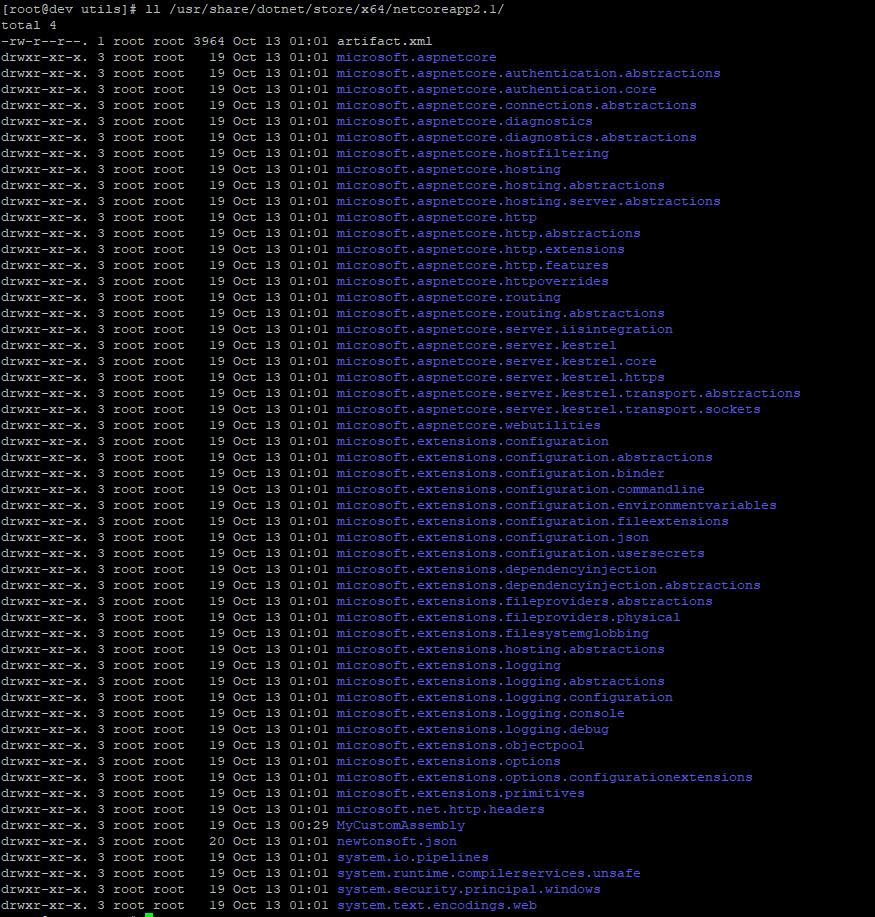
dotnet store --manifest /home/lib/MyCustomAssembly/MyCustomAssembly.csproj --runtime linux-x64 --skip-optimization --output /usr/share/dotnet/store/
I also see all the dependancies downloaded in the filesystem as seen in the screen below. What am I doing wrong?
las3r
on 13 Oct 2018
In our site extensions, when they are launched, we set three environment variables: https://github.com/aspnet/AzureIntegration/blob/218ea6f3033eab25dfbf372bed95830142a17c16/extensions/Microsoft.AspNetCore.AzureAppServices.SiteExtension/applicationHost.xdt#L10-L12. Can you try setting DOTNET_ADDITIONAL_DEPS and DOTNET_SHARED_STORE to the location where you generated the runtime store and additional deps and see if that works?
JunTaoLuo
on 13 Oct 2018
Thanks @JunTaoLuo - is that from the windows-hosted Azure App service? I'd be very interesting in how that's done in the linux variant, because they might behave differently.
I've tried adding this but I didn't see a change, still the same exception about not being able to load Microsoft.AspNetCore.Hosting.Abstractions. As you can see in the screenshot above this is in the /usr/share/dotnet/store for the netcoreapp2.1 target. DOTNET_ADDITIONAL_DEPS was already in my service definition, and I just added the DOTNET_SHARED_STORE now.
Please note that without the DOTNET_ADDITIONAL_DEPS, the MyCustomAssembly cannot be found, so it ís being loaded, just can't find its dependancies (in this case the Microsoft.AspNetCore.Hosting.Abstractions).
My service for this .net core account:
[Unit]
Description=Test service to run .net core

[Service]
User=localuser
Group=localuser
WorkingDirectory=/home/localuser/www
ExecStart=/usr/bin/dotnet MyWebsite.dll
Restart=always
RestartSec=10
SyslogIdentifier=dotnetnetcore-ident
Environment=ASPNETCORE_URLS=http://127.0.0.1:11000
Environment=DOTNET_ADDITIONAL_DEPS=/usr/share/dotnet/additionalDeps/MyCustomAssembly
Environment=DOTNET_SHARED_STORE=/usr/share/dotnet/store
Environment=ASPNETCORE_HOSTINGSTARTUPASSEMBLIES=MyCustomAssembly
#custom
Environment=ASPNETCORE_ENVIRONMENT=Development
Environment=ASPNETCORE_DETAILEDERRORS=0
Environment=somevar=

[Install]
WantedBy=multi-user.target
I've also ruled out permission issues: with root user the same exception appears. Where does the runtime look for assemblies when loading them? I tried to see if there was any file access to the disk using fatrace but I don't see dotnet 'trying' to load a file from disk somewhere.
las3r
on 13 Oct 2018
Hmm I think there are some package version mismatch issues then. Can you set the environment variable COREHOST_TRACE to 1 to enable the corehost logs and attach the output here? Or you can also provide a simplified repro here and I can debug it on my local machine. The OS does not affect the loading of hosting startup assemblies so that probably isn't the problem.
JunTaoLuo
on 15 Oct 2018
It has been attached @JunTaoLuo. I see _no mention_ of the MyCustomAssembly.dll, and neither the Microsoft.AspNetCore.Hosting.Abstractions is being loaded. If you wish I could give you access to my dev server to see what's wrong.
las3r
on 15 Oct 2018
You only captured the first portion of the trace logs. Usually the logs I see are ~40k lines but you only included the first ~2k lines.
JunTaoLuo
on 15 Oct 2018
My bad, attached again. This time it's 10k lines, this ends with "Application started". I also see the hosting abstractions being loaded here based off my deps.json file of the "additional" MyCustomAssembly @JunTaoLuo, so not sure what's wrong.
netcore-trace-full.txt
Ahhh:
Processing TPA for deps entry [Microsoft.AspNetCore.Hosting.Abstractions, 2.0.3, lib/netstandard2.0/Microsoft.AspNetCore.Hosting.Abstractions.dll]
  Considering entry [Microsoft.AspNetCore.Hosting.Abstractions/2.0.3/lib/netstandard2.0/Microsoft.AspNetCore.Hosting.Abstractions.dll], probe dir [], probe fx level:0, entry fx level:0
    Local path query exists /home/las3r/public_aspnet/Microsoft.AspNetCore.Hosting.Abstractions.dll
    Probed deps dir and matched '/home/las3r/public_aspnet/Microsoft.AspNetCore.Hosting.Abstractions.dll'
Adding tpa entry: /home/las3r/public_aspnet/Microsoft.AspNetCore.Hosting.Abstractions.dll, AssemblyVersion: 2.0.3.0, FileVersion: 2.0.3.18114
And this is the culprit. Dotnet takes the 'local' version of this dll in favor of the version specified in the MyCustomAssembly. I've doublechecked this by copying the Microsoft.AspNetCore.Hosting.Abstractions.dll from the runtime store (2.1.1.0) to the application folder, rerunning the application, and now I'm getting the same assembly error for another assembly.
Thanks @julitogtu for the pointers, the only question that remains for now is whether I'm able to pin the version of the libraries used by the CustomAssembly that's being injected. If that's not possible what would you recommend? I have no 'power' over what my users deploy in terms of applications (just like on Azure Web Apps, you don't know what people are deploying), and I need to make sure my dll is injected, regardless of the web app and its dependancy versions.
las3r
on 15 Oct 2018
Yup looks like a package version mismatch. In the logs, it's loading Microsoft.AspNetCore.Hosting.Abstractions 2.0.3
Processing TPA for deps entry [Microsoft.AspNetCore.Hosting.Abstractions, 2.0.3, lib/netstandard2.0/Microsoft.AspNetCore.Hosting.Abstractions.dll]
  Considering entry [Microsoft.AspNetCore.Hosting.Abstractions/2.0.3/lib/netstandard2.0/Microsoft.AspNetCore.Hosting.Abstractions.dll], probe dir [], probe fx level:0, entry fx level:0
    Local path query exists /home/las3r/public_aspnet/Microsoft.AspNetCore.Hosting.Abstractions.dll
    Probed deps dir and matched '/home/las3r/public_aspnet/Microsoft.AspNetCore.Hosting.Abstractions.dll'
What's most likely happening is that the version you are using in the app (which is published to /home/las3r/public_aspnet/ I assume) is different from the one that's required by the hosting startup assembly. Since only one set of assemblies are ultimately resolved (and the app's assemblies win), the one required by the hosting startup assembly (2.1.1) could not be found. You need to ensure the version required by your app and the hosting assembly match.
Though this is the most likely explanation, I can only confirm once I see your .deps.json files for both the app and the hosting startup assembly.
JunTaoLuo
on 16 Oct 2018
This is completely correct @JunTaoLuo. As you can see in my revised comment above I tested and doublechecked this. My web app is in /home/las3r/public_aspnet with version 2.0.3
The problem in this case is that I am not the one running the web app, it can be any number of clients with a scala of different web apps that are outside of my control (this is for a shared hosting offering basically). How is this handled in e.g Azure Web Apps? The same situation exists there, where user assemblies might cause issues when you are trying to inject dll's?
Can I safely remove any of the dependancies of MyCustomAssembly from the clients' web app before launching it? It can only be a small number of dependancies I suppose, since my assembly is _very_ small, all it really does is check a header.
las3r
on 16 Oct 2018
I see. However, 2.0 is now out of support so I'm not sure how relevant this scenario is. Starting in 2.1, you should target the lowest patch of a minor release to ensure compatibility (i.e. a hosting startup assembly targeting 2.1.3 will be compatible with apps targeting 2.1.3, 2.1.4, ...). However, you will still need to release an updated hosting startup assembly for each minor release.
JunTaoLuo
on 16 Oct 2018
The 2.0 was a reference to the version of the webhosting abstraction package, not dotnet core :).
Basically you suggest that I should implement a scheme where I upload an assembly for 2.1.0 with the dependencies for that runtime version, and so on for every minor release.
That will not prevent bad actors from circumventing my injected code by including a lower or higher version of in this case the hosting abstractions DLL, will it?
las3r
on 16 Oct 2018
Our support requires that you use matching frameworks. You'll need to use aspnet core 2.1 on dotnet core 2.1 to be supported. So a mismatching configuration where you are partially using 2.0 and 2.1 is not supported.
For azure site extensions, we release separate extensions for 2.0 and 2.1 and it's up to the user to ensure the extension matching their app's targets is installed. You will probably need something similar to allow users to select which extension to install for their app.
JunTaoLuo
on 16 Oct 2018
All right- well thank you _very_ much for your answers. It has given me enough insights to implement this on our side. I'll close this issue (as I'm happy with the answers I've gotten here). Thank you!
las3r
on 16 Oct 2018
Related issues
 fayezmm
·
3Comments
fayezmm
·
3Comments
 BrennanConroy
·
3Comments
BrennanConroy
·
3Comments
 UweKeim
·
3Comments
UweKeim
·
3Comments
 bgribaudo
·
3Comments
bgribaudo
·
3Comments
 aurokk
·
3Comments
aurokk
·
3Comments