Aspnetcore: FileSystemGlobbing passes invalid path upon upgrade to Core 2.0
_From @JeremyKuhne on Monday, November 6, 2017 9:57:21 AM_
From https://github.com/dotnet/home/issues/88 opened by @HarelM:
``` C#
An unhandled exception of type 'System.ArgumentException' occurred in System.Private.CoreLib.dll
The path is not of a legal form.
System.Private.CoreLib.dll!System.IO.Path.GetFullPath(string path) Unknown No symbols loaded.
Microsoft.Extensions.FileSystemGlobbing.dll!Microsoft.Extensions.FileSystemGlobbing.InMemoryDirectoryInfo.InMemoryDirectoryInfo(string rootDir, System.Collections.Generic.IEnumerable
Microsoft.Extensions.FileSystemGlobbing.dll!Microsoft.Extensions.FileSystemGlobbing.MatcherExtensions.Match(Microsoft.Extensions.FileSystemGlobbing.Matcher matcher, string rootDir, System.Collections.Generic.IEnumerable
Microsoft.Extensions.FileSystemGlobbing.dll!Microsoft.Extensions.FileSystemGlobbing.MatcherExtensions.Match(Microsoft.Extensions.FileSystemGlobbing.Matcher matcher, string file) Unknown No symbols loaded.
Microsoft.Extensions.FileProviders.Physical.dll!Microsoft.Extensions.FileProviders.Physical.PhysicalFilesWatcher.ReportChangeForMatchedEntries(string path) Unknown No symbols loaded.
Microsoft.Extensions.FileProviders.Physical.dll!Microsoft.Extensions.FileProviders.Physical.PhysicalFilesWatcher.OnFileSystemEntryChange(string fullPath) Unknown No symbols loaded.
Microsoft.Extensions.FileProviders.Physical.dll!Microsoft.Extensions.FileProviders.Physical.PhysicalFilesWatcher.OnRenamed(object sender, System.IO.RenamedEventArgs e) Unknown No symbols loaded.
System.IO.FileSystem.Watcher.dll!System.IO.FileSystemWatcher.NotifyRenameEventArgs(System.IO.WatcherChangeTypes action, string name, string oldName) Unknown No symbols loaded.
System.IO.FileSystem.Watcher.dll!System.IO.FileSystemWatcher.ParseEventBufferAndNotifyForEach(byte[] buffer) Unknown No symbols loaded.
System.IO.FileSystem.Watcher.dll!System.IO.FileSystemWatcher.ReadDirectoryChangesCallback(uint errorCode, uint numBytes, System.Threading.NativeOverlapped* overlappedPointer) Unknown No symbols loaded.
System.Private.CoreLib.dll!System.Threading._IOCompletionCallback.PerformIOCompletionCallback(uint errorCode, uint numBytes, System.Threading.NativeOverlapped* pOVERLAP) Unknown No symbols loaded.
```
More details are in the source issue. His site is here:
This is the relevant repository snapshot as I'm planning to check-in the downgrade to 1.1 later tonight.
https://github.com/IsraelHikingMap/Site/tree/fb4e06310e1c5135f446ded685ee548c7e948e28
Note that we (CoreFX) have not made any changes in System.IO from 1.1 to 2.0 that are in this code path.
_Copied from original issue: aspnet/FileSystem#299_
 aspnet-hello
All 24 comments
_From @HarelM on Monday, November 6, 2017 1:22:15 PM_
Might be a timing issue that is happening only in 2.0 for some reason as this issue is not happening all the time, but when updating my database on my development environment this happens and so I can reproduce it with high probability (at least this was the case when I opened this issue).
aspnet-hello
on 2 Jan 2018
_From @czietsman on Wednesday, November 8, 2017 10:29:13 PM_
I've seen our AspNetCore 2.0 app crash a few times. This morning it wrote out a similar stacktrace:
System.ArgumentException: The path is not of a legal form.
at System.IO.Path.LegacyNormalizePath(String path, Boolean fullCheck, Int32 maxPathLength, Boolean expandShortPaths)
at System.IO.Path.GetFullPathInternal(String path)
at Microsoft.Extensions.FileSystemGlobbing.InMemoryDirectoryInfo..ctor(String rootDir, IEnumerable`1 files, Boolean normalized)
at Microsoft.Extensions.FileSystemGlobbing.MatcherExtensions.Match(Matcher matcher, String rootDir, IEnumerable`1 files)
at Microsoft.Extensions.FileProviders.Physical.PhysicalFilesWatcher.ReportChangeForMatchedEntries(String path)
at Microsoft.Extensions.FileProviders.Physical.PhysicalFilesWatcher.OnFileSystemEntryChange(String fullPath)
at Microsoft.Extensions.FileProviders.Physical.PhysicalFilesWatcher.OnRenamed(Object sender, RenamedEventArgs e)
at System.IO.FileSystemWatcher.OnRenamed(RenamedEventArgs e)
at System.IO.FileSystemWatcher.CompletionStatusChanged(UInt32 errorCode, UInt32 numBytes, NativeOverlapped* overlappedPointer)
at System.Threading._IOCompletionCallback.PerformIOCompletionCallback(UInt32 errorCode, UInt32 numBytes, NativeOverlapped* pOVERLAP)
We use a PhysicalFileProvider to watch a settings file. The app ran overnight and there was no activity until this morning when I logged in. The app is running in a VM with Windows Server 2016 installed. Here is the setup code for watching the settings file which is located in UserRootPath:
Directory.CreateDirectory(UserRootPath);
UserRootFileProvider = new PhysicalFileProvider(UserRootPath);
...
changeToken = UserRootFileProvider.Watch(SETTINGS_FILE);
_From @imamy4 on Wednesday, November 29, 2017 3:11:53 AM_
Hi! I get this exception when saving file in VS2017.
Method Microsoft.Extensions.FileProviders.Physical.PhysicalFilesWatcher.OnRenamed received RenamedEventArgs where FullPath is saving file name and OldFullPath is NULL. Further LegacyNormalizePath throws exception because get empty string as argument.
I watched FileSystemWatcher.cs, CompletionStatusChanged method contains which call NotifyRenameEventArgs(WatcherChangeTypes.Renamed, name, oldName) where oldName is NULL.
The problem began after upgrading my app to .NET Core 2.0
aspnet-hello
on 2 Jan 2018
_From @yp87 on Monday, December 11, 2017 2:12:54 PM_
Our application crashes on that line since upgrade to 2.0 {"The path is not of a legal form."}:
[Managed to Native Transition] Annotated Frame
mscorlib.dll!System.IO.Path.NewNormalizePath(string path, int maxPathLength, bool expandShortPaths) Line 500 C# Symbols loaded.
mscorlib.dll!System.IO.Path.NormalizePath(string path, bool fullCheck, int maxPathLength, bool expandShortPaths) Line 423 C# Symbols loaded.
mscorlib.dll!System.IO.Path.GetFullPathInternal(string path) Line 368 C# Symbols loaded.
Microsoft.Extensions.FileSystemGlobbing.dll!Microsoft.Extensions.FileSystemGlobbing.InMemoryDirectoryInfo.InMemoryDirectoryInfo(string rootDir, System.Collections.Generic.IEnumerable files, bool normalized) Line 56 C# Symbols loaded.
Microsoft.Extensions.FileSystemGlobbing.dll!Microsoft.Extensions.FileSystemGlobbing.MatcherExtensions.Match(Microsoft.Extensions.FileSystemGlobbing.Matcher matcher, string rootDir, System.Collections.Generic.IEnumerable files) Line 108 C# Symbols loaded.
Microsoft.Extensions.FileProviders.Physical.dll!Microsoft.Extensions.FileProviders.Physical.PhysicalFilesWatcher.ReportChangeForMatchedEntries(string path) Line 258 C# Symbols loaded.
Microsoft.Extensions.FileProviders.Physical.dll!Microsoft.Extensions.FileProviders.Physical.PhysicalFilesWatcher.OnFileSystemEntryChange(string fullPath) Line 235 C# Symbols loaded.
Microsoft.Extensions.FileProviders.Physical.dll!Microsoft.Extensions.FileProviders.Physical.PhysicalFilesWatcher.OnRenamed(object sender, System.IO.RenamedEventArgs e) Line 181 C# Symbols loaded.
System.dll!System.IO.FileSystemWatcher.OnRenamed(System.IO.RenamedEventArgs e) Line 921 C# Symbols loaded.
System.dll!System.IO.FileSystemWatcher.CompletionStatusChanged(uint errorCode, uint numBytes, System.Threading.NativeOverlapped* overlappedPointer) Line 590 C# Symbols loaded.
mscorlib.dll!System.Threading._IOCompletionCallback.PerformIOCompletionCallback(uint errorCode, uint numBytes, System.Threading.NativeOverlapped* pOVERLAP) Line 135 C# Symbols loaded.
[Native to Managed Transition] Annotated Frame
aspnet-hello
on 2 Jan 2018
_From @natemcmaster on Thursday, December 14, 2017 9:27:20 AM_
cc @muratg for triage
aspnet-hello
on 2 Jan 2018
_From @muratg on Thursday, December 14, 2017 9:52:01 AM_
@natemcmaster Any idea how this may have regressed? Assigning to you, but we can load-balance later based on the workload.
aspnet-hello
on 2 Jan 2018
_From @natemcmaster on Thursday, December 14, 2017 12:34:57 PM_
@muratg I can probably take a look at this next week.
@HarelM @yp87 @imamy4 @czietsman if any of you have a minimal repro, that would be great. The snippets you shared are good clues for an investigation, but still not a full repro since I don't know what kind of values you're passing in to PhysicalFileProvider and other APIs.
aspnet-hello
on 2 Jan 2018
_From @czietsman on Friday, December 15, 2017 3:55:59 AM_
@natemcmaster I'll see if I can put something together for you. I was running my app from within a VM (Hyper-V) with the host drive shared as G:. My binaries were build on the host. It happened pretty frequently if my working directory was also on the shared drive (G:), but hasn't been happening if I started the app from the VM's C: drive.
This setup made it a little bit more tricky to debug the input values coming from OnRenamed().
aspnet-hello
on 2 Jan 2018
_From @HarelM on Friday, December 15, 2017 6:09:57 AM_
Sorry, Not sure how to create a minimal repro as in my case it seems like it has to do with timing.
aspnet-hello
on 2 Jan 2018
_From @yp87 on Friday, December 15, 2017 8:16:55 AM_
In our case, it is aspnetcore's content root physicalFilesWatcher that triggers this issue. The self hosted aspnetcore server is used by a component that is part of a much larger software. We do not even use the content root, but it was pointing to the base folder of our software (which has some tmp files being created/modified/deleted). The issue happened when a change to one of those file was done (not always). When the issue occurs, the FileSystemWatcher detects a rename of a tmp file root/aa.tmp -> root/ which does not even make sense..
aspnet-hello
on 2 Jan 2018
_From @jmorrill on Monday, January 1, 2018 11:57:49 AM_
I'm hitting this with a fairly simple web app. It is triggered by writing an HLS stream to "wwwroot/streams/[guid]/video.m3u8". HLS creates, renames and deletes quite a bit.
Here is a screenshot of where the problem "starts" at:
// Previous FILE_ACTION_RENAMED_OLD_NAME with no new name
NotifyRenameEventArgs(WatcherChangeTypes.Renamed, null, oldName);
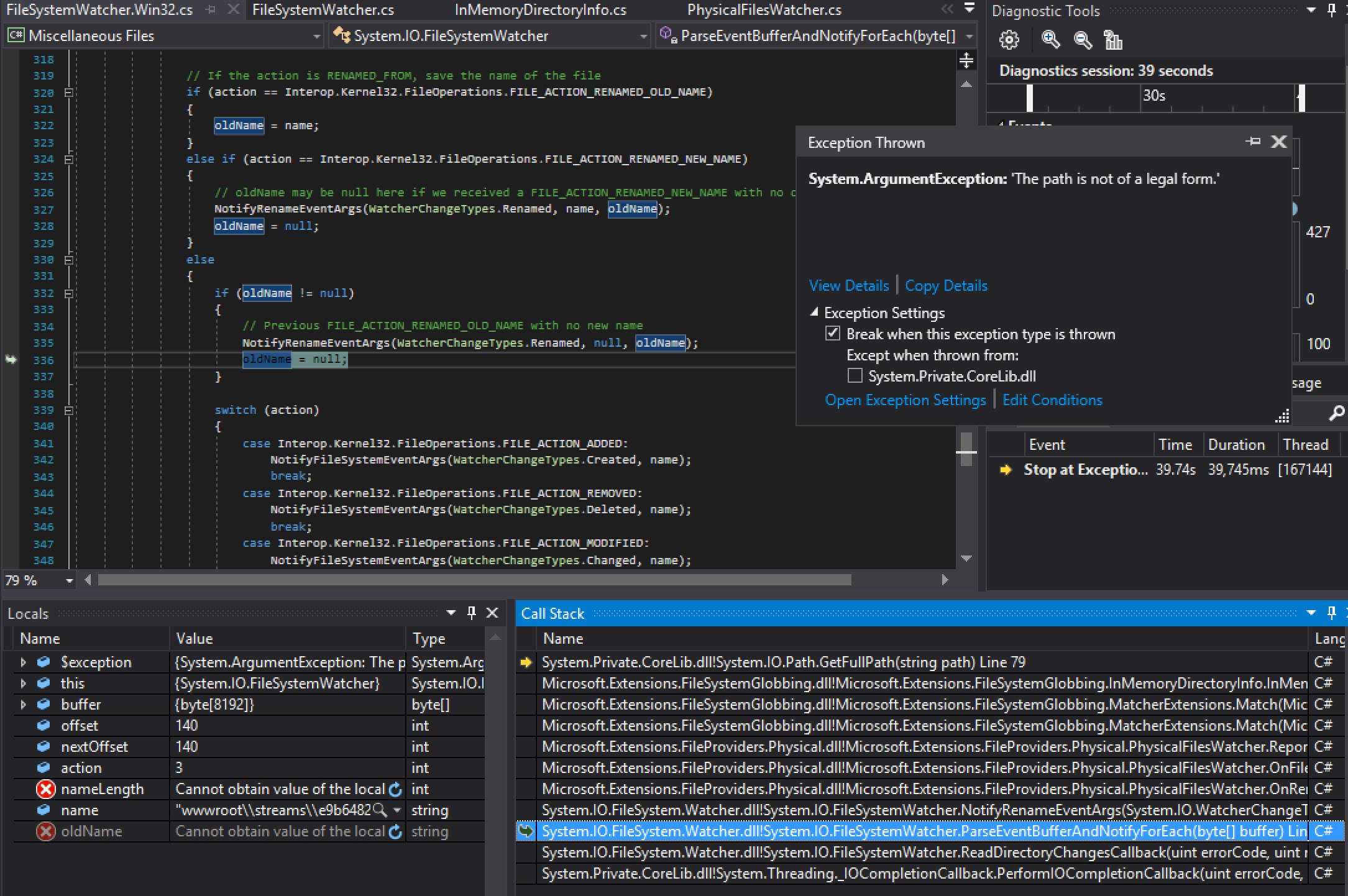
Here's the "RenamedEventArgs" the PhysicalFilesWatcher.cs gets

Notice e.FullPath is ONLY a directory path that does not contain a file.
aspnet-hello
on 2 Jan 2018
@muratg just FYI this is actually crashing people's applications and there are multiple reports (here and Twitter). Can we get someone assigned to look at this sooner and mark it as a candidate for servicing please.
 DamianEdwards
on 2 Jan 2018
DamianEdwards
on 2 Jan 2018
I'm assigned to look at it. If anyone has a repro, that would help.
 natemcmaster
on 2 Jan 2018
natemcmaster
on 2 Jan 2018
@natemcmaster I couldn't find a small reproduction when I tried to understand the issue on my system.
I'll see if I can create a branch on my project and send you the relevant instructions.
If anyone else has a smaller reproduction please go ahead and send it.
 HarelM
on 3 Jan 2018
HarelM
on 3 Jan 2018
I was sent a memory dump internally with this error and can confirm the following:
- Sometimes, the System.IO.FileSystemWatcher.OnRenamed event is raised with missing values for RenamedEventArgs.
- The ASP.NET Core file system wrapper doesn't handle this well (hence
ArgumentException).
I still can't reproduce conditions causing System.IO.FileSystemWatcher.OnRenamed to trigger with bad event args. We can update the ASP.NET Core code to be defensive, but ideally, I'd like to get a fix into FileSystemWatcher.
FYI - here is the code I've been using in an attempt to repro. I'm using Windows 10. If any one can try this on other hardware/OS-es, maybe we can report a better repro to the dotnet/corefx team.
https://gist.github.com/natemcmaster/19a074423b15a656a8e300fd658b8642
natemcmaster
on 18 Jan 2018
A fix for this should be available soon in the nightly build of Microsoft.Extensions.FileProviders.Physical.
natemcmaster
on 19 Jan 2018
As pointed out, OnRenamed has always potentially fired with a null if we get an old name event without a following new name. It isn't documented, but I've created a PR: https://github.com/dotnet/docs/pull/4156. I'm not particularly fond of this code, it would be good to get detailed logs of events to see if we can improve the logic. As stated, however, this code has always been that way, so changing behavior could be quite difficult (compat).
 JeremyKuhne
on 19 Jan 2018
JeremyKuhne
on 19 Jan 2018
@pjanotti, @ianha Fyi
JeremyKuhne
on 19 Jan 2018
We have a candidate fix available on a nightly feed. If you would like to try it out, follow these steps:
- Add a NuGet.config file to your solution and with this patch feed:
<configuration>
  <packageSources>
    <add key="aspnetcore-test-feed" value="https://dotnet.myget.org/F/aspnet-2018-feb-patch-public/api/v3/index.json" />
  </packageSources>
</configuration>
- Update your MSBuild project (*.csproj file) to include a reference to the patched component, Microsoft.Extensions.FileProviders.Physical
<ItemGroup>
  <PackageReference Include="Microsoft.Extensions.FileProviders.Physical" Version="2.0.1-rtm-215" />
</ItemGroup>
- Dotnet restore and re-build your project.
Please let me know ASAP if this does not fix the issue or causes a regression of any kind. We're preparing to release this fix to NuGet.org soon.
natemcmaster
on 19 Jan 2018
I left my app running overnight and it hasn't crashed. It usually crashed within an hour so I think the issue has been resolved.
 czietsman
on 25 Jan 2018
czietsman
on 25 Jan 2018
It seems like this patch solves the problem.
Please let me know when I can get it from NuGet.
HarelM
on 17 Feb 2018
Any updates on when an official release will have this fix?
HarelM
on 15 Mar 2018
It's in the patch release that went out yesterday.
https://www.nuget.org/packages/Microsoft.Extensions.FileProviders.Physical/2.0.1
natemcmaster
on 15 Mar 2018
@natemcmaster, Thanks for the update, hopefully I will be able to migrate to 2.0 finally :-)!
HarelM
on 15 Mar 2018
Related issues
 guardrex
·
3Comments
guardrex
·
3Comments
 rbanks54
·
3Comments
rbanks54
·
3Comments
 TanvirArjel
·
3Comments
TanvirArjel
·
3Comments
 farhadibehnam
·
3Comments
farhadibehnam
·
3Comments
 mj1856
·
3Comments
mj1856
·
3Comments
Most helpful comment
We have a candidate fix available on a nightly feed. If you would like to try it out, follow these steps:
Please let me know ASAP if this does not fix the issue or causes a regression of any kind. We're preparing to release this fix to NuGet.org soon.