Aspnetcore: Serialize complex forms by analyzing the DOM
The current solution to passing back complex form data (see Example) is not straight forward. This could be fixed by providing a JavaScript function that analyzes the DOM and generates JSON without manually adding metadata.
Example
- First Name
- Last Name
- Hobbies
- Running
- Coding
- ...
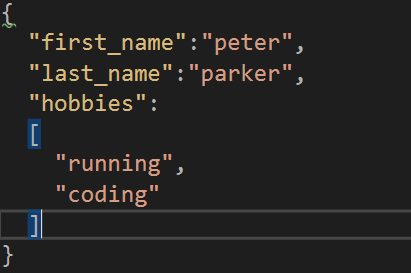
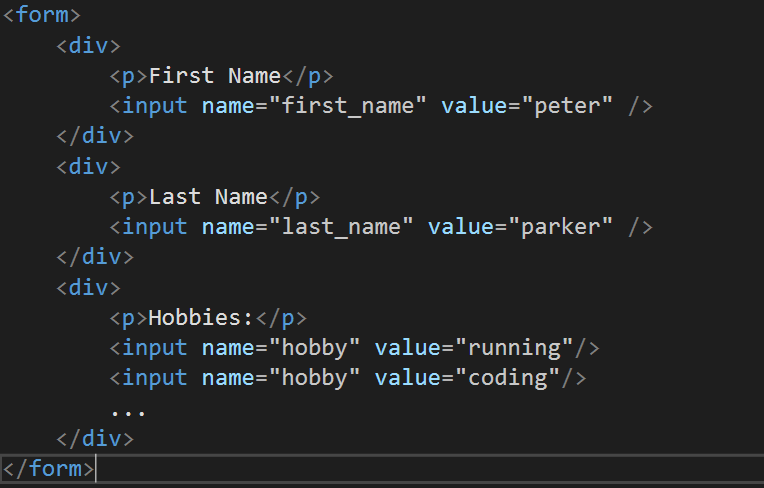
 JaggerJo
All 14 comments
What problem are you proposing we solve and why should ASP.NET be the one to solve it?
 rynowak
on 19 Jun 2017
rynowak
on 19 Jun 2017
The Problem of passing data back to the Controller.
If the fields of a form are fixed this is easy and works well.
But if there are dynamic lists (Hobbies in my Example )it is difficult to pass the data back to the Controller.
The Problem should be solved in ASP.NET because "passing back data" is part of the View approach of MVC. It also could be a external JavaScript Library.. EDIT: Or a custom Model Binder
JaggerJo
on 19 Jun 2017
He is right, their is no option for generating the name with a index automaticly.
You need to write the inputs yourself with a index, otherwise the controller dosent know the postpack off hobby is a List<> element
 Elektri
on 19 Jun 2017
Elektri
on 19 Jun 2017
ASP.NET does not include JavaScript by default because you may not be delivering HTML by default.
Now, you might say "I mean MVC". Okay, but which framework should I integrate with? Which version? Can I minimize that script into my build? Now, do you go CommonJS? Or maybe requirejs? Or system.js?
See where I'm going with this? And that is just about "Adding javascript" part of your post.
The problem you are trying to solve seems to be a common problem solved by most Front-end framework nowadays.
 MaximRouiller
on 19 Jun 2017
MaximRouiller
on 19 Jun 2017
System.Web.Mvc is the assemly that sould be able to build
@Html.EditorFor(model => model.hobby[i])
by its own, and know that it has to build it as a list.
ASP.NET does not include JavaScript by default because you may not be delivering HTML by default
System.Web.Mvc is part of ASP.NET.
At least at is the goal of the issue i think :)
Elektri
on 19 Jun 2017
@Elektri
Covered in my next paragraph. You start introducing JavaScript, you need to start keeping up to date with the wild west of the JavaScript world. As soon as you inject JavaScript anywhere, you open Pandora's box. Inline? If you inline in HTML, it might not work when users are using CSP. Add a separate script? Then you are taking an additional HTTP request and the first thing people will want to do is remove that request by inlining your script.
It goes crazy from there. But here's the good news. It's the perfect space for custom frameworks to find themselves in. If there's something missing in ASP.NET to make the generation of this code in a 3rd party tool easy, that would be excellent feedback.
What can be done to help you write easier JavaScript to integrate with ASP.NET MVC Controllers?
MaximRouiller
on 19 Jun 2017
The Problem of passing data back to a Controller.
MVC already has a standard pattern for this using either HtmlHelpers or Tag Helpers to generate the form field names. Am I missing something here?
rynowak
on 19 Jun 2017
@MaximRouiller I get your point, introducing and shipping a new JavaScript library is not a good way to tackle this. As you mentioned this is solved by most frontend frameworks, could you pleas provide a link to one ? (I personally haven't found something)
@rynowak The problem is not generating the static input fields names in the Razor View, the problem is passing the data of dynamic input fields back (the list of hobbies in the example has an unknown length) to the Controller.
@Elektri Could you please explain how this kind of problem is solved currently and why there is a need for a better way of doing this. Not said that it must be some custom JavaScript Framework
By default JQuery and Bootstrap are included and explained in the docs. Maybe it would be good enough to declare a "official" way of doing this non hacky. Is this scenario even covered in the Docs ?
JaggerJo
on 19 Jun 2017
@JaggerJo
Angular makes you render form elements from your model and sync your HTML content value with your model. No need to convert HTML :arrow_right: JSON. Same thing with KnockoutJS, Aurelia, etc. What you basically do is POST your object directly to your endpoint and it will deserialize properly.
If you are not using these frameworks, jQuery uses a way to serialize HTML forms to QueryStrings. This is kind of similar to what is done by the browser when you submit a form. Except, it's done in JavaScript and allows you to do it asynchronously.
MaximRouiller
on 19 Jun 2017
In any scenario, I would try to avoid complex objects on your forms.
Try to have a model that represent your UI and have that translated server side to something you can build a query/command on.
MaximRouiller
on 19 Jun 2017
This is my solution for the moment. I render each data-row of my Table with a partial view and insert the index of each element with "ViewDataDictionary", this way i can access the index that is needed for the controller to know each item of the list.

In the partial view I render each element something like this

Now I can created somthing like a ajax post back the returns me a new rendered partical view to add to the list, I only need to hand over the next index to controller.
A side note: If you want to allow to delete a row in the middle or at the start of the table it is important to post your index of this element anyway, otherwise the controller isnt able to build up the list properly because of the missinng index

This is how is solve this problem at the moment.
The goal is that the controller build the index itself because of the multiple "hobby" values posted
Elektri
on 20 Jun 2017
@Elektri Didn't thought of doing this in the Controller, might be a simpler/better approach than solving it in js.
@MaximRouiller
Then it would be as simple as:
-> If element name is unique -> map to field / property
-> If name is there multiple times -> map to array with name = name or throw Exception
@MaximRouiller What do you think about an CustomModelBinder that addresses this scenario ?
JaggerJo
on 20 Jun 2017
That's the whole reason CustomModelBinder can be done.
When I try to do something, I check to see if what already exists couldn't be bent toward what I want. If it can't, I try to look into existing libraries to see if I can find something useful.
Finally, if nothing matches my need or nothing can be bent to my needs, I rethink my problem. If I'm the only guy that needed to do "X" there's 2 reasons. Either, I'm a genius and nobody noticed. Or I'm making my life way more complicated than it should.
If and only if after going through all those steps and making sure I'm not making my life difficult do I build a Custom ModelBinder.
MaximRouiller
on 20 Jun 2017
@MaximRouiller I understand what you mean, but its really common to have a form with dynamic field counts/ where specific fields can be added dynamically. I Think this is what you don't get, it's not an edge case.
I don't want to implement a CustomModelBinder. It's just something that freaks me out. I have to implement it that way, so im gonna build my custom indexing as shown by @Elektri. Because this is how to solve this currently.
Closed, I don't think were making progress here..
JaggerJo
on 22 Jun 2017
Related issues
 Pixel-Lord
·
3Comments
Pixel-Lord
·
3Comments
 aurokk
·
3Comments
aurokk
·
3Comments
 mj1856
·
3Comments
mj1856
·
3Comments
 ipinak
·
3Comments
ipinak
·
3Comments
 markrendle
·
3Comments
markrendle
·
3Comments