Aspnetcore.docs: Cannot get login working for Blazor + Azure B2C
I've followed the direction in this page exactly but I get the following error.
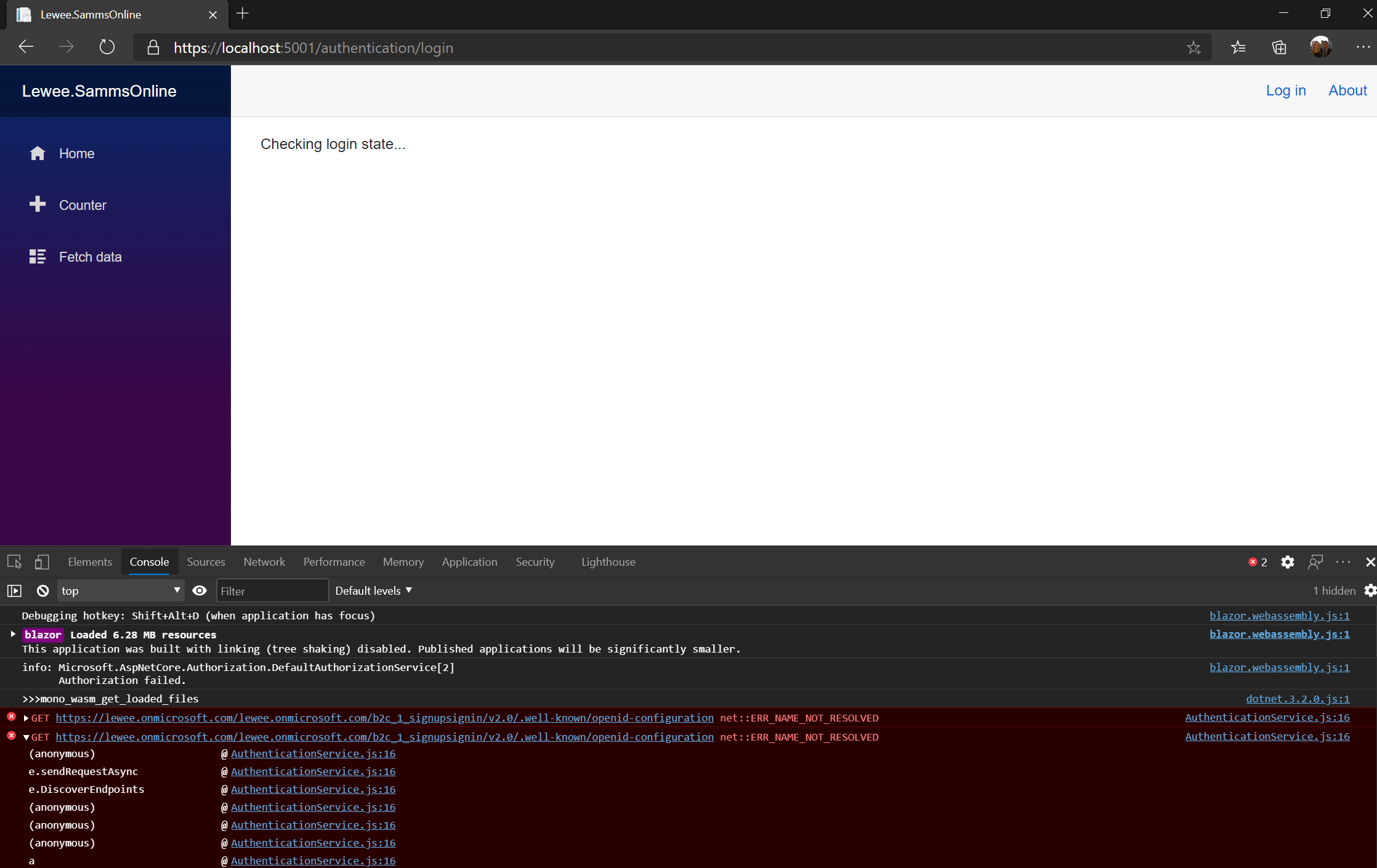
  | (anonymous) | @ | AuthenticationService.js:16
-- | -- | -- | --
  | e.sendRequestAsync | @ | AuthenticationService.js:16
  | e.DiscoverEndpoints | @ | AuthenticationService.js:16
  | (anonymous) | @ | AuthenticationService.js:16
  | (anonymous) | @ | AuthenticationService.js:16
  | (anonymous) | @ | AuthenticationService.js:16
  | a | @ | AuthenticationService.js:16
  | Promise.then (async) |   |
  | s | @ | AuthenticationService.js:16
  | (anonymous) | @ | AuthenticationService.js:16
  | l | @ | AuthenticationService.js:16
  | e.resolveEndpointsAsync | @ | AuthenticationService.js:16
  | e.acquireTokenHelper | @ | AuthenticationService.js:16
  | e.acquireTokenInteractive | @ | AuthenticationService.js:16
  | e.loginRedirect | @ | AuthenticationService.js:16
  | signInCore | @ | AuthenticationService.js:16
  | async function (async) |   |
  | signInCore | @ | AuthenticationService.js:16
  | signIn | @ | AuthenticationService.js:16
  | async function (async) |   |
  | signIn | @ | AuthenticationService.js:16
  | signIn | @ | AuthenticationService.js:16
  | (anonymous) | @ | blazor.webassembly.js:1
  | beginInvokeJSFromDotNet | @ | blazor.webassembly.js:1
  | _mono_wasm_invoke_js_marshalled | @ | dotnet.3.2.0.js:1
  | do_icall | @ | dotnet.wasm:0x10f8b0
  | do_icall_wrapper | @ | dotnet.wasm:0x50b69
  | interp_exec_method | @ | dotnet.wasm:0x2588d
  | interp_runtime_invoke | @ | dotnet.wasm:0xf7390
  | mono_jit_runtime_invoke | @ | dotnet.wasm:0xddb3c
  | do_runtime_invoke | @ | dotnet.wasm:0x3ba84
  | mono_runtime_invoke_checked | @ | dotnet.wasm:0x96a1
  | mono_runtime_try_invoke_array | @ | dotnet.wasm:0x66c25
  | ves_icall_InternalInvoke | @ | dotnet.wasm:0xb44fe
  | ves_icall_InternalInvoke_raw | @ | dotnet.wasm:0xb3ffc
  | do_icall | @ | dotnet.wasm:0x10f8b0
  | do_icall_wrapper | @ | dotnet.wasm:0x50b69
  | interp_exec_method | @ | dotnet.wasm:0x2588d
  | interp_runtime_invoke | @ | dotnet.wasm:0xf7390
  | mono_jit_runtime_invoke | @ | dotnet.wasm:0xddb3c
  | do_runtime_invoke | @ | dotnet.wasm:0x3ba84
  | mono_runtime_try_invoke | @ | dotnet.wasm:0xcfda
  | mono_runtime_invoke | @ | dotnet.wasm:0x44b38
  | mono_wasm_invoke_method | @ | dotnet.wasm:0xca6a6
  | Module._mono_wasm_invoke_method | @ | dotnet.3.2.0.js:1
  | call_method | @ | dotnet.3.2.0.js:1
  | (anonymous) | @ | dotnet.3.2.0.js:1
  | beginInvokeDotNetFromJS | @ | blazor.webassembly.js:1
  | s | @ | blazor.webassembly.js:1
  | e.invokeMethodAsync | @ | blazor.webassembly.js:1
  | (anonymous) | @ | blazor.webassembly.js:1
  | (anonymous) | @ | blazor.webassembly.js:1
  | (anonymous) | @ | blazor.webassembly.js:1
  | (anonymous) | @ | blazor.webassembly.js:1
  | r | @ | blazor.webassembly.js:1
  | (anonymous) | @ | blazor.webassembly.js:1
  | (anonymous) | @ | blazor.webassembly.js:1
  | (anonymous) | @ | blazor.webassembly.js:1
  | (anonymous) | @ | blazor.webassembly.js:1
  | (anonymous) | @ | blazor.webassembly.js:1
  | r | @ | blazor.webassembly.js:1
  | d | @ | blazor.webassembly.js:1
  | f | @ | blazor.webassembly.js:1
  | (anonymous) | @ | blazor.webassembly.js:1
  | (anonymous) | @ | blazor.webassembly.js:1
  | e.onGlobalEvent | @ | blazor.webassembly.js:1
The user flow works when testing using email login via the Azure Portal (the other identity providers haven't been correctly configured yet).
The "well know open ID config" URL in the console looks correct.
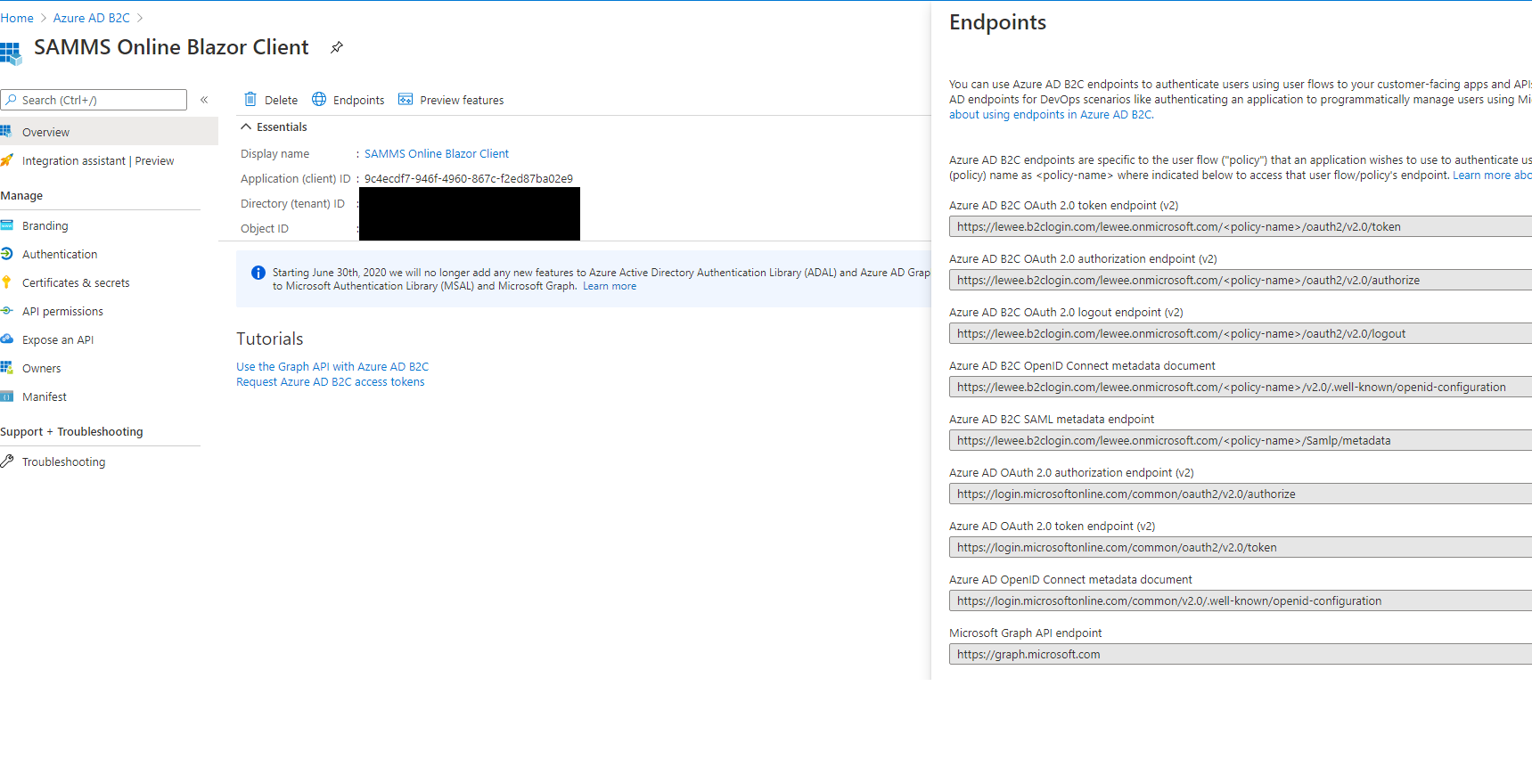
Is the documentation wrong, have not correctly configured something, or is there a bug in one of the packages?
Document Details
⚠ Do not edit this section. It is required for docs.microsoft.com ➟ GitHub issue linking.
- ID: 520b9821-ecef-20af-a601-ea36c4297d88
- Version Independent ID: da9c8ac9-4d7a-4b40-56a2-a4bfe7083567
- Content: Secure an ASP.NET Core Blazor WebAssembly hosted app with Azure Active Directory B2C
- Content Source: aspnetcore/blazor/security/webassembly/hosted-with-azure-active-directory-b2c.md
- Product: aspnet-core
- Technology: aspnetcore-blazor
- GitHub Login: @guardrex
- Microsoft Alias: riande
 TheMagnificent11
All 23 comments
Hello @TheMagnificent11 ... That host isn't correct. Look at the host of the URLs in the Endpoints panel and the topic's app settings config guidance at https://docs.microsoft.com/en-us/aspnet/core/blazor/security/webassembly/hosted-with-azure-active-directory-b2c?view=aspnetcore-3.1#authentication-service-support-1 ...
{
  "AzureAdB2C": {
    "Authority": "https://contoso.b2clogin.com/contoso.onmicrosoft.com/B2C_1_signupsignin1",
    "ClientId": "4369008b-21fa-427c-abaa-9b53bf58e538",
    "ValidateAuthority": false
  }
}
WRT the topic guidance, it calls for the {AAD B2C INSTANCE} be set to the format https://contoso.b2clogin.com/. It _seems like_ you didn't have the right value for that placeholder when you created the solution; however, I can't know for sure ... of course ... I'm just guessing.
If you did run the command that way and still ended up with the wrong config in the client app, then yeah ... we'd need to perhaps check with engineering on that, especially if you're using the latest 5.0 preview SDK.
 guardrex
on 13 Oct 2020
guardrex
on 13 Oct 2020
Hi @guardrex, I used my own B2C instance.
When running the dotnet CLI command in the docs, I believe I correctly substituted into the placeholders.
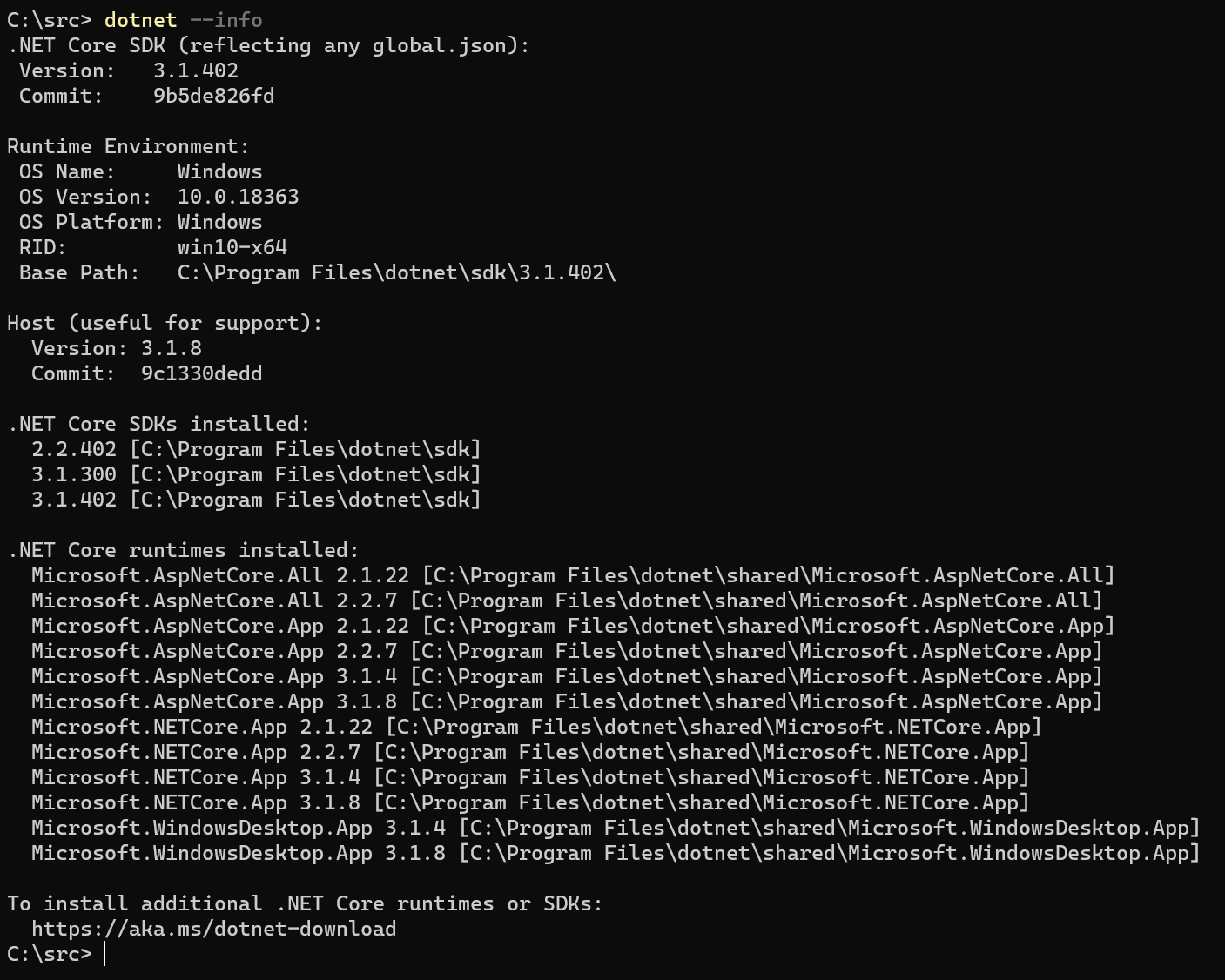
I'm not using the preview SDK and packages; I'm using the .Net 3.1 SDK I'm using the latest stable .Net 3.2.1 packages.
Server
  <ItemGroup>
    <PackageReference Include="Microsoft.AspNetCore.Components.WebAssembly.Server" Version="3.2.1" />
  </ItemGroup>
Client
  <ItemGroup>
    <PackageReference Include="Microsoft.AspNetCore.Components.WebAssembly" Version="3.2.1" />
    <PackageReference Include="Microsoft.AspNetCore.Components.WebAssembly.Build" Version="3.2.1" PrivateAssets="all" />
    <PackageReference Include="Microsoft.AspNetCore.Components.WebAssembly.DevServer" Version="3.2.1" PrivateAssets="all" />
    <PackageReference Include="Microsoft.Authentication.WebAssembly.Msal" Version="3.2.1" />
    <PackageReference Include="Microsoft.Extensions.Http" Version="3.1.6" />
    <PackageReference Include="System.Net.Http.Json" Version="3.2.0" />
  </ItemGroup>
TheMagnificent11
on 13 Oct 2020
I used my own B2C instance.
I showed that to emphasize _the format_ of what should be in the file. Did you change the app setting (client app) to ...
...
"Authority": "https://lewee.b2clogin.com/lewee.onmicrosoft.com/b2c_1_signupsignin",
...
I'm going to close because I think this is a configuration problem that you'll be able to work out. The topic shows the configuration with both placeholders and examples. I don't think that there's anything actionable for the doc.
guardrex
on 14 Oct 2020
@guardrex, sorry about the late reply, but it appears my client app settings are correct (I even changed to lower case for the policy to see if it would make a difference, but it didn't).
{
  "AzureAdB2C": {
    "Authority": "https://lewee.onmicrosoft.com/lewee.onmicrosoft.com/B2C_1_signupsignin",
    "ClientId": "redacted",
    "ValidateAuthority": false
  }
}
I'm almost certain that I substituted the items correctly for the dotnet CLI command to create the projects.
TheMagnificent11
on 20 Oct 2020
I'm starting to think that the docs are correct but there may be an issue in version 3.2.1 of Microsoft.Authentication.WebAssembly.Msal
TheMagnificent11
on 20 Oct 2020
As I said, that host _is not correct_. Use this ...
"Authority": "https://lewee.b2clogin.com/lewee.onmicrosoft.com/b2c_1_signupsignin",
Thanks @guardrex, I finally got around to trying this and it worked 😀
TheMagnificent11
on 28 Oct 2020
@guardrex, I'm getting the following error message now (I re-did CLI creation of the Blazor WASM application).

It appears I've got something wrong in my B2C configuration.
I think some screenshots on the B2C configuration would really help for this documentation page.
TheMagnificent11
on 31 Oct 2020
We can't screenshot the portal because it changes too frequently. If you go to the AAD docs pages in the Identity doc set, you will see screenshots of these configurations. Their topics are cross-linked from this topic.
The error message narrows it down to a permissions problem. Check the scopes/permissions are correct against what the topic shows.
If you require product support, we recommend the usual channels, such as Stack Overflow, Gitter, and Slack. When you find out what the problem is, please do let me know. If I can improve the topic's content, we can take it from there. We can't really do anything tho at this point because all we know is that your app or your app registration is incorrect.
guardrex
on 31 Oct 2020
@guardrex, I've been going through the docs page again trying to confirm whether my B2C setup is correct.
The page has great step-by-step instruction if you are configuring B2C from scratch.
However, now that I have already setup B2C, it's hard to go through the steps and work out if what is there is correct.
It would be useful if there was a summary at the end of each section/numbered list/bullet list that tells you what should be configured/visible.
For example, after the first numbered list in the _Register a server API app_ and before the "Record the following information" paragraph, it would be good if it mentioned what the "Authentication" section of the B2C app has configured. I think screenshots would be ideal, but I think this is the next best thing.
I find it interesting that you say that you can't do screenshots because the UI changes so frequently, yet the instruction detail given is very precise and would vary according to UI changes. I think even screenshots of an outdated UI would be easier to follow that what is currently there (when you B2C apps are already configured you are troubleshooting).
TheMagnificent11
on 27 Nov 2020
It appears I now have the same/similar issue to this one: #17319
I read the whole thread, but not sure what I've done wrong (might be because I'm a bit sleepy and not full comprehending it).
TheMagnificent11
on 27 Nov 2020
@TheMagnificent11 ... Use the migration topic at https://docs.microsoft.com/en-us/aspnet/core/migration/31-to-50?view=aspnetcore-5.0&tabs=visual-studio.
It would be useful if there was a summary at the end of each section/numbered list/bullet list that tells you what should be configured/visible.
The topic already shows the correct config is in each section.
even screenshots of an outdated UI would be easier to follow that what is currently there
😨 Can't do it! 😨 ... We've had a lot of _PAIN_ 😬 trying to keep images updated. With limited staffing and large backlog of issues, we can't be successful with images in reference topics.
the instruction detail given is very precise and would vary according to UI changes
Text is easy/fast to change. Images take time to replace. Time is something in very short supply around here. 🏃😅
same/similar issue to this one
Set the Audience as the topic shows. It's covered in the 5.0 version of the topic now. If you have the https://-style scope for your API (because you're using an untrusted publisher domain), then you need the Authority set. If you're using the api://-style scope with a trusted publisher domain, then you do not need to set the Authority.
guardrex
on 27 Nov 2020
I'll redo the app going the the ASP.Net Core 5.0 version of the docs and see how I go (no need to migrate as it's only the app created from the dotnet new CLI command).
In the meantime, I did as you suggested and posted on Stack Overflow.
TheMagnificent11
on 27 Nov 2020
@TheMagnificent11 ... Oh ... just reminded myself ... sorry about my last message on Authority. That's an AAD (_not_ B2C) scenario. It's only in the AAD standalone and hosted topics, which is why you didn't see it/try it in the first place. Ignore that.
I'll take a look at your SO issue to see if I spot anything amiss.
guardrex
on 27 Nov 2020
@TheMagnificent11 ... If that's a 5.0 app, it should be an Single-page application platform config in the portal for the client app ... not the Web config of a 3.1 app. That's covered in the topic and in the migration guidance.
guardrex
on 27 Nov 2020
... and drop the implicit grant. Don't check those two boxes for the client app registration.
guardrex
on 27 Nov 2020
My issue is for 3.1, but as I said, I'll retry with the whole process with a 5.0 app
TheMagnificent11
on 27 Nov 2020
I see. The guidance as it stands in the 3.1 version of the topic should work then.
~Also, I just noted that we don't have the platform config instruction in the right spot of the migration topic. I'll open a new issue and fix that right now. We have it for WebAssembly only. That's because when we did the doc updates I think only WebAssembly guidance arrived from the product unit. Mind you ... that's just in the migration topic. The 5.0 versions of the two B2C topics do have the SPA platform config instructions.~
~I'll get that resolved in the migration topic by EOD.~
Nevermind! ... The migration coverage is correct. Those sections pertain to both AAD scenarios and call for SPA.
guardrex
on 27 Nov 2020
Ok ... we're good. No issue needed.
- https://docs.microsoft.com/en-us/aspnet/core/migration/31-to-50?view=aspnetcore-5.0&tabs=visual-studio#standalone-blazor-webassembly-app-with-azure-active-directory-aad-b2c
- https://docs.microsoft.com/en-us/aspnet/core/migration/31-to-50?view=aspnetcore-5.0&tabs=visual-studio#hosted-blazor-webassembly-app-with-azure-active-directory-aad-or-aad-b2c
... Those cover both. There are so many combos here it's dizzying! 😵
guardrex
on 27 Nov 2020
@TheMagnificent11 ... I'm sorry that it's so hard to migrate, but we're facing a lot of challenges here: Security is difficult to configure in the first place. Any one tiny wrong thing and 💥😢 ... it all goes to heck in a handbasket. Then, there were major changes between 3.x and 5.0 combined with several combinations of migration changes for the security and other non-security Blazor app changes by hosting model. Migration is challenging this time around.
One way that devs have had success is to do what you're doing. They create a fresh 5.0 app following the new app guidance in the 5.0 topic. Once that's up and running, then they bring over the API and remaining config from their 3.1 app.

_Hang in there ... I'm pull'in for ya!_ - Red (Steve Smith), The Red Green Show © S&S Productions, Inc.
guardrex
on 27 Nov 2020
@guardrex, I figured out the issue with my .Net 3.1 app.
I missed the "†" note about editing the API ID URI.
I've commented-out the mistake in the code below
namespace BlazorClient
{
    public class Program
    {
        public static async Task Main(string[] args)
        {
            ...

            builder.Services.AddMsalAuthentication(options =>
            {
                builder.Configuration.Bind("AzureAdB2C", options.ProviderOptions.Authentication);
                //options.ProviderOptions.DefaultAccessTokenScopes.Add("https://lewee.onmicrosoft.com/https://lewee.onmicrosoft.com/bb5fc96a-dc8c-4601-8af4-83d0be73b0ac/blazor.client");
                options.ProviderOptions.DefaultAccessTokenScopes.Add("https://lewee.onmicrosoft.com/bb5fc96a-dc8c-4601-8af4-83d0be73b0ac/blazor.client");
            });

            await builder.Build().RunAsync();
        }
    }
}
Part of the notes reads.
_If the App ID URI is a custom value or has some other scheme (for example, https:// for an untrusted publisher domain similar to https://contoso.onmicrosoft.com/41451fa7-82d9-4673-8fa5-69eff5a761fd), you must manually update the default scope URI and remove the api:// scheme after the Client app is created by the template_
I think it would be better if it said:
_If the App ID URI is a custom value or has some other scheme (for example, https:// for an untrusted publisher domain similar to https://contoso.onmicrosoft.com/41451fa7-82d9-4673-8fa5-69eff5a761fd), you must manually update the default scope URI and remove the https://{TENANT DOMAIN}/ from the parameter in options.ProviderOptions.DefaultAccessTokenScopes.Add statement in the Program.cs file on client app after it is created by the template_.
I'm going to give the ASP.Net 5 docs ago now as it doesn't make sense to start a brand new app on old tech.
Thanks for all your help.
TheMagnificent11
on 2 Dec 2020
Well ... that's actually a framework error that generates that double-URI-entry configuration, or it's a problem when the dev tries to use the 😵 crazy-long CLI command 😵 to create the app and a value isn't correct in the command.
What you're referring to with the trusted or untrusted publisher domain is a different scenario. The new guidance for 5.0 is that if you have an untrusted publisher domain, your scope will start with https:// and thus you'll add an Authority entry to the appsettings.json file. If the app is registered on a trusted publisher domain, the scope will start with api:// and the Authority entry _is not used/modified_ in the app settings file. There will be a slight difference between using an AAD versus an AAD B2C app because AAD B2C always has an Authority entry (i.e., You won't change it if it's correct after creating the app with the CLI command, and there's no default access token scope in the client app for B2C). Anyway ... you'll see the new guidance on this when you read the 5.0 version of the topic. It's in both the AAD and the AAD B2C topics.
... and there's more work to do ...
- B2C on Identity 2.0 should be able to use 3rd party external providers (Google, FB, etc.). We haven't documented it here, so we'll have to see if we do so next year.
- These apps should be able to establish more scopes for more API endpoints, but we just document one example in the hosted WASM scenario. I'm working on the AAD groups and roles topic, but it will initially focus on AAD. I'll need to confirm that what we put up this week (or next week) also works for B2C (or what changes need to be made to make it work for B2C).
guardrex
on 2 Dec 2020
Related issues
 Rick-Anderson
·
3Comments
Rick-Anderson
·
3Comments
 royshouvik
·
3Comments
royshouvik
·
3Comments
 cocowalla
·
3Comments
cocowalla
·
3Comments
 davisnw
·
3Comments
Rick-Anderson
·
3Comments
davisnw
·
3Comments
Rick-Anderson
·
3Comments
Most helpful comment
Thanks @guardrex, I finally got around to trying this and it worked 😀