Aspnetcore.docs: Blazor WebAssembly Hosted app with IdentityServer returning 401 with custom domain
Working on my Blazor WebAssembly Hosted app with Identity Server and following the steps in the docs I found two issues that are not clearly documented.
- Before deploying to production we need to provision a certificate for signing tokens. I found this in other docs but I would have saved me a lot of time if this way more clearly mentioned in this Blazor WebAssembly Hosted Identity Server docs.
2. Even if the app is working as expected on my "azurewebsites.net" domain, the Identity Server is responding with 401 when trying to work from my custom domain associated to my web app. This is scenario should be clearly mentioned on the documentation and so far I haven't been able to understand what additional configuration is needed for my Blazor WebAssembly Hosted app with IdentityServer to work with my custom domain as well as with my "azurewebsites.net" domain
Document Details
⚠ Do not edit this section. It is required for docs.microsoft.com ➟ GitHub issue linking.
- ID: 9638772f-0f1e-c2a9-8a58-ae8c3e37ae28
- Version Independent ID: 7a5b169e-08cb-cdba-4501-88d3da2723bb
- Content: Secure a hosted ASP.NET Core Blazor WebAssembly app with Identity Server
- Content Source: aspnetcore/blazor/security/webassembly/hosted-with-identity-server.md
- Product: aspnet-core
- Technology: aspnetcore-blazor
- GitHub Login: @guardrex
- Microsoft Alias: riande
 donquijotedelamancha
All 23 comments
Hello @donquijotedelamancha ...
On the first one, I'll cross-link to the certificate content. Thanks for calling that out.
With regard to the custom domain problem, I'm not aware of anything that would prevent an app running with a custom domain. I'll see if I can find time to run some tests this week. No promises on that tho ... we're documenting .NET 5 ... and I have a couple of other high priority non-.NET 5 issues that I'm working this week. I'll get to this as soon as I can. In the meantime, consult with other devs on the usual support channels and report back if you make any progress with it.
 guardrex
on 19 Aug 2020
guardrex
on 19 Aug 2020
Thank you for the feedback! I will report back if I make progress on the issue with the custom domain and definitely please keep me posted on any findings on your side
donquijotedelamancha
on 19 Aug 2020
@donquijotedelamancha Did you figure out the custom domain scenario?
... and btw ... were you using Linux or Windows on Azure App Service?
guardrex
on 27 Aug 2020
@donquijotedelamancha ... I have news ... mostly good news.
One little problem here
I think you may not have hit this one based on your opening remarks ...
When setting up my test self-signed cert for the Azure App, the cert and the setup in Azure Apps works fine to reach the site. Azure is perfectly happy to serve up the app at the custom domain with my cert.
However, the Identity Server bits choke on trying to get access to the key via the CurrentUser/My store ...
"Key": {
    "Type": "Store",
    "StoreName": "My",
    "StoreLocation": "CurrentUser",
    "Name": "CN=www.{HOST}.com"
  }
I kept getting ...
System.InvalidOperationException: Couldn't find a valid certificate with subject 'CN=www.{HOST}.com' on the 'CurrentUser\My' at Microsoft.AspNetCore.ApiAuthorization.IdentityServer.SigningKeysLoader.LoadFromStoreCert(String subject, String storeName, StoreLocation storeLocation, DateTimeOffset currentTime)
at Microsoft.AspNetCore.ApiAuthorization.IdentityServer.SigningKeysLoader.LoadFromStoreCert
So ... to 🙈 _RexHack!_:tm: 🙈 my way around that, I just dropped the PFX into the app and set up the physical cert for IdS as ...
"Key": {
  "Type": "File",
  "FilePath": "{CERTIFICATE}.pfx",
  "Password": "{PASSWORD}"
}
That's an ugly _HACK_, but it works. The app runs after that.
I need to figure out why it isn't getting the cert using CurrentUser/My store.
Good News
With my little hack, the app ✨ _Just Works!_ ✨

Nothing special with the app. It's just my local IdS test app (3.1) based on the topic's guidance shot up into Azure Apps to a Basic (B1) tier service with a custom domain and self-signed cert. Nothing fancy. I'm running right off my app.db database file in the app, which is the dB that I use for my local testing ("DefaultConnection": "DataSource=app.db").
Actionable for this issue
to work with my custom domain as well as with my "azurewebsites.net" domain
"_as well as_" ...
🤔 ... I have a suspicion that it isn't supported outside of using a different configuration file for a different app slot. For instance the set up would be that there's a development slot for the azurewebsites.net configuration with the cert for that host in use and a production slot with the custom domain and cert in use. I'm just guessing tho. You'd need to consult with the Identity Server devs on their repo or ask the community on various support channels (SO, Slack, Gitter, etc.). That's an advanced hosting config that's beyond the scope of what we want to cover here in the Blazor WASM IdS topic. I have a feeling that even the Azure docs authors wouldn't want to cover it ... that they'd probably suggest reaching out to the IdS docs folks for coverage (https://docs.identityserver.io/en/latest/) ... but again ... I'm just guessing on what they might say.
What I need to do is cross-link to the doc coverage on deployment with the IdS cert config _—or—_ include the cert config guidance in the topic itself. I'll do that to address this issue.
First tho ... I need to figure out my IdS bug 🐞☝️. I'll work on that next.
IMPORTANT!
... especially since you mentioned a 401 ...
I just want to re-iterate again here how important it is for all devs to make sure that they _use a fresh in-private/incognito browser for every single test run of an app no matter how minor the change client-side, or server-side, or in the Azure portal._ Prior cookies can ruin your day! All devs should probably take my advice at (and shown at the bottom of all WASM security topics) ...
https://docs.microsoft.com/aspnet/core/blazor/security/webassembly/hosted-with-identity-server#cookies-and-site-data
... for local runs.
When testing in Azure, manually open a fresh in-private/incognito browser for each app test run.
guardrex
on 27 Aug 2020
Strange ... it runs _in the Development environment_ but not in the Production environment.
_RESOLVED_: This was occurring because the dev setting for the cert key is from the dev setting file (added by the IdS framework) ...
"Key": {
  "Type": "Development"
}
Rubber 🦆 says that the cert probably might need to be in a key vault for this to work.
UPDATE: This doesn't seem to matter ... same behavior as just importing the cert directly to the app config in the App Service UI.
UPDATE: I'm also loading the user profile (WEBSITE_LOAD_USER_PROFILE=1). No luck yet. Ending work for the day ... will pick back up with this soon (I hope 🏃).
guardrex
on 27 Aug 2020
Thank you @guardrex for the additional feedback.
To keep you posted, the App is running on the Azure App Service on Windows.
Looking at the apps diagnostics logs I could see a bit more detail about the nature of the 401:
Microsoft.AspNetCore.Authentication.JwtBearer.JwtBearerHandler: Failed to validate the token.
Microsoft.IdentityModel.Tokens.SecurityTokenInvalidIssuerException: IDX10205: Issuer validation failed. Issuer: '[PII is hidden. ]'. Did not match: validationParameters.ValidIssuer: '[PII is hidden. ]' or validationParameters.ValidIssuers: '[PII is hidden.]'.
Quick summary is that currently the app is working on the custom domain as well as on the azurewebsites domain. The steps I followed:
- I added "IssuerUri" and "PublicOrigin" settings on the IdS configuration in appsettings.config with the Uri of my custom domain.
- I added CORS on both Startup.cs and IdentityServer in appsettings.json
Even if the app is working I agree there seem to be an issue with my certificates configuration. I will revert with any additional learnings on this topic.
Ideally I would prefer to fix the certificate configuration and not have to use "IssuerUri" on the IdS configuration since this is not recommended according to IdS docs
donquijotedelamancha
on 28 Aug 2020
Hello @donquijotedelamancha ... I was just about to post what's below. Shouldn't need CORS in the hosted WASM scenario, but that is something perhaps that I'll mention when I doc this because if the server app and client app are on different URLs it will be a problem.
Since my process below uses a separate self-signed cert for IdS, I think there won't be a problem any longer where IdS fails to get the key resulting in the app failing to start. I also don't think that IssuerUri and/or PublicOrigin are going to be a problem ... or any other site or cert config. I'll do some testing here in a few minutes for the dual-domain scenario while I have all of these Azure resources up and running. As you know, it takes some time to set all of this stuff up. I'll get back to you.
🍾 _Here it is!_ ...... finally 😅 ....
The critical action that I found was that the IdS config should use a self-signed _separate_ cert from the site's cert. Idk why it fails when trying to use one cert for both. However, two certs is the way to go for a different reason anyway. @brockallen indicates that separate certs is a best security practice in this scenario.
☣️ _WARNING!_ ☣️ Until we get security pro :eyes: on this, it's _Use at your own risk!_ I'll call for review on the PR for the appropriate approvals.
Steps ...
- Create an App Service Plan for Windows OS with an App Service Plan of Basic B1. I'll use the name
HostedBlazorWASMIdSAppService. - Create a PFX certificate for the site with a CN of the FQDN. Create the cert for 'Server Authentication (1.3.6.1.5.5.7.3.1)' and 'Client Authentication (1.3.6.1.5.5.7.3.2)' with key uses of
digitalSignatureandkeyEncipherment. I'll use OpenSSL, but any of several dozen tools and services would be fine. Keep the password handy because it will be needed to import the cert into AKV later. - Create a new Azure Key Vault on the 'Standard' pricing tier. I'll use a name of
HostedBlazorWASMIdSVault. - In the AKV 'Certificates', import the PFX site certificate. I'll use a name of
HostedBlazorWASMIdSSite. Record the cert's thumbprint, which will be needed for the app's config later. - In the AKV Certificates, generate a new self-signed signing cert for IdS. I'll use a name of
HostedBlazorWASMIdSSigning. The Subject isCN=HostedBlazorWASMIdSSigning. Leave the default Advanced Policy Configuration in place. Record the cert's thumbprint, which will be needed for the app's config later. - Create the App Service. I'll use a name of
hostedblazorwasmidswith a Publish ofCode, Runtime stack of.NET Core 3.1 (LTS), OS ofWindowswith theHostedBlazorWASMIdSAppServicecreated earlier. Sku and size should beBasic B1. Linux OS might be supported but hasn't been tested here. - In the App Service, open Configuration, add a new application setting with a key of
WEBSITE_LOAD_CERTIFICATES. For the value, provide the two cert thumbprints separated by a comma. In the Azure UI, saving app settings is a two-step process: You save an individual key-value setting, then you select the Save button at the very top of the blade to save the settings to the app service. - In the App Service TLS/SSL settings under Private Key Certificates (.pfx), import both the site cert and the signing cert with Import Key Vault Certificate.
- Navigate to the App Service's Custom domain blade. At your ISP, use the IP address and Custom Domain Verification ID values to configure the domain. A typical config is to create an A Record with a Host of
@and a value of the IP address. Create a TXT Record for with a Host ofasuidand the value of the verification ID generated by Azure and provided in the Azure UI. Make sure that you save the changes at your ISP, which sometimes is also a two-step save process ... save the setting, then save the settings to the domain configuration. - Back in the App Service on the Custom domains blade, select Add custom domain, select the A Record option (if not using the CNAME approach), provide the domain (
www.{HOST}.com), select Validate. If the domain recs are good, the portal will allow you to Add custom domain. - In the App Service Custom domains blade, the SSL STATE is marked
Not Secure. Select the Add binding link. Select the site cert for the custom domain binding. In VS, select the Server project and in the app settings file (
appsettings.json) provide the AKV Name of the self-signed signing cert for IdS."IdentityServer": { "Clients": { "HostISRC.Client": { "Profile": "IdentityServerSPA" } }, "Key": { "Type": "Store", "StoreName": "My", "StoreLocation": "CurrentUser", "Name": "CN=HostedBlazorWASMIdSSigning" } },In VS, create an Azure App Service publishing profile for Windows (Linux probably isn't supported). If you view by Resource type, you should be able to navigate within Web App list to find the app service and select it (e.g.,
hostedblazorwasmidsin my case).- In VS when it returns to the Publish window, the AKV and SQL Server dB service dependencies will be automatically detected. No configuration is required for the AKV service. Publish the app.
- Select the Edit link under the deployment profile at the top. Change the destination URL to the site's custom domain URL (
https://www.{HOST}.com). Save the settings. - Publish the app.
... cross fingers 🤞 ... cross toes 🦶 ... sacrifice a MS ergonomic keyboard to the :pray: server gods! :pray: It should :sparkles: _Just Work!_ :sparkles:

If troubleshooting or just curious about the cert availability to the app, you can open an Kudu PowerShell console and execute ...
Get-ChildItem -path Cert:\CurrentUser\My -Recurse | Format-List DnsNameList, Subject, Thumbprint, EnhancedKeyUsageList
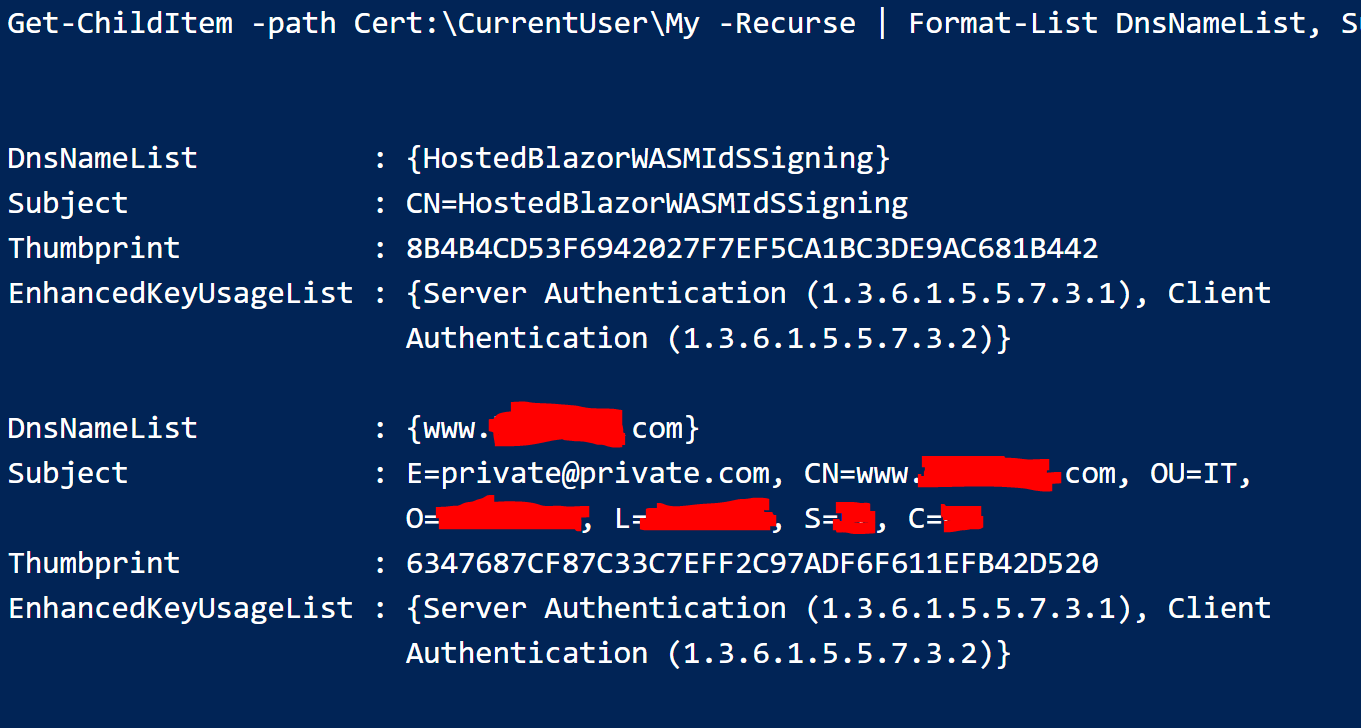
Always remember to use a new in-private/incognito browser to test for every change anywhere no matter how small. _Using the same browser session for new tests with stale cookies is a :skull: pit of failure and death :skull:!_
guardrex
on 28 Aug 2020
@donquijotedelamancha ......
:tada: Boohyeah! :beers:
It works on that guidance :point_up: ...
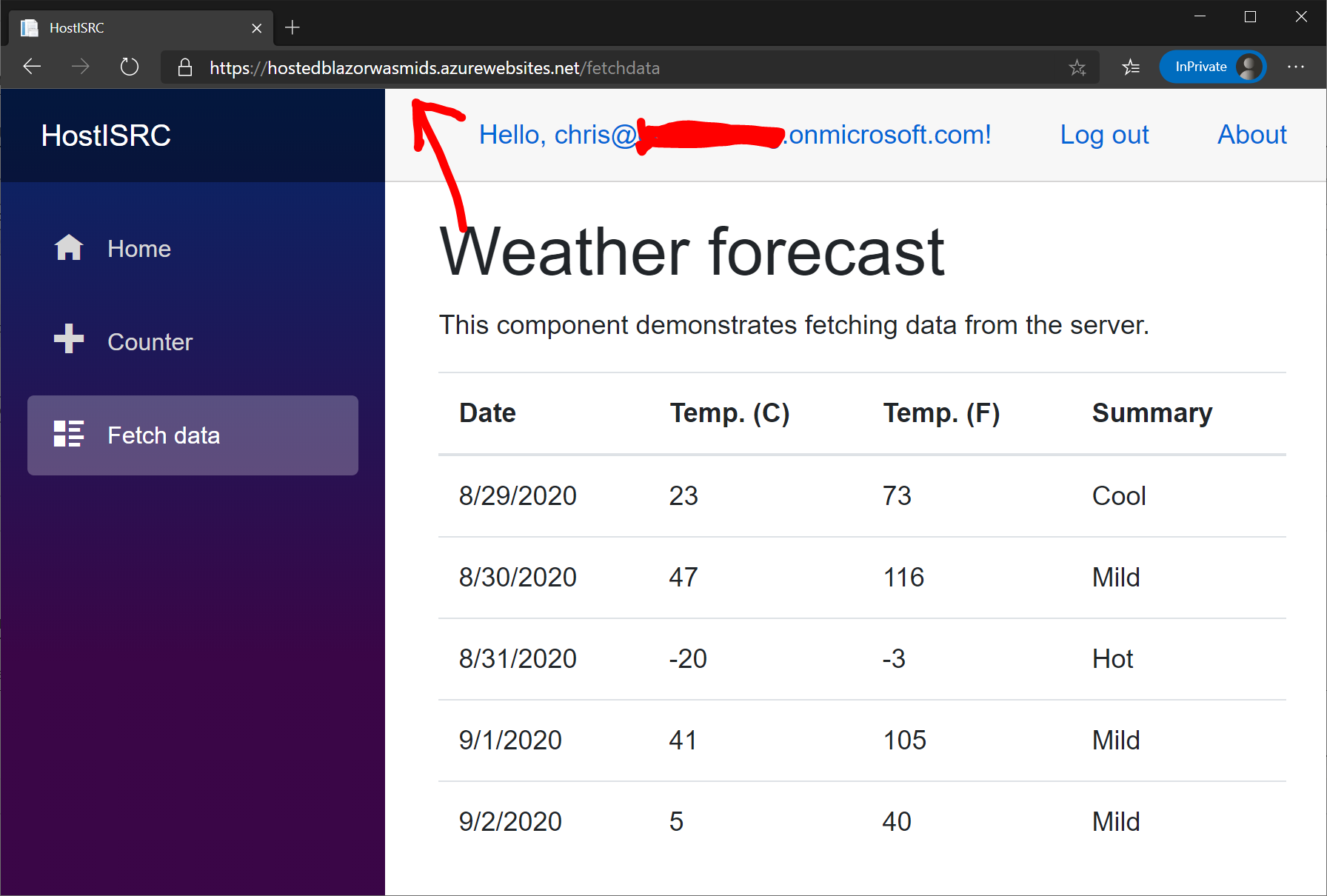
I'm calling it a week right there! Quit while I'm ahead. 😁
(I'm out of hours this week anyway.)
I'll get on writing this up for the topic on Monday morning. We'll get some security pro :eyes: on the PR to provide feedback.
guardrex
on 28 Aug 2020
@guardrex Thank you for the guide. Your second item regarding certificate generation makes several assumptions on user proficiency with cert generation. Could you provide generalized command(s) of what you used in openssl? I know this isn't directly related to Blazor, but for usability-sake it will make your provided steps easier to follow.
The part I am confused on is Create the cert for 'Server Authentication (1.3.6.1.5.5.7.3.1)' and 'Client Authentication (1.3.6.1.5.5.7.3.2)' with key uses of digitalSignature and keyEncipherment. I'm not sure what point in the process that has to be provided and how.
 mark-at-tusksoft
on 17 Sep 2020
mark-at-tusksoft
on 17 Sep 2020
EDIT TL;DR @blowdart ... @mark-at-tusksoft is asking about the OpenSSL commands that I use to create test certs. I'm providing my notes, but I'll delete them if you think it best. I don't want to put anything anywhere on this repo that could even remotely be a security risk.
@mark-at-tusksoft ...
makes several assumptions on user proficiency with cert generation
isn't directly related to Blazor
Could you provide generalized command(s) of what you used in openssl?
Sure ... I can provide that _here_ as 💀 _Use at your own risk!_ 💀 notes (not official and not supported). As you suggest, it isn't directly related to Blazor, so it's beyond the scope of the topic to provide it in the content. What I use personally in the following notes is purely for making testing certs and goes like this ...
Use a text editor to create an sni.cnf external file with the following content ...
[sniconfig]
extendedKeyUsage = 1.3.6.1.5.5.7.3.1,1.3.6.1.5.5.7.3.2
keyUsage = digitalSignature, keyEncipherment
The following commands assume that folders exist for ...
key- Holds keys.csr- Holds CSR files.cert- Holds certificates.
I'll list the FQDN as www-contoso-com. Keep the password handy, as you'll need it when loading the cert into Azure Key Vault.
Instructions for the Blazor-IdS aspects are on the PR at :point_right: https://github.com/dotnet/AspNetCore.Docs/pull/19749
Commands ...
openssl genrsa -des3 -out key/www-contoso-com.key 2048

openssl req -new -sha256 -newkey rsa:2048 -nodes -keyout key/www-contoso-com.key -out csr/www-contoso-com.csr

openssl x509 -req -days 365 -in csr/www-contoso-com.csr -signkey key/www-contoso-com.key -out cert/www-contoso-com.crt -extensions sniconfig -extfile sni.cnf

openssl pkcs12 -export -out cert/www-contoso-com.pfx -inkey key/www-contoso-com.key -in cert/www-contoso-com.crt
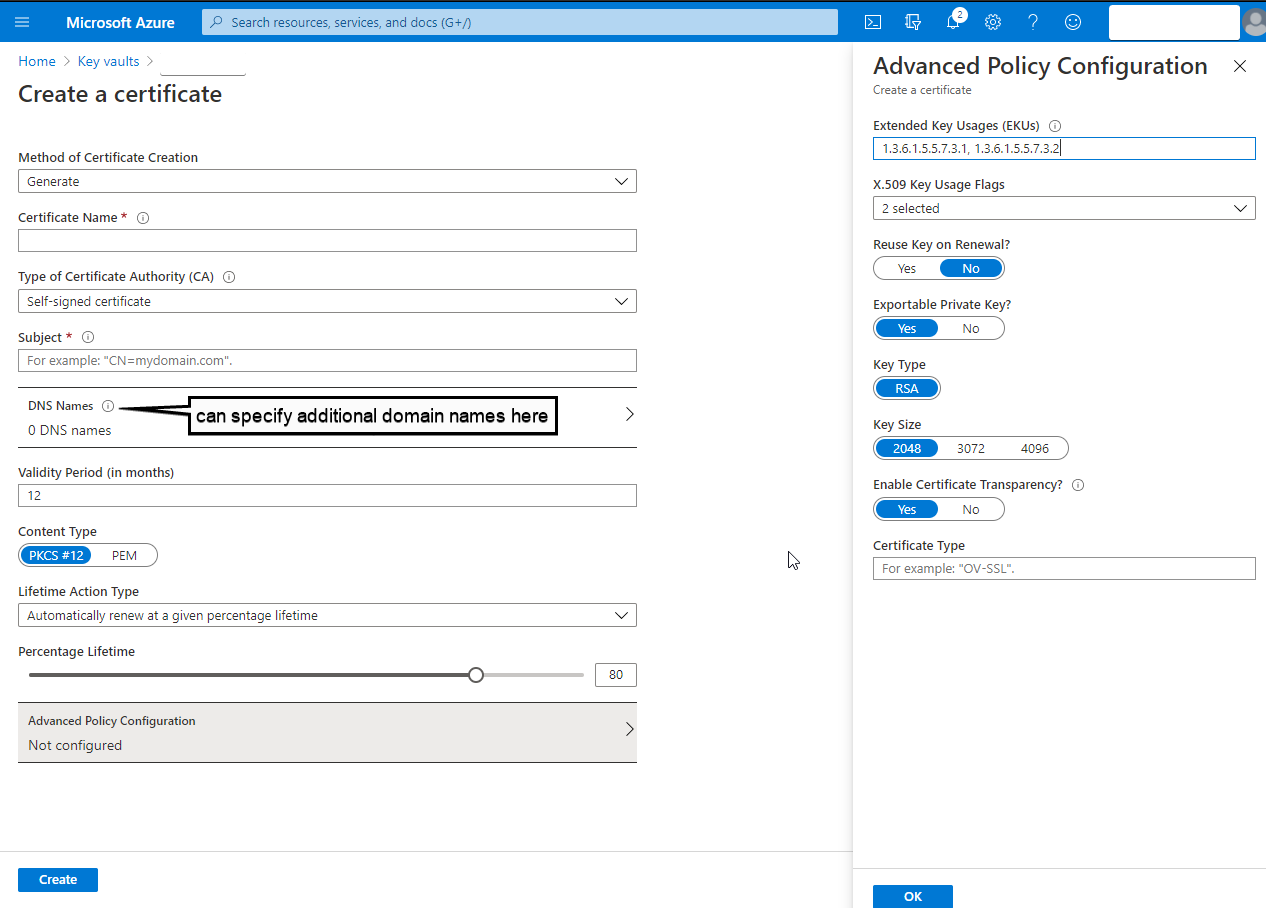
@guardrex Thank you for providing this! While you were writing that out I found XCA which is a really cool GUI tool for generating everything under the sun for key/CSR/PEM/PFX files. After I made the self-signed cert, I found out that AKV will generate all of this for you _and_ renew it. 🤦♂️
mark-at-tusksoft
on 17 Sep 2020
Yes! ... that's true. I use OpenSSL to create test certs, but that can certainly be used. The topic's draft text says that any of several dozen tools/services can be used.
... and speaking of the PR ...
You might want to work directly from the PR diff because there are updates to what I wrote and show here. I'm not sure if anything critical was changed, but it's probably the best bet. Also, it would be a good review of what I wrote, and can let me know if anything there doesn't make sense.
guardrex
on 17 Sep 2020
One more question, mostly about the scope of what this configuration resolves. If I publish to azure after logging in, I can still navigate between pages requiring auth; however, the API bearer token is still invalidated. Shouldn't Microsoft.AspNetCore.Components.WebAssembly.Authentication/AuthenticationService.js be handling this gracefully or is there still some DIY resolution needed beyond what is outlined in the associated PR?
mark-at-tusksoft
on 17 Sep 2020
That's a separate issue. These bits are only focused on authenticating for the server API.
To control access to components (and markup within components) after the user has logged in, typical approaches are based on the user's role claim and described here :point_right: https://docs.microsoft.com/aspnet/core/blazor/security/#authorization
guardrex
on 17 Sep 2020
... actually ...
I can still navigate between pages requiring auth; however, the API bearer token is still invalidated
I might not have read that correctly. You shouldn't be able to sign in (navigate to components that require auth) and then have a bad bearer token for server API access if all of the guidance in the topic is followed. You'd have to walk all of the steps over again to see if perhaps a step was missed somewhere along the way.
guardrex
on 17 Sep 2020
Make sure that you're using a fresh in-private/incognito browser for _every single test run no matter where or what change is made, app or Azure_. The single biggest gotcha thus far has been stale cookies. An app can be fine ... configured correctly ... and Azure config can be fine ... and it will 💥 if a stale cookie is present. You have have a running app, make a config change that breaks the app, change it back to the known good configuration ... run it .. and :boom: for no apparent reason. It's a stale cookie. Check the Troubleshoot section on how to configure VS to use a fresh in-private/incognito browser for every run.
guardrex
on 17 Sep 2020
If you're getting ...
'[PII is hidden. ]'
... on any errors and want to log the "Personally Identifiable Information (PII)," try placing (temporarily) the following in Startup.ConfigureServices of the server app. PII logging might help ...
IdentityModelEventSource.ShowPII = true;
Make sure that you're using a fresh in-private/incognito browser for every single test run no matter where or what change is made, app or Azure.
@guardrex I fully agree with this in a development environment, but I can't' expect my end-users to work in an incognito window 🙃. I was getting this on my production instance, but I can't reproduce it; so until it happens again I'm gonna cross my fingers and assume the certificate finally started working. Again, thank you so much for your quick and responsive assistance!
mark-at-tusksoft
on 17 Sep 2020
I just meant for testing while making lots of config changes and publishing new apps.
Sure thing ... I'm glad it worked out. We'll get this published soon and see how it goes with devs. Thanks for checking it out and providing feedback. I'll get that Azure Key Vault certificate creator called out and linked based on your feedback.
guardrex
on 17 Sep 2020
I followed the guide above to setup the certification on Azure and so far that works and I was apple to add my custom domain. But when I added a second custom domain (in my case an .com to my previous .ch domain) I was able to login, but after that I receive for every request an 401. In the request itself it stated: www-authenticate: Bearer error="invalid_token", error_description="The issuer '[Domain].com' is invalid"
Funny enough the same is true when I try to access via the default azure name. So it seems it just takes the first URL.
Do I have to do something special to support multiple domains?
 NPadrutt
on 8 Oct 2020
NPadrutt
on 8 Oct 2020
@NPadrutt ... It's best to open a new issue. You can open a new issue from the This page feedback button and form at the bottom of any English-US topic.
The documentation is at https://docs.microsoft.com/aspnet/core/blazor/security/webassembly/hosted-with-identity-server?view=aspnetcore-3.1&tabs=visual-studio#host-in-azure-app-service-with-a-custom-domain. There aren't many differences, so it might not matter if the notes are followed here or the topic. However, I recommend the topic in case I changed things between the two.
I'm not sure why you're getting that result. I was able to access the app/API at both the custom domain and at the Azure address. When you look at the topic's coverage, double-check all of your steps.
guardrex
on 8 Oct 2020
@guardrex thanks for you're quick reply. From what I can see I setup everything the same. But I will check my code again and open a new ticket in case I can't find the issue.
NPadrutt
on 8 Oct 2020
Related issues
 danroth27
·
3Comments
danroth27
·
3Comments
 royshouvik
·
3Comments
royshouvik
·
3Comments
 sonichanxiao
·
3Comments
sonichanxiao
·
3Comments
 StevenTCramer
·
3Comments
StevenTCramer
·
3Comments
 wgutierrezr
·
3Comments
wgutierrezr
·
3Comments