Aspnetcore.docs: Need example for hosting multiple Blazor applications.
First, as soon as basePath is set the http client should be configured differently:
In template it has the following configuration which is affected by the value coming from <base> tag:
builder.Services.AddTransient(sp => new HttpClient { BaseAddress = new Uri(builder.HostEnvironment.BaseAddress) });
I assume BaseAddress should not contain the segment from <base> tag, or it should be optional. It is even better to know how base address can be provided by the hosting ASP.NET Core application, if this possible at all.
Second, when hosting multiple applications simple fallback to index.html file does not work, it should be conditional depending on the path segment to serve the file with correct base value.
Third, sometimes applications can have conflicting assets, and <StaticWebAssetBasePath> should be used. This should also be mentioned in the documentation, I believe.
Document Details
⚠ Do not edit this section. It is required for docs.microsoft.com ➟ GitHub issue linking.
- ID: 120edc19-68d5-5a86-0638-59e53ee2275e
- Version Independent ID: 85e547e0-8e56-19e5-7059-c59c4930bb50
- Content: Host and deploy ASP.NET Core Blazor
- Content Source: aspnetcore/host-and-deploy/blazor/index.md
- Product: aspnet-core
- Technology: aspnetcore-hostdeploy
- GitHub Login: @guardrex
- Microsoft Alias: riande
 voroninp
All 7 comments
Hello @voroninp ...
If the app is hosted at a different base path, then the address will be correct in the default case. If a different
BaseAddressis required for theHttpClient, then it can be set there, so having the app base path applied is optional. We could mention thatbuilder.HostEnvironment.BaseAddressis the app's base path and cross-link to App base path and the API doc. It's probably a good idea to mention it.This is the first report here (on the docs repo) on a problem like that. Open this one for engineering at https://github.com/dotnet/aspnetcore/issues. Please add a
cc: @guardrexso that I can follow the discussion.Possibly, yes ... _but_ it's tied into build targets, so I'd like engineering to remark on what they would like to cover about it, if anything. Artak, could u let me know what you/Javier would like to cover for
<StaticWebAssetBasePath>? (btw - It's not covered anywhere at the moment.)
 guardrex
on 15 Jun 2020
guardrex
on 15 Jun 2020
@guardrex Hi, I found out how to map fallback files
app.UseEndpoints(endpoints =>
{
    endpoints.MapRazorPages();
    endpoints.MapControllers();
    endpoints.MapFallbackToFile("Client1/{**any}", "Client1/index.html");
    endpoints.MapFallbackToFile("Client2/{**any}",  "Client2/index.html");
});
Cool. I'll chat with Artak about your approach for a possible call-out in the content.
Leave this issue open. We'll get to this hopefully within a few weeks ... _or months_ 🏃😅. Sorry in advance for any lengthy delay. We're still trying to get caught up on priority coverage.
guardrex
on 18 Jun 2020
It's ok =)
One more comment is that when referencing static assets from Razor Class Library and using base tag, links must be set accordingly:
<base href="/Client1/" />
<link href="../_content/BlazorLib/styles.css" rel="stylesheet" />
I will also link this issue to just let people be aware of possible gotchas.
voroninp
on 19 Jun 2020
[EDIT by guardrex to add inline code for the item]
@javiercn can you please help with this:
I'd like engineering to remark on what they would like to cover about it, if anything. Artak, could u let me know what you/Javier would like to cover for
<StaticWebAssetBasePath>? (btw - It's not covered anywhere at the moment.)
 mkArtakMSFT
on 17 Jul 2020
mkArtakMSFT
on 17 Jul 2020
Hack'in about with this one now. It looks like Javier has this working as of 3.2 Preview 4 ...
https://github.com/javiercn/BlazorMultipleApps
... so I take that forward to 3.2. Two things tho ...
- This scenario is a pain for demonstration purposes to use the hosts
firstapp.comandsecondapp.com. It would be simpler if we base it onlocalhostwith a separate port number for each client app. (_UPDATE:_ I'll draft the update with BOTH in the example.) I just tried it, and it ran nicely like that. - Also idk if it's a bug or by-design, but I don't think this example should set the app base path in the client apps. After the apps are served, each client app I think should just run on its own root (
/) base path. It seems to run ok like this.
BTW - I used 5002 and 5003 for testing, but I'm going to go down one number in the topic example and use 5001 and 5002.
The following are just the changes that I made to BlazorMultipleApps. The topic will describe the full implementation.
launchSettings.json
"applicationUrl": "https://localhost:5002;https://localhost:5003",
Server app
app.MapWhen(ctx => ctx.Request.Host.Port == 5002, first =>

...

app.MapWhen(ctx => ctx.Request.Host.Port == 5003, second =>
I'll include content in the topic to explain that use of ctx.Request.Host.Equals("{HOST}") makes more sense in most production scenarios.
FirstApp and SecondApp
Use a root (default) app base path ...
<base href="/" />
<StaticWebAssetBasePath>
Yes, I see how when it isn't there, static asset conflicts occur. I can draft it up now.
Screenshots
:tada::beers:
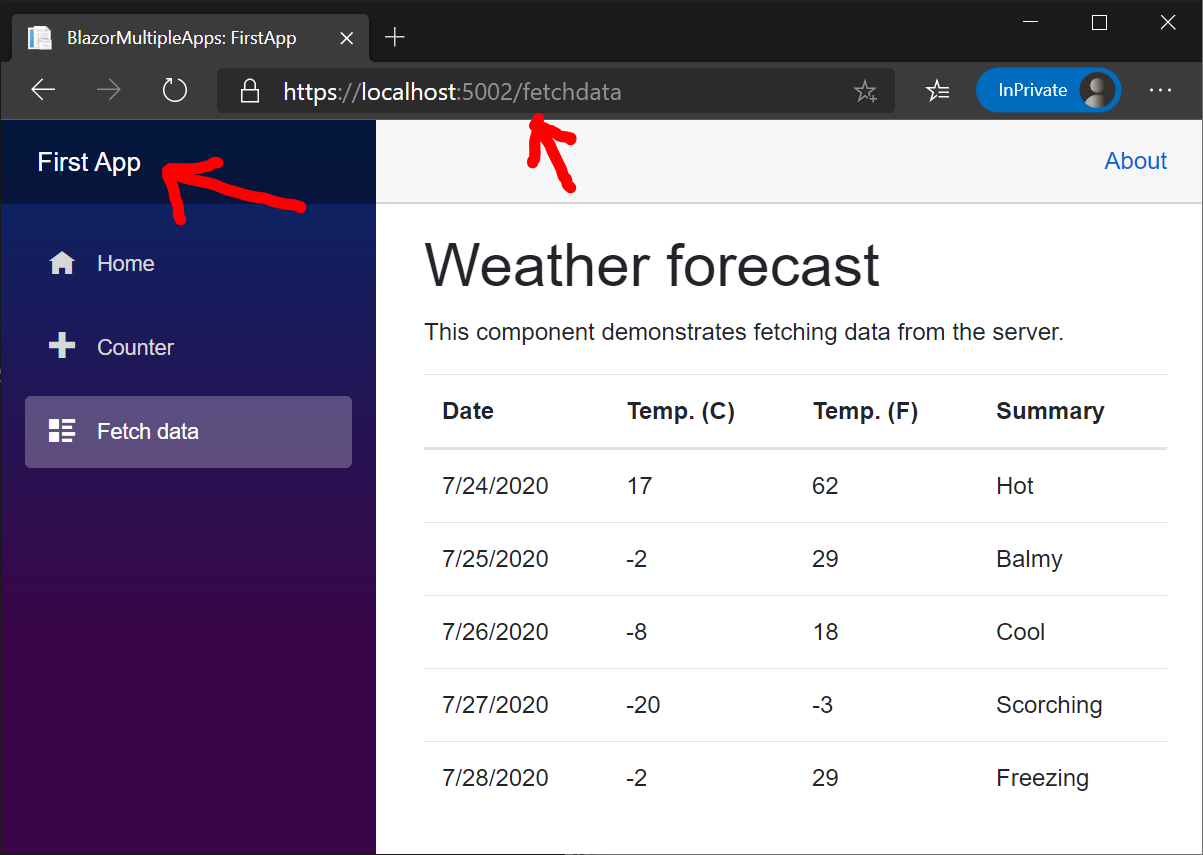

guardrex
on 23 Jul 2020
Related issues
 Mattacks
·
3Comments
Mattacks
·
3Comments
 serpent5
·
3Comments
serpent5
·
3Comments
 StevenTCramer
·
3Comments
StevenTCramer
·
3Comments
 Raghumu
·
3Comments
Raghumu
·
3Comments
 Rick-Anderson
·
3Comments
Rick-Anderson
·
3Comments