Aspnetcore.docs: Should page names be localized?
Should the page names like "Home", "Counter", "Fetch data" be localizable? If yes, no changes needed. If not, then it would be great if those terms can be blocked from localization by using either in-line code, or no-loc custom syntax.
Document Details
⚠ Do not edit this section. It is required for docs.microsoft.com ➟ GitHub issue linking.
- ID: c07e57dc-526f-9479-4695-de7d8f06eb9a
- Version Independent ID: 8226ed72-69b2-3c93-a931-218bd11cf9c8
- Content: Get started with ASP.NET Core Blazor
- Content Source: aspnetcore/blazor/get-started.md
- Product: aspnet-core
- Technology: aspnetcore-blazor
- GitHub Login: @guardrex
- Microsoft Alias: riande
 JasonCard
All 13 comments
Yes, they should be blocked because AFAIK the templates aren't translated in any way.
I'll use in-line code because these might be translated in other contexts.
 guardrex
on 19 May 2020
guardrex
on 19 May 2020
@Rick-Anderson @scottaddie @wadepickett Seems like under the latest thinking that we should be code fencing ...
- File names (e.g. _Host.cshtml :point_right:
_Host.cshtml) - Folder names (e.g., Pages :point_right:
Pages) - Page names (e.g., Counter page :point_right:
Counterpage) - Paths (e.g., wwwroot/css :point_right:
wwwroot/css) - Extensions (e.g., .razor :point_right:
.razor)
In terms of the IDEs, it's difficult to know what changes for our UI text references. I theoretically can set VS to another language and back and :pray: hopefully not get hosed :pray:, but I don't really want to risk it.
guardrex
on 19 May 2020
I felt a safer changing the language on my iMac. Interesting outcome ...
- A lot of UI is changed (e.g., "Application" is translated to "Aplicacion"), but some isn't (e.g. the new "Web and Console" isn't).
- One Blazor template is translated ... "Blazor Server App" is "Aplicacion de servidor Blazor" in Spanish ... but "Blazor WebAssembly App" isn't.
- In a Blazor Server app, everything is in English. I assume the same for all template-based apps.
The IDE is variable, but the list in my last comment :point_up: looks right for code fencing changes.
guardrex
on 19 May 2020
@Rick-Anderson @scottaddie @wadepickett I'll be working on this soon. Has a decision been made on what to code-fence ... is the list that I posted correct? :point_up:
btw- Every hand is against me on using the en dash as a layout element. I think it looks great, including in multiple languages ... and with the MT engine leaving it alone.
Well ... beaten down and busted up 🥊🤕 ... I'll accept the colon. I'll be changing over to colons for existing usages of the en dash as a layout element and using the colon going forward.
guardrex
on 22 May 2020
I don't think there's much problem with Home. I suggest some time in the past, when updating a doc, look at the doc in another language. I look at spanish and german. Usually problems like this jump out.
 Rick-Anderson
on 22 May 2020
Rick-Anderson
on 22 May 2020
The app won't be localized, so the sidebar navlink will render "Home" for link text.
guardrex
on 22 May 2020
@JasonCard ... Code-fence package names, correct? For example ...
Microsoft.AspNetCore.SignalR.Client
guardrex
on 20 Jun 2020
@guardrex Yes, I agree.
JasonCard
on 20 Jun 2020
:smile: ...
\*.*\*
... is rapidly becoming my favorite RegEx on this issue.
We've already gone a little bit down the slippery slope of styling link text. The manual says 'don't do it,' but we're likely going to need to in some cases if we don't use the no-loc metadata for a given topic. I caution against using no-loc in specific topics because that will eliminate the possibility of performing a massive find-'n-replace on that line to add something to the list for every topic.
Another challenge is bold text for UI that we also want to code-fence to avoid loc. The Blazor app template has a counter button with text of "Click me" on a button. We'd normally put that in bold (**Click me**) in the doc text because it's a UI element. Because template text isn't translated, I guess that I'll need to attempt both with:
**`Click me`**
EDIT WRT that :point_up:, I'm going to commit the updated Blazor tutorials, the Build your first Blazor app and Blazor with SignalR topics, to the repo, take them live, and inspect how those get rendered. I'll report back here on the result.
EDIT 2X Yes! ☝️ It ✨ _Just Works!_:tm: ✨
I've also seen that some VS UI is translated and other text isn't. I probably can't go that far with this round of updates. I'll need to go with English for VS UI, which I know isn't correct. I'm not going to have time to get that deep into the weeds on this pass.
guardrex
on 20 Jun 2020
We've already gone a little bit down the slippery slope of styling link text. The manual says 'don't do it,'
Unless there's a risk of over-localization, then do it. Same with hard coded file names like wwwroot.
Rick-Anderson
on 20 Jun 2020
Yes, I'll continue with it. :point_up:
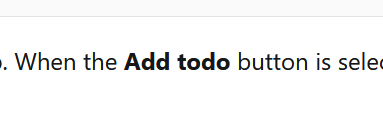
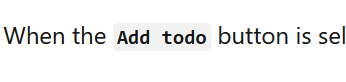
WRT bold and code-fencing, it seems ok.
Before:
After:
guardrex
on 20 Jun 2020
How do you do bold code fenced?
Rick-Anderson
on 20 Jun 2020
Like this ...
**`Add todo`**
Rendered example at Step 8 ...
https://docs.microsoft.com/en-us/aspnet/core/tutorials/build-your-first-blazor-app?view=aspnetcore-3.1#build-a-todo-list
guardrex
on 20 Jun 2020
Related issues
 neman
·
3Comments
neman
·
3Comments
 Raghumu
·
3Comments
Raghumu
·
3Comments
 danroth27
·
3Comments
danroth27
·
3Comments
 YeyoCoder
·
3Comments
Rick-Anderson
·
3Comments
YeyoCoder
·
3Comments
Rick-Anderson
·
3Comments