Aspnetcore.docs: Document performance best practices for Blazor apps
Filing a tracking issue to collect and document our performance best practices for Blazor apps.
Customer request for this info: https://devblogs.microsoft.com/aspnet/blazor-webassembly-3-2-0-preview-4-release-now-available/#comment-1925.
- [ ] WebAssemblyJSRuntime.Unmarhsalled APIs
- [ ] Use S.T.Json over Newtonsoft.Json
- [ ] Avoid marshalling JSON
- [ ] How to avoid excessive re-rendering - use primitive type parameters, use ShouldRender.
- [ ] How to make your app smaller - things you can turn off (managed collations, timezone data)
 danroth27
All 15 comments
I hope you don't mind me commenting, and this may be the same thing as "WebAssemblyJSRuntime.Unmarhsalled APIs", but one thing I've noticed is that using the non-async version of calls to Javascript made a big difference to UI performance in a web assembly project with JS interop!
 LaughingJohn
on 24 Apr 2020
LaughingJohn
on 24 Apr 2020
Perhaps some guidance on using threading in the Runtime vs WebWorker vs animationFrame vs ..? if you need to render in a loop at 30 FPS (a.k.a games).
 rogihee
on 5 May 2020
rogihee
on 5 May 2020
Documeting WebAssemblyJSRuntime.Unmarhsalled APIs will be great, I did some code earlier and lately too and it was always hard to make it work because there is almost nothing to follow.
I tried to make small nuget library to pass data fast between dotnet and js using unmarshalled API, maybe it can help here somehow.
 Lupusa87
on 12 May 2020
Lupusa87
on 12 May 2020
To get the most performance out of your Blazor WebAssembly applications, it would be useful to be mindful of some patterns and primitives.
ComponentBase.ShouldRender()
While Blazor's diffing algorithm will avoid re-rendering components if it perceives it as unchanged, component authors can have fine-grained control over this by overriding ComponentBase.ShouldRender. For instance, if you are authoring a UI-only component that remains unchanged after the initial render, configuring it always return false after the should help avoid additional work:
// PureComponent.razor

<h1>@title</h1>
@code
{
   protected override bool ShouldRender() => false;
}
ShouldRender could also be used to selectively render a component responding to an UI event:
Counter
<h1>Count: @count</h1>
<button @onclick="Click">Click</button>

@code
{
    int count;
    bool shouldRender;
    protected override bool ShouldRender() => shouldRender;

   protected override void OnAfterRender(bool first)
   {
      shouldRender = false;
   }

    void Click()
    {
      shouldRender = true;
      count++;
    }
}
Virtualization
Components offer a convenient way to produce re-usable fragments of code and markup. In general, we recommend authoring components that best align with your application's requirements. One caveat is that, each additional child component contributes to the total time it takes to render a root component. For most applications, this additional overhead is negligible. However applications that produce a large number of components, say a grid with 100s of rows where each cell is a component, should consider some strategies. In such cases, consider virtualizing your grid or list layout so that at any given time, only a subset of components are being rendered. https://github.com/aspnet/samples/tree/master/samples/aspnetcore/blazor has a sample of how you might want to approach this in a Blazor application.
Avoid JSInterop to marshal data
In Blazor Server, JSInterop calls require a network round-trip for a JSInterop call. In Blazor WebAssembly, while JSInterop call has to traverse the WebAssembly - JS boundary, there is overhead involved in serializing and deserialzing content across the two contexts. Frequent JSInterop will have an adverse effect on the application. One possibility might be to consolidate lots of small sized payloads in to single larger payloads instead to avoid context switches.
Use System.Text.Json
System.Text.Json is a high performance and low memory allocation-based JSON serialization library. Blazor's JSInterop implementation relies on System.Text.Json. As a result, using System.Text.Json in your Blazor WebAssembly application would not result in any additional payload size over using alternate JSON libraries. https://docs.microsoft.com/en-us/dotnet/standard/serialization/system-text-json-migrate-from-newtonsoft-how-to has fairly detailed documentation on how you might migrate your applications to System.Text.Json.
Synchronous and unmarshalled JSInterop APIs
Blazor WebAssembly offers two additional flavors of IJSRuntime in addition to the one that is available in Blazor Sever.
@inject IJSRuntime JS

@code{
   protected override void OnInitialized()
   {
        var jsInProcess = (IJSInProcessRuntime)JS;
        // Note that someInteropCall must complete synchronously
        var value = jsInProcess.Invoke<string>("someInteropCall");
    }
}
Additionally, you could use APIs on
@inject IJSRuntime JS

@code{
   protected override void OnInitialized()
   {
        var jsInProcess = (WebAssemblyJSRuntime)JS;
        var value = jsInProcess.InvokeUnmarshalled<string>("someInteropCall");
    }
}
function someInteropCall() {
 return BINDING.js_to_mono_obj("Hello world");
}
Reduce the application size
Linking a Blazor WebAssembly application reduces the application size by trimming unused code in your binaries. By default, the linker is only enabled when building in Release configuration. When deploying ensure that your application is built in Release:
dotnet publish -c Release
Blazor WebAssembly includes a few .NET features that your application might not require. Consider disabling for a smaller payload size
BlazorEnableTimeZoneSupport- Blazor's WebAssembly runtime includes a data file required to make timezone information in your .NET application correct. If your application does not require this, consider disabling it by setting this property in your project file:
<PropertyGroup>
   <BlazorEnableTimeZoneSupport>false</BlazorEnableTimeZoneSupport>
</PropertyGroup>
BlazorWebAssemblyPreserveCollationData- Blazor's WebAssembly runtime includes collation information required to make APIs such asStringComparison.InvariantCultureIgnoreCasework correctly. If you can verify that your application does not require this, consider disabling it by setting this property property in your project file:
<PropertyGroup>
   <BlazorWebAssemblyPreserveCollationData>false</BlazorWebAssemblyPreserveCollationData>
</PropertyGroup>
 pranavkm
on 12 May 2020
pranavkm
on 12 May 2020
Note for cross-linking ShouldRender is covered here :point_right: https://docs.microsoft.com/en-us/aspnet/core/blazor/lifecycle?view=aspnetcore-3.1#suppress-ui-refreshing
 guardrex
on 12 May 2020
guardrex
on 12 May 2020
Thanks @guardrex I wanted to call it out specifically as a perf thing. We've had a couple of Blazor WASM perf issues, where the answer has been to manage controlling rendering using this method. Do you think you'd be able to tie the two together when this is put together?
pranavkm
on 12 May 2020
Yes ... It seems that this is going to be a new topic. Just place everything that you want to cover in the topic here and let me know when ur done ... I'll ping u on the PR. 🖖
☝️ That link was just a _note-to-self_ so that I don't forget about it.
guardrex
on 12 May 2020
@guardrex should be good to go
pranavkm
on 13 May 2020
I recently converted an application of mine from Blazor-Server to Blazor-WASM because I needed to be able to synchronously call obj.invokeMethod instead of obj.invokeMethodAsync. The Blazor-WASM version was so slow it was unusable, while the Blazor-Server version was fine.
If such a performance difference between Blazor-Server and Blazor-WASM is expected, it may be helpful to recommend Blazor-Server over Blazor-WASM for best performance. Actually, I was expecting Blazor-WASM to perform better, so this was quite a disappointment for me.
 JinShil
on 13 May 2020
JinShil
on 13 May 2020
@JinShil It would be great if you could share with us more details about the perf issues you hit so that we can investigate. Please open an issue on https://github.com/dotnet/aspnetcore/issues with details on how to reproduce the perf problems you hit and we'll take a look.
danroth27
on 14 May 2020
@danroth27 The issue I'm encountering appears to be the same as that which is already documented at https://github.com/dotnet/aspnetcore/issues/21085. As mentioned in the first comment there, the app performs fine in Blazor-Server, but has performance issues in Blazor-WASM.
For the application example in https://github.com/dotnet/aspnetcore/issues/21085, one of the symptoms are long-sustained calls to "Minor GC" that can be seen Firefox's Performance analyzer. The performance issue also occurs in Chrome-based browsers, but I don't see the "Minor GC" calls in Chrome's performance tools.
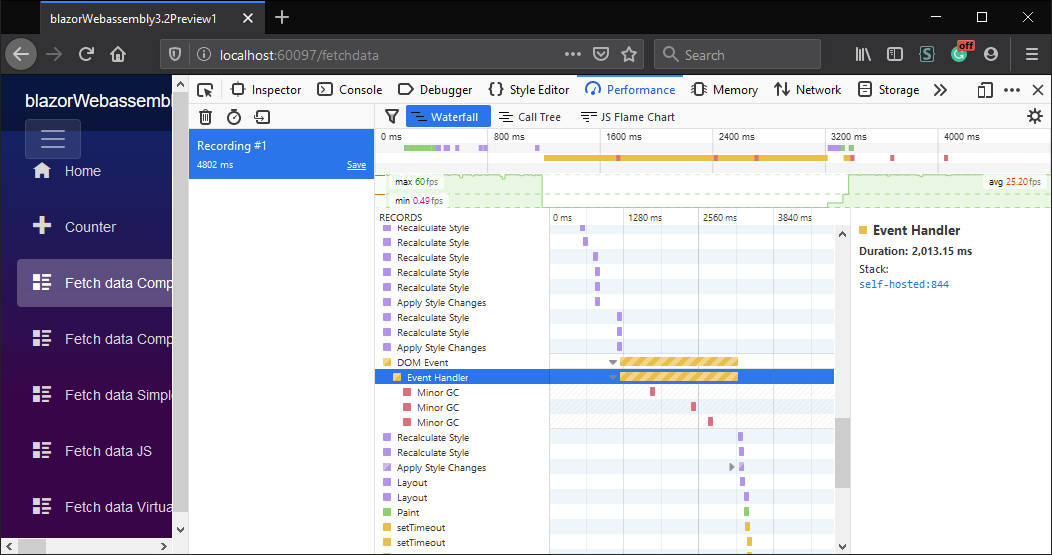
For my app, it's even worse:

The problem appears to be due to large diffs in the DOM, but I can only speculate.
Creating a reduced reproduction of my specific issue will be quite a chore. My application is not open source, so I'm not at liberty to demonstrate it publicly, but if you can provide me with a way to submit it privately, I can send it to you.
I'm currently assuming that if you are able to solve the issue already documented at https://github.com/dotnet/aspnetcore/issues/21085, it will also solve the issue I'm experiencing.
I added my prior comment here because, if the difference in performance between Blazor-Server and Blazor-WASM is expected, it would be nice to have that documented.
JinShil
on 14 May 2020
@JinShil @danroth27 , In addition of the dom problem, I also notice strong difference on "simple" c# algorythm. Like Jinshil i also rewrite a big app in blazor which reuse lot of old c# code and facing these performance issue.
One of the treatment of the app, made at the beginning of the app, take 14 seconds in my blazor app against 0.5 seconds in the original silverlight app.
I don't know exactly whate make this code its really obscure with a lot of reflection, but it work in production since years in the silverlight app.
For now im considering while aot compilation is not here, these bad performance are normal, @danroth27 is it or im not suppose observe such difference ?
 julienGrd
on 14 May 2020
julienGrd
on 14 May 2020
@danroth27 I sent you an e-mail with source code for both Blazor-Server and Blazor-WASM demonstrating the issue. I hope it helps. Sorry I can't demonstrate it publicly.
JinShil
on 15 May 2020
@JinShil Blazor WebAssembly does run the .NET code on an interpreter, so it doesn't benefit from the speed gains that would be seen on other .NET runtimes (e.g., with JIT compilation). We've always advised people that the target scenarios are building rich UIs, rather than doing any standalone CPU-intensive tasks. Longer term we do expect Blazor WebAssembly to be good for CPU-intensive workloads too when AoT support becomes available.
If you have situations where your actual UI rendering is causing perf issues, I'm very interested to know more about it. Generally we expect even really heavy UIs should run fast and smooth when using Blazor's APIs as intended. If you're able to factor out a minimal repro of some UI code that has a perf issue, I'd be happy to take a look. Please note that we can't investigate complete actual projects, only minimal repro projects.
 SteveSandersonMS
on 18 May 2020
SteveSandersonMS
on 18 May 2020
@JinShil Blazor WebAssembly does run the .NET code on an interpreter, so it doesn't benefit from the speed gains that would be seen on other .NET runtimes (e.g., with JIT compilation). We've always advised people that the target scenarios are building rich UIs, rather than doing any standalone CPU-intensive tasks. Longer term we do expect Blazor WebAssembly to be good for CPU-intensive workloads too when AoT support becomes available.
My application is not doing anything CPU-intensive. It is simply highlighting a cell in an 8x10 grid, though it is a somewhat-rich grid.
If you have situations where your actual UI rendering is causing perf issues, I'm very interested to know more about it. Generally we expect even really heavy UIs should run fast and smooth when using Blazor's APIs as intended. If you're able to factor out a minimal repro of some UI code that has a perf issue, I'd be happy to take a look. Please note that we can't investigate complete actual projects, only minimal repro projects.
I submitted a Blazor-Server and Blazor-WASM demonstration of the problem to @danroth27 via e-mail. Please have @danroth27 send it to you and let me know via e-mail if it's not helpful.
There are some changes I can make to the application (e.g. playing around with StateHasChanged() and ShouldRender()) to make it perform better in Blazor-WASM, but I don't need to do that for the Blazor-Server version to achieve acceptable performance.
JinShil
on 19 May 2020
Related issues
 madelson
·
3Comments
madelson
·
3Comments
 YeyoCoder
·
3Comments
YeyoCoder
·
3Comments
 Rick-Anderson
·
3Comments
Rick-Anderson
·
3Comments
 Mattacks
·
3Comments
Mattacks
·
3Comments
 neman
·
3Comments
neman
·
3Comments