Aspnetcore.docs: Blazor WebAssembly with Hosted AAD B2C problem
Hi,
I followed the instructions. When I test, I was able to login. However, I got conflicting results on the redirect:
1) LoginDisplay's @context.User.Identity.Name! I was able to get the correct value
2) @body I got the "There was an error trying to log you in: 'AADB2C90205: This application does not have sufficient permissions against this web resource to perform the operation."
If I click on fetchData, blazor crashes.
Anyone followed the instructions and got it working? There are many placeholders that we need to populate. I wonder if I did something wrong. Any feedback would be helpful. Thanks.
Document Details
⚠ Do not edit this section. It is required for docs.microsoft.com ➟ GitHub issue linking.
- ID: 7d682d4c-86b5-c47e-89a3-3684b2235320
- Version Independent ID: a80e115c-466a-288d-a918-9ef7514f5add
- Content: Secure an ASP.NET Core Blazor WebAssembly hosted app with Azure Active Directory B2C
- Content Source: aspnetcore/security/blazor/webassembly/hosted-with-azure-active-directory-b2c.md
- Product: aspnet-core
- Technology: aspnetcore-security
- GitHub Login: @guardrex
- Microsoft Alias: riande
 Alienroid
All 32 comments
Hello @Alienroid ... The docs in this node are brand new ... we only put them up last week when 3.2-Preview 2 came out, so it's not surprising that a few rough spots are going to be hit with them.
Things might be a little rough in preview. We had some trouble with scopes in the AAD version of the topic that I'll be investigating further this week. Here with AAD B2C, I just discovered something flaky: This app worked just fine here last week. This morning, I fired it up, and it broke (even after clearing site data in developer tools). I noticed a console error about pop-ups being blocked. I disabled the pop-up blocker in Firefox ... cleared cookies, logged the user in again, and now _the FetchData page works!_ It's difficult to document something with unexpected and strange behavior like that.
Try a couple of things ...
- If you're using VS, make sure that you've selected the Hosted project (
xxxxx.Server) when you select the VS Run button. Try it with each of the IIS Express profile and the app's profile (named after the app) in the Run button drop down. I usually use the app's profile and stick with the 5001 port for all of my testing instead of the randomly generated port for IIS Express (although that really should be ok if you want to test it that way). - Disable your browser's popup blocker like I just did. See if that helps (but switch it back if that change doesn't help ... and I'm going to investigate that a bit more here on Monday).
- Make sure that each time you fire the app back up (or make any changes on the Azure Portal side) that you log the user out and clear the cookies in the developer tools console. A lingering user cookie there can easily hose a changed config and give a false negative when you test a new setup.
- Confirm a given behavior in two browsers when something breaks. Again, make sure cookies are cleared before you try and log the user in ... _every single test_.
Client app: Confirm in the Azure Portal for the Client B2C app that you've permitted Access tokens and ID tokens with the correct callback (since I'm using the app's profile to run it, I'm going with port 5001 on that address
https://localhost:5001/authentication/login-callback). My API permissions looks like this ...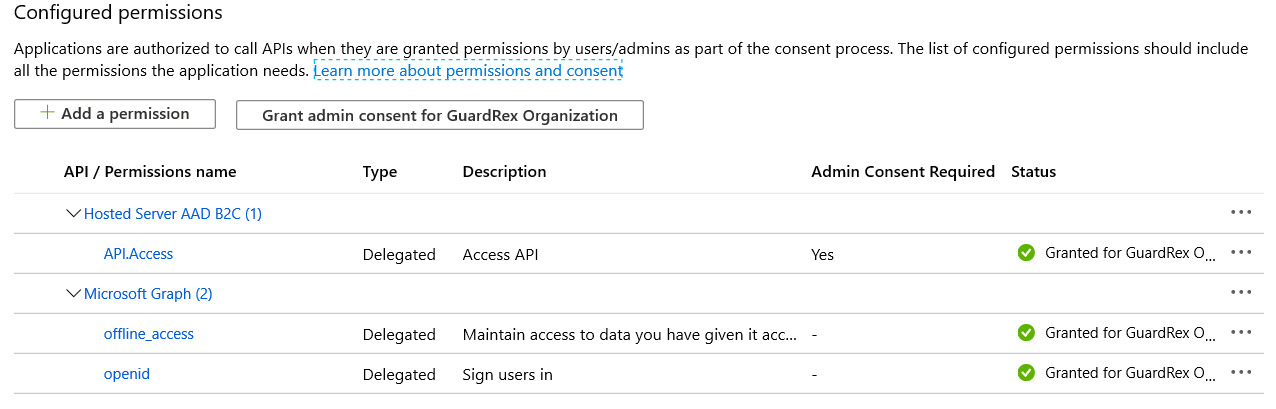
Server app: My Expose an API has the scope that's added to the client app's
DefaultAccessTokenScopes:https://XXXXXXXXX.onmicrosoft.com/CLIENT ID OF SERVER APP/API.Access
Let's also compare notes on settings. Here's what I have in my client ...
builder.Services.AddMsalAuthentication(options =>
{
    var authentication = options.ProviderOptions.Authentication;
    authentication.Authority = "https://XXXXXXXXX.b2clogin.com/XXXXXXXXX.onmicrosoft.com/B2C_1_signupsignin1";
    authentication.ClientId = "CLIENT ID OF CLIENT APP";
    authentication.ValidateAuthority = false;
    options.ProviderOptions.DefaultAccessTokenScopes.Add("https://XXXXXXXXX.onmicrosoft.com/CLIENT ID OF CLIENT APP/API.Access");
});
Here's what I have in the Server app settings ...
"AzureAdB2C": {
  "Instance": "https://XXXXXXXXX.b2clogin.com/",
  "ClientId": "CLIENT ID OF SERVER APP",
  "Domain": "XXXXXXXXX.onmicrosoft.com",
  "SignUpSignInPolicyId": "B2C_1_signupsignin1"
},
 guardrex
on 15 Mar 2020
guardrex
on 15 Mar 2020
Thanks Luke for getting back to me and with such detailed write up. I totally understand that this is only preview, I know this all to well. I'll try it out few more times and report findings here. Otherwise I'm just going to wait for future builds. Thanks again!
Get Outlook for iOShttps://aka.ms/o0ukef
From: Luke Latham notifications@github.com
Sent: Sunday, March 15, 2020 6:20:51 AM
To: dotnet/AspNetCore.Docs AspNetCore.Docs@noreply.github.com
Cc: Alienroid iam31337@hotmail.com; Mention mention@noreply.github.com
Subject: Re: [dotnet/AspNetCore.Docs] Anyone got this working? (#17319)
Hello @Alienroidhttps://github.com/Alienroid ... The docs in this node are brand new ... we only put them up last week when 3.2-Preview 2 came out, so it's not surprising that a few rough spots are going to be hit with them.
Things might be a little rough in preview. We had some trouble with scopes in the AAD version of the topic that I'll be investigating further this week. Here with AAD B2C, I just discovered something flaky: This app worked just fine here last week. This morning, I fired it up, and it broke (even after clearing site data in developer tools). I noticed a console error about pop-ups being blocked. I disabled the pop-up blocker in Firefox ... cleared cookies, logged the user in again, and now the FetchData page works! It's difficult to document something with unexpected and strange behavior like that.
Try a couple of things ...
- If you're using VS, make sure that you've selected the Hosted project (xxxxx.Server) when you select the VS Run button. Try it with each of the IIS Express profile and the app's profile (named after the app) in the Run button drop down. I usually use the app's profile and stick with the 5001 port for all of my testing instead of the randomly generated port for IIS Express (although that really should be ok if you want to test it that way).
- Disable your browser's popup blocker like I just did. See if that helps.
- Make sure that each time you fire the app back up (or make any changes on the Azure Portal side) that you log the user out and clear the cookies in the developer tools console. A lingering user cookie there can easily hose a changed config and give a false negative when you test a new setup.
- Confirm a given behavior in two browsers when something breaks. Again, make sure cookies are cleared before you try and log the user in ... every single test.
—
You are receiving this because you were mentioned.
Reply to this email directly, view it on GitHubhttps://github.com/dotnet/AspNetCore.Docs/issues/17319#issuecomment-599209648, or unsubscribehttps://github.com/notifications/unsubscribe-auth/AH3FBMWK7GPIWHYEYXD3NTTRHTI3HANCNFSM4LKKHMMQ.
Alienroid
on 15 Mar 2020
Update ... rather frustrating, but re-enabling the popup blocker in Firefox and testing again ... _the app works_ as it did the other day. At this point, we can only draw one logical conclusion as to why ... Yes! ...
👽
... they (you) are among us. :smile:
Seriously tho, I can't explain why it flaked out this morning.
I don't have anything actionable yet on your scenario/setup. I would like to investigate a related issue for the topic. You're making available the user data for the user, so the name populates, but the topic doesn't. I think I'd like to do that here. Even if you figure out your app's problem, leave this open. Also, I want to take a look at the instruction for running the app and make sure that the topic guides devs to run the app with the Server project selected in Solution Explorer.
guardrex
on 16 Mar 2020
Hi Luke,
Should I follow up here or in the newer thread you’ve created?
I just did everything again. With firefox, I could log in and log out properly. Clicking on FetchData will crash due to … I haven’t looked into that yet, but it’s on the client side (server controller never got called).
However, if I try with chrome, right after login, I’ll get the error:
There was an error trying to log you in: 'AADB2C90205: This application does not have sufficient permissions against this web resource to perform the operation. Correlation ID: 2e123fba-35d4-4203-9449-6126d1c1ca86 Timestamp: 2020-03-17 00:10:41Z ' Login failed, and top right still shows ‘login’
If I refresh the page (f5), top right now shows my display name from @context.User.Identity.Name!
Alien!
Sent from Mailhttps://go.microsoft.com/fwlink/?LinkId=550986 for Windows 10
From: Luke Lathamnotifications@github.com
Sent: Monday, March 16, 2020 10:13 AM
To: dotnet/AspNetCore.DocsAspNetCore.Docs@noreply.github.com
Cc: Alienroidiam31337@hotmail.com; Mentionmention@noreply.github.com
Subject: Re: [dotnet/AspNetCore.Docs] Blazor WebAssembly with Hosted AAD B2C problem (#17319)
Update ... rather frustrating, but re-enabling the popup blocker in Firefox and testing again ... the app works as it did the other day. At this point, we can only draw one logical conclusion as to why ... Yes! ...
👽
... they are among us. 😄
Seriously tho, I can't explain why it flaked out this morning.
I don't have anything actionable yet on your scenario/setup. I would like to investigate a related issue for the topic. You're making available the user data for the user, so the name populates, but the topic doesn't. I think I'd like to do that here. Even if you figure out your app's problem, leave this open. Also, I want to take a look at the instruction for running the app and make sure that the topic guides devs to run the app with the Server project selected in Solution Explorer.
—
You are receiving this because you were mentioned.
Reply to this email directly, view it on GitHubhttps://github.com/dotnet/AspNetCore.Docs/issues/17319#issuecomment-599658198, or unsubscribehttps://github.com/notifications/unsubscribe-auth/AH3FBMVXITAUO7CC5WG467TRHZM3NANCNFSM4LKKHMMQ.
Alienroid
on 17 Mar 2020
Let's discuss Hosted with AAD B2C here. I'll use the other issue to work through the Azure Portal and scope address aspects of the Hosted with AAD. If you saw that issue, it looks like we'll be chatting with an Azure 🐈 for help with that scenario.
Clicking on FetchData will crash due to …
When you get to that, I had good luck 🍀 with Postman. I had the FetchData component write out the exact token it was going to use to the console ...
if (tokenResult.TryGetToken(out var token))
{

    Console.WriteLine($"Bearer {token.Value}");

    httpClient.DefaultRequestHeaders.Add("Authorization", $"Bearer {token.Value}");
    forecasts = await httpClient.GetJsonAsync<WeatherForecast[]>("WeatherForecast");
}
else
{
    Navigation.NavigateTo(tokenResult.RedirectUrl);
}
Over in Postman, I set up the request to the https://localhost:5001/WeatherForecast/ with the Authorization header.
The server sends back a reason for the API call failure. I think that would have been piped thru to logging if I had turned up the output, but finding a line in a sea of lines 😵 is a PITA. It was easier to just fire up Postman and make a direct request to the backend (Server app) and see what comes back.
if I try with chrome, right after login
... and you're completely zapping the cookies each test, right? ... and you're starting the app from the Server project? ... and your config matches the structure of what I posted :point_up:?
I've been working mostly in Firefox and Edge. My Chrome ate itself the other day, so I uninstalled but didn't get around to reinstalling yet. I'll check Edge in the morning to see how that's going. I'll get Chrome back on here, and see how that goes. I'll report back what I find tomorrow ........... _IF_ I don't do a 1929 nose dive out the window after looking at the DOW futures in the morning. Fortunately, I live on the 1st floor, so I can't really hurt myself too badly!
guardrex
on 17 Mar 2020
I see discussions of that error, too, out there. For example wrt an Azure sample ...
https://github.com/Azure-Samples/active-directory-b2c-javascript-msal-singlepageapp/issues/4
guardrex
on 17 Mar 2020
I've gone through that thread before posted here. That thread seems old and not related. That said, I first gone through non-wasm case, blazor server side and seems to be working fine.
Get Outlook for iOShttps://aka.ms/o0ukef
From: Luke Latham notifications@github.com
Sent: Monday, March 16, 2020 6:09:13 PM
To: dotnet/AspNetCore.Docs AspNetCore.Docs@noreply.github.com
Cc: Alienroid iam31337@hotmail.com; Mention mention@noreply.github.com
Subject: Re: [dotnet/AspNetCore.Docs] Blazor WebAssembly with Hosted AAD B2C problem (#17319)
I see discussions of that error, too, out there. For example wrt an Azure sample ...
Azure-Samples/active-directory-b2c-javascript-msal-singlepageapp#4https://github.com/Azure-Samples/active-directory-b2c-javascript-msal-singlepageapp/issues/4
—
You are receiving this because you were mentioned.
Reply to this email directly, view it on GitHubhttps://github.com/dotnet/AspNetCore.Docs/issues/17319#issuecomment-599826956, or unsubscribehttps://github.com/notifications/unsubscribe-auth/AH3FBMQES22HPZ4QLFASVYLRH3ETTANCNFSM4LKKHMMQ.
Alienroid
on 17 Mar 2020
I wish there's private chat here. We can just chat about stock market or have some laughs. I got LinkedIn or fb if you want to connect jasonertw on Facebook. Futures is up tomorrow but I wouldn't buy anything now (except maybe uso)
I'll try postman later when I have time.
Get Outlook for iOShttps://aka.ms/o0ukef
From: Jason Chen iam31337@hotmail.com
Sent: Monday, March 16, 2020 6:40:03 PM
To: dotnet/AspNetCore.Docs reply@reply.github.com; dotnet/AspNetCore.Docs AspNetCore.Docs@noreply.github.com
Cc: Mention mention@noreply.github.com
Subject: Re: [dotnet/AspNetCore.Docs] Blazor WebAssembly with Hosted AAD B2C problem (#17319)
I've gone through that thread before posted here. That thread seems old and not related. That said, I first gone through non-wasm case, blazor server side and seems to be working fine.
Get Outlook for iOShttps://aka.ms/o0ukef
From: Luke Latham notifications@github.com
Sent: Monday, March 16, 2020 6:09:13 PM
To: dotnet/AspNetCore.Docs AspNetCore.Docs@noreply.github.com
Cc: Alienroid iam31337@hotmail.com; Mention mention@noreply.github.com
Subject: Re: [dotnet/AspNetCore.Docs] Blazor WebAssembly with Hosted AAD B2C problem (#17319)
I see discussions of that error, too, out there. For example wrt an Azure sample ...
Azure-Samples/active-directory-b2c-javascript-msal-singlepageapp#4https://github.com/Azure-Samples/active-directory-b2c-javascript-msal-singlepageapp/issues/4
—
You are receiving this because you were mentioned.
Reply to this email directly, view it on GitHubhttps://github.com/dotnet/AspNetCore.Docs/issues/17319#issuecomment-599826956, or unsubscribehttps://github.com/notifications/unsubscribe-auth/AH3FBMQES22HPZ4QLFASVYLRH3ETTANCNFSM4LKKHMMQ.
Alienroid
on 17 Mar 2020
Just to update where we stand here ...
https://github.com/dotnet/AspNetCore.Docs/pull/17333 – Makes sure that the Display Name comes back for B2C scenarios. It also calls out that the project should be run from the Server app in all of the topics in this node.
@Alienroid ... Did you figure out your issue with your app? I don't have anything else actionable here at this time for the AAD B2C scenario. If you're still having trouble, you might need to either consult with the community and/or the product unit until it's worked out. If there's a gotcha that the topic needs to call out, I can re-open this issue and work it after we know what's going wrong.
guardrex
on 22 Mar 2020
No update from my side. I’ll revisit in the future.
Sent from Mailhttps://go.microsoft.com/fwlink/?LinkId=550986 for Windows 10
From: Luke Lathamnotifications@github.com
Sent: Sunday, March 22, 2020 8:53 AM
To: dotnet/AspNetCore.DocsAspNetCore.Docs@noreply.github.com
Cc: Alienroidiam31337@hotmail.com; Mentionmention@noreply.github.com
Subject: Re: [dotnet/AspNetCore.Docs] Blazor WebAssembly with Hosted AAD B2C problem (#17319)
Just to update where we stand here ...
17333https://github.com/dotnet/AspNetCore.Docs/pull/17333 – Makes sure that the Display Name comes back for B2C scenarios. It also calls out that the project should be run from the Server app in all of the topics in this node.
@Alienroidhttps://github.com/Alienroid ... Did you figure out your issue with your app? I don't have anything else actionable here at this time for the AAD B2C scenario. If you're still having trouble, you might need to either consult with the community and/or the product unit until it's worked out. If there's a gotcha that the topic needs to call out, I can re-open this issue and work it.
—
You are receiving this because you were mentioned.
Reply to this email directly, view it on GitHubhttps://github.com/dotnet/AspNetCore.Docs/issues/17319#issuecomment-602230048, or unsubscribehttps://github.com/notifications/unsubscribe-auth/AH3FBMWTDAMAJYGOC6POGYLRIYYARANCNFSM4LKKHMMQ.
Alienroid
on 22 Mar 2020
Ok ... let's close for now.
guardrex
on 22 Mar 2020
Hi Luke,
Just to update (since I got some feedback from other forums just now). Someone mentioned they have to:
“configure the RoleClaim at AddMsalAuthentication to match whatever B2C returns as a role claim”
I haven’t tried that.
However, I looked at the code more closely. It seems when I click on FetchData, after tokenResult.TryGetToken(out var token), the token is null, which caused my fetchData page to crash. Then I looked at LoginDisplay to see how it was able to get my name. LoginDisplay gets the name parsing from @context.User.Identity.Name! Where ‘context’ is AuthenticationState.
I got to figure out why token is null. I am also interested in how context is populated… it’s like magic there.
Regarding why token is null, I still think my config is wrong. But if that’s the case, why would context be correct?
One other thing I observed, from the person who suggested to config RoleClaim, his AddMsalAuthentication looks like:
options.ProviderOptions.DefaultAccessTokenScopes.Add("https://{domain}.onmicrosoft.com/API.Access");
but the template generated for me looks like:
options.ProviderOptions.DefaultAccessTokenScopes.Add("https://{domain}.onmicrosoft.com/https:// {domain}.onmicrosoft.com/111111-1111-1111-1111-111111111/API.Access");
Did you happen to jump out your first floor window? I think we still got 15-20% to go before we can have real recovery.
Sent from Mailhttps://go.microsoft.com/fwlink/?LinkId=550986 for Windows 10
From: Luke Lathamnotifications@github.com
Sent: Sunday, March 22, 2020 9:21 AM
To: dotnet/AspNetCore.DocsAspNetCore.Docs@noreply.github.com
Cc: Alienroidiam31337@hotmail.com; Mentionmention@noreply.github.com
Subject: Re: [dotnet/AspNetCore.Docs] Blazor WebAssembly with Hosted AAD B2C problem (#17319)
Ok ... let's close for now.
—
You are receiving this because you were mentioned.
Reply to this email directly, view it on GitHubhttps://github.com/dotnet/AspNetCore.Docs/issues/17319#issuecomment-602234119, or unsubscribehttps://github.com/notifications/unsubscribe-auth/AH3FBMSFBAV6NYEVZ34QWZLRIY3G5ANCNFSM4LKKHMMQ.
Alienroid
on 22 Mar 2020
The scope is important for the API access. The client can log the user in; but if the scope is wrong, the FetchPage component won't get an access token, as you're witnessing.
options.ProviderOptions.DefaultAccessTokenScopes.Add("https://{domain}.onmicrosoft.com/https:// {domain}.onmicrosoft.com/111111-1111-1111-1111-111111111/API.Access");
That looks like it may have happened from not having the right values passed into the dotnet new command when the app was created. It should look like this ...
options.ProviderOptions.DefaultAccessTokenScopes
    .Add("https://{TENANT DOMAIN}/{SERVER API CLIENT ID}/{SCOPE}");
{TENANT DOMAIN}is something likeXXXXXXX.onmicrosoft.com... same entry as the server app's Domain entry in the appsettings.json file.{SERVER API CLIENT ID}is something like111111-1111-1111-1111-111111111... make sure it's the _server app_ client ID ... the same one in the server app's ClientId entry in the appsettings.json file.{SCOPE}(going by the example in the topic) isAPI.Access.
15-20% to go before we can have real recovery.
... I hope it's only that much. 🙈 The DOW futures just tanked (again). :cry:
guardrex
on 23 Mar 2020
Might be to much to ask, but is there some way I can share my dotnet new command with you?
Yeah tomorrow is gonna be another bad day. I also sold my bonds
Get Outlook for iOShttps://aka.ms/o0ukef
From: Luke Latham notifications@github.com
Sent: Sunday, March 22, 2020 4:28:22 PM
To: dotnet/AspNetCore.Docs AspNetCore.Docs@noreply.github.com
Cc: Alienroid iam31337@hotmail.com; Mention mention@noreply.github.com
Subject: Re: [dotnet/AspNetCore.Docs] Blazor WebAssembly with Hosted AAD B2C problem (#17319)
The scope is important for the API access. The client can log the user in; but if the scope is wrong, the FetchPage component won't get an access token, as you're witnessing.
options.ProviderOptions.DefaultAccessTokenScopes.Add("https://{domain}.onmicrosoft.com/https:// {domain}.onmicrosoft.com/111111-1111-1111-1111-111111111/API.Access");
That looks like it may have happened from not having the right values passed into the dotnet new command when the app was created. It should look like this ...
options.ProviderOptions.DefaultAccessTokenScopes
.Add("https://{TENANT DOMAIN}/{SERVER API CLIENT ID}/{SCOPE}");
- {TENANT DOMAIN} is something like XXXXXXX.onmicrosoft.com ... same entry as the server app's Domain entry in the appsettings.json file.
- {SERVER API CLIENT ID} is something like 111111-1111-1111-1111-111111111 ... make sure it's the server app client ID ... the same one in the server app's ClientId entry in the appsettings.json file.
- {SCOPE} (going by the example in the topic) is API.Access.
15-20% to go before we can have real recovery.
... I hope it's only that much. 🙈 The DOW futures just tanked (again). 😢
—
You are receiving this because you were mentioned.
Reply to this email directly, view it on GitHubhttps://github.com/dotnet/AspNetCore.Docs/issues/17319#issuecomment-602294127, or unsubscribehttps://github.com/notifications/unsubscribe-auth/AH3FBMSRSPIMHVJCMUEREJDRI2NJNANCNFSM4LKKHMMQ.
Alienroid
on 23 Mar 2020
I don't have a secure way to receive it. I have to follow my company's (and MS's) security policies when it comes to something like that.
It's the one in the topic ...
... which results in the config that I show at the bottom of my comment :point_right: https://github.com/dotnet/AspNetCore.Docs/issues/17319#issuecomment-599209648
It just sounds like it's only your scope that's off. I think if you work on the scope further, you'll probably be able to get it running. Just be sure to keep clearing those browser cookies between changes.
guardrex
on 23 Mar 2020
Hi Luke,
I got it to work. So here’s the weird part. I think I did the dotnet new properly. Appsettings.json is generated correctly. However, program.cs DefaultAccessTokenScopes is generated incorrectly.
Generated:
options.ProviderOptions.DefaultAccessTokenScopes.Add("https:// XXXXXX.onmicrosoft.com/https:// XXXXXX.onmicrosoft.com/11111111-1111-1111-1111-111111111111/API.Access");
Working solution (same as you mentioned):
options.ProviderOptions.DefaultAccessTokenScopes.Add("https://XXXXXX.onmicrosoft.com/11111111-1111-1111-1111-111111111111/API.Access");
It seems dotnet new used value from --app-id-uri instead of the value from --api-client-id
On a separate note, the doc had a minor error. It used "Instance": "https://login.microsoftonline.com/",
It should be “Instance”: “https://XXXXXX.b2clogin.com/”
Thanks again! Now I can think about using Azure AADB2C in the future. 😉
BTW, I think I found you on LinkedIn.
Jason
Sent from Mailhttps://go.microsoft.com/fwlink/?LinkId=550986 for Windows 10
From: Luke Lathamnotifications@github.com
Sent: Sunday, March 22, 2020 5:11 PM
To: dotnet/AspNetCore.DocsAspNetCore.Docs@noreply.github.com
Cc: Alienroidiam31337@hotmail.com; Mentionmention@noreply.github.com
Subject: Re: [dotnet/AspNetCore.Docs] Blazor WebAssembly with Hosted AAD B2C problem (#17319)
I don't have a secure way to receive it. I have to follow my company's (and MS's) security policies when it comes to something like that.
It's the one in the topic ...
... which results in the config that I show at the bottom of my comment 👉 #17319 (comment)https://github.com/dotnet/AspNetCore.Docs/issues/17319#issuecomment-599209648
It just sounds like it's only your scope that's off. I think if you work on the scope further, you'll probably be able to get it running. Just be sure to keep clearing those browser cookies between changes.
—
You are receiving this because you were mentioned.
Reply to this email directly, view it on GitHubhttps://github.com/dotnet/AspNetCore.Docs/issues/17319#issuecomment-602303309, or unsubscribehttps://github.com/notifications/unsubscribe-auth/AH3FBMWKHDSP7YBI6AF5GXLRI2SLRANCNFSM4LKKHMMQ.
Alienroid
on 23 Mar 2020
It seems dotnet new used value from --app-id-uri instead of the value from --api-client-id
That's right, but I think the Azure Portal defaults the value (the GUID part of it) to the server app's client id. Since the same GUID is used in the default case, I used the same GUID (the one with 1's in it) in the topic's instructions and mention the it "might default the value" phrase ...
- Server API app Application ID (Client ID) (for example,
11111111-1111-1111-1111-111111111111) - Server API app App ID URI (for example,
https://contoso.onmicrosoft.com/11111111-1111-1111-1111-111111111111, the Azure portal might default the value to the Client ID)
On a separate note, the doc had a minor error. It used "Instance": "https://login.microsoftonline.com/",
It should be “Instance”: “https://XXXXXX.b2clogin.com/”
Yes! ... it's probably another one of my classic cut-'n-paste errors. 🙈 The entry came from the _Hosted with AAD_ topic. I'll fix that right now. Thanks for letting me know.
guardrex
on 23 Mar 2020
Hi Luke,
I am not sure where to ask this. So Blazor WebAssembly with Hosted AAD B2C authentication is working. However, there’s no documentation or sample code on how to add an userflow.
The examples from blazor server side only configures in startup.cs and it gets configuration from AppSettings.json. That’s the same as Blazor WebAssembly with Hosted (on the server side). However, the client side, we only have program.cs that configures ‘authentication’ so we can use authentication/login in LoginDisplay. However, no idea how we can do that for other userflow. I am not sure if AAD B2C for Blazor WebAssembly is completed or just lack of documentation? Is there some way we can subscribe to the status of the project? Thanks.
Regards,
Jason
Sent from Mailhttps://go.microsoft.com/fwlink/?LinkId=550986 for Windows 10
From: Luke Lathamnotifications@github.com
Sent: Sunday, March 22, 2020 9:19 PM
To: dotnet/AspNetCore.DocsAspNetCore.Docs@noreply.github.com
Cc: Alienroidiam31337@hotmail.com; Mentionmention@noreply.github.com
Subject: Re: [dotnet/AspNetCore.Docs] Blazor WebAssembly with Hosted AAD B2C problem (#17319)
Closed #17319https://github.com/dotnet/AspNetCore.Docs/issues/17319 via #17408https://github.com/dotnet/AspNetCore.Docs/pull/17408.
—
You are receiving this because you were mentioned.
Reply to this email directly, view it on GitHubhttps://github.com/dotnet/AspNetCore.Docs/issues/17319#event-3153562185, or unsubscribehttps://github.com/notifications/unsubscribe-auth/AH3FBMV3UBMLSG4DBQ4WR7DRI3PMNANCNFSM4LKKHMMQ.
Alienroid
on 30 Mar 2020
So I have a similar issue that I can't seem to track down. In our B2C client's AD, we have two types of users. First there are those who are sourced via the Federated Azure Active Directory (which is our parent Azure AD that uses company credentials to validate any user). Then we have those who are sourced via the default Azure Active Active Directory on the B2C subscription.
For some reason, those who are users by virtue of the Federated Azure Active Directory cause a hard crash. It is happening at this line:
var tokenResult = await AuthenticationService.RequestAccessToken();
I am figuring that this has something to do with the scopes but I cannot seem to pinpoint what exactly and why that would only cause the issue for the non-federated AD users.
 adamasmar
on 9 Apr 2020
adamasmar
on 9 Apr 2020
@adamasmar ... open that for engineering at https://github.com/dotnet/aspnetcore/issues.
Please add a cc: @guardrex to the bottom of your issue there so that I can track the discussion. I'm working on these new topics almost daily. If it turns out to be something good that we can surface in the doc, I'll open a new issue for it.
guardrex
on 9 Apr 2020
Hi Luke, I got it to work. So here’s the weird part. I think I did the dotnet new properly. Appsettings.json is generated correctly. However, program.cs DefaultAccessTokenScopes is generated incorrectly. Generated: options.ProviderOptions.DefaultAccessTokenScopes.Add("https:// XXXXXX.onmicrosoft.com/https:// XXXXXX.onmicrosoft.com/11111111-1111-1111-1111-111111111111/API.Access"); Working solution (same as you mentioned): options.ProviderOptions.DefaultAccessTokenScopes.Add("https://XXXXXX.onmicrosoft.com/11111111-1111-1111-1111-111111111111/API.Access"); It seems dotnet new used value from --app-id-uri instead of the value from --api-client-id On a separate note, the doc had a minor error. It used "Instance": "https://login.microsoftonline.com/", It should be “Instance”: “https://XXXXXX.b2clogin.com/” Thanks again! Now I can think about using Azure AADB2C in the future. 😉 BTW, I think I found you on LinkedIn. Jason Sent from Mailhttps://go.microsoft.com/fwlink/?LinkId=550986 for Windows 10 From: Luke Lathamnotifications@github.com Sent: Sunday, March 22, 2020 5:11 PM To: dotnet/AspNetCore.DocsAspNetCore.Docs@noreply.github.com Cc: Alienroidiam31337@hotmail.com; Mentionmention@noreply.github.com Subject: Re: [dotnet/AspNetCore.Docs] Blazor WebAssembly with Hosted AAD B2C problem (#17319) I don't have a secure way to receive it. I have to follow my company's (and MS's) security policies when it comes to something like that. It's the one in the topic ... https://docs.microsoft.com/en-us/aspnet/core/security/blazor/webassembly/hosted-with-azure-active-directory-b2c?view=aspnetcore-3.1#create-the-app ... which results in the config that I show at the bottom of my comment 👉 #17319 (comment)<#17319 (comment)> It just sounds like it's only your scope that's off. I think if you work on the scope further, you'll probably be able to get it running. Just be sure to keep clearing those browser cookies between changes. — You are receiving this because you were mentioned. Reply to this email directly, view it on GitHub<#17319 (comment)>, or unsubscribehttps://github.com/notifications/unsubscribe-auth/AH3FBMWKHDSP7YBI6AF5GXLRI2SLRANCNFSM4LKKHMMQ.
I was getting the exact issue with error AADB2C90205 on 3.2.0-rc1.20223.4 and switched...
https://xxxxxx.onmicrosoft.com/https://xxxxxx.onmicrosoft.com/11111111-1111-1111-1111-111111111111/API.Access
TO
https://xxxxxx.onmicrosoft.com/11111111-1111-1111-1111-111111111111/API.Access
and it worked after the change. Looks like it's still generating incorrectly in Program.cs?
 bradsumner
on 4 May 2020
bradsumner
on 4 May 2020
This pattern ...
https://xxxxxx.onmicrosoft.com/https://xxxxxx.onmicrosoft.com/11111111-1111-1111-1111-111111111111/API.Access
... means that the options values weren't correct in the dotnet new command that generated the app.
I'm probably going to set up a table with example values in the topics soon that will make it easier to match what devs need to take from the Azure portal registration to the options for the command. That should happen fairly fast ... within a week or two.
The interesting thing about ...
https://xxxxxx.onmicrosoft.com/11111111-1111-1111-1111-111111111111/API.Access
is that it was failing earlier. They might have made some changes on the Azure side that make that scope work now. When I make my pass on these topics soon, I'll try that again and see if I get the same good result, then I'll update the topic for it.
guardrex
on 4 May 2020
I wrote a blog documenting this as a note: https://iheartms.azurewebsites.net/2020/03/23/troubleshoot-asp-net-core-blazor-webassembly-hosted-app-with-azure-active-directory-b2c/
But yes, I tried it on RC. If the command have --default-scope "demo.read", it generated
https://xxxxxx.onmicrosoft.com/https://xxxxxx.onmicrosoft.com/11111111-1111-1111-1111-111111111111/demo.readhttps://xxxxxx.onmicrosoft.com/https:/xxxxxx.onmicrosoft.com/11111111-1111-1111-1111-111111111111/demo.read
So, seems program.cs is still generating the wrong scope from:
dotnet new blazorwasm -au IndividualB2C --aad-b2c-instance "{AAD B2C INSTANCE}" --api-client-id "{SERVER API APP CLIENT ID}" --app-id-uri "{SERVER API APP ID URI}" --client-id "{CLIENT APP CLIENT ID}" --default-scope "{DEFAULT SCOPE}" --domain "{DOMAIN}" -ho -ssp "{SIGN UP OR SIGN IN POLICY}" --tenant-id "{TENANT ID}"
Sent from Mailhttps://go.microsoft.com/fwlink/?LinkId=550986 for Windows 10
From: Luke Lathamnotifications@github.com
Sent: Sunday, May 3, 2020 6:04 PM
To: dotnet/AspNetCore.DocsAspNetCore.Docs@noreply.github.com
Cc: Alienroidiam31337@hotmail.com; Mentionmention@noreply.github.com
Subject: Re: [dotnet/AspNetCore.Docs] Blazor WebAssembly with Hosted AAD B2C problem (#17319)
This pattern ...
https://xxxxxx.onmicrosoft.com/https://xxxxxx.onmicrosoft.com/11111111-1111-1111-1111-111111111111/API.Accesshttps://xxxxxx.onmicrosoft.com/https:/xxxxxx.onmicrosoft.com/11111111-1111-1111-1111-111111111111/API.Access
... means that the options values weren't correct in the dotnet new command that generated the app.
I'm probably going to set up a table with example values in the topics soon that will make it easier to match what devs need to take from the Azure portal registration to the options for the command. That should happen fairly fast ... within a week or two.
The interesting thing about ...
https://xxxxxx.onmicrosoft.com/11111111-1111-1111-1111-111111111111/API.Access
is that it was failing earlier. They might have made some changes on the Azure side that make that scope work now. When I make my pass on these topics soon, I'll try that again and see if I get the same good result, then I'll update the topic for it.
—
You are receiving this because you were mentioned.
Reply to this email directly, view it on GitHubhttps://github.com/dotnet/AspNetCore.Docs/issues/17319#issuecomment-623216064, or unsubscribehttps://github.com/notifications/unsubscribe-auth/AH3FBMTSLLXVR6MRKVAMFNTRPYIBRANCNFSM4LKKHMMQ.
Alienroid
on 4 May 2020
@guardrex there's a lot going on in the new command and I get that blazor has been a moving target and Azure B2C is new. Here's my command if it helps...
dotnet new blazorwasm -au IndividualB2C --aad-b2c-instance "https://xxxxxx.b2clogin.com/" --api-client-id "{server guid}" --app-id-uri "https://xxxxxx.onmicrosoft.com/{server guid}" --client-id "{client guid}" --default-scope "API.Access" --domain "xxxxxx.onmicrosoft.com" -ho -ssp "B2C_1_signupsignin" --tenant-id "{tenant guid}"
And thanks @Alienroid for the blog and comments!
bradsumner
on 4 May 2020
I think it might be nice to just have everyone go with ...
dotnet new blazorwasm -au IndividualB2C -ho
... and then change the default values that the template provides.
The command for this experience is 😵.
guardrex
on 4 May 2020
I totally agree with this. The cmd is way too long and confusing 😊
Sent from Mailhttps://go.microsoft.com/fwlink/?LinkId=550986 for Windows 10
From: Luke Latham notifications@github.com
Sent: Sunday, May 3, 2020 6:53:03 PM
To: dotnet/AspNetCore.Docs AspNetCore.Docs@noreply.github.com
Cc: Alienroid iam31337@hotmail.com; Mention mention@noreply.github.com
Subject: Re: [dotnet/AspNetCore.Docs] Blazor WebAssembly with Hosted AAD B2C problem (#17319)
I think it might be nice to just have everyone go with ...
dotnet new blazorwasm -au IndividualB2C -ho
... and then change the default values that the template puts into the framework.
The command for this experience is 😵.
—
You are receiving this because you were mentioned.
Reply to this email directly, view it on GitHubhttps://github.com/dotnet/AspNetCore.Docs/issues/17319#issuecomment-623225060, or unsubscribehttps://github.com/notifications/unsubscribe-auth/AH3FBMSVKQDWE2CVCEVZ7M3RPYNX7ANCNFSM4LKKHMMQ.
Alienroid
on 4 May 2020
I have a similar problem: I can login to AAD B2C with the client and LoginDisplay is correct. But accessing fetchdata on the local server during development leads to a token invalid for this URI error.
During development my API is hosted on my local machine and not in Azure, how must this be configured to accept the token locally?
www-authenticate: Bearer error="invalid_token" or am I missing anything in the Azure config?
 ahlurien
on 24 May 2020
ahlurien
on 24 May 2020
For anyone facing the above problem: solution is to add a call to
services.Configure<JwtBearerOptions>(AzureADB2CDefaults.JwtBearerAuthenticationScheme, options =>
                    {
                        options.Audience = "your Azure AP ID";
                    });
to ConfigureServices
ahlurien
on 24 May 2020
@ahlurien On the service side?
 ossentoo
on 12 Jun 2020
ossentoo
on 12 Jun 2020
Like @ahlurien I had to confiure the audience in my server app to "api://{server app id}/API.Access" to make it work.
I am using AAD and I followed the doc https://docs.microsoft.com/fr-fr/aspnet/core/blazor/security/webassembly/hosted-with-azure-active-directory?view=aspnetcore-3.1
 vtherry
on 7 Jul 2020
vtherry
on 7 Jul 2020
For me it generated the the DefaultAccessTokenScropeWrong. This was what I had there:
`options.ProviderOptions.DefaultAccessTokenScopes.Add("https://applysolutionsb2c.onmicrosoft.com/https://applysolutionsb2c.onmicrosoft.com/[ID]/[API Name]");`
Correct would have been:
options.ProviderOptions.DefaultAccessTokenScopes.Add("https://applysolutionsb2c.onmicrosoft.com/api://[ID]/[API Name]");
The documentation says you have to enter:api://41451fa7-82d9-4673-8fa5-69eff5a761fd
I think if you leave await the "api://" and add the Scope Name at the end it would work correctly from the get go.
 NPadrutt
on 10 Oct 2020
NPadrutt
on 10 Oct 2020
I have more info on that ...
The doubling of the App ID URI is a known (but unresolved error). It's called out in the docs.
The App ID URI is in the api:// format IF your Azure tenant has a verified publisher domain.
The App ID URI is in the https:// format IF your Azure tenant has an unverified publisher domain.
If you have an https:// App ID URI, then under 3.x, you probably will need to remove the scheme. Under 5.x preview, you should be able to keep the scheme but the server API app will probably need an Authority entry in it's app settings file that matches the App ID URI.
These updates are in the 5.0 preview docs now; so if you flip the doc version selector over to 5.0 preview, you'll see the latest content. The latest guidance tho just went in over the last 72 hours or so and is _subject to change without notice_ as we work the bugs out of the docs.
guardrex
on 10 Oct 2020
Related issues
 Rick-Anderson
·
3Comments
Rick-Anderson
·
3Comments
 wgutierrezr
·
3Comments
wgutierrezr
·
3Comments
 aaron-bozit
·
3Comments
aaron-bozit
·
3Comments
 Raghumu
·
3Comments
Raghumu
·
3Comments
 davisnw
·
3Comments
davisnw
·
3Comments