Aspnetcore.docs: Enhance _Host.cshtml coverage
It's not clear to me how one can use plugins like AddMe or Disqus with Blazor pages. Note that with regard to "Inside the <head> element of wwwroot/index.html, provide a function that uses TextDecoder to decode a passed array", with the recent version of Blazor and .net core 3 which I downloaded 3 days ago, there isn't an index.html in wwwroot. Instead, one seems to need to put any javascript that one wants to call into _Host.cshtml, so perhaps the documentation needs to be updated? I've tried to put javascript code there for Disqus and then call it in OnAfterRender in a Razor page, but without managing to get it to run without errors so far. So any suggestions would be welcome!
Document Details
⚠ Do not edit this section. It is required for docs.microsoft.com ➟ GitHub issue linking.
- ID: 49807900-0d56-e23c-1aef-d79099caeffb
- Version Independent ID: feff434f-912c-0985-d575-4a23a629057d
- Content: Blazor JavaScript interop
- Content Source: aspnetcore/blazor/javascript-interop.md
- Product: aspnet-core
- Technology: aspnetcore-blazor
- GitHub Login: @guardrex
- Microsoft Alias: riande
 patrickjlee
All 5 comments
WRT placing the JavaScript into _Host.cshtml, Yes! that's correct for Blazor server-side. The references to wwwroot/index.html are for Blazor client-side. I'll update that.
Also, _Host.cshtml is weakly covered in the Hosting models topic, so I'll add a bit there. There might be a couple of other client-side only references, so I'll also sweep the entire Blazor doc set to see if anything else requires an update.
WRT AddMe/Disqus: I have Disqus running (or mostly running ... didn't fully test it). Here's the approach that I took ...
In _Host.cshtml, I added the following to the <head>, where "XXXXXX" is the Disqus site name ...
<script>
  var disqus_config = function () {
    this.page.url = '/';
    this.page.identifier = '/';
  };

  (function () {
    var d = document, s = d.createElement('script');
    s.src = 'https://XXXXXX.disqus.com/embed.js';
    s.setAttribute('data-timestamp', +new Date());
    (d.head || d.body).appendChild(s);
  })();

  window.reloadDisqus = (elementRef, path) => {
    if (elementRef.childNodes.length === 0) {
      DISQUS.reset({
        reload: true,
        config: function () {
          this.page.identifier = path;
          this.page.url = 'https://localhost:5001' + path;
        }
      }
    });
  }
</script>
Inside the closing <body> tag ...
<script id="dsq-count-scr" src="//XXXXXX.disqus.com/count.js" async></script>
In my app's Counter component, I added the <div> and a call to the reloadDisqus FN ...
@page "/counter"
@using Microsoft.JSInterop
@inject IComponentContext ComponentContext
@inject IJSRuntime JSRuntime

<h1>Counter</h1>

<p>Current count: @currentCount</p>

<button class="btn btn-primary" onclick="@IncrementCount">Click me</button>

<h1>Link to /FetchData with count</h1>

<a href="https://localhost:5001/fetchdata#disqus_thread">Link</a>.

<h1>Disqus</h1>

<div id="disqus_thread" ref="disqus_thread"></div>
<noscript>Please enable JavaScript to view the <a href="https://disqus.com/?ref_noscript">comments powered by Disqus.</a></noscript>

@functions {
    ElementRef disqus_thread;
    int currentCount = 0;

    void IncrementCount()
    {
        currentCount++;
    }

    protected override void OnAfterRender()
    {
        JSRuntime.InvokeAsync<object>("reloadDisqus", disqus_thread, "/Counter");
    }
}
Seems to work ...
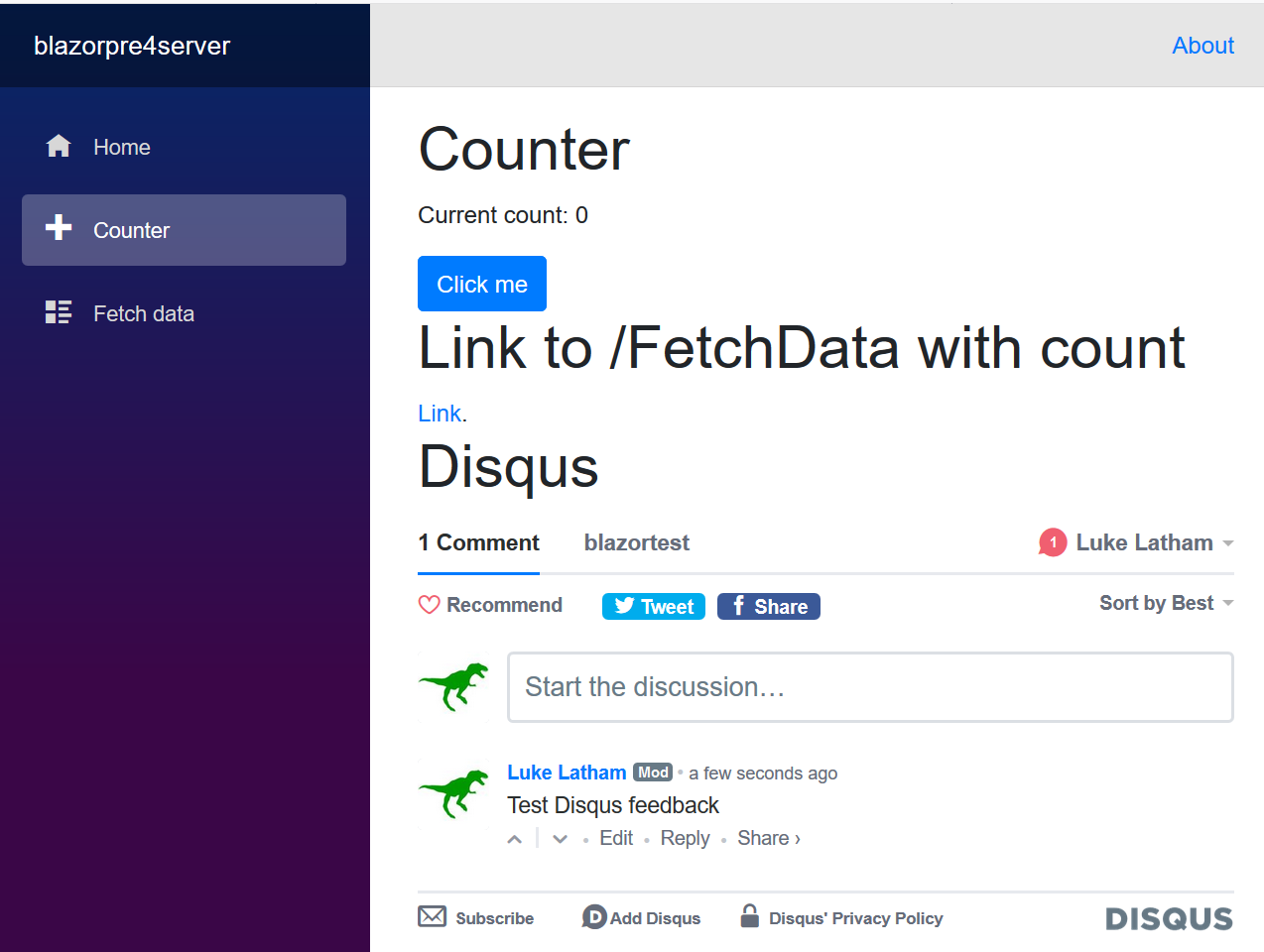

I don't see that link counter working on that FetchData component link ... that may require more work.
In browser dev tools console, I see ...
- On revisits to the Counter component: Request to access cookie or storage on “https://disqusads.com/enable-logging” was blocked because it came from a tracker and content blocking is enabled.
- On first load (or browser page reloads): TypeError: a is null
Those require more research, but it seems like the basic Disqus features are working. Give that set up a shot and see how it goes. If you resolve those last two, please add a note here (even after the issue is closed later when the PR merges) because either others may find and use this issue or we may end up covering this as an example in the docs.
Don't close this issue. I'm going to use it to track the updates for _Host.cshtml_.
 guardrex
on 28 Apr 2019
guardrex
on 28 Apr 2019
Many thanks Luke. @Request.Path is "/" for me, whereas what I think is needed (to make it unique to the view) is "counter" in this case.
The following works for me in _Host.cshtml instead:
```
window.reloadDisqus3 = (path) => {
DISQUS.reset({
reload: true,
config: function () {
this.page.identifier = path; //'@Request.Path';
this.page.url = 'https://pjlee.net/' + path; // '@Request.Path';
alert("identifier was: " + this.page.identifier + " and url was : " + this.page.url);
}
});
}
and in OnAfterRender() in Counter.razor:
string path = "counter";
JSRuntime.InvokeAsync
```
patrickjlee
on 28 Apr 2019
Yes, I see what you mean. The way I had it, it only works when the page (Counter) is loaded (or reloaded in the browser). Very good. :+1: I'll update the code in my earlier post to match.
guardrex
on 28 Apr 2019
Nasty side-effect of what we've done thus far: A rerendering of the component via another event (e.g., the Click me counter increment button) reloads the Disqus. The following works ...
<div id="disqus_thread" ref="disqus_thread"></div>
protected override void OnAfterRender()
{
    JSRuntime.InvokeAsync<object>("reloadDisqus", disqus_thread, "/Counter");
}
window.reloadDisqus = (elementRef, path) => {
  if (elementRef.childNodes.length === 0) {
    DISQUS.reset({
        reload: true,
        config: function () {
        this.page.identifier = path;
        this.page.url = 'https://localhost:5001' + path;
        }
    });
  }
}
[EDIT] I went ahead an updated my earlier post because something like this is virtually required for this to work properly.
@patrickjlee How did you resolve it?
guardrex
on 30 Apr 2019
Thanks, that's very neat! I must admit that I stopped looking into Blazer for a while after finding problems in getting bootstrap 4 styling to work with the project, and a few other things (see https://pjlee.net/blog/an-experiment-setting-up-a-blazor-website-with-telerik-ui-components-a-blog-via-buttercms-and-commen#problems). But I do want to keep an eye on Blazor, because I really like what you and the rest of the team are doing! 👍
patrickjlee
on 1 May 2019
Related issues
 nenmyx
·
3Comments
nenmyx
·
3Comments
 wgutierrezr
·
3Comments
wgutierrezr
·
3Comments
 royshouvik
·
3Comments
royshouvik
·
3Comments
 AnthonyMastrean
·
3Comments
AnthonyMastrean
·
3Comments
 Rick-Anderson
·
3Comments
Rick-Anderson
·
3Comments
Most helpful comment
Yes, I see what you mean. The way I had it, it only works when the page (Counter) is loaded (or reloaded in the browser). Very good. :+1: I'll update the code in my earlier post to match.