Aspnetcore.docs: Unknown bug whereby following the tutorial does not yield expected results
Hi. Following the tutorial exactly, I have encountered an issue whereby the options is getting back null values for both the SendGridUser and SendGridKey. Not too sure if it is a bug or some other configuration issue
public EmailSender(IOptions<AuthMessageSenderOptions> optionsAccessor)
{
      Options = optionsAccessor.Value;
}
Document Details
⚠ Do not edit this section. It is required for docs.microsoft.com ➟ GitHub issue linking.
- ID: fe1bea60-d173-f6d2-3559-b147699e295a
- Version Independent ID: 98e7aacb-2a01-d581-9b03-bfef2893163e
- Content: Account confirmation and password recovery in ASP.NET Core
- Content Source: aspnetcore/security/authentication/accconfirm.md
- Product: aspnet-core
- GitHub Login: @Rick-Anderson
- Microsoft Alias: riande
 Kool-Koder
All 17 comments
Following the tutorial exactly
It should work after you store them with the Secret Manager tool. You're running the app in the Development environment, correct? ... Secrets only work in Development, not Staging/Production/etc., and that sometimes comes up with some of the topics where the Secret Manager tool is used.
If you are in Development and the Secret Manager tool reported that the secrets are successfully saved, let me know, and I'll try to repro it here.
 guardrex
on 24 Dec 2018
guardrex
on 24 Dec 2018
btw -- You should be able to hunt them down on your system if you want. They should be stored at ...
%APPDATA%\Microsoft\UserSecrets\<user_secrets_id>\secrets.json
... it would at least confirm that the Secret Manger tool did it's thing.
guardrex
on 24 Dec 2018
Yes it is in development
Kool-Koder
on 24 Dec 2018
%APPDATA%\Microsoft\UserSecrets\
\secrets.json
I can't find it at this path, but by right clicking the project then looking at secrets.json it did show the value pair. Something like that
{
  "SendGridUser": "API Key ID",
  "SendGridKey": "Key"
}
Ok ... I'll try here and see how it goes. I'll get back to you shortly.
I can't find it at this path
Hummm 🤔 I wonder if engineering moved the cheese on that at some point. I'll check that, too.
guardrex
on 24 Dec 2018
Haha ok sure. Just an update I played around with SendGrid's own example on Github and I could send out a dummy email from them. https://github.com/sendgrid/sendgrid-csharp
Have to work with integrating the codes with the link to confirm the email if I decide to adopt theirs though. Also they store it as an environment variable on the machine itself which is slightly different from what is being done here. Looking forward to hearing updates from you!
Kool-Koder
on 24 Dec 2018
Yes ... For production, environment variables is a common approach. The Azure Key Vault Configuration Provider is also used.
guardrex
on 24 Dec 2018
I see. Hopefully the tutorial works! :)
Kool-Koder
on 24 Dec 2018
Thus far, the Secret Manager tool works and the secrets are in the folder indicated by the topic ...

... with file contents ...
{
  "SendGridUser": "guardrexSG",
  "SendGridKey": "guardrexSG_key"
}
No probs here ... It ✨ _Just Works_:tm: ✨ ...

However, I did cut a corner to save time. I just used the sample app that's provided in the repo at ...
- I stored the two secrets.
I ran a migration for the dB setup:
dotnet ef migrations add InitialCreate dotnet ef database update- Compiled and ran the app.
... so I didn't actually go step-by-step doing everything in the topic. However, I don't see why those steps would fail and not populate the Options there in the ctor when the app is run.
guardrex
on 24 Dec 2018
Oh ok I didn't go into roaming folder to check just now. Let me get back to you tomorrow as I don't have access to my computer for the next few hours. Thank you and Merry Christmas! :)
Kool-Koder
on 24 Dec 2018
Hi. I have checked the file indeed exists at that directory. However, I tried it again and checked but it's still null and the email doesn't get sent.
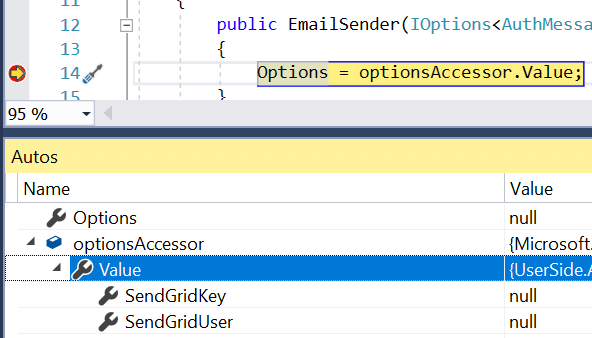
Kool-Koder
on 25 Dec 2018
the file indeed exists at that directory
I assume you opened the file and confirmed that the secrets are in the file?
I'm about out of ideas ... if the app ...
- Has the secrets in the secrets.json file with the correct key names.
- Calls
CreateDefaultBuilder(thusAddUserSecrets). - Is run in the Development environment.
... it should work.
You could try pulling down the sample app from the repo and using that. That's what I did.
To get that sample, fork the repo ... clone locally ... and navigate to aspnetcore/security/authentication/accconfirm/sample/WebPWrecover21 for the sample app. We don't have a way to download a single sample yet ... they're putting together something that will make that happen. For now, you have to fork+clone the whole repo.
Otherwise, you'll need to put your current app up in a GH repo that I can pull down and run here.
guardrex
on 25 Dec 2018
I followed the tutorial. May I know where is the code for point 2, which calls the create default builder? Sure I will try to clone test and get back to you again. Worst case scenario I will create a github repo
Kool-Koder
on 25 Dec 2018
It's in the Program class (Program.cs file)...
public static IWebHostBuilder CreateWebHostBuilder(string[] args) =>
    WebHost.CreateDefaultBuilder(args)
        .UseStartup<Startup>();
CreateDefaultBuilder adds User Secrets ...
https://github.com/aspnet/AspNetCore/blob/master/src/DefaultBuilder/src/WebHost.cs#L173
The Program class/Program.cs file is provided in the template, which the tutorial uses. Therefore, I doubt that there's anything wrong with that aspect of the setup.
guardrex
on 25 Dec 2018
Hi apologies for the late reply. I have tested that the tutorial is indeed working perfectly fine. Have also narrowed down the issue by comparing both project side by side, and due to accidental commenting out in the StartUp.cs file as detailed below. So, I don't think there is a problem regarding this actually. I have also opened up an issue with unclear documentation (#10099) which I managed to clear after researching myself. I think all is fine now and the email is sent out. Thank you very much for your help! :)
public Startup(IConfiguration configuration)
{
      Configuration = configuration;
}
Sure thing ... I'm glad it had a happy ending! I'll close now as resolved.
guardrex
on 25 Dec 2018
Related issues
 Rick-Anderson
·
3Comments
Rick-Anderson
·
3Comments
 nenmyx
·
3Comments
nenmyx
·
3Comments
 madelson
·
3Comments
Rick-Anderson
·
3Comments
madelson
·
3Comments
Rick-Anderson
·
3Comments
 Mattacks
·
3Comments
Mattacks
·
3Comments