Aspnetcore.docs: Reorganize configuration in the Windows Service sample
I was able to get this working just fine with a website in .NET Core like detailed here.
I also have a Windows Service I am creating that is set up like what this document provides:
https://docs.microsoft.com/en-us/aspnet/core/host-and-deploy/windows-service?view=aspnetcore-2.1
I have the exact same code added in my Windows Service as my website - the website pulls in the secret successfully, the windows service connects but brings back a null value on the secret.
I have the AzureKeyVault package referenced in the project. I have the Vault, ClientId, ClientSecret stored in the appsettings.json file. I have added the bit of code for ConfigureAppConfiguration in my program.cs file.
Document Details
⚠ Do not edit this section. It is required for docs.microsoft.com ➟ GitHub issue linking.
- ID: 2cc0b77a-df21-7007-5cec-4399d98c6dc6
- Version Independent ID: efe5ae5e-ff64-f1c7-6920-4512fc8f36d1
- Content: Azure Key Vault configuration provider in ASP.NET Core
- Content Source: aspnetcore/security/key-vault-configuration.md
- Product: aspnet-core
- GitHub Login: @guardrex
- Microsoft Alias: riande
 Eldorian
All 13 comments
Hello @Eldorian ... In theory, you're correct ...... it should work. I have a test WS app here, so I can run the same set up that you did. I'll give it a shot and report back.
 guardrex
on 16 Aug 2018
guardrex
on 16 Aug 2018
@Eldorian I didn't run into any issues using the sample approach from the AKV topic with a Web Host-based Windows Service ...
I can only guess that you have some kind of improper configuration that's preventing it from working, so you'll have to double-check your setup to see if you can figure out why it's not working.
You could try putting up a repro project on GH and then asking devs at Stack Overflow to take a look. Perhaps, someone will spot something amiss.
If you find out what the problem is and it's something the doc should address, please post back here.
guardrex
on 17 Aug 2018
@guardrex Thanks for the verification. Tells me there is at least a light at the end of this tunnel.
Eldorian
on 17 Aug 2018
Yes, it's probably just one little thing holding it up.
Hang in there! I'm pull'in for ya!
guardrex
on 17 Aug 2018
@guardrex I think the problem I'm having is the CreaateWebHostBuilder adds the provider to Azure Key Vault, but then it goes into my Startup class and I think this code overwrites what I just attached to the builder?
public Startup(IHostingEnvironment env)
        {
            var builder = new ConfigurationBuilder()
                .SetBasePath(env.ContentRootPath)
                .AddJsonFile("appsettings.json", optional: false, reloadOnChange: true)
                .AddJsonFile($"appsettings.{env.EnvironmentName}.json", optional: true)
                .AddEnvironmentVariables();
            Configuration = builder.Build();
        }
Does the Windows Service you just tested look the same? Because after this runs I only see 3 providers attached and not 6 and Azure Key Vault is no longer there.
Eldorian
on 17 Aug 2018
I used the Web Host example from the topic and just added the AddAzureKeyVault to that Startup config ...
public Startup(IHostingEnvironment env)
{
    var builder = new ConfigurationBuilder()
        .SetBasePath(env.ContentRootPath)
        .AddJsonFile("appsettings.json", optional: false, reloadOnChange: true)
        .AddJsonFile($"appsettings.{env.EnvironmentName}.json", optional: true)
        .AddEnvironmentVariables()
        .AddAzureKeyVault(
            $"https://<VAULT>.vault.azure.net/",
            "<CLIENT_ID>",
            "<CLIENT_SECRET>");
    Configuration = builder.Build();
}
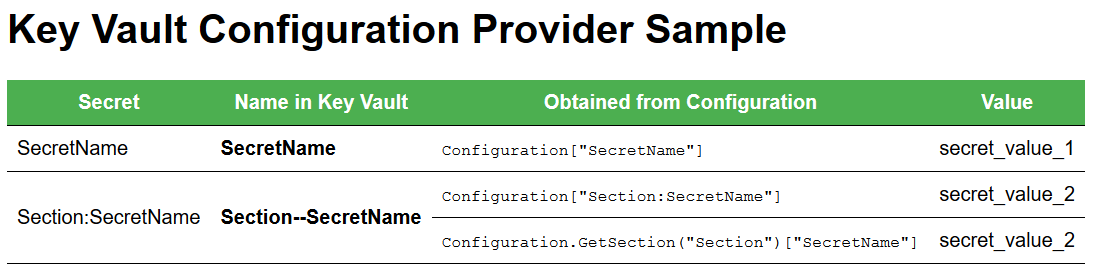
... and then I just created a little middleware branch point down there so that I could hit up the markup with an /akv request on the service's URL ...
app.Map("/akv", builder =>
{
    builder.Run(async context =>
    {
        var encoding = new UTF8Encoding(encoderShouldEmitUTF8Identifier: false);
        var document = string.Format(Markup.Text, Configuration["SecretName"], Configuration["Section:SecretName"], Configuration.GetSection("Section")["SecretName"]);
        context.Response.ContentLength = encoding.GetByteCount(document);
        context.Response.ContentType = "text/html";
        await context.Response.WriteAsync(document);
    });
});
You're correct that config prior to this will be overwritten. It wouldn't have to be that way tho ... you could retain the configuration in your ConfigureAppConfiguration with these config from Startup moved into there. In fact, that's the preferred approach these days ... the preferred approach is not to set up config in Startup like this. I think on the next sweep of the Windows Service topic that we'll be updating the way this is structured.
guardrex
on 17 Aug 2018
Yeah, I don't care for the way it's set up. The problem you're facing now is a concern. The settings files are being re-read into configuration after CreateDefaultBuilder has already read them.
I'm going to do some work on this now and see if I can clean this up.
guardrex
on 17 Aug 2018
Yeah ... this will work out better ...
In Program ...
var host = WebHost.CreateDefaultBuilder(args)
    .ConfigureAppConfiguration((context, config) =>
    {
        config.AddAzureKeyVault(
            $"https://<VAULT>.vault.azure.net/",
            "<CLIENT_ID>",
            "<CLIENT_SECRET>");
    })
... and then over in Startup just ...
public class Startup
{
    public Startup(IConfiguration config)
    {
        Configuration = config;
    }

    public IConfiguration Configuration { get; }
... that's more in line with the 2.1-way of doing things.
I'll put a PR in now to update the topic+sample.
guardrex
on 17 Aug 2018
Yep, that worked for me!
I had found out that it was getting the secret if I had put it in a class somewhere after startup. The problem was because I was trying to access the secret in ConfigureServices at Startup where I was setting up my HttpClient with a header that needed it for an API Key that I was pulling from key vault.
This code is much cleaner, too. I had just assumed that a windows service needed to run a bit differently and thus why the Configuration was done differently between a website and a service...
Eldorian
on 17 Aug 2018
This approach should work if you need config in ConfigureServices ...
public class Startup
{
    private readonly IConfiguration _config;

    public Startup(IConfiguration config)
    {
        _config = config;
    }

    public void ConfigureServices(IServiceCollection services)
    {
        var value = _config["key"];
    }
}
Configuration created in ConfigureAppConfiguration should be be built by the time Startup is created.
[EDIT] ... and since I perfer the field to the property approach, I shot a commit over to that PR to make it match this _config field-based approach.
guardrex
on 17 Aug 2018
Yep, everything is working now where I expected it to.
Eldorian
on 17 Aug 2018
Cool ... thanks for working thru it. It's a good update for the topic+sample.
Future generations will thank us! :smile:
guardrex
on 17 Aug 2018
Or future me when I come back to this topic because I forgot how I did it before.
Thanks for the help on getting everything straightened out and coming up with a better solution.
Eldorian
on 17 Aug 2018
Related issues
 Mattacks
·
3Comments
Mattacks
·
3Comments
 cocowalla
·
3Comments
cocowalla
·
3Comments
 wgutierrezr
·
3Comments
wgutierrezr
·
3Comments
 madelson
·
3Comments
madelson
·
3Comments
 aaron-bozit
·
3Comments
aaron-bozit
·
3Comments
Most helpful comment
Or future me when I come back to this topic because I forgot how I did it before.
Thanks for the help on getting everything straightened out and coming up with a better solution.