Aspnetcore.docs: Update the migration docs to point out that when upgrading to 2.1 your urls will change
https://docs.microsoft.com/en-us/aspnet/core/migration/20_21?view=aspnetcore-2.1#changes-to-authentication-code.
See related #6739
See https://github.com/aspnet/Identity/issues/1815
Proposed changes:
The default UI doesn't currently provide significant new features. Replacing Identity with the RCL package is optional. The advantages to replacing the template generated Identity code with the RCL version include:
- Many files are moved out of your source tree.
- Any bug fixes or new features to Identity come with the M.A.App package. You automatically get the updated Identity when M.A.App is updated.
If you've made non-trivial changes to the template generated Identity code, the preceding advantages may not justify converting to the the RCL version.
Rather than run the scaffolder, the following approach seems simpler/safer/easier to debug:
The following instructions are for a Razor Pages project. The instructions for MVC projects is similar.
- Delete Controllers\AccountController.cs
- Delete Pages\Account*.*
- Generate a new project 2.1 with the same name as the project you want to update. For example, if your project is an ASP.NET Core 2.0 Razor Pages project with individual user accounts with the name WebApp1:
- Generate a new Razor Pages project named WebApp1.
- Specify individual user accounts and ASP.NET Core 2.1.
Changes to _LoginPartial.cshtml
- Update the
<form/>and<a/>markup with the following highlighted code (doc will be highlighted)
@using Microsoft.AspNetCore.Identity

@inject SignInManager<ApplicationUser> SignInManager
@inject UserManager<ApplicationUser> UserManager

@if (SignInManager.IsSignedIn(User))
{
    <form asp-area="Identity" asp-page="/Account/Logout" asp-route-returnUrl="@Url.Page("/Index", new { area = "" })" method="post" id="logoutForm" class="navbar-right">
        <ul class="nav navbar-nav navbar-right">
            <li>
                <a asp-area="Identity" asp-page="/Account/Manage/Index" title="Manage">Hello @UserManager.GetUserName(User)!</a>
            </li>
            <li>
                <button type="submit" class="btn btn-link navbar-btn navbar-link">Log out</button>
            </li>
        </ul>
    </form>
}
else
{
    <ul class="nav navbar-nav navbar-right">
        <li><a asp-area="Identity" asp-page="/Account/Register">Register</a></li>
        <li><a asp-area="Identity" asp-page="/Account/Login">Log in</a></li>
    </ul>
}
The following image shows the changes made:

Copy Areas\Identity_ViewStart.cshtml from the new project to your existing project.
Startup:
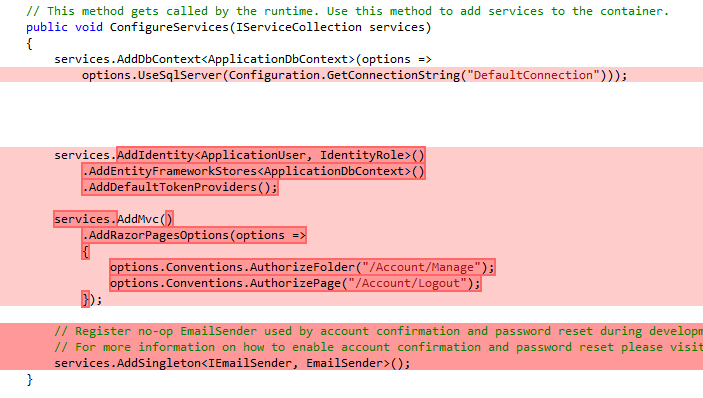
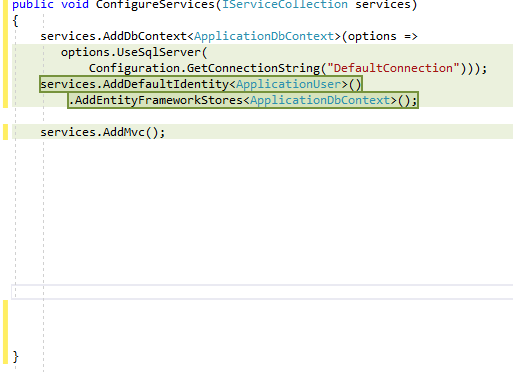
Update ConfigureServices. The following highlighted code shows shows these changes:
public void ConfigureServices(IServiceCollection services)
{
    services.AddDbContext<ApplicationDbContext>(options =>
       options.UseSqlServer(
           Configuration.GetConnectionString("DefaultConnection")));
    services.AddDefaultIdentity<ApplicationUser>()
        .AddEntityFrameworkStores<ApplicationDbContext>();

    services.AddMvc();

}
The following image shows the difference view of changes in the original ConfigureServices. The deleted code is highlighted in red:
The following image shows the difference view of the updated file. New code is highlighted in green:
 Rick-Anderson
All 4 comments
@serpent5 @BlueMarmalade @Edward-Zhou @javiercn please review my approach to the PR
Rick-Anderson
on 9 Jun 2018
Yep, I think this is a useful, detailed explanation of the process. The only thing that might be missing is that although it's apparent in the code changes that add the area tag-helper, it's not explicit that your URLs will change. Crudely, perhaps a note could be included that says something like "By switching to use the new RCL package, all existing URLs in your project (e.g. /Account/Login) will be prefixed with Identity (e.g. /Identity/Account/Login)", etc.
 serpent5
on 12 Jun 2018
serpent5
on 12 Jun 2018
@javiercn please review proposed changes
@serpent5 I agree with your comment, I'll add that note.
Rick-Anderson
on 12 Jun 2018
URLs change, so bookmarks will need to be addressed. Any component using Identity will need to update the URLs. One option is to set up redirects.
With RCL, and scaffolded code everything is in an area. Once you scaffold you have full control and you can modify to your needs.
Update to 2.1
- Use the UI from 2.0
- Update to 2.1 and use the UI in the new RCL
- Update to 2.1 and scaffold the new UI (and delete your old UI)
Rick-Anderson
on 13 Jun 2018
Related issues
 sonichanxiao
·
3Comments
sonichanxiao
·
3Comments
 davisnw
·
3Comments
serpent5
·
3Comments
Rick-Anderson
·
3Comments
davisnw
·
3Comments
serpent5
·
3Comments
Rick-Anderson
·
3Comments
 royshouvik
·
3Comments
royshouvik
·
3Comments