Aspnetcore.docs: Project fails to run after step "Add the database context to the Startup.cs file:"
I add the following to my startup.cs file and get the following error located below.
public void ConfigureServices(IServiceCollection services)
{
// Add framework services.
services.AddMvc();
      services.AddDbContext<MvcMovieContext>(options =>
              options.UseSqlite("Data Source=MvcMovie.db"));

  }
'DbContextOptionsBuilder' does not contain a definition for 'UseSqlite' and no extension method 'UseSqlite' accepting a first argument of type 'DbContextOptionsBuilder' could be found (are you missing a using directive or an assembly reference?)
Along with the terminal error:
Startup.cs(40,27): error CS1061: 'DbContextOptionsBuilder' does not contain a definition for 'UseSqlite' and no extension method 'UseSqlite' accepting a first argument of type 'DbContextOptionsBuilder' could be found (are you missing ausing directive or an assembly reference?)
Looking around online doesn't quite help for this particular issue.
Document Details
⚠ Do not edit this section. It is required for docs.microsoft.com ➟ GitHub issue linking.
- ID: 3acf0cee-ea0e-b1ca-d239-a8f2bb465f5b
- Version Independent ID: 20f61d94-ae6a-af54-e089-dc6be40182a0
- Content: Add a model to an ASP.NET Core MVC app
- Content Source: aspnetcore/tutorials/first-mvc-app-xplat/adding-model.md
- Product: asp.net-core
- GitHub Login: @Rick-Anderson
- Microsoft Alias: riande
 jball5
All 6 comments
I had a similar issue that was resolved by modifying the MvcMovie.csproj file. I replaced
<PackageReference Include="Microsoft.AspNetCore.App" />
with
<PackageReference Include="Microsoft.AspNetCore.All" Version="2.1.0" />
The documentation references the Microsoft.AspNetCore.All package but the template used to generate the project uses Microsoft.AspNetCore.App. Some of the differences in the dependent packages that are loaded by All but not by App are packages related to Sqlite.
 zarthur
on 8 Jun 2018
zarthur
on 8 Jun 2018
@zarthur We strongly recommend you not use M.A.All. You're better off using "Microsoft.AspNetCore.App" with the current version.
@jball5 UseSqlite is not in M.A.App, that's why you got that error. You need to explicitly add it. See https://docs.microsoft.com/en-us/aspnet/core/fundamentals/metapackage?view=aspnetcore-2.1#migrating-from-microsoftaspnetcoreall-to-microsoftaspnetcoreapp
 Rick-Anderson
on 9 Jun 2018
Rick-Anderson
on 9 Jun 2018
Also appears in https://github.com/aspnet/Docs/blob/master/aspnetcore/tutorials/razor-pages-vsc/model.md
See: Razor page Tutorial doesn't tell user to install the SQLite provider #7516
 guardrex
on 8 Jul 2018
guardrex
on 8 Jul 2018
I managed to fix this issue by installing Microsoft.EntityFrameworkCore.Sqlite 2.1.1
- Install dotnet CLI if you haven't
- Get the file path of the MvcMovie.csproject file
- Run this command
dotnet add [filepath] package Microsoft.EntityFrameworkCore.Sqlite --version 2.1.1
Hope this helps
 jasmine-nguyen
on 12 Aug 2018
jasmine-nguyen
on 12 Aug 2018
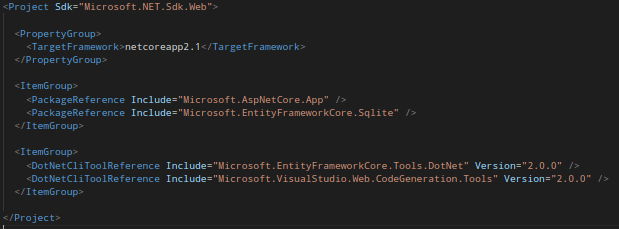
This worked for me
 JesseAReyes1996
on 8 Sep 2018
JesseAReyes1996
on 8 Sep 2018
This was fixed in the 2.2 unification.
Rick-Anderson
on 15 Jan 2019
Related issues
 neman
·
3Comments
neman
·
3Comments
 danroth27
·
3Comments
danroth27
·
3Comments
 AnthonyMastrean
·
3Comments
AnthonyMastrean
·
3Comments
 fabich
·
3Comments
fabich
·
3Comments
 sonichanxiao
·
3Comments
sonichanxiao
·
3Comments
Most helpful comment
I managed to fix this issue by installing Microsoft.EntityFrameworkCore.Sqlite 2.1.1
dotnet add [filepath] package Microsoft.EntityFrameworkCore.Sqlite --version 2.1.1Hope this helps