Aspnetcore.docs: UseSqlite method Not Found!
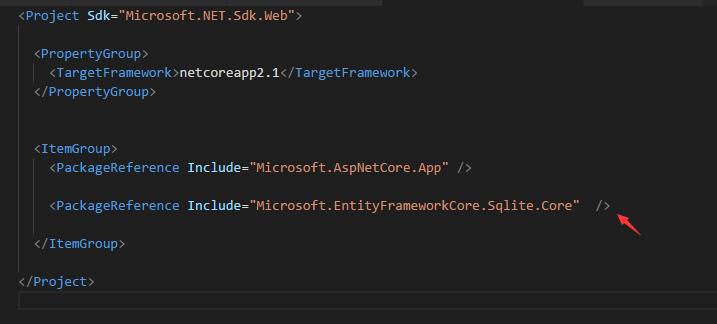
I follow the step but DbContextOptionsBuilder class doesn't have UseSqlite method , Then I find UseSqlite is a extension method in
SqliteDbContextOptionsBuilderExtensions
in Microsoft.EntityFrameworkCore.dll
How can I add this assembly?
Document Details
⚠ Do not edit this section. It is required for docs.microsoft.com ➟ GitHub issue linking.
- ID: b34c4871-adc3-0d13-6f20-6f6ac1f65e91
- Version Independent ID: ea1742b3-808b-d449-3308-6847a9f339f9
- Content: Add a model to an ASP.NET Core Razor Pages app with Visual Studio Code
- Content Source: aspnetcore/tutorials/razor-pages-vsc/model.md
- Service: unspecified
- Product: aspnet-core
- GitHub Login: @Rick-Anderson
- Microsoft Alias: riande
 billschen
All 5 comments
See https://docs.microsoft.com/en-us/aspnet/core/fundamentals/metapackage?view=aspnetcore-2.1#migrating-from-microsoftaspnetcoreall-to-microsoftaspnetcoreapp
 Rick-Anderson
on 30 May 2018
Rick-Anderson
on 30 May 2018
@Rick-Anderson thank you~
billschen
on 31 May 2018
Using ubuntu and get this error.
jeff@jeff-ThinkPad-T420:~/dev/RazorPagesMovie$ dotnet aspnet-codegenerator razorpage -m Movie -dc MovieContext -udl -outDir Pages/Movies --referenceScriptLibraries
Building project ...
Finding the generator 'razorpage'...
Running the generator 'razorpage'...
Could not load file or assembly 'System.Collections.Immutable, Version=1.2.3.0, Culture=neutral, PublicKeyToken=b03f5f7f11d50a3a'. The located assembly's manifest definition does not match the assembly reference. (Exception from HRESULT: 0x80131040)
at Microsoft.VisualStudio.Web.CodeGeneration.ActionInvoker.
at Microsoft.Extensions.CommandLineUtils.CommandLineApplication.Execute(String[] args)
at Microsoft.VisualStudio.Web.CodeGeneration.ActionInvoker.Execute(String[] args)
at Microsoft.VisualStudio.Web.CodeGeneration.CodeGenCommand.Execute(String[] args)
RunTime 00:00:07.11
dotnet --version
2.1.300
 jeffyboh
on 2 Jun 2018
jeffyboh
on 2 Jun 2018
@jtshannon
'System.Collections.Immutable, Version=1.2.3.0,
That's pretty old. What does you .csproj file look like? See the preceding post for a correct one.
Rick-Anderson
on 2 Jun 2018
I had the same issue. Tried to add the reference as @billschen said but I got an exception at the dotnet ef database update.
Found out you need the following package instead (also giving a version to prevent warnings):
<PackageReference Include="Microsoft.EntityFrameworkCore.Sqlite" Version="2.1.1"/>
and not Microsoft.EntityFrameworkCore.Sqlite.Core
 Ju2c0c0
on 5 Jul 2018
Ju2c0c0
on 5 Jul 2018
Related issues
 fabich
·
3Comments
fabich
·
3Comments
 StevenTCramer
·
3Comments
Rick-Anderson
·
3Comments
StevenTCramer
·
3Comments
Rick-Anderson
·
3Comments
 davisnw
·
3Comments
davisnw
·
3Comments
 sonichanxiao
·
3Comments
sonichanxiao
·
3Comments
Most helpful comment
@Rick-Anderson thank you~
