Aspnetcore.docs: Not working for me
So I gave this tutorial a try and off the bat I'm running into issues. I created the new project and when I try to run it using Ctrl + F5 I am prompted to open or save a file called values.json. I must save it and then open it with IE to even see the basic web page with values1 and values2.
I could live with that so I moved on to the "Register the database context" section and when pasting in the code for Startup.cs I get multiple errors: Severity Code Description Project File Line Suppression State Error CS1061 'IMvcBuilder' does not contain a definition for 'SetCompatibilityVersion' and no extension method 'SetCompatibilityVersion' accepting a first argument of type 'IMvcBuilder' could be found (are you missing a using directive or an assembly reference?) and The name ‘CompatibilityVersion’ does not exist in the current context and finally Severity Code Description Project File Line Suppression State Error CS0246 The type or namespace name 'TodoContext' could not be found (are you missing a using directive or an assembly reference?). My using statements are correct and when I right click on the error I can't resolve it by importing a reference. I’m using Visual Studio 2017 Version 15.6.7 with .NET 4.7.02556. Any help with this would be appreciated.
Document Details
⚠ Do not edit this section. It is required for docs.microsoft.com ➟ GitHub issue linking.
- ID: 583ae3e7-5915-f22b-e54c-6c100cf2a7da
- Version Independent ID: 95f2549e-29f9-e31a-b4d0-432b971643ff
- Content: Create a Web API with ASP.NET Core and Visual Studio for Windows
- Content Source: aspnetcore/tutorials/first-web-api.md
- Service: asp.net-core
- GitHub Login: @Rick-Anderson
- Microsoft Alias: riande
 bro-dell
All 7 comments
@bro-dell Which browser are you using when you're prompted to open or save a file called values.json?
The tutorial is based on the selected version of ASP.NET Core. The SetCompatibilityVersion method is available as of ASP.NET Core 2.1. Make sure you've selected the appropriate ASP.NET Core version from the version selector:
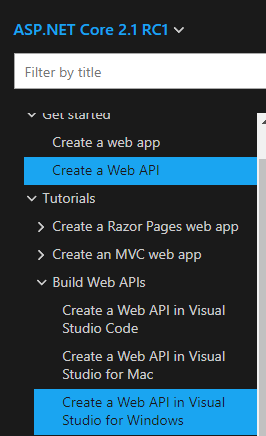
Does the tutorial work for you once you've done this?
 scottaddie
on 14 May 2018
scottaddie
on 14 May 2018
Thanks for the response @scottaddie, I'm using IE when launching the app. In Visual Studio I'm using IIS Express to start the application and after that I'm taken to my downloads for IE where I see values.json, not sure why. Ok I see what you're saying I have ASP.NET Core 1.0 so I switched to that version on the tutorial page. I guess I can still complete the tutorial even though its version 1.0, but it probably wouldn't hurt to upgrade to 2.0 in the future. I'll keep tinkering with it, but it seems that my launch options are a little off for this project.
bro-dell
on 14 May 2018
@bro-dell What you're experiencing is the default behavior of IE. IE will always try to save the response instead of displaying it in the browser. If possible, use one of the 3 browsers indicated in the tutorial. You'll have a much better experience.
It's still possible to build a web API with ASP.NET Core 1.0. There are some attractive web API features in the ASP.NET Core 2.1 release. For that reason alone, I recommend upgrading.
As for your launch options in Visual Studio, those are determined by the Properties/launchSettings.json file. Pay close attention to the value of any launchUrl property values.
scottaddie
on 14 May 2018
Thanks @scottaddie!
bro-dell
on 14 May 2018
@scottaddie I thought that article had an IE warning, but I don't see it. Do we need to add one?
 Rick-Anderson
on 14 May 2018
Rick-Anderson
on 14 May 2018
@Rick-Anderson I don't recall ever seeing an IE warning. Do you have an example of what it would say? I'm happy to add it to the tutorial.
scottaddie
on 14 May 2018
when I try to run it using Ctrl + F5 I am prompted to open or save a file called values.json. I must save it and then open it with IE to even see the basic web page with values1 and values2.
It used to have a warning saying that.
Rick-Anderson
on 14 May 2018
Related issues
 AnthonyMastrean
·
3Comments
AnthonyMastrean
·
3Comments
 madelson
·
3Comments
madelson
·
3Comments
 YeyoCoder
·
3Comments
YeyoCoder
·
3Comments
 davisnw
·
3Comments
davisnw
·
3Comments
 cocowalla
·
3Comments
cocowalla
·
3Comments