Aspnetcore.docs: Update for new hosting bundle installer link
The downloads page link for the hosting bundle installer is ...
... but we've been using an fwlink in the topics.
@shirhatti Is it out? If not, let me know later, and I'll quickly pop it into the IIS and ANCM topics.
 guardrex
All 13 comments
Ping @leecow ... sry forgot u helped with this last time.
guardrex
on 16 Aug 2017
@guardrex - you can use https://aka.ms/dotnetcore.2.0.0-windowshosting
 leecow
on 16 Aug 2017
leecow
on 16 Aug 2017
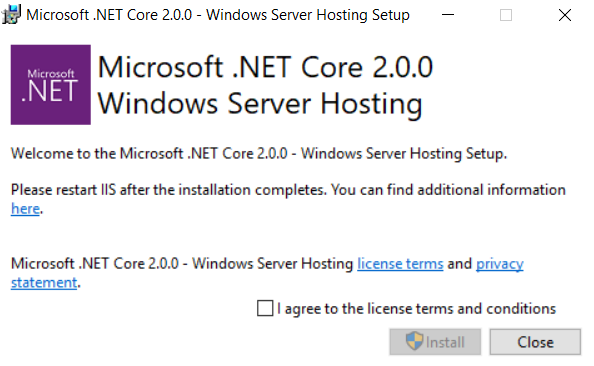
@Rick-Anderson @tdykstra The formal name of the installer is ".NET Core Windows Server Hosting." The word "bundle" has been tacked on (for readability I guess). Most of the time it's part of the link; but in one spot, the link is still ...
... install the [.NET Core Windows Server Hosting](... link ...) bundle ...
Do u want the word "bundle" in the link or outside of it? I'll make it consistent everywhere on this pass.
I also change a couple of spots where it says "ASP.NET Core Windows Server Hosting," because it's really just ".NET Core Windows Server Hosting." I'll fix that, too.
guardrex
on 16 Aug 2017
I guessed ... I went ahead and put the word "bundle" in the link.
guardrex
on 16 Aug 2017
@leecow Side Question: Just ran into something unexpected with the OPT_INSTALL_LTS_REDIST=0 OPT_INSTALL_FTS_REDIST=0 switches. I just ran the installer with them. According to the status messages in the installer window, both the runtime and the runtime store were installed. We state in the topics that if the admin only intends to install the ANCM that these switches will configure the install to only include the module and its config file ... nothing else.
guardrex
on 16 Aug 2017
@joeloff
 shirhatti
on 17 Aug 2017
shirhatti
on 17 Aug 2017
LTS and FTS only apply to 1.x bundles, We treat 2.0 as LTS for now. So if you do OPT_INSTALL_LTS=0, you should only get the package store and ANCM. We can look at adding a switch to disable the package store as well for 2.0.1 if you'd like
Also, we have OPT_NO_X86=1. When you specify this, it won't install the x86 bits on x64 OS. In 1.x we only installed the CPU bits matching the OS architecture, but in 2.x we made a change because people on 64-bit OS can host 32-bit and 64-bit applications so we'll install both if we can
 joeloff
on 17 Aug 2017
joeloff
on 17 Aug 2017
@joeloff I don't think you're making a policy statement but want to be clear, 2.0 has not been declared LTS yet and should be considered 'current' from a lifecycle perspective.
leecow
on 17 Aug 2017
@leecow correct. I just used one of the existing switches we had when we shipped both LTS/FTS in 1.x since we removed one of runtime copies. I wanted to steer away from a complete setup rewrite of the bundle.
joeloff
on 17 Aug 2017
So if you do OPT_INSTALL_LTS=0, you should only get the package store and ANCM.
According to the installer messages, it's adding the runtime. Maybe it isn't, but that's what the status messages say. I'd need to dig into the log to confirm.
The use case for this is pure SCD hosting scenarios, where the admin only wants the ANCM and config file. This isn't currently possible. @Rick-Anderson @tdykstra I'd like to pull that note from the topic. How do u want it handled?
guardrex
on 17 Aug 2017
@guardrex yes, you are correct. That flag appears to be disabled when support for the OPT_NO_X86 was added and because the package store is always installed.
joeloff
on 17 Aug 2017
I think we should fix this properly in 2.0.1. Given that the bundle is intended to install as much as possible by default and that we don't necessarily carry LTS/FTS bits.
I'd propose that we do the following:
- No flags installs everything it can install
- OPT_INSTALL_RUNTIME=0 disables all the runtimes, so if there are LTS/FTS both are disabled
2.1 OPT_INSTALL_LTS and OPT_INSTALL_FTS can be specified, but will only apply if the bundle carries an LTS and FTS runtime. - OPT_INSTALL_PACKAGE_STORE=0 disables all the package stores
- OPT_INSTALL_X86=0 disables installing x86 packages on x64 OS
joeloff
on 17 Aug 2017
It might be unusual to either ...
- Install the runtime but not the runtime store
- Install the runtime store but not the runtime
However, the SCD 😍 folks can combine the flags and ultimately end up with only ANCM module and config file, so that sounds very nice.
In the meantime tho, I should pull the note. It's not a current feature of the installer. If you open an issue for tracking those installer flag updates :point_up:, I'll create a doc issue attached to your tracking issue so we can come back at 2.0.1 or 2.1 and put an updated note back in the topics.
guardrex
on 17 Aug 2017
Related issues
 StevenTCramer
·
3Comments
StevenTCramer
·
3Comments
 wgutierrezr
·
3Comments
wgutierrezr
·
3Comments
 danroth27
·
3Comments
danroth27
·
3Comments
 Mattacks
·
3Comments
Mattacks
·
3Comments
 nenmyx
·
3Comments
nenmyx
·
3Comments