Aspnetboilerplate: Castle.MicroKernel.CircularDependencyException when resolving MvcRouteHandler
Hello! I got a question.
Abp.Boilerplate, v 3.9.0
Why am i getting Castle.MicroKernel.CircularDependencyException on
app.UseMvc(routes =>
            {
                routes.MapRoute(
                    name: "defaultWithArea",
                    template: "{area}/{controller=Home}/{action=Index}/{id?}");

                routes.MapRoute(
                    name: "default",
                    template: "{controller=Home}/{action=Index}/{id?}");
            });
with breaking on exceptions turned on? How do i get rid of it?
As far as I understood, the exception is thrown when resolving MvcRouteHandler.
Full exception message is
Dependency cycle has been detected when trying to resolve component 'Microsoft.AspNetCore.Razor.Language.RazorProjectEngine_143cff80-96bf-4aa2-80fc-af7373a01ca6'.
The resolution tree that resulted in the cycle is the following:
Component 'Microsoft.AspNetCore.Razor.Language.RazorProjectEngine_143cff80-96bf-4aa2-80fc-af7373a01ca6' resolved as dependency of
    component 'Microsoft.AspNetCore.Razor.Language.RazorEngine_e513da7d-e020-4ea6-925d-e4c5c69c3bee' resolved as dependency of
    component 'Microsoft.AspNetCore.Mvc.Razor.Internal.LazyMetadataReferenceFeature_5cbf1bf2-21ea-4c01-9186-70edda5f81ff' resolved as dependency of
    component 'Microsoft.AspNetCore.Razor.Language.RazorProjectEngine_143cff80-96bf-4aa2-80fc-af7373a01ca6' resolved as dependency of
    component 'Microsoft.AspNetCore.Mvc.Razor.Compilation.IViewCompilerProvider_08cd7c5c-c9cf-4a5e-a5aa-12aec9f1961b' resolved as dependency of
    component 'Microsoft.AspNetCore.Mvc.Razor.IRazorPageFactoryProvider_c1da251e-97e1-41d8-adc2-9d9ea0d9242c' resolved as dependency of
    component 'Microsoft.AspNetCore.Mvc.Razor.IRazorViewEngine_4bdad906-7788-4ff0-8bc0-4af945e4a625' resolved as dependency of
    component 'Microsoft.Extensions.Options.IConfigureOptions`1[[Microsoft.AspNetCore.Mvc.MvcViewOptions, Microsoft.AspNetCore.Mvc.ViewFeatures, Version=2.1.1.0, Culture=neutral, PublicKeyToken=adb9793829ddae60]]_ad494af2-5ab1-43d8-944f-8d612001e90b' resolved as dependency of
    component 'Microsoft.Extensions.Options.IOptionsFactory`1_ebc4dd86-b18c-422a-8986-a406cad4eb42' resolved as dependency of
    component 'Microsoft.Extensions.Options.IOptionsFactory`1_ebc4dd86-b18c-422a-8986-a406cad4eb42' resolved as dependency of
    component 'Microsoft.Extensions.Options.IOptions`1_d8f88dbb-e8a9-4196-abf8-9b7398343629' resolved as dependency of
    component 'Microsoft.Extensions.Options.IOptions`1_d8f88dbb-e8a9-4196-abf8-9b7398343629' resolved as dependency of
    component 'Microsoft.AspNetCore.Mvc.ApplicationModels.IPageApplicationModelProvider_47b77ab4-c4c0-4b1f-b306-1dd46aa082be' resolved as dependency of
    component 'Microsoft.AspNetCore.Mvc.RazorPages.Infrastructure.IPageLoader_930a8b19-9481-41d1-b412-9ba32a232960' resolved as dependency of
    component 'Microsoft.AspNetCore.Mvc.Abstractions.IActionInvokerProvider_8784d307-44bc-4edb-8a61-f3127ad49b79' resolved as dependency of
    component 'Microsoft.AspNetCore.Mvc.Infrastructure.IActionInvokerFactory_4961e9f6-9ade-4a98-9e3e-4de3f80bac3c' resolved as dependency of
    component 'Microsoft.AspNetCore.Mvc.Internal.MvcRouteHandler_d7531031-381e-4ff3-b56c-3568a38854a3' which is the root component being resolved.
 alexeynikitin
All 27 comments
@alexeynikitin does this happen when you add the above route configuration ?
 ismcagdas
on 28 Jun 2018
ismcagdas
on 28 Jun 2018
Actually inside the .UseMvc the MvcRouteHandler is tried to be resolved from IoC and this causes to exception. To reproduce this, turn on "break on exception" in VS.
alexeynikitin
on 29 Jun 2018
@alexeynikitin I just downloaded a project with the options which you can see in the below screenshot
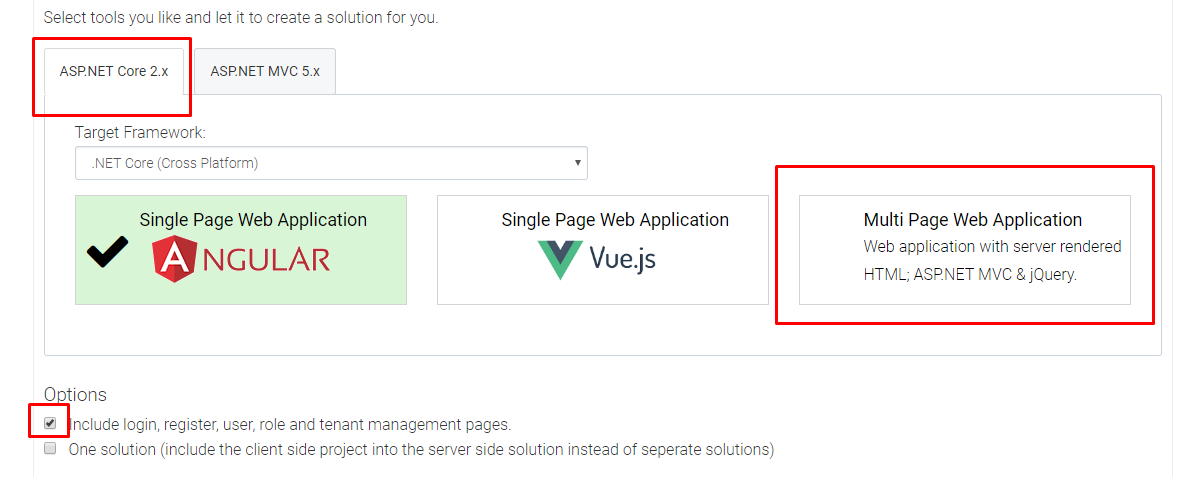
Then checked the option in the below screenshot

But after all, couldn't reproduce this problem. Did you add a new page to downloaded application ?
ismcagdas
on 29 Jun 2018
@ismcagdas Ok, let me make it clear.
I reproduced it with just downloaded project.
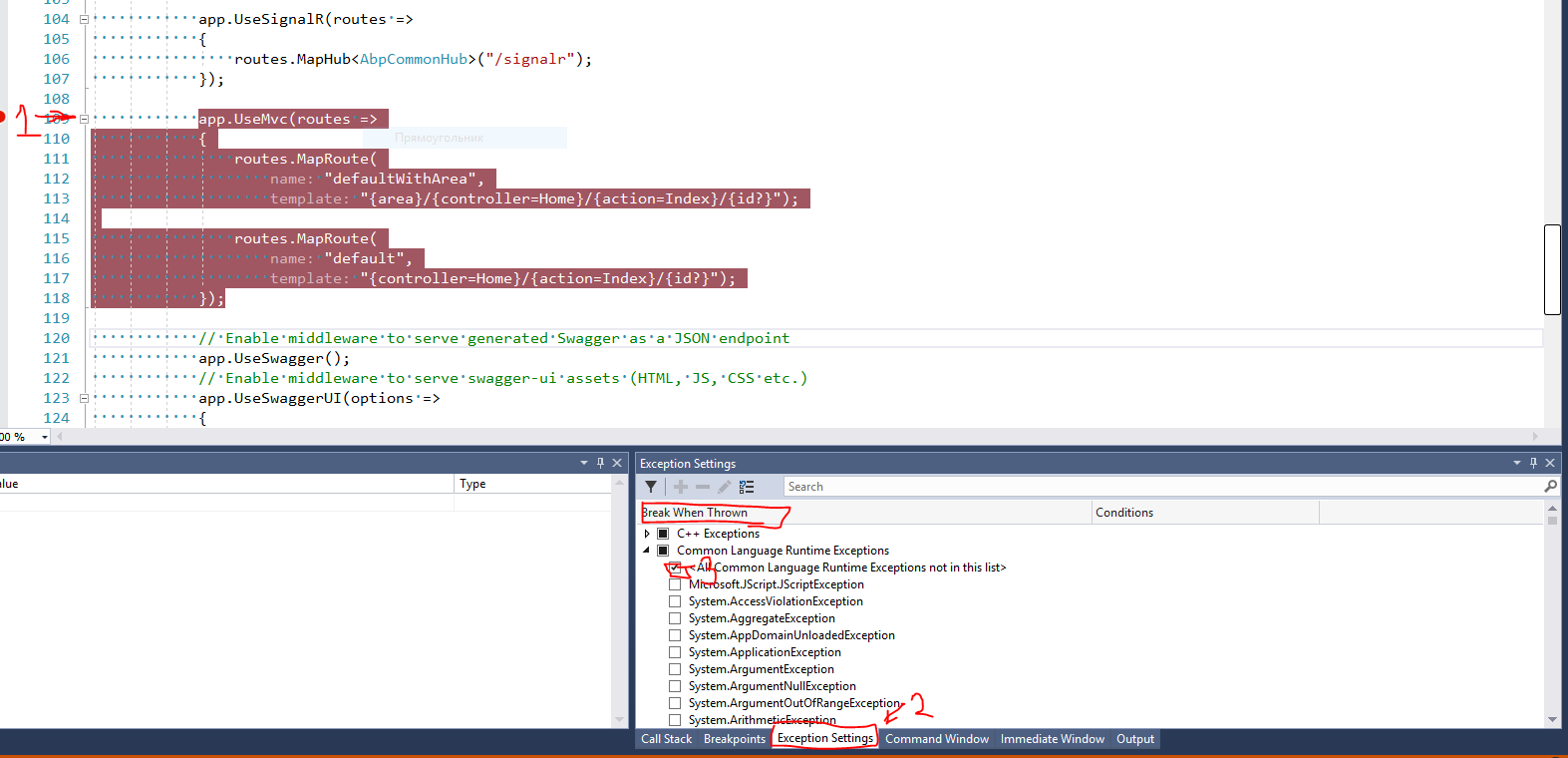
First, you set breakpoint on .UseMvc line, then start the debug session.
Second, open Exception settings tab in VS as shown on picture =), to make it simple, check All CLR Exception item.
Then just continue your debugging and you will get mentioned exception.
alexeynikitin
on 29 Jun 2018
I'm not sure, but, maybe, it just should be disregarded.
alexeynikitin
on 29 Jun 2018
@alexeynikitin still couldn't reproduce it.
- Do you have .NET Core 2.1 sdk installed ?
- Does it work if you don't select "All CLR Exception item" ?
ismcagdas
on 29 Jun 2018
@ismcagdas
- Yes, i have .net Core 2.1
- Yes, it works, but in "Output" window in debugger i get "Exception thrown: 'Castle.MicroKernel.CircularDependencyException' in Castle.Windsor.dll"
Oh, wait! I have a vue-based SPA, could it be problem?
alexeynikitin
on 29 Jun 2018
@alexeynikitin do you mean you have the vue folder in your solution ? I think it can't cause this problem but probably we are working on different versions.
Do you remember what you have selected while downloading the project on https://aspnetboilerplate.com/Templates page ? If not, you can send your project to [email protected] (of course if you want to share it) and we can take a look.
ismcagdas
on 30 Jun 2018
@ismcagdas ok, i've just tested Multi Page Web Application template, there is no exception indeed. But Vue.js Single Page Application template does throw exception in Web.Host project, Startup.cs.
Can you check it out one more time?
alexeynikitin
on 2 Jul 2018
@alexeynikitin
We know that the ioc built into the net core does not support property injection, but the ioc component built into the abp framework supports property injection.
The final dependency issue appears in: https://github.com/aspnet/Mvc/blob/c3f76137259bea68d4add1aa0d2f79b77a86cfa6/src/Microsoft.AspNetCore.Mvc.Razor/Internal/LazyMetadataReferenceFeature.cs#L27
Because the abp framework requires property injection, we can't turn off the property injection solution.
However, this exception does not affect the use of the program.
And I didn't find a way to register a single component to cancel the property injection.
 maliming
on 3 Jul 2018
maliming
on 3 Jul 2018
@maliming maybe it possible to explicitly add cycling reference to IoC with a function that would resolve it by executing constructor?
 NoofSaeidh
on 3 Jul 2018
NoofSaeidh
on 3 Jul 2018
@NoofSaeidh
I think you are right.
We may still encounter this kind of service in the future.
maliming
on 3 Jul 2018
Try this:
- Create
AbpPropertiesDependenciesModelInspectorclass as shown below:
````C#
using Castle.Core;
using Castle.MicroKernel.ModelBuilder.Inspectors;
using Castle.MicroKernel.SubSystems.Conversion;
namespace Abp.Dependency
{
public class AbpPropertiesDependenciesModelInspector : PropertiesDependenciesModelInspector
{
public AbpPropertiesDependenciesModelInspector(IConversionManager converter)
: base(converter)
{
}
    protected override void InspectProperties(ComponentModel model)
    {
        if (model.Implementation.FullName != null &&
            model.Implementation.FullName.StartsWith("Microsoft"))
        {
            return;
        }

        base.InspectProperties(model);
    }
}
}
````
- Go to your
Startup.cs, add following code in theservices.AddAbp...options:
````C#
var propInjector = options.IocManager.IocContainer.Kernel.ComponentModelBuilder
.Contributors
.OfType
.Single();
options.IocManager.IocContainer.Kernel.ComponentModelBuilder.RemoveContributor(propInjector);
options.IocManager.IocContainer.Kernel.ComponentModelBuilder.AddContributor(new AbpPropertiesDependenciesModelInspector(new DefaultConversionManager()));
````
See my commit for exact code: https://github.com/aspnetboilerplate/aspnetboilerplate/commit/1270e6766905994b69e1e2b8fe2d40ffeacb817d
If this works properly, we may include it into the framework. I know that Microsoft team ignores property injection, so the property injection shouldn't work for Microsoft types.
 hikalkan
on 5 Jul 2018
hikalkan
on 5 Jul 2018
Did you try this?
hikalkan
on 20 Jul 2018
Merged. Will be released in the next version.
hikalkan
on 20 Jul 2018
@hikalkan Sorry, i hadn't tried yet. But, IMHO, this is kinda dirty to rely on Microsoft's classes namespace. I can't suggest better solution for now, so I decided to think about it later.
alexeynikitin
on 20 Jul 2018
The part
app.UseMvc(routes =>
{
   routes.MapRoute("default", "{controller=Home}/{action=Index}/{id?}");
});
can be replaced with app.UseMvcWithDefaultRoute(); then the debugger also doesn't stop at this statement with a Castle.MicroKernel.CircularDependencyException. (In my case (3.8.0) after the break I could "Continue" without problems.)
 dedlfix
on 1 Nov 2018
dedlfix
on 1 Nov 2018
@dedlfix is this the code you are talking about https://github.com/aspnetboilerplate/module-zero-core-template/blob/master/aspnet-core/src/AbpCompanyName.AbpProjectName.Web.Mvc/Startup/Startup.cs#L82 ?
ismcagdas
on 1 Nov 2018
Yes, it is a shortcut for the mentioned code of the startup.cs. However, it doesn't include the area part. So it is only usable for these types of templates that don't add areas.
dedlfix
on 1 Nov 2018
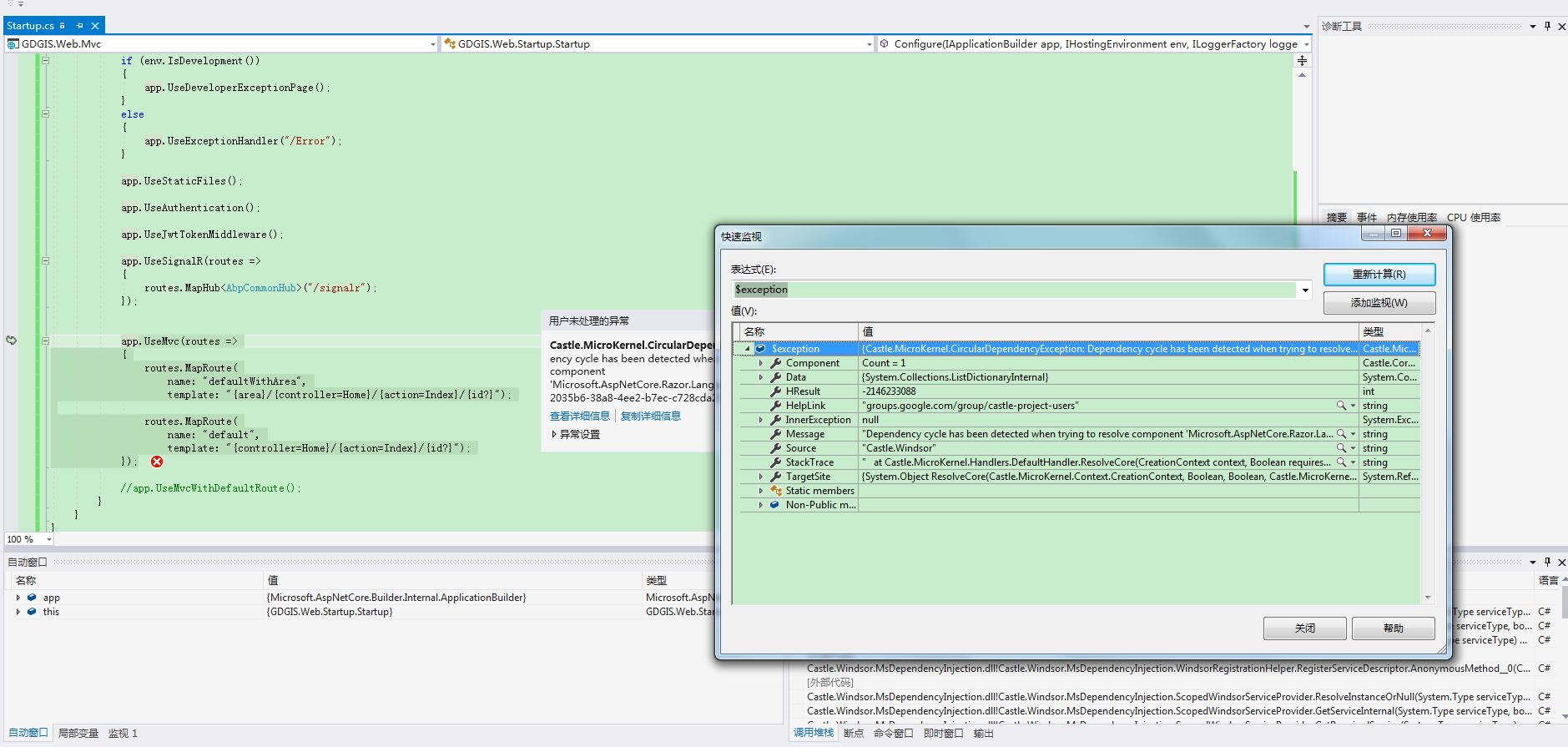
@dedlfix @ismcagdas I have the same problem. Has your problem been solved? Could you please give us some solutions?
 codonge
on 15 Feb 2019
codonge
on 15 Feb 2019
Have you tried this? https://github.com/aspnetboilerplate/aspnetboilerplate/issues/3569#issuecomment-402738621
maliming
on 15 Feb 2019
@zoudonger I can't give any other suggestion than in https://github.com/aspnetboilerplate/aspnetboilerplate/issues/3569#issuecomment-435051327.
dedlfix
on 15 Feb 2019
Also I have this problem in the latest version!

 Mehranh
on 13 May 2019
Mehranh
on 13 May 2019
You can try https://github.com/aspnetboilerplate/aspnetboilerplate/issues/3569#issuecomment-435051327 if you don't use Areas.
ismcagdas
on 14 May 2019
I have the some problem. Tried the a workaround from the comment: https://github.com/aspnetboilerplate/aspnetboilerplate/issues/3569#issuecomment-435051327
with the same result.
Any other fix?
 do-it-ger
on 20 May 2019
do-it-ger
on 20 May 2019
@do-it-ger
Have you tried this? https://github.com/aspnetboilerplate/aspnetboilerplate/issues/3569#issuecomment-402738621
maliming
on 21 May 2019
It works well. Thanks. 感谢大佬。
https://github.com/aspnetboilerplate/aspnetboilerplate/issues/3569#issuecomment-402738621

 LeoZhw
on 12 Jun 2019
LeoZhw
on 12 Jun 2019
Related issues
hikalkan
·
48Comments
 abolfazlmohammadiseif
·
29Comments
abolfazlmohammadiseif
·
29Comments
 natiki
·
26Comments
hikalkan
·
42Comments
natiki
·
26Comments
hikalkan
·
42Comments
 beriniwlew
·
31Comments
beriniwlew
·
31Comments
Most helpful comment
Try this:
AbpPropertiesDependenciesModelInspectorclass as shown below:````C#
using Castle.Core;
using Castle.MicroKernel.ModelBuilder.Inspectors;
using Castle.MicroKernel.SubSystems.Conversion;
namespace Abp.Dependency
{
public class AbpPropertiesDependenciesModelInspector : PropertiesDependenciesModelInspector
{
public AbpPropertiesDependenciesModelInspector(IConversionManager converter)
: base(converter)
{
}
}
````
Startup.cs, add following code in theservices.AddAbp...options:````C#()
var propInjector = options.IocManager.IocContainer.Kernel.ComponentModelBuilder
.Contributors
.OfType
.Single();
options.IocManager.IocContainer.Kernel.ComponentModelBuilder.RemoveContributor(propInjector);
options.IocManager.IocContainer.Kernel.ComponentModelBuilder.AddContributor(new AbpPropertiesDependenciesModelInspector(new DefaultConversionManager()));
````
See my commit for exact code: https://github.com/aspnetboilerplate/aspnetboilerplate/commit/1270e6766905994b69e1e2b8fe2d40ffeacb817d
If this works properly, we may include it into the framework. I know that Microsoft team ignores property injection, so the property injection shouldn't work for Microsoft types.