Aspnetboilerplate: Username length validation error
Hi there
Firstly a great job with this framework. I am trying to change the UserName length to 256. I've read many posts where it's suggested to override the UserName StringLength. But for some reason it doesn't appear to work for me
Your Abp package version.
3.8.0
Your base framework: .Net Framework or .Net Core.
.Net Core
Exception message and stack trace if available.
Your request is not valid!
The following errors were detected during validation. - The field UserName must be a string with a maximum length of 32.
Steps needed to reproduce the problem.
Download ASP.NET Core 2.0 Multipage version
Run the web app
Changed the Username length to 256 in both the User and UserDto classes
public class User : AbpUser<User>
    {
        public const string DefaultPassword = "123qwe";

        // OVERRIDE here
        [StringLength(256)]
        [MaxLength(256)]
        public override string UserName { get; set; }

        public static string CreateRandomPassword()
        {
            return Guid.NewGuid().ToString("N").Truncate(16);
        }

        public static User CreateTenantAdminUser(int tenantId, string emailAddress)
        {
            var user = new User
            {
                TenantId = tenantId,
                UserName = AdminUserName,
                Name = AdminUserName,
                Surname = AdminUserName,
                EmailAddress = emailAddress
            };

            user.SetNormalizedNames();

            return user;
        }
    }

No matter what I try the validator still thinks I'm trying to use max length 32, am I overriding in the wrong error?
 dotnetshadow
All 36 comments
Hi, after changing the [StringLength(256)] did you performed migration update on db?
 tamys
on 4 Jun 2018
tamys
on 4 Jun 2018
Did you change the value here CreateUserDto?
 ryancyq
on 4 Jun 2018
ryancyq
on 4 Jun 2018
Thanks for your suggestions but it still doesn't work
@tamys Yes I did do the migration
@ryancyq I tried your suggestion of updating CreateUserDto but got an internal server error

dotnetshadow
on 5 Jun 2018
Check your Logs.txt.
 acjh
on 5 Jun 2018
acjh
on 5 Jun 2018
When everything is set to length 32 everything works correctly
dotnetshadow
on 5 Jun 2018
This the log file after trying to create a username with more than 32 character length
Logs.txt
For some reason it's saying the login has failed but I can create a user when everything is 32 chacters
dotnetshadow
on 5 Jun 2018
I've just updated the log files to show that I have logged in, but fails when trying to create the user
Logs.txt
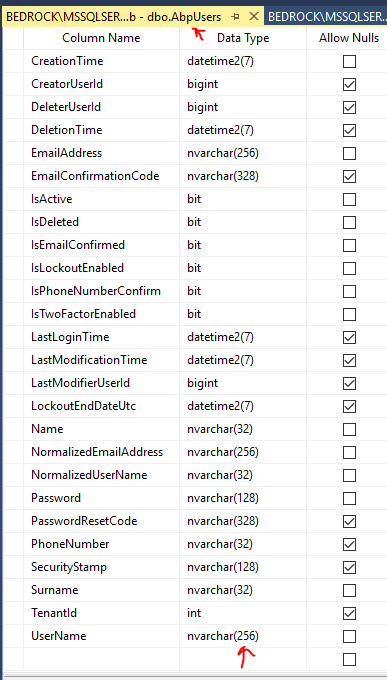
Database shows correct 256
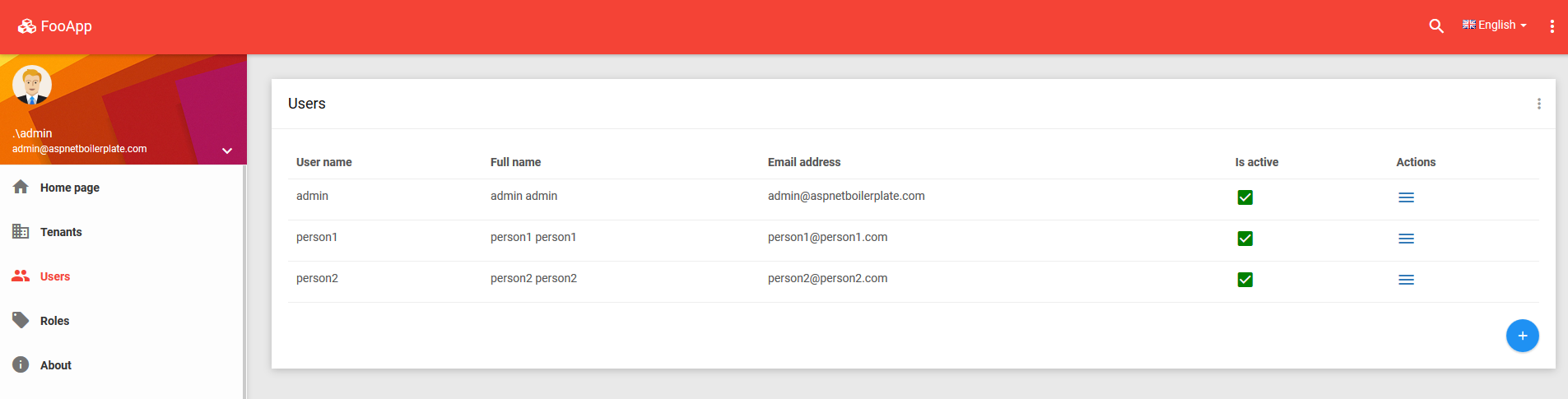
I can create users when max username length is 32
dotnetshadow
on 5 Jun 2018
Try new-ing the property:
c#
[StringLength(256)]
public new string UserName { get; set; }
Related: #1274
acjh
on 5 Jun 2018
@acjh Thanks, I tried that and still doesn't work. I noticed this issue in asp.net mvc full framework as well, using v3.6.2, something I think has changed recently where this is no longer working correctly.
MVC5 Version
Ironically I downloaded the asp.net mvc5 version and did similar things to get 256 characters. I noticed that the user did get created but an exception was thrown
ERROR 2018-06-05 09:28:09,325 [12 ] nHandling.AbpApiExceptionFilterAttribute - Validation failed for one or more entities. See 'EntityValidationErrors' property for more details.
System.Data.Entity.Validation.DbEntityValidationException: Validation failed for one or more entities. See 'EntityValidationErrors' property for more details.
at System.Data.Entity.Internal.InternalContext.SaveChanges()
at System.Data.Entity.Internal.LazyInternalContext.SaveChanges()
at Abp.EntityFramework.AbpDbContext.SaveChanges()

Test
I guess the easiest way to test this would be just download a new blank project and just try to change the username length and nothing else. Perhaps if someone is successful they could attach their solution as a zip in here?
dotnetshadow
on 5 Jun 2018
@dotnetshadow You also need to increase the length of 'NormalizedUserName' field of User entity and UserName field of UserAccount entity. Override OnModelCreating of your DbContext like below;
```c#
protected override void OnModelCreating(ModelBuilder modelBuilder)
{
base.OnModelCreating(modelBuilder);
modelBuilder.Entity<User>().Property(u => u.UserName).HasMaxLength(256);
modelBuilder.Entity<User>().Property(u => u.NormalizedUserName).HasMaxLength(256);
modelBuilder.Entity<UserAccount>().Property(u => u.UserName).HasMaxLength(256);
}
```
 ismcagdas
on 5 Jun 2018
ismcagdas
on 5 Jun 2018
UPDATE
I finally got it working I had to also edit the CreateUserDto. Would the MVC5 version have similar changes?
public class CreateUserDto : IShouldNormalize
{
[Required]
[StringLength(256)]
public string UserName { get; set; }
@ismcagdas Thanks for your feedback, I tried what you suggested but this does not work, could you please leave the issue opened until it's verified that it is working
Please use the following workflow to ensure that it is working correctly
Steps to Reproduce
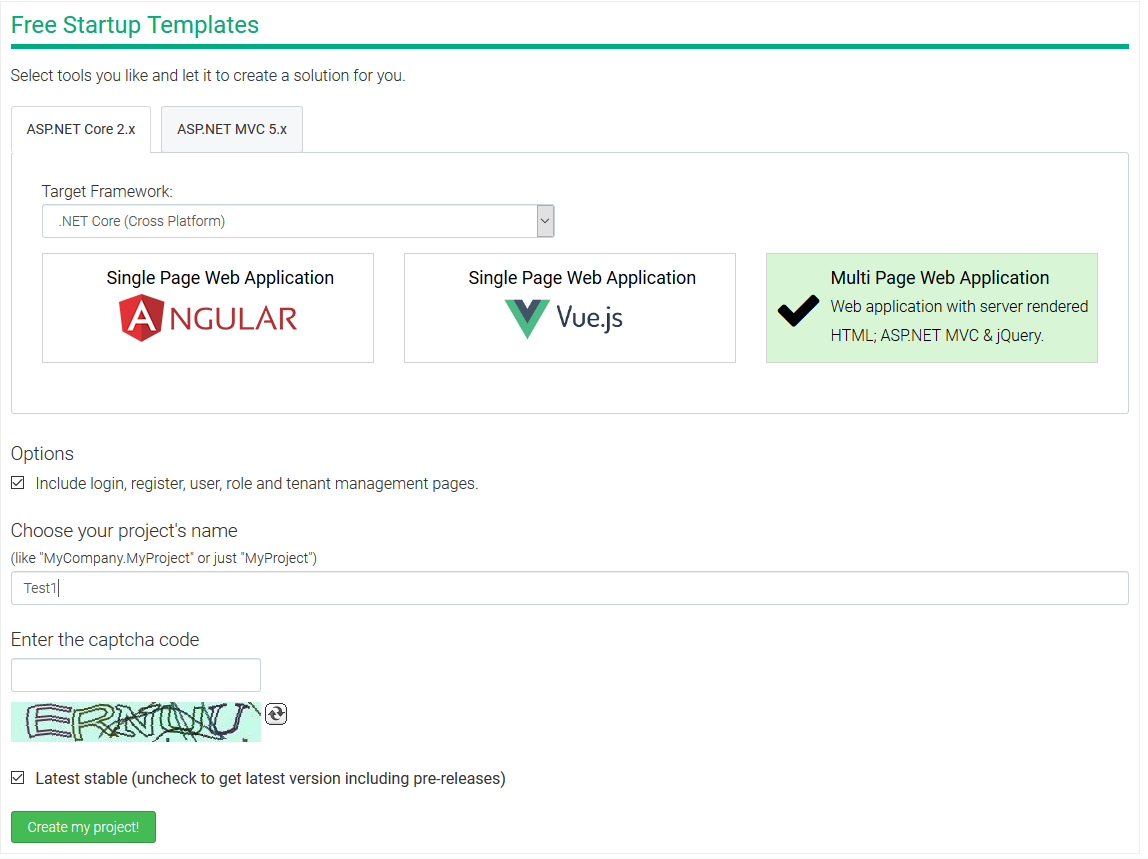
Download .NET Core version of ABP
Add suggested modifications
protected override void OnModelCreating(ModelBuilder modelBuilder)
{
base.OnModelCreating(modelBuilder);
modelBuilder.Entity<User>().Property(u => u.UserName).HasMaxLength(256);
modelBuilder.Entity<User>().Property(u => u.NormalizedUserName).HasMaxLength(256);
modelBuilder.Entity<UserAccount>().Property(u => u.UserName).HasMaxLength(256);
}
- Add Migrations
using Microsoft.EntityFrameworkCore.Migrations;
using System;
using System.Collections.Generic;
namespace Test1.Migrations
{
public partial class Username_Length : Migration
{
protected override void Up(MigrationBuilder migrationBuilder)
{
migrationBuilder.AlterColumn<string>(
name: "UserName",
table: "AbpUsers",
maxLength: 256,
nullable: false,
oldClrType: typeof(string),
oldMaxLength: 32);
migrationBuilder.AlterColumn<string>(
name: "NormalizedUserName",
table: "AbpUsers",
maxLength: 256,
nullable: false,
oldClrType: typeof(string),
oldMaxLength: 32);
migrationBuilder.AlterColumn<string>(
name: "UserName",
table: "AbpUserAccounts",
maxLength: 256,
nullable: true,
oldClrType: typeof(string),
oldMaxLength: 32,
oldNullable: true);
}
protected override void Down(MigrationBuilder migrationBuilder)
{
migrationBuilder.AlterColumn<string>(
name: "UserName",
table: "AbpUsers",
maxLength: 32,
nullable: false,
oldClrType: typeof(string),
oldMaxLength: 256);
migrationBuilder.AlterColumn<string>(
name: "NormalizedUserName",
table: "AbpUsers",
maxLength: 32,
nullable: false,
oldClrType: typeof(string),
oldMaxLength: 256);
migrationBuilder.AlterColumn<string>(
name: "UserName",
table: "AbpUserAccounts",
maxLength: 32,
nullable: true,
oldClrType: typeof(string),
oldMaxLength: 256,
oldNullable: true);
}
}
}

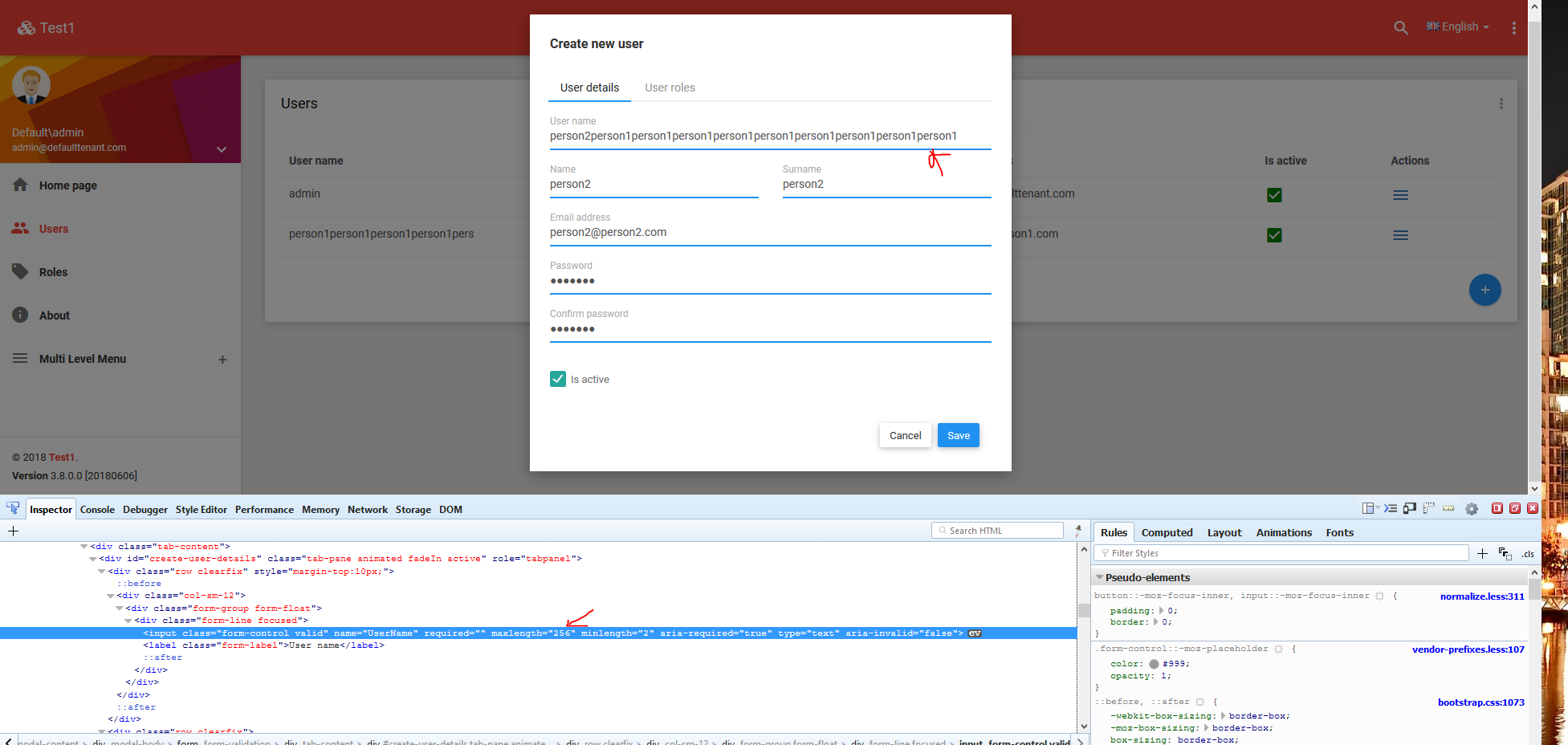
- Run the app, Login and try to add a User (please note had to modify the cshtml to increase the maxlength input to 256 it was trying to use the 32 value)

- Could you attach a zip version of a blank app that works with the username length increased?
dotnetshadow
on 6 Jun 2018
@dotnetshadow I thought you already changed the CreateUserDto accordingly, sorry.
Would the MVC5 version have similar changes?
I think NormalizedUserNamedoesn't exist in MVC 5 version. Other than that, it should be similar.
ismcagdas
on 6 Jun 2018
@ismcagdas I just tried it on MVC5 but for some reason I can't get it working on that version, I think it has to do with the UserAccount Username, I will try a little later to investigate why the core one now works and the mvc5 version doesn't
dotnetshadow
on 7 Jun 2018
@dotnetshadow is there any error message on MVC 5.x in the Log file ?
ismcagdas
on 7 Jun 2018
I am also trying to resolve this issue on MVC 5.x. I have made the changes suggested, and can confirm that both User.UserName and UserAccount.UserName are now set at nvarchar(256).
However, I am still getting validation errors. Below are the errors in the log file:
ERROR 2018-06-08 09:06:43,846 [9 ] loud.EntityFramework.IppexCloudDbContext - There are some validation errors while saving changes in EntityFramework:
ERROR 2018-06-08 09:06:43,847 [9 ] loud.EntityFramework.IppexCloudDbContext - - UserName: The field UserName must be a string with a maximum length of 32.
ERROR 2018-06-08 09:06:44,194 [9 ] nHandling.AbpApiExceptionFilterAttribute - Validation failed for one or more entities. See 'EntityValidationErrors' property for more details.
System.Data.Entity.Validation.DbEntityValidationException: Validation failed for one or more entities. See 'EntityValidationErrors' property for more details.
at System.Data.Entity.Internal.InternalContext.SaveChangesAsync(CancellationToken cancellationToken)
at System.Data.Entity.Internal.LazyInternalContext.SaveChangesAsync(CancellationToken cancellationToken)
at Abp.EntityFramework.AbpDbContext.
--- End of stack trace from previous location where exception was thrown ---
at System.Runtime.CompilerServices.TaskAwaiter.ThrowForNonSuccess(Task task)
at System.Runtime.CompilerServices.TaskAwaiter.HandleNonSuccessAndDebuggerNotification(Task task)
at Abp.EntityFramework.Uow.EfUnitOfWork.
--- End of stack trace from previous location where exception was thrown ---
at System.Runtime.CompilerServices.TaskAwaiter.ThrowForNonSuccess(Task task)
at System.Runtime.CompilerServices.TaskAwaiter.HandleNonSuccessAndDebuggerNotification(Task task)
at Abp.EntityFramework.Uow.EfUnitOfWork.
--- End of stack trace from previous location where exception was thrown ---
at System.Runtime.CompilerServices.TaskAwaiter.ThrowForNonSuccess(Task task)
at System.Runtime.CompilerServices.TaskAwaiter.HandleNonSuccessAndDebuggerNotification(Task task)
at Abp.EntityFramework.Uow.EfUnitOfWork.
--- End of stack trace from previous location where exception was thrown ---
at System.Runtime.CompilerServices.TaskAwaiter.ThrowForNonSuccess(Task task)
at System.Runtime.CompilerServices.TaskAwaiter.HandleNonSuccessAndDebuggerNotification(Task task)
at Abp.Domain.Uow.UnitOfWorkBase.
--- End of stack trace from previous location where exception was thrown ---
at System.Runtime.CompilerServices.TaskAwaiter.ThrowForNonSuccess(Task task)
at System.Runtime.CompilerServices.TaskAwaiter.HandleNonSuccessAndDebuggerNotification(Task task)
at Abp.Domain.Uow.UnitOfWorkInterceptor.<>c__DisplayClass6_0.<
--- End of stack trace from previous location where exception was thrown ---
at System.Runtime.CompilerServices.TaskAwaiter.ThrowForNonSuccess(Task task)
at System.Runtime.CompilerServices.TaskAwaiter.HandleNonSuccessAndDebuggerNotification(Task task)
at Abp.Threading.InternalAsyncHelper.
--- End of stack trace from previous location where exception was thrown ---
at System.Runtime.CompilerServices.TaskAwaiter.ThrowForNonSuccess(Task task)
at System.Runtime.CompilerServices.TaskAwaiter.HandleNonSuccessAndDebuggerNotification(Task task)
at Abp.Threading.InternalAsyncHelper.
--- End of stack trace from previous location where exception was thrown ---
at System.Runtime.CompilerServices.TaskAwaiter.ThrowForNonSuccess(Task task)
at System.Runtime.CompilerServices.TaskAwaiter.HandleNonSuccessAndDebuggerNotification(Task task)
at System.Threading.Tasks.TaskHelpersExtensions.
--- End of stack trace from previous location where exception was thrown ---
at System.Runtime.CompilerServices.TaskAwaiter.ThrowForNonSuccess(Task task)
at System.Runtime.CompilerServices.TaskAwaiter.HandleNonSuccessAndDebuggerNotification(Task task)
at System.Web.Http.Controllers.ApiControllerActionInvoker.
--- End of stack trace from previous location where exception was thrown ---
at System.Runtime.CompilerServices.TaskAwaiter.ThrowForNonSuccess(Task task)
at System.Runtime.CompilerServices.TaskAwaiter.HandleNonSuccessAndDebuggerNotification(Task task)
at Abp.WebApi.Uow.AbpApiUowFilter.
--- End of stack trace from previous location where exception was thrown ---
at System.Runtime.CompilerServices.TaskAwaiter.ThrowForNonSuccess(Task task)
at System.Runtime.CompilerServices.TaskAwaiter.HandleNonSuccessAndDebuggerNotification(Task task)
at Abp.WebApi.Validation.AbpApiValidationFilter.
--- End of stack trace from previous location where exception was thrown ---
at System.Runtime.CompilerServices.TaskAwaiter.ThrowForNonSuccess(Task task)
at System.Runtime.CompilerServices.TaskAwaiter.HandleNonSuccessAndDebuggerNotification(Task task)
at Abp.WebApi.Auditing.AbpApiAuditFilter.
--- End of stack trace from previous location where exception was thrown ---
at System.Runtime.CompilerServices.TaskAwaiter.ThrowForNonSuccess(Task task)
at System.Runtime.CompilerServices.TaskAwaiter.HandleNonSuccessAndDebuggerNotification(Task task)
at System.Web.Http.Controllers.ActionFilterResult.
--- End of stack trace from previous location where exception was thrown ---
at System.Runtime.CompilerServices.TaskAwaiter.ThrowForNonSuccess(Task task)
at System.Runtime.CompilerServices.TaskAwaiter.HandleNonSuccessAndDebuggerNotification(Task task)
at Abp.WebApi.Security.AntiForgery.AbpAntiForgeryApiFilter.
--- End of stack trace from previous location where exception was thrown ---
at System.Runtime.CompilerServices.TaskAwaiter.ThrowForNonSuccess(Task task)
at System.Runtime.CompilerServices.TaskAwaiter.HandleNonSuccessAndDebuggerNotification(Task task)
at Abp.WebApi.Authorization.AbpApiAuthorizeFilter.
--- End of stack trace from previous location where exception was thrown ---
at System.Runtime.CompilerServices.TaskAwaiter.ThrowForNonSuccess(Task task)
at System.Runtime.CompilerServices.TaskAwaiter.HandleNonSuccessAndDebuggerNotification(Task task)
at System.Web.Http.Controllers.AuthenticationFilterResult.
--- End of stack trace from previous location where exception was thrown ---
at System.Runtime.CompilerServices.TaskAwaiter.ThrowForNonSuccess(Task task)
at System.Runtime.CompilerServices.TaskAwaiter.HandleNonSuccessAndDebuggerNotification(Task task)
at System.Web.Http.Controllers.ExceptionFilterResult.
 PhilipWynn
on 8 Jun 2018
PhilipWynn
on 8 Jun 2018
@ismcagdas @PhilipWynn Yes that's the exact error I'm getting too
dotnetshadow
on 8 Jun 2018
@dotnetshadow you can try the approach in EntityFrameworkCore/#4434 to debug the exact db error with details
ryancyq
on 8 Jun 2018
@ryancyq yes I'm using this as a way to suppress the error by checking the message, ideally this shouldn't happen. Ironically the entry does go into the database, it's just a popup is shown indicating an error
ERROR 2018-06-08 09:06:43,847 [9 ] loud.EntityFramework.IppexCloudDbContext - - UserName: The field UserName must be a string with a maximum length of 32.
dotnetshadow
on 8 Jun 2018
@dotnetshadow probably this is the UserName field of another entity. Which entities have you configured to have a length for Username greater than 32 ?
ismcagdas
on 11 Jun 2018
@dotnetshadow I am using AsnetZero MVC. I have applied the following UserName length changes to the context:
modelBuilder.Entity
modelBuilder.Entity
I can confirm that both fields are now set to nvarchar(256) in the database.
However, still getting the following error when trying to add a usename greater than 32 chars:
ERROR 2018-06-07 15:11:48,617 [10 ] loud.EntityFramework.IppexCloudDbContext - There are some validation errors while saving changes in EntityFramework:
ERROR 2018-06-07 15:11:48,617 [10 ] loud.EntityFramework.IppexCloudDbContext - - UserName: The field UserName must be a string with a maximum length of 32.
Not sure what other fields need to be increased to solve this?
PhilipWynn
on 11 Jun 2018
@PhilipWynn @ismcagdas same issue. I've tried increasing the UserName field length for a fair few of the tables. The result is that the fields in the database are correct but the error still occurs.
Perhaps the best option would be to download the ASP.NET MVC5 demo version and make the UserName field adjustments and see if you are getting the same issue?
dotnetshadow
on 12 Jun 2018
I've got v5.3 up and running here. Still getting the same issue.
PhilipWynn
on 12 Jun 2018
Why do you need a username more than 32 chars length? Who can remember it? Or do you have another goal?
 hikalkan
on 12 Jun 2018
hikalkan
on 12 Jun 2018
I have several clients who want to use email address as user name. This can often be more than 32 characters...
PhilipWynn
on 12 Jun 2018
OK, that's a reasonable use case. So, we can consider to increase default length to 256.
hikalkan
on 12 Jun 2018
hikalkan
on 12 Jun 2018
Yes, we have been using email address as user names. Would love to see default length to 256 as well! Thank you.
 nogatek
on 13 Jun 2018
nogatek
on 13 Jun 2018
While we wait for the default constant length to be changed, can anyone advise on how I get past this issue? Have I missed something from the other posts I've been researching?
I am getting the same error as detailed above:
DbContext - - UserName: The field UserName must be a string with a maximum length of 32.
ERROR 2018-06-13 12:46:10,454 [52 ] nHandling.AbpApiExceptionFilterAttribute - Validation failed for one or more entities. See 'EntityValidationErrors' property for more details.
System.Data.Entity.Validation.DbEntityValidationException: Validation failed for one or more entities. See 'EntityValidationErrors' property for more details.
at System.Data.Entity.Internal.InternalContext.SaveChanges()
Despite this error, the record is being created! All my database tables are correct.
So far I have changed the following,
OnModelCreating within DbContext:
modelBuilder.Entity<User>().Property(t => t.UserName).HasMaxLength(50);
modelBuilder.Entity<UserAccount>().Property(u => u.UserName).HasMaxLength(50);
User.cs Entity
[MaxLength(50)]
[StringLength(50)]
public override string UserName { get; set; }
CreateUserDto.cs
[MaxLength(50)]
[StringLength(50)]
public string UserName { get; set; }
RegisterViewModel.cs
[MaxLength(50)]
[StringLength(50)]
public string UserName { get; set; }
Is there anywhere I've missed making another change?
 techcolin
on 13 Jun 2018
techcolin
on 13 Jun 2018
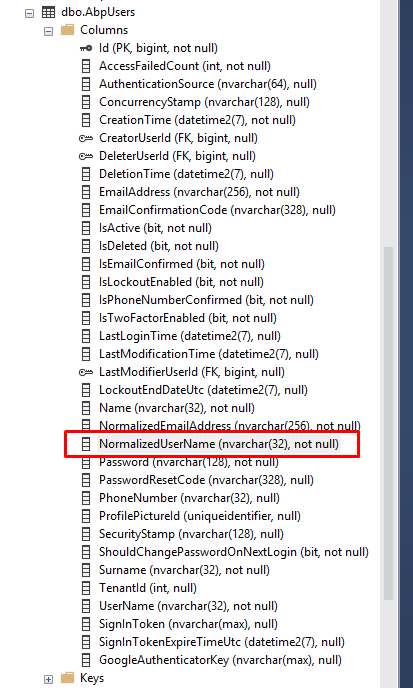
Did you increase the length of 'NormalizedUserName' field of User entity and UserNamefield of UserAccount entity?
 ebicoglu
on 13 Jun 2018
ebicoglu
on 13 Jun 2018
Hi @ebicoglu
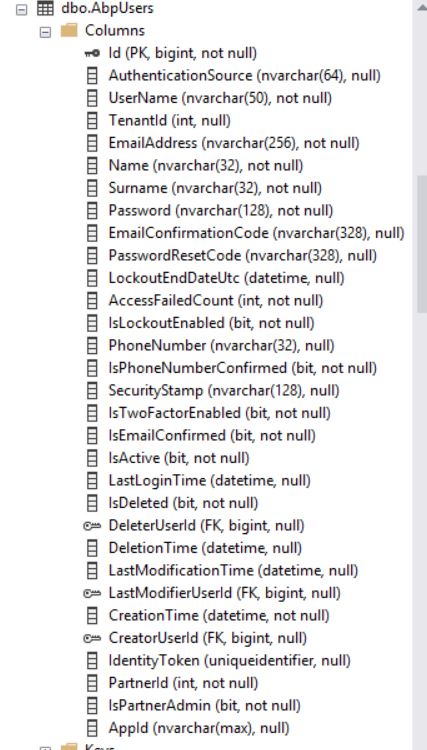
I read that on various forums but I don't have that field in my User entity. I guess that's from another version.
techcolin
on 13 Jun 2018
check your database table. maybe you didn't see it in some base classes
ebicoglu
on 13 Jun 2018
Sorry I should have been clearer - I did check the table and the Normalized fields are not present.
techcolin
on 13 Jun 2018
@techcolin yes @ebicoglu is talking about ASP.NET Core version but your's is ASP.NET MVC 5.x.
Workaround below might work for you;
- Instead of using
modelBuilder.Entity<User>().Property(t => t.UserName).HasMaxLength(50);do it like this;
Add below lines into your User class;
[StringLength(256)]
public override string UserName { get; set; }
- Create a user account class like this;
[Table("AbpUserAccounts")]
public class MyUserAccount : UserAccount
{
[StringLength(256)]
public override string UserName { get; set; }
}
Change length of UserName field in CreateUserDto class.
Create a new class for UserAccount synchronization;
public class MyUserAccountSynchronizer : UserAccountSynchronizer
{
private readonly IUnitOfWorkManager _unitOfWorkManager;
private readonly IRepository<UserAccount, long> _userAccountRepository;
public MyUserAccountSynchronizer(
IRepository<UserAccount, long> userAccountRepository,
IUnitOfWorkManager unitOfWorkManager) : base(userAccountRepository, unitOfWorkManager)
{
_userAccountRepository = userAccountRepository;
_unitOfWorkManager = unitOfWorkManager;
}
public override void HandleEvent(EntityCreatedEventData<AbpUserBase> eventData)
{
using (_unitOfWorkManager.Current.SetTenantId(null))
{
_userAccountRepository.Insert(new MyUserAccount
{
TenantId = eventData.Entity.TenantId,
UserName = eventData.Entity.UserName,
UserId = eventData.Entity.Id,
EmailAddress = eventData.Entity.EmailAddress,
LastLoginTime = eventData.Entity.LastLoginTime
});
}
}
}
- Replace ABP's UserAccountSynchronizer with your version in the PreInitialize method of your Core module;
Configuration.ReplaceService<UserAccountSynchronizer, MyUserAccountSynchronizer>();
If you have problems while updating a user, you can also override Update event;
public virtual void HandleEvent(EntityUpdatedEventData<AbpUserBase> eventData)
{
// ....
}
Thanks @ismcagdas - I have implemented your suggested method, however it hasn't made any differences to the outcome.
Your final line was showing errors in VS so I had to change it to the following to get the solution to build. This may be wrong so any advice is appreciated:
Configuration.ReplaceService(typeof(UserAccountSynchronizer), () =>
{
IocManager.Register
});
I'm not sure what is expected but this override handler doesn't seem to get hit in debugging when I create a user.
All that said, both the User and the UserAccount records are created successfully, however the same validation error is thrown:
ERROR 2018-06-14 11:34:52,561 [69 ] Project.EntityFramework.ProjectDbContext - - UserName: The field UserName must be a string with a maximum length of 32.
ERROR 2018-06-14 11:34:52,596 [69 ] nHandling.AbpApiExceptionFilterAttribute - Validation failed for one or more entities. See 'EntityValidationErrors' property for more details.
System.Data.Entity.Validation.DbEntityValidationException: Validation failed for one or more entities. See 'EntityValidationErrors' property for more details.
at System.Data.Entity.Internal.InternalContext.SaveChanges()
at Abp.EntityFramework.AbpDbContext.SaveChanges()
at Abp.EntityFramework.Uow.EfUnitOfWork.SaveChanges()
at Abp.EntityFramework.Uow.EfUnitOfWork.CompleteUow()
at Abp.Domain.Uow.UnitOfWorkBase.Complete()
at Abp.Domain.Uow.UnitOfWorkInterceptor.PerformSyncUow(IInvocation invocation, UnitOfWorkOptions options)
at Castle.DynamicProxy.AbstractInvocation.Proceed()
techcolin
on 14 Jun 2018
@techcolin you need to add using statement below to use generic version of ReplaceService;
using Abp.Configuration.Startup;
Could you put a breakpoint in the HandleEvent(EntityCreatedEventData<AbpUserBase> eventData) method of MyUserAccountSynchronizer and see if it hits when creating a new user.
ismcagdas
on 14 Jun 2018
Great - that worked! Now managed through the HandleEvent override and the error is gone.
Records all created as expected.
For completeness I as you suggested I needed to override the Update handler as follows:
public override void HandleEvent(EntityUpdatedEventData<AbpUserBase> eventData)
        {
            using (_unitOfWorkManager.Current.SetTenantId(null))
            {
                UserAccountOverride userAccount = (UserAccountOverride)_userAccountRepository.FirstOrDefault(ua => ua.TenantId == eventData.Entity.TenantId && ua.UserId == eventData.Entity.Id);
                if (userAccount != null)
                {
                    userAccount.UserName = eventData.Entity.UserName;
                    userAccount.EmailAddress = eventData.Entity.EmailAddress;
                    userAccount.LastLoginTime = eventData.Entity.LastLoginTime;
                    _userAccountRepository.Update(userAccount);
                }
            }
        }
Thanks very much for your help with this - I don't think I'd have got there on my own, but I now have some new insight into ABP.
techcolin
on 14 Jun 2018
Related issues
 jzhouw
·
3Comments
jzhouw
·
3Comments
 AlexGeller
·
3Comments
AlexGeller
·
3Comments
 apchenjun
·
3Comments
hikalkan
·
3Comments
apchenjun
·
3Comments
hikalkan
·
3Comments
 dyhaz
·
3Comments
dyhaz
·
3Comments
Most helpful comment
Great - that worked! Now managed through the HandleEvent override and the error is gone.
Records all created as expected.
For completeness I as you suggested I needed to override the Update handler as follows:
public override void HandleEvent(EntityUpdatedEventData<AbpUserBase> eventData)
        {
            using (_unitOfWorkManager.Current.SetTenantId(null))
            {
                UserAccountOverride userAccount = (UserAccountOverride)_userAccountRepository.FirstOrDefault(ua => ua.TenantId == eventData.Entity.TenantId && ua.UserId == eventData.Entity.Id);
                if (userAccount != null)
                {
                    userAccount.UserName = eventData.Entity.UserName;
                    userAccount.EmailAddress = eventData.Entity.EmailAddress;
                    userAccount.LastLoginTime = eventData.Entity.LastLoginTime;
                    _userAccountRepository.Update(userAccount);
                }
            }
        }
Thanks very much for your help with this - I don't think I'd have got there on my own, but I now have some new insight into ABP.