Aspnet-api-versioning: Problems using AddVersionedApiExplorer with AddMvcCore on .NET Core 2.2.106
Hi,
I'm getting an error using the AddVersionedApiExplorer with AddMvcCore on .NET Core 2.2.106:
'IMvcCoreBuilder' does not contain a definition for 'AddVersionedApiExplorer' and the best extension method overload 'IServiceCollectionExtensions.AddVersionedApiExplorer(IServiceCollection, Action
Here's the packages that I used:
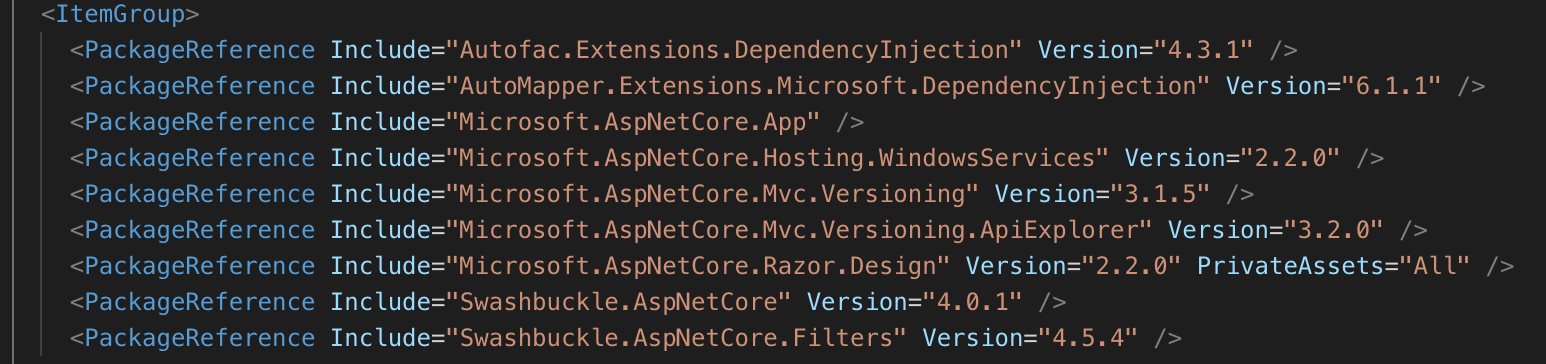
Is there something that I missed out on this one?
Thanks!
Regards,
Ked
 keeed
keeed
All 4 comments
It looks like you might be upgrading from 2.x to 3.x? As noted in the release notes and the wiki, the AddVersionedApiExplorer moved from extending IMvcCoreBuilder to IServiceCollection so that it has better congruency with other service registrations starting in 3.0.
What used to be:
```c#
services.AddMvcCore().AddApiExplorer().AddVersionedApiExplorer();
or
```c#
services.AddMvcCore().AddVersionedApiExplorer();
is now simply:
c#
services.AddVersionedApiExplorer();
The sample projects also reflects this. This change also addressed an issue where people commonly forgot to call AddApiExplorer(), which now happens automatically. I hope that helps.
 commonsensesoftware
on 19 Aug 2019
commonsensesoftware
on 19 Aug 2019
Thanks for this @commonsensesoftware
I've combined everything and was able to make it work, I hope that this can help others as well:
Version:
.Net Core 2.2.106
So to make it work, I used the combination of this 3:

Also, another important learning for me was that you need to annotate your controller class with the [ApiController] attribute else Swagger won't be able to identify them when using API Versioning.
keeed
on 20 Aug 2019
There's nothing _wrong_ with adding services.AddMvcCore().AddApiExplorer(), but if you've moved up to the latest package version, this shouldn't be required anymore. API Versioning depends on this when you add the API Explorer support, so it's now called automatically on your behalf. services.AddMvc() also makes this call.
Starting in 3.0, there is support to _filter_ controllers automatically by _convention_ via the IApiControllerFilter service. The default implementation filters controllers that have the API controller conventions applied a la [ApiController]. This change makes supporting the mixing of API and UI controllers easier. A lot of people were mixing the two and frustrated by the versioning policies applied to UI controllers. Unfortunately, this causes a behavioral change that essentially breaks things when users upgrade to 3.0+. You can revert to the old behavior using options.UseApiConventions = false. This option was available prior to 3.0, but was false. Starting in 3.0, it's now true.
Dealing with breaking changes is difficult and they are limited to major releases. I always call out these changes. I suggest skimming through the release notes and samples during major version changes to verify your configuration.
Glad you got it all sorted out. Thanks.
commonsensesoftware
on 20 Aug 2019
It would appear this issue is resolved. Feel free to come back if you have more questions.
commonsensesoftware
on 27 Oct 2019
Related issues
 gopaldogra
·
7Comments
gopaldogra
·
7Comments
 danielmeza
·
3Comments
danielmeza
·
3Comments
 smstuebe
·
4Comments
smstuebe
·
4Comments
 krzkraw
·
5Comments
krzkraw
·
5Comments
 gingters
·
4Comments
gingters
·
4Comments
Most helpful comment
It looks like you might be upgrading from 2.x to 3.x? As noted in the release notes and the wiki, the AddVersionedApiExplorer moved from extending IMvcCoreBuilder to IServiceCollection so that it has better congruency with other service registrations starting in 3.0.
What used to be:
```c#
services.AddMvcCore().AddApiExplorer().AddVersionedApiExplorer();
is now simply:
c#
services.AddVersionedApiExplorer();
The sample projects also reflects this. This change also addressed an issue where people commonly forgot to call
AddApiExplorer(), which now happens automatically. I hope that helps.