Asciidoctor-pdf: Index term gets double space or extra padding-left?
I have the following text;
From Laravel's perspective, a model is an _Eloquent_ model. ((Eloquent)) is an Object Relational Mapper (ORM) (((Object Relational Mapper,ORM))) built specifically for ((Laravel)) but is useful in any PHP application. It ties a model to a corresponding table using a simple ((ActiveRecord)) pattern and offers a ((fluent API)).
In my theme, I use the MinionPro font, which I defined like this;
font:
  catalog:
    merge: true
    MinionPro:
      regular: MinionPro/MinionProRegular.ttf
      italic: MinionPro/MinionProItalic.ttf
      bold: MinionPro/MinionProBold.ttf
      bold_italic: MinionPro/MinionProBoldItalic.ttf

base:
  font:
    family: MinionPro
    size: 12
    color: #303030
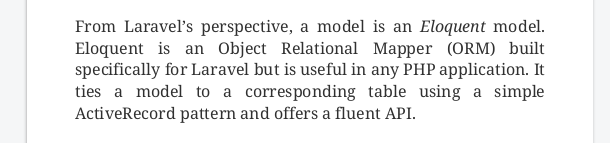
When I generate my PDF, this is my output. You can see that the index terms have extra whitespace preceding them.

As you can see, this also happens when using concealed index terms.
Here is the copy/pasted text;
From Laravel’s perspective, a model is an Eloquent model. Eloquent is
an Object Relational Mapper (ORM) built specifically for Laravel but is
useful in any PHP application. It ties a model to a corresponding table
using a simple ActiveRecord pattern and offers a fluent API.
I also ran this copy/pasted text through a tool to check whether the space is a weird unicode character but it appears to be a normal space (U+0020 : SPACE [SP]).
I also can't find anything controlling this behavior in the theming/styling docs. It doesn't happen when using other fonts so I think it might be font-related but I don't know how or why. This is what it looks like with the default font;
 peterjaap
All 18 comments
You're observation is correct. Non-visible index terms cause spaces on either side not to be collapsed. (We have to use a null character to force an anchor to be created by the PDF generator). Therefore, you need to put the terms directly adjacent to existing text so that they don't stand alone.
We don't see this in the HTML output even though there is extra space since HTML is much more aggressive about collapsing spaces.
 mojavelinux
on 29 Apr 2020
mojavelinux
on 29 Apr 2020
Hmm, though I see the same behavior is happening with visible index terms...that is a problem.
mojavelinux
on 29 Apr 2020
Oh, I know what it is. It means the font you are using is missing one of the required glyphs (in this case the null character) (or it doesn't have a zero width in the font). When the glyph is missing (or has the incorrect width), the PDF generator inserts a space (since it is interpreting the font).
This is detailed here: https://github.com/asciidoctor/asciidoctor-pdf/blob/v1.5.x/docs/theming-guide.adoc#modifying-the-font
(We don't see this behavior when using the provided Noto Serif font).
mojavelinux
on 29 Apr 2020
It looks like we could make this more portable by switching from the null character to a zero-width space. The reason is, the PDF generator already removes zero-width spaces from the text during processing without consulting the font. So you don't need that glyph in your font, it won't show up in the output, it always resolves to a 0 width (so space won't be reserved for it). Seems like reason enough to it. I'll do some testing.
mojavelinux
on 29 Apr 2020
Yep, that's definitely the right solution.
mojavelinux
on 29 Apr 2020
Great! For now I'll just remove any space before (( in my preprocessor.
peterjaap
on 29 Apr 2020
It turns out that advance won't work, at least not for visible index terms. The correct workaround is to open up the font (using fontforge) and copy the U+200B value to the U+0000 value, then save the font.
(This could also be done with a script, which is what we used for preparing the bundled fonts).
mojavelinux
on 29 Apr 2020
@mojavelinux I was just trying that out with FontForge :) Thanks
peterjaap
on 29 Apr 2020
I just gave it a try and it worked. Here's what I did:
- Open font in fontforge
- Navigate to U+200B (using Ctrl+Shift+>)
- Right click and Copy
- Navigate to U+0000
- Right click and Paste
- File > Generate Fonts...
- Generate
mojavelinux
on 29 Apr 2020
Once I sort out why one of the tests is failing, I'll create a PR to make the switch from null to zero-width space to avoid this whole exercise.
mojavelinux
on 29 Apr 2020
My font also doesn't have the U+200B character. I tried copying the exclamation mark to U+0000 and U+200B to see if that would show up, but it doesn't. When I copy the exclamation mark to the space character, it does show up.
peterjaap
on 29 Apr 2020
I've also tried adding Noto Serif as a fallback font so it will pick the missing glyphs from there but that doesn't help either.
peterjaap
on 29 Apr 2020
Find any other glyph in the font that is empty to copy. Then, edit the
metrics and set the width to 0. You just need the glyph to be empty with 0
width.
mojavelinux
on 29 Apr 2020
@mojavelinux thanks, setting the width to 0 worked! :+1:
Edit; I could have read that in the docs....

peterjaap
on 29 Apr 2020
The issue with the concealed index item persists using this workaround but I guess you already knew that.
peterjaap
on 29 Apr 2020
The issue with the concealed index item persists using this workaround but I guess you already knew that.
Yes, concealed terms in the middle of text should be affixed to visible text. That's just a general best practice because the spaces on either side can be misinterpreted (as there are many layers of processing to convince they are not significant).
mojavelinux
on 29 Apr 2020
Good news! I found the source of the bug. When the null character is concealed, its width is not set to 0. If the font incorrectly reports the null character as having a width, then you end up with extra space (even though no character is detected at that location). I'll submit a PR shortly.
mojavelinux
on 30 Apr 2020
Nice!
On Thu, 30 Apr 2020 at 23:33, Dan Allen notifications@github.com wrote:
Good news! I found the source of the bug. When the null character is
concealed, its width is not set to 0. If the font incorrectly reports the
null character as having a width, then you end up with extra space (even
though no character is detected at that location). I'll submit a PR shortly.—
You are receiving this because you authored the thread.
Reply to this email directly, view it on GitHub
https://github.com/asciidoctor/asciidoctor-pdf/issues/1672#issuecomment-622126202,
or unsubscribe
https://github.com/notifications/unsubscribe-auth/AADJKAFODWRYQLMI4FWMQX3RPHVCXANCNFSM4MTQSCKA
.
peterjaap
on 1 May 2020
Related issues
 BojanStipic
·
5Comments
BojanStipic
·
5Comments
 bwklein
·
3Comments
bwklein
·
3Comments
 IbnSaeed
·
9Comments
IbnSaeed
·
9Comments
 mimiz
·
3Comments
mimiz
·
3Comments
 aidanhs
·
3Comments
aidanhs
·
3Comments