Asciidoctor-pdf: Footnotes are not positioned correctly
I trying to use footnotes with pdf like

in pdf it doesn't display correctly

Thanks
 gAmUssA
All 68 comments
Not sure but maybe it relates to #83
gAmUssA
on 12 Jan 2015
You should be able to use cross references inside a footnote (keep in mind that footnotes display inline currently). Thus, you can do something like:
SPI footnote:[More information about the SPI can be found in <<chapter_13#,Chapter 13>>
I recommend using an explicit title in the xref as I have done, though the implicit title should work when creating the PDF.
 mojavelinux
on 13 Jan 2015
mojavelinux
on 13 Jan 2015
In my opinion this has nothing to do with references but with the fact that footnotes display inline currently:
Example:
Just the Java code.footnote:[
With the exception of the [filename]+plugin.xml+ and [filename]+MANIFEST.MF+ files required for Eclipse plugins.
].
Developers preferring to write the necessary code manually, may do so.
PDF:

HTML:

Footnotes looks much better in the HTML output because they are not inlined.
 jmini
on 6 May 2015
jmini
on 6 May 2015
We inlined the footnotes as a temporary, short term solution. The long term
solution is to put them at the bottom of page or chapter.
The challenge is that we have to reserve space for the footnotes, but we
have to know how much space we need and on which page. Thus, we have to
hook into the page transition, which turns out to be a lot of work. This is
where PDF gets really hard :/
mojavelinux
on 6 May 2015
If we use the end of chapter, things get a lot simpler (but still some
work).
mojavelinux
on 6 May 2015
The way Prawn works, it makes it very difficult to figure out how to reserve space for the footnotes at the bottom of the page. First, we have to know if there are any footnotes on the current page. Then, we have to calculate how many lines we need to render those footnotes. If we need a lot of lines, there's a chance that it pushes a paragraph off the page. If that paragraph was the source of a footnote, then we have less footnotes and we need less space. It gets pretty complicated pretty quickly.
@graphitefriction suggested that once we have at least one footnote on a page, we reserve a fixed amount of space and reduce the font size of the footnotes to fit in that space. I think this is how the DocBook toolchain works (but we should double check).
The easiest solution is to put the footnotes at the end of the chapter (which is a standard place for them to go, just not always the most convenient).
mojavelinux
on 11 May 2015
If that paragraph was the source of a footnote, then we have less footnotes and we need less space.
We may just let this be an edge case where we end up with more space for footnotes than needed. At least we are able to fit the footnotes.
mojavelinux
on 11 May 2015
Related to #73.
mojavelinux
on 25 May 2015
@mojavelinux Definitely a difficult task to fix indeed. What about instead of trying to automatically figure out spacing, statically add space to the footer as the # of footnotes are added to page by X up to only Y # of footnotes. If additional footnotes reside on page, move footnotes to following page. For example, say I have 6 footnotes on a page. However, you have decided that per page the most footnote space I'll allocate to a page is X which would only fit 5 footnotes. The 6th footnote would just be moved to the following page. Also the edge case where it pushes a paragraph containing footnotes to following pg, then the footnotes should reside on that new page not the previous page.
In the end, all I'm trying to say is maybe its better to have the user help define how many footnotes they need versus trying to automagically render all the info. :) It at least would be way better than inline footnotes IMO.
 rlopez133
on 11 Jun 2015
rlopez133
on 11 Jun 2015
Thanks for the input @rlopez133!
As it turns out, the exploration I did to implement inline images uncovered
a technique to solve the footnote calculation problem.
In short, I have access to the text layout, at which point I can detect a
footnote and push in the bottom margin by the amount of space the footnote
needs. If there isn't enough space, I can force it to go to the next page.
In theory, this should work. What's left is to try it.
mojavelinux
on 11 Jun 2015
Let me know if you need someone to test it out :)
rlopez133
on 11 Jun 2015
Count on it!
mojavelinux
on 11 Jun 2015
I just added footnotes and ran into this issue with them rendering inline in PDFs.
They appear at the end of the document (a chapter) when using the AsciiDoctor Chrome extension.
 nathany
on 2 Oct 2015
nathany
on 2 Oct 2015
Putting them at the end of the document / chapter would be the easiest way, and probably the first step. But in a page-oriented layout like PDF, the correct place to put them is at the bottom of the page. That requires some tricks, but as I mentioned above, I think I sorted out a creative solution. Prawn is a bit stiff in this area, so it requires that we be creative. (It would be nice if Prawn had flexible regions, but it doesn't really abstract to that level).
mojavelinux
on 2 Oct 2015
Either would be an improvement over having the footnotes inline, though the bottom of the page makes sense. For now I'm going to comment them out, because this just doesn't look good.

Thanks.
nathany
on 2 Oct 2015
How easy would it be to have the footnotes appear at the end of the chapter?
I only have a few footnotes right now, so it's probably easiest if I emulate that behaviour by hand. I can just do some superscript numbers and regular text at the end.
nathany
on 2 Oct 2015
Easy enough that I'm going to split this issue into two parts. First I'm going to implement the end of the chapter approach. I'll commit that as a short-term workaround. Then I'll dig into getting them at the bottom of the page (perhaps using an option to control the placement).
mojavelinux
on 8 Oct 2015
This is one of the next things I'll work on.
Putting footnotes inline wasn't really intended for production output. That was more to remind us that they weren't being handled and so we didn't drop content. More like debugging output.
mojavelinux
on 8 Oct 2015
Thanks Dan. I can also help test it out.
nathany
on 8 Oct 2015
For scientific use of asciidoctor-pdf bottom footnotes are indispensable. As this feature is not yet available in asciidoctor-pdf-1.5.0.alpha.9 another workaround could be using asciidoctor-latex <file>.adoc or asciidoctor -b docbook <file>.adoc.
 getreu
on 16 Oct 2015
getreu
on 16 Oct 2015
Noticed this myself trying to write an archival document. I figure that plain ASCII is the way to go, and seems ASCIIDoc is a nice implementation. I agree that footnotes at the bottom of the page is indispensable. This PDF renderer is much nicer than the others, so I appreciate the work done.
I look forward to at least the end-of-chapter workaround. How can I help?
 rasusmilch
on 30 Dec 2015
rasusmilch
on 30 Dec 2015
I pretty much know what I have to do, so it's just a matter of doing it. I'll try to prototype soon so that I can see what help is needed. Usually, I discover stuff in the first few minutes of hacking.
mojavelinux
on 30 Dec 2015
@mojavelinux You know what you need to do for end notes or bottom-of-page footnotes? Obviously I'm more excited about the later, but that's good news regardless.
rasusmilch
on 30 Dec 2015
I know what to do in both cases, it's just that the bottom of page will take longer to get working. The reason is because I have to play around with calculations to know how much space to reserve for the bottom of page footnotes. The end of chapter is easier because it's just a matter of appending the content.
mojavelinux
on 30 Dec 2015
@mojavelinux Wonderful news on both accounts. Thanks for the update and hard work. Let me know if you need a guinea pig or any help I can offer.
rasusmilch
on 30 Dec 2015
is there any date in near future to close this issue?
 doedle
on 20 Jan 2016
doedle
on 20 Jan 2016
This work is much appreciated. Has there been any progress on PDF footnotes in the last months?
Is there any development release or feature switch that changes the footnote behaviour from inline to something else?
I don't really care on which exact page the footnotes will appear, even end-of-chapter would be a huge improvement over inline footnotes.
 vog
on 13 Jul 2016
vog
on 13 Jul 2016
I haven't had a chance to work on it yet. My focus has been elsewhere in the project. I am going to release another alpha soon to keep things moving, but it will not include this change.
mojavelinux
on 14 Jul 2016
nathany
on 22 Jul 2016
Our first issue with a bounty! Super cool. I'll create a label for it in the issue tracker so it's easier to find these issues.
You caught me just as I'm leaving for vacation. When I return, I'll try to get some more information here to help me or anyone else solve this issue.
mojavelinux
on 23 Jul 2016
Still would like to see this resolved. 😜
nathany
on 5 Jan 2017
Trust me, so would I. I think about it everyday. I'm very close to another release and this is one of the first issues I'm going to try to get to after that release. We're chipping away the rouge edges in Asciidoctor PDF each month.
mojavelinux
on 5 Jan 2017
Sooo what I'm about to say is not a fix but it is a workaround, albeit requires to be aware of pg breaks and when you'd like to display the pseudo footnote. Basically create a superscript, then call the superscript when you know you are near the end of the pg.
For example,
Rally^1^ is a great tool for benchmarking OpenStack.
(At the end of the page or where I know it will be the end of the pg for that pdf),
^1^ https://wiki.openstack.org/wiki/Rally
While I understand this doesn't fix the problem, it at least looks way better than having inline footnotes IMO.Of course like everyone else, I'd love to see a programmable way but something better than nothing?
rlopez133
on 13 Jan 2017
I've been using something similar in the theming guide. I use square brackets around the number (to match that style) and use an ordered list to refer to the numbers instead of repeating the superscript. But basically it's the same idea. But it has allowed me to think a bit more about where footnotes can go in the future.
mojavelinux
on 13 Jan 2017
 mordae
on 30 Jan 2017
mordae
on 30 Jan 2017
I just tried to make a pdf and footnotes are still inline.
Any update/progress with this?
 narimiran
on 28 Jan 2018
narimiran
on 28 Jan 2018
Not yet, but I think about it often. There's absolutely zero chance we'll move forward with implementation until we nail down the expected behavior in detail. So that's what has to happen first.
The problem is, I can't figure how to know how much space to reserve for a bottom of the page footnote, and whether reserving that space knocks the footnote anchor to the next page. Other engines are able to do this because the essentially try multiple times. But we only have a single pass, so it's extraordinarily complicated in my head.
The simple solution, of course, is just to write all the footnotes on the last page (or last page of the chapter). It's the bottom of the page footnotes that are tricky. But that's part of establishing expectations.
mojavelinux
on 4 Feb 2018
I believe the "simple solution" would be a great start, because although not perfect, it would serve the need just fine for 95% of the use cases.
The big problem with asciidoctor-pdf is that footnotes appear inline within the text, which renders them essentially unusable and means you can't use footnotes at all in your document. Every solution that moves them "away" is already a huge improvement.
vog
on 6 Feb 2018
If the simple solution is "at the last page of the chapter", this would be indeed good enough!
narimiran
on 6 Feb 2018
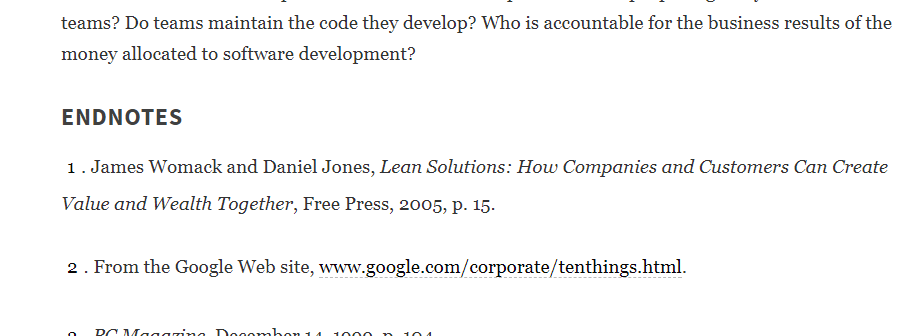
Agree. For example, a quite popular digital library uses this approach (endnotes instead of footnotes):
 AlexanderZobkov
on 6 Feb 2018
AlexanderZobkov
on 6 Feb 2018
I would be content with end notes as well ($25 bounty still pending) but would prefer a separate section at the end of the document, with a custom heading. Thanks for your hard work!
mordae
on 7 Feb 2018
A major +1 from me on the endnote format. Especially given the similarity to the HTML output, I think that would actually be the preferred option in many cases.
 gtebbutt
on 8 Feb 2018
gtebbutt
on 8 Feb 2018
$50 bounty still pending from me, and I would also be quite happy with endnotes.
nathany
on 10 Feb 2018
Will match the current $50 bounty for the Q&D end-notes solution. Nothing fancy, just move the footnotes to the end of the chapter for now.
Also, here's a suggestion for an (admittedly dumb) but maybe workable, intermediate single-pass end-of-page solution:
Using the default theme, pre-compute an average for height_of_footnote_line / characters_per_line based on random input. This is some constant that then gets hard-coded. Then, multiplying this by the character length of each footnote, taking ceil(), and summing yields an approximation of the vertical space needed at the bottom of the page for the footnotes that have been encountered so far. Pad this by by something reasonable, say 10%; allow the user to specify a multiplier anywhere in the asciidoc; and call it a day.
When the footnotes occupy too much, or too little, space, the user can update directly in the asciidoc by using their own multiplier.
I'd be more than happy with a solution like this that required me to tweak the final output as an interim single-pass solution. Ultimately, though, I don't see how you get a really clean solution without either doing multiple passes, or having some sort of separate buffer where you can pre-render the footnotes and know the exact page height required.
 popdjnz
on 3 Mar 2018
popdjnz
on 3 Mar 2018
Thanks for these thoughtful suggestions, @popdjnz. That moves me closer to a solution. I'm pretty sure this is how the DocBook toolchain works. It seems to work within a fixed amount of space. It's still tricky in our case since the footnote can fall off the page just by putting the space there...which would be find if we had a layout engine in Prawn...but we don't. So it will still take some trial and error to get something that works.
Either way, I agree that the path to a solution has two steps. The first is to make endnotes. I agree these should go under some sort of heading. Then, in a follow-up step, we can slide them into a footer region.
Unfortunately, I just don't have the time to do this right now. But since there's lot of interests and bounties, I'll do my best to schedule time for it as soon as I can.
mojavelinux
on 19 Mar 2018
Currently, I have a configuration with footnotes placed at bottom of the pages. I use CSS Paged Media specification. Unfortunately, only a few "browsers" implement it. I have to use specialized tools that generate PDF from HTML and implement CSS Paged Media specification (princeXML, pdfreactor, antennahouse, ...).
Note that, some people try to implement parts of CSS Paged Media specification in Javascript for browsers that don't support it.
My suggestion is to add an option to asciidoctor to generate footnotes compliant with CSS Paged Media and delegate the hard work to browsers (or javascript). I think that it is not really possible to implement this feature correctly without browser support.
Information about footnote usage is described in PrinceXML documentation. Basically, we need to define a CSS class with attribute float: footnote:
.fn { float: footnote; }
Next, footnote have to be defined inline with <span class="fn">footnote content</span>. Unfortunately, current footnote:[content] syntax since it does not place footnote inline in HTML result. So I have to use an alternative way. Something like [.fn]*Footnote content*.
 jerome-pouiller
on 21 Mar 2018
jerome-pouiller
on 21 Mar 2018
Is the asciidoctor-fopub project useful for reserving space? Because asciidoctor-fopub is able to do it. So maybe code from that project can be used, or at least the technique.
 Eiskasten
on 27 Mar 2018
Eiskasten
on 27 Mar 2018
@PraeluceantBoreus useful for some ideas, perhaps, but the problem really comes down to the fact that Opal cannot undo once it writes to a page. In other words, there isn't a separate layout step, which is something Apache FO has. We work around this problem in many cases by using a scratch document, but that doesn't always tell us what we need to know and it's very expensive time-wise.
mojavelinux
on 27 Mar 2018
If someone wants to try to solve this problem, I'd be happy to assist. I just have too many things on my plate to dedicated time to it right now.
mojavelinux
on 28 Oct 2018
@mojavelinux, how far is your progress at putting endnotes on the last page of a chapter?
 Cellebyte
on 12 Feb 2019
Cellebyte
on 12 Feb 2019
Hello.
I opened a PR for a partial fix to this footnotes problem: https://github.com/asciidoctor/asciidoctor-pdf/pull/1010
 bcourtine
on 22 Mar 2019
bcourtine
on 22 Mar 2019
@bcourtine Thanks for submitting that PR! That provided me with the raw materials for a full solution. Stay tuned for a revised proposal.
mojavelinux
on 7 Apr 2019
So the logic will be that the footnotes will go at the end of the chapter for a book (or the end of the document if there are any remaining) and the end of the document for an article.
One open question is whether the footnote definition should be duplicated if the reference to the footnote appears in multiple chapters. For now, I think we'll just link to where the footnote was original defined. If that feels to unnatural, we can think about how to duplicate it.
mojavelinux
on 7 Apr 2019
Please test PR #1016. I believe you will be pleased. Thanks again to @bcourtine for getting the ball rolling on this!
mojavelinux
on 7 Apr 2019
This is solved in master in so far as we made the end notes.
I've though long and hard about whether it's possible to make bottom-of-the-page footnotes. While I have better ideas now about how it might work, I simply don't have the time it would take to implement a solution. Regardless, that will need to be tracked in a separate issue.
mojavelinux
on 13 Apr 2019
Did any "bottom-of-the-page footnote" efforts happen after this?
 rv0
on 12 Jul 2019
rv0
on 12 Jul 2019
No, it's not possible (unless someone can prove me wrong). We'll be sticking with the current solution (unless someone comes forward to show that it's possible to do it another way).
mojavelinux
on 12 Jul 2019
No, it's not possible (unless someone can prove me wrong).
Just wondering, but if it's not possible, how do tools like FrameMaker and LaTeX accomplish this? Would it not be possible to study the LaTeX source code?
 arjantijms
on 22 Jan 2020
arjantijms
on 22 Jan 2020
It's not possible because of how Prawn is implemented. It writes directly to the PDF stream with no way to rollback. Tools like FrameMaker and LaTeX use multiple passes of trial and error until all the content fits. Prawn just can't do that. It would require implementing Prawn (and pdf-core) from scratch with a different architecture.
mojavelinux
on 22 Jan 2020
We will not be implementing footnotes in this converter. That will be a key requirement for the browser-based PDF converter, currently called asciidoctor-pdf.js.
mojavelinux
on 22 Jan 2020
Interesting. I can't see that it isn't possible with the current engine, I thought you meant it wasn't possible in general (for PDF).
How will the browser-based PDF converter work? Render everything into HTML first, and then generate PDF from that?
arjantijms
on 22 Jan 2020
I can't see that it isn't possible with the current engine, I thought you meant it wasn't possible in general (for PDF).
Exactly. Thanks for pointing that out. I'm specifically talking about a limitation of the tech stack in this converter.
Render everything into HTML first, and then generate PDF from that?
Correct, though it's all in memory / via an API. We're using browser tech as the layout engine. I'll post more details once the 1.5.0 and 2.0.0 releases are out. Though you can read up on it here: https://github.com/Mogztter/asciidoctor-pdf.js/
mojavelinux
on 23 Jan 2020
Hi @mojavelinux
May be it will be easier if a long footnote(s) will be allowed to overflow to the next page?
Like here, note arrows >>>

 mishka88ru
on 29 Feb 2020
mishka88ru
on 29 Feb 2020
We're sticking with putting footnotes at the end of chapter or article. The PDF generator we use simply cannot easily accommodate more advanced layouts.
mojavelinux
on 29 Feb 2020
@mojavelinux is there a way to put the footnotes at the end of the chapter at the bottom of the page? Right now they immediately follow the text and it does not look great, not sure what would be a good solution to go about this.
 radekosmulski
on 23 Nov 2020
radekosmulski
on 23 Nov 2020
As this issue is closed, I assume it would be better to open a separate issue for this new problem.
vog
on 23 Nov 2020
Please open a separate issue with this idea. It might be possible to
vertically align the footnotes at the bottom of the last page of the
chapter by using the dry run technique. We could at least give it a try.
mojavelinux
on 23 Nov 2020
Thank you very much for your replies @vog and @mojavelinux! Opened a new issue #1833
radekosmulski
on 23 Nov 2020
Related issues
 mimiz
·
3Comments
mimiz
·
3Comments
 7SW
·
3Comments
7SW
·
3Comments
 amieiro
·
6Comments
amieiro
·
6Comments
 lurch
·
7Comments
lurch
·
7Comments
 asilvestre
·
5Comments
asilvestre
·
5Comments
Most helpful comment