Asbru-cm: Do not allow modification in protected folders
Describe the bug
When I close a terminal, I often user Ctrl+D shortcut. The same shortcut in the connection tree stay for "Duplicate", so sometimes by mistake I get multiple copy of the same connection in the same folder.
To avoid duplication, I try to write protect the folder and the connections in it, but in any case I can duplicate the connection with the Ctrl+D shortcut.
Expected behavior
I'm expecting that is not possible to add, duplicate or remove nothing in a write protected folder, or in any case I expecting that a write protected connection cannot be duplicated.
Environment (please complete the following information):
- OS: Ubuntu 20.04
- Ásbrú Version 6.2.1
 nikuzz
All 6 comments
If the parent folder is protected, it probably means you don't want to modify it and consequently don't want to add new connections in it.
So in that case, I definitely support the idea.
But why wouldn't you want to duplicated a protected connection ? I would find it useful actually to be able to temporary duplicated a "protected" connection (ie: a connection I don't want to modify) to test out some new parameters or change something for a quick test ; and then probably delete it.
Would that be ok if we limit this to the first part : "not possible to add, duplicate or remove nothing in a write protected folder" ?
 gfrenoy
on 9 Jun 2020
gfrenoy
on 9 Jun 2020
Yes! for me if a folder is write protected nothing has to change in it.
I agree with you that duplicate (clone) a protected connection may be useful, but in any case you have to unprotect the duplicated one in any case; you cannot simply press "del" to delete it in case of duplication mistake, and you cannot change nothing. Maybe the cloned connection has to be copied unprotected?
In any case for me is good enough if I cannot copy / paste / duplicate nothing in a write protected folder/group.
nikuzz
on 9 Jun 2020
When duplicating a connection into a protected folder, you should now see a warning like this one:
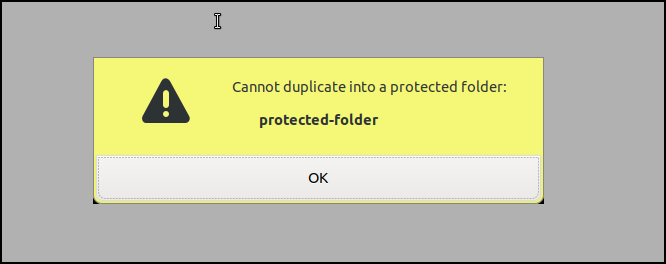
This change is available on the loki branch and will be released with 6.3.0.
Many different cases are now better managed:
- [x] Cannot delete a protected group
- [x] Cannot cut a protected group
- [x] Cannot cut a folder containing protected connection(s) or group(s)
- [x] Cannot delete a folder containing protected connection(s) or group(s)
- [x] Cannot paste a connection/group into a protected folder
- [x] Cannot drop a connection into a protected folder
- [x] Cannot duplicate a connection into a protected folder
- [x] Cannot add a connection or group into a protected folder
- [x] Cannot rename a protected folder
And probably others, please let me know if you found other cases...Testers are more than welcome !
gfrenoy
on 10 Jun 2020
And why not change the shortcut to something else once we know that Ctrl+D is commonly used to close terminals ?
 popxunga
on 10 Jun 2020
popxunga
on 10 Jun 2020
Yes, as of 6.3, you'll be able to change the default shortcut key so that's definitely a good workaround for the initial request. But while thinking about it I actually extended the initial question to improve the concept of "protected folder". I think it really make more sense now...
gfrenoy
on 10 Jun 2020
As far as I know, this works fine on 6.3 so let me close the issue to prepare the next milestone.
gfrenoy
on 28 Jun 2020
Related issues
 binnih
·
10Comments
popxunga
·
14Comments
popxunga
·
5Comments
binnih
·
10Comments
popxunga
·
14Comments
popxunga
·
5Comments
 vibo69
·
13Comments
vibo69
·
13Comments
 wcasanova
·
17Comments
wcasanova
·
17Comments
Most helpful comment
When duplicating a connection into a protected folder, you should now see a warning like this one:

This change is available on the
lokibranch and will be released with 6.3.0.Many different cases are now better managed:
And probably others, please let me know if you found other cases...Testers are more than welcome !