Asbru-cm: SSH authenticity of host issue
Describe the bug
When ssh connection is attempted to host for first time, you receive the normal warning about the authenticity of the host. You are prompted to enter "yes/no/fingerprint" at the prompt to accept the key, but nothing you enter makes any difference here.
To Reproduce
Steps to reproduce the behavior:
- SSH to new host
- Wait for the warning with the prompt "Are you sure you want to continue connecting (yes/no/[fingerprint])? yes/no
Please type 'yes', 'no' or the fingerprint: " - Nothing happens
Expected behavior
If you type "yes", the SSH connection should continue
Screenshots
If applicable, add screenshots to help explain your problem.
Desktop (please complete the following information):
- OS: Archlinux
- Version: Current
Additional context
If I SSH to the host in a separate terminal window first, the expected behavior will then occur. Its only when connecting to a new host via Asbru for the first time will this happen.
 Mjolinir
All 16 comments
Did you try the option "Auto-accept (...) SSH keys" ?

 gfrenoy
on 7 May 2019
gfrenoy
on 7 May 2019
Yes sir, this option is indeed checked
Mjolinir
on 7 May 2019
I just realized I did make a mistake in my bug report. The O/S is Archlinux, not Fedora. Im not sure if it makes any real difference, but it does work fine on a Fedora box, but not on Archlinux.
Mjolinir
on 7 May 2019
Hello everyone, I use Archlinux, and I have the same problem.
I think the problem started with the update to version 8
*Archlinux
*openssh 8.0
 wcasanova
on 7 May 2019
wcasanova
on 7 May 2019
Ok so my best bet at this point is that the string that is displayed has been slightly changed in Archlinux so you will need to change the regular expression accordingly:
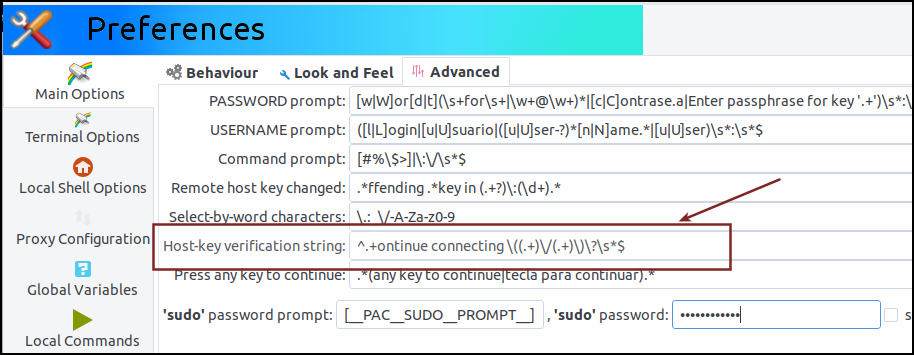
The string you mention in your initial report is matching the default regexp ; can you double check:
- what is the exact message that is displayed ?
- what is the exact regexp that you have in your configuration ?
gfrenoy
on 8 May 2019
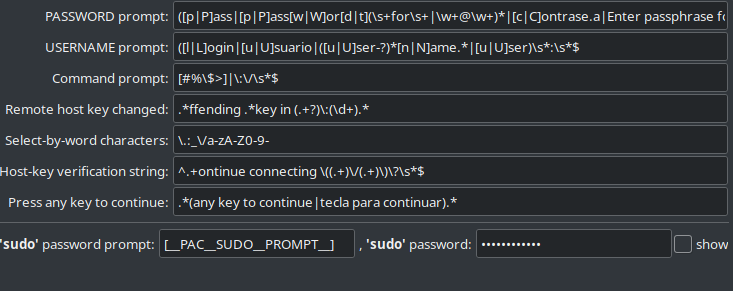

wcasanova
on 8 May 2019
Thanks :) But, mmm, what I see here is:

So there is a different in the displayed message but I don't understand why the regexp is not matching what you see.
Another thing I don't understand is the "yes/no" message that is written after the question. Any idea from where it comes ?
The problem I have here is that I don't have a Archlinux machine to test :-/
gfrenoy
on 8 May 2019
I am not sure what is causing the 2nd "yes/no" question, but I did find something that seems to match: https://github.com/openssh/openssh-portable/blob/master/sshconnect.c
Is that somehow incorporated?
I see the same output as B1tl0rd:
The authenticity of host '[hostname.domain.com]:3822 ([10.xx.xx.xx]:3822)' can't be established.
ECDSA key fingerprint is SHA256:lyoKO81TCXQHaffMaIUWNR6ZJZFKJS6q0WnxM89dJV0.
Are you sure you want to continue connecting (yes/no/[fingerprint])? yes/no
Please type 'yes', 'no' or the fingerprint:
 <-= DISCONNECTED (PRESS <ENTER> TO RECONNECT) (Thu May  9 13:12:50 2019)
I noticed when I ssh to the same machine via the terminal, that 2nd "yes/no" question is not asked, its only there when using Asbru
Mjolinir
on 9 May 2019
Mmm, I really need a similar host to reproduce the issue :-/
Can someone give me some instructions on how to get Ásbrú working on Archlinux ?
I downloaded the image from the section "HTTP Direct Downloads" on https://www.archlinux.org/download/ but when I start the machine, I only get a command prompt and did not find instructions to install Gnome and Ásbrú ...
[sorry, I'm a Ubuntu user...]
gfrenoy
on 10 May 2019
Sure, it is available in the AUR. You just need an AUR helper (
https://wiki.archlinux.org/index.php/AUR_helpers), I recommend "yay", but
you can use any youd like. Then you install it with:
yay -S asbru-cm-git
That should do it!
On Thu, May 9, 2019, 6:03 PM Gaëtan Frenoy notifications@github.com wrote:
Mmm, I really need a similar host to reproduce the issue :-/
Can someone give me some instructions on how to get Ásbrú working on
Archlinux ?I downloaded the image from the section "HTTP Direct Downloads" on
https://www.archlinux.org/download/ but when I start the machine, I only
get a command prompt and did not find instructions to install Gnome and
Ásbrú ...
[sorry, I'm a Ubuntu user...]—
You are receiving this because you authored the thread.
Reply to this email directly, view it on GitHub
https://github.com/asbru-cm/asbru-cm/issues/145#issuecomment-491084893,
or mute the thread
https://github.com/notifications/unsubscribe-auth/ABV7HGHZNA2TY2FCX46UURLPUSNU3ANCNFSM4HLJNYYQ
.
Mjolinir
on 10 May 2019
Mmm, I really need a similar host to reproduce the issue :-/
Can someone give me some instructions on how to get Ásbrú working on Archlinux ?
I downloaded the image from the section "HTTP Direct Downloads" on https://www.archlinux.org/download/ but when I start the machine, I only get a command prompt and did not find instructions to install Gnome and Ásbrú ...
[sorry, I'm a Ubuntu user...]
Hi..
https://wiki.archlinux.org/index.php/Installation_guide
http://averagelinuxuser.com/a-step-by-step-arch-linux-installation-guide/
https://www.fosslinux.com/7117/how-to-install-arch-linux-complete-guide.htm
wcasanova
on 10 May 2019
What I typically do is downloading some "live CD" of a distribution and from there, execute a few instructions to get Ásbrú working on that distribution. Said differently and even if this would be very interesting, I really don't want to spend time building a machine from scratch...
So I downloaded the Manjaro distrib ; I think it's the closer and more mature one.
After the live distrib has started, I did:
sudo pacman -Sy yay binutils make gcc pkg-config fakeroot patch gtk-engine-murrine openssh
yay -S asbru-cm-git
And now I can reproduce the issue :)
And I also now understand what is wrong with the regular expression ! It is trying to capture the yes or no options but is confused by the third option and picked "yes/no" as the first option and "[fingerprint]" as the second one.
Can you try to change it to the following:
^.+ontinue connecting \(([^/]+)\/([^/]+)(?:[^)])?\)\?\s*$
It is working for me ;-p
gfrenoy
on 11 May 2019
HI,
before "^.+ontinue connecting ((.+)\/(.+))\?\s$"
The authenticity of host 'ip (ip)' can't be established.
ECDSA key fingerprint is SHA256:########################.
Are you sure you want to continue connecting (yes/no/[fingerprint])? yes/no
Please type 'yes', 'no' or the fingerprint:
after "^.+ontinue connecting (([^/]+)\/([^/]+)(?:[^)])?)\?\s$"
The authenticity of host 'ip (ip)' can't be established.
ECDSA key fingerprint is SHA256:##########################.
Are you sure you want to continue connecting (yes/no/[fingerprint])?
wcasanova
on 11 May 2019
Looks like I did not retyped it correctly ; sorry about that, the copy/paste from the VM did not work. I forgot a "+", it should be:
^.+ontinue connecting \(([^/]+)\/([^/]+)(?:[^)]+)?\)\?\s*$
I saved the regular expression here so you can give it try on your own: https://regexr.com/4dq50
gfrenoy
on 11 May 2019
thank you, it worked
wcasanova
on 11 May 2019
This works for me as well, thank you an nice work :)
Mjolinir
on 13 May 2019
Related issues
 Frankstar
·
8Comments
wcasanova
·
17Comments
Frankstar
·
8Comments
wcasanova
·
17Comments
 rmueck
·
6Comments
rmueck
·
6Comments
 popxunga
·
7Comments
popxunga
·
7Comments
 paliasp
·
11Comments
paliasp
·
11Comments
Most helpful comment
Looks like I did not retyped it correctly ; sorry about that, the copy/paste from the VM did not work. I forgot a "+", it should be:
I saved the regular expression here so you can give it try on your own: https://regexr.com/4dq50