Arviz: Fix commented line from posterior predictive docs
Describe the bug
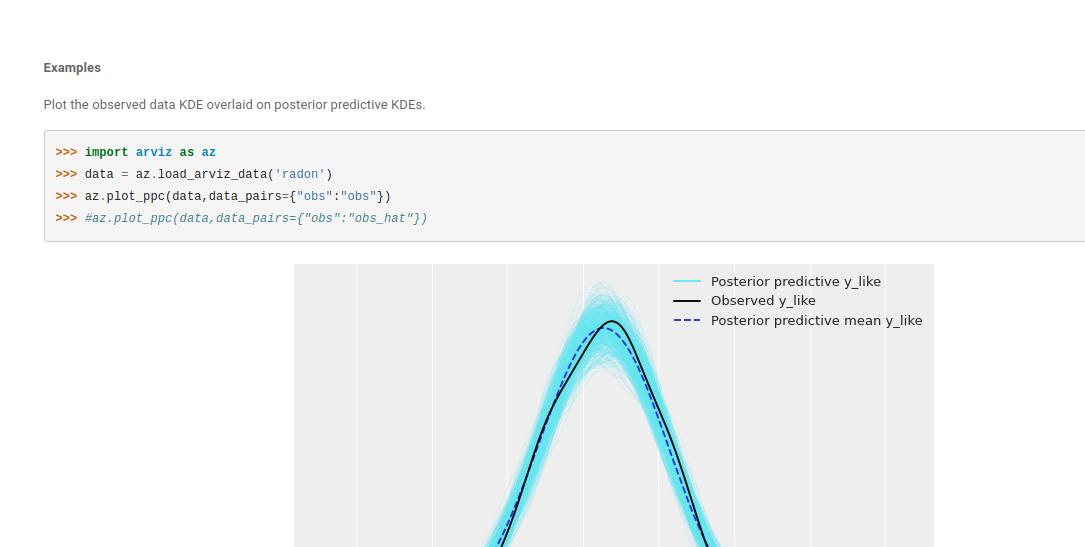
Commented line in docs does not belong
https://arviz-devs.github.io/arviz/generated/arviz.plot_ppc.html#arviz.plot_ppc
Expected behavior
Determine what sensible doc would be that does not include a commented line (See aris comment below)
 canyon289
All 23 comments
Maybe we can add a bit more text there or change it.
It is there to remind Stan (and other) users about the data_pairs
 ahartikainen
on 19 Apr 2020
ahartikainen
on 19 Apr 2020
Once #1132 is fixed we should have an example dataset from pystan to then add an example of data pairs usage in the code, not only in a comment
 OriolAbril
on 20 Apr 2020
OriolAbril
on 20 Apr 2020
Should I delete the commented line?
 elijose55
on 17 Jun 2020
elijose55
on 17 Jun 2020
Hi that would be good. If you can think of any other examples too that'd be great!
canyon289
on 20 Jun 2020
@canyon289 is this still available to update?
 ari-hacks
on 13 Jul 2020
ari-hacks
on 13 Jul 2020
I believe so. @elijose55 were you still planning on working on this? If not in ~24 hours I'll give @ari-hacks the go ahead to give it a try :)
canyon289
on 13 Jul 2020
hey @canyon289 , I'd love to know the best way to run this project locally? I tried the docs on Docker but the build errors out.
ari-hacks
on 17 Jul 2020
I think #1297 should fix the issue with building docs in docker.
OriolAbril
on 17 Jul 2020
hey @OriolAbril , thanks for the update. It looks like all the docker commands are working now except for
./scripts/container.sh --docs which throws an Extension error.
Alternatively, I don't mind running locally but I don't see a step to spin up docs locally.
ari-hacks
on 18 Jul 2020
It is quite hidden, see the paragraph right below step 4. To build docs locally you will need to install all dependencies in requirements and requirements-docs plus some extra non pip dependencies.
What is the traceback of the Extension error? Does it look related to matplotlib?
OriolAbril
on 18 Jul 2020
@ari-hacks Looks like you're getting help from Oriol but wanted to apologize for the docs erroring out on docker. I'll take a look and fix that so you or whoever else has a better experience next time
canyon289
on 18 Jul 2020
@ari-hacks I fixed the container issue and successfully got the docs to build. You're welcome to use that method, or install the libraries locally. Whatever you prefer!
Details of the error I saw for reference are in this issue ticket https://github.com/arviz-devs/arviz/issues/1303
Thank you immensely for commenting back here with the error and letting us know, and thank you in advance for your help with the docs!
Ive also assigned this issue to you to indicate to others that you're the one working on it. Also thanks for your patience
canyon289
on 18 Jul 2020
@OriolAbril and @canyon289 thanks for all the help here!
This is what I get after running ./scripts/container.sh --docs:
Extension error:
Handler <function main at 0x......> for event 'builder-inited' threw an exception
skipping /opt/arviz/examples/matplotlib/mpl_plot_autocorr.py
skipping /opt/arviz/examples/matplotlib/mpl_plot_bpv.py
skipping /opt/arviz/examples/matplotlib/mpl_plot_bpv_tstat.py
skipping /opt/arviz/examples/matplotlib/mpl_plot_compare.py
skipping /opt/arviz/examples/matplotlib/mpl_plot_density.py
skipping /opt/arviz/examples/matplotlib/mpl_plot_dist.py
skipping /opt/arviz/examples/matplotlib/mpl_plot_elpd.py
skipping /opt/arviz/examples/matplotlib/mpl_plot_energy.py
skipping /opt/arviz/examples/matplotlib/mpl_plot_ess_evolution.py
skipping /opt/arviz/examples/matplotlib/mpl_plot_ess_local.py
skipping /opt/arviz/examples/matplotlib/mpl_plot_ess_quantile.py
skipping /opt/arviz/examples/matplotlib/mpl_plot_forest.py
skipping /opt/arviz/examples/matplotlib/mpl_plot_forest_ridge.py
skipping /opt/arviz/examples/matplotlib/mpl_plot_hdi.py
running /opt/arviz/examples/matplotlib/mpl_plot_joint.py
Successful build. Find html docs in doc/build directory
I am noticing now that is does say build successful, I'm just not clear on how to run those generated docs locally.
With the other docker commands a URL is provided in the output.
ari-hacks
on 19 Jul 2020
Oh boy this one is real cryptic. @ari-hacks this might require some back and forth but I promise we'll help you get through it if you have the time. We'll both learn something along the way.
That error does look "weird" but lets see if we can ignore it. Can you go to your doc/build/_html folder and see if you see an index.html. If you do would you mind double clicking on it and seeing if it opens up the ArviZ docs in your browser? This will help us see if docs are built even in the presence of some unknown error. To answer your question directly about how to run the docs after they're built, the docs are a website so the index.html runs the docs in your browser by opening the docs locally from your computer.
I attached a screenshot of what my build looks like below for reference.

Could you also verify you have the latest version of arviz pulled from master? We had a couple issues with docs last week but Oriol and I just fixed them (We hope).
The commands most likely are (just listing them here just in case you need them)
git checkout master
git pull origin master
@ari-hacks, another thing. If its easier for you and youre comfortable with it I would be happy to live debug with you over google meet or whatever. Just let us know what fits your needs best and I can try and help. The good news is once we figure this out you should be able to work on any part of ArviZ :). It's just the first couple of times where this issues arise
canyon289
on 19 Jul 2020
With current info my guess is that docs are being built but some of the code is erroring out due to matplotlib 3.3 which is also breaking our tests. That would mean that index.html can be opened but some images or even pages will be missing
OriolAbril
on 19 Jul 2020
Thanks, guys, this is helpful! I think perhaps I am missing a step?
I am synced with ArviZ's master in my forked repo (I even deleted my local clone and re-cloned just in case there is some weirdness there).
These are the steps I am taking:
- clear cache
./scripts/container.sh --clear-cache - build
/scripts/container.sh --build - run test
./scripts/container.sh --test - build docs
./scripts/container.sh --docs - navigate to doc/build, this is the output:
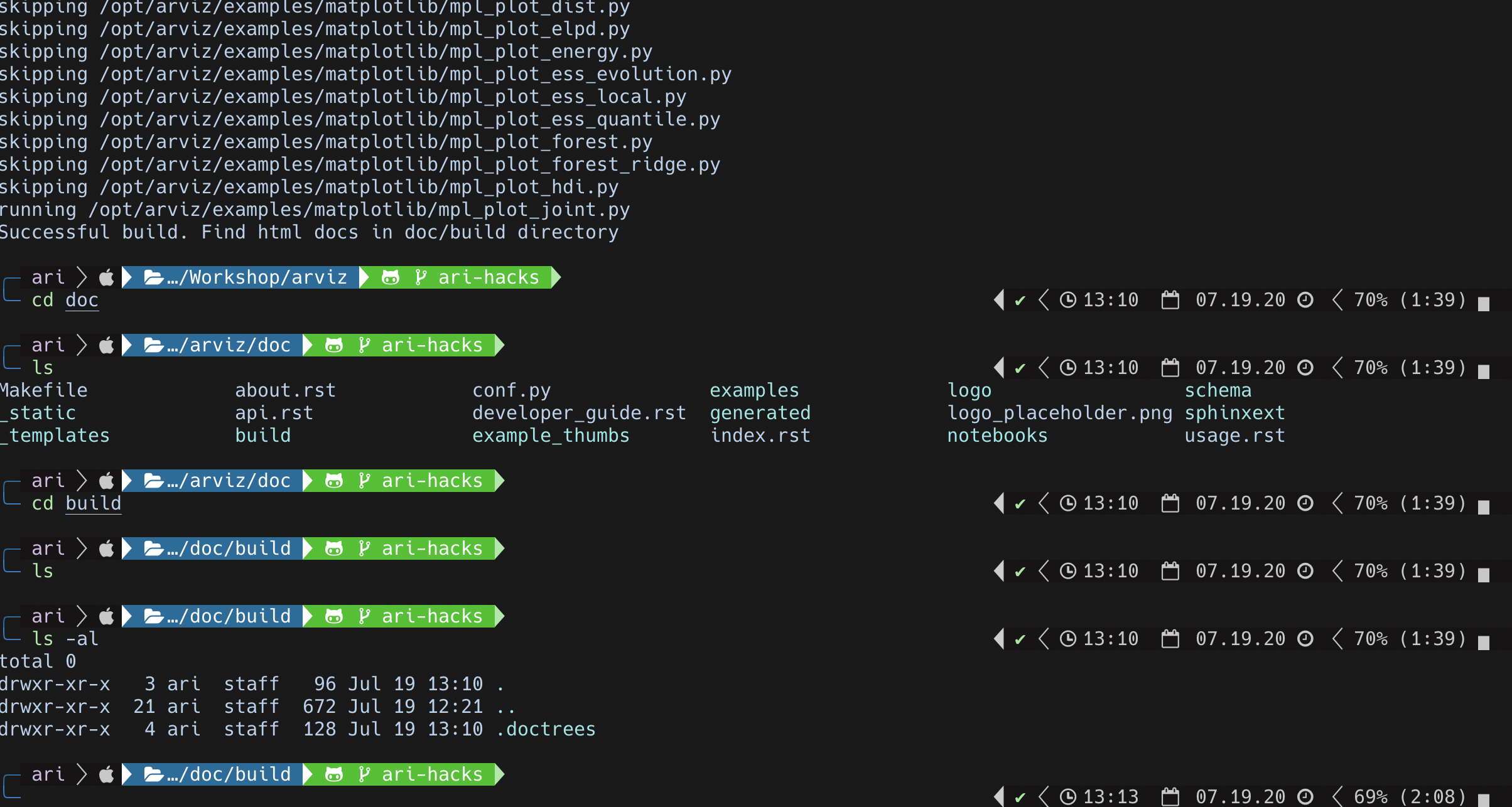
@canyon289, I noticed from your screenshot you are in doc/_build instead of doc/build I do not see doc/_build on my end.
If connecting remotely would help troubleshoot that would be great too!
ari-hacks
on 19 Jul 2020
First off your terminal is beautiful. If I can ask what are you using? It looks amazing.
As for the issue on hand now I'm baffled. Turns out the _build directory was an old one. I started fresh and running the --docs command generated a arviz/doc/build directory with an index.html for me just like what you're getting, but now I' m not sure what's going....
I noticed that in your doc generation there seems to be a lot of skips for some reason. Do you mind running this command ./scripts/container.sh --docs > doc_build_logs.txt and then posting the log file? I've attached mine for reference.
I'm hoping by looking at the logs we can figure it out together. I feel like were close though!
 canyon289
on 20 Jul 2020
canyon289
on 20 Jul 2020
@canyon289 , I am up and running it looks like it was an issue with matplotlib.
@OriolAbril put in a fix for it earlier in the day! 🎉
Thanks again for all the help here, I'm looking forward to contributing more to this project.
Thanks! The terminal is a mix of iTerm2 + Oh My Zsh + powerlevel10k(on top of 9) + some custom powerleve10k config🙂
ari-hacks
on 20 Jul 2020
canyon289
on 21 Jul 2020
@ari-hacks if you have a second do you have any feedback for the new developer process? What worked, what didn't? How can we make your next experience better, and the experience of next person who tries to contribute to ArviZ?
canyon289
on 22 Jul 2020
@canyon289 , working on this project was a great experience! I really appreciated all the help with getting up and running. After Docker was building correctly is was a smooth experience and navigating around the code was pretty easy. 🙂
The only thing that might be more helpful is updating the instructions a bit under Building documentation with Docker to let contributors know they have to rebuild with the --docs command after changes and the index.html file has to be dragged and dropped into the browser.
ari-hacks
on 22 Jul 2020
Thank you for the feedback! Added a new issue ticket to help track
canyon289
on 22 Jul 2020
Related issues
 narendramukherjee
·
6Comments
narendramukherjee
·
6Comments
 fonnesbeck
·
5Comments
fonnesbeck
·
5Comments
 fbartolic
·
3Comments
fbartolic
·
3Comments
 eigenfoo
·
6Comments
canyon289
·
3Comments
eigenfoo
·
6Comments
canyon289
·
3Comments
Most helpful comment
@canyon289 , I am up and running it looks like it was an issue with matplotlib.
@OriolAbril put in a fix for it earlier in the day! 🎉
Thanks again for all the help here, I'm looking forward to contributing more to this project.
Thanks! The terminal is a mix of iTerm2 + Oh My Zsh + powerlevel10k(on top of 9) + some custom powerleve10k config🙂