Many users have this question: how to connect to remote arthas agent in different network environments?
The user can't connect to the remote IP directly, so we need the proxy.
browser <-> arthas tunnel server <-> arthas tunnel client <-> arthas agent
 hengyunabc
All 3 comments
测试版本
测试arthas的 tunnel 功能
用户只需要下载 arthas-3.1.2-SNAPSHOT-bin.zip ,解压后使用。
使用时增加参数--tunnel-server:
比如:as.sh --tunnel-server 'ws://47.75.156.201:7777/ws'
attach成功之后,会打印出agentId,比如:
  ,---.  ,------. ,--------.,--.  ,--.  ,---.   ,---.
 /  O  \ |  .--. ''--.  .--'|  '--'  | /  O  \ '   .-'
|  .-.  ||  '--'.'   |  |   |  .--.  ||  .-.  |`.  `-.
|  | |  ||  |\  \    |  |   |  |  |  ||  | |  |.-'    |
`--' `--'`--' '--'   `--'   `--'  `--'`--' `--'`-----'


wiki      https://alibaba.github.io/arthas
tutorials https://alibaba.github.io/arthas/arthas-tutorials
version   3.1.2.20190830153716
pid       86183
time      2019-08-30 15:40:53
id        URJZ5L48RPBR2ALI5K4V
如果是启动时没有连接到 tunnel server,也可以在后续自动重连成功之后,通过 session命令来获取 agentId:
[arthas@86183]$ session
 Name           Value
-----------------------------------------------------
 JAVA_PID       86183
 SESSION_ID     f7273eb5-e7b0-4a00-bc5b-3fe55d741882
 AGENT_ID       URJZ5L48RPBR2ALI5K4V
 TUNNEL_SERVER  ws://47.75.156.201:7777/ws
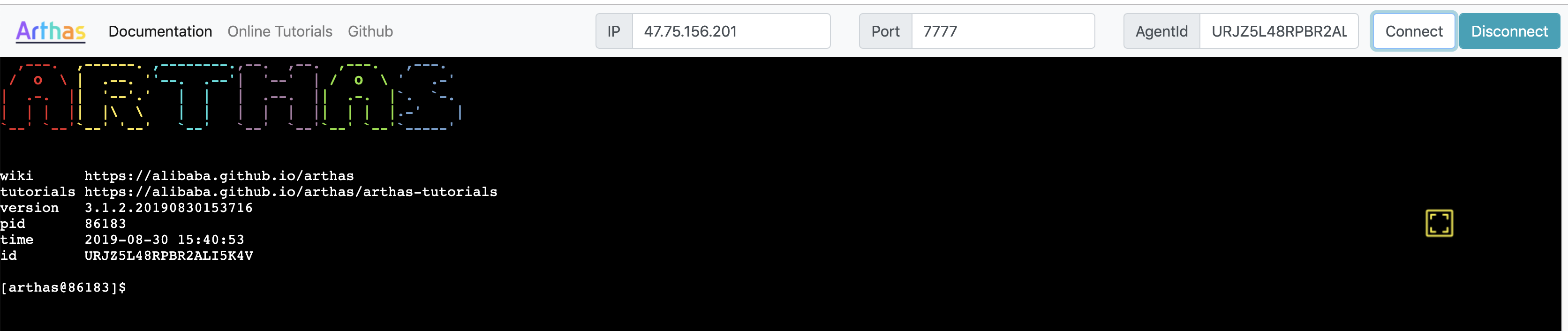
然后访问 http://47.75.156.201:8080/ ,输入 agentId,就可以连接到本机上的arthas了。
测试 arthas tunnel server
下载 arthas-tunnel-server-3.1.2-SNAPSHOT.jar.zip ,解压得到一个spring boot fat jar,直接 java -jar 启动即可。
启动之后访问 8080 可以看到web页面。 访问 http://localhost:8080/actuator/arthas 可以查看当前的连接信息。
需要登陆,用户名是 arthas ,密码在启动日志里会打印出来。
hengyunabc
on 30 Aug 2019
👍3
可以生产用了?
 papalian
on 3 Sep 2019
papalian
on 3 Sep 2019
@papalian 3.1.2版本发布了,可以使用 https://alibaba.github.io/arthas/web-console.html
hengyunabc
on 9 Sep 2019
Was this page helpful?
0 / 5 - 0 ratings
Related issues
hengyunabc
·
4Comments
 xmt1139057136
·
3Comments
xmt1139057136
·
3Comments
 x334085347
·
5Comments
x334085347
·
5Comments
 joey-happy
·
3Comments
joey-happy
·
3Comments
 lanshiqin
·
7Comments
lanshiqin
·
7Comments
Most helpful comment
测试版本
arthas-3.1.2-SNAPSHOT-bin.zip
测试arthas的 tunnel 功能
用户只需要下载 arthas-3.1.2-SNAPSHOT-bin.zip ,解压后使用。
使用时增加参数
--tunnel-server:比如:
as.sh --tunnel-server 'ws://47.75.156.201:7777/ws'attach成功之后,会打印出agentId,比如:
如果是启动时没有连接到 tunnel server,也可以在后续自动重连成功之后,通过 session命令来获取 agentId:
然后访问 http://47.75.156.201:8080/ ,输入 agentId,就可以连接到本机上的arthas了。
测试 arthas tunnel server
下载 arthas-tunnel-server-3.1.2-SNAPSHOT.jar.zip ,解压得到一个spring boot fat jar,直接 java -jar 启动即可。
启动之后访问 8080 可以看到web页面。 访问 http://localhost:8080/actuator/arthas 可以查看当前的连接信息。
需要登陆,用户名是 arthas ,密码在启动日志里会打印出来。