Arrow: Visual differentiatior in docs for `Beginner` vs `Advanced` content.
Often times like in the case of Validation there are certain snippets and paragraphs that are considered advanced and for people that may already be familiar with FP. We need a visual way to structure and differentiate areas that are beginner friendly from others that are considered more advance. Perhaps a badge or page / content separator that we can use as divider. Ideas are more than welcome, we should probably see how other libs or projects do this kind of stuff before we commit to an implementation across the entire set of docs.
 raulraja
All 9 comments
Aren't doc snippets per datatype / typeclass kind of already ordered from most trivial examples to more complex ones from top to bottom? Maybe it's just a matter of gradually increasing complexity for each docs page. If there's a big complexity gap then it could mean we're lacking some intermediate examples.
 JorgeCastilloPrz
on 20 May 2018
JorgeCastilloPrz
on 20 May 2018
Trying to find some examples, but all libraries I check got differentiated sections between basic and advanced content from a higher point of view, like Scala, Angular, ReactJs or MDN ones:
https://reactjs.org/docs/hello-world.html
https://docs.scala-lang.org/
https://angular.io/docs
https://developer.mozilla.org/en-US/docs/Web/JavaScript
Or doesn't make any difference in content level (which are the majority, sadly).
In the case of Arrow i would add just a badge telling the reader that the following content might not be suitable for him/her if not previously familiarized with FP concepts. Just a visual indicator, that on hover give this kind of explanation would suffice IMO.
 calvellido
on 22 May 2018
calvellido
on 22 May 2018
Sounds good, can you coordinate with Isra to get a preview of what those
may look like in a documentation page like the ones we have now?
On Tue, May 22, 2018 at 10:29 AM Juan Valencia notifications@github.com
wrote:
Trying to find some examples, but all libraries I check got differentiated
sections between basic and advanced content from a higher point of view,
like Scala, Angular, ReactJs or MDN ones:https://reactjs.org/docs/hello-world.html
https://docs.scala-lang.org/
https://angular.io/docs
https://developer.mozilla.org/en-US/docs/Web/JavaScriptOr doesn't make any difference in content level (which are the majority,
sadly).In the case of Arrow i would add a just badge telling the reader that the
following content might not be suitable for him/her if not previously
familiarized with FP concepts. Just a visual indicator, that on hover give
this kind of explanation would suffice IMO.—
You are receiving this because you authored the thread.
Reply to this email directly, view it on GitHub
https://github.com/arrow-kt/arrow/issues/850#issuecomment-390906814, or mute
the thread
https://github.com/notifications/unsubscribe-auth/AAb4XGLVu_h3Cyvd3W2DRXYdNzIkjxRxks5t08xbgaJpZM4UGKkL
.>
Raul
raulraja
on 22 May 2018
Will do! :+1:
calvellido
on 22 May 2018
We have a final design proposal. Now we can implement in doc ;)
- https://invis.io/UZJL42WCX3W#/298806497_Arrow-Documentation
 israelperezglez
on 28 May 2018
israelperezglez
on 28 May 2018
looks good! :)
JorgeCastilloPrz
on 28 May 2018
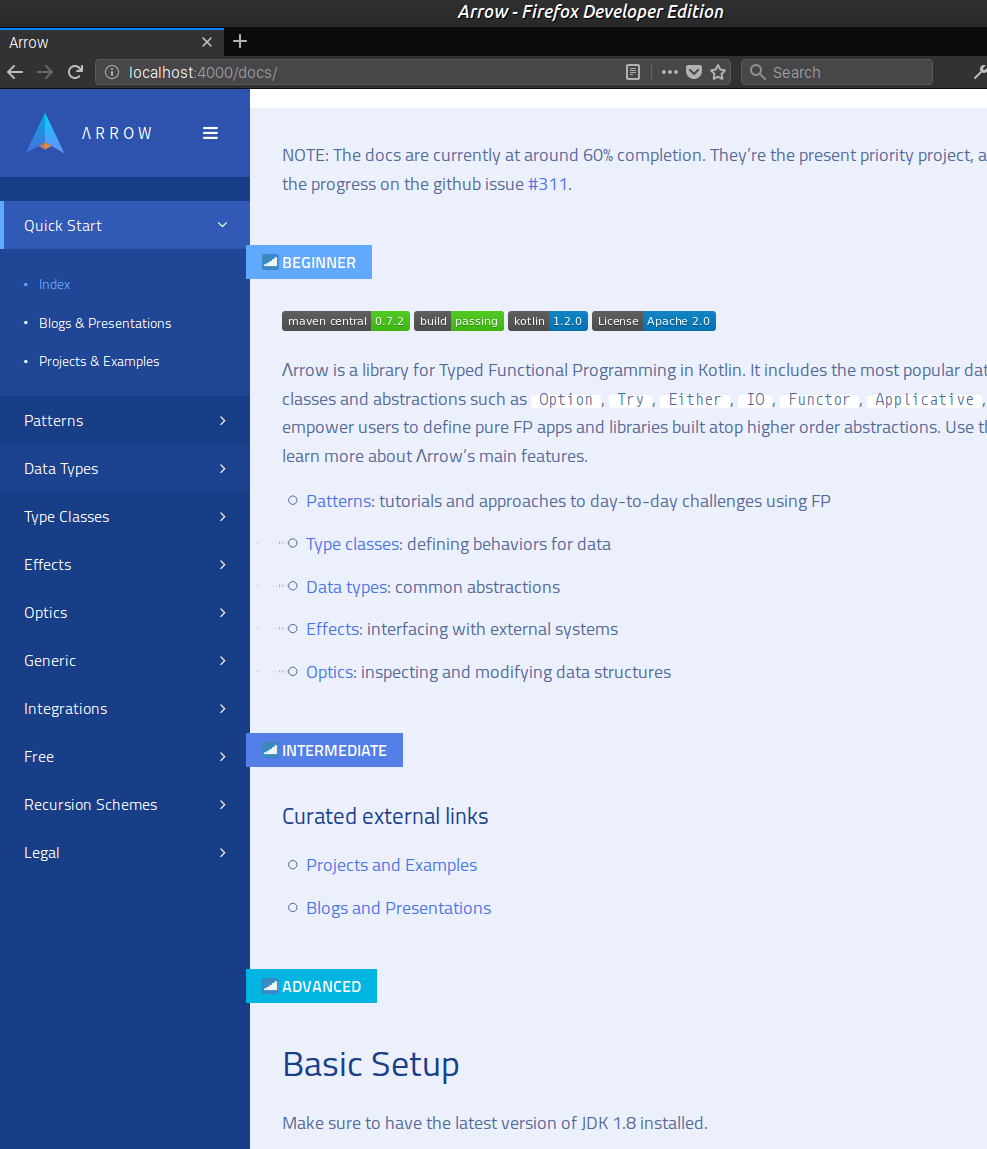
WIP:
calvellido
on 12 Jun 2018
@calvellido good work ;)
israelperezglez
on 13 Jun 2018
This is the final proposed appearance:
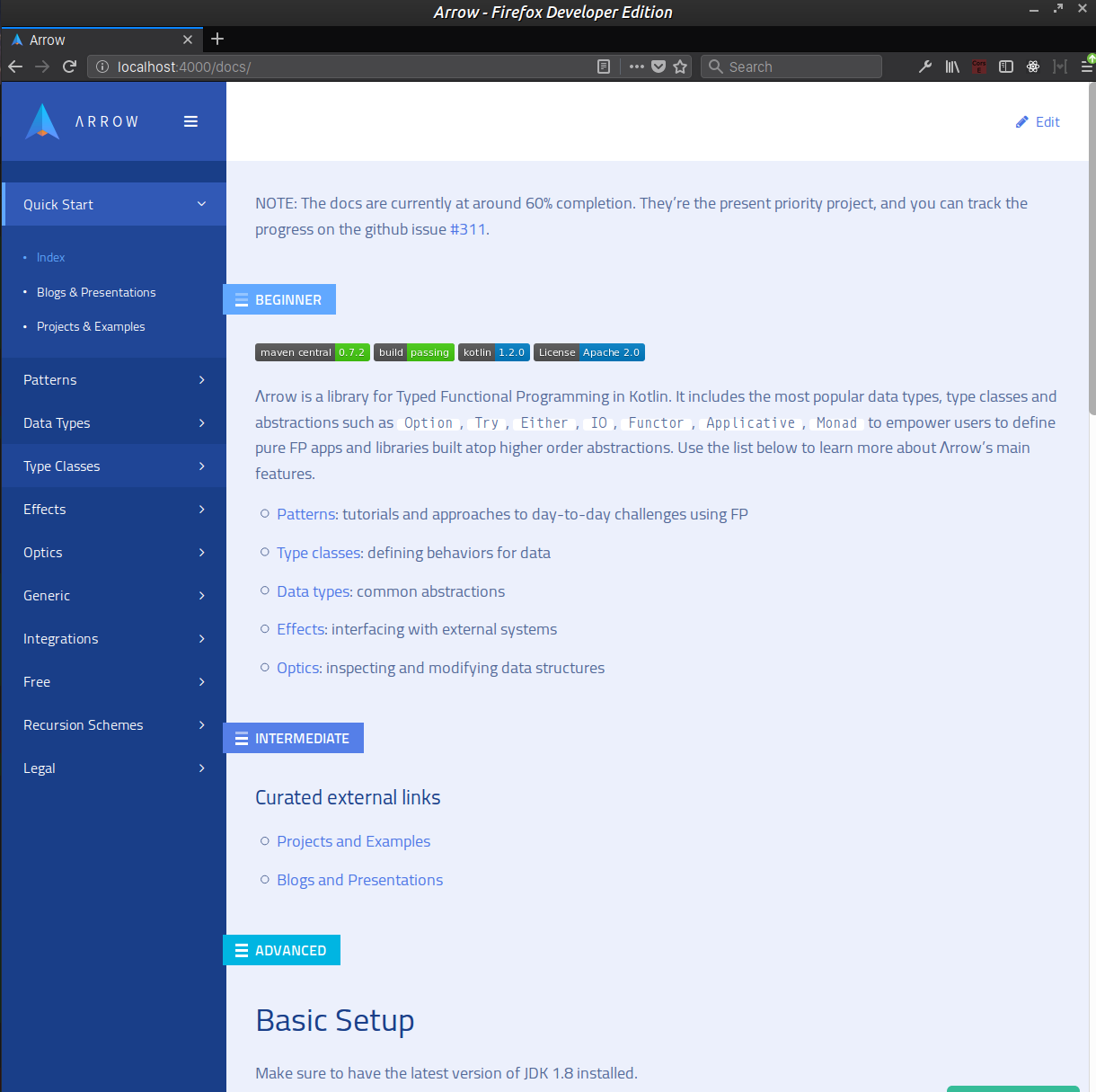
To use it on the markdown files please add this kind of snippet, with the desired level:
{:.beginner}
beginner
An example would be:
### Lorem ipsum dolor sit amet, consectetur adipiscing elit

{:.beginner}
beginner

This is a beginner block. Lorem ipsum dolor sit amet, consectetur adipiscing elit,
sed do eiusmod tempor incididunt ut labore et dolore magna aliqua. Ut enim ad
minim veniam, quis nostrud exercitation ullamco laboris nisi ut aliquip ex ea
commodo consequat.

{:.intermediate}
intermediate

This is an intermediate block. Lorem ipsum dolor sit amet, consectetur adipiscing elit,
sed do eiusmod tempor incididunt ut labore et dolore magna aliqua. Ut enim ad
minim veniam, quis nostrud exercitation ullamco laboris nisi ut aliquip ex ea
commodo consequat.

{:.advanced}
advanced

This is an advanced block. Lorem ipsum dolor sit amet, consectetur adipiscing elit,
sed do eiusmod tempor incididunt ut labore et dolore magna aliqua. Ut enim ad
minim veniam, quis nostrud exercitation ullamco laboris nisi ut aliquip ex ea
commodo consequat.
Related issues
 pakoito
·
3Comments
pakoito
·
3Comments
pakoito
·
3Comments
pakoito
·
3Comments
 ovu
·
4Comments
ovu
·
4Comments
 JLLeitschuh
·
4Comments
pakoito
·
4Comments
JLLeitschuh
·
4Comments
pakoito
·
4Comments
Most helpful comment
WIP: