Armory: Canvas Get Slider and Canvas Get Checkbox are causing C build failure
I can't export my project and i am getting a warning about "scene don't have an active camera" but i have a camera in the scene.
I get this error too:
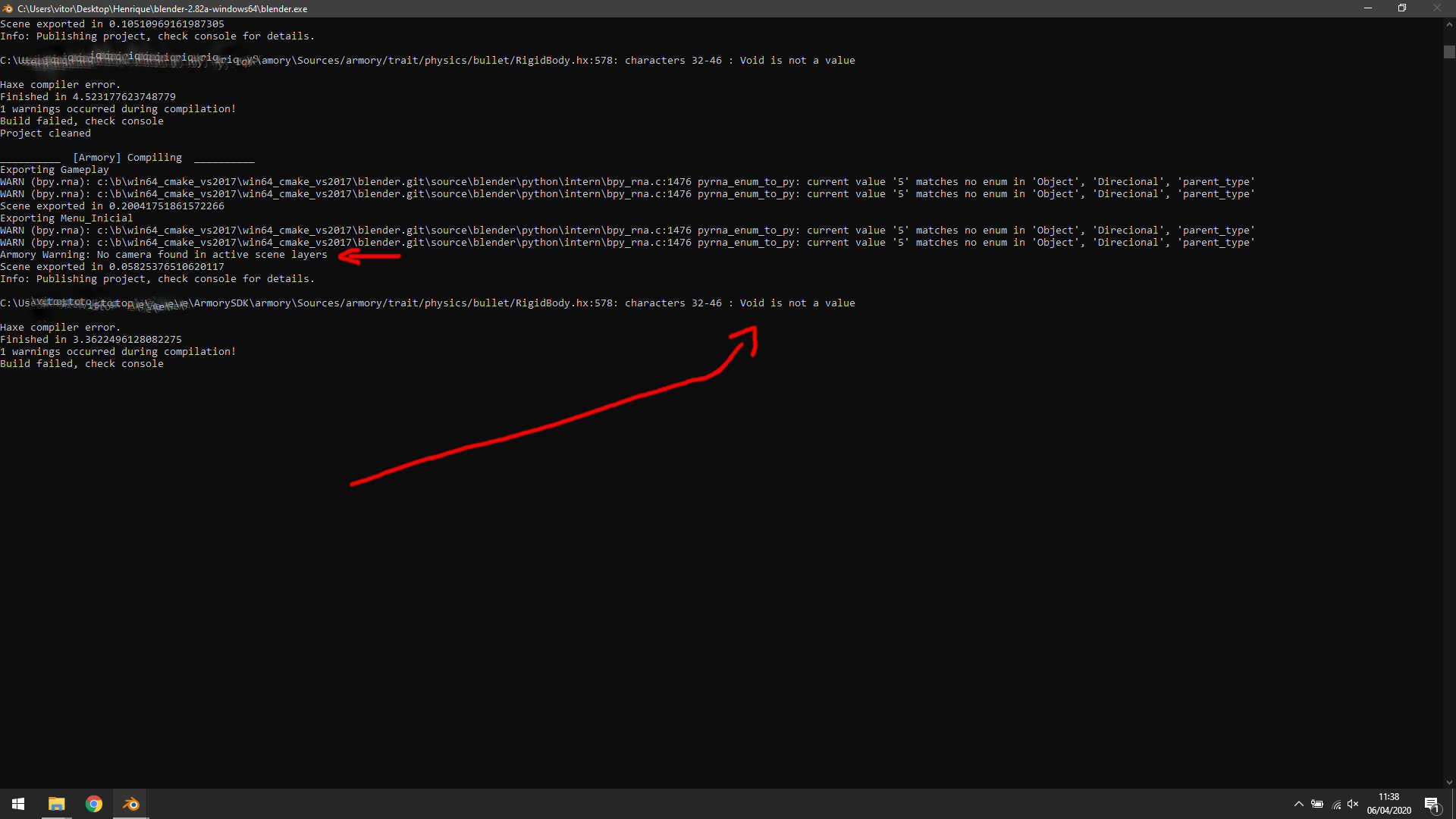
If someone can clarify this for me, i will be gratefully.
 knowledgenude
All 10 comments
This actually looks like two different issues:
- The
Void is not a valueerror has been fixed a few days ago (Link), you should update your SDK to the latest Git version. The camera message is not an error but a warning instead. With the first issue resolved, the game should run but might have a different behaviour than expected.
Is the camera linked from another .blend file or is it actually an object of the exported scene? I had some problems in the past with cameras from linked collections, they often don't seem to work. Can you share a minimal example file of the issue?
Regardless of that, is the camera set in
Properties > Scene Properties > Scene?
 MoritzBrueckner
on 6 Apr 2020
MoritzBrueckner
on 6 Apr 2020
Thanks for the answer, @MoritzBrueckner. I will try to update ArmorySDK trough the Git now and see what happens.
The camera is properly set in scene propeties, i really don't know what is happening. Maybe i try to reproduce this in another .blend file later.
knowledgenude
on 6 Apr 2020
Warning related to cameras in scene continues even with the update on SDK. The problem seems to be solved by deleting the cameras and adding new cameras to the scene, but when i do it, the screen turns black. I will clean the project by deleting unecessary stuff, etc. later and test again. It does not seems to be related to the cameras.
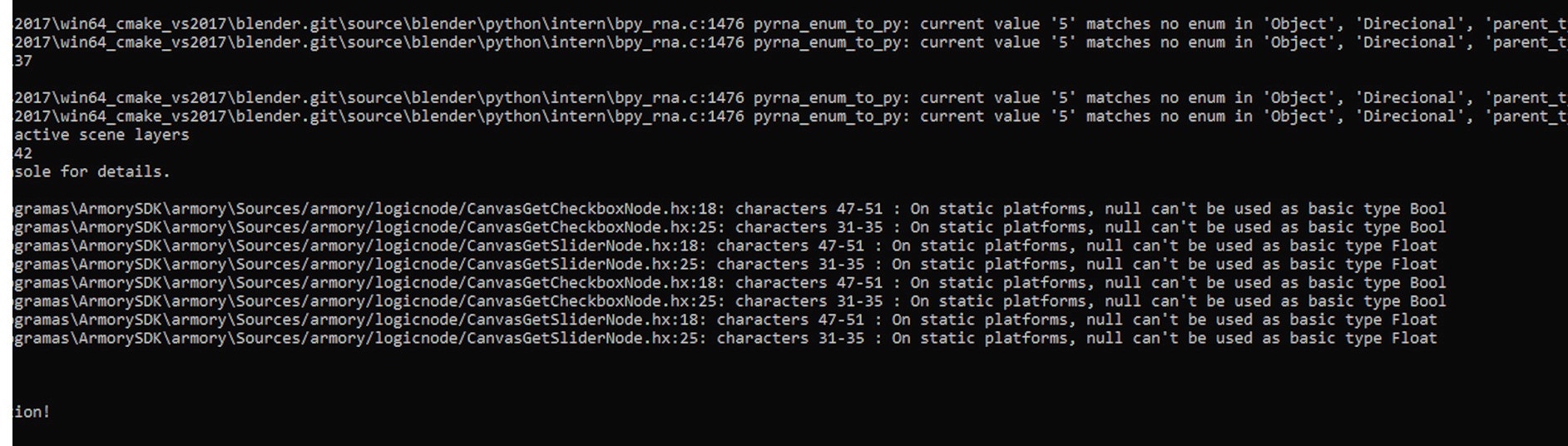
Git update solved the issue related to bullet. But now i got another issue, probably related to wrong logic nodes i do. Can someone tell me what it mean?
When i can export the project to C, i will test Krom exporting again, because i got sucessfully export to it but i got black screen.
Is this problem related to wrong logic or are the logic nodes that i have used bugged?
knowledgenude
on 6 Apr 2020
It looks the logic nodes are not supported on static targets (C for example) indeed, they return null in some cases (for example if the canvas element was not found) but it should be a Bool type value.
The issue above occurs when there is no canvas object (or it is not ready yet) or the given element is not found.
I'm not really used to the node system (using Haxe all the time) so I'm not sure if raising an error (e.g. CanvasGetCheckboxNode: Element [name] was not found!) or returning a default value (false or 0.0 e.g.) + displaying a warning is the better way here. What do you think? Are there cases in which there should be no error when some elements don't exist?
If you understand Haxe, that's my proposed fix for CanvasGetCheckboxNode.hx (the other nodes would then be fixed similarly):
Before:
override function get(from: Int) {
    if (canvas == null) canvas = Scene.active.getTrait(CanvasScript);
    if (canvas == null) canvas = Scene.active.camera.getTrait(CanvasScript);
    if (canvas == null || !canvas.ready) return null;

    // This Try/Catch hacks around an issue where the handles are
    // not created yet, even though canvas.ready is true.
    try {
        return canvas.getHandle(inputs[0].get()).selected;
    }
    catch (e: Dynamic) { return null; }
}
After:
override function get(from: Int) {
    if (canvas == null) canvas = Scene.active.getTrait(CanvasScript);
    if (canvas == null) canvas = Scene.active.camera.getTrait(CanvasScript);
    if (canvas == null) throw "CanvasGetCheckboxNode: Canvas was not found!";
    if (!canvas.ready) {
        trace("CanvasGetCheckboxNode: Canvas is not ready, returning 'false'");
        return false;
    }

    // This Try/Catch hacks around an issue where the handles are
    // not created yet, even though canvas.ready is true.
    try {
        return canvas.getHandle(inputs[0].get()).selected;
    }
    catch (e: Dynamic) {
        throw 'CanvasGetCheckboxNode: Element "${inputs[0].get()}" was not found!';
    }
}
The problem with this solution is that it basically bypasses the workaround described in the comment above the try block.
@Sandy10000 You have written those nodes, what do you think?
Another problem with this solution is that there would be error messages on every frame, but it's just a minor issue.
@luboslenco What do you think about an error handler class with a method throwOnce(message: String) that creates an unique ID with a macro (like in Zui's handle system) for every line calling that method and only throws an error if the error with that ID is not raised already?
MoritzBrueckner
on 6 Apr 2020
I am not a programmer, but i think that i understand what you do in your code. When Checkbox return null, you change it to a string, right? And you do exactly what it need to be fixed. I tested the Canvas Get Slider node and Canvas Get Check node and it's bugged. You simply can't export any project if these nodes are on some object trait. Even if these nodes are alone in the whole scene, the build will failure.
Here is the test file
:
Get Slider and Get Check issue.zip
knowledgenude
on 6 Apr 2020
Yep, it is an compile error so it will fail even if they are used correctly, didn't notice that.
You are almost right, but instead of returning null it returns false in one case and in all the other cases, it raises an error (so it just "quits" the calculation for that frame) with the throw "Error message" syntax. Just returning false in all cases would mean that the error might remain unnoticed by most users.
The proposed fix works, yes, but I don't know if that is true for all edge cases and if that new behaviour is intended. Maybe there is some better way, that's why I asked Sandy10000.
Edit: because you changed the title of the issue: the camera problem is still there right? What about opening a separate issue for that if there is not already one?
MoritzBrueckner
on 6 Apr 2020
I just figured out how to force the warning with the camera:
Create a new file
Create a camera on the scene
Create a new scene with new settings
Create another camera in the created scene
Start the player
Expected: Armory will return a camera warning that does not exist in the scene, even with a camera in each scene.
Did you think that worth a new topic? Or it is a problem with Blender scenes and no related to Armory? I will create just to ensure.
knowledgenude
on 6 Apr 2020
Did you think that worth a new topic?
Yes, absolutely, it is an Armory problem.
MoritzBrueckner
on 6 Apr 2020
Should work the same now like in Krom with https://github.com/armory3d/armory/commit/4c3332858ef0f397d898b3050fd86f80e47868eb. The compiler assumed a return type of Bool but it should have been Null<Bool>. When null is returned then element does not exist.
 luboslenco
on 7 Apr 2020
luboslenco
on 7 Apr 2020
I was late to notice the message. The problem with the canvas node seems to have been solved already.
Thanks to @knowledgenude for reporting bugs and @MoritzBrueckner and @luboslenco for their support.
 Sandy10000
on 8 Apr 2020
Sandy10000
on 8 Apr 2020
Related issues
 HeadClot
·
3Comments
HeadClot
·
3Comments
 donalffons
·
3Comments
donalffons
·
3Comments
 DevMagicLord
·
3Comments
DevMagicLord
·
3Comments
 Nos-
·
4Comments
Nos-
·
4Comments
 BrahRah
·
3Comments
BrahRah
·
3Comments
Most helpful comment
Should work the same now like in Krom with https://github.com/armory3d/armory/commit/4c3332858ef0f397d898b3050fd86f80e47868eb. The compiler assumed a return type of
Boolbut it should have beenNull<Bool>. When null is returned then element does not exist.