Argo: Artifact/parameter failure should not be fatal if step/task condition is false
Checklist:
- [x] I've included the version.
- [x] I've included reproduction steps.
- [x] I've included the workflow YAML.
- [x] I've included the logs.
What happened:
I have two steps that I would like to run under some condition. The first step creates an artifact that is consumed by the second. When the condition evaluates to false, the second step fails the entire workflow
What you expected to happen:
The workflow should ignore this resolution error and just skip the step.
How to reproduce it (as minimally and precisely as possible):
I've added false conditions to this example:
apiVersion: argoproj.io/v1alpha1
kind: Workflow
metadata:
  generateName: conditional-artifact-passing-
spec:
  entrypoint: artifact-example
  templates:
  - name: artifact-example
    steps:
    - - name: generate-artifact
        template: whalesay
        when: false
    - - name: consume-artifact
        template: print-message
        when: false
        arguments:
          artifacts:
          - name: message
            from: "{{steps.generate-artifact.outputs.artifacts.hello-art}}"

  - name: whalesay
    container:
      image: docker/whalesay:latest
      command: [sh, -c]
      args: ["sleep 1; cowsay hello world | tee /tmp/hello_world.txt"]
    outputs:
      artifacts:
      - name: hello-art
        path: /tmp/hello_world.txt

  - name: print-message
    inputs:
      artifacts:
      - name: message
        path: /tmp/message
    container:
      image: alpine:latest
      command: [sh, -c]
      args: ["cat /tmp/message"]
The result:
Status:              Failed
Message:             Unable to resolve: {{steps.generate-artifact.outputs.artifacts.hello-art}}
Anything else we need to know?:
Environment:
- Argo version:
$ argo version
argo: v2.4.1
  BuildDate: 2019-10-08T23:14:59Z
  GitCommit: d7f099992d8cf93c280df2ed38a0b9a1b2614e56
  GitTreeState: clean
  GitTag: v2.4.1
  GoVersion: go1.11.5
  Compiler: gc
  Platform: linux/amd64
- Kubernetes version :
$ kubectl version -o yaml
clientVersion:
  buildDate: "2019-08-19T11:13:54Z"
  compiler: gc
  gitCommit: 2d3c76f9091b6bec110a5e63777c332469e0cba2
  gitTreeState: clean
  gitVersion: v1.15.3
  goVersion: go1.12.9
  major: "1"
  minor: "15"
  platform: linux/amd64
serverVersion:
  buildDate: "2020-01-15T17:47:46Z"
  compiler: gc
  gitCommit: 2c6d0ee462cee7609113bf9e175c107599d5213f
  gitTreeState: clean
  gitVersion: v1.14.8-gke.33
  goVersion: go1.12.11b4
  major: "1"
  minor: 14+
  platform: linux/amd64
Message from the maintainers:
If you are impacted by this bug please add a 👍 reaction to this issue! We often sort issues this way to know what to prioritize.
 samath117
All 11 comments
Just to add a little information, I am seeing this issue on Argo v2.7.0 and using DAG instead of steps.
Not sure if that's helpful, but I was about to file an issue myself.
 sudermanjr
on 6 Apr 2020
sudermanjr
on 6 Apr 2020
I have same issue. My gitlab-pipeline workflow failed when skipped clone-repository step. Because build-image step can't resolve artifacts from clone-repository step, but build-image should be skipped and workflow should not failed.
              templates:
              - name: gitlab-pipeline
                steps:·
                - - name: prepare-environment
                    template: prepare-environment
                    arguments:
                      parameters:
                      - name: message
                        value: "{{workflow.parameters.message}}"
                - - name: clone-repository
                    template: clone-repository
                    when: "{{steps.prepare-environment.outputs.parameters.event-name}} == tag_push"
                    arguments:
                      artifacts:
                      - name: cloudevent
                        from: "{{steps.prepare-environment.outputs.artifacts.cloudevent}}"
                      - name: environment
                        from: "{{steps.prepare-environment.outputs.artifacts.environment}}"
                - - name: build-image
                    template: build-image
                    when: "{{steps.prepare-environment.outputs.parameters.event-name}} == tag_push"
                    arguments:
                      artifacts:
                      - name: environment
                        from: "{{steps.prepare-environment.outputs.artifacts.environment}}"
                      - name: repository
                        from: "{{steps.clone-repository.outputs.artifacts.repository}}"
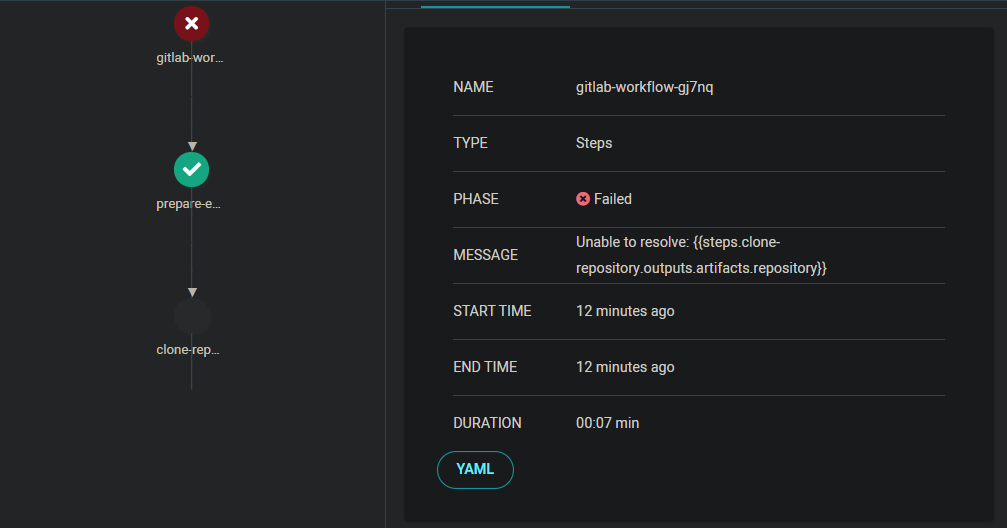
 Eji4h
on 9 Apr 2020
Eji4h
on 9 Apr 2020
Fixed by #2657. Should be on the next release
 simster7
on 10 Apr 2020
simster7
on 10 Apr 2020
I submitted the same workflow after updating to 2.7.2 and I am still getting the issue.
Name:                artifact-passing-dqxhs
Namespace:           kepler-feature-eks
ServiceAccount:      argo
Status:              Error
Created:             Mon Apr 13 11:42:47 -0600 (13 seconds ago)
Started:             Mon Apr 13 11:42:47 -0600 (13 seconds ago)
Finished:            Mon Apr 13 11:42:47 -0600 (13 seconds ago)
Duration:            0 seconds

STEP                       TEMPLATE       PODNAME  DURATION  MESSAGE
 ⚠ artifact-passing-dqxhs  main-dag
 ├-⚠ consume-artifact      print-message                     Unable to resolve: {{tasks.generate-artifact.outputs.artifacts.hello-art}}
 └-○ generate-artifact     whalesay                          when 'false' evaluated false
This is the workflow:
# This example demonstrates the ability to pass artifacts
# from one step to the next.
apiVersion: argoproj.io/v1alpha1
kind: Workflow
metadata:
  generateName: artifact-passing-
spec:
  entrypoint: main-dag
  serviceAccountName: argo
  templates:
  - name: main-dag
    dag:
      tasks:
        - name: generate-artifact
          template: whalesay
          when: false
        - name: consume-artifact
          dependencies: [generate-artifact]
          when: false
          template: print-message
          arguments:
            artifacts:
            - name: message
              from: "{{tasks.generate-artifact.outputs.artifacts.hello-art}}"

  - name: whalesay
    container:
      image: docker/whalesay:latest
      command: [sh, -c]
      args: ["sleep 1; cowsay hello world | tee /tmp/hello_world.txt"]
    outputs:
      artifacts:
      - name: hello-art
        path: /tmp/hello_world.txt

  - name: print-message
    inputs:
      artifacts:
      - name: message
        path: /tmp/message
    container:
      image: alpine:latest
      command: [sh, -c]
      args: ["cat /tmp/message"]
@sudermanjr Will take a look today
simster7
on 13 Apr 2020
@sudermanjr I wasn't able to duplicate this on 2.7.2 – the workflow succeeded as expected for me. Could you provide your workflow-controller logs?
simster7
on 13 Apr 2020
In fact, there is a test case with the same Workflow to ensure that it doesn't fail:
https://github.com/argoproj/argo/blob/master/workflow/controller/dag_test.go#L55-L113/2bc0bd9c85f34d63902fbacec93500feee896bf4/workflow/controller/dag_test.go#L44
simster7
on 13 Apr 2020
Yeah, that's really strange. I'll do some more digging on my end and see if there's something I missed when I updated.
Here's the logs pertaining to that workflow
argo-kepler-feature-eks-workflow-controller-8d958bbcc-mj4gw controller time="2020-04-13T21:01:35Z" level=info msg="Processing workflow" namespace=kepler-feature-eks workflow=artifact-passing-5mxhp
argo-kepler-feature-eks-workflow-controller-8d958bbcc-mj4gw controller time="2020-04-13T21:01:35Z" level=info msg="Updated phase  -> Running" namespace=kepler-feature-eks workflow=artifact-passing-5mxhp
argo-kepler-feature-eks-workflow-controller-8d958bbcc-mj4gw controller time="2020-04-13T21:01:35Z" level=info msg="DAG node {artifact-passing-5mxhp artifact-passing-5mxhp artifact-passing-5mxhp DAG main-dag nil    Running   2020-04-13 21:01:35.200567974 +0000 UTC 0001-01-01 00:00:00 +0000 UTC   <nil> nil nil [] []} initialized Running" namespace=kepler-feature-eks workflow=artifact-passing-5mxhp
argo-kepler-feature-eks-workflow-controller-8d958bbcc-mj4gw controller time="2020-04-13T21:01:35Z" level=info msg="All of node artifact-passing-5mxhp.generate-artifact dependencies [] completed" namespace=kepler-feature-eks workflow=artifact-passing-5mxhp
argo-kepler-feature-eks-workflow-controller-8d958bbcc-mj4gw controller time="2020-04-13T21:01:35Z" level=info msg="Skipped node {artifact-passing-5mxhp-1054104208 artifact-passing-5mxhp.generate-artifact generate-artifact Skipped whalesay nil    Skipped artifact-passing-5mxhp when 'false' evaluated false 2020-04-13 21:01:35.200703848 +0000 UTC 2020-04-13 21:01:35.200703848 +0000 UTC   <nil> nil nil [] []} initialized Skipped (message: when 'false' evaluated false)" namespace=kepler-feature-eks workflow=artifact-passing-5mxhp
argo-kepler-feature-eks-workflow-controller-8d958bbcc-mj4gw controller time="2020-04-13T21:01:35Z" level=warning msg="Error updating workflow: Operation cannot be fulfilled on workflows.argoproj.io \"artifact-passing-5mxhp\": the object has been modified; please apply your changes to the latest version and try again Conflict" namespace=kepler-feature-eks workflow=artifact-passing-5mxhp
argo-kepler-feature-eks-workflow-controller-8d958bbcc-mj4gw controller time="2020-04-13T21:01:35Z" level=info msg="Re-applying updates on latest version and retrying update" namespace=kepler-feature-eks workflow=artifact-passing-5mxhp
argo-kepler-feature-eks-workflow-controller-8d958bbcc-mj4gw controller time="2020-04-13T21:01:35Z" level=info msg="Update retry attempt 1 successful" namespace=kepler-feature-eks workflow=artifact-passing-5mxhp
argo-kepler-feature-eks-workflow-controller-8d958bbcc-mj4gw controller time="2020-04-13T21:01:35Z" level=info msg="Workflow update successful" namespace=kepler-feature-eks phase=Running resourceVersion=12352721 workflow=artifact-passing-5mxhp
I re-deployed my workflow controller and it worked.
Not sure how I got into that state, but I'm good now. Thanks for looking!
sudermanjr
on 13 Apr 2020
Not sure how I got into that state, but I'm good now. Thanks for looking!
Woo! Glad to hear
simster7
on 13 Apr 2020
For anyone reading this in the future, I have multiple controllers in multiple namespaces. It seems I hadn't isolated them as much as I though I had, and a different-versioned controller was updating the workflow.
sudermanjr
on 13 Apr 2020
Related issues
 stevef1uk
·
4Comments
stevef1uk
·
4Comments
 logicfox
·
4Comments
logicfox
·
4Comments
 tigerwings
·
3Comments
tigerwings
·
3Comments
 vicaire
·
4Comments
vicaire
·
4Comments
 srados
·
3Comments
srados
·
3Comments
Most helpful comment
Woo! Glad to hear