Arfoundation-samples: AR Scene Switches crash AR(Black screen)
When we are using AR Foundation, while trying to switch between AR Scenes, we see black screen in 2nd,3rd... scenes. AR only works in first scene( in terms of order, not a scene specific issue). So when we look through logs, it appears to be arsubsystems crash when we change scenes on iOS only. It works on ARCore(Android) regardless. We think sessions are not restarted between scene switches. We need a fix.
 merpheus-dev
All 21 comments
when we look through logs, it appears to be arsubsystems crash when we change scenes on iOS only
Have you got a callstack for the crash?
 tdmowrer
on 30 Jan 2019
tdmowrer
on 30 Jan 2019
@tdmowrer Yeah,we got a script called "ARObjectManager" and it subscribes to system state and camera subsystem this is how it crashes:
(Filename: ./Runtime/Export/Debug.bindings.h Line: 45)
default 13:11:31.819171 +0000   Kwest   Uploading Crash Report
default 13:11:31.819687 +0000   Kwest   NullReferenceException: Object reference not set to an instance of an object.
  at UnityEngine.MonoBehaviour.StopCoroutine (System.Collections.IEnumerator routine) [0x00000] in <00000000000000000000000000000000>:0
  at Kwest.AR.ARObjectManager.ARSubsystemManager_systemStateChanged (UnityEngine.XR.ARFoundation.ARSystemStateChangedEventArgs obj) [0x00000] in <00000000000000000000000000000000>:0
  at System.Action
1[T].Invoke (T obj) [0x00000] in <00000000000000000000000000000000>:0
at UnityEngine.XR.ARFoundation.ARSession+
at UnityEngine.SetupCoroutine.InvokeMoveNext (System.Collections.IEnumerator enumerator, System.IntPtr returnValueAddress) [0x00000] in <00000000000000000000000000000000>:0
at UnityEngine.GameObject.AddComponent[T] () [0x00000] in <00000000000000000000000000000000>:0
`
merpheus-dev
on 30 Jan 2019
Looks like you are calling StopCoroutine(null); in
Kwest.AR.ARObjectManager.ARSubsystemManager_systemStateChanged
What does that do?
tdmowrer
on 30 Jan 2019
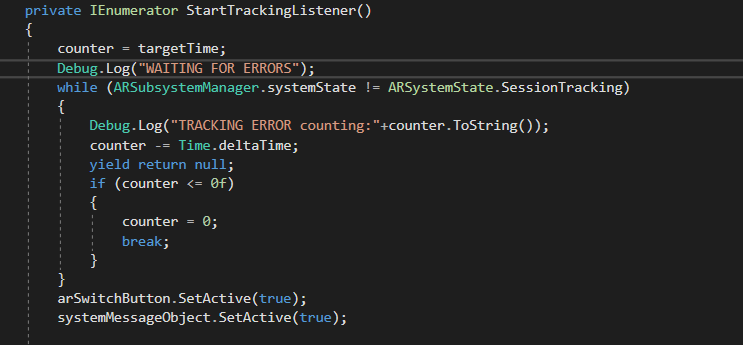
We are starting a coroutine which is responsible from waiting until arsystemstate turns to tracking to be able to spawn objects.
This is that method:
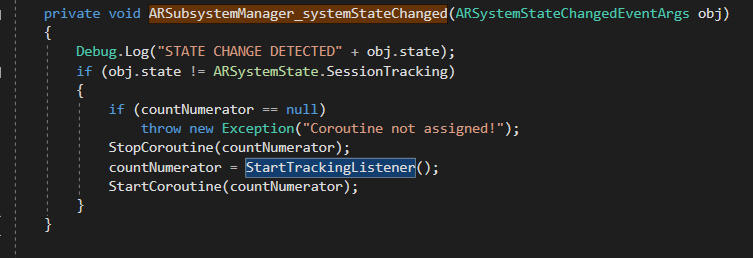
And in that coroutine, we are counting for a while in case off ar is not working we display that error to screen for users.
merpheus-dev
on 30 Jan 2019
@tdmowrer I think problem not happens in this particular part. We've tested in a simpler project and we had the same problem regardless without having a specific script. To reproduce this issue:
- Create two AR Scenes, add arsessionorigin prefab and arsession game object to both of those scenes.
- Create a little script which counts time, after couple of seconds, switches to second scene.
- Build it for iOS
- First scene works, when it switches to second scene screen goes black.
merpheus-dev
on 30 Jan 2019
@tdmowrer Did you guys reproduce it as well ?
merpheus-dev
on 1 Feb 2019
@m3rt32 @tdmowrer I'm having this problem with my project right now as well. I put LoadScene in OnApplicationFocus and have the same results. Seems to happen in the sample scenes for both iOS and Android as well.
 BikutaAnkuta
on 11 Apr 2019
BikutaAnkuta
on 11 Apr 2019
Well the thing is, when I updated my Unity version, this issue gone away(at least I couldn't address it again,yet). Which version of Unity are you using @BikutaAnkuta ?
merpheus-dev
on 12 Apr 2019
I'm currently on 2018.3.0f2. I haven't tried to replicate the issue on another copy of unity yet, that may be something to check.
BikutaAnkuta
on 12 Apr 2019
@BikutaAnkuta Yes, I think this is the problem. Try latest version which is right now 2018.3.12 , I don't know exactly but this issue seems to be fixed. But I think you should upgrade an give it a shot to confirm.
merpheus-dev
on 12 Apr 2019
@m3rt32 Seems like upgrading to 2018.3.7 fixes the issue. I haven't tried anything between 3.0 and 3.7 to see if its fixed any sooner. Thanks for providing a solution!
BikutaAnkuta
on 13 Apr 2019
I've experienced this problem with Unity 2019.1.
To make the problem reproduced, I've added a button "Reload" the "SimpleAR" sample scene that just load the same "SimpleAR" scene. After reloading, the screen becomes black.
 samuelmorais
on 30 Jul 2019
samuelmorais
on 30 Jul 2019
Same here. Seems issue was not solved Unity 2019.1.
 d3m3tr105
on 5 Aug 2019
d3m3tr105
on 5 Aug 2019
Same here. Seems issue was not solved Unity 2019.2
 karstenvoigt81
on 7 Aug 2019
karstenvoigt81
on 7 Aug 2019
Experiencing the same issue with 2019.2. Tried to resolve by resetting ARSession or destroying/re-instantiating the ARSession object in Start(). Did not work.
EDIT: found some similar issues:
https://github.com/Unity-Technologies/arfoundation-samples/issues/254
https://github.com/Unity-Technologies/arfoundation-samples/issues/217
This comment clarifies which package versions are not affected:
https://github.com/Unity-Technologies/arfoundation-samples/issues/217#issuecomment-516670311
 silverua
on 15 Aug 2019
silverua
on 15 Aug 2019
I had a temporary fix by making the gameobject with the ARSession a singleton that does not destroy on load. It fixed the issue, however it is a bit unstable. Using Unity 2019.2.0f1.
DontDestroyOnLoad(this);
 makled
on 28 Aug 2019
makled
on 28 Aug 2019
i test every methods at this page
is there any other way to fixt this bug
 ehsanwwe
on 24 Sep 2019
ehsanwwe
on 24 Sep 2019
@ehsanwwe
I'd suggest trying to always keep one ARsession and one ARsession origin through out the entire game. As in the very first scene has the ARsession and ARsession origin in a game object. Then move this game object with you in between scenes (very important not to put other ARsession and ARsession origins in the "next" scene.)
makled
on 24 Sep 2019
I have same problem #340
any idea?
 WangChaolun
on 25 Oct 2019
WangChaolun
on 25 Oct 2019
same problem here in 2020 may :S
 mavc18
on 5 May 2020
mavc18
on 5 May 2020
@mavc18 there are several issues discussed here, and there are currently no known issues with scene switching; could you describe your issue in more detail?
tdmowrer
on 5 May 2020
Related issues
 kennethlng
·
5Comments
kennethlng
·
5Comments
 jessekirbs
·
5Comments
jessekirbs
·
5Comments
 AdrienMgm
·
5Comments
AdrienMgm
·
5Comments
 rvegele
·
9Comments
rvegele
·
9Comments
 jBachalo
·
6Comments
jBachalo
·
6Comments
Most helpful comment
I've experienced this problem with Unity 2019.1.
To make the problem reproduced, I've added a button "Reload" the "SimpleAR" sample scene that just load the same "SimpleAR" scene. After reloading, the screen becomes black.