Arduino: SPIFFS Config Files Could not open to write
Basic Infos
This issue is regarding the SPIFFS of ESP8266 I am using it to save some configuration files.
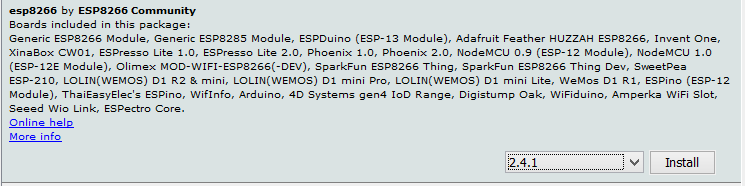
Latest version 7d512c4c7cdda24bc32b36ed4fbe26d07389e336 has an issue with opening the files with SPIFFS which was working fine with 2.4.1 ESP Board Library available in Arduino Boards Manager.
It does not work properly from 2.5.x

Please can someone look in to this issue @igrr
Platform
- Hardware: ESP12E (Tried with several Lolin NodeMCU 12E v3 boards)
- Core Version: 7d512c4c7cdda24bc32b36ed4fbe26d07389e336
- Development Env: Arduino IDE IDE version 1.8.3 and 1.8.8
- Operating System: and with both Arduino Mac OS Mojave and Windows 8.1 IDEs running the IDE version 1.8.3 and 1.8.8 respectively.
Problem Description
This issue is regarding the SPIFFS of ESP8266 I am using it to save some configuration files. This was working fine on 2.4.1 on boards manager of Arduino IDE. Since I need to call https end point when I installed the latest version since it has the implementation of
WiFiClientSecure client; setFingerprint(fingerprint);, which is fine in the latest commit (
7d512c4c7cdda24bc32b36ed4fbe26d07389e336)
back to the issue, I tried the same example to use with config file example, and it shows the error message Failed to mount file system, In addition to the official example I tried an example provided from an external site (code mentioned below) It also works with 2.4.x and now it is not working.


MCVE Sketch
#include "FS.h"

void setup() {
  Serial.begin(115200);

  // always use this to "mount" the filesystem
  bool result = SPIFFS.begin();
  Serial.println("SPIFFS opened: " + result);

  // this opens the file "f.txt" in read-mode
  File f = SPIFFS.open("/f.txt", "r");

  if (!f) {
    Serial.println("File doesn't exist yet. Creating it");

    // open the file in write mode
    File f = SPIFFS.open("/f.txt", "w");
    if (!f) {
      Serial.println("file creation failed");
    }
    // now write two lines in key/value style with  end-of-line characters
    f.println("ssid=abc");
    f.println("password=123455secret");
  } else {
    // we could open the file
    while(f.available()) {
      //Lets read line by line from the file
      String line = f.readStringUntil('\n');
      Serial.println(line);
    }

  }
  f.close();
}

void loop() {
  // nothing to do for now, this is just a simple test

}
 chamithchathuka
All 5 comments
Your MCVE looks like a modified example, and has no SPIFFS. So it's not going to be mounting SPIFFS or producing any output like what you've suggested. The description also is unclear to me.
Please provide a MCVE we can run and reproduce the errors you're getting, and run it with full debugging on and attach those logs as well.
Also, before that, make sure you're configured with a SPIFFS region in the Arduino menu. The tools menu has an option which you might have gotten set to "no spiffs" and, obviously, SPIFFS wouldn't work then.
 earlephilhower
on 31 Jan 2019
earlephilhower
on 31 Jan 2019
@earlephilhower Hi, Thanks for the prompt feedback, I am really sorry I have pasted a wrong code which I used to initiate the HTTPS connection. I have edited the code section pasted the exact example I used in my previous comment on the issue.
Below is the is the full output for my code. for the latest commit 7d512c4c7cdda24bc32b36ed4fbe26d07389e336
SDK:3.0.0-dev(c0f7b44)/Core:win-2.5.0-dev=-195000/lwIP:STABLE-2_1_2_RELEASE/glue:1.1/BearSSL:6778687
SPIFFS opened:
SPIFFSImpl::open: fd=-10024 path=`/f.txt` openMode=0 accessMode=1 err=-10024
File doesn't exist yet. Creating it
SPIFFSImpl::open: fd=-10024 path=`/f.txt` openMode=5 accessMode=2 err=-10024
file creation failed
Here is the output for the official example
Not Working
SDK:3.0.0-dev(c0f7b44)/Core:win-2.5.0-dev=-195000/lwIP:STABLE-2_1_2_RELEASE/glue:1.1/BearSSL:6778687

Mounting FS...
Failed to mount file system
add 1
aid 1
station: 78:4f:43:86:ab:0b join, AID = 1

I tried the same with the old version which was available in Arduino IDE Boards Manager 2.4.1
These are outputs
for My code - with v2.4.1 (which is perfectly working).
sd�lܟ<�⸮l⸮<
⸮l⸮
c|⸮⸮⸮⸮r⸮#⸮c⸮⸮'o⸮do'⸮⸮⸮c
pćdsdrl8⸮o⸮
⸮$
⸮⸮
b
'⸮|d⸮⸮b⸮⸮og⸮�l⸮⸮l`⸮o'l`o;Ǜ⸮'
c
⸮l{ۓo
b⸮$⸮⸮dǜ⸮p⸮⸮l`⸮⸮'⸮
SDK:2.2.1(cfd48f3)/Core:2.4.1/lwIP:2.0.3(STABLE-2_0_3_RELEASE/glue:arduino-2.4.1)
SPIFFSImpl: allocating 512+240+1400=2152 bytes
SPIFFSImpl: mounting fs @300000, size=fb000, block=2000, page=100
SPIFFSImpl: mount rc=0
PIFFS opened:
ssid=abc
password=123455secret
SPIFFS_close: fd=1
SPIFFS_close: fd=1
This is the output for the [ official example] (https://github.com/esp8266/Arduino/tree/master/libraries/esp8266/examples/ConfigFile) (which is perfectly working)
1384, room 16
tail 8
chksum {l�l⸮⸮|�⸮d⸮|
⸮
d⸮
b<⸮⸮⸮⸮s⸮c⸮
#⸮⸮og⸮lgo⸮⸮⸮
c
p⸮⸮${$sdp⸮g⸮
⸮l⸮⸮
co⸮<l⸮
⸮c⸮⸮gn⸮�dćd`⸮'o
d`gs⸮ۓo
#⸮$;⸮⸮g
c⸮l⸮⸮$
⸮⸮⸮x⸮⸮d`⸮⸮o⸮
SDK:2.2.1(cfd48f3)/Core:2.4.1/lwIP:2.0.3(STABLE-2_0_3_RELEASE/glue:arduino-2.4.1)
Mounting FS...
SPIFFSImpl: allocating 512+240+1400=2152 bytes
SPIFFSImpl: mounting fs @300000, size=fb000, block=2000, page=100
SPIFFSImpl: mount rc=0
SPIFFS_close: fd=1
Config saved
Loaded serverName: api.example.com
Loaded accessToken: 128du9as8du12eoue8da98h123ueh9h98
SPIFFS_close: fd=1
Config loaded
Just tried your updated sketch above and it seemed to run fine.
You missed the last part of my comment which, I think, is the problem. Do you have a SPIFFS region defined in the menus?
With Tools->Flash Size>4M (no SPIFFS) I get the failure to write, of course. With Tools->Flash Size->3M (1M SPIFFS) it runs fine for me.
earlephilhower
on 1 Feb 2019
Hi @earlephilhower ,
Thanks very much to helping me to figure it out. It was default in 4M (1M SPIFFS). 4.2.1. So I did not look into that. After I changing to the above, It worked as expected.
chamithchathuka
on 1 Feb 2019
Your MCVE looks like a modified example, and has no SPIFFS. So it's not going to be mounting SPIFFS or producing any output like what you've suggested. The description also is unclear to me.
Please provide a MCVE we can run and reproduce the errors you're getting, and run it with full debugging on and attach those logs as well.
Also, before that, make sure you're configured with a SPIFFS region in the Arduino menu. The tools menu has an option which you might have gotten set to "no spiffs" and, obviously, SPIFFS wouldn't work then.
Thank you so much almost, after 2-3hr I have solved this problem, No tutorials given any advice about this tool bar option.
 wekex35
on 8 Sep 2019
wekex35
on 8 Sep 2019
Related issues
 hulkco
·
3Comments
hulkco
·
3Comments
 hoacvxd
·
3Comments
hoacvxd
·
3Comments
 markusschweitzer
·
3Comments
markusschweitzer
·
3Comments
 mechanic98
·
3Comments
mechanic98
·
3Comments
 tiestvangool
·
3Comments
tiestvangool
·
3Comments
Most helpful comment
Your MCVE looks like a modified example, and has no SPIFFS. So it's not going to be mounting SPIFFS or producing any output like what you've suggested. The description also is unclear to me.
Please provide a MCVE we can run and reproduce the errors you're getting, and run it with full debugging on and attach those logs as well.
Also, before that, make sure you're configured with a SPIFFS region in the Arduino menu. The tools menu has an option which you might have gotten set to "no spiffs" and, obviously, SPIFFS wouldn't work then.