Platform
- Hardware: ESP8266
- Core Version: [Esp8266/Arduino v2.4.1|Arduino IDE 1.8.5]
- Development Env: [Arduino IDE|Platformio]
- Operating System: [MacOS 10.13.4|iOS 11.4]
Settings in IDE
- Module: [Wemos mini D1 Pro 16M]
- Flash Size: [15MB/1MB]
- Flash Frequency: [40Mhz]
- CPU Frequency: [160MHz]
- Upload Using: [SERIAL]
- Upload Speed: [115200|other] (serial upload only)
Problem Description
Hello,
I try to use the mDNS library with Wemos mini D1 pro, and that's not working !!!
When I ping the ip it's work, when I ping other .local equipment it's working but when I try to ping or use in some different browser the esp hostname (uvpm.local) a got an error ???
I use mac os with high sierra, iPhones with some different network tools and "bonjour" mDNS scanner, I can see the ip and the open port but not the hostname.local
Esp8266/Arduino v2.4.1
I try to use the MDNS.begin before and after the serveurweb.begin();
Best regards,
MCVE Sketch
wifiManager.autoConnect("UVPM","mdp");
//if you get here you have connected to the WiFi
Serial.println("connected...yeey :)");
serveurWeb.begin();
printHTTPServerInfo();
if (!MDNS.begin("uvpm")) { // Start the mDNS responder for esp8266.local
Serial.println("Error setting up MDNS responder!");
}
Serial.println("mDNS responder started");
// Add service to MDNS-SD
MDNS.addService("http", "tcp", 80);
 meditant
All 31 comments
mDNS works for me. And if you don't fill out the required information from the issue template nobody is going to take your failure seriously.
 RudyFiero
on 6 Jun 2018
RudyFiero
on 6 Jun 2018
Hello,
I changed my post, sorry.
I have read many posts about mDNS and sometime it work and sometimes not !
The integration is simple and I don't see why it is not working, and I don't see if the problem comes from my computer why it works with other mDNS implementation ?
Best regards,
meditant
on 6 Jun 2018
Hello,
I try another board ESP32 Wemos LOLIN with the same program, iMac and iPhone i just change to ESP32 include :
include
include
It's work fine !
Strange no ?
meditant
on 6 Jun 2018
There are big differences in the implementation so I'm not surprised by this. When you revised the issue and stated that you are using MacOS I thought that might be part of the problem. The mDNS code is being looked at, a rewrite, but it is not a very high priority mainly due to the complexity and the amount of work involved. So I don't expect anything new for a while.
The only thing I can suggest is using a program like Wireshark and try and determine where things are failing. If I had an Apple computer I would try and look into this but I don't so I can't.
RudyFiero
on 6 Jun 2018
I download Wireshark and try to look why !
The ESP32 library works fine but after some time stop to work, the ESP32 it not freeze and the webserver work but only with ip address...
Thanks for all this informations !!!
meditant
on 6 Jun 2018
@RudyFiero is correct. In the esp32 framework, MDNS is a wrapper around the IDF implementation, which is completely different from ours. In fact, that implementation actually passes Apple's conformance tests, while our naive code does not.
Our MDNS is being rewritten based on the IDF code, but it will take a long time due to the complexity of the protocol logic and IDF code, and due to the extreme differences in architecture between IDF and NONOS SDK. Also, because I have to prioritize my time :p
For our current implementation, it's unlikely it will be fixed by any current developer. However, if you encounter a bug or crash, and propose a fix, I'll try to evaluate and merge it.
There's at least one known mem leak and one known bug related to compressed pointer atm. Looking at the proposed fixes is still on my todo list.
 devyte
on 6 Jun 2018
devyte
on 6 Jun 2018
Marking as Waiting for feedback, pending details about what's wrong and a fix.
devyte
on 6 Jun 2018
Hello, I have the same problem of mDNS and sometimes it works and sometimes not. I'm using ESP8266 and the mDNS_WEB_Server example. I have bonjour installed, but I can not connect to it, I put the IDE with debug enable and the output is this:
When accessed by IP:
WS: ac
: ref 1
WS: av
: ref 2
: ur 2
New client
: rn 381
Request: /
Sending 200
: wr 113 113 0
: wrc 113 113 0
Done with client
: ur 1
close
WS: dis
of the
WS: ac
: ref 1
WS: av
: ref 2
: ur 2
New client
WS: ac
When I access for esp8266.local /:
: rcl
Abort
: rcl
Abort
Invalid request:
: ur 1
WS: dis
of the
: ref 1
WS: av
: ref 2
: ur 2
: ur 1
WS: dis
of the
: urn 52
Urch 52, 28
: urd 4, 28, 13
I hope this information helps you.
And if anyone already has news, thank you for saying so.
Cump Joel Mendes
 mjoelmendes
on 11 Jul 2018
mjoelmendes
on 11 Jul 2018
include
include
i am using this and when i connect my pc and esp32 with the same network it is working in browser but in the android device i need to enter the ip address to access the esp32.What should i do to correct it.
 aravindara
on 8 Oct 2018
aravindara
on 8 Oct 2018
Closing in view of #5442 with a full rewrite of mdns.
devyte
on 5 Dec 2018
The example code I've found on the web for mDNS does not work for me. It's the same issue as the OP.
I dug through the library source code and the example code did work. Every time! There are quite a few differences in the code so I took each line from the working code and put it into the non working version. The line that is missing is the non working code is the following:
void loop() {
MDNS.update();
}
Hope this helps somebody.
If you want to check out the example code you can find it here on MacOS:
/Users/
 karmakazi
on 23 Jul 2019
karmakazi
on 23 Jul 2019
I am no software guy by any means yet tried activating mdns on android by installing printer apps like LetsPrintDroid , Printershare and Printbot which use mdns and lo and behold - both chrome and firefox immediately started recognizing esp8266.local! It may be useful for many of us to simply install these apps so that browsers on android become useful on iot plateforms. May be some of the wise software guys find out which of the three did the trick.
 rajnish1959
on 23 Oct 2019
rajnish1959
on 23 Oct 2019
I spent a week trying to find why my ESP8266 mDNS wasn't working.
When i ping it, the following happened-
ping esp8266 -Ping request could not find host esp8266. Please check the name and try again.
ping esp8266.local -Ping request could not find host esp8266.local. Please check the name and try again.
ping esp8266. -Ping Worked
via browser I wasn't able to access ' esp8266.local '
finally it worked when i used ' esp8266./ '
Also this worked in Chrome on Android and on Windows both with and without bonjour installed on Windows.
 nikk16
on 12 Aug 2020
nikk16
on 12 Aug 2020
Try adding setSleepMode(WIFI_NONE_SLEEP); in setup().
esp8266.local is resolved by a daemon on your PC. You need either "bonjour" (macOS), "mDNS services"(?windows) or "avahi-daemon"(linux) installed to be able to resolve the .local mDNS names published by the esp.
finally it worked when i used ' esp8266./ '
That one may have been resolved by your local DNS+DHCP server.
Also this worked in Chrome on Android and on Windows after uninstalling Bonjour too.
That is a further reason in favor of your router. esp8266.local should work with a proper mDNS environment on your computer. There are android apps, I use "service browser" for testing.
 d-a-v
on 12 Aug 2020
d-a-v
on 12 Aug 2020
I will try to find the problem in Windows and report back if I find it. But for now, I can access my ESP via ' esp8266./ '.
I posted it in case someone else was having a similar problem, they would find this answer. Thanks for your quick reply.
I had bonjour installed, ' esp8266.local ' still didnt work.
' esp8266./ ' worked both with and without bonjour installed on Windows.
' esp8266./ ' worked in Chrome on Android whithout any other apps or settings changes.
' esp8266./ ' worked both on my router and on my mobile hotspot.
Basically, ' esp8266./ ' worked universally.
nikk16
on 12 Aug 2020
Hello,
For me it started working when I have added to the main loop these lines:
// Allow MDNS processing
MDNS.update();
I think this is critical.
I do not know if this is critical, but I have this in my setup() function:
Use Wifi in STA mode (not AP mode):
WiFi.mode(WIFI_STA);
delay(100);
And I am also registering an http service on port 80:
if (MDNS.begin("myname")) {
MDNS.addService("http", "tcp", 80);
Serial.println("\nMDNS responder started");
}
 apulai
on 28 Sep 2020
apulai
on 28 Sep 2020
For what it's worth : simply starting MDNS in setup() and updating it in loop() wasn't enough for the sensor to answer pings at esp8266.local.
The ESP actually had to offer a service (e.g. HTTP on port 80) for it to answer at esp8266.local, even just for pings.
 EricDuminil
on 30 Nov 2020
EricDuminil
on 30 Nov 2020
@EricDuminil Can you retry with git head version or beta release version and open a new issue if you can reproduce it (with MCVE or a reference to a relevant existing example) ?
d-a-v
on 1 Dec 2020
@d-a-v Sorry, the problem is hard to reproduce, so I cannot give a MCVE. This issue https://github.com/espressif/arduino-esp32/issues/4406 seems to be the closest to what I'm experiencing.
EricDuminil
on 5 Dec 2020
Are you experiencing issues with mDNS on esp32 or esp8266?
d-a-v
on 5 Dec 2020
@d-a-v Sorry about that, I realize it wasn't clear at all. I'm experiencing these problems with an esp8266. The symptoms are exactly the same as in the linked issue, which was indeed described for an esp32.
It might help understanding the issue if it appears on different boards.
EricDuminil
on 5 Dec 2020
We need to be able to reproduce. We still don't know what version of the core you are using nor if you experience such issue with the provided mDNS examples. mDNS has had such issues you describe but has been recently updated. You need to try with git master version of this esp8266 core, or with the beta release version installable on arduino ide.
If you still experience these problems, please open a new issue with details.
d-a-v
on 6 Dec 2020
@d-a-v As far as I can tell, the core version I use is 2.6.2 with PlatformIO, and 2.7.4 with Arduino IDE, both with the same behaviour.
Sorry, I didn't find the beta release version on arduino ide, either via Google or on GitHub. I also couldn't manage to compile the git master version with PlatformIO.
Do I need another source than https://arduino.esp8266.com/stable/package_esp8266com_index.json ?
EricDuminil
on 7 Dec 2020
About PlatformIO here is an unofficial answer after a google search: https://github.com/platformio/platform-espressif8266/issues/49#issuecomment-341227995
About Arduino IDE, here is an unofficial answer from me.
edit Our official answer:
https://arduino-esp8266.readthedocs.io/en/latest/installing.html#using-git-version
d-a-v
on 7 Dec 2020
@d-a-v Thanks a lot. I used https://d-a-v.github.io/esp8266/Arduino/package_esp8266com_index.json in Arduino IDE and tried both git:'2.7.2-182-g8b662ed3' and git:'2.7.2-365-g96c62677'. The problem still persists.
Using the "mDNS_Web_Server.ino" example (the only modification was for SSID & password), the ESP8266 stops answering at http://esp8266.local after 2 minutes. The HTTP server still answers when using the local IP.
One ugly workaround is to force a restart:
MDNS.close();
MDNS.begin("esp8266");
every 30 seconds, but it seems to create a memory leak (~224 bytes at every restart).
EricDuminil
on 7 Dec 2020
@EricDuminil @d-a-v
Might be related to the way the example is handling the http requests in relation to browser optimization.
That would cause the MDNS,update() not being called.
Due to this construct :
  // Wait for data from client to become available
  while (client.connected() && !client.available()) {
    delay(1);
  }
Can you retry with this updated example and report back ?
/*
  ESP8266 mDNS responder sample

  This is an example of an HTTP server that is accessible
  via http://esp8266.local URL thanks to mDNS responder.

  Instructions:
  - Update WiFi SSID and password as necessary.
  - Flash the sketch to the ESP8266 board
  - Install host software:
    - For Linux, install Avahi (http://avahi.org/).
    - For Windows, install Bonjour (http://www.apple.com/support/bonjour/).
    - For Mac OSX and iOS support is built in through Bonjour already.
  - Point your browser to http://esp8266.local, you should see a response.

*/


#include <ESP8266WiFi.h>
#include <ESP8266mDNS.h>
#include <WiFiClient.h>

#include <ESP8266Webserver.h>
#ifndef STASSID
#define STASSID "your-ssid"
#define STAPSK  "your-password"
#endif

const char* ssid = STASSID;
const char* password = STAPSK;

// HTTP server at port 80 will respond to HTTP requests
ESP8266WebServer server(80);

void handleHTTPRequest() {
  Serial.println("");
  Serial.println("HTTP Request");

  IPAddress ip = WiFi.localIP();
  String ipStr = ip.toString();
  String s = "<!DOCTYPE HTML>\r\n<html><h3><head>Hello from ";
  s += WiFi.hostname() + ".local at " + server.client().localIP().toString() + "</h3></head>";

  Serial.println("Sending 200");
  server.send(200, "text/html", s);
  Serial.println("Done with request");
}

void setup(void) {
  Serial.begin(115200);

  // Connect to WiFi network
  WiFi.mode(WIFI_STA);
  WiFi.begin(ssid, password);
  Serial.println("");

  // Wait for connection
  while (WiFi.status() != WL_CONNECTED) {
    delay(500);
    Serial.print(".");
  }
  Serial.println("");
  Serial.print("Connected to ");
  Serial.println(ssid);
  Serial.print("IP address: ");
  Serial.println(WiFi.localIP());

  // Setup HTTP server
  server.on("/", handleHTTPRequest);
  // Start HTTP server
  server.begin();

  // Set up mDNS responder:
  // - first argument is the domain name, in this example
  //   the fully-qualified domain name is "esp8266.local"
  // - second argument is the IP address to advertise
  //   we send our IP address on the WiFi network
  if (!MDNS.begin("esp8266")) {
    Serial.println("Error setting up MDNS responder!");
    while (1) {
      delay(1000);
    }
  }
  Serial.println("mDNS responder started");

  // Add service to MDNS-SD
  MDNS.addService("http", "tcp", 80);
}

void loop(void) {

  MDNS.update();
  server.handleClient();
}
 hreintke
on 8 Dec 2020
hreintke
on 8 Dec 2020
@hreintke Sorry, it shows same behaviour as before. (I had to uppercase the S in #include <ESP8266WebServer.h>)
The ESP stops answering at esp8266.local after 2 minutes.
❯ while sleep 10; do; date; ping -c1 -w3 -O -q esp8266.local | grep received; done
Sun Dec 13 23:40:02 CET 2020
ping: esp8266.local: Name or service not known
Sun Dec 13 23:40:17 CET 2020
1 packets transmitted, 1 received, 0% packet loss, time 0ms
Sun Dec 13 23:40:27 CET 2020
1 packets transmitted, 1 received, 0% packet loss, time 0ms
Sun Dec 13 23:40:37 CET 2020
1 packets transmitted, 1 received, 0% packet loss, time 0ms
Sun Dec 13 23:40:47 CET 2020
1 packets transmitted, 1 received, 0% packet loss, time 0ms
Sun Dec 13 23:40:57 CET 2020
1 packets transmitted, 1 received, 0% packet loss, time 0ms
Sun Dec 13 23:41:07 CET 2020
1 packets transmitted, 1 received, 0% packet loss, time 0ms
Sun Dec 13 23:41:17 CET 2020
1 packets transmitted, 1 received, 0% packet loss, time 0ms
Sun Dec 13 23:41:27 CET 2020
1 packets transmitted, 1 received, 0% packet loss, time 0ms
Sun Dec 13 23:41:37 CET 2020
1 packets transmitted, 1 received, 0% packet loss, time 0ms
Sun Dec 13 23:41:47 CET 2020
1 packets transmitted, 1 received, 0% packet loss, time 0ms
Sun Dec 13 23:41:57 CET 2020
1 packets transmitted, 1 received, 0% packet loss, time 0ms
Sun Dec 13 23:42:07 CET 2020
1 packets transmitted, 1 received, 0% packet loss, time 0ms
Sun Dec 13 23:42:17 CET 2020
ping: esp8266.local: Name or service not known
Actually visiting the website regularly (with Firefox & Chrome on Linux Mint 19.3) as opposed to merely pinging esp8266.local makes the esp answers for longer than 2 minutes. But if the webserver isn't called for more than 2 minutes, it stops answering esp8266.local, even though the access via local IP still works fine.
Note that it might start answering at esp8266.local afterwards, but this seems really random and I couldn't find a reproducible reason why or when it does.
EricDuminil
on 13 Dec 2020
@EricDuminil @d-a-v
This are the results of my test with your settings :
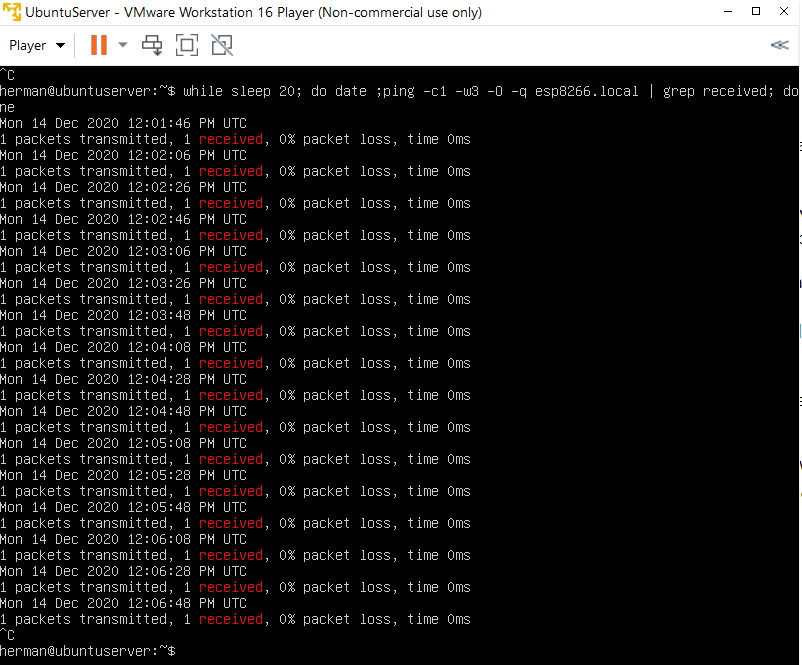
hreintke
on 14 Dec 2020
I ran the same test, plus avahi-daemon is killed (automatically restarted, PID is shown) to flush the mDNS cache every 20s:
$ while sleep 20; do \
    echo ""; ps auxww|grep avahi-daemon.*running | grep -v grep; \
    date; \
    ping -c1 -w3 -O -q esp8266.local | grep received; \
    sudo killall avahi-daemon; \
  done

avahi       7288  0.1  0.0   8872  3772 ?        Ss   15:29   0:00 avahi-daemon: running [bat.local]
Mon Dec 14 15:29:42 CET 2020
1 packets transmitted, 1 received, 0% packet loss, time 0ms

avahi       7380  0.2  0.0   8864  3668 ?        Ss   15:29   0:00 avahi-daemon: running [bat.local]
Mon Dec 14 15:30:03 CET 2020
1 packets transmitted, 1 received, 0% packet loss, time 0ms

avahi       7426  0.2  0.0   8872  3668 ?        Ss   15:30   0:00 avahi-daemon: running [bat.local]
Mon Dec 14 15:30:23 CET 2020
1 packets transmitted, 1 received, 0% packet loss, time 0ms

avahi       7439  0.2  0.0   8864  3704 ?        Ss   15:30   0:00 avahi-daemon: running [bat.local]
Mon Dec 14 15:30:43 CET 2020
1 packets transmitted, 1 received, 0% packet loss, time 0ms

avahi       7450  0.2  0.0   8864  3716 ?        Ss   15:30   0:00 avahi-daemon: running [bat.local]
Mon Dec 14 15:31:04 CET 2020
1 packets transmitted, 1 received, 0% packet loss, time 0ms

[...]

avahi       7630  0.2  0.0   8864  3796 ?        Ss   15:34   0:00 avahi-daemon: running [bat.local]
Mon Dec 14 15:35:08 CET 2020
1 packets transmitted, 1 received, 0% packet loss, time 0ms

avahi       7671  0.2  0.0   8876  3776 ?        Ss   15:35   0:00 avahi-daemon: running [bat.local]
Mon Dec 14 15:35:28 CET 2020
1 packets transmitted, 1 received, 0% packet loss, time 0ms
^C
@EricDuminil
I just ran into the same issue as yours.
We are going to investigate.
d-a-v
on 14 Dec 2020
@EricDuminil Can you try #7786git master or the alpha release v0.0.2snapshot release v0.0.1 which includes it ?
d-a-v
on 22 Dec 2020
Related issues
 Chagui-
·
3Comments
Chagui-
·
3Comments
 Khorne13
·
3Comments
Khorne13
·
3Comments
 mechanic98
·
3Comments
mechanic98
·
3Comments
 horendus
·
3Comments
horendus
·
3Comments
 SmartSouth
·
3Comments
SmartSouth
·
3Comments
Most helpful comment
The example code I've found on the web for mDNS does not work for me. It's the same issue as the OP.
I dug through the library source code and the example code did work. Every time! There are quite a few differences in the code so I took each line from the working code and put it into the non working version. The line that is missing is the non working code is the following:
void loop() {
MDNS.update();
}
Hope this helps somebody.
If you want to check out the example code you can find it here on MacOS:/Library/Arduino15/packages/esp8266/hardware/esp8266/2.5.2/libraries/ESP8266mDNS/examples/mDNS_Web_Server/mDNS_Web_Server.ino
/Users/