Arduino: client.write() is not working smoothly. After sending some data it getting halt for some seconds.
There is some problem in receiving acknowledgement of tcp packets.
 NayanKaran
All 17 comments
You are not really helping us helping you.
https://github.com/esp8266/Arduino#issues-and-support
Instead of removing the issue template, please fill it.
Instead of copying your full logs, please strip them down, and explain where it is wrong. Only one example maybe enough to understand.
 d-a-v
on 8 Jan 2018
d-a-v
on 8 Jan 2018
ESP8266 Arduino core version: 2.4.0
include
include
include
include "FS.h"
include
include
include "memorysaver.h"
include
const int CS = 16;// set GPIO16 as the slave select
uint8_t resolution = 3;
static const size_t bufferSize = 4096;
//This demo can only work on OV2640_MINI_2MP or ARDUCAM_SHIELD_V2 platform.
if !(defined (OV2640_MINI_2MP)||(defined (ARDUCAM_SHIELD_V2) && defined (OV2640_CAM)))
error Please select the hardware platform and camera module in the ../libraries/ArduCAM/memorysaver.h file
endif
ArduCAM myCAM(OV2640, CS);
const char* ssid = "3C2i4b0k";
const char* password = "3C2i4b0kel6b4rS6eP15d5zujp19CEjhqYLH3MAl0QWmwYzQQyZM07Mq5i60";
const char* host = "192.168.137.1";
const int httpPort = 80;
//WiFiClientSecure client;
WiFiClient client;
uint8_t buffer[bufferSize] = {0xFF};
//************
//camera related function's definition
///////////////////////////////////////////////////////////////////////////////////
// used when form is submitted and at setup to set the camera resolution //
///////////////////////////////////////////////////////////////////////////////////
void setCamResolution(int reso)
{
switch (reso)
{
case 0:
myCAM.OV2640_set_JPEG_size(OV2640_160x120);
resolution = 0;
break;
case 1:
  myCAM.OV2640_set_JPEG_size(OV2640_176x144);
  resolution = 1;
  break;

case 2:
  myCAM.OV2640_set_JPEG_size(OV2640_320x240);
  resolution = 2;
  break;

case 3:
  myCAM.OV2640_set_JPEG_size(OV2640_352x288);
  resolution = 3;
  break;

case 4:
  myCAM.OV2640_set_JPEG_size(OV2640_640x480);
  resolution = 4;
  break;

case 5:
  myCAM.OV2640_set_JPEG_size(OV2640_800x600);
  resolution = 5;
  break;

case 6:
  myCAM.OV2640_set_JPEG_size(OV2640_1024x768);
  resolution = 6;
  break;

case 7:
  myCAM.OV2640_set_JPEG_size(OV2640_1280x1024);
  resolution = 7;
  break;

case 8:
  myCAM.OV2640_set_JPEG_size(OV2640_1600x1200);
  resolution = 8;
  break;
}
}
void captureAndUpload()
{
myCAM.flush_fifo(); //Flush the FIFO
myCAM.clear_fifo_flag(); //Clear the capture done flag
myCAM.start_capture(); //Start capture
while (!myCAM.get_bit(ARDUCHIP_TRIG , CAP_DONE_MASK));
Serial.println("Captured!");
size_t len = myCAM.read_fifo_length();
if (len >= 0x07ffff) {
Serial.println("Over size.");
return;
} else if (len == 0 ) {
Serial.println("Size is 0.");
return;
}
Serial.printf("Time: %lu\n", millis());
Serial.printf("availableForWrite: %d\n", client.availableForWrite());
client.println("POST /test/upload.php HTTP/1.1");
//Serial.println("1");
client.println("Host: localhost.com");
client.println("Cache-Control: no-cache");
client.println("Content-Type: application/x-www-form-urlencoded");
client.print("Content-Length: ");
client.println(len);
client.println();
Serial.printf("Image size: %d\n",len);
File f = SPIFFS.open("/temp.jpg", "w");
myCAM.CS_LOW();
myCAM.set_fifo_burst();
#if !(defined (ARDUCAM_SHIELD_V2) && defined (OV2640_CAM))
SPI.transfer(0xFF);
#endif
while (len) {
size_t will_copy = (len < bufferSize) ? len : bufferSize;
SPI.transferBytes(&buffer[0], &buffer[0], will_copy);////Copy JPEG data from FIFO to buffer
if (client.connected())
f.write(&buffer[0], will_copy);////Write JPEG data from buffer to file
//using client.write() instread of f.write() would decrease the upload speed.
//Serial.println("3");
len -= will_copy;
}
client.flush();
client.write(f);
client.println();
f.close();
Serial.println("Upload Done!\n-------------\n");
myCAM.CS_HIGH();
}
void setup() {
Wire.begin();
Serial.begin(115200);
Serial.println();
Serial.print("connecting to ");
Serial.println(ssid);
WiFi.mode(WIFI_STA);
WiFi.begin(ssid, password);
while (WiFi.status() != WL_CONNECTED) {
delay(500);
Serial.print(".");
}
Serial.println("");
Serial.println("WiFi connected");
Serial.println("IP address: ");
Serial.println(WiFi.localIP());
if (!SPIFFS.begin()) {
Serial.println("Failed to mount file system");
return;
}
//****
//setup camera
uint8_t vid, pid;
uint8_t temp;
Serial.println("ArduCAM Start!");
pinMode(CS, OUTPUT);
SPI.begin();
SPI.setFrequency(8000000); //4MHz
//Check if the ArduCAM SPI bus is OK
myCAM.write_reg(ARDUCHIP_TEST1, 0x55);
temp = myCAM.read_reg(ARDUCHIP_TEST1);
if (temp != 0x55) {
Serial.println("SPI1 interface Error!");
}
//Check if the camera module type is OV2640
myCAM.wrSensorReg8_8(0xff, 0x01);
myCAM.rdSensorReg8_8(OV2640_CHIPID_HIGH, &vid);
myCAM.rdSensorReg8_8(OV2640_CHIPID_LOW, &pid);
if ((vid != 0x26 ) && (( pid != 0x41 ) || ( pid != 0x42 )))
Serial.println("Can't find OV2640 module! pid: " + String(pid));
else
Serial.println("OV2640 detected.");
//Change to JPEG capture mode and initialize the OV2640 module
myCAM.set_format(JPEG);
myCAM.InitCAM();
setCamResolution(resolution);
myCAM.clear_fifo_flag();
//client.setTimeout(100);
}
void loop() {
// put your main code here, to run repeatedly:
while (!client.connected())
{Serial.println("Connecting...");
client.stop();
client.connect(host,httpPort);
}
captureAndUpload();
while(client.available()){
char c = client.read();
Serial.print(c);
}
}
Output:
Captured!
Time: 154373
availableForWrite: 184
Image size: 2053
Upload Done!
Captured!
Time: 154442//time elapsed between image upload: 154442-154373 = 69ms
availableForWrite: 26
Image size: 2052
Upload Done!
Captured!
Time: 158431
availableForWrite: 1002 //time elapsed between image upload: 158431 - 154442 = 3989 ms
Image size: 2052
Upload Done!
Captured!
Time: 158606 ////time elapsed between image upload: 158606 - 158431 = 69ms
availableForWrite: 844
Image size: 2052
Upload Done!
The client.write() should have taken same time to upload the image to the server but that is not the case. whenever client.availableForWrite() is getting too low the client.write() is getting halt for some seconds and again resumes it's operation.
NayanKaran
on 8 Jan 2018
We are not in multi-threading environment.
I don't know how much time takes this loop, but still you can try replace
while (!myCAM.get_bit(ARDUCHIP_TRIG , CAP_DONE_MASK));
by
while (!myCAM.get_bit(ARDUCHIP_TRIG , CAP_DONE_MASK)) delay(0);
You can also try the MSS=1460 option in Tools menu since you seem to deal with big packets.
You can also try to disable nagle algorithm, with client->setNoDelay(true); which will have no effects if all your packets are big.
d-a-v
on 8 Jan 2018
while (!myCAM.get_bit(ARDUCHIP_TRIG , CAP_DONE_MASK));
is not much of concern. That takes only few ms (about 40-50 ms when working properly). Actually that helps when there is some problem with camera by resetting the device.
I checked and the main cause of the delay is by the client.write() function. (Not always only when client.availableForWrite(); returning lower values. )
Thanks. I tried MSS=1460. This decreases number of time the function halts with in some interval sometimes not always (The behavior is very unpredictable) . But still the issue is same:
This is the output
Captured! in 41391 us.
Time: 74417
availableForWrite: 74
Image size: 2052
3
Upload Done!
Captured! in 50352 us.
Time: 79350 //time halted: 79350 - 74417 = 4933 ms
availableForWrite: 390
Image size: 2053
3
Upload Done!
) and client->setNoDelay(true);, client.flush(), nothing is solving the issue.
NayanKaran
on 8 Jan 2018
Would you be able to provide a tcpdump / wireshark capture of the traffic, only the part around when you observe such 5s delay ?
d-a-v
on 8 Jan 2018
sure. Just some minute.
NayanKaran
on 8 Jan 2018
esp8266 tcp debug.zip
Complete session. Wire shark showing these error massages after/when the program is in halt state.

NayanKaran
on 8 Jan 2018
It is difficult to isolate one of your loops by reading only the dumps since buffering on tcp side is asynchronous.
I can observe one big lag of 11s @ 18:09:39
erratic from 18:10:10
stable from 18:11:17 until the end.
other lags are below 2s.
They do not match your 4~5s lags.
So what you can try is
- call
client->flush()at the end of every transferred imageclient>write(f)(not before, like you do) (isolation in tcp dump will be easier) - change your sketch to simulate your camera with random data, trigger the same bug with this, so we can try and reproduce locally the bug
And by writing these lines, I just realize that you are wearing your flash by using it as a buffer for every image. You just can directly send data:
f.write(&buffer[0], will_copy);
could become
client.write(buffer, will_copy);
and get rid of f.
d-a-v
on 8 Jan 2018
debugclientwrite.zip
The zip contains sketch to debug the client.write() function and third party libraries used.
and htdocs of the server to test the upload operation.
And by writing these lines, I just realize that you are wearing your flash by using it as a buffer for every image. You just can directly send data:
f.write(&buffer[0], will_copy);
could become
client.write(buffer, will_copy);
and get rid of f.
client.write(f) is used because client.write(&stream) is much faster than client.write(buffer, will_copy);
wearing your flash
just for testing.
streamBuffer is used in the given sketch.
They do not match your 4~5s lags.
The behavior is unpredictable/unstable.
NayanKaran
on 9 Jan 2018
Thanks for the sketch.
I tried with apache2/phpupload, on my local host (AP@1meter) and on a remote host (traceroute around the country to my ADSLrouter@home),
I also tried with nc -l 80 instead of apache for both hosts.
I only tried with MSS=536.
It turns out that the problem is apache. The sketch itself is doing well with nc.
local host: (ubuntu16.04, fresh apache+php install)
nc: BW=~780kbps min=31ms max=1628ms (long run, not stopping)
apache: BW=~214kbps min=32ms max=282ms
It has to be noted that the provided php script eventually stopped working after 700KB (1MB the second time) with host's tcp receive window=0 meaning the tcp server is exhausted.
remote host: (ADSL ping time is 30ms, downlink bw 20Mbits/s 14 hops, devuan-ascii)
nc: BW=~173kbps min=167ms max=2977ms (on 68MB transfered, not stopping)
apache: BW=~130kbps min=170 max=517 (stopped after 600KB with same host's tcp receive window=0)
I am not a php/apache expert and I just don't know what happens,
but I can't say that I see something wrong on the ESP side.
updated sketch
#include<ESP8266WiFi.h>
#include <LoopbackStream.h>

WiFiClient client;

const char* ssid     = "open";
const char* password = "";

const char* host = "prout";
const int port = 80;

void setup() {
  Serial.begin(115200);
  Serial.setDebugOutput(true);

  WiFi.mode(WIFI_STA);
  WiFi.begin(ssid, password);
  while (WiFi.status() != WL_CONNECTED)
  {
    delay(500);
    Serial.print(".");
  }
  Serial.print("\nWiFi connected.\nIP address: ");
  Serial.println(WiFi.localIP());
}

void uploadRandomData()
{
  if (!client.connected())
    return;
  //Serial.print("pos:1");
  client.println("POST /test/upload.php HTTP/1.1");
  //Serial.print(",2");
  client.println("Host: api.hungrytail.com");
  client.println("Cache-Control: no-cache");
  client.println("Content-Type: application/octet-stream");
  client.println("Content-Length: 4800");
  client.println();


  LoopbackStream buffer(5000);

  buffer.print(<very big string in the zip above>);

  //ensures LoopbackStream is working perfectly.
  //*******************************************
#if 0
  Serial.print("First few characters: ");
  for (uint16_t i = 0; i < 10; i++)
  {
    char a;
    a = buffer.peek(i);
    Serial.print(a);
  }
  Serial.print(" Last few characters: ");
  for (uint16_t i = 4790; i < 4800; i++)
  {
    char a;
    a = buffer.peek(i);
    Serial.print(a);
  }
  Serial.printf(" Available for read: %d ", buffer.available());
  //ensures LoopbackStream is working perfectly.
  //*******************************************
#endif
  static long start = -1;
  static long sz = 0;
  if (start < 0) start = millis();
  static long min = 1000000000;
  static long max = 0;
  long a = millis();
  sz += buffer.available();
  client.write(buffer);
  client.println();
  client.flush();
  a = millis() - a ;
  long bwkbps = ((sz / 128)  * 1000) / (millis() - start);

  if (a < min) min = a;
  if (a > max) max = a;
  Serial.printf("sz=%lu kbps=%lu dur=%lu min=%lu max=%lu availableForWrite:%lu\n", sz, bwkbps, a, min, max, client.availableForWrite());
}

void loop() {
  if (client.connected())
    uploadRandomData();
  else
  {
    Serial.println("Connecting...");
    client.connect(host, port);
  }
}
i'd like to add that I'm not sure the esp8266 is made to send such large data abroad with your QoS requirements (your dump shows you send your images to amazonaws).
It's Ok to send small states and statuses, but I'm not sure large data with (relatively) high bandwith is sustainable without the glitches you observed. Due to memory constraints (and unknown bugs in blobs that prevent us to use large MSS in a stable way), the tcp buffer are kept low and this prevents large bandwidth and low latency at the same time.
d-a-v
on 9 Jan 2018
I also tested the sketch with node js server on aws ubuntu.
The apache2 server is blocking tcp communication after there is some acknowledgement error.
In both cases node.js and apache2 there is some acknowledgement error due to which the delay is getting increased. (in case of apache2: The server sending "tcp window full" massage due to the acknowledgement error sent by the esp8266.)
below is the screenshot of the error massages in case of Apache (local host):
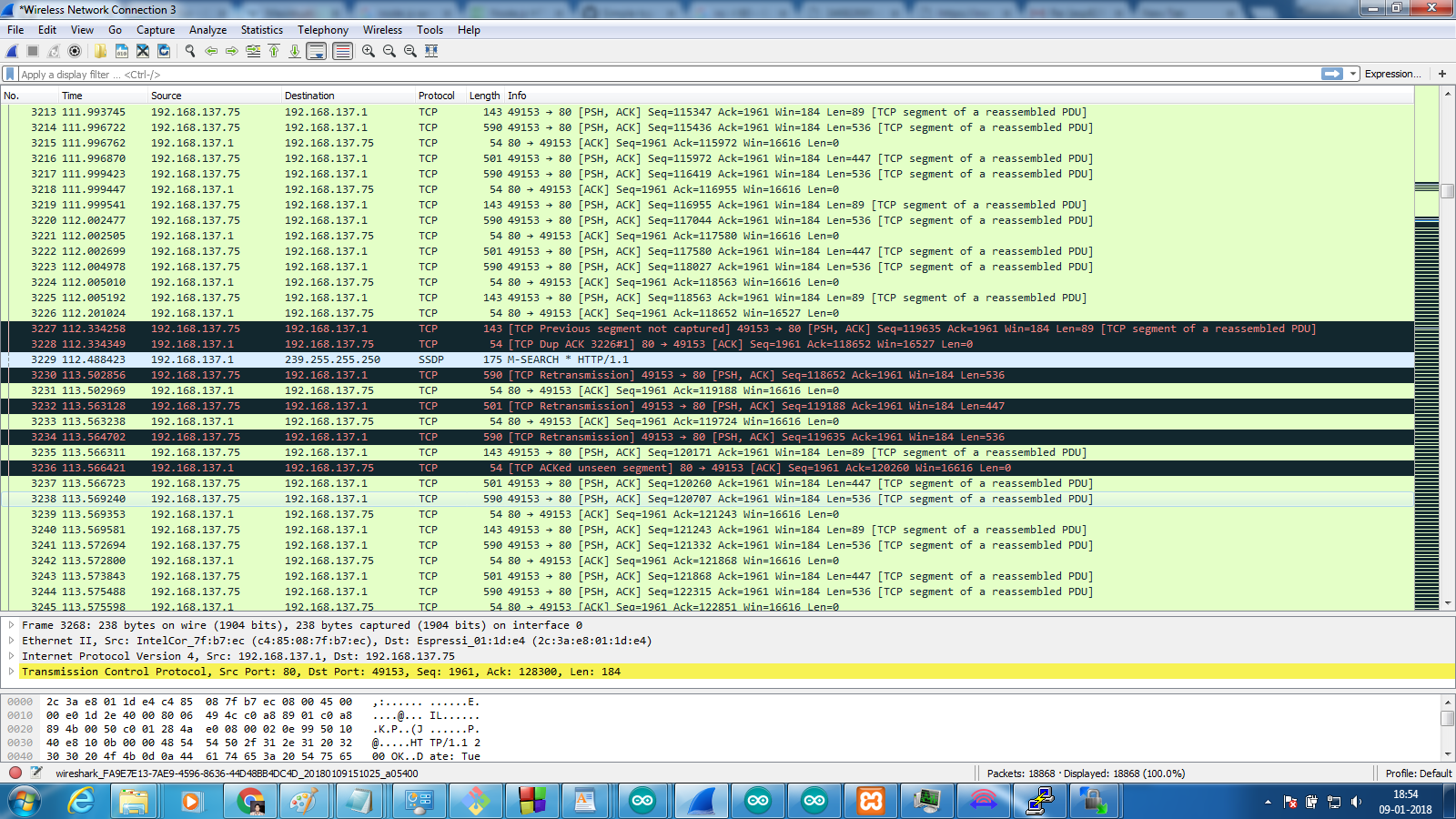
below is the acknowledgement error in case of node js (aws server):

NayanKaran
on 9 Jan 2018
The log you show are perfectly regular working TCP protocol.
You saw the tcp-fast-retransmit algorithm in action, where a packet is lost, peer (server) aswering three times that a packet is lost, and sender (esp) restarting from where peer say the packet is lacking. Then transmission is going on. And you got your latency hole.
What you have, other people had it too long ago. They realized that real time video transmission cannot work with TCP because TCP is an exact protocol and will retransmit lost data on purpose.
So they made up new protocols and codecs for streaming which allow lost packets and which do not rely on TCP but rather on IP or UDP.
So either
- you keep your ESP, arducam, sketch, and you lower your QoS requirements
- you look for (not TCP) streaming libraries that will fit in esp8266
- you get a raspberry pi or equiv with a dedicated cam for $20 and stream the hell with it
(1 or 2 are preferred though :).
There's nothing more we can do in here. Things are working as expected.
d-a-v
on 9 Jan 2018
ok,
I am thinking to test the same with other SDKs and check whether this persist or not.
NayanKaran
on 9 Jan 2018
@d-a-v Have you tried this type of scenarios with other SDKs.
you get a raspberry pi or equiv with a dedicated cam for $20 and stream the hell with it
This seems to be cheap. is it includes both (camera+raspberry pi)? can you provide link?
Thanks.
NayanKaran
on 9 Jan 2018
I have been only using extensively the esp8266 nonos-SDK with arduino API.
About other chips I was talking about unix chips, google for raspberry pi 0 W, and its cam, or orange pi and any usb cam.
d-a-v
on 9 Jan 2018
How "[LWIP] Fix the sequence number error of RST+ACK;" bug fixed by the official SDK relates to this issue?
https://github.com/espressif/ESP8266_NONOS_SDK/releases/tag/v2.2.0
NayanKaran
on 20 Sep 2018
Related issues
 mark-hahn
·
3Comments
mark-hahn
·
3Comments
 SmartSouth
·
3Comments
SmartSouth
·
3Comments
 Marcelphilippeandrade
·
3Comments
Marcelphilippeandrade
·
3Comments
 horendus
·
3Comments
horendus
·
3Comments
 Geend
·
3Comments
Geend
·
3Comments
Most helpful comment
You are not really helping us helping you.
https://github.com/esp8266/Arduino#issues-and-support
Instead of removing the issue template, please fill it.
Instead of copying your full logs, please strip them down, and explain where it is wrong. Only one example maybe enough to understand.