Arduino: Writing files with SPIFFS no longer working for ESP-01
Basic Infos
SPIFFS no longer works on a ESP-01.
Hardware
Hardware: ESP-01
Core Version: 2.3.0-rc2
also tried with stable
I reproduced this problem on several different ESP-01. So seems not to be hardware related
Description
Problem description
SPIFFS worked for a long time but all of a sudden it stoped working on a ESP-01.
Whenever i write a file its not existing or empty after next boot.
Using the same sketch on an Wemos D1 mini its works without problems. Actually im only facing this problem on a ESP-01.
Settings in IDE
Module: Generic ESP8266 Module
Flash Size: 1MB (64k SPIFFS), also tried with 512k (64k SPIFFS)
CPU Frequency: 80Mhz
Flash Mode: DIO
Flash Frequency: 40Mhz
Upload Using: SERIAL
Reset Method: ck
Sketch
include
void setup()
{
Serial.begin(115200);
if (!SPIFFS.begin()) Serial.println("error while mounting filesystem!");
readFile();
writeFile();
readFile();
Serial.println("done");
}
void readFile()
{
Serial.println("reading");
File f = SPIFFS.open("/myFile.txt", "r");
if (!f) Serial.println("file not available");
else if (f.available()<=0) Serial.println("file exists but available <0");
else
{
String ssidString = f.readStringUntil('#');
Serial.print("read from file: ");
Serial.println(ssidString);
}
f.close();
}
void writeFile()
{
Serial.println("writing");
File f = SPIFFS.open("/myFile.txt", "w");
if (!f) Serial.println("File creation failed");
else
{
f.print("networkConfig");
f.print("#");
f.flush();
f.close();
}
}
void loop()
{
}
Debug Messages
messages here
Output of first run:
reading
file not available
writing
reading
read from file: <--- here we see the problem already
doneOutput of second run:
eading
file not available
writing
reading
read from file:
doneOutput of third run:
reading
read from file:
writing
File creation failed <---- check this!
reading
read from file:
done
Any ideas?
thank you!
 funtastic99
All 162 comments
I found out some additional information that might be helpful.
The working ESP-01 report as flash_id:
Manufacturer: e0
Device: 4014
and the new ones that are not working:
Manufacturer: 85
Device: 6014
May the new flash chip is not supported by the arduino esp plugin yet ?
funtastic99
on 3 Jan 2018
I'm having the same problem.
Out of the first batch of 20 where the problem first showed up only 7 of them worked properly. All functions except for SPIFFS seem fine.
Out of the next batch of 20, 9 worked properly.
I just received another 2 batches of 20. One batch from a different seller on eBay and the other batch from a seller on AliExpress.
Out of the new batch from eBay only 2 work properly.
All 20 of the new batch from Aliexpress are faulty.
I checked the Chip ID's and I can confirm that Flash Chips with a manufacturer ID of 85 and Device ID of 6014 do not work. I can also confirm that the 2 that did work have the manufacturer ID of E0 and Chip ID of 4014.
I had a look at the flash chips with a magnifying glass and found the faulty ones were all branded FUYA and the 2 that have working SPIFFS are branded BergMicro.
I sure hope someone has a solution for this as it's a major problem for anyone who needs to store stuff like settings. EEPROM is an alternative but it's so clunky compared to SPIFFS and I really don't want to have to recode my sketches.
 ondabeach
on 5 Jan 2018
ondabeach
on 5 Jan 2018
Its definitely a problem with writing SPIFFS. Reading works because i uploaded a flash image of a functional device with SPIFFS data present. But for reading the flash as anyway only mapped to memory while for writing a correct initializiation and timing is needed. I wonder why the booter itself has no problems writing the flash but SPIFFS has. I would have expected that finally the same functions are used to write the flash but it seems that the spiffs implementation is doing something strang and chip dependend.
funtastic99
on 5 Jan 2018
So it seems like problem in SPIFFS and/or write implementation. Right?
 Pablo2048
on 5 Jan 2018
Pablo2048
on 5 Jan 2018
yes seems like
funtastic99
on 5 Jan 2018
I found that the 'Upload Sketch Data' function of the IDE works. A sketch can then read the data but a sketch can't write to SPIFFS.
This will impact a lot of people, I've bought esp-01 modules witj these PUYA branded flash chips from 3 different suppliers now. Out of the 80 modules only 18 have worked as they had BergMicro flash chips onboard.
ondabeach
on 5 Jan 2018
I'm seeing a similar, but different problem. My sketch does not find any files in the fs after uploading the spiffs image. I're tried uploading with esptool and the Arduino IDE, but I get the same result. The processor is an ESP01 on a Sonoff device. I've tried both the 512k64k and 1m64k configurations and neither work.
Is the issue I'm seeing related to this report? Am I possibly doing something wrong? What is the best way to diagnose this? I've added some code to the setup function that lists all files and it finds none.
 weswitt
on 6 Jan 2018
weswitt
on 6 Jan 2018
@weswitt is this a new board purchased recently?
Can you check the writing on the Flash chip, is it PUYA brand? Look for a number like P25Q80?.
Or you can load and run the following code to get the chip data. You're looking for the manufacturer ID of 85. If you have that flash chip then yes, you have the same problem as us.
//***************
include "FS.h"
void setup() {
Serial.begin(9600);
SPIFFS.begin();
FSInfo fs_info;
SPIFFS.info(fs_info);
float fileTotalKB = (float)fs_info.totalBytes / 1024.0;
float fileUsedKB = (float)fs_info.usedBytes / 1024.0;
float flashChipSize = (float)ESP.getFlashChipSize() / 1024.0 / 1024.0;
float realFlashChipSize = (float)ESP.getFlashChipRealSize() / 1024.0 / 1024.0;
float flashFreq = (float)ESP.getFlashChipSpeed() / 1000.0 / 1000.0;
FlashMode_t ideMode = ESP.getFlashChipMode();
Serial.printf("n#####################n");
Serial.printf("__________________________nn");
Serial.println("Firmware: ");
Serial.printf(" Chip Id: %08Xn", ESP.getChipId());
Serial.print(" Core version: "); Serial.println(ESP.getCoreVersion());
Serial.print(" SDK version: "); Serial.println(ESP.getSdkVersion());
Serial.print(" Boot version: "); Serial.println(ESP.getBootVersion());
Serial.print(" Boot mode: "); Serial.println(ESP.getBootMode());
Serial.printf("__________________________nn");
Serial.println("Flash chip information: ");
Serial.printf(" Flash chip Id: %08X (for example: Id=001640E0 Manuf=E0, Device=4016 (swap bytes))n", ESP.getFlashChipId());
Serial.printf(" Sketch thinks Flash RAM is size: "); Serial.print(flashChipSize); Serial.println(" MB");
Serial.print(" Actual size based on chip Id: "); Serial.print(realFlashChipSize); Serial.println(" MB ... given by (2^( "Device" - 1) / 8 / 1024");
Serial.print(" Flash frequency: "); Serial.print(flashFreq); Serial.println(" MHz");
Serial.printf(" Flash write mode: %sn", (ideMode == FM_QIO ? "QIO" : ideMode == FM_QOUT ? "QOUT" : ideMode == FM_DIO ? "DIO" : ideMode == FM_DOUT ? "DOUT" : "UNKNOWN"));
Serial.printf("__________________________nn");
Serial.println("File system (SPIFFS): ");
Serial.print(" Total KB: "); Serial.print(fileTotalKB); Serial.println(" KB");
Serial.print(" Used KB: "); Serial.print(fileUsedKB); Serial.println(" KB");
Serial.printf(" Block size: %lun", fs_info.blockSize);
Serial.printf(" Page size: %lun", fs_info.pageSize);
Serial.printf(" Maximum open files: %lun", fs_info.maxOpenFiles);
Serial.printf(" Maximum path length: %lunn", fs_info.maxPathLength);
Dir dir = SPIFFS.openDir("/");
Serial.println("SPIFFS directory {/} :");
while (dir.next()) {
Serial.print(" "); Serial.println(dir.fileName());
Serial.println(" "); Serial.println(dir.fileSize());
}
Serial.printf("__________________________nn");
Serial.printf("CPU frequency: %u MHznn", ESP.getCpuFreqMHz());
Serial.print("#####################");
// open file for reading
File f = SPIFFS.open("/login.txt", "r");
if (!f) {
Serial.println("file open failed");
} Serial.println("====== Reading from SPIFFS file =======");
// write 10 strings to file
for (int i=1; i<=10; i++){
String s=f.readStringUntil('n');
Serial.print(i);
Serial.print(":");
Serial.println(s);
}
}
void loop() {
delay(2);
}
//**************
ondabeach
on 6 Jan 2018
Same issue as #3616 , tracking there.
Closing this one.
 devyte
on 6 Jan 2018
devyte
on 6 Jan 2018
@ondabeach thanks for the assistance. below is the diagnostic output from the sketch you provided:
#
Firmware:
Chip Id: 0042A910
Core version: 2_4_0
SDK version: 2.1.0(deb1901)
Boot version: 31
Boot mode: 1
Flash chip information:
Flash chip Id: 001440E0 (for example: Id=001640E0 Manuf=E0, Device=4016 (swap bytes))
Sketch thinks Flash RAM is size: 0.50 MB
Actual size based on chip Id: 1.00 MB ... given by (2^( "Device" - 1) / 8 / 1024
Flash frequency: 40.00 MHz
Flash write mode: DIO
File system (SPIFFS):
Total KB: 51.72 KB
Used KB: 0.00 KB
Block size: 4096
Page size: 256
Maximum open files: 5
Maximum path length: 32
SPIFFS directory {/} :
CPU frequency: 80 MHz
###############file open failed
====== Reading from SPIFFS file =======
1:
2:
3:
4:
5:
6:
7:
8:
9:
10:
weswitt
on 6 Jan 2018
@weswitt The last sketch was just to get the flash chip data, the printing of 1~10 at the bottom was left in by mistake.
The chip ID retrieved shows that you have a flash chip that should work, it does for the OP and myself.
FYI, you have flash size set to 512k 64k but your board actually has 1MB. That isn't an issue as the actual size is bigger than your setting.
Try the following code, it should work on your board.
//******************
include "FS.h"
String realSize = String(ESP.getFlashChipRealSize());
String ideSize = String(ESP.getFlashChipSize());
bool flashCorrectlyConfigured = realSize.equals(ideSize);
void setup() {
Serial.begin(9600);
if(flashCorrectlyConfigured){
SPIFFS.begin();
Serial.println("flash correctly configured, SPIFFS started, IDE size: " + ideSize + ", real size: " + realSize);
}
else Serial.println("flash incorrectly configured, SPIFFS cannot start, IDE size: " + ideSize + ", real size: " + realSize);
Serial.println("nVery basic Spiffs example, writing 10 lines to SPIFFS filesystem, and then read them back");
SPIFFS.begin();
if (!SPIFFS.exists("/formatComplete.txt")) {
Serial.println("Please wait 30 secs for SPIFFS to be formatted");
SPIFFS.format();
//delay(30000);
Serial.println("Spiffs formatted");
File f = SPIFFS.open("/formatComplete.txt", "w");
if (!f) {
Serial.println("file open failed");
} else {
f.println("Format Complete");
}
} else {
Serial.println("SPIFFS is formatted. Moving along...");
}
}
void loop() {
// open file for writing
File f = SPIFFS.open("/f.txt", "w");
if (!f) {
Serial.println("file open failed");
}
Serial.println("====== Writing to SPIFFS file =========");
// write 10 strings to file
for (int i=1; i<=10; i++){
f.print("Millis() : ");
f.println(millis());
Serial.println(millis());
}
f.close();
// open file for reading
f = SPIFFS.open("/f.txt", "r");
if (!f) {
Serial.println("file open failed");
} Serial.println("====== Reading from SPIFFS file =======");
// write 10 strings to file
for (int i=1; i<=10; i++){
String s=f.readStringUntil('n');
Serial.print(i);
Serial.print(":");
Serial.println(s);
}
// wait a few seconds before doing it all over again
delay(3000);
}
//***********************
ondabeach
on 6 Jan 2018
Thanks @ondabeach. Running that code does confirm that writing to and reading from SPIFFS work fine on my device.
But this brings me back to my problem. What I'm seeing is that when I flash a SPIFFS to the device and then run a sketch the sketch sees zero files.
This happens if I use the Arduino IDE or esptool. This is the esptool command line that I'm using:
esptool.exe -vv -cd ck -cb 115200 -cp com3 -ca 0xEB000 -cf test-spiffs.bin
Does the tool used to flash the SPIFFS need to be up todate with the SPIFFS in the core? Maybe the tool is too old and is not writing a format that the core runtime understands?
weswitt
on 7 Jan 2018
No problem @weswitt.
I'm not sure if esptool needs to.be updated. Much quicker and simpler to use the IDE as you're already in there rather than using command line methods.
We know your hardware is ok and that sketch can write and read SPIFFS so to look at your uploading files to SPIFFS issue:
No idea of your experience level, I'm just a hacker myself so we'll start with the basics.
Use "Show Sketch Folder" under "Sketch" menu.
Create a folder there called "data".
Create/copy your files there. (For testing just create a text file there called "Test.txt" with contents as follows:
Line 1
Line 2
Line 3
Line 4
Line 5
Line 6
Line 7
Line 8
Line 9
Line 10
Make sure you carriage return after the "10" or that line won't be read.
Select "Sketch Data Upload" from Tools menu. (Make sure serial monitor is not open and board is in upload mode)
Here's a tidied up version of the Get Flash Data/SPIFFS Read sketch.
//*******************
include "FS.h"
void setup() {
Serial.begin(9600);
SPIFFS.begin();
FSInfo fs_info;
SPIFFS.info(fs_info);
float fileTotalKB = (float)fs_info.totalBytes / 1024.0;
float fileUsedKB = (float)fs_info.usedBytes / 1024.0;
float flashChipSize = (float)ESP.getFlashChipSize() / 1024.0 / 1024.0;
float realFlashChipSize = (float)ESP.getFlashChipRealSize() / 1024.0 / 1024.0;
float flashFreq = (float)ESP.getFlashChipSpeed() / 1000.0 / 1000.0;
FlashMode_t ideMode = ESP.getFlashChipMode();
Serial.println("==========================================================");
Serial.println("Firmware: ");
Serial.printf(" Chip Id: %08Xn", ESP.getChipId());
Serial.print(" Core version: "); Serial.println(ESP.getCoreVersion());
Serial.print(" SDK version: "); Serial.println(ESP.getSdkVersion());
Serial.print(" Boot version: "); Serial.println(ESP.getBootVersion());
Serial.print(" Boot mode: "); Serial.println(ESP.getBootMode());
Serial.printf("__________________________nn");
Serial.println("Flash chip information: ");
Serial.printf(" Flash chip Id: %08X (for example: Id=001640E0 Manuf=E0, Device=4016 (swap bytes))n", ESP.getFlashChipId());
Serial.printf(" Sketch thinks Flash RAM is size: "); Serial.print(flashChipSize); Serial.println(" MB");
Serial.print(" Actual size based on chip Id: "); Serial.print(realFlashChipSize); Serial.println(" MB ... given by (2^( "Device" - 1) / 8 / 1024");
Serial.print(" Flash frequency: "); Serial.print(flashFreq); Serial.println(" MHz");
Serial.printf(" Flash write mode: %sn", (ideMode == FM_QIO ? "QIO" : ideMode == FM_QOUT ? "QOUT" : ideMode == FM_DIO ? "DIO" : ideMode == FM_DOUT ? "DOUT" : "UNKNOWN"));
Serial.printf(" CPU frequency: %u MHznn", ESP.getCpuFreqMHz());
Serial.printf("__________________________nn");
Serial.println("File system (SPIFFS): ");
Serial.print(" Total KB: "); Serial.print(fileTotalKB); Serial.println(" KB");
Serial.print(" Used KB: "); Serial.print(fileUsedKB); Serial.println(" KB");
Serial.printf(" Block size: %lun", fs_info.blockSize);
Serial.printf(" Page size: %lun", fs_info.pageSize);
Serial.printf(" Maximum open files: %lun", fs_info.maxOpenFiles);
Serial.printf(" Maximum path length: %lunn", fs_info.maxPathLength);
Serial.printf("__________________________nn");
Dir dir = SPIFFS.openDir("/");
Serial.println("SPIFFS directory {/} :");
while (dir.next()) {
Serial.print("File Name "); Serial.println(dir.fileName());
Serial.print("File Length "); Serial.println(dir.fileSize());
Serial.print("====== First 10 lines of file ("); Serial.print(dir.fileName()); Serial.println(") =======");
// open file for reading
File f = SPIFFS.open("/Test.txt", "r");
if (!f) {
Serial.println("file open failed");
}
else{
// read 10 strings from file
for (int i=1; i<=10; i++){
String s=f.readStringUntil('n');
Serial.print(i);
Serial.print(" : ");
Serial.println(s);
}
}
Serial.println("==========================================================");
}
}
void loop() {
delay(3000);
}
//********************
ondabeach
on 7 Jan 2018
Hi @igrr, here's the output with the PUYA chip:
phys_addr=962560
phys_size=65536
phys_page=256
phys_block=4096
Flash ID: 00146085
Flash size, calculated by ID: 1048576
Flash size, as set in IDE: 1048576
Formatting FS...
SPIFFSImpl: allocating 512+240+1400=2152 bytes
SPIFFSImpl: mounting fs @eb000, size=10000, block=1000, page=100
SPIFFSImpl: mount rc=0
Mounting FS...
SPIFFSImpl: mounting fs @eb000, size=10000, block=1000, page=100
SPIFFSImpl: mount rc=0
Testing read/write...
readFile
SPIFFSImpl::open: fd=-10002 path=f.txt openMode=0 accessMode=1 err=-10002
33: Failed to open file
appendFile
File size=0
f.write returned 7
SPIFFS_close: fd=1
readFile
File size=7
SPIFFS_read rc=-10012
File contents:
SPIFFS_close: fd=1
appendFile
File size=7
f.write returned 7
SPIFFS_close: fd=1
readFile
File size=7
SPIFFS_read rc=-10012
File contents:
SPIFFS_close: fd=2
ondabeach
on 7 Jan 2018
@igrr For comparison, this is the output from a BergMicro chip on one of my last 2 modules that can use SPIFFS (hint hint ;)
phys_addr=962560
phys_size=65536
phys_page=256
phys_block=4096
Flash ID: 001440E0
Flash size, calculated by ID: 1048576
Flash size, as set in IDE: 1048576
Formatting FS...
SPIFFSImpl: allocating 512+240+1400=2152 bytes
SPIFFSImpl: mounting fs @eb000, size=10000, block=1000, page=100
SPIFFSImpl: mount rc=-10025
Mounting FS...
SPIFFSImpl: mounting fs @eb000, size=10000, block=1000, page=100
SPIFFSImpl: mount rc=0
Testing read/write...
readFile
SPIFFSImpl::open: fd=-10002 path=f.txt openMode=0 accessMode=1 err=-10002
33: Failed to open file
appendFile
File size=0
f.write returned 7
SPIFFS_close: fd=1
readFile
File size=7
File contents:
foobar
SPIFFS_close: fd=1
appendFile
File size=7
f.write returned 7
SPIFFS_close: fd=1
readFile
File size=14
File contents:
foobar
foobar
SPIFFS_close: fd=1
ondabeach
on 7 Jan 2018
@ondabeach thanks for these logs! What happens if you run the test on the PUYA module, setting flash configuration in IDE to, say, 512K/64K?
 igrr
on 7 Jan 2018
igrr
on 7 Jan 2018
@igrr pretty much the same result Ivan. Thanks for your help with this issue. Whatever you need, just let me know.
phys_addr=438272
phys_size=65536
phys_page=256
phys_block=4096
Flash ID: 00146085
Flash size, calculated by ID: 1048576
Flash size, as set in IDE: 524288
Formatting FS...
SPIFFSImpl: allocating 512+240+1400=2152 bytes
SPIFFSImpl: mounting fs @6b000, size=10000, block=1000, page=100
SPIFFSImpl: mount rc=0
Mounting FS...
SPIFFSImpl: mounting fs @6b000, size=10000, block=1000, page=100
SPIFFSImpl: mount rc=0
Testing read/write...
readFile
SPIFFSImpl::open: fd=-10002 path=f.txt openMode=0 accessMode=1 err=-10002
33: Failed to open file
appendFile
File size=0
f.write returned 7
SPIFFS_close: fd=1
readFile
File size=7
SPIFFS_read rc=-10012
File contents:
SPIFFS_close: fd=1
appendFile
File size=7
f.write returned 7
SPIFFS_close: fd=1
readFile
File size=7
SPIFFS_read rc=-10012
File contents:
SPIFFS_close: fd=2
ondabeach
on 7 Jan 2018
Hmm, that doesn't give any clue, to be honest. Okay, let's try another kind of a test:
https://gist.github.com/igrr/964b0d139ce63fcee07c8c1f1facb24d
Same as before, please have debug level set to CORE. No need to run on the "working" board, just on the PUYA one.
igrr
on 7 Jan 2018
Hi igrr,
i am also still facing this problem but as a workaround now switched to eeprom.
I also loaded your test sketch. Here is the output:
scandone
state: 0 -> 2 (b0)
state: 2 -> 3 (0)
state: 3 -> 5 (10)
add 0
aid 12
cnt
connected with CAROLAN, channel 6
dhcp client start...
phys_addr=962560
phys_size=65536
phys_page=256
phys_block=4096
Flash ID: 00146085
Flash size, calculated by ID: 1048576
Flash size, as set in IDE: 1048576
Testing write...
Test data partition @ 0xeb000
dst=0 src=0 len=0
dst=0 src=0 len=4
dst=0 src=0 len=16
dst=0 src=0 len=64
dst=0 src=0 len=1
dst=0 src=1 len=1
dst=1 src=0 len=1
dst=1 src=1 len=1
dst=1 src=1 len=2
dst=1 src=1 len=3
dst=1 src=1 len=4
dst=1 src=1 len=5
dst=3 src=2 len=5
dst=4 src=4 len=60
dst=59 src=0 len=5
dst=60 src=0 len=4
dst=60 src=0 len=3
dst=60 src=0 len=2
dst=63 src=0 len=1
dst=64 src=0 len=0
dst=59 src=59 len=5
dst=60 src=60 len=4
dst=60 src=60 len=3
dst=60 src=60 len=2
dst=63 src=63 len=1
dst=64 src=64 len=0
Testing write/read...
Seed=0 Start=235 Count=16
235: erase write ip:192.168.178.107,mask:255.255.255.0,gw:192.168.178.1
read done
236: erase write read done
237: erase write read done
238: erase write read done
pm open,type:2 0
239: erase write read done
240: erase write read done
241: erase write read done
242: erase write read done
243: erase write read done
244: erase write read done
245: erase write read done
246: erase write read done
247: erase write read done
248: erase write read done
249: erase write read done
250: erase write bcn_timout,ap_probe_send_start
read done
Seed=1 Start=235 Count=16
235: erase write ap_probe_send over, rest wifi status to disassoc
state: 5 -> 0 (1)
rm 0
pm close 7
read done
236: erase write scandone
state: 0 -> 2 (b0)
state: 2 -> 3 (0)
state: 3 -> 5 (10)
add 0
aid 12
cnt
connected with CAROLAN, channel 6
dhcp client start...
read done
237: erase write read done
238: erase write read done
239: erase write read done
240: erase write read done
241: erase write pm open,type:2 0
read done
242: erase write read done
243: erase write read done
244: erase write read done
245: erase write read done
246: erase write read done
247: erase write read done
248: erase write read done
249: erase write read done
250: erase write read done
Seed=42 Start=235 Count=16
235: erase write read done
236: erase write read done
237: erase write read done
238: erase write read done
239: erase write read done
240: erase write read done
241: erase write read done
242: erase write read done
243: erase write read done
244: erase write read done
245: erase write read done
246: erase write read done
247: erase write read done
248: erase write read done
249: erase write read done
250: erase write read done
Formatting FS...
SPIFFSImpl: allocating 512+240+1400=2152 bytes
SPIFFSImpl: mounting fs @eb000, size=10000, block=1000, page=100
SPIFFSImpl: mount rc=-10025
Mounting FS...
SPIFFSImpl: mounting fs @eb000, size=10000, block=1000, page=100
SPIFFSImpl: mount rc=0
Testing read/write...
readFile
SPIFFSImpl::open: fd=-10002 path=f.txt openMode=0 accessMode=1 err=-10002
36: Failed to open file
appendFile
File size=0
f.write returned 7
SPIFFS_close: fd=1
readFile
File size=7
File contents:
foobar
SPIFFS_close: fd=1
appendFile
File size=7
f.write returned 7
SPIFFS_close: fd=1
readFile
File size=14
File contents:
foobar
foobar
SPIFFS_close: fd=1
funtastic99
on 7 Jan 2018
@funtastic99 Your output is what i would describe as "normal". Perhaps the issues you and @ondabeach are seeing are not the same after all...
igrr
on 7 Jan 2018
@igrr The strange thing is that ondebeach an me both have spiffs problems with flash id Manufacturer: 85, Device: 6014. Maybe its causing different effects.
But still the initial testprogramm at the beginning of this ticket is not showing the expected output after writing. Any idea why ?
Thank!
funtastic99
on 7 Jan 2018
@igrr Ok, exact same settings as last test, same board, nothing moved or changed.
phys_addr=962560
phys_size=65536
phys_page=256
phys_block=4096
Flash ID: 00146085
Flash size, calculated by ID: 1048576
Flash size, as set in IDE: 1048576
Testing write...
Test data partition @ 0xeb000
dst=0 src=0 len=0
dst=0 src=0 len=4
dst=0 src=0 len=16
dst=0 src=0 len=64
dst=0 src=0 len=1
dst=0 src=1 len=1
dst=1 src=0 len=1
dst=1 src=1 len=1
dst=1 src=1 len=2
dst=1 src=1 len=3
dst=1 src=1 len=4
dst=1 src=1 len=5
dst=3 src=2 len=5
dst=4 src=4 len=60
dst=59 src=0 len=5
dst=60 src=0 len=4
dst=60 src=0 len=3
dst=60 src=0 len=2
dst=63 src=0 len=1
dst=64 src=0 len=0
dst=59 src=59 len=5
dst=60 src=60 len=4
dst=60 src=60 len=3
dst=60 src=60 len=2
dst=63 src=63 len=1
dst=64 src=64 len=0
Testing write/read...
Seed=0 Start=235 Count=16
235: erase write read done
236: erase write read done
237: erase write read done
238: erase write read done
239: erase write read done
240: erase write read done
241: erase write read done
242: erase write read done
243: erase write read done
244: erase write read done
245: erase write read done
246: erase write read done
247: erase write read done
248: erase write read done
249: erase write read done
250: erase write read done
Seed=1 Start=235 Count=16
235: erase write read done
236: erase write read done
237: erase write read done
238: erase write read done
239: erase write read done
240: erase write read done
241: erase write read done
242: erase write read done
243: erase write read done
244: erase write read done
245: erase write read done
246: erase write read done
247: erase write read done
248: erase write read done
249: erase write read done
250: erase write read done
Seed=42 Start=235 Count=16
235: erase write read done
236: erase write read done
237: erase write read done
238: erase write read done
239: erase write read done
240: erase write read done
241: erase write read done
242: erase write read done
243: erase write read done
244: erase write read done
245: erase write read done
246: erase write read done
247: erase write read done
248: erase write read done
249: erase write read done
250: erase write read done
Formatting FS...
SPIFFSImpl: allocating 512+240+1400=2152 bytes
SPIFFSImpl: mounting fs @eb000, size=10000, block=1000, page=100
SPIFFSImpl: mount rc=-10025
Mounting FS...
SPIFFSImpl: mounting fs @eb000, size=10000, block=1000, page=100
SPIFFSImpl: mount rc=0
Testing read/write...
readFile
SPIFFSImpl::open: fd=-10002 path=f.txt openMode=0 accessMode=1 err=-10002
36: Failed to open file
appendFile
File size=0
f.write returned 7
SPIFFS_close: fd=1
readFile
File size=7
SPIFFS_read rc=-10012
File contents:
SPIFFS_close: fd=1
appendFile
File size=7
f.write returned 7
SPIFFS_close: fd=1
readFile
File size=7
SPIFFS_read rc=-10012
File contents:
SPIFFS_close: fd=2
ondabeach
on 7 Jan 2018
Sorry, not getting any closer...
Please try replacing Esp.cpp in your esp8266 core directory with the one attached here, run same test.
igrr
on 7 Jan 2018
@igrr esp.cpp replaced, IDE restarted and all settings the same.
phys_addr=438272
phys_size=65536
phys_page=256
phys_block=4096
Flash ID: 00146085
Flash size, calculated by ID: 1048576
Flash size, as set in IDE: 524288
Testing write...
Test data partition @ 0x6b000
dst=0 src=0 len=0
dst=0 src=0 len=4
dst=0 src=0 len=16
dst=0 src=0 len=64
dst=0 src=0 len=1
dst=0 src=1 len=1
dst=1 src=0 len=1
dst=1 src=1 len=1
dst=1 src=1 len=2
dst=1 src=1 len=3
dst=1 src=1 len=4
dst=1 src=1 len=5
dst=3 src=2 len=5
dst=4 src=4 len=60
dst=59 src=0 len=5
dst=60 src=0 len=4
dst=60 src=0 len=3
dst=60 src=0 len=2
dst=63 src=0 len=1
dst=64 src=0 len=0
dst=59 src=59 len=5
dst=60 src=60 len=4
dst=60 src=60 len=3
dst=60 src=60 len=2
dst=63 src=63 len=1
dst=64 src=64 len=0
Testing write/read...
Seed=0 Start=107 Count=16
107: erase write Flash verify error @0x6b000, orig=0xffffffff, data=0x00000000, read=0x00000000
read done
108: erase write Flash verify error @0x6c000, orig=0xffffffff, data=0x00000000, read=0x00000000
read done
109: erase write Flash verify error @0x6d000, orig=0xffffffff, data=0x00000000, read=0x00000000
read done
110: erase write Flash verify error @0x6e000, orig=0xffffffff, data=0x00000000, read=0x00000000
read done
111: erase write Flash verify error @0x6f000, orig=0xffffffff, data=0x00000000, read=0x00000000
read done
112: erase write Flash verify error @0x70000, orig=0xffffffff, data=0x00000000, read=0x00000000
read done
113: erase write Flash verify error @0x71000, orig=0xffffffff, data=0x00000000, read=0x00000000
read done
114: erase write Flash verify error @0x72000, orig=0xffffffff, data=0x00000000, read=0x00000000
read done
115: erase write Flash verify error @0x73000, orig=0xffffffff, data=0x00000000, read=0x00000000
read done
116: erase write Flash verify error @0x74000, orig=0xffffffff, data=0x00000000, read=0x00000000
read done
117: erase write Flash verify error @0x75000, orig=0xffffffff, data=0x00000000, read=0x00000000
read done
118: erase write Flash verify error @0x76000, orig=0xffffffff, data=0x00000000, read=0x00000000
read done
119: erase write Flash verify error @0x77000, orig=0xffffffff, data=0x00000000, read=0x00000000
read done
120: erase write Flash verify error @0x78000, orig=0xffffffff, data=0x00000000, read=0x00000000
read done
121: erase write Flash verify error @0x79000, orig=0xffffffff, data=0x00000000, read=0x00000000
read done
122: erase write Flash verify error @0x7a000, orig=0xffffffff, data=0x00000000, read=0x00000000
read done
Seed=1 Start=107 Count=16
107: erase write read done
108: erase write read done
109: erase write read done
110: erase write read done
111: erase write read done
112: erase write read done
113: erase write read done
114: erase write read done
115: erase write read done
116: erase write read done
117: erase write read done
118: erase write read done
119: erase write read done
120: erase write read done
121: erase write read done
122: erase write read done
Seed=42 Start=107 Count=16
107: erase write read done
108: erase write read done
109: erase write read done
110: erase write read done
111: erase write read done
112: erase write read done
113: erase write read done
114: erase write read done
115: erase write read done
116: erase write read done
117: erase write read done
118: erase write read done
119: erase write read done
120: erase write read done
121: erase write read done
122: erase write read done
Formatting FS...
SPIFFSImpl: allocating 512+240+1400=2152 bytes
SPIFFSImpl: mounting fs @6b000, size=10000, block=1000, page=100
SPIFFSImpl: mount rc=-10025
Flash verify error @0x6b0fc, orig=0xffff, data=0xffff0429, read=0xfff70429
Flash verify error @0x6c0fc, orig=0xffff, data=0xffff0429, read=0xffff0429
Flash verify error @0x6d0fc, orig=0xffff, data=0xffff0429, read=0xffdf0429
Flash verify error @0x6e0fc, orig=0xffff, data=0xffff0429, read=0xffff0429
Flash verify error @0x6f0fc, orig=0xffff, data=0xffff0429, read=0xefff0429
Flash verify error @0x700fc, orig=0xffff, data=0xffff0429, read=0xffff0429
Flash verify error @0x710fc, orig=0xffff, data=0xffff0429, read=0xfbff0429
Flash verify error @0x720fc, orig=0xffff, data=0xffff0429, read=0x7fff0429
Flash verify error @0x730fc, orig=0xffff, data=0xffff0429, read=0x7fff0429
Flash verify error @0x740fc, orig=0xffff, data=0xffff0429, read=0xffff0429
Flash verify error @0x750fc, orig=0xffff, data=0xffff0429, read=0xefff0429
Flash verify error @0x760fc, orig=0xffff, data=0xffff0429, read=0xffff0429
Flash verify error @0x770fc, orig=0xffff, data=0xffff0429, read=0xfff70429
Flash verify error @0x780fc, orig=0xffff, data=0xffff0429, read=0xffff0429
Flash verify error @0x790fc, orig=0xffff, data=0xffff0429, read=0xfff70429
Flash verify error @0x7a0fc, orig=0xffff, data=0xffff0429, read=0xbfff0429
Mounting FS...
SPIFFSImpl: mounting fs @6b000, size=10000, block=1000, page=100
SPIFFSImpl: mount rc=0
Testing read/write...
readFile
SPIFFSImpl::open: fd=-10002 path=f.txt openMode=0 accessMode=1 err=-10002
36: Failed to open file
appendFile
Flash verify error @0x6b105, orig=0xffffffff, data=0x00000000, read=0x00000000
Flash verify error @0x6b106, orig=0xffffffff, data=0x00000000, read=0x00000000
Flash verify error @0x6b107, orig=0xffffffff, data=0x00000000, read=0x00000000
Flash verify error @0x6b108, orig=0xffffffff, data=0x00000000, read=0x00000000
Flash verify error @0x6b109, orig=0xffffffff, data=0x00000000, read=0x00000000
Flash verify error @0x6b10a, orig=0xffffffff, data=0x00000000, read=0x00000000
File size=0
f.write returned 7
Flash verify error @0x6b000, orig=0xffff8001, data=0x0001ffff, read=0x0001f77f
Flash verify error @0x6b204, orig=0xfffffffc, data=0x6f6f66ff, read=0x6f6f66ff
Flash verify error @0x6b105, orig=0x00, data=0x00000000, read=0x00000000
Flash verify error @0x6b106, orig=0x00, data=0x00000000, read=0x00000000
Flash verify error @0x6b107, orig=0x00, data=0x00000000, read=0x00000000
Flash verify error @0x6b108, orig=0x00, data=0x00000000, read=0x00000000
Flash verify error @0x6b109, orig=0x00, data=0x00000000, read=0x00000000
Flash verify error @0x6b10a, orig=0x00, data=0x00000000, read=0x00000000
SPIFFS_close: fd=1
readFile
File size=7
SPIFFS_read rc=-10012
File contents:
SPIFFS_close: fd=1
appendFile
File size=7
f.write returned 7
SPIFFS_close: fd=1
readFile
File size=7
SPIFFS_read rc=-10012
File contents:
SPIFFS_close: fd=2
ondabeach
on 7 Jan 2018
@igrr I have a second machine as a backup. I made everything the same as far as I can see, including the new Esp.cpp. The only difference I'm aware of is that on the original machine that gave the Flash Verify errors in the output The esp8266com/esp8266 folder was updated to v2.4.0 using GitGui whereas on this machine it was done through the Boards Manager and the URL in IDE preferences.
I can't write to SPIFFS via a sketch on either machine but the esp8266 Sketch Data Upload plugin can.
phys_addr=438272
phys_size=65536
phys_page=256
phys_block=4096
Flash ID: 00146085
Flash size, calculated by ID: 1048576
Flash size, as set in IDE: 524288
Testing write...
Test data partition @ 0x6b000
dst=0 src=0 len=0
dst=0 src=0 len=4
dst=0 src=0 len=16
dst=0 src=0 len=64
dst=0 src=0 len=1
dst=0 src=1 len=1
dst=1 src=0 len=1
dst=1 src=1 len=1
dst=1 src=1 len=2
dst=1 src=1 len=3
dst=1 src=1 len=4
dst=1 src=1 len=5
dst=3 src=2 len=5
dst=4 src=4 len=60
dst=59 src=0 len=5
dst=60 src=0 len=4
dst=60 src=0 len=3
dst=60 src=0 len=2
dst=63 src=0 len=1
dst=64 src=0 len=0
dst=59 src=59 len=5
dst=60 src=60 len=4
dst=60 src=60 len=3
dst=60 src=60 len=2
dst=63 src=63 len=1
dst=64 src=64 len=0
Testing write/read...
Seed=0 Start=107 Count=16
107: erase write read done
108: erase write read done
109: erase write read done
110: erase write read done
111: erase write read done
112: erase write read done
113: erase write read done
114: erase write read done
115: erase write read done
116: erase write read done
117: erase write read done
118: erase write read done
119: erase write read done
120: erase write read done
121: erase write read done
122: erase write read done
Seed=1 Start=107 Count=16
107: erase write read done
108: erase write read done
109: erase write read done
110: erase write read done
111: erase write read done
112: erase write read done
113: erase write read done
114: erase write read done
115: erase write read done
116: erase write read done
117: erase write read done
118: erase write read done
119: erase write read done
120: erase write read done
121: erase write read done
122: erase write read done
Seed=42 Start=107 Count=16
107: erase write read done
108: erase write read done
109: erase write read done
110: erase write read done
111: erase write read done
112: erase write read done
113: erase write read done
114: erase write read done
115: erase write read done
116: erase write read done
117: erase write read done
118: erase write read done
119: erase write read done
120: erase write read done
121: erase write read done
122: erase write read done
Formatting FS...
SPIFFSImpl: allocating 512+240+1400=2152 bytes
SPIFFSImpl: mounting fs @6b000, size=10000, block=1000, page=100
SPIFFSImpl: mount rc=-10025
Mounting FS...
SPIFFSImpl: mounting fs @6b000, size=10000, block=1000, page=100
SPIFFSImpl: mount rc=0
Testing read/write...
readFile
SPIFFSImpl::open: fd=-10002 path=f.txt openMode=0 accessMode=1 err=-10002
36: Failed to open file
appendFile
File size=0
f.write returned 7
SPIFFS_close: fd=1
readFile
File size=7
SPIFFS_read rc=-10012
File contents:
SPIFFS_close: fd=1
appendFile
File size=7
f.write returned 7
SPIFFS_close: fd=1
readFile
File size=7
SPIFFS_read rc=-10012
File contents:
SPIFFS_close: fd=2
ondabeach
on 7 Jan 2018
Thanks @ondabeach , these logs with "flash verify error" mean that we are indeed seeing some hardware dependent issue.
I can't explain why you are not seeing these with the other machine, my only guess is that you are copying Esp.cpp file into one core installation, but the IDE is using some other one.
I have updated the test: https://gist.github.com/igrr/964b0d139ce63fcee07c8c1f1facb24d and Esp.zip, please give it another try. If the log ends up being long, could you please paste it into gist.github.com and post a link here?
Suggest doing this on the machine where you got Flash verify errors in the previous test.
igrr
on 7 Jan 2018
@igrr No longer than the others I think.
phys_addr=438272
phys_size=65536
phys_page=256
phys_block=4096
Flash ID: 00146085
Flash size, calculated by ID: 1048576
Flash size, as set in IDE: 524288
Testing flash write bits...
Mask=0xffffffff
Mask=0xfffffffe
Mask=0xfffffffd
Mask=0xfffffffb
Mask=0xfffffff7
Mask=0xffffffef
Mask=0xffffffdf
Mask=0xffffffbf
Mask=0xffffff7f
Mask=0xfffffeff
Mask=0xfffffdff
Mask=0xfffffbff
Mask=0xfffff7ff
Mask=0xffffefff
Mask=0xffffdfff
Mask=0xffffbfff
Mask=0xffff7fff
Mask=0xfffeffff
Mask=0xfffdffff
Mask=0xfffbffff
Mask=0xfff7ffff
Mask=0xffefffff
Mask=0xffdfffff
Mask=0xffbfffff
Mask=0xff7fffff
Mask=0xfeffffff
Mask=0xfdffffff
Mask=0xfbffffff
Mask=0xf7ffffff
Mask=0xefffffff
Mask=0xdfffffff
Mask=0xbfffffff
Mask=0x7fffffff
Testing flash random write...
Seed=0 Start=107 Count=16
Seed=1 Start=107 Count=16
Seed=2 Start=107 Count=16
Seed=3 Start=107 Count=16
Formatting FS...
SPIFFSImpl: allocating 512+240+1400=2152 bytes
SPIFFSImpl: mounting fs @6b000, size=10000, block=1000, page=100
SPIFFSImpl: mount rc=-10025
Flash write verify error addr=0x6b0fc, orig=0x0000ffff, data=0xffff0429, read=0xfff70429
Flash write verify error addr=0x6c0fc, orig=0x0000ffff, data=0xffff0429, read=0xffff0429
Flash write verify error addr=0x6d0fc, orig=0x0000ffff, data=0xffff0429, read=0xffdf0429
Flash write verify error addr=0x6e0fc, orig=0x0000ffff, data=0xffff0429, read=0xffef0429
Flash write verify error addr=0x6f0fc, orig=0x0000ffff, data=0xffff0429, read=0xefff0429
Flash write verify error addr=0x700fc, orig=0x0000ffff, data=0xffff0429, read=0xffff0429
Flash write verify error addr=0x710fc, orig=0x0000ffff, data=0xffff0429, read=0xffff0429
Flash write verify error addr=0x720fc, orig=0x0000ffff, data=0xffff0429, read=0x7fff0429
Flash write verify error addr=0x730fc, orig=0x0000ffff, data=0xffff0429, read=0x7fff0429
Flash write verify error addr=0x740fc, orig=0x0000ffff, data=0xffff0429, read=0xffff0429
Flash write verify error addr=0x750fc, orig=0x0000ffff, data=0xffff0429, read=0xefdf0429
Flash write verify error addr=0x760fc, orig=0x0000ffff, data=0xffff0429, read=0xffff0429
Flash write verify error addr=0x770fc, orig=0x0000ffff, data=0xffff0429, read=0xff770429
Flash write verify error addr=0x780fc, orig=0x0000ffff, data=0xffff0429, read=0xffff0429
Flash write verify error addr=0x790fc, orig=0x0000ffff, data=0xffff0429, read=0xffd70429
Flash write verify error addr=0x7a0fc, orig=0x0000ffff, data=0xffff0429, read=0xbfff0429
Mounting FS...
SPIFFSImpl: mounting fs @6b000, size=10000, block=1000, page=100
Flash read verify (#0) error addr=0x710fc, data=0xffbf0429, check=0xffff0429
Flash read verify (#1) error addr=0x710fc, data=0xffbf0429, check=0xffff0429
Flash read verify (#2) error addr=0x710fc, data=0xffbf0429, check=0xffff0429
Flash read verify (#0) error addr=0x710fc, data=0xffbf0429, check=0xffff0429
Flash read verify (#1) error addr=0x710fc, data=0xffbf0429, check=0xffff0429
Flash read verify (#2) error addr=0x710fc, data=0xffbf0429, check=0xffff0429
Flash read verify (#0) error addr=0x720fc, data=0x7eff0429, check=0x7fff0429
Flash read verify (#1) error addr=0x720fc, data=0x7eff0429, check=0x7fff0429
Flash read verify (#2) error addr=0x720fc, data=0x7eff0429, check=0x7fff0429
Flash read verify (#0) error addr=0x790fc, data=0xffd70429, check=0xffdf0429
Flash read verify (#2) error addr=0x790fc, data=0xffd70429, check=0xffdf0429
Flash read verify (#0) error addr=0x720fc, data=0x7eff0429, check=0x7fff0429
Flash read verify (#1) error addr=0x720fc, data=0x7eff0429, check=0x7fff0429
Flash read verify (#2) error addr=0x720fc, data=0x7eff0429, check=0x7fff0429
SPIFFSImpl: mount rc=0
Testing read/write...
readFile
SPIFFSImpl::open: fd=-10002 path=f.txt openMode=0 accessMode=1 err=-10002
37: Failed to open file
appendFile
File size=0
f.write returned 7
Flash write verify error addr=0x6b000, orig=0xffff8001, data=0x0001ffff, read=0x0001f57f
Flash write verify error addr=0x6b204, orig=0xfffffffc, data=0x6f6f66ff, read=0x6f6f66ff
SPIFFS_close: fd=1
readFile
File size=7
SPIFFS_read rc=-10012
File contents:
SPIFFS_close: fd=1
appendFile
File size=7
f.write returned 7
SPIFFS_close: fd=1
readFile
File size=7
SPIFFS_read rc=-10012
File contents:
SPIFFS_close: fd=2
ondabeach
on 8 Jan 2018
Okay, so reads are the issue, not writes. Let's try to reduce flash frequency to 20MHz and see if that helps. In boards.txt, please add the following lines:
generic.menu.FlashFreq.20=20MHz
generic.menu.FlashFreq.20.build.flash_freq=20
next to
generic.menu.FlashFreq.40=40MHz
generic.menu.FlashFreq.40.build.flash_freq=40
Restart the IDE, select 20MHz, flash and run the same test.
igrr
on 8 Jan 2018
@igrr I'll do that now but my sketch can read but it can't write. If I manually create an end user's settings file and upload it to flash with the Sketch Data Upload, then the sketch can read the settings file but it can't write new settings. Output from 20mhz upload coming shortly.
ondabeach
on 8 Jan 2018
@igrr Ok, here's the output after flashing at 20Mhz
phys_addr=438272
phys_size=65536
phys_page=256
phys_block=4096
Flash ID: 00146085
Flash size, calculated by ID: 1048576
Flash size, as set in IDE: 524288
Testing flash write bits...
Mask=0xffffffff
Mask=0xfffffffe
Mask=0xfffffffd
Mask=0xfffffffb
Mask=0xfffffff7
Mask=0xffffffef
Mask=0xffffffdf
Mask=0xffffffbf
Mask=0xffffff7f
Mask=0xfffffeff
Mask=0xfffffdff
Mask=0xfffffbff
Mask=0xfffff7ff
Mask=0xffffefff
Mask=0xffffdfff
Mask=0xffffbfff
Mask=0xffff7fff
Mask=0xfffeffff
Mask=0xfffdffff
Mask=0xfffbffff
Mask=0xfff7ffff
Mask=0xffefffff
Mask=0xffdfffff
Mask=0xffbfffff
Mask=0xff7fffff
Mask=0xfeffffff
Mask=0xfdffffff
Mask=0xfbffffff
Mask=0xf7ffffff
Mask=0xefffffff
Mask=0xdfffffff
Mask=0xbfffffff
Mask=0x7fffffff
Testing flash random write...
Seed=0 Start=107 Count=16
Seed=1 Start=107 Count=16
Seed=2 Start=107 Count=16
Seed=3 Start=107 Count=16
Formatting FS...
SPIFFSImpl: allocating 512+240+1400=2152 bytes
SPIFFSImpl: mounting fs @6b000, size=10000, block=1000, page=100
SPIFFSImpl: mount rc=-10025
Flash write verify error addr=0x6b0fc, orig=0x0000ffff, data=0xffff0429, read=0xffb70429
Flash write verify error addr=0x6c0fc, orig=0x0000ffff, data=0xffff0429, read=0xffff0429
Flash write verify error addr=0x6d0fc, orig=0x0000ffff, data=0xffff0429, read=0xffdf0429
Flash write verify error addr=0x6e0fc, orig=0x0000ffff, data=0xffff0429, read=0xffef0429
Flash write verify error addr=0x6f0fc, orig=0x0000ffff, data=0xffff0429, read=0xefff0429
Flash write verify error addr=0x700fc, orig=0x0000ffff, data=0xffff0429, read=0xfffe0429
Flash write verify error addr=0x710fc, orig=0x0000ffff, data=0xffff0429, read=0xfbbf0429
Flash write verify error addr=0x720fc, orig=0x0000ffff, data=0xffff0429, read=0x7fff0429
Flash write verify error addr=0x730fc, orig=0x0000ffff, data=0xffff0429, read=0x7fff0429
Flash write verify error addr=0x740fc, orig=0x0000ffff, data=0xffff0429, read=0xffff0429
Flash write verify error addr=0x750fc, orig=0x0000ffff, data=0xffff0429, read=0xefdf0429
Flash write verify error addr=0x760fc, orig=0x0000ffff, data=0xffff0429, read=0xffff0429
Flash write verify error addr=0x770fc, orig=0x0000ffff, data=0xffff0429, read=0xff770429
Flash write verify error addr=0x780fc, orig=0x0000ffff, data=0xffff0429, read=0xffff0429
Flash write verify error addr=0x790fc, orig=0x0000ffff, data=0xffff0429, read=0xffdf0429
Flash write verify error addr=0x7a0fc, orig=0x0000ffff, data=0xffff0429, read=0xbfff0429
Mounting FS...
SPIFFSImpl: mounting fs @6b000, size=10000, block=1000, page=100
Flash read verify (#0) error addr=0x6b0fc, data=0xfff70429, check=0xffff0429
Flash read verify (#0) error addr=0x6b0fc, data=0xffff0429, check=0xfff70429
Flash read verify (#1) error addr=0x6b0fc, data=0xffff0429, check=0xffb70429
Flash read verify (#2) error addr=0x6b0fc, data=0xffff0429, check=0xfff70429
Flash read verify (#0) error addr=0x6c0fc, data=0xffff0429, check=0xdfff0429
Flash read verify (#1) error addr=0x6c0fc, data=0xffff0429, check=0xdfff0429
Flash read verify (#1) error addr=0x6c0fc, data=0xffff0429, check=0xdfff0429
Flash read verify (#0) error addr=0x700fc, data=0xffff0429, check=0xfffe0429
Flash read verify (#2) error addr=0x700fc, data=0xffff0429, check=0xfffe0429
Flash read verify (#0) error addr=0x700fc, data=0xfffe0429, check=0xffff0429
Flash read verify (#2) error addr=0x700fc, data=0xfffe0429, check=0xffff0429
Flash read verify (#0) error addr=0x710fc, data=0xfbbf0429, check=0xfbff0429
Flash read verify (#2) error addr=0x710fc, data=0xfbbf0429, check=0xfbff0429
Flash read verify (#0) error addr=0x710fc, data=0xfbbf0429, check=0xfbff0429
Flash read verify (#2) error addr=0x710fc, data=0xfbbf0429, check=0xfbff0429
Flash read verify (#0) error addr=0x790fc, data=0xffd70429, check=0xffdf0429
Flash read verify (#2) error addr=0x790fc, data=0xffd70429, check=0xffdf0429
Flash read verify (#1) error addr=0x700fc, data=0xffff0429, check=0xfffe0429
Flash read verify (#2) error addr=0x700fc, data=0xffff0429, check=0xfffe0429
Flash read verify (#0) error addr=0x710fc, data=0xfabf0429, check=0xfbbf0429
Flash read verify (#2) error addr=0x730fc, data=0xffff0429, check=0x7fff0429
SPIFFSImpl: mount rc=0
Testing read/write...
readFile
Flash read verify (#1) error addr=0x730fc, data=0xffff0429, check=0x7fff0429
SPIFFSImpl::open: fd=-10002 path=f.txt openMode=0 accessMode=1 err=-10002
37: Failed to open file
appendFile
Flash read verify (#0) error addr=0x700fc, data=0xfffe0429, check=0xffff0429
Flash read verify (#0) error addr=0x710fc, data=0xfbbf0429, check=0xfabf0429
Flash read verify (#1) error addr=0x710fc, data=0xfbbf0429, check=0xfabf0429
Flash read verify (#2) error addr=0x710fc, data=0xfbbf0429, check=0xfabf0429
Flash read verify (#1) error addr=0x6c0fc, data=0xffff0429, check=0xdfff0429
Flash read verify (#2) error addr=0x6c0fc, data=0xffff0429, check=0xdfff0429
Flash read verify (#0) error addr=0x700fc, data=0xffff0429, check=0xfffe0429
Flash read verify (#1) error addr=0x700fc, data=0xffff0429, check=0xfffe0429
Flash read verify (#2) error addr=0x700fc, data=0xffff0429, check=0xfffe0429
Flash read verify (#0) error addr=0x710fc, data=0xfabf0429, check=0xfbbf0429
Flash read verify (#1) error addr=0x710fc, data=0xfabf0429, check=0xfbbf0429
Flash read verify (#0) error addr=0x730fc, data=0xffff0429, check=0x7fff0429
File size=0
f.write returned 7
Flash write verify error addr=0x6b000, orig=0xffff8001, data=0x0001ffff, read=0x0001e77f
Flash write verify error addr=0x6b204, orig=0xfffffffc, data=0x6f6f66ff, read=0x6f6f66ff
SPIFFS_close: fd=1
readFile
File size=7
SPIFFS_read rc=-10012
File contents:
SPIFFS_close: fd=1
appendFile
File size=7
f.write returned 7
SPIFFS_close: fd=1
readFile
File size=7
SPIFFS_read rc=-10012
File contents:
SPIFFS_close: fd=2
ondabeach
on 8 Jan 2018
@igrr I just received some 4Mbit flash chips and replaced the PUYA chip. One odd thing is the flash size of 2 based on chip ID but it looks like it's working. So that's positive proof that it's the PUYA chip that 8266 SPIFFS doesn't like. I'll load up my sketch on the other machine and let you know the result.
The chip I soldered on is this one from RS Components:
http://docs-asia.electrocomponents.com/webdocs/1328/0900766b8132801f.pdf
Here is the output:
phys_addr=438272
phys_size=65536
phys_page=256
phys_block=4096
Flash ID: 0001841F
Flash size, calculated by ID: 2
Flash size, as set in IDE: 524288
Testing flash write bits...
Mask=0xffffffff
Mask=0xfffffffe
Mask=0xfffffffd
Mask=0xfffffffb
Mask=0xfffffff7
Mask=0xffffffef
Mask=0xffffffdf
Mask=0xffffffbf
Mask=0xffffff7f
Mask=0xfffffeff
Mask=0xfffffdff
Mask=0xfffffbff
Mask=0xfffff7ff
Mask=0xffffefff
Mask=0xffffdfff
Mask=0xffffbfff
Mask=0xffff7fff
Mask=0xfffeffff
Mask=0xfffdffff
Mask=0xfffbffff
Mask=0xfff7ffff
Mask=0xffefffff
Mask=0xffdfffff
Mask=0xffbfffff
Mask=0xff7fffff
Mask=0xfeffffff
Mask=0xfdffffff
Mask=0xfbffffff
Mask=0xf7ffffff
Mask=0xefffffff
Mask=0xdfffffff
Mask=0xbfffffff
Mask=0x7fffffff
Testing flash random write...
Seed=0 Start=107 Count=16
Seed=1 Start=107 Count=16
Seed=2 Start=107 Count=16
Seed=3 Start=107 Count=16
Formatting FS...
SPIFFSImpl: allocating 512+240+1400=2152 bytes
SPIFFSImpl: mounting fs @6b000, size=10000, block=1000, page=100
SPIFFSImpl: mount rc=-10025
Mounting FS...
SPIFFSImpl: mounting fs @6b000, size=10000, block=1000, page=100
SPIFFSImpl: mount rc=0
Testing read/write...
readFile
SPIFFSImpl::open: fd=-10002 path=f.txt openMode=0 accessMode=1 err=-10002
37: Failed to open file
appendFile
File size=0
f.write returned 7
SPIFFS_close: fd=1
readFile
File size=7
File contents:
foobar
SPIFFS_close: fd=1
appendFile
File size=7
f.write returned 7
SPIFFS_close: fd=1
readFile
File size=14
File contents:
foobar
foobar
SPIFFS_close: fd=1
ondabeach
on 8 Jan 2018
Well, yes, it's quite certain that there's something interesting going on between the ESP and PUYA flash chip. "Flash read verify error" messages show that every now and then, one or two bits are read incorrectly (e.g. instead of 0xffff0429 it reads 0xdfff0429), which causes SPIFFS to fail during write operation.
Glad that you have a workaround for now. We have ordered a few of these PUYA chips, my colleagues will investigate this as soon as the chips arrive.
igrr
on 8 Jan 2018
@igrr Ok, the same module with the 4Mbit flash chip soldered on uploads and can write and read SPIFFS. It runs my sketch and the module functions perfectly.
I also just received the last batch of 20 modules I had on order and they all carry the PUYA chip. I now have about 95 esp-01's with this chip on-board. At least now I can replace the chips to keep filling orders, but I sure hope I don't have to swap them all out.
Thanks for trying Ivan, at least you've laid the groundwork for when your guys get some PUYA chips in-house. I'm sure then it will be much easier to sort out.
I look forward to some good news in the coming days :)
Cheers, Steve.
ondabeach
on 8 Jan 2018
I was just looking into your testing/debugging and I was wondering if it is just a matter of writing 4 bytes to the flash to fix it?
(I hope I just did not miss the post where you already tried something like this....)
Just look at these code snippets from the ESP library:
https://github.com/esp8266/Arduino/blob/3b0c3958377d868c6374699c0e45903c559b152e/cores/esp8266/Esp.cpp#L202-L216
If the 3rd byte is a 0, the flash size will be estimated as 512 k
But if you write the proper value to the 3rd byte, based on the result of ESP.getFlashChipRealSize() then it might start to work?
I think it is worth a try, but I don't have these chips here.
 TD-er
on 16 Jan 2018
TD-er
on 16 Jan 2018
@igrr have your colleagues had any luck with the PUYA chip?
ondabeach
on 19 Jan 2018
@igrr I know you're always busy working on multiple issues but can I get a little feedback on this issue please. As I warned, it's getting more widespread and it's only going to spread faster and faster and I fear that it will soon spread to other modules.
ondabeach
on 22 Jan 2018
Hi @ondabeach, sorry for the late reply. We've got some samples of this flash chip, and sadly, we don't have a solution yet. From what we see, the chip does not correctly read data in some cases, and does not correctly write in other cases. This is not specific to the ESP8266 — same issue can be reproduced with ESP32. My colleagues are still looking into this. I will update the issue when we find something.
igrr
on 22 Jan 2018
@igrr Do you have any idea on the difference between the flash tools (which seem to work just fine) and how the SPIFFS routines operate?
And do you have any summary somewhere of things already tried?
Then I can also have a look at the code, without wasting time on ideas you probably already thought of, tried and rejected.
And I really should get one of those chips to test with.
Also, do you have a chip model number, or list of models that work and those that don't work?
Maybe comparing datasheets can also give some hints.
TD-er
on 22 Jan 2018
@TD-er We know that the pattern used by the flash tools does not cause problems:
- erase sector
- write whole sector
However, read-modify-write patterns used in SPIFFS do cause problems, sometimes.
For example, the following code snippet illustrates one of the failure modes. The code is for ESP32, but similar test can fail on the ESP8266:
ESP_ERROR_CHECK(spi_flash_erase_range(0x90000, 0x1000));
uint32_t flash_addr = 0x900fc;
for (int bit = 0; bit < 32; ++bit) {
uint32_t val_rd = 0, val_rd_2 = 0;
uint32_t val_wr = ~BIT(bit);
ESP_ERROR_CHECK(spi_flash_read(flash_addr, &val_rd, 4));
printf("bit=%d val_rd=0x%08x val_wr=0x%08x\n", bit, val_rd, val_wr);
ESP_ERROR_CHECK(spi_flash_write(flash_addr, &val_wr, 4));
ESP_ERROR_CHECK(spi_flash_read(flash_addr, &val_rd_2, 4));
assert(val_rd_2 == val_rd & val_wr);
}
In this code snippet, we erase bits of a 32-bit word one by one. With this flash chip, one of the read-modify-write iteration fails with an assert: a bit which should be cleared is not cleared, or a bit which should not be cleared is.
Another (possibly related) failure mode is that inconsistent values are returned when reading same address multiple times. In some values, some of the bits which should be set are reported as cleared.
Regarding chip model number: it is P25Q80H, as reported by @ondabeach.
Regarding the datasheet: it used to be available from puyasemi.com, until the whole website went 404 somewhere during last week. Just one note about the datasheet: as one of my colleagues has noticed, it has unusually good English for a small Chinese chip company, and some sentences can be found verbatim in Cypress S25FS512S datasheet... That alone gives a few hints.
Our next step would be to make the failing test 100% repeatable and check the waveforms on the scope to see if this is a timing issue of some sorts (e.g. the flash chip outputs the right bit too late for the ESP to sample it correctly) or if the flash chip just doesn't output correct signal level at all.
igrr
on 22 Jan 2018
OK, that sounds quite serious indeed.
Since last week at ESPeasy, a PR was created to detect CRC errors in settings: https://github.com/letscontrolit/ESPEasy/pull/720
It was done by someone who had experienced flash errors apparently often enough to dive into this.
So perhaps timing was already quite critical, also for other flash chips?
Can you share the datasheets, if they are no longer accessible from the manufacturer's site?
Webarchive doesn't seem to have it and Google only has a cached version. (in html, not PDF)
TD-er
on 22 Jan 2018
@igrr, @TD-er, here is the datasheet for the PUYA chip, I downloaded a couple of weeks ago when I first started digging into the problem.
P25Q80H_FLASH CHIP.pdf
This is the datasheet for the chip I am using to replace the PUYA chip. It's only 512Kbyte, but that's all my sketch needs. FYI this chip is reported as having a size of zero bytes by ESP.getFlashChipRealSize() but it works just fine including writing and reading files in flash.
[AT25SF041.pdf]
(https://github.com/esp8266/Arduino/files/1651969/AT25SF041.pdf)
So, it looks like the whole PUYA company has gone down the toilet. I suspect they dumped these chips onto the market at a bargain price to try and get a bit of cash together as the ship sank. Who knows how many thousands of them are now floating around and how many module manufacturers have bought them. One thing I do know is that they will keep selling the affected modules even if they know they have a problem. So will the resellers that we buy them from. This means that we're going to be stuck with this issue for quite some time.
@igrr, I find it strange that you are getting random bit states when reading the same memory locations. When I put my user settings file into flash using the 'ESP8266 Sketch Data Upload', my sketch reads the data just fine.
I will check the reliability of reading from flash by doing the following:
I will upload my sketch in the usual way with the IDE 1.8.5 8266 core 2.3.
Next I will upload the settings file using 'Sketch Data Upload'.
The first thing my sketch does in setup is SPIFFS.begin then it reads the data in the settings file into variables. To test, I will try continually rebooting the module and see if the variables are read reliably every time. I'll let you know the result.
ondabeach
on 22 Jan 2018
@ondabeach the tests you have done above (with modified Esp.cpp) have also indicated data read errors — these were logged as Flash read verify (#0) error addr=0x6b0fc, data=0xfff70429, check=0xffff0429. In this example, the address first reads 0xfff70429 and then 0xffff0429, i.e. a single bit error.
igrr
on 22 Jan 2018
Yes @igrr, very strange that my sketch reads SPIFFS file ok when it is written using the 'Sketch Data Upload' on the same chip that your code had the read errors.
It will be interesting to see if my sketch reads ok repeatedly when i test it tomorrow.
ondabeach
on 22 Jan 2018
Read errors set aside for a while, the odd thing about this flash chip is that it behaves like some byte-erasable EEPROMs do, when we write data to it.
addr=0x00090000 bit=1 val_rd=0xfffffffe val_wr=0xfffffffd expected=0xfffffffc result=0xfffffffd
addr=0x00090000 bit=2 val_rd=0xfffffffd val_wr=0xfffffffb expected=0xfffffff9 result=0xfffffffb
addr=0x00090000 bit=3 val_rd=0xfffffffb val_wr=0xfffffff7 expected=0xfffffff3 result=0xfffffff7
addr=0x00090000 bit=4 val_rd=0xfffffff7 val_wr=0xffffffef expected=0xffffffe7 result=0xffffffef
addr=0x00090000 bit=5 val_rd=0xffffffef val_wr=0xffffffdf expected=0xffffffcf result=0xffffffdf
addr=0x00090000 bit=6 val_rd=0xffffffdf val_wr=0xffffffbf expected=0xffffff9f result=0xffffffbf
addr=0x00090000 bit=7 val_rd=0xffffffbf val_wr=0xffffff7f expected=0xffffff3f result=0xffffff7f
addr=0x00090000 bit=8 val_rd=0xffffff7f val_wr=0xfffffeff expected=0xfffffe7f result=0xfffffeff
addr=0x00090000 bit=9 val_rd=0xfffffeff val_wr=0xfffffdff expected=0xfffffcff result=0xfffffdff
addr=0x00090000 bit=10 val_rd=0xfffffdff val_wr=0xfffffbff expected=0xfffff9ff result=0xfffffbff
addr=0x00090000 bit=11 val_rd=0xfffffbff val_wr=0xfffff7ff expected=0xfffff3ff result=0xfffff7ff
addr=0x00090000 bit=12 val_rd=0xfffff7ff val_wr=0xffffefff expected=0xffffe7ff result=0xffffefff
addr=0x00090000 bit=13 val_rd=0xffffefff val_wr=0xffffdfff expected=0xffffcfff result=0xffffdfff
addr=0x00090000 bit=14 val_rd=0xffffdfff val_wr=0xffffbfff expected=0xffff9fff result=0xffffbfff
addr=0x00090000 bit=15 val_rd=0xffffbfff val_wr=0xffff7fff expected=0xffff3fff result=0xffff7fff
addr=0x00090000 bit=16 val_rd=0xffff7fff val_wr=0xfffeffff expected=0xfffe7fff result=0xfffeffff
addr=0x00090000 bit=17 val_rd=0xfffeffff val_wr=0xfffdffff expected=0xfffcffff result=0xfffdffff
addr=0x00090000 bit=18 val_rd=0xfffdffff val_wr=0xfffbffff expected=0xfff9ffff result=0xfffbffff
addr=0x00090000 bit=19 val_rd=0xfffbffff val_wr=0xfff7ffff expected=0xfff3ffff result=0xfff7ffff
addr=0x00090000 bit=20 val_rd=0xfff7ffff val_wr=0xffefffff expected=0xffe7ffff result=0xffefffff
addr=0x00090000 bit=21 val_rd=0xffefffff val_wr=0xffdfffff expected=0xffcfffff result=0xffdfffff
addr=0x00090000 bit=22 val_rd=0xffdfffff val_wr=0xffbfffff expected=0xff9fffff result=0xffbfffff
addr=0x00090000 bit=23 val_rd=0xffbfffff val_wr=0xff7fffff expected=0xff3fffff result=0xff7fffff
addr=0x00090000 bit=24 val_rd=0xff7fffff val_wr=0xfeffffff expected=0xfe7fffff result=0xfeffffff
addr=0x00090000 bit=25 val_rd=0xfeffffff val_wr=0xfdffffff expected=0xfcffffff result=0xfdffffff
addr=0x00090000 bit=26 val_rd=0xfdffffff val_wr=0xfbffffff expected=0xf9ffffff result=0xfbffffff
addr=0x00090000 bit=27 val_rd=0xfbffffff val_wr=0xf7ffffff expected=0xf3ffffff result=0xf7ffffff
addr=0x00090000 bit=28 val_rd=0xf7ffffff val_wr=0xefffffff expected=0xe7ffffff result=0xefffffff
addr=0x00090000 bit=29 val_rd=0xefffffff val_wr=0xdfffffff expected=0xcfffffff result=0xdfffffff
addr=0x00090000 bit=30 val_rd=0xdfffffff val_wr=0xbfffffff expected=0x9fffffff result=0xbfffffff
addr=0x00090000 bit=31 val_rd=0xbfffffff val_wr=0x7fffffff expected=0x3fffffff result=0x7fffffff
in this test, val_rd is the word read from flash before writing, val_wr is the word being written, expected is what you would normally expect to see in this word after writing with other flash chips (=val_rd & val_wr), and result is the word actually read back from flash.
As you see, it somehow sets the previously programmed bits back to 1, using just the program operation — without an erase. Which is really odd. We could work around this by reading data first, doing logical AND with the data we want to write, and writing the result back. That is, if we can get the reads to work reliably.
igrr
on 22 Jan 2018
Is there an exact model number of the PUYA chip available? I don't see it in this thread, other than possibly "P25Q80". And, of course, http://puyasemi.com is dead.
Google has a cached copy of the P25Q80H chip in HTML (so bye bye timing charts):
http://webcache.googleusercontent.com/search?q=cache:FUgOwHRjnqUJ:www.puyasemi.com/attached/file/20171025/20171025133034_11952.pdf+&cd=1&hl=en&ct=clnk&gl=us&client=ubuntu
The Page Program section may be of interest here, but I'm not familiar with SPIFFs internals enough to comment.
10.24 Page Program (PP)
The Page Program (PP) instruction is for programming the memory to be "0". A Write Enable (WREN) instruction must execute to set the Write Enable Latch (WEL) bit before sending the Page Program (PP). The device programs only the last 256 data bytes sent to the device. If the entire 256 data bytes are going to be programmed, A7-A0 (The eight least significant address bits) should be set to 0. If the eight least significant address bits (A7-A0) are not all 0, all transmitted data going beyond the end of the current page are programmed from the start address of the same page (from the address A7-A0 are all 0). If more than 256 bytes are sent to the device, the data of the last 256-byte is programmed at the request page and previous data will be disregarded. If less than 256 bytes are sent to the device, the data is programmed at the requested address of the page without effect on other address of the same page.
The sequence of issuing PP instruction is: CS# goes low→ sending PP instruction code→ 3-byte address on SI→ at least 1-byte on data on SI→ CS# goes hi
 earlephilhower
on 22 Jan 2018
earlephilhower
on 22 Jan 2018
earlephilhower, look back at my next to last post. There is a link to the datasheet of the PUYA chip in question.
ondabeach
on 22 Jan 2018
Sorry, my bad. No reading these issues before my first coffee of the day!
earlephilhower
on 22 Jan 2018
@igrr is right, this behaviour is more like an EEProm, but with a memory size of a flash chip. It would appear they execute a full page erase/rewrite on every write access. That would also explain the early failure and essentially make that chip a WOM.
https://en.wikipedia.org/wiki/Write-only_memory_(joke)
 s0170071
on 22 Jan 2018
s0170071
on 22 Jan 2018
A page is like 256 bytes?
That could work, but then the reading and writing scheme should be changed.
For example:
Just write to the first available free page until it is full. Then erase the first few pages needed to store all variable data, copy them over to the first usable page and erase the rest.
Reading is then just looking at the (presumable) last used page +1 is that's erased, it was the correct location, else continue searching.
Drawback is that you must always have at least the largest data chunk in size available as free space.
TD-er
on 22 Jan 2018
Is this related?
devyte
on 22 Jan 2018
@devyte That sounds like a plausible explanation.
TD-er
on 22 Jan 2018
To test, someone with the chip would have to pull a newer version of spiffs, and then enable SPIFFS_NO_BLIND_WRITES in spiffs_config.h, then rebuild.
devyte
on 23 Jan 2018
@devyte I have almost 80 esp-01 modules left with the PUYA chip on-board, since I probably have the most to gain from a fix I'll put my hand up to do whatever it takes.
Just let me know what you want me to do and where to get the files.
ondabeach
on 23 Jan 2018
@igrr @devyte @TD-er
Ok, the problem is definitely how SPIFFS writes to flash.
This is the contents of the settings file my sketch stores in flash:
YakkerFlash
12345678
YourNetwork
YourPassword
19200
2000
23
1
0
2
If I upload the file using Sketch Data Upload my sketch reads the file perfectly EVERY time. I just rebooted the esp-01 about 30 times and the data was read accurately every single time.
BUT, as soon as I try to change a line in the file with the end user html interface,which rewrites the whole file one line at a time using:
File f = SPIFFS.open("/login.txt", "w");
f.println(APssid);
f.println(APpwd);
f.println(STAssid);
f.println(STApwd)........
When it reboots the file can not be read using:
File f = SPIFFS.open("/login.txt", "r");
if (!f) {
Don't know if this needs to be taken into account when SPIFFS is updated, it's from the PUYA datasheet:
DP bit. The Dual Page (DP) bit is a non-volatile Read/Write bit in the Configure Register that allows Dual Page operation. When the DP bit is set to 0 (Default) the page size is 256bytes. When the DP pin is set to 1, the page size is 512bytes.
This bit controls the page programming buffer address wrap point. Legacy SPI devices generally have used a 256 Byte page programming buffer and defined that if data is loaded into the buffer beyond the 255 Byte location, the address at which additional bytes are loaded would be wrapped to address zero of the buffer. The P25Q80H provides a 512 Byte page programming buffer that can increase programming performance. For legacy software compatibility, this configuration bit provides the option to continue the wrapping behavior at the 256 Byte boundary or to enable full use of the available 512 Byte buffer by not wrapping the load address at the 256 Byte boundary.
When the DP pin is set to 1, the page erase instruction (81h) will erase the data of the chosen Dual Page to be "1"
ondabeach
on 23 Jan 2018
My tentative plan for working around read and write issues was to introduce 'quirk' flags, which would be set at startup depending on flash vendor/model id. Then at run time, customize flash read and write operations based on these quirks. For write, we would do read-mask-write instead of just write, and for read we would read multiple times until we get the same value multiple times. (That is, if we don't figure out which timing adjustment we need to make to fix erroneous reads).
In the meantime, SPIFFS_NO_BLIND_WRITES is worth trying. It only fixes the issue for SPIFFS, but that might be sufficient, as the first step.
igrr
on 23 Jan 2018
@igrr I'll keep my fingers crossed for you, the 'quirk' flag approach will be a pain in the butt for you guys, but what can you do when manufacturers can't standardize.
I'll happily give the SPIFFS_NO_BLIND_WRITES a try which I can do immediately, but I will need instructions on where to download and how to rebuild (or a link to a how to) as I've never done anything like that before. I've never gone deeper than the IDE when it comes to anything Arduino.
ondabeach
on 23 Jan 2018
@igrr That's sort of what I was getting at. The solution in the SPIFFS repo provides a fix for SPIFFS, which fixes the most urgent issue, but it's not a complete solution. The issue likely affects the entire flash IO layer, so a complete solution for us would have to be implemented at that level. What the fix in the SPIFFS repo does, if it pans out, is show the way.
If the plan is to set a flag based on vendor/model id, then I suggest a solution that integrates both this R/W mode flag as well as the flash size. I don't mean necessarily a single table for everything, but just put everything in one place.
devyte
on 23 Jan 2018
I think I could live with a compile-time flag to switch functionality. For ESPeasy it would mean a separate build task to deliver a separate artifact for download.
Trial-and-error attempts to detect the flash type sounds like something tricky and hard to maintain.
Also a list of brands/models is probably impossible to maintain and are those values guaranteed correct? (fake chips)
Only if we can detect/query the supported flash features of the chip, a runtime switch would be the preferred solution.
All based on the idea this is actually the solution, but it sounds all very plausible. So let's assume you guys already found the solution ;)
TD-er
on 23 Jan 2018
@ondabeach, can you try to give the chip some time between the writes ? And check the operating voltage at the memory using a scope ?
Those flash chips have an internal charge pump that provides the programming voltage. If it is too weak that may explain why it works during upload and fails on other occasions.
If a write is exexuted with a low programming voltage, it actually is a bad write. The written byte may have a bad read margin and thus fail from time to time or even degrade.
Giving a write some more time (more that in the spec and more than is signalled by SPI) may support that charge pump.
s0170071
on 23 Jan 2018
Do you mean simply use something like this:
File f = SPIFFS.open("/login.txt", "w");
Delay(50);
f.println(APssid);
Delay(50);
f.println(APpwd);
Delay(50);
f.println(STAssid);
Delay(50);
f.println(STApwd)........
I'll give it a try and let you know.
Ive only got a cheap little pocket sized digital scope but I'll see if is good enough to get a decent reading.
ondabeach
on 23 Jan 2018
Exactly, thats what I mean. If that does not work maybe even on a byte-by-byte basis.
If your scope does not read any voltage glitches, you can also try and just add a small capacitor (e.g. ceramic, 100nF) across the voltage supply pins of the flash.
s0170071
on 23 Jan 2018
Keep in mind, delay() may trigger other actions than expected.
It is also an indication to do some background tasks.
TD-er
on 23 Jan 2018
Yes, I tried both delay() and delayMicroseconds(), with delays ranging from 200us to 200ms and it made no difference.
It's way past my bedtime so I'll dig the scope out in the morning and check the volts during writes.
ondabeach
on 23 Jan 2018
Those ESP01 boards don't have RF shielding. Maybe that can make a difference?
Try to shield it a bit, without covering the antenna, or maybe without WiFi enabled.
TD-er
on 23 Jan 2018
Did You see after formatFS, tryMount gives rc=-10025 means SPIFFS_ERR_NOT_A_FS
 uzi18
on 24 Jan 2018
uzi18
on 24 Jan 2018
@TD-er no problem, I'll just put it on my head. I always wear my tin-foil hat so the government can't control my mind lol.
ondabeach
on 24 Jan 2018
@uzi18 no errors.
ondabeach
on 24 Jan 2018
@igrr how to get https://github.com/pellepl/spiffs in platformio arduino/espressif?
it just tried overwriting the files in ~/.platformio/packages/framework-arduinoespressif8266/cores/esp8266/spiffs, but now offcourse it doesnt compile ;)
whats the "official" way to update it? or does it need porting to espressif first?
 psy0rz
on 29 Jan 2018
psy0rz
on 29 Jan 2018
Ok, i'm now using platformio 1.6.0 and replaced the spiffs stuff with the one from github.
Using these platformio compile settings:
[env:dev_ESP8266_1024]
; platform = [email protected]
platform = espressif8266
framework = arduino
board = esp12e
upload_speed=460800
build_flags = ${common.build_flags} -Wl,-Tesp8266.flash.1m128.ld -D PLUGIN_BUILD_TESTING -D PLUGIN_BUILD_DEV -D SPIFFS_NO_BLIND_WRITES=1
upload_port = /dev/serial/by-path/pci-0000:00:14.0-usb-0:3.3:1.0-port0
I added a compile error to the new SPIFFS_NO_BLIND_WRITES-code to make sure it was actually used.
Still no difference: writing doesnt seem to work.
psy0rz
on 30 Jan 2018
Also mentioned earlier: Reading existing files that where uploaded via the "upload SPIFFS"-function in platformio works.
Writing to a file creates the file (SPIFFS.opendir() sees it), but reading the first bytes gives an error.
psy0rz
on 30 Jan 2018
@igrr, @devyte, someone, anyone? Any chance of an update on this issue please?
Is in the too hard basket?
Is it not 'fixable'?
Am I wrong in thinking this is a major issue?
We know that there are a growing number of people who have reported it here, so there must be many, many more who have not.
The makers of the flash chip are still in business, I don't know why their website was down but it's back up again (http://www.puyasemi.com/English/index.php). Surely someone can communicate with someone there to work out the problem.
There are so many open issues related to this now it's impossible to tell if anything is being done. I suggest closing all but one, or possible closing all existing ones and one of you guys starting a new 'Official' bug issue or whatever so it's easier to keep a track of progress being made.
Please at least give me an idea if this is ever going to be resolved, or if someone is actively working on it.
Tthanks in advance.
ondabeach
on 8 Feb 2018
Just curious, what devices use this flash part??
weswitt
on 8 Feb 2018
I have over 70 esp-01 modules left with this flash chip. The last 5 lots of 20 modules I've bought have them, from 3 different suppliers. The chances are if you buy an esp-01 module it will have the PUYA flash chip on it, unless the supplier doesn't sell many and have old stock.
@igrr said that the problem has been reported on an esp32 module as well.
PUYA are obviously doing something that the assemblers of IOT modules like. Price is the most likely reason, and if they're cheaper than the competition I think the vast majority of Chinese companies are going to buy from them. As a result, pretty much any module that has a flash chip on board could well be affected at some point if not already.
ondabeach
on 8 Feb 2018
FWIW, with the following patch I was able to get the writes working as expected. Reads, however, are still a problem on some modules. YMMV.
From 030fbf1039db5a758c2212f10d5833671e3731e9 Mon Sep 17 00:00:00 2001
From: Ivan Grokhotkov <[email protected]>
Date: Thu, 8 Feb 2018 17:00:00 +0800
Subject: [PATCH] WIP: add workaround for flash chips which can flip 0s to 1s
---
cores/esp8266/Esp.cpp | 16 +++++++++++++++-
1 file changed, 15 insertions(+), 1 deletion(-)
diff --git a/cores/esp8266/Esp.cpp b/cores/esp8266/Esp.cpp
index f4c0b220..c5c32f74 100644
--- a/cores/esp8266/Esp.cpp
+++ b/cores/esp8266/Esp.cpp
@@ -501,7 +501,21 @@ bool EspClass::flashEraseSector(uint32_t sector) {
bool EspClass::flashWrite(uint32_t offset, uint32_t *data, size_t size) {
ets_isr_mask(FLASH_INT_MASK);
- int rc = spi_flash_write(offset, (uint32_t*) data, size);
+ int rc;
+ uint32_t* ptr = data;
+#ifdef FLASH_QUIRK_WRITE_0_TO_1
+ static uint32_t read_buf[SPI_FLASH_SEC_SIZE / 4];
+ rc = spi_flash_read(offset, read_buf, size);
+ if (rc != 0) {
+ ets_isr_unmask(FLASH_INT_MASK);
+ return false;
+ }
+ for (size_t i = 0; i < size / 4; ++i) {
+ read_buf[i] &= data[i];
+ }
+ ptr = read_buf;
+#endif // FLASH_QUIRK_WRITE_0_TO_1
+ rc = spi_flash_write(offset, ptr, size);
ets_isr_unmask(FLASH_INT_MASK);
return rc == 0;
}
--
2.14.3 (Apple Git-98)
(note that by "writes" and "reads" I mean actual writes and reads to the flash memory; not SPIFFS "write file" and "read file" operations)
igrr
on 8 Feb 2018
So you're faking it by reading the previous value, AND'ing it with the new data and write that instead?
Just to make it behave as 'normal' flash.
And what's with the reading?
I was just comparing datasheets from different vendors, to get an idea about the differences.
And I came across "Output Driver Strength" parameter for read operations. Any idea what that should do? The default (for Winbond chips) is at 25% and you can set it using two register bits up to 100%.
The Puya datasheet doesn't mention anything about "driver", nor "strength"
Edit:
It appears to be a setting to correctly match impedance for different frequencies and when the bus is shared. It may also compensate for impedance mismatches in board design and/or on the receiving side of the bus.
Will try to find something similar on the PUYA datasheet. Perhaps is has something similar.
Or else you may want to lower the read speed? (or simply read it more than once as a hack)
TD-er
on 8 Feb 2018
@igrr, don't take this the wrong way, but I think your advanced knowledge is getting in the way of simple understanding. For the benefit of the audience, let's go back to KISS, and write in language that even newbies can understand.
So, just slow that magnificent brain down for a minute and read this post without doing any background processing.
I don't know what modules you're having read problems on but on all 70 odd PUYA P25Q80H chipped esp-01 modules I have, reading works perfectly. On every one. Every time. If you are getting flaky reads, it is due to flaky writes. Writing is the problem... NOT reading. The sketch below proves that.
The key to fixing SPIFFS is in the difference in the way that SPIFFS.println() for example works as opposed to the "Sketch Data Upload" function.
I hate to repeat myself... but I'm going to anyway :)
WRITING is the problem... NOT reading. The following proves that conclusively.
Upload a small text file (/test.txt) with the following contents to SPIFFS using the Arduino IDE's "8266 Sketch Data Upload" function. Then, by running the very simple sketch below, you will see that a PUYA chip can be read successfully, with 100% accuracy, 100% of the time, using a very simple sketch.
0
This
was
uploaded
using
8266
Sketch
Data
Upload
9
Then run this sketch:
include "FS.h"
void setup()
{
SPIFFS.begin();
Serial.begin(115200);
}
void loop(){
static int iter=0;
Serial.print("Read : ");
Serial.println(iter);
File f = SPIFFS.open("/test.txt", "r");
for(int i = 0; i <=9; i++){
Serial.println(f.readStringUntil('n'));
}
f.close();
delay(2000);
//********UNCOMMENT THESE LINES TO CONFIRM THAT WRITING DOES NOT WORK ON PUYA CHIP
// delay(2000);
//
// f = SPIFFS.open("/test.txt", "w");
// for(int i = 0; i <=9; i++){
// f.println(i);
// }
// f.close();
//*******************************
iter++;
}
ondabeach
on 9 Feb 2018
@ondabeach I am very happy that you are not seeing any read related issues in you batch of chips/modules, _with this particular test_. As I said above, YMMV. Please try the patch posted above and see if it fixes the write issue you are seeing.
igrr
on 9 Feb 2018
That being said, I have a possible explanation why you are not seeing read errors in this test. It has two parts. And I also have a theory which may explain both read and write issues, see below.
First, you are testing flash read operation indirectly via SPIFFS file read operation. This means that you are verifying the contents of the file itself. However, you can not verify filesystem metadata this way, as SPIFFS only reads it internally. At the same time, in my tests, i have never seen a read error in flash regions occupied by file data; _all errors happen in the metadata parts_.
Second, you are probably testing reads after uploading the filesystem image via "Sketch Data Upload" feature. In such scenario, I have not seen read issues (even in metadata) as well! The only case when read errors are seen, is after modifying the filesystem on the device (e.g. by writing new files).
So to observe read errors, the test must a) perform some write operations using SPIFFS first (which will fail, as you know) and b) read from flash directly (ESP.flashRead), not via SPIFFS. Read each 32-bit word a number of times and compare results obtained in each read.
While writing this, I decided to verify again that everything indeed worked the way I am describing. To my surprise, I could not reproduce the read issue anymore! Turns out, I had the patch for the write issue already applied, and my test sketch formats the filesystem (SPIFFS.format) at the beginning. Reverting the patch and running the test again, I could now see read errors happening in metadata regions. So it seems that read errors are only observed after writing using a non-patched method.
All the facts put together, here is a possible explanation of both write and read issues.
Most SPI NOR Flash chips allow pages to be programmed multiple times, without erasing the page each time, but only setting '1' bits to '0' is possible. Attempting to set a bit which is already '0' back to '1' does not result in any change. This property of flash memory is used by some flash filesystems (including SPIFFS) to store various bit maps in an efficient way, where each bit of a bit map can be cleared independently, without erasing the page.
With this flash chip, as we have seen, it is somehow possible to set a bit which is already '0' back to '1'. (I don't understand how exactly this can happen in NOR flash, but then maybe this flash chip is not conventional NOR.) The issue with this is that the memory cell is not set to true '1' state, but rather into a state midway between '0' and '1'. In physical terms, the floating gate of the transistor likely does not get enough charge, at least not enough compared to the charge it gets during "sector erase" operation. Since the state is not a well-defined '1', reading the memory cell can result in '0' or '1' being read out.
The patch for the write issue also solves the read issue, because it prevents bits previously programmed to '0' from being reset half-way into '1' state.
igrr
on 9 Feb 2018
@igrr sounds good.
2 questions
Will this work with core 2.3 ?
Besides patching the ESP.cpp file, is there anything else I need to do?
ondabeach
on 9 Feb 2018
I think it should also work with 2.3, but I haven't tested whether the patch applies cleanly on 2.3.
In addition to applying the patch, you need to define FLASH_QUIRK_WRITE_0_TO_1 somewhere in the build process (either by adding #define FLASH_QUIRK_WRITE_0_TO_1 in the same file, or by adding -D FLASH_QUIRK_WRITE_0_TO_1 to the compiler command line).
igrr
on 9 Feb 2018
A lifetime ago I wrote the world's first Windows based veterinary management system using VB~VB6.
Then about 18 months ago I taught myself just enough C/++ to get by on Arduino and that's it.
What do I need to build and what do I build it with?
Can you upload a pre-built file somewhere I can grab it? And tell me where to put it... without being rude ;)
I can try it on 2.3 and 2.4 and let you know how it goes.
ondabeach
on 9 Feb 2018
Or perhaps pinpoint to some good source of information on how to integrate a pre-built version of these 'core library' into an automated build process using PlatformIO.
I've been trying yesterday but did not succeed on that.
TD-er
on 9 Feb 2018
@TD-er If you are using platformio, looks like instructions in this post show how to use a local copy of esp8266/Arduino repository: https://community.platformio.org/t/using-local-git-version-of-esp8266/2085
@ondabeach Which environment are you using to compile your sketches? Arduino IDE, or PlatformIO, or something else? I'll try to give you instructions based on that.
igrr
on 9 Feb 2018
@igrr That looks do-able. Will look at it this evening.
TD-er
on 9 Feb 2018
@igrr Arduino 1.85
ondabeach
on 9 Feb 2018
@ondabeach Locate your esp8266 core directory. Since you have already done some modifications to Esp.cpp in the past (when you helped me with the initial tests), I assume that part is easy to figure out. Then do modifications as shown in the patch above. Then add one line above EspClass:flashWrite:
#define FLASH_QUIRK_WRITE_0_TO_1
Once that is done, save the file and build/upload the sketch. Note that you will have to upload filesystem from IDE, to fix the previous possibly incorrect state of the filesystem on the device.
igrr
on 9 Feb 2018
@igrr Happy to report that the patch works on core 2.3 and 2.4.
Tested a PUYA chipped esp-01 with both cores before and after patching. Once patched everything works perfectly.
Thanks for your time and effort in resolving this issue. Next time I'm having a beer I'll have one for you :)
ondabeach
on 9 Feb 2018
Couldn't we check if manufacturers ID is PUYA (85H) in SFDP very early in
core runtime and conditionaly use this solution?
uzi18
on 9 Feb 2018
Above my pay grade, but I'm sure that the fix will be merged in some way soon so that manual patching will not be required. Maybe check back later, @igrr is probably pushing out some well earned Z's.
Speaking of which it's 1:08AM here in OZ so I'm going horizontal too.
ondabeach
on 9 Feb 2018
We have learned that P25Q80H performs page erase even when few bits are being modified from 1 to 0. This cancels out any benefits of wear levelling which SPIFFS brings to the table.
Be advised that applications which perform writes to SPIFFS on P25Q80H can fail due to flash wear much faster than on other flash chips.
igrr
on 13 Feb 2018
So it is more of a set-and-forget kind of chip.
Can we detect it in software, or do they have a bogus/borrowed vendor ID in the chip?
Then I can add a warning in the user interface of ESPeasy
TD-er
on 13 Feb 2018
So it is more of a set-and-forget kind of chip.
I think it was supposed to be a convenience feature, so that applications wouldn't need to do sector erase. Apparently the behaviour of SPIFFS and other similar libraries has not been taken into account. In fact, i don't think the "normal" behaviour is standardized or documented anywhere, it's just the way NOR flash chips commonly work.
We are checking with the manufacturer whether there is a possibility to disable this erase-before-write feature.
Can we detect it in software, or do they have a bogus/borrowed vendor ID in the chip?
I don't see anything indicating it is bogus. You should be able to use ESP.getFlashChipId() to detect it.
igrr
on 13 Feb 2018
Is it possible writes are now much slower? seconds instead of much less than a second.
I have never used "normal" esp1s chips so i dont have anything to compare.
psy0rz
on 14 Feb 2018
Writes will naturally be slower. I never thought to measure the difference as I only use SPIFFS to store end user settings on all of my commercial devices. SPIFFS only gets written to once when I initially program in the factory defaults, and then again when the user changes baud rate and password.
I think it's worth mentioning that that is the kind of thing flash is meant to be used for. It's meant for mostly static data. It should not be used for data that will be changing frequently.
@psy0rz if you like I can run some comparative tests to see what the difference in write speeds is between conventional SIPFFS and 'The PUYA Method'
I can do that on the one module, before and after replacing the PUYA chip to get an accurate comparison.
ondabeach
on 14 Feb 2018
@psy0rz Yes, indeed writing to P25Q80H is noticeably slower than other flash chips. This is more obvious when flashing at high baud rates.
igrr
on 14 Feb 2018
Hey, I just got a batch of P25Q80H ESP-01 modules and after much head-banging I eventually found my way here. Thanks for all the work guys; after patching the 2.4 core things are working again (Yay)!
Just one question though, does the current patch shown here affect other boards/flash chips? ie do I need to comment out #define FLASH_QUIRK_WRITE_0_TO_1 when working with a non P25Q80H based board? I see that there are some potential issues with wear-leveling with these flash chips, while I don't think that will be an issue for me I just want to make sure that the patch doesn't negate the wear-leveling on other chips as well (it looks like a hardware based issue on the P25Q80H but I figured I'd ask anyways since I don't know all that well how SPIFFS and this patch work).
 cchaz003
on 17 Feb 2018
cchaz003
on 17 Feb 2018
Yes, you do not want to use this patch on flash chips that won't need it.
TD-er
on 17 Feb 2018
Alright, sounds good, thanks for the quick reply!
cchaz003
on 17 Feb 2018
It is quite a hack to make these Puya chips work, but this creates a lot more writes and voids a lot of optimizations in the SPIFF write operations.
TD-er
on 17 Feb 2018
--- a/cores/esp8266/Esp.h 2018-02-17 21:39:52.517191055 +0100
+++ b/cores/esp8266/Esp.h 2018-02-17 21:41:04.179819228 +0100
@@ -142,6 +142,8 @@
struct rst_info * getResetInfoPtr();
bool eraseConfig();
+ void ESPClass() {flash_chip_id = getFlashChipId();};
+ uint32_t flash_chip_id;
inline uint32_t getCycleCount();
};
--- a/cores/esp8266/Esp.cpp 2017-12-13 14:36:11.000000000 +0100
+++ b/cores/esp8266/Esp.cpp 2018-02-17 21:47:17.372070833 +0100
@@ -501,7 +501,21 @@
bool EspClass::flashWrite(uint32_t offset, uint32_t *data, size_t size) {
ets_isr_mask(FLASH_INT_MASK);
- int rc = spi_flash_write(offset, (uint32_t*) data, size);
+ int rc;
+ uint32_t* ptr = data;
+ if ((flash_chip_id & 0x000000ff) == 0x85){ // 0x146085 PUYA
+ static uint32_t read_buf[SPI_FLASH_SEC_SIZE / 4];
+ rc = spi_flash_read(offset, read_buf, size);
+ if (rc != 0) {
+ ets_isr_unmask(FLASH_INT_MASK);
+ return false;
+ }
+ for (size_t i = 0; i < size / 4; ++i) {
+ read_buf[i] &= data[i];
+ }
+ ptr = read_buf;
+ }
+ rc = spi_flash_write(offset, ptr, size);
ets_isr_unmask(FLASH_INT_MASK);
return rc == 0;
}
Try this patch if it compile, it will work on both normal and puya chips.
uzi18
on 17 Feb 2018
Just for future reference the last patch by @uzi18 did not work for me, but the original one by @igrr
work like a charm...
 zafrirron
on 22 Feb 2018
zafrirron
on 22 Feb 2018
It wasn't tested before I will try to update it.
uzi18
on 22 Feb 2018
Ok this one have tested on puya and on no puya flash, works for me.
@TD-er can we test it on ESPEasy?
@igrr do You think we can integrate it into esp8266 core?
uzi18
on 25 Feb 2018
Hello...I have wemos d1r2...spiffs worked fine for a while (several weeks)..and now suddenly, I'm not able to write files neither thru IDE nor thru program.....I was not able to read carefully 100% of the posts above..just took a fast look at them , looking for the magic word"SOLVED"..unfortunately, that word did not appear..... would a simple reload of SPIFFS library solve this issue??? is espressif working to solve this?!?!
regards
marcelo(argentina)
 mbenitez01
on 17 Mar 2018
mbenitez01
on 17 Mar 2018
@mbenitez01 if your board worked for a while, then stopped, then it's not this issue. This issue has to do with newer bosrds that come with a new flash chip (puya chip), which works differently than all other flash chips to date.
In your case, most likely your board fried, or your OS changed something (e.g. auto updated drivers or whatever), which is messing you up. In any case, this is not the right place to discuss, I suggest seeking help at a community forum like esp8266.com or stackoverflow.
devyte
on 17 Mar 2018
Thank you very much
All you solved my problem with ESP-01 (Puya P25Q80H), I apply the puya_v2.patch and now I can write in SPIFFS.
Thank you again
Livio (Rome- Italy)
 rlivio
on 21 Mar 2018
rlivio
on 21 Mar 2018
Could some one help me why am I getting the following output for the diagnostic tool:
flash correctly configured, SPIFFS started, IDE size: 1048576, real size: 1048576
Very basic Spiffs example, writing 10 lines to SPIFFS filesystem, and then read them back
Please wait 30 secs for SPIFFS to be formatted
ets Jan 8 2013,rst cause:4, boot mode:(1,0)
wdt reset
I have tried many things, different examples but never managed to make SPIFFS working.
@weswitt - Can you pls tell me what were your IDE settings for 001440E0 ?
Thanks.
 janoist1
on 25 Mar 2018
janoist1
on 25 Mar 2018
Hi janoist1
I try to work with SPIFFS following the "A Beginner's Guide to the ESP8266" on https://tttapa.github.io/, but the memory on my module ESP-01 is Puya P25Q80H, so I need to make some change as described before, now is working.
But your problem seems to be the watchdog, you can try to disable it with: ESP.wdtDisable(); but the hardware watchdog will reset the processor after 8 seconds anyway.
If you have some loop try to insert some delay(1), the delay retrigger the watchdog also.
Bye
Livio
rlivio
on 26 Mar 2018
I'm happy to report that using the "#define FLASH_QUIRK_WRITE_0_TO_1" is enough to get the Wemos D1 Mini Pro board working perfectly!
 doccaz
on 4 Apr 2018
doccaz
on 4 Apr 2018
fortunately this was just a USB port hang... after a POR it has been
working like a charm...
Marcelo Benitez
15-3660-0730
4661-9462
pedromarcelobenitez(skype)
iot-argentina.xyz http://iot-argentina.xyz
soluciones.16mb.com
On Sat, Mar 17, 2018 at 12:16 AM, Develo notifications@github.com wrote:
@mbenitez01 https://github.com/mbenitez01 if your board worked for a
while, then stopped, then it's not this issue. This issue has to do with
newer bosrds that come with a new flash chip (puya chip), which works
differently than all other flash chips to date.
In your case, most likely your board fried, or your OS changed something
(e.g. auto updated drivers or whatever), which is messing you up. In any
case, this is not the right place to discuss, I suggest seeking help at a
community forum like esp8266.com or stackoverflow.—
You are receiving this because you were mentioned.
Reply to this email directly, view it on GitHub
https://github.com/esp8266/Arduino/issues/4061#issuecomment-373890441,
or mute the thread
https://github.com/notifications/unsubscribe-auth/ACptRed6YEyELXjYK27ofZonR0L0IFMjks5tfIAUgaJpZM4RQEvn
.
mbenitez01
on 4 Apr 2018
I have an ESP-07 that was recently purchased from Tayda Electronics, and confirmed I had a Puya chip by running esptool.
Manufacturer: 85
Device: 6014
I was having issues with writing to the SPIFFS, the patch from igrr seems to have solved the issue.
It would be great if this patch could be merged into the build. :)
 hsand
on 4 Apr 2018
hsand
on 4 Apr 2018
Thank you @igrr. Your patch worked for me. I had trouble until I caught the comments later on about adding #define FLASH_QUIRK_WRITE_0_TO_1 and especially the part about uploading filesystem from IDE, to fix the previous possibly incorrect state of the filesystem on the device.
 DarrenSchwartz
on 26 Apr 2018
DarrenSchwartz
on 26 Apr 2018
I just received a new batch of ESP-01 and all have the Puya chip. This is my first experience, so I apologize for my late entry to the conversation. I have done much reading over the past two days and see the issue has been resolved.
I have downloaded @uzi18 puya_v2.patch.zip patch file. I just don't understand how to apply it. Do I open the ESP.CPP and comment out the "-" lines and add the "+" lines? Or do I put this in my sketch? Or is there a menu item in Arduino IDE I can select to have it do the mods for me?
And again, my greenness showing through here... There are several references to "Sketch data upload" function in Arduino IDE. Is this just a different way of identifying the "upload" button? I have three different versions of "Erase Flash" under the Tools tab, but the I see nothing about uploading sketch data.
Finally, It looks like most of this work was done in early April 2018. Is this still the most current fix? Or, should I be looking somewhere else for more updated fixes?
THANK YOU ALL. I have found the Puya issue to be very frustrating. At first I thought I did a poor job assembling the hardware I am using the ESP in. Then I thought I broke my sketch. After tearing out my hair, I believe it boils down to this new batch of ESPs and the puya chip onboard.
 mrlightsman
on 7 May 2018
mrlightsman
on 7 May 2018
Confirming @uzi18 puya_v2.patch.zip works well on ESP-01. Would love to see it incorporated into the next build of Arduino IDE or ESP Board librarary... wherever the ESP.CPP source code comes from.
mrlightsman
on 9 May 2018
@mrlightsman nice to hear it.
@TD-er @igrr any update here? If You want I will prepare PR.
uzi18
on 9 May 2018
@mrlightsman Could you upload your esp.cpp with the patch applied? I tried patching myself but it still doesn't work.
 derp7331
on 13 May 2018
derp7331
on 13 May 2018
Hi! yes the patch works but not 100%. I have to try a "write" up to 2-3 time till it works
 lebherz
on 13 May 2018
lebherz
on 13 May 2018
I haven't tried @uzi18 's patch but I can tell you that @igrr 's patch works perfectly. I've build about 100 devices with the PUYA chipped esp-01 since applying his patch and I've not had a problem since. It works first time every time.
If there are several options to choose from and @igrr 's is one of them... just use that and save yourself some time and effort.
Thanks again @igrr you're a legend!
ondabeach
on 14 May 2018
@derp7331 @uzi18 @ondabeach
Here is the modified ESP.cpp that I have been using based on the patch. I chose to use @uzi18 patch rather than @igrr because, as I understand it, the igrr patch must be undone to flash older (non-Puya) chips whereas the uzi18 patch can do both. I still have a mixture of chips and don't want to have to fuss with it.
One thing I have noticed. I use the Arduino as the programmer. When doing non-puya chips, when IDE starts the flash, I do a short click of the Arduino reset but, get a double blink from the LED, then it flashes the chip as expected. With the Puya chip I need to press and hold the Arduino reset button for the duration of the flash process.
I hope this helps others.
mrlightsman
on 14 May 2018
@derp7331
@uzi18
@ondabeach
@lebherz
Sorry. I attached the OLD version of ESP.cpp in the earlier post rather than the patched version. Here is the PATCHED version. Many apologies.
Esp.zip
mrlightsman
on 14 May 2018
Thanks @mrlightsman!
I have the patchFile :)
is there a dependence to the ESP8266 Version 2.3.0? Or can a I update to 2.4.0 and modify again the ESP.cpp? :)
lebherz
on 14 May 2018
You can try to update function for 2.4.1 core, i think nothing changed in flash api.
uzi18
on 15 May 2018
@mrlightsman Thanks a lot man! Works like a charm.
derp7331
on 15 May 2018
okey.. there seems to be no changes in ESP.ccp V2.3.0 to 2.4.1 :) and it worked as @derp7331 said
thx @mrlightsman
lebherz
on 15 May 2018
I take no credit for any of this work. All I did was post the smart people's work so guys like me could use it easier. All the credit goes to the contributors...
mrlightsman
on 16 May 2018
I can confirm, too that uzi18's puya_v2.patch.zip works as expected.
 MaxChinni
on 30 May 2018
MaxChinni
on 30 May 2018
@TD-er maybe it is a time to finally integrate this patch in espeasy, so. Special build for puya chips will not needed anymore?
uzi18
on 31 May 2018
@uzi18 I agree.
I have been looking into our build process and it looks quite easy to do, so we could remove those "PUYA" builds from ESPeasy.
TD-er
on 31 May 2018
Hi @ all,
I still have issues. I downloaded this repo and replaced the 2.4.1 version, which already worked fine with the wemos r1 mini. With my ESP8266-01 it does not work.
I flashed the same code as the issue-creator. Here my output:
file exists but available <0
writing
File creation failed
reading
file exists but available <0
done
I flashed in DIO Mode 1M flash size with 64 K SPIFFS
I also used the patch of the above zip and I erased and reflashed the whole memory. No luck till yet...
Are there any more suggestions out there?
Thanks,
Fabian
 fabian727
on 14 Jul 2018
fabian727
on 14 Jul 2018
@fabian727 what is Your flash chip and manufacturer ID?
uzi18
on 24 Jul 2018
This is all I could get of information:
#####################file open failed
====== Reading from SPIFFS file =======
1:
2:
3:
4:
5:
6:
7:
8:
9:
10:
#####################
__________________________
Firmware:
Chip Id: 00AC966E
Core version: f3f00ed6
SDK version: 2.2.0(f28eaf2)
Boot version: 31
Boot mode: 1
__________________________
Flash chip information:
Flash chip Id: 00146085 (for example: Id=001640E0 Manuf=E0, Device=4016 (swap bytes))
Sketch thinks Flash RAM is size: 1.00 MB
Flash frequency: 40.00 MHz
Flash write mode: QIO
__________________________
File system (SPIFFS):
Total KB: 0.00 KB
Used KB: 1050628.37 KB
Block size: 0
Page size: 0
Maximum open files: 5
Maximum path length: 32
SPIFFS directory {/} :
__________________________
CPU frequency: 80 MHz
I can confirm that with Arduino IDE 2.4.1 the patch also works (by copying and pasting the lines into Esp.h and Esp.cpp. Thanks much to @uzi18 for the patch. BTW, I am working on ESP-01ses with/without the PUYA special chip and they all work after the patch.
 bobhuang1
on 4 Aug 2018
bobhuang1
on 4 Aug 2018
@fabian727 so you have got Puya on board =)
uzi18
on 4 Aug 2018
@uzi18 Yep, they always come up with cheap crap that we have find workarounds... Thanks again, uzi18!
bobhuang1
on 4 Aug 2018
My PUYA patch did not work. Cost me a hell lot of time, but I found the problem.
I renamed my (old) esp.cpp file to esp-copy.cpp, and put (the new) esp.cpp in the directory in place of the old esp.cpp. STUPID!!
PUYA patch did not work!
I deliberately made a error in esp.cpp. The compiler complained, so the new esp.cpp was part of the package.
I inserted a Serial.println(); statement in esp.cpp in EspClass::flashWrite.
No way, that statement was never executed.
I discovered that EspClass::flashWrite was called by spiffs_hal_write in file spiffs_hal.cpp.
Added: Serial.println(); statements in spiffs_hal_write, these WERE executed!
What was wrong: EspClass::flashWrite in esp-copy.cpp was executed instead of EspClass::flashWrite in esp.cpp!!
So file esp-copy.cpp deleted, problem solved!
 EdjeRaketje
on 5 Aug 2018
EdjeRaketje
on 5 Aug 2018
Hi to all,
I have an esp8266 with PUYA flash chip. I was trying to write with SPIFFS without luck. Reading about in google i find that using this patch ESP.cpp could solve this problem. The thing is I can't find the ESP.cpp in any folder. I've read about including the ESP.h in header but it didn't work. I'm using arduino IDE 1.8.5 on linux debian 64.
I can read the memory but not to write. The flash memory is 1M. I have this setup:
Flash memory 1M with SPIFFS 512K
Generic esp8266
My question is where can I find the ESP.cpp? I've already downloaded the zip, but I don't know where the original esp.cpp is. Where to copy? Do I have to install a library?
Thanks in advance for your help.
Regards
Gaston
 GastonMelo
on 18 Aug 2018
GastonMelo
on 18 Aug 2018
Thanks @uzi18, your V2 patch works great. I would love to see this get merged.
DarrenSchwartz
on 8 Sep 2018
Firstly thank you to all those on this discussion - thanks to your eloquent and detailed posts I have managed to resolve my problem.
It wasn't obvious though as like @weswitt above my device outputted "Manuf=E0" and not 85. I pressed on though as the NOR chip is clearly marked as a PUYA! And also as I was experiencing exactly the same issue: I could write to SPIFFS with the Arduino IDE and read it back but as soon as I changed it from the uC I could no longer read it.
@uzi18's patch made no difference as the manufacturer ID reported by the chip on my board isn't 85 but as soon as I applied @iggr's original patch (without the conditional) my board works exactly as intended.
It seems PUYA (as with lots of other manufacturers) have not always honestly reported the manufacturer ID and so some people may have this issue even with a conditional patch like @uzi18's applied.
For those interested, here are the details from the pysical chip and the ESP:
Physical chip reads:
PUYA
P25080H
7L1F34D
Data from sketch above showing what the ESP sees the chip as:
(Note this is physically a PUYA chip but shows "Manuf=E0" not 85!)
__________________________
Firmware:
Chip Id: 00ABD3FE
Core version: 2_4_2
SDK version: 2.2.1(cfd48f3)
Boot version: 31
Boot mode: 1
__________________________
Flash chip information:
Flash chip Id: 00146085 (for example: Id=001640E0 Manuf=E0, Device=4016 (swap bytes))
Sketch thinks Flash RAM is size: 1.00 MB
Actual size based on chip Id: 1.00 MB ... given by (2^( "Device" - 1) / 8 / 1024
Flash frequency: 40.00 MHz
Flash write mode: QIO
__________________________
File system (SPIFFS):
Total KB: 110.55 KB
Used KB: 0.00 KB
Block size: 4096
Page size: 256
Maximum open files: 5
Maximum path length: 32
SPIFFS directory {/} :
__________________________
CPU frequency: 80 MHz
 yknivag
on 12 Sep 2018
yknivag
on 12 Sep 2018
ok so can provide v3 of patch to. support also your chip manufacturer id
uzi18
on 12 Sep 2018
@uzi18 - The chip I have reports the Manuf ID of a chip that normally works (09). I have no idea how to determine if the working chip is present or the PUYA chip is present programmatically.
@iggr's patch works but that applies to all chips, not just the PUYA ones.
It's hard to get a photo of the chip where you can see the writing - too small for my camera and I do not have a bench microscope but I have attached my best attempt. I have transcribed the writing from it in my post above.
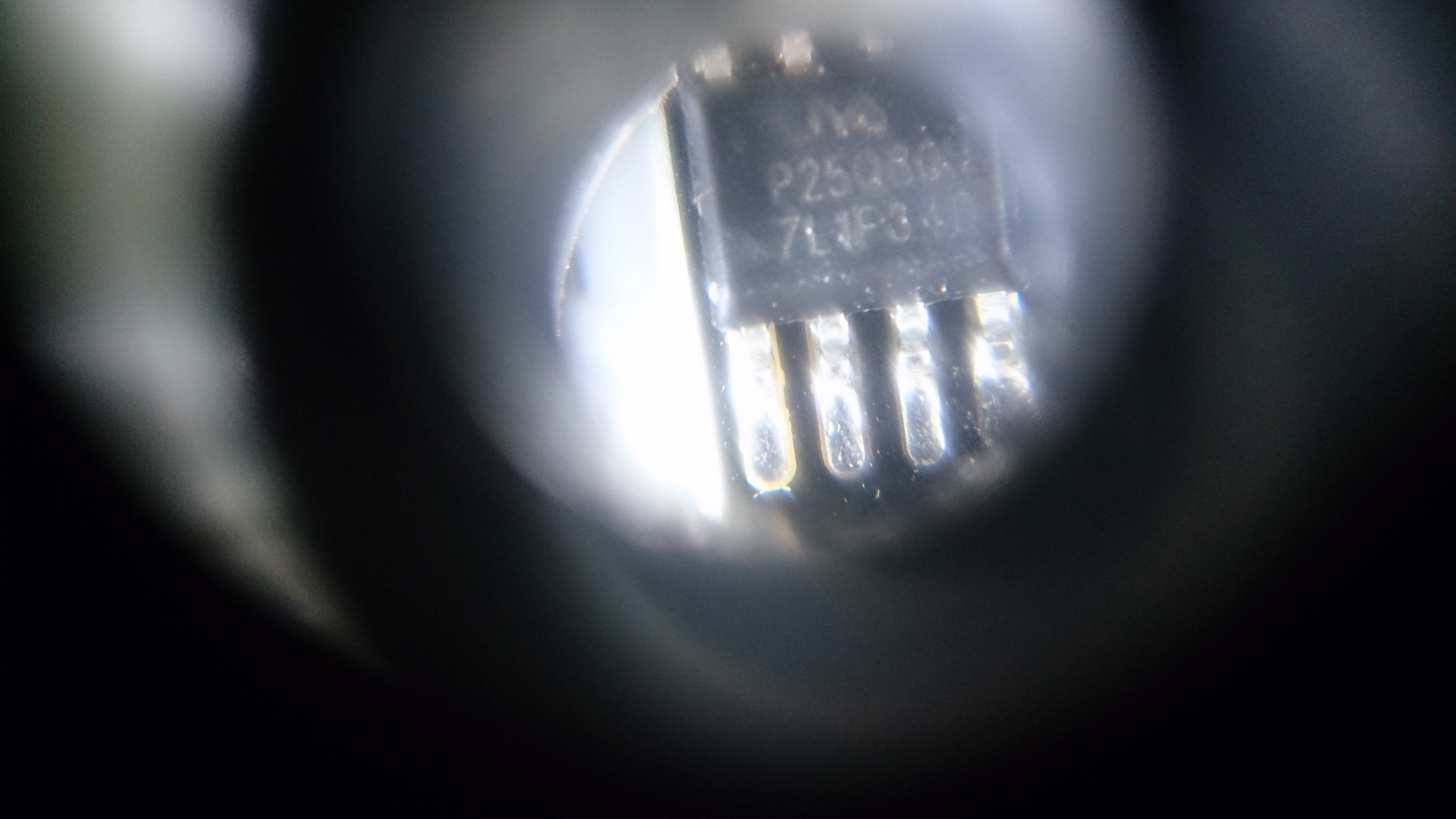
The ESP01 modules were purchased March 8th 2018 from "Sincere Company Store" on AliExpress. The listing is still active and they are picture there with the "PUYA" chip. https://www.aliexpress.com/item/KLV-40V300A-1-872-987-11-high-voltage-board-In-stock-Best-price-and-good-service/603533808.html
yknivag
on 12 Sep 2018
Your flash chip id is: 00146085
and chip part number: puya P25Q80H
manufacturer 85 (not E0)
uzi18
on 12 Sep 2018
So in the end, are we able to reliably recognize puya chips ?
@uzi18 please prepare a PR, and add a conditional, so we can
- always update your test if it can be reliable (could it be ?)
- add a menu option for the conditional (though there are already many options..)
- add a board generator option for the conditional
 d-a-v
on 13 Sep 2018
d-a-v
on 13 Sep 2018
Hi @uzi18 - you're right! I was reading the wrong part of the output. Your v2 patch works perfectly with my chips.
+1 for merging @uzi18's v2 patch to core.
yknivag
on 13 Sep 2018
I have the same problem in my esp01. May I know how to uploading filesystem from IDE?
Sorry I'm very new to Arduino.
 kevcavein
on 19 Sep 2018
kevcavein
on 19 Sep 2018
Thank you @igrr. Your patch worked for me. I had trouble until I caught the comments later on about adding #define FLASH_QUIRK_WRITE_0_TO_1 and especially the part about uploading filesystem from IDE, to fix the previous possibly incorrect state of the filesystem on the device.
May I know what file should I upload to filesystem???? I almost pull all my hair off trying to figure out how to solve the spiff problem. I can't store my blynk id using wifimanager.
kevcavein
on 19 Sep 2018
Take this file Esp.zip from @mrlightsman's post above. Replace it with the esp.cpp file in your arduino IDE program folder. I am using the portable version so it looks like this: C:arduino-1.8.6portablepackagesesp8266hardwareesp82662.4.2coresesp8266Esp.cpp. Just look for the 'packages' folder in your install directory and follow it down. Once the esp.cpp file is replaced, restart the IDE and flash your sketch using the "Tools -> Erase Flash -> All Flash Contents" option. After it's done flashing, go to "Tools -> ESP8266 Sketch Data Upload". This will upload all the files in the "data" subfolder of your sketch folder.
DarrenSchwartz
on 19 Sep 2018
I can confirm that @uzi18 v2 patch works nicely (thanks to everyone involved in creating it!). Using Arduino IDE, on some "Sonoff Basic" modules with PUYA chips.
However, I have some tips to give:
- Make SURE you're patching the correct Esp.h/Esp.cpp files. Lost some time patching the wrong ones.
- Make SURE you've cleaned any precompiled/cached versions. They're usually stored on (Windows) "
/Users/ /AppData/Local/Temp/arduino_*". Kill them all and then restart the IDE. Also lost some significant amount of time before fixing this. - Make sure that you select (at least for the first upload) "Erase ALL Flash" under "Tools" -> "Erase Flash".
- Clean the SPIFFS area using your favorite ESP8266 Sketch Data Uploader (answer "yes" to the question "do you want to upload a clean SPIFFS image?"). Your SPIFFS image MAY contain files already, but it must be pristine, that is, NOTHING may have been written to it after is was uploaded.
- Having your sketch (after patch) write anything to an "unclean" SPIFFS (one that was "touched" by any kind of write from a pre-patch sketch) doesn't make it "clean".
- Any kind of write from a pre-patch sketch to any SPIFFS image will make it unclean. Patching and reuploading your sketch will NOT work. You've got to reupload your SPIFFS image and then upload your sketch after patching before the old one still in flash writes anything to SPIFFS. I solved this by adding a large temporary delay to my sketch, giving me time to put it again in flash mode after SPIFFS image upload and before actual old sketch execution.
 mcpicoli
on 5 Oct 2018
mcpicoli
on 5 Oct 2018
Edit file Esp.cpp:
 bool EspClass::flashWrite(uint32_t offset, uint32_t *data, size_t size) {
    static uint32_t flash_chip_id = 0;
        uint32_t *read_buf=NULL;
    if (flash_chip_id == 0)
        flash_chip_id = getFlashChipId();
    ets_isr_mask(FLASH_INT_MASK);
    int rc;
    uint32_t* ptr = data;
    if ((flash_chip_id & 0x000000ff) == 0x85) { // 0x146085 PUYA
        read_buf=new uint32_t [SPI_FLASH_SEC_SIZE / 4];
        if(!read_buf) return false;
        rc = spi_flash_read(offset, read_buf, size);
        if (rc != 0) {
            delete read_buf;
            ets_isr_unmask(FLASH_INT_MASK);
            return false;
        }
        for (size_t i = 0; i < size / 4; ++i) {
            read_buf[i] &= data[i];
        }
        ptr = read_buf;
    }
    rc = spi_flash_write(offset, ptr, size);
        if(read_buf!=NULL) delete read_buf;
    ets_isr_unmask(FLASH_INT_MASK);
    return rc == 0;
}
 PaulBortnikov
on 9 Oct 2018
PaulBortnikov
on 9 Oct 2018
@all updated puya patch v3 used now in ESPEasy project:
https://github.com/letscontrolit/ESPEasy/blob/mega/patches/puya_v3.patch#L8
uzi18
on 7 Nov 2018
The described fix (flashWrite function) worked for me as well with Sonoff S26, which also uses PUYA flash. Any plans to perform the change in mainline?
 maxim-kukushkin
on 1 Dec 2018
maxim-kukushkin
on 1 Dec 2018
Any plans to perform the change in mainline?
Is this patch part of 2.5.0-Beta1?
 mrWheel
on 13 Dec 2018
mrWheel
on 13 Dec 2018
It is not in -beta1. A variation of the patch used in ESPEasy will be used in the core, but it's not targeted to a release yet.
devyte
on 13 Dec 2018
@devyte Just curious, what will be different?
TD-er
on 13 Dec 2018
Ok, so all the people that use the ESP-01 with (almost all nowadays) a PUYA chip cannot upgrade to a new version in the foreseeable future ?!
If I may ask: What's holding them up?
mrWheel
on 13 Dec 2018
Not only ESP-01 but many other new devices. Sonoff S26 is one of the examples
maxim-kukushkin
on 13 Dec 2018
@devyte Just curious, what will be different?
The patch:
- uses a static 4KB buffer, which means everyone using the patch has 4KB less heap, including those users who do _not_ have a puya chip. Instead, a dynamically allocated buffer should be used.
- evaluates the first if condition every single call of the function, although only the first one after boot actually does anything. Instead of a private static, a global could be used that is set elsewhere only once at bootup, and then if condition is no longer needed. Alternatively, The ESPClass could get a new data member (i.e.: instead of the global flag) which is set on construction, and a method to return its value.
- calculates the flash_chip_id condition in the second if every single call of the function, which makes no sense, because it can't ever change at runtime. Instead, the condition should be fully calculated once and the result stored in a flag, which should then be checked.
- detects the condition based on flash_chip_id, which isn't very robust, as has been shown with the flash chip size. Instead, a general purpose detection approach should be implemented that transparently covers other potential brands and manufacturers that have the same quirk, should they appear.
Example: on first bootup after flashing, choose a sector, e.g.: within the update area of the flash layout., preferably one that is unlikely to be used. Do a write test and read back sequence known to behave differently with puya chips. If puya is detected, set a quirk flag somewhere. On all successive bootups, detect that the quirk flag is set, so don't do the test again. Use the quirk flag in the write function to decide whether the additional logic is done or not.
Given the above, the patch won't be accepted as-is into our core. There have been several internal discussions on exactly what to do, but given that the patch is available, there have been, and still are, higher priorities, e.g.: figuring out how to ease IRAM usage.
There have been a lot of comments from many users in this discussion, and I see the patch is even being applied elsewhere, but I still don't see a PR here. Instead of wondering what will happen, I invite those involved to make a PR with the proposed patch, and implement at least points 1-3 above on top of it. If you come up with a good solution for point 4, even better.
devyte
on 13 Dec 2018
While do understand that the expected behavior in open source is to some up with a proper patch for an issue, I tend to disagree with this point:
"given that the patch is available, there have been, and still are, higher priorities"
No. You've just indicated that the patch is a really basic workaround, apparently not suitable for any production use. People only use it as PoC because it makes their devices work at least somehow, comparing to not working at all
So, if there's any prioritization done, pease consider this issue as not having any workaround at all, as apparently there's no candidate for a merge
Current firmware literally doesn't work on recent chips. Also, comparing to other issues, at least some investigation has been done by the community, identifying the root cause and a PoC fix
maxim-kukushkin
on 13 Dec 2018
Totally agree with maxim-kukushkin
mrWheel
on 13 Dec 2018
@maxim-kukushkin and @mrWheel everyone else on the thread: you obviously care very much about the Puya patch.
Please, one of you take what @devyte has suggested and wrap it into a PR so we can advance.
earlephilhower
on 13 Dec 2018
@maxim-kukushkin & @devyte
I would if only I new how ...
But yes, your right: I try to make software for devices with ESP-01’s and thats not without problems!
mrWheel
on 13 Dec 2018
@devyte Sounds like very legitimate points.
I didn't have a look at it myself, but wasting 4k of heap is reason enough to not apply it like it is now.
When is the deadline for 2.5.0? ;)
TD-er
on 13 Dec 2018
Given the length of this thread, I'm closing in favor of #5493 . Resolution will be handled there.
devyte
on 14 Dec 2018
Related issues
 SmartSouth
·
3Comments
SmartSouth
·
3Comments
 Marcelphilippeandrade
·
3Comments
Marcelphilippeandrade
·
3Comments
 mechanic98
·
3Comments
mechanic98
·
3Comments
 hoacvxd
·
3Comments
hoacvxd
·
3Comments
 eliabieri
·
3Comments
eliabieri
·
3Comments
Most helpful comment
Edit file Esp.cpp: