Arduino: Wifi Not connecting on Wemos D1 R2, mini and mini pro
I Have a couple of wemos devices (Wemos D1 R2 and a Wemos Mini) and the all run a piece of code fine.
I recently got some wemos mini pro's, but when loading the same s/w on to it, it won't connect to the wifi network.
I tried moving closer to the router, no joy.
Flashed it with a wifi scanner, and noticed my network doesn't pop up in the list.. not even when I move close..
Any idea's?
-- Logging from the wemos --
Connecting to UPC643521
....wifi evt: 1
STA disconnect: 201
....wifi evt: 1
STA disconnect: 201
.....wifi evt: 1
STA disconnect: 201
....wifi evt: 1
STA disconnect: 201
.....wifi evt: 1
STA disconnect: 201
....wifi evt: 1
STA disconnect: 201
....wifi evt: 1
 martin072
All 35 comments
Other Update.. Running the module in Soft AP does broadcast the SSID, but unable to connect to it..
Could this be related to non-original wemos modules (ie. this one is from AliExpress)?
-- UPDATE --
Now my Wemos D1 R2 won't connect to an WiFi AP either? Help..
Serial debug output:
Connecting to: UPC643521
state: 5 -> 0 (0)
rm 0
del if0
usl
mode : null
mode : sta(60:01:94:33:00:c0)
add if0
f r0, ...scandone
state: 0 -> 2 (b0)
.state: 2 -> 3 (0)
state: 3 -> 5 (10)
add 0
aid 1
cnt
.....state: 5 -> 2 (2a0)
rm 0
..reconnect
state: 2 -> 0 (0)
f r0, scandone
state: 0 -> 2 (b0)
state: 2 -> 3 (0)
state: 3 -> 5 (10)
add 0
aid 1
cnt
......state: 5 -> 2 (2a0)
rm 0
.reconnect
state: 2 -> 0 (0)
f r0, scandone
state: 0 -> 2 (b0)
state: 2 -> 3 (0)
state: 3 -> 5 (10)
add 0
aid 1
cnt
......state: 5 -> 2 (2a0)
rm 0
.reconnect
state: 2 -> 0 (0)
f r0, .scandone
state: 0 -> 2 (b0)
state: 2 -> 3 (0)
state: 3 -> 5 (10)
add 0
aid 1
cnt
.....state: 5 -> 2 (2a0)
rm 0
..reconnect
state: 2 -> 0 (0)
f r0, scandone
state: 0 -> 2 (b0)
state: 2 -> 3 (0)
state: 3 -> 5 (10)
add 0
aid 1
cnt
......state: 5 -> 2 (2a0)
rm 0
.reconnect
martin072
on 23 Dec 2017
Does the WiFi scanner show any other networks?
Is your network on 2.4GHz? On a channel <=12 ?
Is your AP configured to show SSID?
 5chufti
on 27 Dec 2017
5chufti
on 27 Dec 2017
I have the same problem with my Wemos D1 mini pro boards.
The Wemos SSID only appears when the softAP is set without password, but I cannot connect to it.
I have tried several wifi channels below 12...
Same code works perfectly fine with Wemos D1 mini boards... Then also works fine with hidden SSID and for wifi-channels 1-14.
 aslake
on 31 Dec 2017
aslake
on 31 Dec 2017
Yes it sometimes shows up in the scanner, it appears and disappears. It is running on 2.4Ghz indeed.
When I try a D1 R2 board it works fine instantly. I am thinking this could be caused by a Wemos Mini Pro clone? I noticed they don't carry the wemos logo on it... I've ordered an official wemos mini pro, see if it makes a difference..
martin072
on 2 Jan 2018
If you have a magnifier or a multimeter, you could check the antenna connection ?
 d-a-v
on 2 Jan 2018
d-a-v
on 2 Jan 2018
It’s on the internal antenna.
martin072
on 2 Jan 2018
I meant the soldering points of the internal antenna. With esp powered off and with a digital multimeter, you can check if the wire is continuous (if things are accessible)
d-a-v
on 2 Jan 2018
I bought 4 pcs Wemos D1 Mini Pro clone and I have the same trouble ((
Does anyone know at least some way to make them work?
Thanks!
 beastgrim
on 28 Feb 2018
beastgrim
on 28 Feb 2018
@beastgrim quite a few bugs in the latest Core release and we are eagerly awaiting the next release that has the fixes. Try rolling back to the very buggy, but usable 2.3.0 or use Git with the master branch.
 pieman64
on 1 Mar 2018
pieman64
on 1 Mar 2018
I experience the same problems with running the Wemos D1 Mini pro as an AP.
(No problems with the same software on a "non-pro" Wemos)
The signal fluctuates (signal measured with the excellent vistumbler)
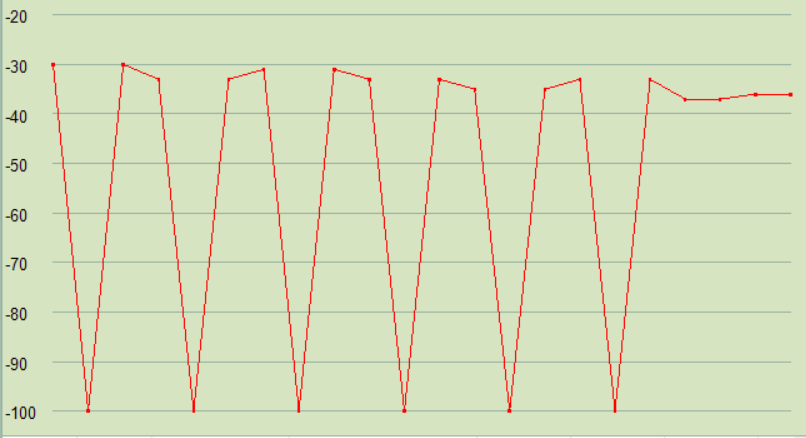
Sometimes I am lucky and can connect to the access point (I expect that I need a connection for a couple of seconds to make the actual handshake).
I see no change in the measured signal whether I setup the Wemos AP to run with or without password - - but I might be that the handshake is faster without password - and therefore it works a little better.
I have full connection to the wemos (over serial) and I get no error code or any other diagnostics.
Also note that I have not seen any problems connecting the Wemos D1 Mini Pro to a wifi-network - it is only the AP-functionality that is giving me problems
 ThomasQvist
on 9 Mar 2018
ThomasQvist
on 9 Mar 2018
@ThomasQvist make sure you are running it in AP mode only. Check that you have WiFi.mode before calling WiFi.softAP:
  WiFi.mode(WIFI_AP);
  WiFi.softAP(ssid, password);
It the chip is in STA+AP mode, then the station will be trying to scan for a network to connect to, and since scan covers multiple channels, the AP will not be on the desired channel for some percentage of total time. This might explain the behavior you are observing.
 igrr
on 9 Mar 2018
igrr
on 9 Mar 2018
Small Update, I ordered an official Wemos Mini Pro, and unfortunately the same results. I am not able to connect to my Local home WiFi, where as the regular wemos don't have any issues at all..
martin072
on 14 Mar 2018
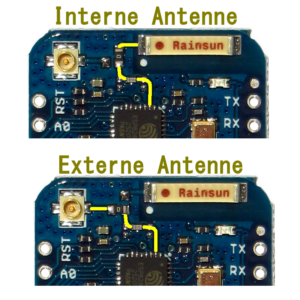
please check that you are on internal antenna according to this picture:
https://arduino-projekte.info/unterschied-wemos-d1-mini-vs-d1-mini-pro/
and also check that the crystal (small metall square close to D1/Rx pins) is 26MHz
5chufti
on 14 Mar 2018
Thanks for the update - makes me happy - since I have been trying "everything" (including the advice from @igrr ) and checked the antenna without any luck.
...and also makes me sad - I am waiting for a new batch of Wemos d1 mini pros - hoped that I just had a faulty one.
Are there anyone that can get a stable signal from a Wemos Mini d1 Pro running in AP-mode?
(And again - I only have problems in AP-mode - not connecting via Wifi to other AP's)
ThomasQvist
on 14 Mar 2018
@ThomasQvist,
For me it’s the WiFi connections that doesn’t work. I am not using the AP function
martin072
on 14 Mar 2018
I also bought my WEMOS from Ali...
I am connecting to a router, but only have problems if I add the UpdateServer.
If I recompile and flash with other data, then recompile with the correct one, I can connect. If I uncomment the lines for the UpdateServer I cannot connect.
There is also running: mDNS and NeoPixel. That's it
 fabian727
on 6 May 2018
fabian727
on 6 May 2018
Any update on this subject?
martin072
on 6 Aug 2018
Try this: Before setting up the softAP, erase the flash storage and every else that might be saved there with this command
Wifi.disconnect();
 michaelradhuber
on 23 Jan 2019
michaelradhuber
on 23 Jan 2019
I have been playing around with this for hours, everything seemed fine but i could not connect to my home WiFi, my router saw it but didn't assign an IP.
I tried setting a static IP and still the same, i then tried a hotspot from my mobile and it connected as soon as I uploaded the script, so I set up my router identical to my mobile hotspot, but still nothing. until i pressed reset on my Wemos!! straight away it connected to my router with an IP. everytime i upload a script it needs a reset before it will connect hopefully this helps people!
 seanmcd1405
on 6 Aug 2019
seanmcd1405
on 6 Aug 2019
Have the same issue as already described above with a WEMOS D1 mini pro board.
Tried different WIFI-modes, from unprotected to WEP and WPA. Different static Channels, short passwords without any special characters etc.
I can't establish a connection :(
WIFI module gets recognised, also is able to see the WIFI-channels around me.
Need some advise or a handy trick to get a connection to work.


Thanks!
 ackbyte
on 8 Sep 2019
ackbyte
on 8 Sep 2019
Short password means >= 8 chars
Try reducing Tx power
Try external antenna (ceramic one sucks)
 devyte
on 9 Sep 2019
devyte
on 9 Sep 2019
@devyte, thank you for your reply! Password length depends on the used security: 5 chars, 8 chars.
TX power on the AP cant be reduced, its kind of blackbox.
I will try to test this point on my second DDWRT AP which has an additional 2,4 GHz channel.
Changing the antenna is not so easy:
the resistor has to be desoldered and changed the position to make the external antenna working.
Currently I am able to scan for near Channels from the WEMOS, this mens antenna is woking pretty fine and the range is for the testing mode acceptable.
Has someone a good piece of code to test the WIFI connection in a good way?
ackbyte
on 9 Sep 2019
Check return of WiFi.begin() (i think it returns whether it succeeded).
By reduce Tx I meant on the ESP, not your AP.
And try pwd with 8chars min regardless of security.
devyte
on 9 Sep 2019
I have been playing around with this for hours, everything seemed fine but i could not connect to my home WiFi, my router saw it but didn't assign an IP.
I tried setting a static IP and still the same, i then tried a hotspot from my mobile and it connected as soon as I uploaded the script, so I set up my router identical to my mobile hotspot, but still nothing. until i pressed reset on my Wemos!! straight away it connected to my router with an IP. everytime i upload a script it needs a reset before it will connect hopefully this helps people!
seanmcd1405 , I have the exact same problem on my Wemos D1 mini board bought from Amazon. Regular sketches will be uploaded and work fine. Wifi sketches bomb out. It says connecting to my ssid ... and just hangs there. I do not see an IP address reported back on the serial monitor and it is in that endless ... loop. I have done everything except press the reset button after uploading the sketch. Maybe I will do that tonight and report back to you if it works on mine. Thanks for the tip.
 srinpraveen
on 9 Sep 2019
srinpraveen
on 9 Sep 2019
Try positioning the WEMOS board such that there is nothing near the antenna. If your kit came with the connectors with the long leads, plug that onto your headers to give more space between the antenna and the protoboard. Try and keep your jumper wires clear of the antenna space as much as possible.
 mhightower83
on 11 Sep 2019
mhightower83
on 11 Sep 2019
@mhightower83 , sorry turned out that it was the simplest of mistakes. The ssid of my router when first configured many many years ago had a whitespace at the end of the ssid string. I was not aware of this till now. I would like to kick myself for my years of ignorance. Now it seems to work very well.
srinpraveen
on 11 Sep 2019
Try positioning the WEMOS board such that there is nothing near the antenna. If your kit came with the connectors with the long leads, plug that onto your headers to give more space between the antenna and the protoboard. Try and keep your jumper wires clear of the antenna space as much as possible.
did you try reduce the RF TX power with WiFi.setOutputPower??
 jandrassy
on 11 Sep 2019
jandrassy
on 11 Sep 2019
@jandrassy , I actually did not have to change my wifi power settings. The root cause of my problem was a trailing whitespace character on my ssid string when the router was configured. I had missed catching this for a long period of time. After fixing it, the wifi connectivity so far has been very stable on the d1 mini.
srinpraveen
on 11 Sep 2019
@srinpraveen, sorry for the dumb question, is it one original wemos or a copy from aliexpress or so?
I'am asking just to understand the root issues for other problems.
Thanks!
ackbyte
on 11 Sep 2019
Hi zeldor,
I edited my original comment. By mistake, I had mentioned that I had bought the board from aliexpress. Actually when I checked back my emails, turns out that I had actually got it from Amazon. And this was a original wemos d1 mini board. The reviews for the product were good. And thankfully it's been working out very well so far. Wifi connection is pretty stable.
srinpraveen
on 11 Sep 2019
@zeldor , here is a link to the one that I purchased from amazon back in 2017. Hope that helps. https://www.amazon.com/gp/product/B01MDRVUQU/ref=ppx_od_dt_b_asin_title_s00?ie=UTF8&psc=1
The price is not super cheap like in Aliexpress but all goods are of pretty good quality from this seller.
srinpraveen
on 11 Sep 2019
@jandrassy , I actually did not have to change my wifi power settings. The root cause of my problem was a trailing whitespace character on my ssid string when the router was configured. I had missed catching this for a long period of time. After fixing it, the wifi connectivity so far has been very stable on the d1 mini.
then delete your comments from this issue. I commented the quote, not your problem
jandrassy
on 11 Sep 2019
Hi, not sure if it's related. But I struggled 3 days, with exactly the same problem on 50 Wemos Boards. Finally I solved that removing one inductor in the antenna matching network. Not sure why it worked (I can guess it has an erroneous value) but it did!. Not just on one, but all. Complete details and photos:
https://geekenargentina.wordpress.com/2019/10/08/esp8266-connectivity-troubleshooting/
I hope it helps others
Román
 romansapia
on 10 Oct 2019
romansapia
on 10 Oct 2019
@romansapia excelente trabajo! There are way too many copies out there with hw mistakes, and some manufacturers don't even bother to test these days.
I'm closing this, because there is no singular reproducible issue or solution described.
devyte
on 10 Oct 2019
@ThomasQvist make sure you are running it in AP mode only. Check that you have
WiFi.modebefore callingWiFi.softAP:WiFi.mode(WIFI_AP); WiFi.softAP(ssid, password);It the chip is in STA+AP mode, then the station will be trying to scan for a network to connect to, and since scan covers multiple channels, the AP will not be on the desired channel for some percentage of total time. This might explain the behavior you are observing.
The Wemos D1 Pro brodcasts its own SSID and custom user's code unable to be overwritten. What's a mistery? May it lack of some compile options that I leave everything by default on Arduino IDE?
 woodlist
on 23 Apr 2020
woodlist
on 23 Apr 2020
Related issues
 Marcelphilippeandrade
·
3Comments
Marcelphilippeandrade
·
3Comments
 dariopb
·
3Comments
dariopb
·
3Comments
 hulkco
·
3Comments
hulkco
·
3Comments
 tiestvangool
·
3Comments
tiestvangool
·
3Comments
 mreschka
·
3Comments
mreschka
·
3Comments
Most helpful comment
Hi, not sure if it's related. But I struggled 3 days, with exactly the same problem on 50 Wemos Boards. Finally I solved that removing one inductor in the antenna matching network. Not sure why it worked (I can guess it has an erroneous value) but it did!. Not just on one, but all. Complete details and photos:
https://geekenargentina.wordpress.com/2019/10/08/esp8266-connectivity-troubleshooting/
I hope it helps others
Román