Arduino: Wemos D1 error while uploading sketch
Arduino: 1.6.12 (Windows 10), Плата:"WeMos D1 R2 & mini, 80 MHz, 115200, 4M (3M SPIFFS)"
Скетч использует 226 729 байт (21%) памяти устройства. Всего доступно 1 044 464 байт.
Глобальные переменные используют 31 936 байт (38%) динамической памяти, оставляя 49 984 байт для локальных переменных. Максимум: 81 920 байт.
C:\Users\admin\AppData\Local\Arduino15packages\esp8266\tools\esptool\0.4.9/esptool.exe -vv -cd nodemcu -cb 115200 -cp COM3 -ca 0x00000 -cf C:\Users\admin\AppData\Local\Temp\arduino_build_771914/WiFiScan.ino.bin
esptool v0.4.9 - (c) 2014 Ch. Klippel [email protected]
setting board to nodemcu
setting baudrate from 115200 to 115200
setting port from COM1 to COM3
setting address from 0x00000000 to 0x00000000
espcomm_upload_file
espcomm_upload_mem
setting serial port timeouts to 1000 ms
opening bootloader
resetting board
trying to connect
flush start
setting serial port timeouts to 1 ms
Произошла ошибка при загрузке скетча
setting serial port timeouts to 1000 ms
flush complete
espcomm_send_command: sending command header
espcomm_send_command: sending command payload
read 0, requested 1
trying to connect
flush start
setting serial port timeouts to 1 ms
setting serial port timeouts to 1000 ms
flush complete
espcomm_send_command: sending command header
espcomm_send_command: sending command payload
read 0, requested 1
trying to connect
flush start
setting serial port timeouts to 1 ms
setting serial port timeouts to 1000 ms
flush complete
espcomm_send_command: sending command header
espcomm_send_command: sending command payload
read 0, requested 1
resetting board
trying to connect
flush start
setting serial port timeouts to 1 ms
setting serial port timeouts to 1000 ms
flush complete
espcomm_send_command: sending command header
espcomm_send_command: sending command payload
read 0, requested 1
trying to connect
flush start
setting serial port timeouts to 1 ms
setting serial port timeouts to 1000 ms
flush complete
espcomm_send_command: sending command header
espcomm_send_command: sending command payload
read 0, requested 1
trying to connect
flush start
setting serial port timeouts to 1 ms
setting serial port timeouts to 1000 ms
flush complete
espcomm_send_command: sending command header
espcomm_send_command: sending command payload
read 0, requested 1
resetting board
trying to connect
flush start
setting serial port timeouts to 1 ms
setting serial port timeouts to 1000 ms
flush complete
espcomm_send_command: sending command header
espcomm_send_command: sending command payload
read 0, requested 1
trying to connect
flush start
setting serial port timeouts to 1 ms
setting serial port timeouts to 1000 ms
flush complete
espcomm_send_command: sending command header
espcomm_send_command: sending command payload
read 0, requested 1
trying to connect
flush start
setting serial port timeouts to 1 ms
setting serial port timeouts to 1000 ms
flush complete
espcomm_send_command: sending command header
espcomm_send_command: sending command payload
read 0, requested 1
warning: espcomm_sync failed
error: espcomm_open failed
error: espcomm_upload_mem failed
 ghost
ghost
All 40 comments
It looks like it's unable to reset your board to programming-mode. Do you have something connected to GPIO0, GPIO2 and/or GPIO15?
 WereCatf
on 13 Oct 2016
WereCatf
on 13 Oct 2016
It looks like it's unable to reset your board to programming-mode. Do you have something connected to GPIO0, GPIO2 and/or GPIO15?
Good day. No. Only usb connected.
2 blue diods flash + esp8266 blink twice when uploading sketch.
ghost
on 13 Oct 2016
Well, then I don't know. Something is preventing it from going into programming-mode, but I can't say what. You could pull GPIO0 to GND manually and resetting the board, that should at least allow you to flash a sketch on it.
WereCatf
on 13 Oct 2016
You could pull GPIO0 to GND manually and resetting the board
Wemos D1 has no GPIO0

ESP8266 may be?
ghost
on 13 Oct 2016
Yes, it does have GPIO0. GPIO0 is connected to D3, see https://www.wemos.cc/product/d1.html
WereCatf
on 13 Oct 2016
Yes, it does have GPIO0. GPIO0 is connected to D3, see https://www.wemos.cc/product/d1.html
I must pull D3 to GND? OK. I will check. Thank you.
ghost
on 13 Oct 2016
Not helped :(
warning: espcomm_send_command: didn't receive command response
warning: espcomm_send_command(FLASH_DOWNLOAD_BEGIN) failed
closing bootloader
flush start
setting serial port timeouts to 1 ms
setting serial port timeouts to 1000 ms
flush complete
error: espcomm_upload_mem failed
ghost
on 13 Oct 2016
IT'S WORKS!!! :) But I didn't now what I do :)
I pull of GPIO0 and GND - and it uploaded!
@WereCatf, many thanks to You!
ghost
on 13 Oct 2016
It worked for me too!
 JollySwagman
on 16 Oct 2016
JollySwagman
on 16 Oct 2016
Hi, I am a new user with Wemos D1 R2 on OSX Sierra:
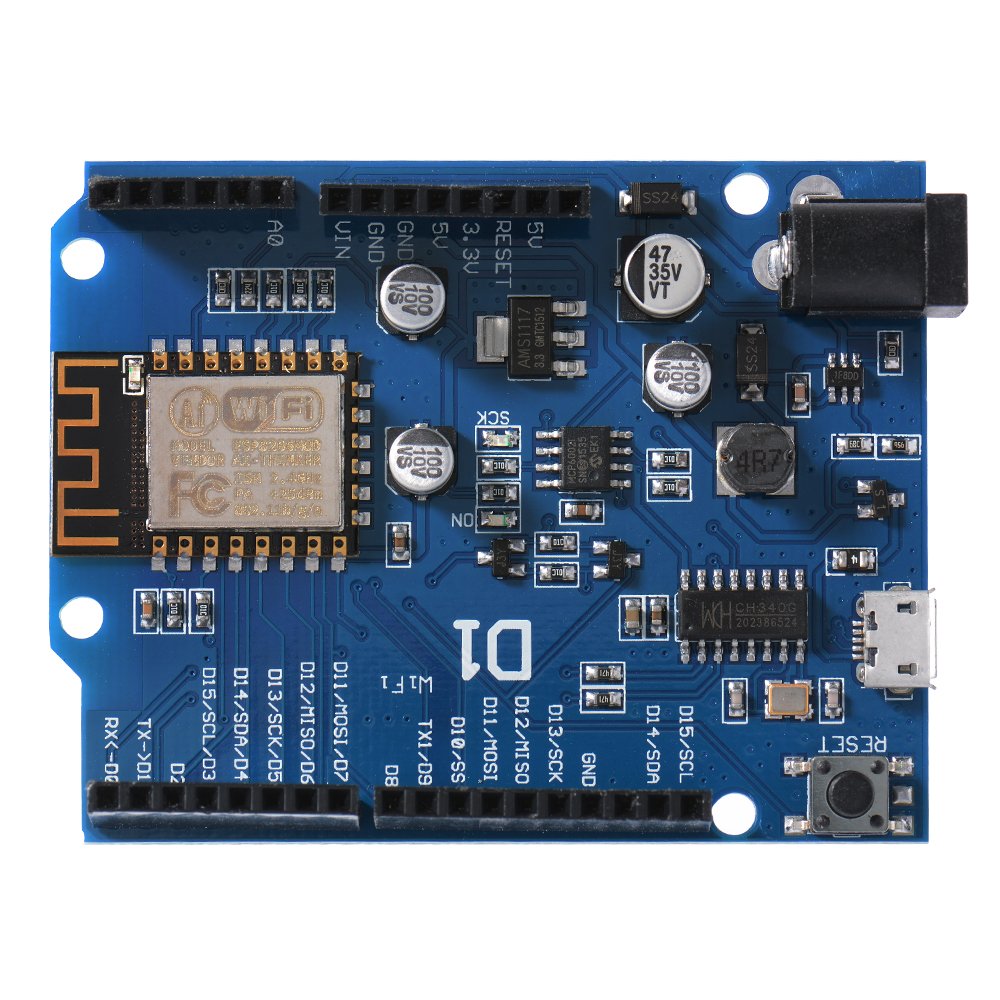
I could install the drivers for Sierra but after some tests with the board, suddenly I could install any Sketch and I always receive the same message:
Uploading 226304 bytes from /var/folders/_v/ygs75xf50wd8ypygstdmh9s00000gn/T/arduino_build_343736/protoShieldLeds.ino.bin to flash at 0x00000000
warning: espcomm_send_command: didn't receive command response
warning: espcomm_send_command(FLASH_DOWNLOAD_BEGIN) failed
error: espcomm_upload_mem failed
error: espcomm_upload_mem failed
I have tried to connect with a wire GPIO0 to GND but the problem continues. Any help?
I am reading this page, but I don´t know how to reset the chip esp8266:
https://github.com/esp8266/Arduino/blob/master/doc/boards.md#wemos-d1
I remember that in the beginning some led in the chip blip but now is disabled only turn on when I reset the board. Any help?
Many thanks in advance.
Cheers
Juan Antonio
 jabrena
on 8 Nov 2016
jabrena
on 8 Nov 2016
HI,
I have same problem, but not resolve.
I try pull D3 to GND, and not work.
How do I solve?
Thanks.
 frankchih
on 21 Feb 2017
frankchih
on 21 Feb 2017
I solved every issue with the old esp8266 boot configuration:
D3 to GND (GPIO0 logic level 0)
D4 floating (GPIO2 has pullup logic level 1)
D8 to GND (GPIO15 logic level 0)
...and not only the upload issue we are talking here, but even the 'not recognized usb device' my windows tells me with the cheapest chinese wemos D1 mini V1 board
So, for those of you only trying to pull down D3, please try pulling down D8 also.
EDIT: I've found a smarter way to do this. RTS signal correctly pulls down D3 so it is only sufficient to connect D3 and D8 together, they both get pulled down and everything works. Maybe a second pull-down transistor can be inserted in next wemos design if my analisys is correct.
 segaura
on 18 Apr 2017
segaura
on 18 Apr 2017
I'm facing the same problem with Wemos D1 R2.
I'm on Windows 7, have tried different USB ports, and download speeds. Also tried pulldown D3 and D8 without any effect.
Any other ideas? Could have something to do with power supply through USB?
I have had this before, and then it usually worked every one in four tries. But now it's simply stuck.
Sketch uses 254,147 bytes (24%) of program storage space. Maximum is 1,044,464 bytes.
Global variables use 37,608 bytes (45%) of dynamic memory, leaving 44,312 bytes for local variables. Maximum is 81,920 bytes.
Uploading 258288 bytes from C:\Users\nnohrras\AppData\Local\Temp\arduino_build_726740/ArducamOnD1.ino.bin to flash at 0x00000000
warning: espcomm_send_command: didn't receive command response
warning: espcomm_send_command(FLASH_DOWNLOAD_BEGIN) failed
error: espcomm_upload_mem failed
error: espcomm_upload_mem failed
 ratnick
on 10 May 2017
ratnick
on 10 May 2017
I had the same problem. I took the following 2 steps:
- I connected D3 to GND and D8 to GND with simple jumper cables.
- I took out every single USB device connected to my machine. (Keyboard, Mouse, Monitor extension)
 vikibaarathi
on 26 Jun 2017
vikibaarathi
on 26 Jun 2017
I had the same problem and I try to recovery the solder of WiFi header on WeMos D1 board.
It works!
 AmiraliSetayeshi
on 26 Jun 2017
AmiraliSetayeshi
on 26 Jun 2017
what is pulldown mean ?
 yogamuliawan
on 3 Jul 2017
yogamuliawan
on 3 Jul 2017
what is pulldown mean ?
Connect one to another :)
ghost
on 3 Jul 2017
by jump wires ?
yogamuliawan
on 3 Jul 2017
Yep.
GPIO0 on GND
ghost
on 3 Jul 2017
sorry sir, im new on arduino
what is GPIO0 , is that a pin or what ? i know GND
yogamuliawan
on 3 Jul 2017
im using Wemos D1R2
yogamuliawan
on 3 Jul 2017
@yogamuliawan WeMos' use ESP8266's and the pins are referenced GPIO 0, 2, 4, 5 etc. WeMos use D1, D2 as they think it makes it easier for you but IMHO they should stick with the Espressif GPIO numbers.
Go to the WeMos site and dig out the look up table for the D1R2 that maps D references to GPIO references. GPIO 0 should be D3. See mini "map" at https://wiki.wemos.cc/products:d1:d1_mini
For some reason WeMos are forever removing useful stuff from their site, like the "maps" for products they have just stopped supplying etc.
 pieman64
on 3 Jul 2017
pieman64
on 3 Jul 2017
lol, this is so ridiculous....
how, when and for how long are you supposed to ground the D3(gpio0) pin?
1) when the board is completely off
2) when the board is connected to a power source (and ground for 1-2 seconds? both D pins???)
3) before and during the uploading of a sketch
4) do you also need to ground the D8 pin then?
5) or it gives the best results when you bridge D3 and D8 while the board is running? or offline ?
6) ground D3 and D8 at the same time or after the 1st one has been grounded for 1-2 seconds?
7) do you need to reboot or reset the board after some of that has been done?
8) do i need to use a special USB data cable to upload stuff or can i use a regular USB charging cable too?
9) what is the special USB data cable even called?
10) does the port upload speed have to be 115200 or 921600 or 9600???
.....
 jimsy3
on 21 Jul 2017
jimsy3
on 21 Jul 2017
lol... not to mention that my problem was probably just a too long cable... (2+2 or 1+2meters)
jimsy3
on 21 Jul 2017
I have same error and I have connect D3 to GND and D8 to GND, but the error still there.
 MariaDab
on 3 Aug 2017
MariaDab
on 3 Aug 2017
To all having this problem. not all boards have the same D numbering. The relevant pins to make sure of are GPIO0, GPIO2 and/or GPIO15, but you'll need to figure out which D numbers they correspond to on your board. Keep in mind that some boards are clones, i.e.: they can have pcb mistakes, have bad flash, etc.
OP's issue is resolved, and I personally can't reproduce on a Wemos D1 mini r2. In addition, to those having the comm open failed error, it is documented.
Closing per #3655 .
 devyte
on 11 Oct 2017
devyte
on 11 Oct 2017
Had same problem...
Solved: Goto control panel, device manager, ports COM and LPT,
Find USB-SERIAL CH340(COM6) ...or what ever your com port is... and double click on it
select port settings
change bits per second from 9600 to 155200 and click ok
Go back to arduino ide sketch and set in tools the upload speed to 155200 accordingly
upload sketch again...
Done
(no connection from d3 or d8 needed...)
 sancs001
on 29 Mar 2018
sancs001
on 29 Mar 2018
@sancs001 you rock!
 slakbal
on 5 Apr 2018
slakbal
on 5 Apr 2018
Same issue, I tried all of the above; ran into the same problem with one board; will not load anything.

Even tried to reload NodeMCU. Other boards work fine. Suspect board is toasted
 deki1225
on 11 Apr 2018
deki1225
on 11 Apr 2018
(This is a solution for future reference)
I had a similar issue with a Wemos D1 mini from Banggood.
I've tried everything recommended, D3/D8 to GND, pressing reset button, etc. Tried from Mac, tried form Linux.
My board had a particularity: what should be the CH340G chip had no markings on it, so I started to suspect this was the problem. Whenever I tried to upload I saw the board led flashing, but never an answer on the serial line. (I had no debugging elements)
So I have a second FTDI (real one) board, and I:
- connected the FTDI to the computer usb
- FTDI Rx/Tx to Tx/Rx of the Wemos.
- Connected the Wemos board directly the PC (for power).
- D3(GPIO0) to GND (this stays on for the duration of the upload).
Then I selected the external FTDI serial device as the Arduino port (115200 bauds) and before pressing upload I would press and release the RESET button on the Wemos board.
With that it works, I can upload any sketches.
I hope this helps someone else.
 creinero
on 21 Apr 2018
creinero
on 21 Apr 2018
Hi,
I had the same problem with my Wemos D1 R2. It resolved by combining D3 and D8 with jumper. I reset and transferred the program. Thanks to @segaura !
 kijuku
on 28 Jun 2018
kijuku
on 28 Jun 2018
This thread helped fix my "bricked" wemos D1 mini. In my case, I was getting the upload error and when I looked at the serial output, all I saw were the random characters during boot up. I left a jumper wire in place from D3 (GPIO0) to ground and was able to upload sketches again. However, the board only booted the sketch once the jumper wire was removed.
Super useful thread, thanks!
 KazW
on 14 Sep 2018
KazW
on 14 Sep 2018
Hi Guys
I spent 2 hours trying to fix this issue, tried everything you suggested, and then I got desperate and start looking at the board, when I flipped it I noticed that GPIO3(D0 Rx) and GPIO1(D1 Tx) where soldered together, I got my solder and I separate them and Woilaaaaaaaaa! Started working right away. It came like that from Aliexpress, check yours in case you have the same defect!
 peter3099
on 26 Sep 2018
peter3099
on 26 Sep 2018
nothing of the above solutions solved my problem.
In my case the LED don't turn on. (only turns on if i connect D4 to gnd).
I suspect the Wemos Di mini is burned !!!
 Ricardosgeral
on 26 Apr 2019
Ricardosgeral
on 26 Apr 2019
Hi,
I have problem with Wemos D1 R1.
I want connect with wifi and mobile app "Blynk" but when i upload program for connect arduino to wifi, I have problem. Some Errors.
warning: espcomm_sync failed
error: espcomm_open failed
error: espcomm_open failed
Code:
define BLYNK_PRINT Serial
include
include
// You should get Auth Token in the Blynk App.
// Go to the Project Settings (nut icon).
char auth[] = "...";
// Your WiFi credentials.
// Set password to "" for open networks.
char ssid[] = "...";
char pass[] = "...";
void setup()
{
// Debug console
Serial.begin(9600);
Blynk.begin(auth, ssid, pass);
}
void loop()
{
Blynk.run();
}
 Kamil34138
on 27 Apr 2019
Kamil34138
on 27 Apr 2019
When i conncect GND and D9(GPI02) the LED on wifi module turn on...
Kamil34138
on 27 Apr 2019
include
include
include
include //This library you can add via Include Library > Manage Library >
include
include // This library is already built in to the Arduino IDE
include //This library you can add via Include Library > Manage Library >
LiquidCrystal_I2C lcd(0x3F, 16, 2);
define DHTPIN D8 //define as DHTPIN the Pin 3 used to connect the Sensor
define DHTTYPE DHT11 //define the sensor used(DHT11)
DHT dht(DHTPIN, DHTTYPE);//create an instance of DHT
const char* host = "iot-web";
const char* ssid = "Dedew";
const char* password = "dewy2488";
ESP8266WebServer server(80);
float humidity, temp_f; // Values read from sensor
String webString="";
unsigned long previousMillis = 0; // will store last temp was read
const long interval = 2000; // interval at which to read sensor
void handle_root() {
server.send(200, "text/plain", "Welcome to weather server, open /temp, /humidity or /api");
delay(100);
}
void setup(void)
{
lcd.init(); // initializing the LCD
lcd.backlight();
Serial.begin(9600);
dht.begin(); // initialize temperature sensor
// Connect to WiFi network
WiFi.begin(ssid, password);
Serial.print("\n\r \n\rWorking to connect");
// Wait for connection
while (WiFi.status() != WL_CONNECTED) {
delay(500);

Serial.print(".");
}
Serial.println("");
Serial.println("DHT Weather Reading Server");
Serial.print("Connected to ");
Serial.println(ssid);
Serial.print("IP address: ");
Serial.println(WiFi.localIP());
MDNS.begin(host);
MDNS.addService("http", "tcp", 80);
Serial.printf("Ready! Open http://%s.local in your browser\n", host);
server.on("/", handle_root);
gettemperature();       // read sensor

webString="Temperature: "+String((int)temp_f)+" Celsius";

server.send(200, "text/plain", webString);
});
gettemperature();           // read sensor

webString="Humidity: "+String((int)humidity)+"%";

server.send(200, "text/plain", webString);
});
//Rest API for sensor data
gettemperature();           // read sensor

String json="{\"temperature\":"+String((int)temp_f)+",\"humidity\":"+String((int)humidity)+"}";

Serial.println(json);

server.send(200, "application/json", json);
});
server.begin();
Serial.println("HTTP server started");
}
void loop(void)
{
server.handleClient();
gettemperature();
lcd.setCursor(0, 0);
String hs="Humidity: "+String((int)humidity)+" % ";
String ts="Temp: "+String((int)temp_f)+" C ";
lcd.setCursor(0, 0);
lcd.print(ts);
lcd.setCursor(0, 1);
lcd.print(hs);
}
void gettemperature() {
unsigned long currentMillis = millis();
if(currentMillis - previousMillis >= interval) {
previousMillis = currentMillis;

humidity = dht.readHumidity();          // Read humidity (percent)

temp_f = dht.readTemperature(false);     // Read temperature as Celsius

if (isnan(humidity) || isnan(temp_f)) {

  humidity=0;

  temp_f=0;

  Serial.println("Failed to read from DHT sensor!");

  return;

}
}
}
warning: espcomm_sync failed
error: espcomm_open failed
error: espcomm_open failed
 dewy24
on 22 Aug 2019
dewy24
on 22 Aug 2019
This is most-times a hardware issue (USB port or cables) or a driver issue. The core repo is not the appropriate place to get help for these kinds of things. Try the forums at https://esp8266.com or https://gitter.im/esp8266/Arduino
 earlephilhower
on 22 Aug 2019
earlephilhower
on 22 Aug 2019
warning: espcomm_sync failed
error: espcomm_open failed
error: espcomm_open failed
Attention !!!!!!!!!!
this error taken when tx pin connected and i solve this upload problem with OTA
like when uploading procces i switch tx to gpio and then finished upload reverce .. my code setu part:
void setup() {
Serial.begin(9600);
while (!Serial);
USE_SERIAL.begin(9600);
HMISerial.begin(9600);
HMISerial.write(0xff);
HMISerial.write(0xff);
HMISerial.write(0xff);
WiFi.disconnect();
WiFi.mode(WIFI_STA);
);
//WiFiMulti.addAP("xxxx", "xxxx1");
Serial.print("Looking for WiFi ");
String s = "";
WiFi.enableSTA(true);
WiFi.setAutoConnect(true);
WiFi.setAutoReconnect(true);
Serial.println(WiFi.softAPIP());
while (WiFiMulti.run() != WL_CONNECTED) {
s += '.';
// Printer(s);
if (s.length() > 18) {
s = "";
}
delay(1000);
// ESP.restart();
}
String st = WiFi.SSID().c_str();
Serial.println("");
Serial.print("IP address: ");
Serial.println(WiFi.localIP());
Serial.print("MAC: ");
Serial.println(WiFi.macAddress());
Printer(st);
// wifi_set_sleep_type(NONE_SLEEP_T);
webSocket.begin("192.168.111.111", 9300);
//webSocket.begin("192.168.1.250", 6548);
webSocket.setReconnectInterval(1000);
webSocket.onEvent(webSocketEvent);
WiFi.hostname("machine_m\":79"); // DHCP Hostname (useful for finding device for static lease)
ArduinoOTA.setHostname("m\":79");
ArduinoOTA.setPort(8266);
ArduinoOTA.setPassword("asd");
// !!!!!!!!!!!!!!!!!!!!!!!!!!!!!!!!!!!!!!!!!!!!!!!!!!!!!! Attention
ArduinoOTA.onStart( {
/////////////////change pin to gpio////////
//GPIO 1 (TX) swap the pin to a GPIO.
pinMode(1, FUNCTION_3);
//GPIO 3 (RX) swap the pin to a GPIO.
pinMode(3, FUNCTION_3);
///////////////////////
String type;
if (ArduinoOTA.getCommand() == U_FLASH) {
  type = "sketch";
} else { // U_SPIFFS
  type = "filesystem";
}

// NOTE: if updating SPIFFS this would be the place to unmount SPIFFS using SPIFFS.end()
Serial.println("Start updating " + type);
});
ArduinoOTA.onEnd( {
////////////////change pin to rx tx again//////////
//GPIO 1 (TX) swap the pin to a TX.
pinMode(1, FUNCTION_0);
//GPIO 3 (RX) swap the pin to a RX.
pinMode(3, FUNCTION_0);
///////////////////////
Serial.println("\nEnd");
});
ArduinoOTA.begin();
delay(1000);
}
 Slayer4477
on 18 Feb 2020
Slayer4477
on 18 Feb 2020
change tx pin to gpio ,,, i solve this problem with ota upload
void setup() {
Serial.begin(9600);
while (!Serial);
WiFi.hostname("xxxxx"); // DHCP Hostname (useful for finding device for static lease)
ArduinoOTA.setHostname("xxxx");
ArduinoOTA.setPort(8266);
ArduinoOTA.setPassword("");
ArduinoOTA.onStart( {
/////////////////change pin to gpio////////
//GPIO 1 (TX) swap the pin to a GPIO.
pinMode(1, FUNCTION_3);
//GPIO 3 (RX) swap the pin to a GPIO.
pinMode(3, FUNCTION_3);
///////////////////////
String type;
if (ArduinoOTA.getCommand() == U_FLASH) {
  type = "sketch";
} else { // U_SPIFFS
  type = "filesystem";
}

// NOTE: if updating SPIFFS this would be the place to unmount SPIFFS using SPIFFS.end()
Serial.println("Start updating " + type);
});
ArduinoOTA.onEnd( {
////////////////change pin to rx tx again//////////
//GPIO 1 (TX) swap the pin to a TX.
pinMode(1, FUNCTION_0);
//GPIO 3 (RX) swap the pin to a RX.
pinMode(3, FUNCTION_0);
///////////////////////
Serial.println("\nEnd");
});
ArduinoOTA.begin();
delay(1000);
}
Slayer4477
on 18 Feb 2020
Related issues
 markusschweitzer
·
3Comments
markusschweitzer
·
3Comments
 mreschka
·
3Comments
mreschka
·
3Comments
 Geend
·
3Comments
Geend
·
3Comments
 mark-hahn
·
3Comments
mark-hahn
·
3Comments
 eliabieri
·
3Comments
eliabieri
·
3Comments
Most helpful comment
I solved every issue with the old esp8266 boot configuration:
D3 to GND (GPIO0 logic level 0)
D4 floating (GPIO2 has pullup logic level 1)
D8 to GND (GPIO15 logic level 0)
...and not only the upload issue we are talking here, but even the 'not recognized usb device' my windows tells me with the cheapest chinese wemos D1 mini V1 board
So, for those of you only trying to pull down D3, please try pulling down D8 also.
EDIT: I've found a smarter way to do this. RTS signal correctly pulls down D3 so it is only sufficient to connect D3 and D8 together, they both get pulled down and everything works. Maybe a second pull-down transistor can be inserted in next wemos design if my analisys is correct.