Arduino-pro-ide: Port detection doesn't work on macOS Catalina
Describe the bug
It is not possible to upload code to the boards because Port Detection doesn't work.
No Port is shown in the board manager. I tried with Nano Every and Uno, no luck.
- OS macOS Catalina (MacBook Pro 15'' 2018)
- Version 0.0.1
 sstaub
All 48 comments
Hi @sstaub, thanks for your report.
does this snapshot build for macos solve your issue?
please let us know!
 rsora
on 21 Oct 2019
rsora
on 21 Oct 2019
Test it, but it did not work. In the board list some items are grayed out (see snapshot) ???
Maybe it will better to select the port from the status bar like the Arduino PlugIn from MS on VSC does.

sstaub
on 21 Oct 2019
Hi @sstaub, thanks for your report.
does this snapshot build for macos solve your issue?please let us know!
I tested on Mac OS Mohave and port can be seen and can upload.
 engineerJishnu
on 21 Oct 2019
engineerJishnu
on 21 Oct 2019
Sorry, No. The port detection works on 1.810 without a problem, also on PlatformIO.
There are some changes on handling USB port on macOS Catalina which causes some problems with drivers.
sstaub
on 21 Oct 2019
Sorry, No. The port detection works on 1.810 without a problem, also on PlatformIO.
There are some changes on handling USB port on macOS Catalina which causes some problems with drivers.
may be, that's why I haven't still updated my OS from Mohave to Catalina.

engineerJishnu
on 21 Oct 2019
no port detected also for me:
Arduino PoC 0.0.1 (0.0.1.20191018.1)
Mac OsX 10.12.6 sierra
 Mas7ro
on 21 Oct 2019
Mas7ro
on 21 Oct 2019
no port detected on Ubuntu 18.04.03.
 F-K-F-F
on 21 Oct 2019
F-K-F-F
on 21 Oct 2019
Hi @sstaub, thanks for your report.
does this snapshot build for macos solve your issue?please let us know!
for me this build It runs!!!
except for Serial monitor
on Mac OsX 10.12.6 sierra
Serial Monitor don't sends to Arduino but it reads from it
Mas7ro
on 21 Oct 2019
No, the board manager is now empty.


sstaub
on 21 Oct 2019
Hi @sstaub, thanks for your report.
does this snapshot build for macos solve your issue?please let us know!
For me it works. I'm using MacOS Catalina 10.15.1 Beta (19B77a) on a MacBook Pro Retina 2013.
 rdaisson
on 21 Oct 2019
rdaisson
on 21 Oct 2019
Now it works, thank you.
sstaub
on 22 Oct 2019
Hi,
I cannot get my port shown up in this either.... Can you help me.


 SaiAnjan
on 30 Dec 2019
SaiAnjan
on 30 Dec 2019
Why is this issue closed? Arduino doesn't work with OSX, there are no longer any supported drivers. Try any other operating system.
 rocketkittens
on 9 Jan 2020
rocketkittens
on 9 Jan 2020
Why is this issue closed?
Might have something to do with the feedback "Now it works, thank you" from Oct 21. Scroll up to see it.
 PaulStoffregen
on 9 Jan 2020
PaulStoffregen
on 9 Jan 2020
With v0.0.3 on macOS Catalina 10.15.2 it works, my UNO is recognized and I can upload and also receive data in the serial monitor..
sstaub
on 9 Jan 2020
@SaiAnjan did you fix the problem?
 johnjeremih
on 14 Feb 2020
johnjeremih
on 14 Feb 2020
latest version is v0.0.4 https://github.com/arduino/arduino-pro-ide/releases
 mastrolinux
on 14 Feb 2020
mastrolinux
on 14 Feb 2020
Even in v.0.0.5-alpha preview i don't have any ports listed to communicate with my board
 andrewwatson
on 22 Mar 2020
andrewwatson
on 22 Mar 2020
@andrewwatson which boards are you testing with?
 ubidefeo
on 23 Mar 2020
ubidefeo
on 23 Mar 2020
@andrewwatson i had the same problem with my mega board, i uninstalled everything related to arduino and updated to macOS 10.15.4 to give it a shot and it works with v.0.0.5-alpha, and now i can connect and see the port automatically. I believe Apple fixed the issue.


 fen1x2609
on 25 Mar 2020
fen1x2609
on 25 Mar 2020
Hi everyone, I tried the suggested operations but I sill cannot se any suitable ports.
I'm using Arduino One with macOS 10.15.4 on macPro. The board is connected via an USBc adapter (the LEDs are on). Using v0.0.5-alpha.preview.

 MatteFrank
on 29 Mar 2020
MatteFrank
on 29 Mar 2020
Solved restarting and reinstalling... sorry for the spam. Now it works.
MatteFrank
on 29 Mar 2020
@andrewwatson which boards are you testing with?
I'm using an AdaFruit HUZZAH Feather board. It used to work with older versions of Mac OS/X.
andrewwatson
on 5 Apr 2020
Im using an ELEGOO MEGA 2560 R3 Board Black
fen1x2609
on 6 Apr 2020
So I figured out the problem. It was the cable I was using!
andrewwatson
on 10 Apr 2020
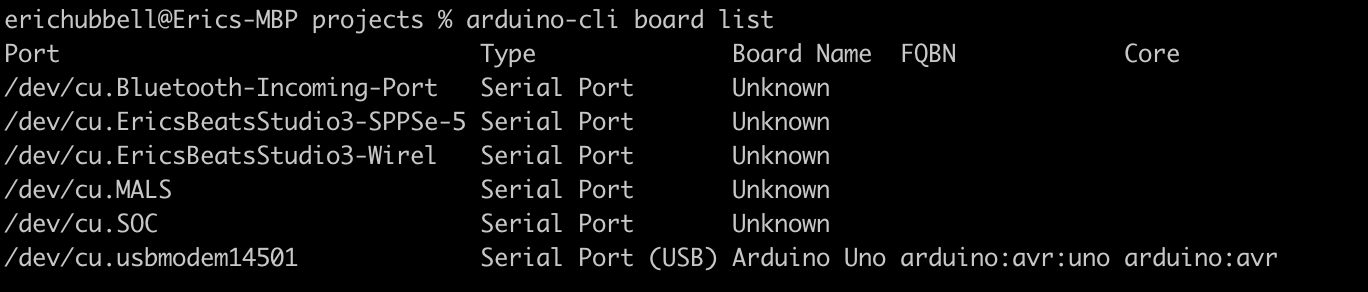
I'm still running into this issue despite following the steps mentioned above. I've restarted, reinstalled, etc and still showing no boards via the Arduino Pro IDE even though I do show the board via the MacOS system hardware section and am able to work with the board via Arduino-Cli and the Arduino Cloud IDE.
Am I missing a step to load the board into the Arduino Pro IDE? Thanks for the help!
Setup:
Arduino Pro IDE v0.0.5
MacOS v10.15.4
Arduino Uno


 ehubbell
on 20 Apr 2020
ehubbell
on 20 Apr 2020
Same issue happing for me as well. Have tried everything I can (I'm a total newb though, so pardon my newb).
- GY-Arduino ISP V2 - TinyUSB ISP
- MacBook Pro 2019, 10.15.4
Have tried about five different USB to Micro USB cables, even bought a USBC to Micro USB to bypass the USBC hub I have to use.
Can see that there is something connected in System Preferences:
FabISP:
Product ID: 0x0c9f
Vendor ID: 0x1781
Version: 1.04
Speed: Up to 1.5 Mb/s
Location ID: 0x14300000 / 6
Current Available (mA): 500
Extra Operating Current (mA): 0
Tried so many things in terminal, have never been able to see any ports that are relevant. Only see the Bluetooth ports.


I've entered this world as I want to program my Turnigy 9x V2 using OpenTX Companion, seemed soooooo easy on Youtube, yet here we are two days later and about 10hrs...
If anyone can shed some light on this insanely frustrating problem it would be SO appreciated.
Who'd of thought it would be so hard to plug something in? A lifelong Mac user, that's who...
 JNSD90
on 23 Apr 2020
JNSD90
on 23 Apr 2020
@ehubbell @JNSD90
can you specify which boards you are using?
manufacturer, model, source, even USB to TTL Serial chip
every modern board manufactured by Arduino uses USB bridging technologies which do not require drivers on Windows, Linux, Mac OS.
if your system does not see your board it means that there are no drivers installed for the USB bridge chip.
I do not want to jump to assumptions but you might have a clone board using a CP2102 or CH340 adapter and then you need to install drivers :)
ubidefeo
on 23 Apr 2020
Apologies if I wasn't clear.
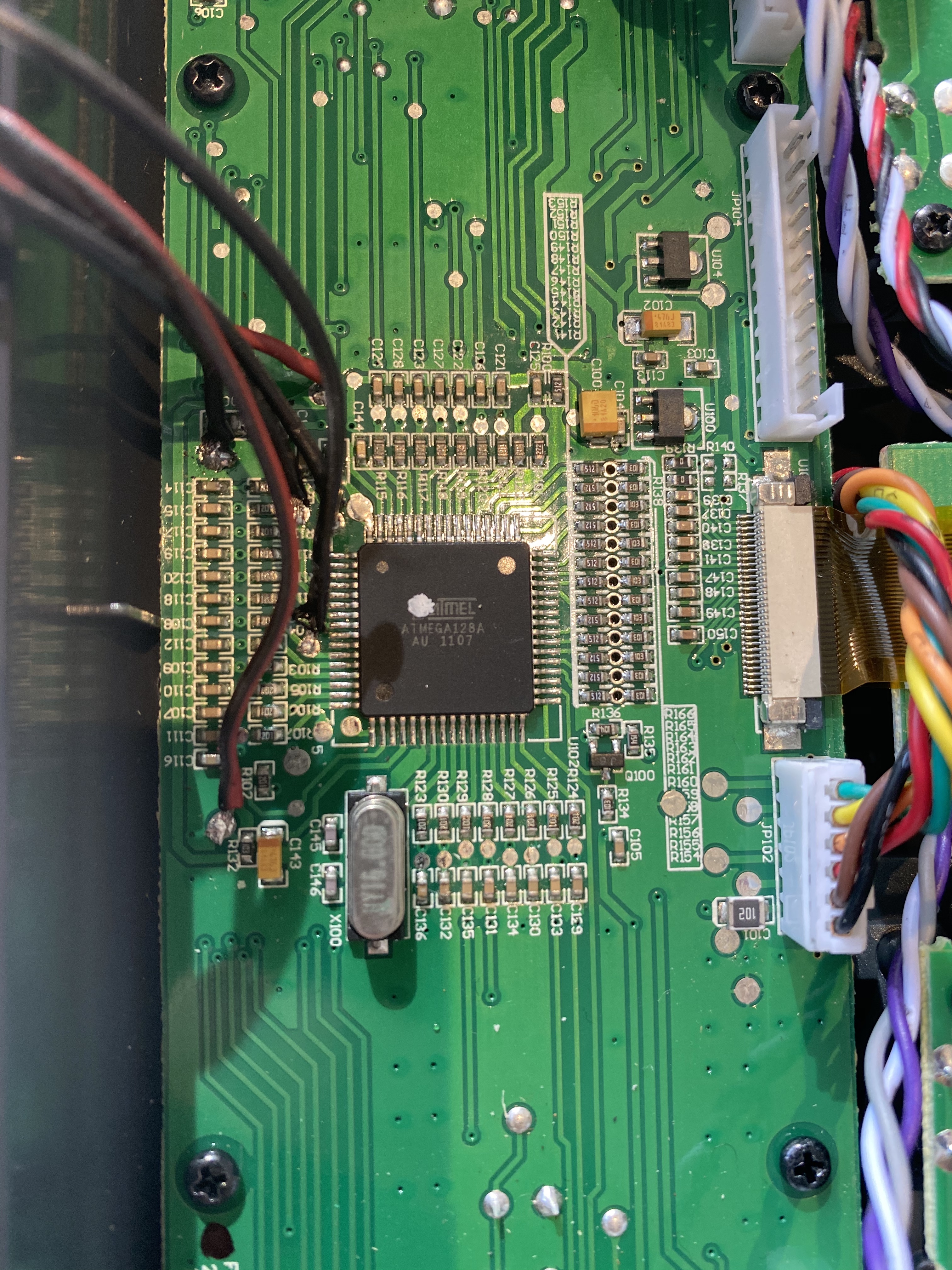
I'm using a ATtiny44
I have connected it to the Turnigy 9x transmitter board which has an ATMEGA128A Chip in it. (Image attached below).
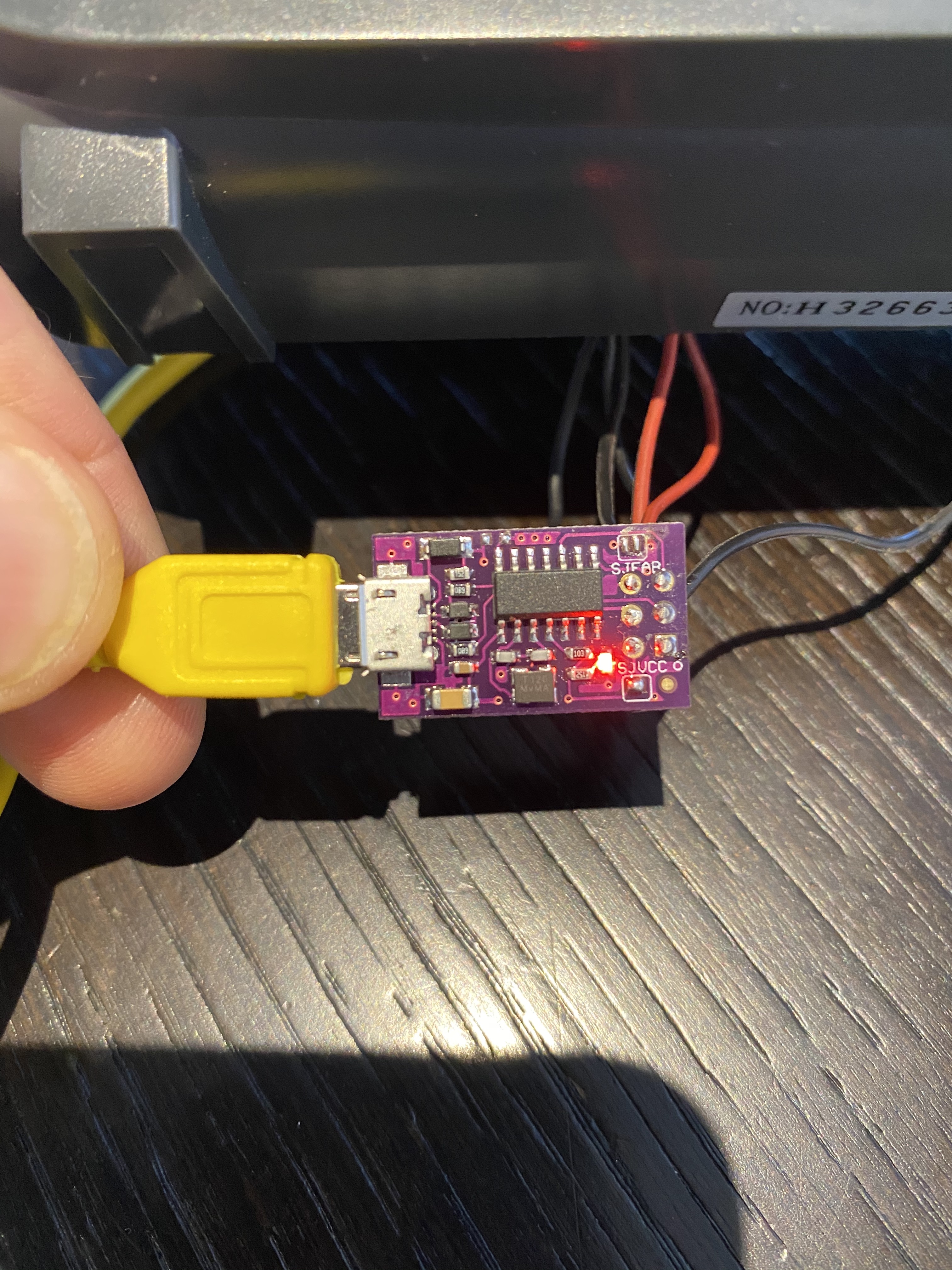
If I am reading the chip on the ATTINY44 the lettering says the following:
atmel1724
attiny44a
ssy
JNSD90
on 23 Apr 2020
@JNSD90 that's a USBtinyISP ISP programmer. It doesn't use a serial port, so the port not being detected is normal and expected. Arduino Pro IDE does not currently support ISP programmers (https://github.com/arduino/arduino-cli/issues/27), so you won't be able to do this using Arduino Pro IDE. Please use the standard Arduino IDE:
https://www.arduino.cc/en/Main/Software
 per1234
on 23 Apr 2020
per1234
on 23 Apr 2020
Thanks @per1234 - was commenting as have tried everything, started with the standard software, tried everything. This was the only thread that had people running the most up to date Mac OSX experiencing the same issues I was (albeit I'm using a USBtinyISP not a board)...
The USBtinyISP does connect through USB however, and in no program and with no amount of messing around have I been able to see the USBtiny connected.
If this isn't the right thread to be discussing this (which I fear it isn't) any help in pointing out the right place (I've looked through multiple threads on here that are much older).
I'm desperate at this stage.
JNSD90
on 23 Apr 2020
Please post on the Arduino Forum. We'll help you out over there:
https://forum.arduino.cc
per1234
on 23 Apr 2020
Thank you, will do!
JNSD90
on 23 Apr 2020
Thank you, will do!
Hello,
Could you link me to where you asked this question on arduino.cc? I cannot get this to work and I am as frustrated as you were. I've made like 5 forum accounts today and no one is able to help. I don't understand why just installing a driver doesn't work, but it's Mac so it makes sense.
 ghost7575-png
on 10 May 2020
ghost7575-png
on 10 May 2020
@ghost7575-png
if your board is not an original it might be using a CH340 USB chip which needs a driver for your OS.
Of the board is made by Arduino it needs no drivers.
Can you try downloading the classic IDE and see if it shows up?
If it doesn't the your board is the problem.
Please refer to support where you purchased your board from
ubidefeo
on 10 May 2020
@ghost7575-png
if your board is not an original it might be using a CH340 USB chip which needs a driver for your OS.
Of the board is made by Arduino it needs no drivers.
Can you try downloading the classic IDE and see if it shows up?
If it doesn't the your board is the problem.
Please refer to support where you purchased your board from
Thanks for the reply. It turns out, what I had wired was drawing too much power from the board I believe. This caused the port to be unrecognized. Silly fix but good to know nothing was wrong with the board.
ghost7575-png
on 10 May 2020
@ubidefeo apologies for the delay. I purchased the board from the Arduino store online (https://www.arduino.cc/) so pretty sure it's legit. The board is also recognized via Arduino-Cli and the Arduino Cloud IDE. Here's the version and a link to the item purchased:
Arduino Uno Rev3
SKU: 8058333490090
https://store.arduino.cc/usa/arduino-uno-rev3
ehubbell
on 13 May 2020
to anyone still looking for an answer, i found a solution after a lot of frustration.
The issue for me was a missing CH340 driver for the ftdi chip on my board. I removed all of the old drivers i had tried from "macintosh HD>library>extensions" and then i installed the CH340 driver for mac linked on this page: https://learn.sparkfun.com/tutorials/how-to-install-ch340-drivers/all (Driver v1.5 (2018-07-04)). finally i was able to see the port at "dev/cu.usbserial..."
previously i had only been able to see bluetooth ports as others described, but when i tested another board that did not have ftdi, i noticed i could see its port on catalina 10.15.4 without any drivers installed, which lead me to discover that the issue with my original board was the missing FTDI driver
hope this helps!
 withersc
on 17 May 2020
withersc
on 17 May 2020
CH341SER_MAC.ZIP
here is the actual zip for the linked driver
withersc
on 17 May 2020
I'm trying to use arduino pro ide to program an ESP8266 without success:
- with alpha001 I don't see ports at all
- with alpha006 (0.0.6.20200409.2) I cant' see ESP8266 (or wifiduino) in boards list (and I don't see ports except "system" ports.
I'm using a Macbook with Catalina (10.15.4)
I need to install some driver too ?
Thanks in advance :)
 gaskb
on 22 May 2020
gaskb
on 22 May 2020
Under the Arduino IDE all ESP-32 Units can not be programmed with Mac OS Catalina 10.15.5. 10.15.5 had a second update from Apple. After the first update the Silicon Labs Driver was working, but only for a short time. With the second update Apple closed the Silicon Labs Driver "CP210x Macintosh OSX VCP Driver 5.3.5 - February 25, 2020" again. And Silicon Labs is not willing to deliver a Driver which is correctly signed by Apple. So at the moment it is not possible to program ESP-32 Units with Arduino. After the Virus this is an other "Lockdown".
 rwaelty
on 14 Jun 2020
rwaelty
on 14 Jun 2020
@rwaelty
unfortunately Catalina is the worst thing that could happen to the Mac OS world, and if you're unfortunate enough not to have hardware that can be rolled back to Mojave there's nothing you can do to address this kind of issues.
Our more recent boards (UNO and beyond) do not require drivers to work on Mac OS, but we had our own woes with the notarisation process for Catalina.
It is a pain in the teeth :(
ubidefeo
on 14 Jun 2020
@ehubbell
my apologies back at you, I've completely missed your mention in the myriad of GH notifications I get every day 😓
have you downloaded release 0.0.6 yet?
if a board is not found then its core is not installed, but the IDE should be able to address that.
I'll try keep an eye open for your reply, let me know 🙏
ubidefeo
on 14 Jun 2020
@ubidefeo
Thank for Your answer. To be honest, I wouldn't be using an old Mac system anymore. I haven't had a virus or worm with Apple since 1980. There is a reason for that. Apple has communicated for over a year that kernel extensions will be made more secure in the future and old ones will no longer work. It is the same as with the 32 bit programs, there was also the prospect that only 64 bit programs would work in the future. Arduino together with other firms overslept that too. But some programmers think waiting will solve the problems. Unfortunately, this is not the case, you should make adjustments in good time. Apple provides all the necessary tools. Well I'm not the seller of CP 2102 N IC’s Silicon Labs is.
rwaelty
on 14 Jun 2020
I know very well what you mean, @rwaelty
I never had a problem with malware on any of my systems either (except that DOS virus I got on a floppy in 1994), it's just that over the past few years Apple's releases have often been problematic at launch.
I usually turn to a new OS when the next one is launched, as Apple timely releases patches for the currently alive OS any time a vulnerability comes up.
Catalina is another beast, and I know way too many developers, musicians and designers who had complaints about it.
I'm still within my safe time window for upgrades, and have yet to find a feature I need in Catalina, while Mojave has been a great OS for all my needs and machines :)
That said, our products (software/hardware) work very well on Catalina, we activated the notarisation process as soon as it was required for both IDE and Agent, and the USB-Serial bridge on our boards is not handled by chips requiring 3rd party drivers.
Unfortunately we can't do anything to address issues related to boards manufactured by others, but we try to point users reporting such issues to the right resources, because often such problems are reported as "your software doesn't work" (you should see the forums :D )
I hope SiLab gets their game together, because the CP2102/2104 are good adapters
ubidefeo
on 15 Jun 2020
@ubidefeo
After several e-mail's to Silicon Labs I gave it up. They insisted that their driver is working with Mac OS 10.15.4 and Mac OS 10.15.5. We know this is not true. In the meantime I'm glad that all other Arduino CPU's are working. :-)
rwaelty
on 15 Jun 2020
This issue is still unresolved for me. I am on 10.15.5 and I am trying to program Itsybitsy board (nrf52840 express). The port is still unrecognized. Any suggestions?
 paris007
on 14 Jul 2020
paris007
on 14 Jul 2020
@paris007
if you read the whole thread you'll see that while at the beginning the issue was in some cases due to our tools, following releases have fixed it.
As @rwaelty also discovered upon several attempts this is SiLab's fault with providing unreliable drivers for Mac OS Catalina.
The issues is with the hardware, not the software, and this board is engineered by Adafruit.
You can see this issue reported on their forum
Unfortunately Mac OS Catalina (and any future release) has made it harder to create drivers, and it's up to the manufacturers to rectify this situation.
When the device is recognised on a system level our tools are most likely able to deal with it, but unfortunately we have absolutely no power over drivers for a chip in a specific OS
ubidefeo
on 15 Jul 2020
Related issues
 DoodlesEpic
·
4Comments
DoodlesEpic
·
4Comments
 natemara
·
6Comments
natemara
·
6Comments
 mikeboski
·
6Comments
mikeboski
·
6Comments
 Master811129
·
6Comments
Master811129
·
6Comments
 j-rieck
·
5Comments
j-rieck
·
5Comments
Most helpful comment
I know very well what you mean, @rwaelty
I never had a problem with malware on any of my systems either (except that DOS virus I got on a floppy in 1994), it's just that over the past few years Apple's releases have often been problematic at launch.
I usually turn to a new OS when the next one is launched, as Apple timely releases patches for the currently alive OS any time a vulnerability comes up.
Catalina is another beast, and I know way too many developers, musicians and designers who had complaints about it.
I'm still within my safe time window for upgrades, and have yet to find a feature I need in Catalina, while Mojave has been a great OS for all my needs and machines :)
That said, our products (software/hardware) work very well on Catalina, we activated the notarisation process as soon as it was required for both IDE and Agent, and the USB-Serial bridge on our boards is not handled by chips requiring 3rd party drivers.
Unfortunately we can't do anything to address issues related to boards manufactured by others, but we try to point users reporting such issues to the right resources, because often such problems are reported as "your software doesn't work" (you should see the forums :D )
I hope SiLab gets their game together, because the CP2102/2104 are good adapters