Arduino-esp32: WPA2 Enterprise PEAP-MSCHAPv2 not working
Hardware:
Board: esp32dev
Core Installation/update date: 04/05/2018
IDE name: Platform.io
Flash Frequency: 80Mhz
Upload Speed: 115200
Description:
The ESP32 cannot connect to WiFi using WPA2 Enterprise PEAP/MSCHAPv2. There is an error message reported, please see below.
Error messages when executing the sketch:
.E (3449) wpa: Method private structure allocated failure

..E (7006) wpa: Method private structure allocated failure

..E (10559) wpa: Method private structure allocated failure
Sketch:
#include "esp_wpa2.h"
#include <WiFi.h>

const char *ssid = "mySSID";
#define EAP_ID "myID"
#define EAP_USERNAME ""
#define EAP_PASSWORD "myPassword"

void setup() {

    Serial.begin(9600);
    delay(10);

    Serial.println();
    Serial.print("Connecting to ");
    Serial.println(ssid);

    WiFi.disconnect(true);

    esp_wifi_sta_wpa2_ent_set_identity((uint8_t *)EAP_ID, strlen(EAP_ID));
    //esp_wifi_sta_wpa2_ent_set_username((uint8_t *)EAP_USERNAME, strlen(EAP_USERNAME));
    esp_wifi_sta_wpa2_ent_set_password((uint8_t *)EAP_PASSWORD, strlen(EAP_PASSWORD));

    esp_wpa2_config_t config = WPA2_CONFIG_INIT_DEFAULT();
    esp_err_t code = esp_wifi_sta_wpa2_ent_enable(&config);

    Serial.print("Code: ");
    Serial.println(code);

    WiFi.begin(ssid);

    while (WiFi.status() != WL_CONNECTED) {
        delay(2000);
        Serial.print(".");
    }

    Serial.println("");
    Serial.println("WiFi connected");
    Serial.println("IP address: ");
    Serial.println(WiFi.localIP());
}

void loop() {
    // Your code here.
}
Debug Messages:
Connecting to mySSID
[D][WiFiGeneric.cpp:293] _eventCallback(): Event: 2 - STA_START
Code: 0
.E (3569) wpa: Method private structure allocated failure

.[D][WiFiGeneric.cpp:293] _eventCallback(): Event: 5 - STA_DISCONNECTED
[W][WiFiGeneric.cpp:298] _eventCallback(): Reason: 2 - AUTH_EXPIRE
.E (7118) wpa: Method private structure allocated failure

[D][WiFiGeneric.cpp:293] _eventCallback(): Event: 5 - STA_DISCONNECTED
[W][WiFiGeneric.cpp:298] _eventCallback(): Reason: 2 - AUTH_EXPIRE
..E (10691) wpa: Method private structure allocated failure
 averri
All 28 comments
hi @averri PEAP method need certificate to build TLS tunnel, password and username to do MSCHAPv2 verify, I saw you mark down the username set, I think it may the reason why you fail, can you set a legal name and password and try again? Besides, please make sure your server need do certificate verify so that you can build TLS tunnel needn't certificate
 XinDeng11
on 7 May 2018
XinDeng11
on 7 May 2018
Hi @XinDeng11, thank you very much for your attention.
I have set the username together with identity and valid password and it's not working. I have tested the same configuration using my Android phone, and it's working fine. The administrator of the network recommend to use just the identity, without username, and there is no need to set any certificate in the client. This configuration is working fine in the Android phone.
So, in summary, this code snippet is not working (using the same username as identity):
esp_wifi_sta_wpa2_ent_set_identity((uint8_t *)EAP_ID, strlen(EAP_ID));
esp_wifi_sta_wpa2_ent_set_username((uint8_t *)EAP_USERNAME, strlen(EAP_USERNAME));
esp_wifi_sta_wpa2_ent_set_password((uint8_t *)EAP_PASSWORD, strlen(EAP_PASSWORD));
Do you think I still need to get the server certificate and set it in the code?
averri
on 7 May 2018
@averri, yeah, there is unnecessary to use user name in TLS method. But it should have a username and password in PEAP method because our ID can not instead of username now. Many phones has installed some common certificates so that it can pass. But PEAP can jump certificate check if it unnessary. Can you offer us your sniffer log(air packets) so that we can check when it failed.
XinDeng11
on 7 May 2018
Hi @XinDeng11, I'll test again with a certificate (presuming a server certificate, because I don't have the client one) and let you know. Thanks for this information. In relation to the sniffer, I don't have access to the router, so the other place we could capture is inside the ESP32, but I'm unaware of any solution like this. I did a test trying to capture the packets in promiscuous mode in the WiFi interface of my notebook, but then I noticed that there are no relevant packets of the authentication process. I have filtered the packets by the MAC address of ESP32. Another option I have is to buy a router with WPA2 Enterprise and create my development environment, where I can easily capture the relevant logs.
Please let me know if there is any other option for capturing the sniffer logs.
averri
on 8 May 2018
I'm having this exactly same issue. I tried to connect to my university's network (eduroam) with the code above but I couldn't succeed.
By the way @averri , how can you get this Debug Messages?
I only get:
"Connecting to eduroam
Code: 0
....................................................................................... (and so on...)"
 viniciusov
on 14 May 2018
viniciusov
on 14 May 2018
Also having this problem with "eduroam"
 Phill93
on 21 May 2018
Phill93
on 21 May 2018
If I am right, ID to Eduroam is for instance (in my university): xxx48
username is: [email protected]
password: password
Try it with that!
 martinius96
on 3 Jun 2018
martinius96
on 3 Jun 2018
@martinius96 , that does not work. The issue here is not about wrong credentials.
averri
on 3 Jun 2018
Understand.
How about this sketch? Is it usable?
https://gist.github.com/me-no-dev/2d2b51b17226f5e9c5a4d9a78bdc0720
It got example with certificate
martinius96
on 3 Jun 2018
Today I have tried Eduroam network. Working all ok, connecting about 4 seconds and then connected.
Sketch I have used:
`#include "esp_wpa2.h"
include
String line;
const char* ssid = "eduroam"; // your ssid
define EAP_ID "[email protected]"
define EAP_USERNAME "[email protected]"
define EAP_PASSWORD "password"
ifdef __cplusplus
extern "C" {
endif
uint8_t temprature_sens_read();
ifdef __cplusplus
}
endif
uint8_t temprature_sens_read();
void setup() {
Serial.begin(115200);
delay(10);
Serial.println();
Serial.print("Connecting to ");
Serial.println(ssid);

// WPA2 enterprise magic starts here
WiFi.disconnect(true);

esp_wifi_sta_wpa2_ent_set_identity((uint8_t *)EAP_ID, strlen(EAP_ID));
esp_wifi_sta_wpa2_ent_set_username((uint8_t *)EAP_USERNAME, strlen(EAP_USERNAME));
esp_wifi_sta_wpa2_ent_set_password((uint8_t *)EAP_PASSWORD, strlen(EAP_PASSWORD));
esp_wpa2_config_t config = WPA2_CONFIG_INIT_DEFAULT();
esp_wifi_sta_wpa2_ent_enable(&config);
Serial.println("MAC address: ");
Serial.println(WiFi.macAddress());
// WPA2 enterprise magic ends here
WiFi.begin(ssid);
WiFi.setHostname("PINGER");
while (WiFi.status() != WL_CONNECTED) {
delay(500);
Serial.print(".");
}
Serial.println("");
Serial.println("WiFi connected");
Serial.println("IP address: ");
Serial.println(WiFi.localIP());
}
/*
- everyhting below this, in loop(), is just a standard request to a webserver and nothing else than an example to show that is works.
*/
const char* host = "arduino.php5.sk";
void loop() {
delay(5000);
while (WiFi.status() != WL_CONNECTED) {
delay(500);
Serial.print(".");
WiFi.begin(ssid);
WiFi.setHostname("PINGER");
}
Serial.print("connecting to ");
Serial.println(host);
WiFiClient client;
if (!client.connect(host, 80)) {
    Serial.println("connection failed");
    return;
}

String url = "/rele/rele1.txt";

Serial.print("Requesting URL: ");
Serial.println(url);

// This will send the request to the server
client.print(String("GET ") + url + " HTTP/1.1\r\n" +
             "Host: " + host + "\r\n" +
             "Connection: close\r\n\r\n");
unsigned long timeout = millis();
while (client.available() == 0) {
    if (millis() - timeout > 5000) {
        Serial.println(">>> Client Timeout !");
        client.stop();
        return;
    }
}

// Read all the lines of the reply from server and print them to Serial
while(client.available()) {
     line = client.readStringUntil('\n');
    Serial.println(line);

}

if (line=="VYP"){
  Serial.println("Vypnuty spotrebic");
  }else if (line=="ZAP"){
  Serial.println("Zapnuty spotrebic");
  }
  Serial.println(line.length());
//Serial.println(velkost);
Serial.println();
Serial.println("closing connection");
int measurement = 0;

measurement = hallRead();

Serial.print("Hall sensor measurement: ");
Serial.println(measurement);
 Serial.print("Temperature: ");
// Convert raw temperature in F to Celsius degrees
Serial.print((temprature_sens_read() - 32) / 1.8);
Serial.println(" C");
}`
martinius96
on 4 Jun 2018
@averri Don't answer now.
martinius96
on 7 Jun 2018
@martinius96 I can't get this code to work either. Our network is PEAP and MSCHAP V2. I even tried it setting a certificate, but that results in the "wpa: Method private structure..." error.
BTW, your example code is not well formatted, making it hard to copy. The code in your repo was fine, but didn't work either.
 mickel1138
on 25 Jun 2018
mickel1138
on 25 Jun 2018
@mickel1138 Hello there, I have tried it on Eduroam network in my university in Slovakia and also on school hostel network, that is under WPA2 Enterprise too (but it isn't Eduroam). Same sketch worked for me on both networks. Both these networks were under PEAP and MsCHAPv2 methods. That's weird. It was first sketch i have used on ESP32 board and it worked. I was using ESP32 DevKit v1 board. Maybe isn't there problem with ID and identity? I got for instance [email protected] for ID and for identity too.. Maybe it isn't same at you, because in my sketch i set ID and IDENTITY same in my sketch in repo.
martinius96
on 25 Jun 2018
@martinius96 I have tried various combinations of ID, and user name. None of those worked. This issues seems to happen to others too, and may have to do with the ESP library build. There is quite a thread on it here: https://github.com/espressif/esp-idf/issues/1297
mickel1138
on 25 Jun 2018
@mickel1138 hmm, understand.. And how about version of ESP32 Arduino core? I was using latest at my tests.
martinius96
on 25 Jun 2018
@martinius96 I just pulled form the GIT repo, no changes, I use Arduino IDE 1.85. Tried different boards. Most likely there is a difference between your network, and the one i'm trying to get on. Like I mentioned before, many people have to same issue, it's not for a lack of trying. Thanks for your help, but i'm going to retire this effort.
mickel1138
on 26 Jun 2018
Hello @martinius96 ,
@mickel1138 is right, it's not about the code nor the board. It's something related to the network. I tested here on my university's network (Eduroam) with a lot of example codes found here using esp8266 AND esp32, without success.
Now we are waiting for Espressif release some kind of fix to work well with those networks.
viniciusov
on 26 Jun 2018
Okay, we can wait for fix.. @mickel1138
What OS or service is running your RADIUS server? There are many distributions and services like Zeroshell, Freeradius and so on. Both networks i have tested were Using Linux and Freeradius server for RADIUS server. Maybe your network isn't using RADIUS server but TACACS, it is little bit different. Maybe problem is there.
martinius96
on 26 Jun 2018
I tried it with Zeroshell (Linux software) but it isn't working, on school wifi, where is Eduroam under FreeRadius and Debian, worked OK..
Problems:

On Eduroam networks working...
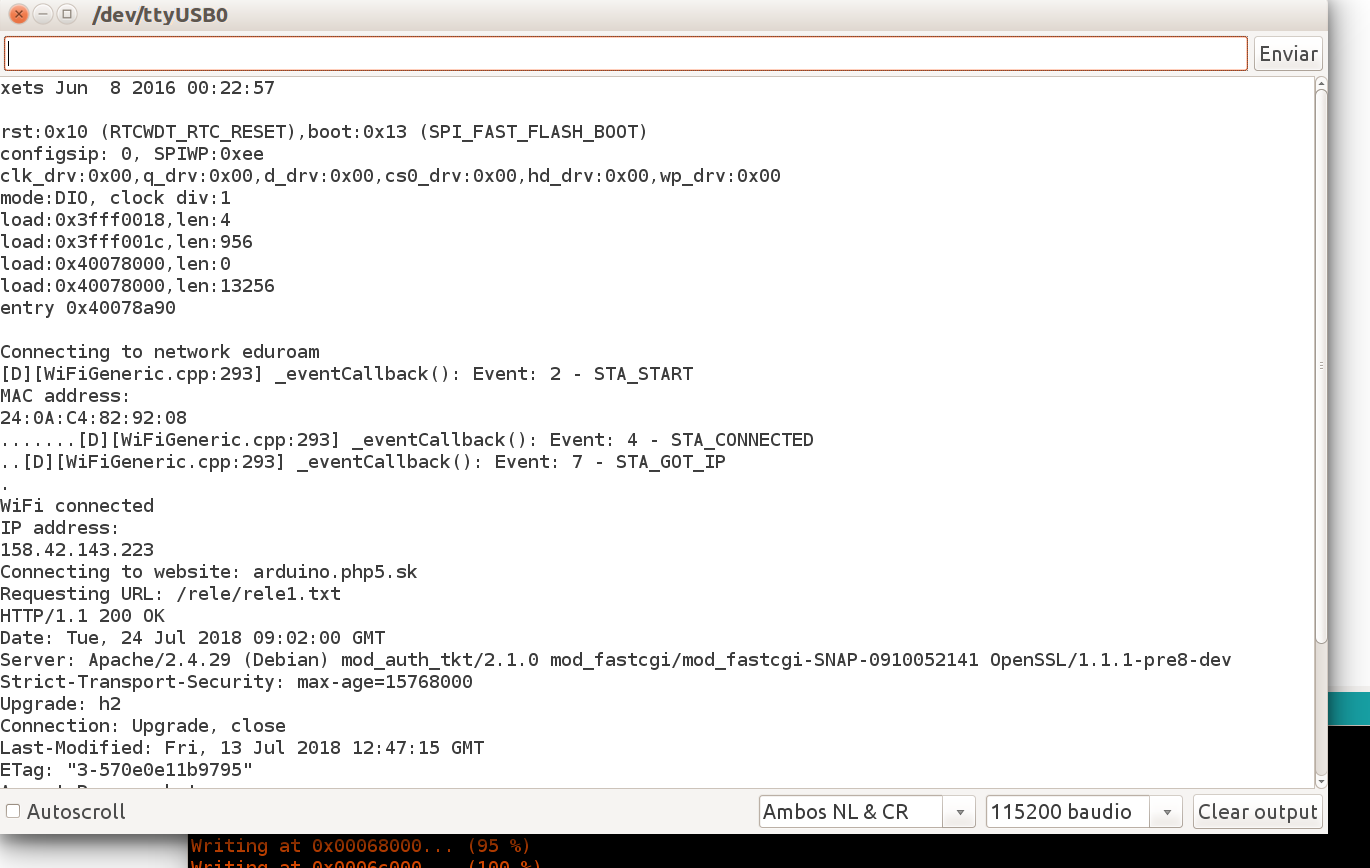
martinius96
on 23 Jul 2018
Hello,
In my case my university uses "eduroam" WPA2 Enterprise, TTLS, no certificate, MSCHAPv2(no EAP)
and I was able to connect using the code below. I had to insert the WiFi.mode(WIFI_STA); otherwise my ESP32 would reset with Guru meditation..
// eduroam WPA2 Enterprise, TTLS, no certificate, MSCHAPv2(no EAP)
include "esp_wpa2.h"
include
define EAP_IDENTITY "jonny" // ID eg: "jonny" not [email protected]
define EAP_PASSWORD "passwd"
define MENOPC "ESP32 Board"
String line;
const char* ssid = "eduroam";
WiFiClient client;
void setup() {
Serial.begin(115200);
delay(10);
Serial.println();
Serial.println(ssid);
WiFi.disconnect(true);
WiFi.mode(WIFI_STA);
esp_wifi_sta_wpa2_ent_set_identity((uint8_t *)EAP_IDENTITY, strlen(EAP_IDENTITY));
esp_wifi_sta_wpa2_ent_set_username((uint8_t *)EAP_IDENTITY, strlen(EAP_IDENTITY));
esp_wifi_sta_wpa2_ent_set_password((uint8_t *)EAP_PASSWORD, strlen(EAP_PASSWORD));
esp_wpa2_config_t config = WPA2_CONFIG_INIT_DEFAULT();
esp_wifi_sta_wpa2_ent_enable(&config);
Serial.println("MAC address: ");
Serial.println(WiFi.macAddress());
WiFi.begin(ssid);
while (WiFi.status() != WL_CONNECTED) {
delay(500);
Serial.print(".");
}
Serial.println("");
Serial.println("IP address: ");
Serial.println(WiFi.localIP());
}
void loop() {
while (client.available()) {
char c = client.read();
Serial.write(c);
}
if (!client.connected()) {
if (client.connect("my-site", 3000)) {
client.println("GET /sensores?temperatura=123&id=ESP32 HTTP/1.1");
client.println("Connection: close");
client.println();
delay(2000);
}
}
}
 fabiorochaufsc
on 10 Aug 2018
fabiorochaufsc
on 10 Aug 2018
Hi, wpa2_enterprise esp-idf example is struggling with connecting to my corporate PEAP-MSCHAPv2 network either. So it does not seem to be just arduino-esp32 related but lies deeper in the esp-idf itself. I'm in a no way a wpa2 expert but it seems that it depends on the certificates configuration on the network and the wpa2 supplicant code somehow did not ignore optional certificate checking results so it's either failing on checking server self-signed certificate when ca cert is supplied like this:
wpa: X509: Did not find any of the issuers from the list of trusted certificates
wpa: TLSv1: Server certificate chain validation failed (reason=6)
or failing to provide a proper certificate to server when it was not set up (by commenting out these lines):
ESP_ERROR_CHECK( esp_wifi_sta_wpa2_ent_set_ca_cert(ca_pem_start, ca_pem_bytes) );
ESP_ERROR_CHECK( esp_wifi_sta_wpa2_ent_set_cert_key(client_crt_start, client_crt_bytes, client_key_start, client_key_bytes, NULL, 0) );
It fails this time on server side after this diagnostic appears locally:
wpa: TLSv1: Full client certificate chain not configured - validation may fail
Android phones are connecting to the network just fine without any certificates being installed.
All I know about network configuration so far is that it has been set up by admin with this Cisco how-to.
Maybe it will lead someone more knowledgeable in the right direction.
There is a discussion here as well.
https://www.esp32.com/viewtopic.php?f=2&t=3108&p=29227#p29227
 ybuyankin
on 17 Aug 2018
ybuyankin
on 17 Aug 2018
Hello there, i have small "update" for you.
One university professor was unable to join Eduroam network.
He edited my sketch a little bit, there were problem with mode of device, he set it like @fabiorochaufsc. Thanks a lot for your code too.
If code below will not work, try uncomment esp_wifi_sta_wpa2_ent_set_new_password function and comment esp_wifi_sta_wpa2_ent_set_password function..
He was using it first time with esp_wifi_sta_wpa2_ent_set_new_password function and in second try with esp_wifi_sta_wpa2_ent_set_password function and now he is able to join Eduroam network in his university.
Sketch can be found in my repo for testing... https://github.com/martinius96/ESP32-Eduroam/blob/master/connect_eduroam_2018_new_fix.ino
Let me know, if it is working, I can't try it now, because i will be in University at September.
@ybuyankin In your case, you are using certificate, it is little bit different.
martinius96
on 17 Aug 2018
The solution provided by @fabiorochaufsc works with enterprise PEAP MSCHAPv2 without a certificate. I was trying with Eduroam version and can't get a success. Apparently, WIFI_STA mode does the job, many thanks!
 desmondtch
on 20 Aug 2018
desmondtch
on 20 Aug 2018
@martinius96 Thanks, but the whole point is that when I try it without the certificate, it fails in another way. I've tried this first so it supposedly depends on network configuration.
ybuyankin
on 20 Aug 2018
Thanks for feedback... Hm, maybe you are true.. For instance I was unable to join 802.1x network at home, it was under Linux Zeroshell and PEAP + MsCHAPv2 without certificate. I haven't tryed with that WIFI_STA mode. But.. Eduroam networks must be configured under any global "standard" how to set it up. I will let you know if I was sucessful.
martinius96
on 20 Aug 2018
@XinDeng11
I'm sorry, can you tell me, how does controller choose between PEAP and TLS? I can't find anything in code, where we tell him what to use?
 MikhailNatalenko
on 19 Oct 2018
MikhailNatalenko
on 19 Oct 2018
This issue has been automatically marked as stale because it has not had recent activity. It will be closed if no further activity occurs. Thank you for your contributions.
![stale[bot] picture](https://avatars3.githubusercontent.com/in/1724?v=4&s=40) stale[bot]
on 1 Aug 2019
stale[bot]
on 1 Aug 2019
This stale issue has been automatically closed. Thank you for your contributions.
stale[bot]
on 15 Aug 2019
Related issues
 maxpromer
·
3Comments
maxpromer
·
3Comments
 0x1abin
·
3Comments
0x1abin
·
3Comments
 mistergreen
·
4Comments
mistergreen
·
4Comments
 OAXP
·
4Comments
OAXP
·
4Comments
 docloulou
·
3Comments
docloulou
·
3Comments