Arduino-esp32: DEEPSLEEP_RESET gets stuck after a few resets
Hardware:
Board: ESP32 Dev Module - Sparkfun ESP32 Thing
Core Installation/update date: 30/oct/2017
IDE name: Arduino IDE
Flash Frequency: 80Mhz
Upload Speed: 921600
Description:
The board does not correctly restart after deep sleep. Im using the builtin example sketch "TimerWakeUp" without modifications and no other hardware attached and i get random results on the powerup after sleep.
The board usually start successfully a few times after deepsleep, but then it failes to run the actual sketch after startup and a manual reset is needed.
The debug information below shows that the device starts after deepsleep and outputs "Boot number: x", but then in the last boot it doesn't output anything from the sketch and does not return to sleep. A manual press of the reset button restarts the device and the it runs for a few more deepsleep cycles before it gets stuck again.
Any one else seen this problem?
Sketch:
builtin "TimerWakeUp" example sketch
Debug Messages:
rst:0x10 (RTCWDT_RTC_RESET),boot:0x13 (SPI_FAST_FLASH_BOOT)
configsip: 0, SPIWP:0xee
clk_drv:0x00,q_drv:0x00,d_drv:0x00,cs0_drv:0x00,hd_drv:0x00,wp_drv:0x00
mode:DIO, clock div:1
load:0x3fff0018,len:4
load:0x3fff001c,len:956
load:0x40078000,len:0
load:0x40078000,len:11904
entry 0x40078a3c
Boot number: 1
Wakeup was not caused by deep sleep
Setup ESP32 to sleep for every 5 Seconds
Going to sleep now
ets Jun  8 2016 00:22:57

rst:0x5 (DEEPSLEEP_RESET),boot:0x13 (SPI_FAST_FLASH_BOOT)
configsip: 0, SPIWP:0xee
clk_drv:0x00,q_drv:0x00,d_drv:0x00,cs0_drv:0x00,hd_drv:0x00,wp_drv:0x00
mode:DIO, clock div:1
load:0x3fff0018,len:4
load:0x3fff001c,len:956
load:0x40078000,len:0
load:0x40078000,len:11904
entry 0x40078a3c
Boot number: 2
Wakeup caused by timer
Setup ESP32 to sleep for every 5 Seconds
Going to sleep now
ets Jun  8 2016 00:22:57

rst:0x5 (DEEPSLEEP_RESET),boot:0x13 (SPI_FAST_FLASH_BOOT)
configsip: 0, SPIWP:0xee
clk_drv:0x00,q_drv:0x00,d_drv:0x00,cs0_drv:0x00,hd_drv:0x00,wp_drv:0x00
mode:DIO, clock div:1
load:0x3fff0018,len:4
load:0x3fff001c,len:956
load:0x40078000,len:0
load:0x40078000,len:11904
entry 0x40078a3c
 jh83
jh83
All 124 comments
I'm having the same problem. My sketch goes to sleep for 60 seconds after taking temp/humidity readings etc via I2C. It used to work ok before system upgraded to most recent commit. First two restarts work ok but always hangs on third restart.
Debug messages
rst:0x5 (DEEPSLEEP_RESET),boot:0x13 (SPI_FAST_FLASH_BOOT)
configsip: 0, SPIWP:0xee
clk_drv:0x00,q_drv:0x00,d_drv:0x00,cs0_drv:0x00,hd_drv:0x00,wp_drv:0x00
mode:DIO, clock div:1
load:0x3fff0018,len:4
load:0x3fff001c,len:956
load:0x40078000,len:0
load:0x40078000,len:11904
entry 0x40078a3c
rst:0x10 (RTCWDT_RTC_RESET),boot:0x13 (SPI_FAST_FLASH_BOOT)
configsip: 0, SPIWP:0xee
clk_drv:0x00,q_drv:0x00,d_drv:0x00,cs0_drv:0x00,hd_drv:0x00,wp_drv:0x00
mode:DIO, clock div:1
load:0x3fff0018,len:4
load:0x3fff001c,len:956
load:0x40078000,len:0
load:0x40078000,len:11904
entry 0x40078a3c
Boot number: 1
Setup ESP32 to sleep for every 60 Seconds
Connecting to SKYE3E0B
MQTT connecting ...connected
19.74
1015.97
Going to sleep now
ets Jun 8 2016 00:22:57
rst:0x5 (DEEPSLEEP_RESET),boot:0x13 (SPI_FAST_FLASH_BOOT)
configsip: 0, SPIWP:0xee
clk_drv:0x00,q_drv:0x00,d_drv:0x00,cs0_drv:0x00,hd_drv:0x00,wp_drv:0x00
mode:DIO, clock div:1
load:0x3fff0018,len:4
load:0x3fff001c,len:956
load:0x40078000,len:0
load:0x40078000,len:11904
entry 0x40078a3c
Boot number: 2
Setup ESP32 to sleep for every 60 Seconds
Connecting to SKYE3E0B
MQTT connecting ...connected
19.73
1015.91
Going to sleep now
ets Jun 8 2016 00:22:57
rst:0x5 (DEEPSLEEP_RESET),boot:0x13 (SPI_FAST_FLASH_BOOT)
configsip: 0, SPIWP:0xee
clk_drv:0x00,q_drv:0x00,d_drv:0x00,cs0_drv:0x00,hd_drv:0x00,wp_drv:0x00
mode:DIO, clock div:1
load:0x3fff0018,len:4
load:0x3fff001c,len:956
load:0x40078000,len:0
load:0x40078000,len:11904
entry 0x40078a3c
 iot-man
on 31 Oct 2017
iot-man
on 31 Oct 2017
I'm having a "similar" problem. In my case it happened with ESP.restart().
It gets successfully restarted a few times, but after several cycles it hangs like below.
rst:0xc (SW_CPU_RESET),boot:0x13 (SPI_FAST_FLASH_BOOT)
configsip: 0, SPIWP:0xee
clk_drv:0x00,q_drv:0x00,d_drv:0x00,cs0_drv:0x00,hd_drv:0x00,wp_drv:0x00
mode:DIO, clock div:1
load:0x3fff0018,len:4
load:0x3fff001c,len:956
load:0x40078000,len:0
load:0x40078000,len:11904
entry 0x40078a3c
 oshiemon
on 1 Nov 2017
oshiemon
on 1 Nov 2017
Same here, after commit https://github.com/espressif/arduino-esp32/commit/55289a45af1e7898ca0b8da037d92a83baaf0083 this problem starts
 copercini
on 1 Nov 2017
copercini
on 1 Nov 2017
Same here, hangs after 2-3 reboot, just after the 'entry' log line
 degehi
on 3 Nov 2017
degehi
on 3 Nov 2017
Exactly the same problem for me as well with an unmodified "TimerWakeUp" example sketch.
 etimou
on 4 Nov 2017
etimou
on 4 Nov 2017
I would suggest an issue to be opened in IDF (if one does not already exist). It is surely something in that update.
 me-no-dev
on 6 Nov 2017
me-no-dev
on 6 Nov 2017
I reset the core version back to https://github.com/espressif/arduino-esp32/tree/95123681d5340defa24472e441758fba88e3a34f as was suggested in Issue #801 and my sketch with a 20 minute deep sleep that would hang after an hour or so (as described above) now has been working properly for 2 days.
 mikey60
on 6 Nov 2017
mikey60
on 6 Nov 2017
Any patch for deepsleep issue ???
 cristianhumelnicu
on 8 Nov 2017
cristianhumelnicu
on 8 Nov 2017
I can do the test with older version as well, but I am not very familiar
with git.
I guess the following commands on debian must be adapted:
git clone https://github.com/espressif/arduino-esp32.git esp32
git submodule update --init --recursive
What is the way to follow?
On Wed, Nov 8, 2017 at 10:28 AM, cristianhumelnicu <[email protected]
wrote:
Any patch for deepsleep issue ???
—
You are receiving this because you commented.
Reply to this email directly, view it on GitHub
https://github.com/espressif/arduino-esp32/issues/796#issuecomment-342760057,
or mute the thread
https://github.com/notifications/unsubscribe-auth/AFozOX29RaB7vvCxqu1svKkNz1Z3ZzUpks5s0XQ7gaJpZM4QLpWy
.
etimou
on 9 Nov 2017
@etimou: what I did: just apply a checkout after de clone operation, with a version number before 55289a4
on the esp32 directory: git checkout 9512368
running without reboot hangs with this release for me.
degehi
on 9 Nov 2017
thank you! it works perfectly with this version.
On Thu, Nov 9, 2017 at 12:22 PM, David notifications@github.com wrote:
@etimou https://github.com/etimou: what I did: just apply a checkout
after de clone operation, with a version number before 55289a4
https://github.com/espressif/arduino-esp32/commit/55289a45af1e7898ca0b8da037d92a83baaf0083on the esp32 directory: git checkout 9512368
https://github.com/espressif/arduino-esp32/commit/95123681d5340defa24472e441758fba88e3a34frunning without reboot hangs with this release for me.
—
You are receiving this because you were mentioned.
Reply to this email directly, view it on GitHub
https://github.com/espressif/arduino-esp32/issues/796#issuecomment-343125619,
or mute the thread
https://github.com/notifications/unsubscribe-auth/AFozOaG5qnBe3CGMlcg3EoGHXNa1naGYks5s0uBogaJpZM4QLpWy
.
etimou
on 10 Nov 2017
@etimou, @degehi
Could you tell me what is the maximum time you've been able to keep ESP32 in deepsleep? All I've done is a deepsleep time of 30 minutes ... if it's more than 30 minutes it's not waking up again ffrom deepsleep...
cristianhumelnicu
on 16 Nov 2017
I've run the deep sleep example for more a little bit more than one hour
with no problem. It think the counter was around 800.
On Thu, Nov 16, 2017 at 9:48 AM, cristianhumelnicu <[email protected]
wrote:
@etimou https://github.com/etimou, @degehi https://github.com/degehi
Could you tell me what is the maximum time you've been able to keep ESP32
in deepsleep? All I've done is a deepsleep time of 30 minutes ... if it's
more than 30 minutes it's not waking up again ffrom deepsleep...—
You are receiving this because you were mentioned.
Reply to this email directly, view it on GitHub
https://github.com/espressif/arduino-esp32/issues/796#issuecomment-344854810,
or mute the thread
https://github.com/notifications/unsubscribe-auth/AFozOWrfh46w_nd7VBMllU7jngBq4QIWks5s2_bXgaJpZM4QLpWy
.
etimou
on 16 Nov 2017
@etimou Do you use the deepsleep example from Arduino or other scatch ?
Thk!
cristianhumelnicu
on 16 Nov 2017
I am using my own program based on the Arduino deepsleep example an it sleeps for 20 minutes and then sends sensor data to ThingSpeak. It has run for several days. When I get a chance I will change the deepsleep to one hour and see if it continues to work.
mikey60
on 16 Nov 2017
I'm using the Sparkfun esp32 thing and am having similar issues however its not just sleep, i'm getting hanged reboots when pressing the reset button too, not just in the TimerWakeUp sketch.
I also find that I get about 5 reboots before a hang when RTC_DATA_ATTR int bootCount = 0; is intialised however if I comment it out and all references to it then I get about 30-40 reboots before a hang.
Using latest with 80a7d60 commited 6 days ago
 iotmodules
on 16 Nov 2017
iotmodules
on 16 Nov 2017
Using the MHET Live D1 mini-kit.
Can confirm the problem with hanging reboots.
Both the reset button and ESP.restart() have the issue.
 CelliesProjects
on 16 Nov 2017
CelliesProjects
on 16 Nov 2017
I am using the deep sleep example from Arduino, not modified.
On Thu, Nov 16, 2017 at 10:11 PM, Cellie notifications@github.com wrote:
Using the MHET Live D1 mini-kit.
Can confirm the problem with hanging reboots.—
You are receiving this because you were mentioned.
Reply to this email directly, view it on GitHub
https://github.com/espressif/arduino-esp32/issues/796#issuecomment-345063739,
or mute the thread
https://github.com/notifications/unsubscribe-auth/AFozOXOqiAkCWZX2x1qxgTveoh2lZZQdks5s3KUJgaJpZM4QLpWy
.
etimou
on 18 Nov 2017
I'm having the same problem (with latest Arduino - idf):
I set up a deep-sleep / wake timer for N seconds (5, 2 or even 1 second) and after a low number of wake-ups (2 to 6 times of normal waking up), ESP32 hangs.
So after reading the above posts, I am waiting for the bug to be crushed (on IDF, it seems).
Regards,
Enrique.
 euquiq
on 21 Nov 2017
euquiq
on 21 Nov 2017
There is a commit that fixes it on IDF https://github.com/espressif/esp-idf/commit/abacf8d2a0347a4bf95315cdb227e9b8b1c93794 seems like just wait @me-no-dev bump the version for Arduino IDE =)
copercini
on 21 Nov 2017
need to check if @nkolban has updated the BLE lib and find some time to put a new release.
me-no-dev
on 21 Nov 2017
That is job number 1 starting now
 nkolban
on 21 Nov 2017
nkolban
on 21 Nov 2017
@me-no-dev Could you estimate when any fix update for deepsleep and reset issue will be availble ?
cristianhumelnicu
on 25 Nov 2017
I have updated Arduino. Can you pull the latest changes and give it a try?
me-no-dev
on 25 Nov 2017
@me-no-dev I already did .. using deepsleep example with timer wake-up and put to be 60 min in deep sleep . Until now have 12 deepsleep cycles without problems for 1h deepsleep
But i still have one problem .. I put another 3 x Wroom32 (Rev.1) to sleep 2h , 6h and 8h ant all of them standing in sleep about 45 minutes and after that wake up . All i've done with success is 1h sleep time with first Wroom32
Could u guide me what is supouse to do for long time deepsleep i mean 8h - 24h ?
Thank you very much!
cristianhumelnicu
on 25 Nov 2017
@cristianhumelnicu please post a minimal sketch that shows that issue and I will run it here on a few boards to see the result
me-no-dev
on 28 Nov 2017
@me-no-dev Is the standard deepsleep example and i use Wroom32 Silicon Rev.1 chipset
#define uS_TO_S_FACTOR 1000000
#define TIME_TO_SLEEP  7200

RTC_DATA_ATTR int bootCount = 0;

void setup(){
  Serial.begin(115200);
  delay(200);

  ++bootCount;
  Serial.println("Boot number: " + String(bootCount));

  esp_sleep_enable_timer_wakeup(TIME_TO_SLEEP * uS_TO_S_FACTOR);
  Serial.println("Setup ESP32 to sleep for every " + String(TIME_TO_SLEEP) + " Seconds");

 Serial.println("Going to sleep now");
  esp_deep_sleep_start();
}
void loop(){
}
After last update is working for 1h deep sleep, but if I set TIME_TO_SLEEP>2h , the microconttroler exit from deep sleep in 45min
Until last arduino-esp update never did exit from deepsleep for TIME_TO_SLEEP > 30 min
I did try to define TIME_TO_SLEEP as unsigned long with same results
Thank you !
cristianhumelnicu
on 28 Nov 2017
OH!!!! I got it ;)
(TIME_TO_SLEEP * uS_TO_S_FACTOR) this will default to 32 bit integer as opposed to 64bit one (which is what the wakeup timer expects), so in essence you overflow the 32bit number.
Try ((uint64_t)(TIME_TO_SLEEP) * uS_TO_S_FACTOR) instead
me-no-dev
on 28 Nov 2017
Hi there ! I got a slightly different issue: I got a wakeup timer, which at this time is set for 3 seconds. When the ESP32 awakes, it produces two beeps in a piezoelectric, then goes to sleep.
After about 2 - 3 hours of working about OK, timing goes wrong and it starts to wake up each 1 second by itself.
At first I had a screen connected thru SPI to the ESP32 showing battery level when awake, but the screen started to be unresponsive at the time of the "acceleration". So I took it off the system just in case it was something related to it.
It seems to be not. Bottom line, after some time, timer awakening seems to default to another timing.
Right now I am in the process of creating a minimal example code and reproduce the problem with it. I will post it ASAP.
Regards,
Enrique.
euquiq
on 28 Nov 2017
I apologize for the late response. I actually cloned the esp32-arduino
version 12 hours ago and my sketch worked just fine overnight. It has
executed flawlessly for the past 12 hours or about 36 twenty minute
deep-sleep periods. Also this version of esp32-arduino seems to have
corrected the Arduino OTA issue I was experiencing with the ESP32 Radio
sketch. Thank you for all the hard work.
On Sat, Nov 25, 2017 at 4:21 AM, Me No Dev notifications@github.com wrote:
I have updated Arduino. Can you pull the latest changes and give it a try?
—
You are receiving this because you commented.
Reply to this email directly, view it on GitHub
https://github.com/espressif/arduino-esp32/issues/796#issuecomment-346931810,
or mute the thread
https://github.com/notifications/unsubscribe-auth/ACDp7skObfz2a5zxv7ZkpCwP1JYbJxhdks5s5-o-gaJpZM4QLpWy
.
mikey60
on 28 Nov 2017
I pulled the latest release now as well and it seems as if the device starts correctly after deepsleep now.
I would also like to say that it's boot is better overall now. Previously it could also fail to load the sketch after i pressed the reset button, but now it seems as if it always successfully starts the sketch.
jh83
on 28 Nov 2017
Well i confirm too .. the deepsleep and reset is running normal after latest arduino-esp32 update
I think in this moment we can close the issue !
@me-no-dev Thank you for all !
cristianhumelnicu
on 28 Nov 2017
@cristianhumelnicu not so fast ... ! I am trying this code:
#include <esp_deep_sleep.h>

//----Defines
#define uS_TO_S_FACTOR 1000000  /* Conversion factor for micro seconds to seconds */
#define SLEEP  3 //3 seconds
#define pinBeeper 32

//RTC_DATA_ATTR int bootCount = 0;

void setup()
{
    ledcSetup(0, 2000, 8); //for tone generation
    ledcAttachPin(pinBeeper, 0); //Beeper GPIO to channel 0
    tone(5000, 50); //Happy tone
    tone(6000, 50);
    esp_sleep_enable_timer_wakeup(SLEEP * uS_TO_S_FACTOR);
    esp_deep_sleep_start();
}


//Generates a tone
void tone(int freq, int dur) {
    ledcWrite(0, 127);
    ledcWriteTone(0, freq);
    delay(dur);
    ledcWrite(0, 0);
}

void loop()
{
    //This is not going to be called
}
It starts OK, the beeping occurs on the correct timing. BUT after a couple of hours I cronometrize it again, and instead of 3 seconds, on this opportunity the beeps are spaced about 4 seconds and a half.
Today in the morning, a similar test, made the beeping go from the programmed 3 seconds down into 1 second.
I would say that something WEIRD is going on ... maybe it is my particular ESP32 board, so I will try now with a newer board, which also is version 1 silicon inside. (The one I am trying now is Version 0).
euquiq
on 28 Nov 2017
Maybe it is better for me to open another issue ?
euquiq
on 28 Nov 2017
@euquiq
warning esp_deep_sleep.h will be deprecated in the next release. Use esp_sleep.h instead.
BTW why dont u use delay(3000); instead deepsleep? .. Because is all about boot time of ESP32
cristianhumelnicu
on 29 Nov 2017
@cristianhumelnicu thanks for the EYESUP on the deprecation for esp_deep_sleep.h ...
On the delay(3000) issue, this is part of a burn - in test for a system that operates under solar panel / supercapacitors system so I really need to put the ESP32 to sleep.
I find weird that sleep time may go faster or slower than the programmed value. Sometimes for a significant %. I am at this time performing tests on different sleep times, to see it's behavior.
I do not think it is "Boot time" related, not at differences drifting from 3 seconds down to 1 second or 4.x seconds, when WIFI is off, etc.
But if you can throw any idea or light into it, I will try to understand / process it into my tests.
Thank you, Enrique
euquiq
on 29 Nov 2017
I tried the last revision, like @mikey60 @fiskfan and @cristianhumelnicu, those last days and I still have reboot problems. It seems better than before (I use ESP32 with a 1 hour deepsleep and it can run a day without any problem) but finally, sooner or later, it will hang again on wake-up. I tried less than 1 hour deepsleep but same results
If I come back with version 9512368, it works fine even after several days.
What I use:
#define uS_TO_S_FACTOR 1000000  /* Conversion factor for micro seconds to seconds */
#define TIME_TO_SLEEP  3600     /* Time ESP32 will go to sleep (in seconds) */
...
// init deep sleep
esp_sleep_enable_timer_wakeup((uint64_t)(TIME_TO_SLEEP) * uS_TO_S_FACTOR);
...
esp_deep_sleep_start();
Hardware: Sparkfun ESP32 Thing
Nobody has the same problem than I?
degehi
on 19 Dec 2017
I can see the same problem on a Adafruit Huzzah32 feather board. I have a simple modified deep sleep sketch which logs the booth count to a influxdb (which is plotted with grafana). Sleep duration is 120 seconds. As you can see below it randomly gets rest to 0. Max I have seen it grow is 700 times (close to a day).

 mvadu
on 25 Dec 2017
mvadu
on 25 Dec 2017
Any news regarding this issue? I continue having the same issue on some boards; namely that the esp32 stops waking-up correctly after some (non-deterministic) number of cycles of sleep/wake up. I get, in addition to the DEEPSLEEP_RESET a TG0WDT_SYS_RESET. All the values I have stored as RTC_DATA_ATTR are gone after the problem occurs.
Any hints? I am using a ESP-WROOM-32 module.
Core Installation/update date: 08/02/2018
IDE name: Arduino IDE 1.8.5
Flash Frequency: 40Mhz / also happens at 80MHz
Upload Speed: 115200
rst:0x5 (DEEPSLEEP_RESET),boot:0x12 (SPI_FAST_FLASH_BOOT)
ets Jun 8 2016 00:22:57
rst:0x7 (TG0WDT_SYS_RESET),boot:0x12 (SPI_FAST_FLASH_BOOT)
ets Jun 8 2016 00:22:57
rst:0x7 (TG0WDT_SYS_RESET),boot:0x12 (SPI_FAST_FLASH_BOOT)
configsip: 0, SPIWP:0xee
clk_drv:0x00,q_drv:0x00,d_drv:0x00,cs0_drv:0x00,hd_drv:0x00,wp_drv:0x00
mode:DIO, clock div:1
load:0x3fff0018,len:4
load:0x3fff001c,len:956
load:0x40078000,len:0
load:0x40078000,len:13076
entry 0x40078a58
 cloudiaworld
on 8 Feb 2018
cloudiaworld
on 8 Feb 2018
Hi, I don't know about the resolution but I have the same problem. My 2 cents : I observed that the board is heating when it hangs. Sometimes after a long hanging time (10 hours for my last observation), the esp unlock itself and my sketch execute correctly for a random time until it hangs again. Very annoying problem for critical usage like lift pump management in my case.
 alexisartus
on 19 Jul 2018
alexisartus
on 19 Jul 2018
Same problem here. It works for a while but eventually does not wake up. Or more exactly, it hangs on wake-up, as the fact the chip is hot makes me think it is no longer in deep-sleep.
For low-power IoT applications (as it is mine) this issue is a deal-breaker.
 misan
on 1 Aug 2018
misan
on 1 Aug 2018
Same problem here, i also use a ESP32 Dev Module and it get stuck after some time. My sketch runs as follows:
- wakeup
- connect to wifi
- get data from BME280
- send data via mqtt to openhab
- go to deep_sleep
- wakeup after 5 Minutes
The last run was about 30-35 hours without a problem but then stucks again. After a button reset it doe work again.
 wagnerfl85
on 6 Aug 2018
wagnerfl85
on 6 Aug 2018
I have a similar sketch like @wagnerfl85 (ESP32, wifi, BME data...) . I send data to Home Assistant via MQTT.
Using latest Arduino build the ESP32 battery module hangs after 2-3 hours!
 gianky69
on 27 Aug 2018
gianky69
on 27 Aug 2018
Same issue here. With both adafruit feather and WEMOS ESP32. Hangup when wakeup from deep sleep. I only tried with 1 to 10 minutes. After some wakeup, it stuck. Can be after 10 or after 700.
As I see here this is an ongoing issue for long time. Will there be a solution?
 mkihr
on 28 Aug 2018
mkihr
on 28 Aug 2018
Hi everybody. I don't know if it can help but here are some observations again : I tried with a raw esp32 (just the chip, not mount in any dev board) and I am near 1 month without any stall. It represent 3786 wakes as it wakes every 10mn. The esp32 is just connected to an SHT31 sensor to get temp/hdty. It is powered through a tsp-03 step down buck (220v to 3,3v). I have lot of different ESP32 and ESP8266 Chinese dev boards working in parallel in the same wake up frequency and every of them stalled lot of times during the same period. So for the moment my conclusion is that it is maybe not due to the ESP chip itself but more to the board it is attached. So if you absolutely need to run a project with ESP, look a my workaround. I used a Board Plate Pinboard Convertor to solder the esp32 (50 cents) and an ESP-WROOM32 (3$). I just soldered required pins for my sht sensor and tx/rx to program it. It is just a bit difficult to solder chip pin to the board but it is feasible. I will keep posting here if I see any stall for my "naked" ESP32.
 axelisart
on 27 Sep 2018
axelisart
on 27 Sep 2018
That is a very good point @axelisart I am going to monitor what happens to the power supply during the wake-up from sleep. It may well be that many of the existing boards are not properly designed to handle well this sudden load change. Thanks for reporting it, as many of us are trying to figure out why we could not get a reliable result when apparently others have no complaints.
misan
on 27 Sep 2018
No wonder there is wake-up trouble, supply rail looks like sh*t on restart. Next stop is to get a decent 3v3 supply.

misan
on 27 Sep 2018
@misan I see those droops (5 I think) are off scale, How far down does they go?
Chuck.
 stickbreaker
on 27 Sep 2018
stickbreaker
on 27 Sep 2018
It appears they go almost 1Volt down.

misan
on 27 Sep 2018
@misan Wow, that regulator is useless, If I am reading you scope correctly, 800mV droop, 800mV overshoot. So the 3.3V drops down to 2.5V. A 24% reduction! and then jumps to 4.1V on the rebound. That is ridiculous.
Chuck.
stickbreaker
on 27 Sep 2018
@misan It's almost like you have an inductor on the power line.
Try changing your USB cable, maybe you have a one with a builtin choke.
Chuck.
stickbreaker
on 27 Sep 2018
@stickbreaker Thanks Chuck, similar results powering it from Raspberry PI 2A power brick. AMS117 LDO. I'll try a larger capacitor after the regulator.
misan
on 27 Sep 2018
The specs for a AMS1117 show only a 25mV variance from 0 to 800mA load, but that is with input held at 4.75V.

You are definitely going to have to beef up that power circuit.
Chuck.
stickbreaker
on 27 Sep 2018
@misan
It could even be board layout issues. Sometimes there is no consideration for instantaneous current flow when traces are laid out. a 10mil trace can't handle much power!
Chuck.
stickbreaker
on 27 Sep 2018
@stickbreaker good point, maybe a thicker wire is all that is needed. I will keep on searching ,thanks a lot.
misan
on 27 Sep 2018
Having similar issues trying to deep sleep a wemos lolin32 v1 clone board, after a few cycles of deep sleep it just prints dots in the serial , left the esp connected on the laptop for serial monitoring.
Code also doesn't run , i see no connections to the server it sends the data.
All just sends dots on serial.
`
...
...
`
PS: reseting the board via power or onboard reset button "fixes" the issue.
 blackbrayn
on 3 Oct 2018
blackbrayn
on 3 Oct 2018
This week ive been doing test with this example and it worked for 30-40 cycles with no issue (short test): https://github.com/nkolban/ESP32_BLE_Arduino/blob/7951347ed68313d75c367e1f2cce763cb56d1eb2/examples/BLE_iBeacon/BLE_iBeacon.ino
 chegewara
on 3 Oct 2018
chegewara
on 3 Oct 2018
@blackbrayn Not sure about your code, but many programs will print dots while WiFi access is being secured. If that is the case, it may well be printing forever if access is never granted for any reason.
That was one of the problems I experienced that looked like a fault of the deep sleep but it was actually an endless loop in my code once Wifi authentication was not successful. After a closer consideration, it was user error (me) and not the ESP fault. But the fact that data logging stopped at a given point looked like the chip was at fault.
That said, I can easily trigger a fault condition in the TimerWakeUp example if I commented out the delay in
`void setup(){
Serial.begin(115200);
delay(1000); //Take some time to open up the Serial Monitor`
It is my understanding that delay helps to get things settled, as it will fail after a while if commented out. Also, some boards will change the serial port every time I upload new code (while others do not do that).
misan
on 3 Oct 2018
@misan Thx for the tips , i'll increase the time to see if it helps(thinking it's maybe too agressive for the wireless).
Just noticed that running on battery seems to be more stable for now (maybe the voltage doesn't drop that much) , i'll do some more tests on the electric side once i get some time , maybe solder a capacitor right to the pins of the board that conect directly to the esp module.
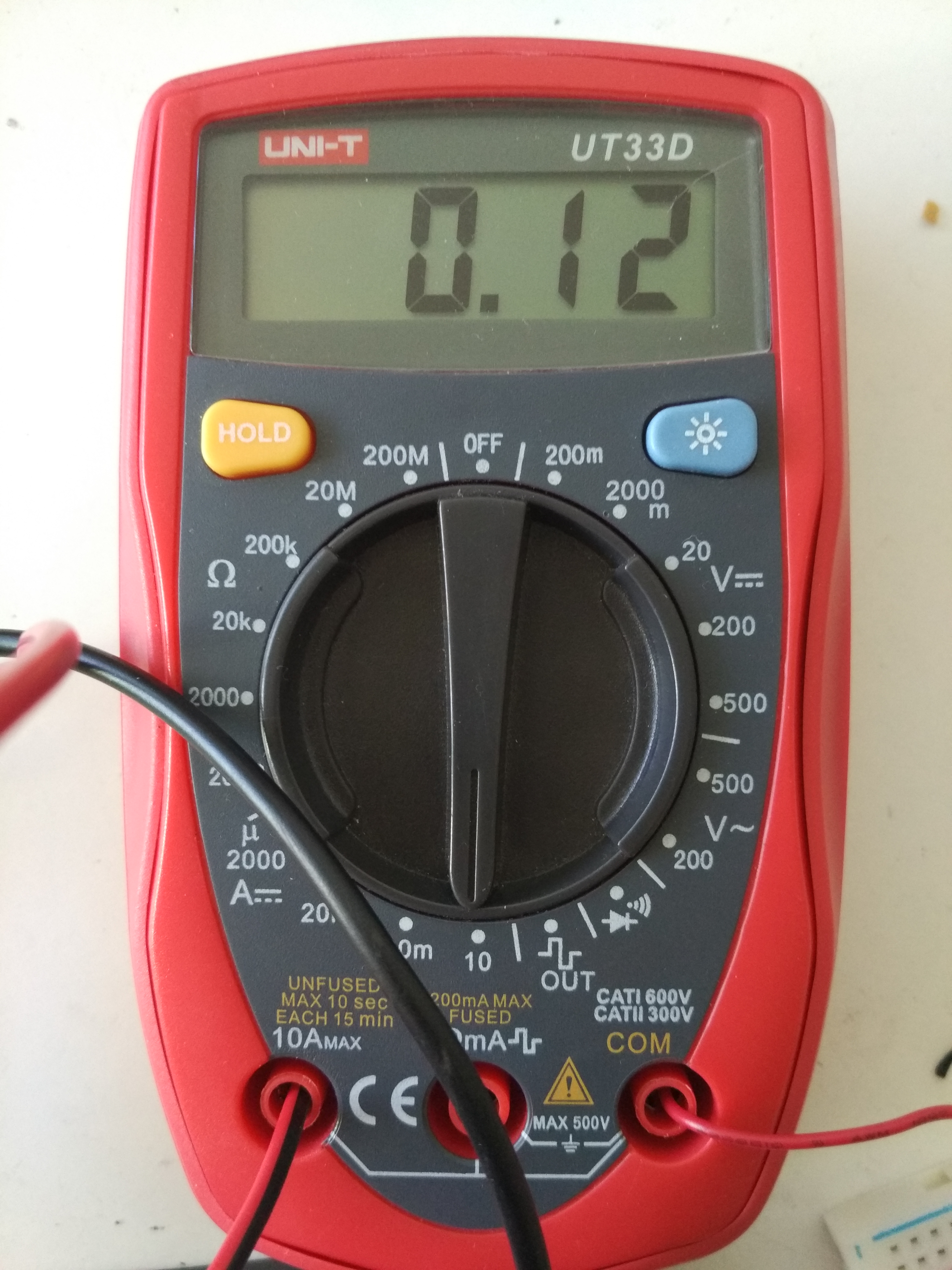
Running the battery thru the multimeter on the low amps side(100mA) causes instant problems (no boot i supose) , using the 10 amp range that has a beefy shunt and a lower resistance works fine but can't really measure deep sleep curent.
blackbrayn
on 3 Oct 2018
I always had it running on a lipo battery, and still had the problem. Not sure about the spoke dropping voltage resulting in a reset
mvadu
on 3 Oct 2018
Just ran a test on lipo battery with no other modifications(just a multimeter in series) to really see if it's more stable on my board(wemos lolin32 v1) , it just stopped after a while, it worked for only one hour and after that it started drawing 120mA all the time.
ps:test was on a 5 minute deep sleep time , waking up just to get readings from temp/humidity sensor , conect to wireless and send the data to a server.
blackbrayn
on 4 Oct 2018
@misan I also eliminated a problem on the code side regarding the wireless conection , i took the wireless connection down about 20 minutes so the esp32 will not connect for about 3-4 cycles of deep sleep , it just worked after re-conecting power to the wireless AP, as soon as it woke up it transmited data , so everything points out to a power issue or some other bug that determines the esp not to work. I'll also try with a separate power supply feedind 4v to the battery terminals of my wemos lolin32 board see if it's more stabe , but i doubt it , since i had no problem with tests that did not use deep sleep.
blackbrayn
on 4 Oct 2018
@blackbrayn I have the same problem. Did you ever managed to solve this? Thanks
 StefanStsc
on 19 Jan 2019
StefanStsc
on 19 Jan 2019
@StefanStsc Hello , i did not continue the power related tests , i managed to get better stability (but not fully stable) by adding sleep timers before and after enabling wifi , and before and after the other operations in the code.
I also got a barebone esp32 module to test with a diferent power suply and the mininmum conections.
blackbrayn
on 22 Jan 2019
I'm also facing a similar (the same?) issue. My ESP32 randomly stops after waking up. I tested it a few times. The result was:
Stuck @ 64. boot
Stuck @ 54. boot
Stuck @ 132. boot
While only deep sleeping for 15seconds in between. I used delay(1000) at the beginning of the setup.
I can't really tell what's going on. There are no signs of under-volting.
Any suggestions? :)
 JLIspace
on 5 Mar 2019
JLIspace
on 5 Mar 2019
The only thing helped in my case (ESP32 sending readings from BME280 via MQTT, then sleeping for 5 minutes, operated using a lifepo4 battery, no response after ~1.5 days) was a big fat capacitor...
 muczy
on 5 Mar 2019
muczy
on 5 Mar 2019
The only thing helped in my case (ESP32 sending readings from BME280 via MQTT, then sleeping for 5 minutes, operated using a lifepo4 battery, no response after ~1.5 days) was a big fat capacitor...
I already have a pretty big one on my 5V supply rail. There are some other compenents using it but I haven't seen a significant drop yet. (lowest was about 4,9V)
Could it be that the 3V3 voltage regulator built into my dev board can't handle the esp itself? 🤔
Available power shouldn't be an issue as it's directly comming from a rather big LiFePO4 battery pack.
I previously had problems with weak power supplies causing the esp32 to crash and restart but this is the first time that it just quietly quits doing its job.
I'm basically planning to run this setup 24/7 so having it fail after as low as 5 minutes is a major flaw :D
Thanks for your suggestion! I'll definately verify the voltage again.
JLIspace
on 5 Mar 2019
Hello, I would like to pitch in with my experience. I too am facing a similar issue. The board in question is a custom ESP32 wrover board powered from a LD1117 3.3V regulator with a 10uF input and output capacitance. As suggested a couple of times on the thread, I did place a beefy (1000 uF/ 10V) elcap directly across the ESP32 power pins with short leads.
However, I still get the same stalling issue when the device reboots and halts without executing any code. The code is more or less this, wake up, read from BME680 and TSL2591, send data. wait till next transmission time and repeat. If the device is not able to post to the server or get an IP at any point of time, the device reboots.
I would be extremely grateful for any other suggestions to fix this issue. :-)
Thanks in advance!!
 krish2487
on 3 Apr 2019
krish2487
on 3 Apr 2019
@krish2487 hello , did you try adding wait timers before enabling wifi or conecting to server? Maybe it helps a bit like in my case , not a permanent fix but it's something.
blackbrayn
on 3 Apr 2019
@blackbrayn I did not explicitly add any other delay. There is already an existing delay in the firmware.
This is the specific bit for wifi connection.
        WiFi.disconnect();
        delay(500);
        wifiConnected = false;
        WiFi.begin(ssid, password);
I am assuming that thats what you meant by adding a wait timer? There is already a half a second delay. Should I increase it??
Thanks for the suggestion. Anything that helps is appreciated. :-)
krish2487
on 3 Apr 2019
Had the same issue, but also with permanently looping functions. 2 to 12 hours of operation, then silence.
Very stable power supply solved my problems - in this case a 1000µF Capacitor between 3,3V and GND, as well as thick wires, solded directly to the ESP32 Development Board.
(I'm powering through the 3,3V Pin from a small power supply that also powers two "rails" of pins for several sensors. The rails already had a capacitor and the cable to the ESP was only about 8cm long, but in the end I needed the measures mentioned above - well, maybe not all of them, I installed them all at once, but the package works...).
So, power supply seems crucial, see also https://arduino-hannover.de/2018/07/25/die-tuecken-der-esp32-stromversorgung/ (in German though).
Talking software - I use a 500ms delay first, to allow proper wakeup. And also some delay at the end, to allow proper MQTT publishing of sensor data (seemed to be necessary after the first tests).
 cookie0815
on 27 May 2019
cookie0815
on 27 May 2019
Had the same issue, but also with permanently looping functions. 2 to 12 hours of operation, then silence.
Very stable power supply solved my problems - in this case a 1000µF Capacitor between 3,3V and GND, as well as thick wires, solded directly to the ESP32 Development Board.
(I'm powering through the 3,3V Pin from a small power supply that also powers two "rails" of pins for several sensors. The rails already had a capacitor and the cable to the ESP was only about 8cm long, but in the end I needed the measures mentioned above - well, maybe not all of them, I installed them all at once, but the package works...).
So, power supply seems crucial, see also https://arduino-hannover.de/2018/07/25/die-tuecken-der-esp32-stromversorgung/ (in German though).Talking software - I use a 500ms delay first, to allow proper wakeup. And also some delay at the end, to allow proper MQTT publishing of sensor data (seemed to be necessary after the first tests).
Excellent article , covers problematic scenarios when powering the esp module with actual measurements , i will try to do some more testing on my module as well when i get time.
blackbrayn
on 29 May 2019
Very stable power supply solved my problems - in this case a 1000µF Capacitor between 3,3V and GND, as well as thick wires, solded directly to the ESP32 Development Board.
What was a voltage of this capacitor? I have 16V, is it fine or not?
 alexvancasper
on 4 Jun 2019
alexvancasper
on 4 Jun 2019
Higher voltage on the filtering capacitor will not be a issue , except larger dimensions there is no problem.
blackbrayn
on 9 Jun 2019
I am using a micro usb cable the outcome still the same
Here is my source code
https://gist.github.com/kenken64/9d1332dba50644f2ac934c5f76800ce2
For just 30 minutes
11:12:14.438 -> ESP32 Mijia Temp Sensor BLE Client | Compiled: Jun 24 2019/11:11:17
11:12:14.438 -> Connecting to kenken64
11:12:15.015 -> [D][WiFiGeneric.cpp:336] _eventCallback(): Event: 0 - WIFI_READY
11:12:15.015 -> [D][WiFiGeneric.cpp:336] _eventCallback(): Event: 2 - STA_START
11:12:15.557 -> .[D][WiFiGeneric.cpp:336] _eventCallback(): Event: 5 - STA_DISCONNECTED
11:12:15.932 -> [W][WiFiGeneric.cpp:351] _eventCallback(): Reason: 203 - ASSOC_FAIL
11:12:15.932 -> [D][WiFiGeneric.cpp:336] _eventCallback(): Event: 0 - WIFI_READY
11:12:15.932 -> [D][WiFiGeneric.cpp:336] _eventCallback(): Event: 2 - STA_START
11:12:15.966 -> [D][WiFiGeneric.cpp:336] _eventCallback(): Event: 2 - STA_START
11:12:16.068 -> .[D][WiFiGeneric.cpp:336] _eventCallback(): Event: 4 - STA_CONNECTED
11:12:16.579 -> ....[D][WiFiGeneric.cpp:336] _eventCallback(): Event: 7 - STA_GOT_IP
11:12:18.250 -> [D][WiFiGeneric.cpp:379] _eventCallback(): STA IP: 192.168.1.56, MASK: 255.255.255.0, GW: 192.168.1.254
11:12:18.557 -> .
11:12:18.557 -> WiFi connected
11:12:18.557 -> IP address: 192.168.1.56
11:12:19.173 -> [D][FreeRTOS.cpp:158] take(): Semaphore taking: name: ScanEnd (0x3ffed6c8), owner:
11:12:19.173 -> [D][FreeRTOS.cpp:167] take(): Semaphore taken: name: ScanEnd (0x3ffed6c8), owner: start
11:12:19.173 -> [D][BLEAdvertisedDevice.cpp:418] setRSSI(): - setRSSI(): rssi: -64
11:12:19.208 -> [D][BLEAdvertisedDevice.cpp:247] parseAdvertisement(): Type: 0x01 (), length: 1, data: 1a
11:12:19.208 -> [D][BLEAdvertisedDevice.cpp:247] parseAdvertisement(): Type: 0xff (), length: 9, data: 4c00100503183fc043
11:12:19.208 -> [D][BLEAdvertisedDevice.cpp:395] setManufacturerData(): - manufacturer data: 4c00100503183fc043
11:12:19.208 -> BLE Advertised Device found: Name: , Address: 64:75:00:08:90:d0, manufacturer data: 4c00100503183fc043
11:12:20.269 -> [D][BLEAdvertisedDevice.cpp:418] setRSSI(): - setRSSI(): rssi: -67
11:12:20.269 -> [D][BLEAdvertisedDevice.cpp:247] parseAdvertisement(): Type: 0x01 (), length: 1, data: 05
11:12:20.269 -> [D][BLEAdvertisedDevice.cpp:247] parseAdvertisement(): Type: 0x02 (), length: 2, data: e7fe
11:12:20.269 -> [D][BLEAdvertisedDevice.cpp:447] setServiceUUID(): - addServiceUUID(): serviceUUID: 0000fee7-0000-1000-8000-00805f9b34fb
11:12:20.304 -> [D][BLEAdvertisedDevice.cpp:247] parseAdvertisement(): Type: 0x09 (), length: 6, data: 4d5331303230
11:12:20.304 -> [D][BLEAdvertisedDevice.cpp:407] setName(): - setName(): name: MS1020
11:12:20.304 -> [D][BLEAdvertisedDevice.cpp:247] parseAdvertisement(): Type: 0xff (), length: 8, data: 1102a4c17b28834f
11:12:20.304 -> [D][BLEAdvertisedDevice.cpp:395] setManufacturerData(): - manufacturer data: 1102a4c17b28834f
11:12:20.338 -> [D][BLEAdvertisedDevice.cpp:247] parseAdvertisement(): Type: 0x09 (), length: 6, data: 4d5331303230
11:12:20.338 -> [D][BLEAdvertisedDevice.cpp:407] setName(): - setName(): name: MS1020
11:12:20.338 -> BLE Advertised Device found: Name: MS1020, Address: a4:c1:7b:28:83:4f, manufacturer data: 1102a4c17b28834f, serviceUUID: 0000fee7-0000-1000-8000-00805f9b34fb
11:12:20.407 -> [D][BLEAdvertisedDevice.cpp:418] setRSSI(): - setRSSI(): rssi: -61
11:12:20.407 -> [D][BLEAdvertisedDevice.cpp:247] parseAdvertisement(): Type: 0x01 (), length: 1, data: 06
11:12:20.441 -> [D][BLEAdvertisedDevice.cpp:247] parseAdvertisement(): Type: 0x16 (), length: 20, data: 95fe5020aa019466d933342d580d1004f000bf02
11:12:20.441 -> [D][BLEAdvertisedDevice.cpp:247] parseAdvertisement(): Type: 0x09 (), length: 8, data: 4d4a5f48545f5631
11:12:20.441 -> [D][BLEAdvertisedDevice.cpp:407] setName(): - setName(): name: MJ_HT_V1
11:12:20.441 -> [D][BLEAdvertisedDevice.cpp:247] parseAdvertisement(): Type: 0x03 (), length: 4, data: 0f180a18
11:12:20.474 -> [D][BLEAdvertisedDevice.cpp:447] setServiceUUID(): - addServiceUUID(): serviceUUID: 0000180f-0000-1000-8000-00805f9b34fb
11:12:20.474 -> [D][BLEAdvertisedDevice.cpp:447] setServiceUUID(): - addServiceUUID(): serviceUUID: 0000180a-0000-1000-8000-00805f9b34fb
11:12:20.474 -> [D][BLEAdvertisedDevice.cpp:247] parseAdvertisement(): Type: 0x16 (), length: 8, data: ffffe5d64f946dd2
11:12:20.507 -> BLE Advertised Device found: Name: MJ_HT_V1, Address: 58:2d:34:33:d9:66, serviceUUID: 0000180f-0000-1000-8000-00805f9b34fb
11:12:20.507 -> Found our device! address: Forming a connection to 58:2d:34:33:d9:66
11:12:20.507 -> - Created client
11:12:20.507 -> [I][BLEDevice.cpp:600] addPeerDevice(): add conn_id: 0, GATT role: client
11:12:20.507 -> [D][FreeRTOS.cpp:158] take(): Semaphore taking: name: RegEvt (0x3ffed960), owner:
11:12:20.542 -> [D][FreeRTOS.cpp:167] take(): Semaphore taken: name: RegEvt (0x3ffed960), owner: connect
11:12:20.542 -> [D][BLEDevice.cpp:154] gattClientEventHandler(): gattClientEventHandler [esp_gatt_if: 4] ... Unknown
11:12:20.542 -> [D][BLEClient.cpp:158] gattClientEventHandler(): gattClientEventHandler [esp_gatt_if: 4] ... Unknown
11:12:20.542 -> [D][FreeRTOS.cpp:158] take(): Semaphore taking: name: OpenEvt (0x3ffedd44), owner:
11:12:20.576 -> [D][FreeRTOS.cpp:167] take(): Semaphore taken: name: OpenEvt (0x3ffedd44), owner: connect
11:12:24.485 -> [D][BLEDevice.cpp:154] gattClientEventHandler(): gattClientEventHandler [esp_gatt_if: 4] ... Unknown
11:12:24.485 -> [D][BLEClient.cpp:158] gattClientEventHandler(): gattClientEventHandler [esp_gatt_if: 4] ... Unknown
11:12:24.485 -> [D][BLEDevice.cpp:584] updatePeerDevice(): update conn_id: 4, GATT role: client
11:12:24.519 -> [D][BLEDevice.cpp:154] gattClientEventHandler(): gattClientEventHandler [esp_gatt_if: 4] ... Unknown
11:12:24.519 -> [D][BLEClient.cpp:158] gattClientEventHandler(): gattClientEventHandler [esp_gatt_if: 4] ... Unknown
11:12:24.519 -> - Connected to server
11:12:24.519 -> [D][FreeRTOS.cpp:158] take(): Semaphore taking: name: SearchCmplEvt (0x3ffedda4), owner:
11:12:24.553 -> [D][FreeRTOS.cpp:167] take(): Semaphore taken: name: SearchCmplEvt (0x3ffedda4), owner: getServices
11:12:25.744 -> [D][BLEDevice.cpp:154] gattClientEventHandler(): gattClientEventHandler [esp_gatt_if: 4] ... Unknown
11:12:25.777 -> [D][BLEClient.cpp:158] gattClientEventHandler(): gattClientEventHandler [esp_gatt_if: 4] ... Unknown
11:12:25.777 -> [D][BLEDevice.cpp:154] gattClientEventHandler(): gattClientEventHandler [esp_gatt_if: 4] ... Unknown
11:12:25.777 -> [D][BLEClient.cpp:158] gattClientEventHandler(): gattClientEventHandler [esp_gatt_if: 4] ... Unknown
11:12:25.777 -> [D][BLEDevice.cpp:154] gattClientEventHandler(): gattClientEventHandler [esp_gatt_if: 4] ... Unknown
11:12:25.811 -> [D][BLEClient.cpp:158] gattClientEventHandler(): gattClientEventHandler [esp_gatt_if: 4] ... Unknown
11:12:25.811 -> [D][BLEDevice.cpp:154] gattClientEventHandler(): gattClientEventHandler [esp_gatt_if: 4] ... Unknown
11:12:25.811 -> [D][BLEClient.cpp:158] gattClientEventHandler(): gattClientEventHandler [esp_gatt_if: 4] ... Unknown
11:12:25.845 -> [D][BLEDevice.cpp:154] gattClientEventHandler(): gattClientEventHandler [esp_gatt_if: 4] ... Unknown
11:12:25.845 -> [D][BLEClient.cpp:158] gattClientEventHandler(): gattClientEventHandler [esp_gatt_if: 4] ... Unknown
11:12:25.845 -> [D][BLEDevice.cpp:154] gattClientEventHandler(): gattClientEventHandler [esp_gatt_if: 4] ... Unknown
11:12:25.845 -> [D][BLEClient.cpp:158] gattClientEventHandler(): gattClientEventHandler [esp_gatt_if: 4] ... Unknown
11:12:25.879 -> [D][BLEDevice.cpp:154] gattClientEventHandler(): gattClientEventHandler [esp_gatt_if: 4] ... Unknown
11:12:25.879 -> [D][BLEClient.cpp:158] gattClientEventHandler(): gattClientEventHandler [esp_gatt_if: 4] ... Unknown
11:12:25.879 -> [D][BLEDevice.cpp:154] gattClientEventHandler(): gattClientEventHandler [esp_gatt_if: 4] ... Unknown
11:12:25.879 -> [D][BLEClient.cpp:158] gattClientEventHandler(): gattClientEventHandler [esp_gatt_if: 4] ... Unknown
11:12:25.913 -> - Found our service
11:12:25.913 -> [D][BLEDevice.cpp:154] gattClientEventHandler(): gattClientEventHandler [esp_gatt_if: 4] ... Unknown
11:12:25.913 -> [D][BLERemoteService.cpp:191] retrieveCharacteristics(): Found a characteristic: Handle: 14, UUID: 226caa55-6476-4566-7562-66734470666d
11:12:25.913 -> [D][BLEClient.cpp:158] gattClientEventHandler(): gattClientEventHandler [esp_gatt_if: 4] ... Unknown
11:12:25.947 -> [D][BLERemoteCharacteristic.cpp:280] retrieveDescriptors(): Found a descriptor: Handle: 15, UUID: 00002901-0000-1000-8000-00805f9b34fb
11:12:25.947 -> [D][BLERemoteCharacteristic.cpp:280] retrieveDescriptors(): Found a descriptor: Handle: 16, UUID: 00002902-0000-1000-8000-00805f9b34fb
11:12:25.947 -> [D][BLERemoteCharacteristic.cpp:280] retrieveDescriptors(): Found a descriptor: Handle: 17, UUID: 00002904-0000-1000-8000-00805f9b34fb
11:12:25.981 -> [D][BLERemoteService.cpp:191] retrieveCharacteristics(): Found a characteristic: Handle: 19, UUID: 226cbb55-6476-4566-7562-66734470666d
11:12:25.981 -> [D][BLERemoteCharacteristic.cpp:280] retrieveDescriptors(): Found a descriptor: Handle: 20, UUID: 00002901-0000-1000-8000-00805f9b34fb
11:12:25.981 -> [D][BLERemoteCharacteristic.cpp:280] retrieveDescriptors(): Found a descriptor: Handle: 21, UUID: 00002902-0000-1000-8000-00805f9b34fb
11:12:26.015 -> - Found our characteristic
11:12:26.015 -> [D][FreeRTOS.cpp:158] take(): Semaphore taking: name: RegForNotifyEvt (0x3fff0a38), owner:
11:12:26.015 -> [D][FreeRTOS.cpp:167] take(): Semaphore taken: name: RegForNotifyEvt (0x3fff0a38), owner: registerForNotify
11:12:26.015 -> [D][BLEDevice.cpp:154] gattClientEventHandler(): gattClientEventHandler [esp_gatt_if: 4] ... Unknown
11:12:26.050 -> [D][BLEClient.cpp:158] gattClientEventHandler(): gattClientEventHandler [esp_gatt_if: 4] ... Unknown
11:12:26.050 -> We are now connected to the BLE Thermostat
11:12:26.050 -> Turning Notification On
11:12:26.050 -> [D][BLEDevice.cpp:154] gattClientEventHandler(): gattClientEventHandler [esp_gatt_if: 4] ... Unknown
11:12:26.050 -> [D][BLEClient.cpp:158] gattClientEventHandler(): gattClientEventHandler [esp_gatt_if: 4] ... Unknown
11:12:26.120 -> [D][BLEDevice.cpp:154] gattClientEventHandler(): gattClientEventHandler [esp_gatt_if: 4] ... Unknown
11:12:26.120 -> [D][BLEClient.cpp:158] gattClientEventHandler(): gattClientEventHandler [esp_gatt_if: 4] ... Unknown
11:12:26.772 -> MQTT Connected
11:12:27.044 -> [D][BLEDevice.cpp:154] gattClientEventHandler(): gattClientEventHandler [esp_gatt_if: 4] ... Unknown
11:12:27.044 -> [D][BLEClient.cpp:158] gattClientEventHandler(): gattClientEventHandler [esp_gatt_if: 4] ... Unknown
11:12:27.078 -> [D][BLERemoteCharacteristic.cpp:163] gattClientEventHandler(): Invoking callback for notification on characteristic Characteristic: uuid: 226caa55-6476-4566-7562-66734470666d, handle: 14 0xe, props: broadcast: 0, read: 0, write_nr: 0, write: 0, notify: 1, indicate: 0, auth: 0
11:12:27.078 ->
11:12:57.090 -> Disconnect from BLE device.
11:12:57.090 -> Setup ESP32 to sleep for every 20 Seconds
11:12:57.090 -> Going to sleep now.
11:13:18.013 -> ets Jun 8 2016 00:22:57
11:13:18.013 ->
11:13:18.013 -> rst:0x5 (DEEPSLEEP_RESET),boot:0x13 (SPI_FAST_FLASH_BOOT)
11:13:18.013 -> configsip: 0, SPIWP:0xee
11:13:18.013 -> clk_drv:0x00,q_drv:0x00,d_drv:0x00,cs0_drv:0x00,hd_drv:0x00,wp_drv:0x00
11:13:18.013 -> mode:DIO, clock div:1
11:13:18.013 -> load:0x3fff0018,len:4
11:13:18.013 -> load:0x3fff001c,len:1100
11:13:18.013 -> load:0x40078000,len:9232
11:13:18.013 -> load:0x40080400,len:6400
11:13:18.013 -> entry 0x400806a8
11:13:18.525 ->
12:00:12.631 -> MQTT Connected
12:00:41.879 -> Disconnect from BLE device.
12:00:41.879 -> Setup ESP32 to sleep for every 20 Seconds
12:00:41.879 -> Going to sleep now.
12:01:02.803 -> ets Jun 8 2016 00:22:57
12:01:02.803 ->
12:01:02.803 -> rst:0x5 (DEEPSLEEP_RESET),boot:0x13 (SPI_FAST_FLASH_BOOT)
12:01:02.803 -> configsip: 0, SPIWP:0xee
12:01:02.837 -> clk_drv:0x00,q_drv:0x00,d_drv:0x00,cs0_drv:0x00,hd_drv:0x00,wp_drv:0x00
12:01:02.837 -> mode:DIO, clock div:1
12:01:02.837 -> load:0x3fff0018,len:4
12:01:02.837 -> load:0x3fff001c,len:1100
12:01:02.837 -> load:0x40078000,len:9232
12:01:02.837 -> load:0x40080400,len:6400
12:01:02.837 -> entry 0x400806a8
12:01:03.309 ->
12:01:03.309 -> ESP32 Mijia Temp Sensor BLE Client | Compiled: Jun 24 2019/11:11:17
12:01:03.309 -> Connecting to kenken64
12:01:03.852 -> [D][WiFiGeneric.cpp:336] _eventCallback(): Event: 0 - WIFI_READY
12:01:03.852 -> [D][WiFiGeneric.cpp:336] _eventCallback(): Event: 2 - STA_START
12:01:04.399 -> .[D][WiFiGeneric.cpp:336] _eventCallback(): Event: 4 - STA_CONNECTED
12:01:04.877 -> ......[D][WiFiGeneric.cpp:336] _eventCallback(): Event: 7 - STA_GOT_IP
12:01:07.429 -> [D][WiFiGeneric.cpp:379] _eventCallback(): STA IP: 192.168.1.56, MASK: 255.255.255.0, GW: 192.168.1.254
12:01:07.906 -> .
12:01:07.906 -> WiFi connected
12:01:07.906 -> IP address: 192.168.1.56
12:01:08.522 -> [D][FreeRTOS.cpp:158] take(): Semaphore taking: name: ScanEnd (0x3ffed6b4), owner:
12:01:08.522 -> [D][FreeRTOS.cpp:167] take(): Semaphore taken: name: ScanEnd (0x3ffed6b4), owner: start
12:01:08.796 -> [D][BLEAdvertisedDevice.cpp:418] setRSSI(): - setRSSI(): rssi: -71
12:01:08.796 -> [D][BLEAdvertisedDevice.cpp:247] parseAdvertisement(): Type: 0x01 (), length: 1, data: 1a
12:01:08.796 -> [D][BLEAdvertisedDevice.cpp:247] parseAdvertisement(): Type: 0xff (), length: 9, data: 4c00100503183fc043
12:01:08.829 -> [D][BLEAdvertisedDevice.cpp:395] setManufacturerData(): - manufacturer data: 4c00100503183fc043
12:01:08.829 -> BLE Advertised Device found: Name: , Address: 64:75:00:08:90:d0, manufacturer data: 4c00100503183fc043
12:01:09.065 -> [D][BLEScan.cpp:97] handleGAPEvent(): Ignoring 64:75:00:08:90:d0, already seen it.
12:01:09.440 -> [D][BLEAdvertisedDevice.cpp:418] setRSSI(): - setRSSI(): rssi: -68
12:01:09.440 -> [D][BLEAdvertisedDevice.cpp:247] parseAdvertisement(): Type: 0x01 (), length: 1, data: 05
12:01:09.440 -> [D][BLEAdvertisedDevice.cpp:247] parseAdvertisement(): Type: 0x02 (), length: 2, data: e7fe
12:01:09.440 -> [D][BLEAdvertisedDevice.cpp:447] setServiceUUID(): - addServiceUUID(): serviceUUID: 0000fee7-0000-1000-8000-00805f9b34fb
12:01:09.474 -> [D][BLEAdvertisedDevice.cpp:247] parseAdvertisement(): Type: 0x09 (), length: 6, data: 4d5331303230
12:01:09.474 -> [D][BLEAdvertisedDevice.cpp:407] setName(): - setName(): name: MS1020
12:01:09.474 -> [D][BLEAdvertisedDevice.cpp:247] parseAdvertisement(): Type: 0xff (), length: 8, data: 1102a4c17b28834f
12:01:09.474 -> [D][BLEAdvertisedDevice.cpp:395] setManufacturerData(): - manufacturer data: 1102a4c17b28834f
12:01:09.508 -> [D][BLEAdvertisedDevice.cpp:247] parseAdvertisement(): Type: 0x09 (), length: 6, data: 4d5331303230
12:01:09.508 -> [D][BLEAdvertisedDevice.cpp:407] setName(): - setName(): name: MS1020
12:01:09.508 -> BLE Advertised Device found: Name: MS1020, Address: a4:c1:7b:28:83:4f, manufacturer data: 1102a4c17b28834f, serviceUUID: 0000fee7-0000-1000-8000-00805f9b34fb
12:01:09.782 -> [D][BLEAdvertisedDevice.cpp:418] setRSSI(): - setRSSI(): rssi: -92
12:01:09.782 -> [D][BLEAdvertisedDevice.cpp:247] parseAdvertisement(): Type: 0xff (), length: 26, data: 750042040180ae3801959a5f6f3a01959a5f6e01000000000000
12:01:09.782 -> [D][BLEAdvertisedDevice.cpp:395] setManufacturerData(): - manufacturer data: 750042040180ae3801959a5f6f3a01959a5f6e01000000000000
12:01:09.816 -> BLE Advertised Device found: Name: , Address: 38:01:95:9a:5f:6f, manufacturer data: 750042040180ae3801959a5f6f3a01959a5f6e01000000000000
12:01:10.154 -> [D][BLEAdvertisedDevice.cpp:418] setRSSI(): - setRSSI(): rssi: -64
12:01:10.154 -> [D][BLEAdvertisedDevice.cpp:247] parseAdvertisement(): Type: 0x01 (), length: 1, data: 06
12:01:10.188 -> [D][BLEAdvertisedDevice.cpp:247] parseAdvertisement(): Type: 0x16 (), length: 20, data: 95fe5020aa013866d933342d580d1004f000bd02
12:01:10.188 -> [D][BLEAdvertisedDevice.cpp:247] parseAdvertisement(): Type: 0x09 (), length: 8, data: 4d4a5f48545f5631
12:01:10.188 -> [D][BLEAdvertisedDevice.cpp:407] setName(): - setName(): name: MJ_HT_V1
12:01:10.188 -> [D][BLEAdvertisedDevice.cpp:247] parseAdvertisement(): Type: 0x03 (), length: 4, data: 0f180a18
12:01:10.222 -> [D][BLEAdvertisedDevice.cpp:447] setServiceUUID(): - addServiceUUID(): serviceUUID: 0000180f-0000-1000-8000-00805f9b34fb
12:01:10.222 -> [D][BLEAdvertisedDevice.cpp:447] setServiceUUID(): - addServiceUUID(): serviceUUID: 0000180a-0000-1000-8000-00805f9b34fb
12:01:10.222 -> [D][BLEAdvertisedDevice.cpp:247] parseAdvertisement(): Type: 0x16 (), length: 8, data: ffffe5d64f946dd2
12:01:10.256 -> BLE Advertised Device found: Name: MJ_HT_V1, Address: 58:2d:34:33:d9:66, serviceUUID: 0000180f-0000-1000-8000-00805f9b34fb
12:01:10.256 -> Found our device! address: Forming a connection to 58:2d:34:33:d9:66
12:01:10.256 -> - Created client
12:01:10.256 -> [I][BLEDevice.cpp:600] addPeerDevice(): add conn_id: 0, GATT role: client
12:01:10.256 -> [D][FreeRTOS.cpp:158] take(): Semaphore taking: name: RegEvt (0x3ffedcb0), owner:
12:01:10.291 -> [D][FreeRTOS.cpp:167] take(): Semaphore taken: name: RegEvt (0x3ffedcb0), owner: connect
12:01:10.291 -> [D][BLEDevice.cpp:154] gattClientEventHandler(): gattClientEventHandler [esp_gatt_if: 4] ... Unknown
12:01:10.291 -> [D][BLEClient.cpp:158] gattClientEventHandler(): gattClientEventHandler [esp_gatt_if: 4] ... Unknown
12:01:10.291 -> [D][FreeRTOS.cpp:158] take(): Semaphore taking: name: OpenEvt (0x3ffedeb8), owner:
12:01:10.325 -> [D][FreeRTOS.cpp:167] take(): Semaphore taken: name: OpenEvt (0x3ffedeb8), owner: connect
12:01:14.244 -> [D][BLEDevice.cpp:154] gattClientEventHandler(): gattClientEventHandler [esp_gatt_if: 4] ... Unknown
12:01:14.278 -> [D][BLEClient.cpp:158] gattClientEventHandler(): gattClientEventHandler [esp_gatt_if: 4] ... Unknown
12:01:14.278 -> [I][BLEDevice.cpp:611] removePeerDevice(): remove: 0, GATT role client
12:01:14.278 -> [D][BLEDevice.cpp:154] gattClientEventHandler(): gattClientEventHandler [esp_gatt_if: 4] ... Unknown
12:01:14.278 -> [D][BLEDevice.cpp:154] gattClientEventHandler(): gattClientEventHandler [esp_gatt_if: 4] ... Unknown
 kenken64
on 24 Jun 2019
kenken64
on 24 Jun 2019
More info and related issues regarding stability when powering wireless :
https://github.com/esp8266/Arduino/issues/2070
I finally managed to get stable(1 month and running) deep sleep (timer 5 minutes) on the lolin32 with a 18650 battery conected to the board by switching code for transmitting data to http post and a 1000ms delay after Serial.begin and WiFi.begin.
Exact code used (didn't have time to clean it up, just changed the domain and wifi credentials) :
https://github.com/blackbrayn/Lolin32-Deep-Sleep
I also put the wireless network down and the server receiving the data to be sure the code loop won't freak out . It just proceeds to sleep& try to send data. (i only adjusted the wireless connect a bit , the code is commented).
blackbrayn
on 23 Jul 2019
[STALE_SET] This issue has been automatically marked as stale because it has not had recent activity. It will be closed in 14 days if no further activity occurs. Thank you for your contributions.
![stale[bot] picture](https://avatars3.githubusercontent.com/in/1724?v=4&s=40) stale[bot]
on 22 Sep 2019
stale[bot]
on 22 Sep 2019
Because the bot wants to close it: this problem is still happening.
StefanStsc
on 22 Sep 2019
[STALE_CLR] This issue has been removed from the stale queue. Please ensure activity to keep it openin the future.
stale[bot]
on 22 Sep 2019
Sorry to jump onto a 2 year old thread, but I'm having the same issue.
Any progress? anything I can provide to help with troubleshooting?
thanks.
 basil59
on 23 Oct 2019
basil59
on 23 Oct 2019
[STALE_SET] This issue has been automatically marked as stale because it has not had recent activity. It will be closed in 14 days if no further activity occurs. Thank you for your contributions.
stale[bot]
on 22 Dec 2019
This seems to happen if the power supply is not perfect during power on. I could fix it with some capacitors. Anyway I consider this as a workaround, because the same power supply does not result in any problems during normal operation.
So no real progress and no real fix.
StefanStsc
on 22 Dec 2019
[STALE_CLR] This issue has been removed from the stale queue. Please ensure activity to keep it openin the future.
stale[bot]
on 22 Dec 2019
[STALE_SET] This issue has been automatically marked as stale because it has not had recent activity. It will be closed in 14 days if no further activity occurs. Thank you for your contributions.
stale[bot]
on 20 Feb 2020
Bot, forget that. Get it fixed.
StefanStsc
on 20 Feb 2020
[STALE_CLR] This issue has been removed from the stale queue. Please ensure activity to keep it openin the future.
stale[bot]
on 20 Feb 2020
[STALE_SET] This issue has been automatically marked as stale because it has not had recent activity. It will be closed in 14 days if no further activity occurs. Thank you for your contributions.
stale[bot]
on 20 Apr 2020
Still not solved.
StefanStsc
on 20 Apr 2020
[STALE_CLR] This issue has been removed from the stale queue. Please ensure activity to keep it openin the future.
stale[bot]
on 20 Apr 2020
[STALE_SET] This issue has been automatically marked as stale because it has not had recent activity. It will be closed in 14 days if no further activity occurs. Thank you for your contributions.
stale[bot]
on 19 Jun 2020
Yeah, it's still happening for me.
JLIspace
on 19 Jun 2020
[STALE_CLR] This issue has been removed from the stale queue. Please ensure activity to keep it openin the future.
stale[bot]
on 19 Jun 2020
Got the same issue.
 bglowacki
on 22 Jun 2020
bglowacki
on 22 Jun 2020
Also still the same problem
alexisartus
on 23 Jun 2020
And I've also this issue for more than one year.
StefanStsc
on 23 Jun 2020
Hmm I removed code that reads from Capacitive Soil Moisture sensor, and disconnected the sensor from the ESP32 and it seems like the issue doesn't happen for now. I have been successfully running the DeepSleep cycles for almost a day.
Going to reconnect the sensor now and see what happens.
bglowacki
on 23 Jun 2020
OK, seems like it is working don't know the actual thing that caused the problem.
The code that had problem was
#include <Arduino.h>
#include <WiFi.h>
#include <PubSubClient.h>
#include <ArduinoJson.h>

// IPAddress ip(192,168,1,172);
const char* topic = "test_sensor_2";
// #define SLEEP_TIME 3600000000 // 1 hour
#define SLEEP_TIME  600000000 // 10 minutes
// #define SLEEP_TIME  60000000; // 1 minute


const char* ssid = "*******";
const char* password = "********";

WiFiClient espClient;
PubSubClient client(espClient);

const char* mqtt_server = "192.168.1.128";

const int analog_pin = 36;
StaticJsonDocument<256> doc;

// Ticker sleep_ticker;

void connectWiFi() {
  // IPAddress gateway(192,168,1,254);
  // IPAddress subnet(255,255,255,0);

  delay(1);
  WiFi.persistent(false);
  WiFi.mode(WIFI_STA);
  // WiFi.config(ip, gateway, subnet);
  WiFi.begin(ssid, password);

  Serial.print("Connecting");
  while (WiFi.status() != WL_CONNECTED) {
    delay(500);
      Serial.print(".");
  }
  Serial.println();

  Serial.print("Connected, IP address: ");
  Serial.println(WiFi.localIP());
}

void connectMqtt() {
  while (!client.connected()) {
  Serial.print("Attempting MQTT connection...");
  client.setServer(mqtt_server, 1883);
  if (client.connect("ESP8266 Client")) {
    Serial.println("connected");
    }
  }
}

void getReadings(int numberOfReads) {
  int soil_moisture_value = 0;
  int soil_moisture_percent = 0;
  const int air_value = 3104;
  const int water_value = 1403;

  for (int i=0;i<numberOfReads;i++) {
    soil_moisture_value = analogRead(analog_pin);
    delay(100);
  }

  soil_moisture_percent = map(soil_moisture_value, air_value, water_value, 0, 100);

  if(soil_moisture_percent > 100) {
    soil_moisture_percent = 100;
  } else if(soil_moisture_percent <0) {
    soil_moisture_percent = 0;
  }

  doc["sensor"] = "soil moisture";
  doc["raw_value"] = soil_moisture_value;
  doc["value"] = soil_moisture_percent;
  doc["rssi"] = WiFi.RSSI();

}

void publishMessage() {
  char buffer[256];
  size_t n = serializeJson(doc, buffer);
  bool published = client.publish(topic, buffer, n);
  delay(500);

  Serial.print("published: ");
  Serial.println(String(published));

  Serial.println(buffer);
  client.disconnect();
  delay(500);
}

void sleep() {
  esp_sleep_enable_timer_wakeup(SLEEP_TIME);
  WiFi.disconnect();
  delay(500);
  esp_deep_sleep_start();
 }

void setup() {
  Serial.begin(115200);
  // sleep_ticker.once_ms(200000, &sleep);
  connectWiFi();
  connectMqtt();
  getReadings(5);
  publishMessage();
  sleep();
}

void loop() {
  // put your main code here, to run repeatedly:
}
The code that does not have problem is:
#include <Arduino.h>
#include <WiFi.h>
#include <PubSubClient.h>
#include <ArduinoJson.h>

// IPAddress ip(192,168,1,172);
const char* topic = "soil_humidity_sensor_1";
// #define SLEEP_TIME 3600000000 // 1 hour
#define SLEEP_TIME  600000000 // 10 minutes
// #define SLEEP_TIME  60000000; // 1 minute


const char* ssid = "*********";
const char* password = "*********";

WiFiClient espClient;
PubSubClient client(espClient);

const char* mqtt_server = "192.168.1.128";

void connect_wifi() {
  WiFi.begin(ssid, password);
  Serial.print("Connecting");
  while (WiFi.status() != WL_CONNECTED) {
    delay(500);
      Serial.print(".");
  }
  Serial.println();

  Serial.print("Connected, IP address: ");
  Serial.println(WiFi.localIP());
}

void connect_mqtt() {
  while (!client.connected()) {
    Serial.print("Attempting MQTT connection...");
    client.setServer(mqtt_server, 1883);
    if (client.connect("ESP8266 Client")) {
      Serial.println("connected");
    }
  }
}

int get_readings() {
  int soil_moisture_value = 0;
  int soil_moisture_percent = 0;
  const int air_value = 3104;
  const int water_value = 1403;

  for (int i=0;i<5;i++) {
    soil_moisture_value = analogRead(34);
    delay(100);
  }

  soil_moisture_percent = map(soil_moisture_value, air_value, water_value, 0, 100);

  if(soil_moisture_percent > 100) {
    soil_moisture_percent = 100;
  } else if(soil_moisture_percent <0) {
    soil_moisture_percent = 0;
  }

  return soil_moisture_percent;
}

void publish_message(int soil_moisture_percent) {
  char message[16];
  itoa(soil_moisture_percent, message, 10);
  bool published = client.publish(topic, message);
  delay(500);

  Serial.print("published: ");
  Serial.println(String(published));
  delay(500);
}

void sleep() {
  esp_sleep_enable_timer_wakeup(SLEEP_TIME);
  delay(1);
  esp_deep_sleep_start();
}

void setup() {
  connect_wifi();
  connect_mqtt();
  int soil_moisture_percent = get_readings();
  publish_message(soil_moisture_percent);
  sleep();
}

void loop() { }
Regrettably I’m suffering from this for a project that requires deep sleep - my unit is a tinypico with a stable power supply and a solar panel to keep it charged. It’s very random on how long it will run with deep sleep but it always fails eventually requiring physical access/reset
 rmhomecouk
on 24 Jun 2020
rmhomecouk
on 24 Jun 2020
@rmhomecouk since you have a backup power may be you can trigger restart at certain intervals and test if the need for physical access goes away..
mvadu
on 24 Jun 2020
I went with using the watchdog timer for restarting the esp32 once locked up. Periodically restarting it did not work for me. It seems like the issue has a totally sporadic cause...
JLIspace
on 24 Jun 2020
I am experiencing the same problem. @StefanStsc, could you share a schematic with the capacitors you used to address the problem?
 fbambusi
on 3 Jul 2020
fbambusi
on 3 Jul 2020
Try using a voltage supervisor on the en pin.
Sent from my iPhone
On 3 Jul 2020, at 09:31, Fulvio Bambusi notifications@github.com wrote:
I am experiencing the same problem. @StefanStsc, could you share a schematic with the capacitors you used to address the problem?—
You are receiving this because you commented.
Reply to this email directly, view it on GitHub, or unsubscribe.
iotmodules
on 3 Jul 2020
Hi, unfortunately, the voltage supervisor did not solve the problem. However, light sleep does not seem to have the same problem.
Two caveats in case you want to adopt this solution:
- Light sleep's current consumption is 0.8 ma, compared to 10ua of deep sleep.
- When the ESP32 awakes from light sleep, it resumes the execution after the esp_light_sleep_start() instruction: therefore, in case you relied on esp_deep_sleep_start() to restart the program, you should add extra code to reproduce this behaviour.
fbambusi
on 7 Jul 2020
@fbambusi I can't remember exactly. Too long ago. It was capacitors on 3V3 pin and separate one on EN. Took some time to find the correct combination but worked.
Anyway, I still insist that this is a bug that needs to be solved.
StefanStsc
on 7 Jul 2020
As a note: I saw this problem when writing Arduino code by hand, but can no longer see it since I moved to Esphome. I know Esphome might not be an alternative, for quite some, but might help in checking if you have a hardware issue.
 ghost
on 7 Jul 2020
ghost
on 7 Jul 2020
facing a similar issue, it works fine for around 200 cycles then fails to wake up again.
 NaimSakaamini
on 11 Aug 2020
NaimSakaamini
on 11 Aug 2020
Ok there is an option to delay the startup of the processor to give the flash time to initialise. Not so easy to configure using an Arduino build but with esp-idf you can set it with makemenu config.
Sent from my iPhone
On 11 Aug 2020, at 15:56, Naim Sakaamini notifications@github.com wrote:
facing a similar issue, it works fine for around 200 cycles then fails to wake up again.—
You are receiving this because you commented.
Reply to this email directly, view it on GitHub, or unsubscribe.
iotmodules
on 11 Aug 2020
@iotmodules Did you figure it out? So you're saying delaying the startup of the processor fixed it?
 sagar448
on 12 Aug 2020
sagar448
on 12 Aug 2020
@JLIspace Did the watchdog timer fix the issue for you?
sagar448
on 12 Aug 2020
@sagar448 As a workaround I was using the watchdog timer. It worked with ESP IDF. It was not an ideal solution because it increased the power consumption a lot.
StefanStsc
on 12 Aug 2020
This is a very good explanation of how to use voltage supervisors to make sure the esp32 boots properly.
Sent from my iPhone
On 12 Aug 2020, at 15:15, Sagar Jaiswal notifications@github.com wrote:
@iotmodules Did you figure it out? So you're saying delaying the startup of the processor fixed it?—
You are receiving this because you were mentioned.
Reply to this email directly, view it on GitHub, or unsubscribe.
iotmodules
on 12 Aug 2020
Ok there is an option to delay the startup of the processor to give the flash time to initialise. Not so easy to configure using an Arduino build but with esp-idf you can set it with makemenu config.
…
Sent from my iPhone
On 11 Aug 2020, at 15:56, Naim Sakaamini @.*> wrote: facing a similar issue, it works fine for around 200 cycles then fails to wake up again. — You are receiving this because you commented. Reply to this email directly, view it on GitHub, or unsubscribe.
I'm trying to add the delay. Where in the menu config were you able to set it up?
thank you
NaimSakaamini
on 17 Aug 2020
CONFIG_ESP32_DEEP_SLEEP_WAKEUP_DELAY
 lbernstone
on 17 Aug 2020
lbernstone
on 17 Aug 2020
Thank you @lbernstone. I had it already set to 2000us.
You think I should increase it to avoid the issue, or is 2000us sufficient enough?
NaimSakaamini
on 17 Aug 2020
2000 is the default in arduino. If you are seeing flash read err, 1000 in your logs, then you should increase it. If you have no logs, then you are just chasing ghosts.
lbernstone
on 17 Aug 2020
I have no logs. It only goes to sleep after random number of cycles and never wakes up. Am I supposed to do something to get the logs ?
NaimSakaamini
on 17 Aug 2020
I'm having the same problem. But interestingly only when I'm on battery power. So I think my code is OK and the deep sleep and wake up working properly - but only on stable voltage from USB port. I have a NodeMCU ESP32S module and I'm using Arduino to make and sync my code the the ESP. And of course I'm using the recent Arduino-ESP32 libraries 1.0.4. You can find my code here https://github.com/miniAirQ/miniAirQ
Now I'm fighting with ghosts because I can not see any logs or messages while I'm on battery power (no serial monitor). I made LED blinkings in proper part of my code and then it was turned out that after 3-4 deep sleep cycles the reboot process stucked somewhere.
Do you have any suggestions what to follow, how to create a persistent log or any other thing to figure out the exact problem? Battery powering is important to me so the answer "switch over to a stable 5V" will not make me happy.
Thank you very much.
 zonehun
on 23 Aug 2020
zonehun
on 23 Aug 2020
rst:0x10 (RTCWDT_RTC_RESET),boot:0x1f (SPI_FAST_FLASH_BOOT)
flash read err, 1000
ets_main.c 371
I am getting this error in my esp32 devkit v1
How to solve it?
I am using arduino IDE for programming the esp32
 Kashyapkoshti
on 28 Aug 2020
Kashyapkoshti
on 28 Aug 2020
Please don't hijack issues. Your problem clearly has nothing to do with deep sleep.
lbernstone
on 28 Aug 2020
Please don't hijack issues. Your problem clearly has nothing to do with deep sleep.
I am not hijacking your issue,i dont have any clue about my error.
i read somewhere in your comments that flash read errr,1000 and i thought maybe this is related.
Kashyapkoshti
on 28 Aug 2020
[STALE_SET] This issue has been automatically marked as stale because it has not had recent activity. It will be closed in 14 days if no further activity occurs. Thank you for your contributions.
stale[bot]
on 28 Oct 2020
Not solved
StefanStsc
on 28 Oct 2020
[STALE_CLR] This issue has been removed from the stale queue. Please ensure activity to keep it openin the future.
stale[bot]
on 28 Oct 2020
I'm quite sure I have a similar issue, on MicroPython. Using deep sleep, sometimes my ESP32 (Heltec Wifi kit 32) doesn't wake up. It runs on 4x NiMH + a diode to lower the voltage. Works perfectly (it's not charging the batteries of course). When the battery voltate is lower, it fails to wake up significantly more often. So I can confirm the feeling of the battery being related.
MicroPython doesn't support other sleep modes, so I cannot test them. I assumed max watchdog timer value to be seconds-ish, but @JLIspace 's comment suggests it can be longer; @JLIspace could you elaborate just a little bit on your solution?
Edit: To add on that, I noticed when the machine doesn't wake from timed sleep, it's also unable to wake up from button (GPIO) wake up sources that it usually does wake up from.
 zeekoe
on 30 Nov 2020
zeekoe
on 30 Nov 2020
Related issues
 mpatafio
·
4Comments
mpatafio
·
4Comments
 docloulou
·
3Comments
docloulou
·
3Comments
 AsafFisher
·
4Comments
AsafFisher
·
4Comments
 zuqualla
·
4Comments
zuqualla
·
4Comments
 paramono
·
4Comments
paramono
·
4Comments
Most helpful comment
That is job number 1 starting now