Arctos: Uploading ALMNH:Inv Antarctic specimens to Arctos - bulkloader ontology issues
Hello,
I am getting ready to upload data from our recent Antarctic cruise via the bulkloader, starting with some backlogged specimens. Because we are not using object tracking, I was advised to use PART_ATTRIBUTE_VALUE_1 and PART_ATTRIBUTE_TYPE_1 to record what box we were storing specimens in and "location," respectively. The bulkloader isn't liking these, though. How should I be uploading this information now?
A copy of my test bulkloader with some backlogged specimens is here (gitHub wouldn't let me upload the file even though it is a .csv for some reason):
http://genomes.ua.edu/Kocot/test.csv
Thanks!
Kevin
 kmkocot
All 13 comments
See https://github.com/ArctosDB/arctos/issues/new?assignees=&labels=Bug&template=bug_report.md&title= or https://handbook.arctosdb.org/how_to/How-to-Use-Issues-in-Arctos.html#issue-protips - you can zip csv to attach.
The good solution is barcodes.
If that's really not accessible, you can load parts separately. The only trick to that is making sure both the "core" data and the part have a shared unique identifier. It looks like you're pre-assigning catalog numbers, so you can just use the guid (eg GUID_prefix + ':' + cat_num) as the shared identifier, or if I'm misreading that you can add a UUID (or whatever, doesn't matter, as long as it's unique).
I'm happy to help shuffle data around, generate UUIDs, or whatever.
 dustymc
on 21 Jun 2021
dustymc
on 21 Jun 2021
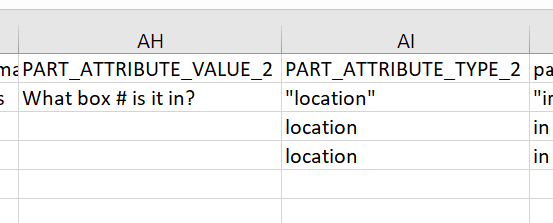
location should not be in quotes and if you have an attribute type, you need to have an attribute value.
 Jegelewicz
on 21 Jun 2021
Jegelewicz
on 21 Jun 2021
To upload a csv on GitHub, Zip it up and load the zipped file.
Jegelewicz
on 21 Jun 2021
Also - just saw your part names
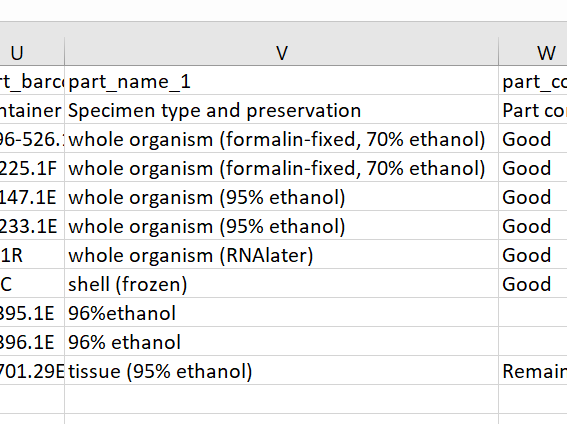
96% ethanol is not a valid part name, so those will need to be changed.
Starting in July, part and preservation will be separated, so you might want to go ahead and structure your data that way now. For example, the last line would change to this (i've hidden some columns so you can see the relevant columns)
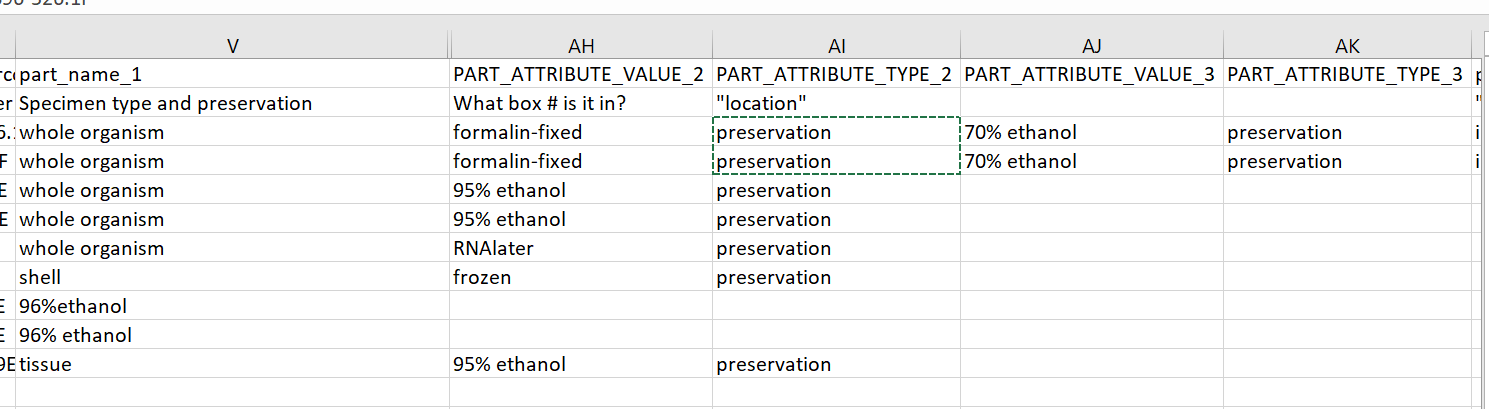
BUT I am not sure how many part attributes are allowed in the bulkloader (something I should know...). I think the best thing would be to load parts separately. This worked GREAT for me at NMMNH. I can organize this test data in the way for you and help guide you through it if you would like.
Jegelewicz
on 21 Jun 2021
Thank you both for the help and feedback! One thing I neglected to mention about my example data is that the second line was just a sort of clarification line for what the entries should look like. Also, I'm only pre-assigning catalog numbers for some of these specimens but if that helps make the part data uploading smoother then it's easy enough to do. Attached is a (zipped, thanks!) updated version of this spreadsheet with that line removed and some other issues fixed.
I wish I had the time/energy/presence of mind for proper barcodes but I have no staff support and am thoroughly confused already.
I agree I should go ahead and structure my data with preservation separated out now. However, I'm confused how the columns should be labeled / organized to preserve the information I want to keep and satisfy the bulkloader. @Jegelewicz if you would you have time to organize the test data as an example I can follow, that would be immensely helpful. Maybe we could Zoom and you should share your screen so I can watch you work your magic? From there I can figure out the necessary awk/excel commands to reformat the data.
Thank you both again!
Kevin
test.zip
kmkocot
on 22 Jun 2021
@kmkocot no worries - I can't look at it until later today or possibly tomorrow morning, but I'll be in touch and we can meet up if needed.
Jegelewicz
on 22 Jun 2021
Thank you so much @Jegelewicz! There's not a rush.
kmkocot
on 22 Jun 2021
@kmkocot I removed all the parts from your record bulkload and created a part bulkload with them. So, after your load the records, you can load the parts using the Part Bulkload Tool. I also did some things that I think you will find helpful in the long run.
- Parts that had a volume in remark will now have a "remaining volume" attribute, making it easy to find "stuff with more than 2ml" - of course if you remove stuff, change this!
- Since you have not ventured into barcodes, I created a "part identifier" attribute for the parts that had barcodes. If these are actual barcodes, let's consider getting them reserved and available for you to use in that way. If that is too much, they will be easy to find in this part attribute.
- I separated the preservation from the part name by adding a "preservation" attribute to each part. Some of them have two because they have been in formalin and 95% ethanol.
Some notes
The part bulkloader is structured as ONE part per row followed by its attributes.
All of the part attributes can also be assigned a date, determiner and a remark. These are not required, but you may find them useful later on (or whoever comes after you may find it useful :-) ). I used the remark for the formalin attributes to indicate that it was a fixative. One way to track what a specimen has been treated with is to date each of the preservative attributes - kind of providing a history of what's happened to it.
Removing all of the parts from the bulkload file makes it easier to deal with and I really prefer this method of bulkloading. Let me know if you want to talk through this!
test_partless_bulkload.zip
Jegelewicz
on 23 Jun 2021
Thank you very much for this. I was able to fix errors in the test_partless_bulkload.csv file to get the bulkloader to take it but after that I'm lost again. I managed to create multiple copies of each record but then I tried to delete them but they just say DELETE under the "loaded" header... Can you make all of my attempts go away so I can start over? Or do I have the ability to do this and I'm missing it? Overall, I'm confused about what happens after bulkload a csv file that doesn't throw any errors.
With regards to the volume - that is just the size of the container that we used. Remaining volume doesn't really make sense.
Would you have time to chat over Zoom sometime so I could try to articulate my bulkloader questions and get a sense of how you processed the example file I sent so I can do it to the real data? I assume you are doing this in excel rather than with scripts?
Thanks!
Kevin
kmkocot
on 23 Jun 2021
@kmkocot it takes a bit for the "DELETE" to work - it looks like you only have one record sitting in there now.
With regards to the volume - that is just the size of the container that we used. Remaining volume doesn't really make sense.
Cool - you can move that back to remark.
Would you have time to chat over Zoom sometime so I could try to articulate my bulkloader questions and get a sense of how you processed the example file I sent so I can do it to the real data?
Sure - I don't have anything scheduled tomorrow - let me know what time! I just moved stuff in Excel, but we could develop a script pretty easily and that might be something a bunch of people can use.
Jegelewicz
on 23 Jun 2021
develop a script
I could take that on as well - it's a step in the direction of https://github.com/ArctosDB/arctos/issues/2178.
dustymc
on 23 Jun 2021
Thank you @Jegelewicz and @dustymc! I think I have successfully bulkloaded 9 records :)
I'm feeling a little more confident and will try my hand with the parts now. I may come crawling back defeated to follow up on a Zoom meeting but I think I might be OK.
I'm not sure what your scripting tool of choice is, but I will make a little sed/awk one-liner to split up the parts from my actual Antarctic specimen data to have one part per line and will share that here.
kmkocot
on 23 Jun 2021
@kmkocot you are the best! I was gonna use R and maybe I'll still do that so that people have choices....
Feel free to ask for a call or whatever if you need it - that's what we are here for!
Jegelewicz
on 24 Jun 2021
Related issues
 AJLinn
·
3Comments
AJLinn
·
3Comments
 acdoll
·
4Comments
AJLinn
·
4Comments
Jegelewicz
·
6Comments
acdoll
·
4Comments
AJLinn
·
4Comments
Jegelewicz
·
6Comments
 ccicero
·
8Comments
ccicero
·
8Comments
Most helpful comment
Thank you @Jegelewicz and @dustymc! I think I have successfully bulkloaded 9 records :)
I'm feeling a little more confident and will try my hand with the parts now. I may come crawling back defeated to follow up on a Zoom meeting but I think I might be OK.
I'm not sure what your scripting tool of choice is, but I will make a little sed/awk one-liner to split up the parts from my actual Antarctic specimen data to have one part per line and will share that here.