Arcore-unity-sdk: arcore-sdk errors when imported to unity
SPECIFIC ISSUE ENCOUNTERED
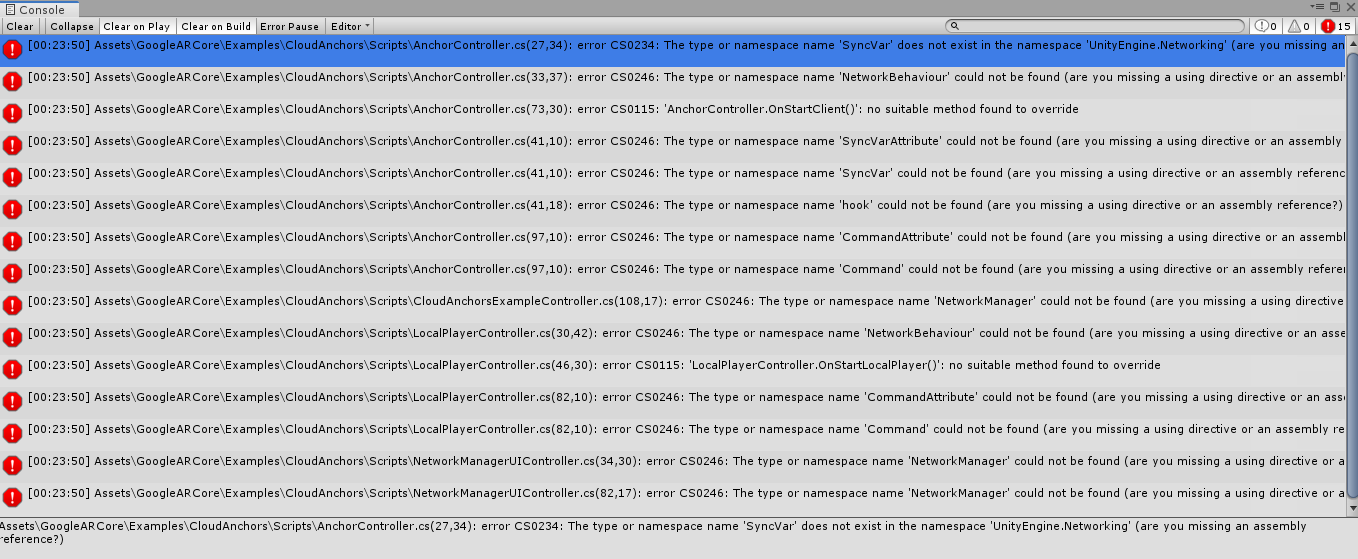
unity console shows bunch of errors when arcore-sdk is imported
VERSIONS USED
- Unity: 2019.1.0f2
- ARCore SDK for Unity: 1.8.0
- Device manufacturer, model, and O/S: Windows
STEPS TO REPRODUCE THE ISSUE
- unity console shows errors when sdk is imported into unity
WORKAROUNDS (IF ANY)
ADDITIONAL COMMENTS
 sherzodkh
All 17 comments
SPECIFIC ISSUE ENCOUNTERED
unity console shows bunch of errors when arcore-sdk is imported
VERSIONS USED
- Unity: 2019.1.0f2
- ARCore SDK for Unity: 1.8.0
- Device manufacturer, model, and O/S: Windows
STEPS TO REPRODUCE THE ISSUE
- unity console shows errors when sdk is imported into unity
WORKAROUNDS (IF ANY)
ADDITIONAL COMMENTS
Please fix it, I'm having this problem too
 dhvl5
on 6 May 2019
dhvl5
on 6 May 2019
Same problem here! Any workaround, please???
 marklinmao
on 6 May 2019
marklinmao
on 6 May 2019
Just quick fix: deleted Unity 2019 and downloaded Unity previous version 2018.3.14f1 and it's working fine now.
sherzodkh
on 7 May 2019
I was having the same issue and found a way to get it to work in 2019.1.2
1) Start a new project and set the build target to Android.
2) Close Unity.
3) Copy and paste the ARCore Assets and Settings folders into the new project.
4) Open the project in Unity.
5) There will be errors, ignore those for now.
6) Under "Project Settings > Player > Scripting Runtime Version" change it to ".NET 4.x Equivalent"
7) Restart Unity when prompted.
This has worked twice, though I have no idea why this specific order of events works. Doing it in any other order results in a project that cannot be fixed.
 sam598
on 14 May 2019
sam598
on 14 May 2019
Hello @sam598
Thanks for the workaround.
I'm actually using Unity 2019.1.2f1 and tried your steps. Since my "Scripting Runtime Version" is already set to "NET 4.x Equivalent" when I start a new project, I tried to set it "NET 3.5 Equivalent" and reset it to 4.x but it won't fix my errors (the same 15 errors in the initial post up here). Any clue ?
I think that maybe I didn't copy-paste the right folders (step 3). Could you give more precisions please ?
 AttikaMayou
on 15 May 2019
AttikaMayou
on 15 May 2019
@AttikaMayou
When I started a new project it is set to "NET 4.x Equivalent". For some reason it gets set to "NET 3.5 Equivalent" between steps 3 and 4.
I have no idea why this specific series of steps works, but it has worked twice for me. Doing them in any other order has led to a project that I cannot fix.
sam598
on 15 May 2019
Thanks for the quick reply @sam598 !
I'll go back to Unity 2018.3.12f1 since even with the ARCore v1.8.0, I can't get it to work with Unity 2019.1.2f1 :(
AttikaMayou
on 16 May 2019
Same here
On Thu, May 16, 2019 at 2:08 AM Attika notifications@github.com wrote:
Thanks for the quick reply @sam598 https://github.com/sam598 !
I'll go back to Unity 2018.3.12f1 since even with the ARCore v1.8.0, I
can't get it to work with Unity 2019.1.2f1 :(—
You are receiving this because you are subscribed to this thread.
Reply to this email directly, view it on GitHub
https://github.com/google-ar/arcore-unity-sdk/issues/550?email_source=notifications&email_token=AIXDF2BGD44NHCX7HSZDIYTPVUP7TA5CNFSM4HJPP7C2YY3PNVWWK3TUL52HS4DFVREXG43VMVBW63LNMVXHJKTDN5WW2ZLOORPWSZGODVRFVUI#issuecomment-492985041,
or mute the thread
https://github.com/notifications/unsubscribe-auth/AIXDF2FKUVTEZTCJ5ZOODPTPVUP7TANCNFSM4HJPP7CQ
.
 CGstunts
on 17 May 2019
CGstunts
on 17 May 2019
Maybe it could help some ! I had the same error messages yesterday and the solution for Unity 2019 was to do:
Window> Package Manager to install the HLAPI and XR Multiplayer Legacy Input Helpers packages.
 LaVraieVicotte
on 21 May 2019
LaVraieVicotte
on 21 May 2019
unity 2019.1.4 problems still persist.
 TheBricktop
on 12 Jun 2019
TheBricktop
on 12 Jun 2019
unity 2019.1.8 same problem, I wanted to develop ;(
 anficyon
on 5 Jul 2019
anficyon
on 5 Jul 2019
unity 2019.1.10f1 same problem
 knightcube
on 22 Jul 2019
knightcube
on 22 Jul 2019
Unity v2019.2.0f1 & ARCore v1.11 still persists with this problem.
 NocturnalWisp
on 15 Aug 2019
NocturnalWisp
on 15 Aug 2019
Hey, this just solved the problem for me!
For Unity 2019 you have to include the packages "Multiplayer HLAPI" and "XR Legacy Input Helpers".
My source:
https://developers.google.com/ar/develop/unity/enable-arcore
Import the ARCore SDK for Unity
Download the ARCore SDK for Unity and import it into your project by clicking the menu Assets > Import package > Custom Package. (Unity 2019 only: To fix the compilation errors, use Window > Package Manager to install the Multiplayer HLAPI and XR Legacy Input Helpers packages.)
I hope this helps!
 Clyorath
on 19 Aug 2019
Clyorath
on 19 Aug 2019
Hey, this just solved the problem for me!
For Unity 2019 you have to include the packages "Multiplayer HLAPI" and "XR Legacy Input Helpers".
My source:
https://developers.google.com/ar/develop/unity/enable-arcoreImport the ARCore SDK for Unity
Download the ARCore SDK for Unity and import it into your project by clicking the menu Assets > Import package > Custom Package. (Unity 2019 only: To fix the compilation errors, use Window > Package Manager to install the Multiplayer HLAPI and XR Legacy Input Helpers packages.)
I hope this helps!
Thank you it is working fine.
 SanketPanda
on 23 Oct 2019
SanketPanda
on 23 Oct 2019
Hey, this just solved the problem for me!
For Unity 2019 you have to include the packages "Multiplayer HLAPI" and "XR Legacy Input Helpers".
My source:
https://developers.google.com/ar/develop/unity/enable-arcoreImport the ARCore SDK for Unity
Download the ARCore SDK for Unity and import it into your project by clicking the menu Assets > Import package > Custom Package. (Unity 2019 only: To fix the compilation errors, use Window > Package Manager to install the Multiplayer HLAPI and XR Legacy Input Helpers packages.)
I hope this helps!
yo it fixed my error
thanks
 AntonyJeeva
on 12 May 2020
AntonyJeeva
on 12 May 2020
Hey, this just solved the problem for me!
For Unity 2019 you have to include the packages "Multiplayer HLAPI" and "XR Legacy Input Helpers".
My source:
https://developers.google.com/ar/develop/unity/enable-arcoreImport the ARCore SDK for Unity
Download the ARCore SDK for Unity and import it into your project by clicking the menu Assets > Import package > Custom Package. (Unity 2019 only: To fix the compilation errors, use Window > Package Manager to install the Multiplayer HLAPI and XR Legacy Input Helpers packages.)
I hope this helps!
Thank you man ! This helped
 adityaspt
on 15 Sep 2020
adityaspt
on 15 Sep 2020
Related issues
 SetoKaiba
·
6Comments
SetoKaiba
·
6Comments
 Maikol2712
·
5Comments
Maikol2712
·
5Comments
 alexbu92
·
4Comments
alexbu92
·
4Comments
 tarakinsuide
·
4Comments
tarakinsuide
·
4Comments
 AdilRabbani
·
4Comments
AdilRabbani
·
4Comments
Most helpful comment
Hey, this just solved the problem for me!
For Unity 2019 you have to include the packages "Multiplayer HLAPI" and "XR Legacy Input Helpers".
My source:
https://developers.google.com/ar/develop/unity/enable-arcore
Import the ARCore SDK for Unity
Download the ARCore SDK for Unity and import it into your project by clicking the menu Assets > Import package > Custom Package. (Unity 2019 only: To fix the compilation errors, use Window > Package Manager to install the Multiplayer HLAPI and XR Legacy Input Helpers packages.)
I hope this helps!