Arcore-android-sdk: Camera Drift in ARCore
Hi,
We are currently using ARCore's NDK and both us and our users are noticing some drastic camera drifts without any notifications on ARCore's side of things.
What we see is that the camera position is being updated and moved farther and farther away even though the user is sitting still. During this time we are also monitoring the ArCamera's TrackingState and it is neither AR_TRACKING_STATE_PAUSED nor AR_TRACKING_STATE_STOPPED. As a result, there's no way for us, or our users to determine that the given positions are invalid.
I've attached the logs for one occurrence of this issue below.
If you take a look at the logs, you can see that the ArCamera starts off reporting Unavailable (our wrapper for PAUSED or STOPPED) and is returning [0,0,0] initially.
Once tracking initializes, the position seems to be stable for about 12 seconds before beginning to drift out to z=-45 all the while reporting that the camera is normal (our wrapper for ArCamera's Tracking state).
Once the z position hits -45, then the ArCamera begins again to report Unavailable before reverting back to normal, drifting out to z=-50, and then settling on z=-18.
The entire time this is happening, I am simply sitting down and looking forward at my monitor (there is a window to the side of it).
One peculiar thing to note is that the issue of drifting seems to happen to our Pixel and Pixel 2 (both are non-XL) devices a lot more than on our S8+ device we have here. With the S8+, this is rarely, if at all an issue, but with a Pixel, the drift seems to happen often after starting ARCore.
Logs for this issue: camera_drift.txt
 achuvm
All 26 comments
Could you capture a video showing this behavior, ideally with point cloud display enabled?
 inio
on 7 Mar 2018
inio
on 7 Mar 2018
Hi @inio,
This seems to happen more on app start and it is interesting that when it happens the cloud points are non-existent or "far" away. See 2 instances of this in the videos below.
Longer video, heavy shifting
https://drive.google.com/file/d/1gjZfgN5NX5LY4hmOGINAwX2pGDu4KZoh/view
Shorter video, more typical of what happens, slight drift and shift.
https://drive.google.com/open?id=1oBf-zUIpaBYN051lmzTQ5rzjgRyapPJu
In both cases, the white box is placed 1 meter in front of the user (in fixed world coordinates of [0, 0, -1], our camera starts off in the -z axis).
Thanks,
achuvm
on 7 Mar 2018
Thanks for the videos! This drift definitely does seem kinda severe and I've sent to to the tracking team to make sure it's not indicative of something wrong, however:
If you want the lock something physically in place, you could create an anchor and not use world coordinates. Before creating an anchor, you should have enough of a map built to get at least one plane detection.
inio
on 7 Mar 2018
Hi @inio, thanks for looking into this. If it helps, I actually did a side by side comparison with:
- A 3D droid OBJ model, placed in world coordinates (placed in relation to the AR Camera's transform, so that they move in reference to the camera's movement).
- A semi-transparent black surface, representing Google's Trackable Plane (should react similarly to a Trackable Anchor).
Note that as seen in the video link i've attached below, we see that the both (1) and (2) are both drifting significantly, even though my camera was still and facing the same direction most of the time - You can see that both the droid and the plane "float/flys" almost out of view from the still camera.
As such these situations may affect Google's Trackables as well. And it's probably occurring because of the same issue that @achuvm is seeing above:
What we see is that the camera position is being updated and moved farther and farther away even though the user is sitting still.
ARCore Drifting Video Bug:
https://drive.google.com/open?id=1dM3DkZqX_IeWG5eO8JSG6BPx6GB0yLUu
 dthian
on 7 Mar 2018
dthian
on 7 Mar 2018
Hi @inio,
We are also seeing this issue using the Hello AR Java sample app provided here.
Here's a video for it:
https://drive.google.com/file/d/1Kxjr80NoR5Py962Orl1OxgrPqj0oj8SF/view?usp=sharing
Thanks,
achuvm
on 8 Mar 2018
Hi @inio,
Is there any update on this issue? Also, isn't this a bug, even though it doesn't the labeled "bug" like the other ARCore issues (should it have that label)?
The last video posted by @achuvm has a pretty dramatic drift and accurately demonstrates how this bug can drastically impact the user experience of customers using ARCore.
Thanks!
dthian
on 14 Mar 2018
@achuvm: that's pretty dramatic drift. Is that on the Pixel or the S8? Would it be possible to get a logcat dump from a session like that?
@dthian: Some of the early samples were less conclusive on "working as intended" vs "bug", but @achuvm's latest video is definitely bug-worthy behavior.
inio
on 14 Mar 2018
@achuvm Ping. Any chance we could get a logcat of a session with drift like that? That seems like really bad calibration, but on a Pixel 2 especially that should be nearly impossible since each device is individually calibrated.
inio
on 19 Mar 2018
Hey @inio,
Yeah, sorry, we've been busy. I'll try to get you a logcat by EOD.
Thanks for the ping!
achuvm
on 19 Mar 2018
Hi @inio,
We were having issues repro-ing the issue today (the Sun is out in Seattle), but we did see a bit of drift at the end of the following logs:
Observationally, tt looks like the issue occurs right before we lose tracking in that we'll see things start to drift, and if we don't point the device back on an easier-to-track surface, then the object will start flying away before possibly disappearing.
Thanks,
achuvm
on 19 Mar 2018
@achuvm Thanks! I'll get that to our algorithms group.
inio
on 19 Mar 2018
The drift is sever when tracking is lost and person moves to different angle / location
 Edgar-BlipparDev
on 16 May 2018
Edgar-BlipparDev
on 16 May 2018
Hi to everyone
We are experience this drift, too. This happens sometimes when you barely load the ARCore scene. Other times, it happens after a few seconds when the camera "freezes". Do you guys know if google has a plan to solve this in a near future? @achuvm or someone, have you find some workaround to minimize this drift?
 camilorodriguezapriorins
on 29 May 2018
camilorodriguezapriorins
on 29 May 2018
Stumbled upon this thread because I might experience similar issue (described on Unity Forum). In my case - point cloud is drifting, not sure why. Here's the video.
 peetonn
on 5 Jun 2018
peetonn
on 5 Jun 2018
@peetonn Is that a Java/C app or a unity app? It appears to be drawing the point cloud twice, one with the wrong pose.
inio
on 6 Jun 2018
@inio it is Unity app, yes. I've updated it to the latest ARCore yesterday, didn't help. The interesting part is - it used to work normally before, but then there was a project repo cleanup where Temp and Library folders were removed from the repo. so Unity had to recompile them. And then this problem started to manifest.
peetonn
on 6 Jun 2018
@peetonn I'd ask about that on the Unity issues board.
inio
on 7 Jun 2018
Good morning
We also have a Unity app experiencing drift. Android device is
camilorodriguezapriorins
on 7 Jun 2018
@inio - Do you guys have any ideas we can try to eliminate this "drift"? We are creating an IIoT app for a large company but this drift issue is causing us a lot of problems. We aren't seeing this on iOS (ARKit)
Hopefully someone at google cares about this enough to fix it.
What we see happening is the original 0,0,0 point for the scene seems to move around and thus all of our "nodes" in space move too. Please help!
 csp54321
on 7 Jun 2018
csp54321
on 7 Jun 2018
arcore 1.2.1 native
emulator x86 27.2.9
Hi
@inio
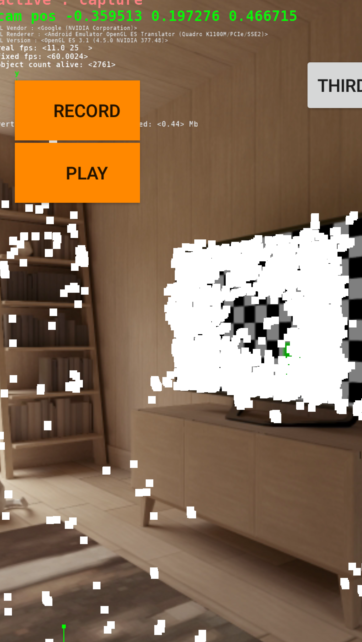
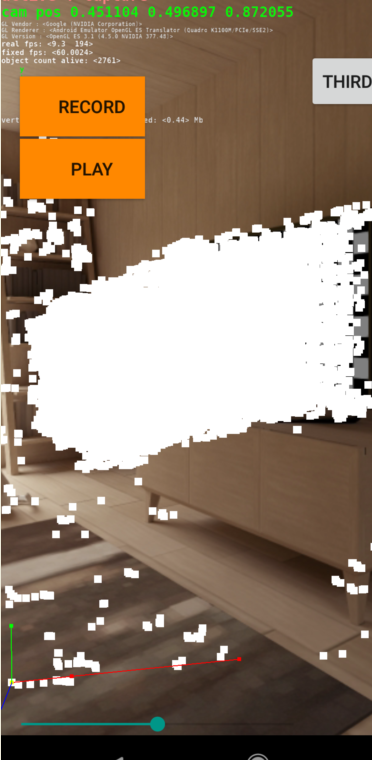
I noticed also "drift"
I noticed cleary the camera view matrix (translation part) drift without that the view changes.
(see cam pos)
I accumulated frame by frame the cloud point and naturally according to the camera we see that the cloud point also drifts quickly.
the view matrix is not aligned to the physical point of view
As expected, I tried the concept of anchoring; and indeed, we see, in logs, the anchor corrects itself according to some internal behaviors. (I guess)
but unfortunately, this correction is not aligned with the significant drift of the camera.
Thanks
 shadd3
on 23 Jun 2018
shadd3
on 23 Jun 2018
Duplicate of #528
inio
on 13 Aug 2018
I'm still facing this issue and this seems to be a very severe issue as users are getting very poor experience because of this. Please give us any update on it. @inio
 chnouman
on 27 Sep 2019
chnouman
on 27 Sep 2019
I also have this issue, using the Unity plugin.
 cynicer
on 17 Oct 2019
cynicer
on 17 Oct 2019
hi, is there any fix of this issue?
 Y2JChamp
on 21 Oct 2019
Y2JChamp
on 21 Oct 2019
Hey @inio I am still facing the same drifting issue on Samsung s9+. I am using sceneform 1.14.0. Do you have any idea what can be the potential problems?
 LiamLuUW
on 28 Jan 2020
LiamLuUW
on 28 Jan 2020
@shadd3 how you calculated the Drift and have you found the solution to fix the drift?
 ragavendranbala
on 21 Feb 2020
ragavendranbala
on 21 Feb 2020
Related issues
 mrrichardli
·
19Comments
mrrichardli
·
19Comments
 rohitagarwal3011
·
17Comments
rohitagarwal3011
·
17Comments
 boehm-e
·
23Comments
boehm-e
·
23Comments
 Godric877
·
17Comments
inio
·
423Comments
Godric877
·
17Comments
inio
·
423Comments