Arcore-android-sdk: Issue running in emulator
Hi, when trying to run the sample on Android Studio, app is not opening on AVD with "HelloAR Java has stopped" being raised.
Full log is here:
02/24 14:48:24: Launching app
$ adb shell am start -n "com.google.ar.core.examples.java.helloar/com.google.ar.core.examples.java.helloar.HelloArActivity" -a android.intent.action.MAIN -c android.intent.category.LAUNCHER
Client not ready yet..Connected to process 7811 on device emulator-5556
Capturing and displaying logcat messages from application. This behavior can be disabled in the "Logcat output" section of the "Debugger" settings page.
I/InstantRun: starting instant run server: is main process
W/art: Before Android 4.1, method android.graphics.PorterDuffColorFilter android.support.graphics.drawable.VectorDrawableCompat.updateTintFilter(android.graphics.PorterDuffColorFilter, android.content.res.ColorStateList, android.graphics.PorterDuff$Mode) would have incorrectly overridden the package-private method in android.graphics.drawable.Drawable
I/OpenGLRenderer: Initialized EGL, version 1.4
D/OpenGLRenderer: Swap behavior 1
D/EGL_emulation: eglCreateContext: 0xab2050c0: maj 2 min 0 rcv 2
D/EGL_emulation: eglMakeCurrent: 0xab2050c0: ver 2 0 (tinfo 0xab2037d0)
D/EGL_emulation: eglCreateContext: 0x9dad5800: maj 2 min 0 rcv 2
W/ARCore-IS: bindService returned false.
E/ARCore-IS: Play Store install service could not be bound.
W/ARCore-IA: Preliminary compatibility check failed.
D/EGL_emulation: eglMakeCurrent: 0x9dad5800: ver 2 0 (tinfo 0x9baff4a0)
I/Choreographer: Skipped 44 frames! The application may be doing too much work on its main thread.
E/ObjectRenderer: Texture loading: glError 1282
E/AndroidRuntime: FATAL EXCEPTION: GLThread 335
Process: com.google.ar.core.examples.java.helloar, PID: 7811
java.lang.RuntimeException: Texture loading: glError 1282
at com.google.ar.core.examples.java.helloar.rendering.ShaderUtil.checkGLError(ShaderUtil.java:73)
at com.google.ar.core.examples.java.helloar.rendering.ObjectRenderer.createOnGlThread(ObjectRenderer.java:128)
at com.google.ar.core.examples.java.helloar.HelloArActivity.onSurfaceCreated(HelloArActivity.java:250)
at android.opengl.GLSurfaceView$GLThread.guardedRun(GLSurfaceView.java:1516)
at android.opengl.GLSurfaceView$GLThread.run(GLSurfaceView.java:1259)
D/EGL_emulation: eglMakeCurrent: 0xab2050c0: ver 2 0 (tinfo 0xab2037d0)
D/EGL_emulation: eglMakeCurrent: 0xab2050c0: ver 2 0 (tinfo 0xab2037d0)
I/Choreographer: Skipped 37 frames! The application may be doing too much work on its main thread.
Application terminated.
Details from the Virtual Device:
Name: Pixel_2_XL_API_25
CPU/ABI: Google APIs Intel Atom (x86)
Path: C:\Users\i826874.androidavd\Pixel_2_XL_API_25_1.avd
Target: google_apis [Google APIs] (API level 25)
Skin: pixel_2_xl
SD Card: 100M
hw.dPad: no
hw.lcd.height: 2880
runtime.network.speed: full
hw.accelerometer: yes
hw.device.name: pixel_2_xl
vm.heapSize: 256
skin.dynamic: yes
hw.device.manufacturer: Google
hw.lcd.width: 1440
hw.gps: yes
hw.initialOrientation: Portrait
image.androidVersion.api: 25
hw.audioInput: yes
image.sysdir.1: system-imagesandroid-25google_apis\x86\
tag.id: google_apis
showDeviceFrame: yes
hw.camera.back: emulated
hw.mainKeys: no
AvdId: Pixel_2_XL_API_25
hw.camera.front: emulated
hw.lcd.density: 560
avd.ini.displayname: Pixel 2 XL API 25
hw.gpu.mode: auto
hw.device.hash2: MD5:1a4fa6b2569f0b76bfb9824b6b6fc976
hw.ramSize: 1536
hw.trackBall: no
PlayStore.enabled: false
fastboot.forceColdBoot: no
hw.battery: yes
hw.cpu.ncore: 2
hw.sdCard: yes
tag.display: Google APIs
runtime.network.latency: none
hw.keyboard: yes
hw.sensors.proximity: yes
disk.dataPartition.size: 800M
hw.sensors.orientation: yes
avd.ini.encoding: UTF-8
hw.gpu.enabled: yes
 gurizilla
All 11 comments
Hi - it looks like you are running on an API25 version of the emulator. Currently, on the emulator, ARCore is only supported in the API27 Revision 4 builds. Will you double check that you are running the correct emulator image? (Note, you may need to go to Tools > SDK Manager > SDK Platforms, Check "Show Packages Details", then verify that Revision 4 of Google APIs Intel x86 Atom System Image - API Level 27 (Oreo) is installed).
 tpsiaki
on 26 Feb 2018
tpsiaki
on 26 Feb 2018
@tpsiaki thanks for catching that.
 inio
on 26 Feb 2018
inio
on 26 Feb 2018
Hey guys, I uninstalled all these previous version as you mentioned, but, when I try to create a AVM with the previously mentioned Android version:
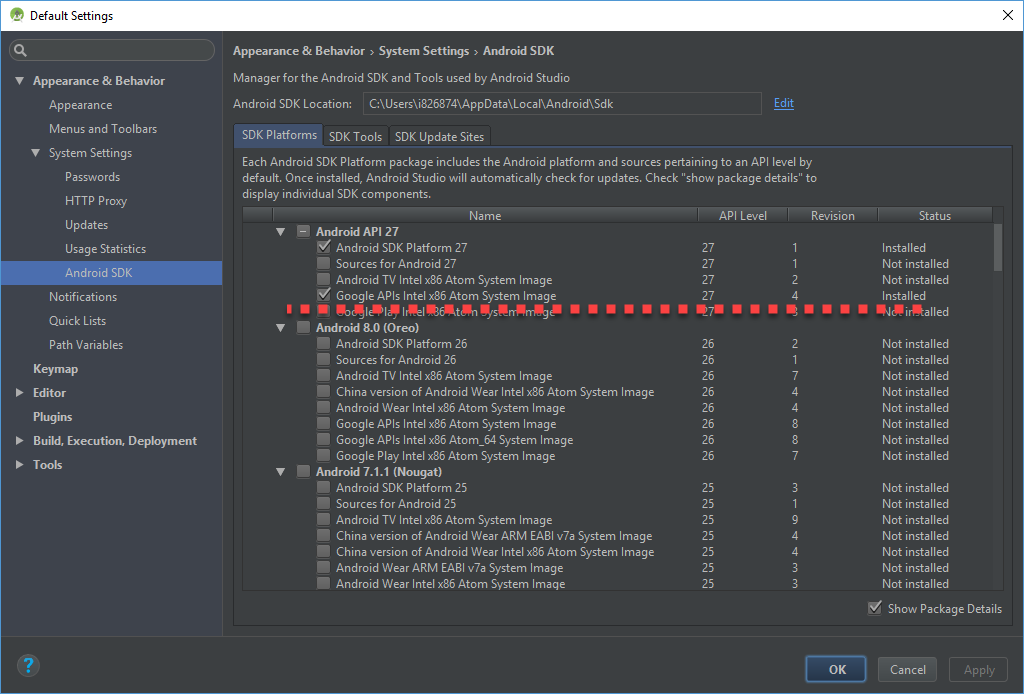
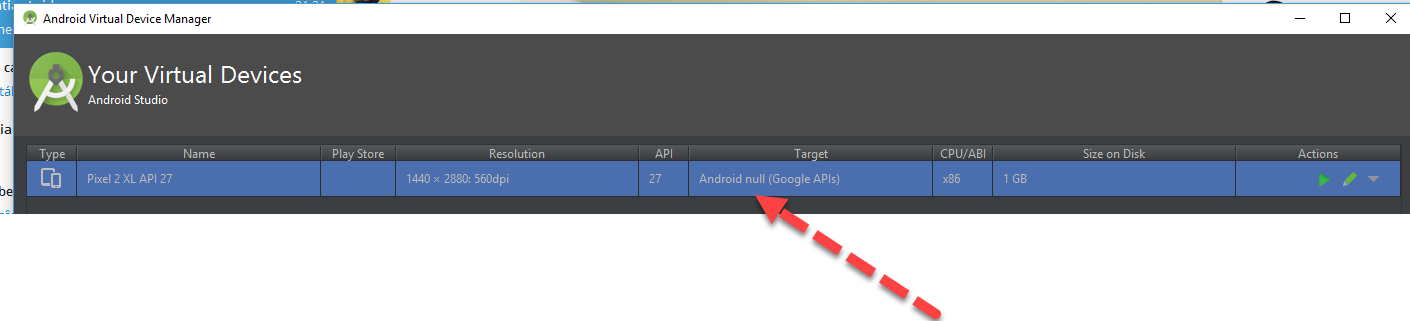
There is this strange "null" target on AVD Manager:
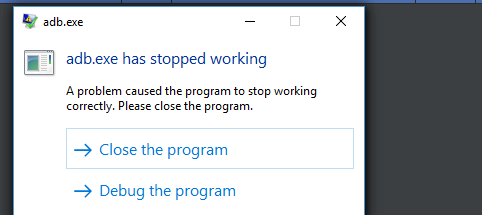
If I try to run the Virtual Device, I keep getting this:
Could you please advise?
Thanks
gurizilla
on 27 Feb 2018
Are you running Android Studio 3.1? It looks like you're running an earlier version of Android Studio (because your AVD has camera back = emulated, and the target is showing as null).
tpsiaki
on 27 Feb 2018
I'm on Android Studio 3.0.1.
I tried to find a newer version but I couldn't.
Also, quick start mentions "Install Android Studio version 3.0 or higher ".
Thanks!
gurizilla
on 27 Feb 2018
From https://developers.google.com/ar/develop/java/emulator:
You'll also need Android Studio 3.1 (Beta).
inio
on 27 Feb 2018
the ARCore integration with the Android Emulator is only fully supported in Android Studio 3.1 or higher (which is currently in Beta). See the ARCore Emulator Documentation for details.
As a workaround, you may be able to edit the config.ini file for your AVD created in Android Studio 3.1 and replace hw.camera.back: emulated with hw.camera.back: virtualscene, (also make sure you're running emulator 27.1.10 or higher) then restart the emulator, but YMMV as the min fully supported version of Android Studio is 3.1
tpsiaki
on 27 Feb 2018
@gurizilla Did Android Studio 3.1 resolve your issue?
Looking at the debug output, it looks like you are hitting into the texture loading bug with the HelloAR Java example. I provided a workaround for that here: https://github.com/google-ar/arcore-android-sdk/issues/48#issuecomment-370053162
 jwmcglynn
on 2 Mar 2018
jwmcglynn
on 2 Mar 2018
Yes, it was solved.
But, it seems like the app is unable to find a surface:
E/native: android_data_source.cc:402 generic::deadline_exceeded: Timed out waiting for metadata. camera_id=MotionTrackingPrimary
E/native: android_cpu_consumer.cc:126 Consumer failed to dequeue Image from ImageReader. status=ImageReaderStatusErrorSpaceClass::AMEDIA_IMGREADER_NO_BUFFER_AVAILABLE: AImageReader_acquireLatestImage image_count=2
gurizilla
on 7 Mar 2018
Closing for inactivity.
inio
on 17 Apr 2018
Hi Team.,
I would like to develop ARCore-Location based application using java in android studio. After doing some research finally I got https://github.com/appoly/ARCore-Location this sample code and its working fine. This sample code's TargetSDKVerion 27.
I would like to use the TargetSDKVerion 29. When I changed the version in my project. Its gets the following error.
E/Filament: Panic
in void *filament::CircularBuffer::alloc(size_t):127
reason: couldn't allocate 6144 KiB of memory for the command buffer
For fix this error., needs to update the ARCore version. My Current ARCore Version 1.0.5 So I tried to update the based on the release notes. The Latest version is : 1.20.0 But I cannot get any samples codes for loation-based AR. Please help me to overcome from this.
Thanks in Advance!
 ArunkumarChandraSekar
on 26 Oct 2020
ArunkumarChandraSekar
on 26 Oct 2020
Related issues
 shliama
·
4Comments
shliama
·
4Comments
 dev19872014
·
3Comments
dev19872014
·
3Comments
 smart734
·
4Comments
smart734
·
4Comments
 rkachach
·
3Comments
rkachach
·
3Comments
 RajkumarRepo
·
3Comments
RajkumarRepo
·
3Comments
Most helpful comment
Hi - it looks like you are running on an API25 version of the emulator. Currently, on the emulator, ARCore is only supported in the API27 Revision 4 builds. Will you double check that you are running the correct emulator image? (Note, you may need to go to Tools > SDK Manager > SDK Platforms, Check "Show Packages Details", then verify that Revision 4 of Google APIs Intel x86 Atom System Image - API Level 27 (Oreo) is installed).