Archivebox: Bugfix: docker iframe adds /data/ to url incorrectly
Describe the bug
Using the docker-compose.yml instructions, adding a URL works fine. When accessing that URL I get a 404 within the iframe.
Steps to reproduce
- Start docker-compose up
- Add URL
- Click on the URL. I get the top bar, but the iframe is a 404
Screenshots or log output
It looks like the iframe is trying to go to http://server/data/archive/1600957105.659589/site/index.html when the data folder doesn't exist as a web entity.
Browsing to http://server/archive/1600957105.659589/site/index.html works. (note: without the /data/ folder)
How can I get the iframe working correctly?

Software versions
Latest docker-compose.yml
 poblabs
All 15 comments
I will give this a check. This may be related to some changes we made to calculate the path to wget.
 cdvv7788
on 24 Sep 2020
cdvv7788
on 24 Sep 2020
Also worth noting that clicking this icon here, brings me to this very long incorrect URL.
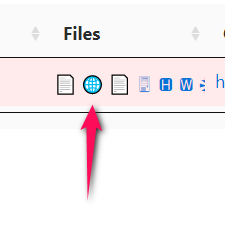
http://server/archive/1600958844.850607//data/archive/1600958844.850607/site/index.html/
poblabs
on 24 Sep 2020
It's probably a str(Path(...)) that's expanding out to the full path now instead of the old relative path.
 pirate
on 24 Sep 2020
pirate
on 24 Sep 2020
Yes, that is the issue. I fixed the static index, but it seems this one persists. I will take care of this.
cdvv7788
on 24 Sep 2020
@poblabs https://github.com/pirate/ArchiveBox/pull/486 This should fix the issue.
cdvv7788
on 25 Sep 2020
@cdvv7788 Will I be able to build a new docker image from your cdvv7788:wget-path branch?
poblabs
on 25 Sep 2020
Yes, it should be possible. If you are getting any issue, please let me know and I will check it.
cdvv7788
on 25 Sep 2020
@cdvv7788 It failed.
docker build . -t archivebox --no-cache
Step 20/29 : WORKDIR "$CODE_DIR"
 ---> Running in e06219be686e
Removing intermediate container e06219be686e
 ---> 1442435435af
Step 21/29 : ADD . "$CODE_DIR"
 ---> 254a0d4fbc47
Step 22/29 : RUN pip install -e .
 ---> Running in 49333e96986c
Obtaining file:///app
    ERROR: Command errored out with exit status 1:
     command: /usr/local/bin/python -c 'import sys, setuptools, tokenize; sys.argv[0] = '"'"'/app/setup.py'"'"'; __file__='"'"'/app/setup.py'"'"';f=getattr(tokenize, '"'"'open'"'"', open)(__file__);code=f.read().replace('"'"'\r\n'"'"', '"'"'\n'"'"');f.close();exec(compile(code, __file__, '"'"'exec'"'"'))' egg_info --egg-base /tmp/pip-pip-egg-info-fstf2f7j
         cwd: /app/
    Complete output (11 lines):
    Traceback (most recent call last):
      File "<string>", line 1, in <module>
      File "/app/setup.py", line 17, in <module>
        VERSION = json.loads((PYTHON_DIR / "package.json").read_text().strip())['version']
      File "/usr/local/lib/python3.8/json/__init__.py", line 357, in loads
        return _default_decoder.decode(s)
      File "/usr/local/lib/python3.8/json/decoder.py", line 337, in decode
        obj, end = self.raw_decode(s, idx=_w(s, 0).end())
      File "/usr/local/lib/python3.8/json/decoder.py", line 355, in raw_decode
        raise JSONDecodeError("Expecting value", s, err.value) from None
    json.decoder.JSONDecodeError: Expecting value: line 1 column 1 (char 0)
    ----------------------------------------
ERROR: Command errored out with exit status 1: python setup.py egg_info Check the logs for full command output.
The command '/bin/sh -c pip install -e .' returned a non-zero code: 1
Weird. I just tried building it and it didn't fail. The automated tests were able to build it too. Can you check if there are no modified files in your local copy? (git status). It looks like the package.json has issues.
cdvv7788
on 25 Sep 2020
Strange. I downloaded the zip file into a new directory, ran the docker build and it still failed. I'll try from master and merge your changes to see if I can get that to build.
poblabs
on 25 Sep 2020
That worked, and the fix worked. Thanks!
poblabs
on 25 Sep 2020
Actually, looks like there is still a minor problem.
Clicking this icon adds a trailing slash which messes up the CSS resources. Removing the trailing slash fixes it.
poblabs
on 25 Sep 2020
Hmmm...it seems this is unrelated. wget is using relative paths (src="../www.google.com/images/branding/googlelogo/1x/googlelogo_white_background_color_272x92dp.png")...it fails to interpret it correctly when there is a trailing slash (the ../ actually points to the current folder instead of moving up 1 level). This is definitely an issue. I will open a new github issue to track it.
cdvv7788
on 25 Sep 2020
@cdvv7788 I found it. Remove the trailing slash from this line.
So it looks like: <a href="/{}/{}" ....
poblabs
on 25 Sep 2020
Yes, it is added in there. However, a trailing slash should not (ideally) break anything at all. I will remove it from that line, but I will leave https://github.com/pirate/ArchiveBox/issues/487 open to find a more permanent solution. Thanks!
cdvv7788
on 25 Sep 2020
Related issues
pirate
·
3Comments
 brandonocasey
·
3Comments
pirate
·
5Comments
brandonocasey
·
3Comments
pirate
·
5Comments
 bobharris
·
5Comments
bobharris
·
5Comments
 MartinThoma
·
4Comments
MartinThoma
·
4Comments