Archivebox: Issues with external resource URLs not being rewritten in wget archives
Greetings,
and thanks in advance for any comment on what follows. I would really need a real solution to this problem that makes ArchiveBox less useful, I can't be the only one to have it, and don't know where else to ask...
An "archive" of a web page should be a version of that page that looks and feels as much as possible as the original, even when that page is loaded:
- today, in a browser totally disconnected from the Internet. Or...
- twenty years from now, in an emulator of today's browsers, when the original website and all its auxiliary resources may be long dead.
If the archived page does not passes those tests, it has little or no value, because it is still dependent on third party resources that may disappear any moment.
A month ago, I filed an issue here because I found out that wget, as used in ArchiveBox, was not passing those tests (for details, see filed an issue here (https://github.com/pirate/ArchiveBox/issues/276). Immediately after that discussion...
- I searched online again, and found no real solution to that problem. The web is full of pages (some 10 years old) claiming to know how to solve the problem above, but if you look at them, they just copy from each other the same options we discussed here one month ago. I've archived some thousands pages while filing that issue here, and can confirm those options fail way too often to do what they promise.
- So, in parallel, I asked "how to make wget always create REALLY complete, REALLY offline copies of web pages directly to the wget developers. The result? Zero answers, after one month.
Summarizing, what I have taken home so far is that wget cannot do real, useful archives, or at least nobody knows how to use it to that purpose, and that this issue raised more interest here than on the wget list. So this seems the best place to ask: am I missing something? Or is it time to replace wget with something else, both in and outside of ArchiveBox? If so, with what?
For example: Firefox/chrome plugins like SingleFile save whole page as ONE HTML file, with javascript, images and even video if you want, embedded inside it. Technically, it should be possible to add to the archivebox container that plugin, and code (selenium?) that, instead of calling wget, tells the browser "save this page with singlefile". Besides being above my own skills, however, this approach has the big problem that would make impossible the deduplication of identical images, scripts etc... across different pages, thus creating much, much bigger archives. Thoughts?
 mfioretti
All 12 comments
Can you post some specific examples of failing pages on the latest version of wget?
 pirate
on 1 Nov 2019
pirate
on 1 Nov 2019
Can you post some specific examples of failing pages on the latest version of wget?
This morning I ran the archivebox container on about ten of my newest bookmarks. These:
https://news.wisc.edu/sharing-control-with-robots-may-make-aircraft-manufacturing-safer-more-efficient/https://www.theguardian.com/commentisfree/2019/nov/01/in-a-world-made-small-by-smartphones-we-crave-escape-into-otherness
are just two examples of the problem, which I see in most of those ten copies:
first, the archived copies contain absolute ( external links to javascript files, or other resources, instead of their local copies, i.e. lots of links like
script type="text/javascript" src="https://news.wisc.edu/wp/wp-includes/js/wp-embed.js"
iframe src="https://c.sharethis.mgr.consensu.org/portal.html"
instead of src="../../news.wisc.edu/wp/wp-includes/js/wp-embed.js" or similar.
Besides, when I load the "local copy" in my browser, I see the bottom bar of the browser itself full of notifications like "reading x", "reading Y"... where X and Y are external websites. That's a sure, definitive proof that the archived copy is NOT complete, isn't it? If it were, I'd only see the browser say "read example.com", that is my own local server.
FTR, I am not caring much for the version of wget because it really seems to be not relevant. If it were, I would have gotten at least a "try with the newer version" on the wget list...
mfioretti
on 2 Nov 2019
I just tried a standard wget archive of both those URLs and it worked fine, I was able to browse 100% local copies of the sites with no external resources requested.
wget --no-verbose \
     --adjust-extension \
     --convert-links \
     --force-directories \
     --backup-converted \
     --span-hosts \
     --no-parent \
     -e robots=off \
     --restrict-file-names=windows \
     --timeout=60 \
     --warc-file=archive.warc \
     --page-requisites \
     --compression=auto \
     --no-check-certificate \
     --no-hsts \
     "https://news.wisc.edu/sharing-control-with-robots-may-make-aircraft-manufacturing-safer-more-efficient/"
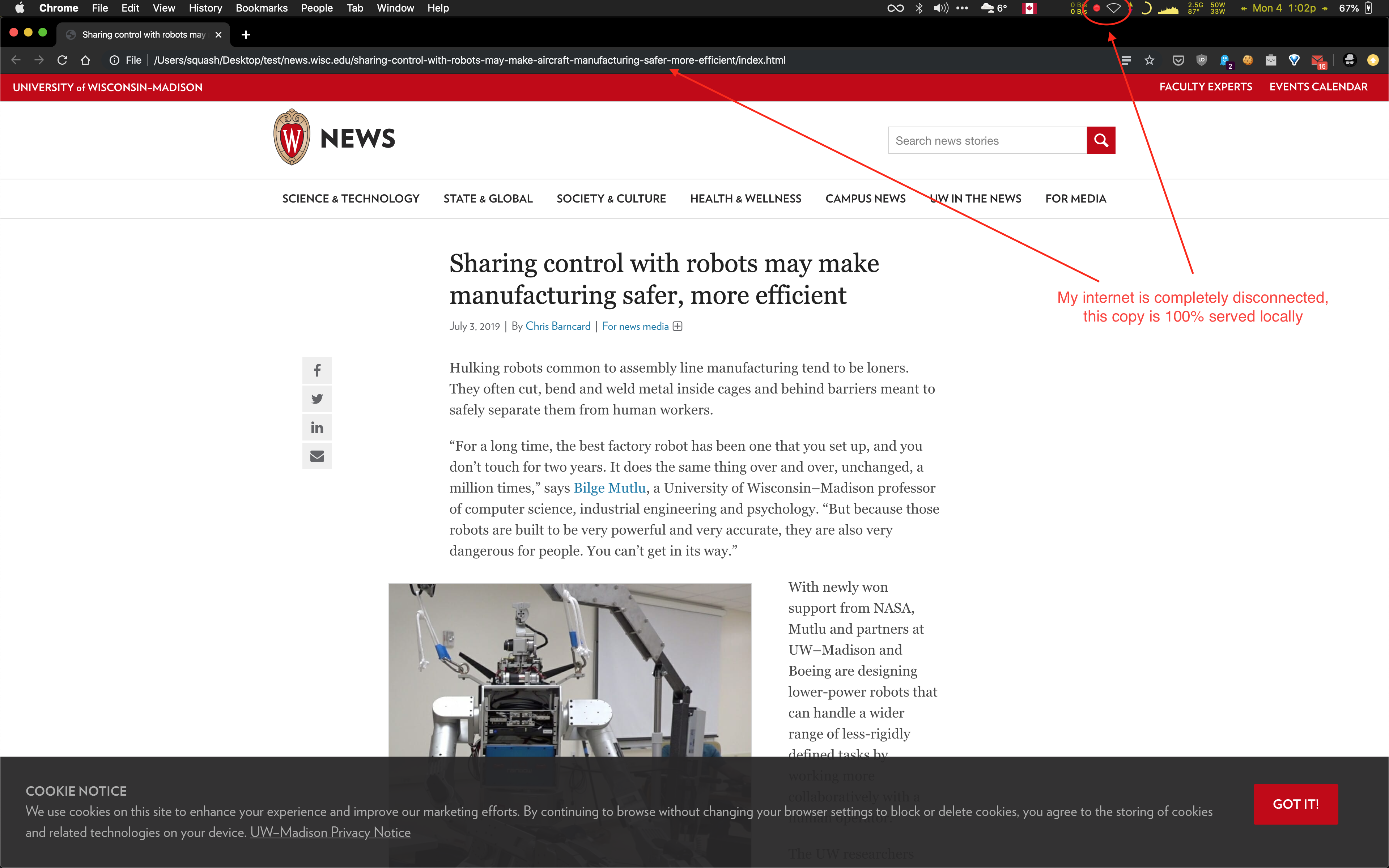
URLs for images, javascript, css, Iframes, etc are all rewritten to relative local archive paths:

This is the standard behavior expected with both wget alone and ArchiveBox + wget, if you're not seeing this behavior then theres either a bug in the container / code setup or a problem with the process you're using to archive sites.
Can you post exactly the commands you've used to archive sites with archivebox? Ideally with a .zip of your archive output folder as well.
pirate
on 4 Nov 2019
Hello @pirate , and first of all sorry for not answering earlier. For some reason, I missed the email notification for your reply, and so only saw it today, when I came back to github for other reasons.
Now, wrt your question: first of all, if I run wget "natively", NOT in the container, on my server, with exactly the same options as you say, it just aborts. Looking into it, I realized that it is because I have version 1.14 of wget, which does not has the --no-hsts and --compression=auto options, only --no-warc-compression.
If I run your command without those options, that is like this:
wget -nv -E -k -x -K -H -np -e robots=off --restrict-file-names=windows --timeout=60 --warc-file=archive.warc -p --no-check-certificate "https://news.wisc.edu/sharing-control-with-robots-may-make-aircraft-manufacturing-safer-more-efficient/"
I get the folder attached. As far as I can tell: images are local, and all scripts are local... except these two in the index.html file:
    <script src="https://oss.maxcdn.com/libs/html5shiv/3.7.0/html5shiv.js"></script>
    <script src="https://oss.maxcdn.com/libs/respond.js/1.4.2/respond.min.js"></script>
so, much better, but not 100%? What next?
Thanks,
mfioretti
on 12 Dec 2019
Are you able to try on the latest version of wget? The URL rewriting logic is constantly being improved, so I'd recommend getting the latest version before debugging this further.
pirate
on 18 Dec 2019
Are you able to try on the latest version of wget? The URL rewriting logic is constantly being improved, so I'd recommend getting the latest version before debugging this further.
This means that you do not have those absolute URLs to oss.maxcdn.com that I mentioned, but relative URLs pointing to local copies of those files, I gather? Or not?
Anyway, I am not sure if I can get the latest version of wget on the server. I may try it on my desktop, but not right away. Related question: which version of wget is used in the current container image of archivebox? If that were the latest, my problem would be solved. I went for the container exactly to avoid version issues...
mfioretti
on 18 Dec 2019
This means that you do not have those absolute URLs to oss.maxcdn.com that I mentioned, but relative URLs pointing to local copies of those files, I gather?
Correct, when I tried archiving it with the given command, wget successfully pulled those files and rewrote the URLs to relative locations of the archived versions.
The container is somewhat dated at this point, so I wouldn't be surprised if the wget version within it is out-of-date as well. wget is constantly evolving and I haven't updated the ArchiveBox container since the last release 6+ months ago. Obviously that's not ideal, the container should be the single-source-of-truth version that always works, but sometimes life gets in the way. Keep an eye on the v0.4 PR to be notified on when the next AB container version gets released. In the meantime, I recommend downloading the latest wget version and pointing AB to it with this config option: https://github.com/pirate/ArchiveBox/wiki/Configuration#wget_binary
pirate
on 5 Jan 2020
Try the latest container version, I updated it recently so the wget binary should've been updated as well.
pirate
on 4 Feb 2020
Try the latest container version, I updated it recently so the
wgetbinary should've been updated as well.
Thanks! Will certainly do it over the weekend. And the way to download/start/run it is always this, right?
cat url-list | cat url_list.csv | docker run -i -v $ARCHIVEBOXHOME:/data nikisweeting/archivebox env [OPTIONS HERE]
mfioretti
on 4 Feb 2020
cat url_list.csv | docker run -i -v $ARCHIVEBOXHOME:/data nikisweeting/archivebox env [OPTIONS HERE] /bin/archive
or
cat url_list.csv | docker run -i -v $ARCHIVEBOXHOME:/data --env-file=ArchiveBox.env nikisweeting/archivebox
pirate
on 4 Feb 2020
Hi @pirate I'm facing a similar issue with the latest version through docker-compose. None of the archived pages seem to download external assets like CSS, images, and JS.
The command I'm using is docker-compose exec archivebox /bin/archive https://feeds.pinboard.in/rss/secret:SECRET/u:USERNAME/t:TAGNAME
I've set the following environment settings in docker-compose.yml:
- USE_COLOR=True
- SHOW_PROGRESS=True
- ONLY_NEW=True
- FETCH_MEDIA=True
- MEDIA_TIMEOUT=36000
BTW, if there's a more appropriate forum this, please let me know.
 neetij
on 18 Mar 2020
neetij
on 18 Mar 2020
@neetij can you try with the latest django branch version? I think this has been fixed. If you're still encountering issues, comment back here and I'll reopen the ticket.
pirate
on 16 Jul 2020
Related issues
pirate
·
5Comments
 thethales
·
3Comments
thethales
·
3Comments
 brandonocasey
·
3Comments
brandonocasey
·
3Comments
 oksjd
·
3Comments
oksjd
·
3Comments
 bobharris
·
5Comments
bobharris
·
5Comments