Archivebox: Archive Method: Wget: Detect and fix downloaded file encodings to utf-8
Best guess for encoding:
$ file -bi archive/1509683331/blog.wesleyac.com/posts/two-interview-questions.html
application/gzip; charset=binary
First un-gzip any gzipped files:
gunzip < archive/1509683331/blog.wesleyac.com/posts/two-interview-questions.html > archive/1509683331/blog.wesleyac.com/posts/two-interview-questions.decoded.html
Then re-detect encoding and normalize to UTF-8
iconv -f ISO-8859-1 -t UTF-8 archive/1509683331/blog.wesleyac.com/posts/two-interview-questions.html > archive/1509683331/blog.wesleyac.com/posts/two-interview-questions.decoded.html
 pirate
All 4 comments

 Offirmo
on 19 Mar 2019
Offirmo
on 19 Mar 2019
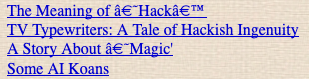
@Offirmo don't worry, the byte-for-byte data from the server is saved correctly in the WARC. Even though it's displaying incorrectly now, as we add encoding fixes later on it will update and fix older previously mangled/badly-decoded archives to display correctly.
pirate
on 16 Apr 2019
@Offirmo I just tried with the django branch: archivebox add http://catb.org/jargon/html/index.html and it seems to be working correctly now.
@pirate I guess this has been fixed since. Can you please confirm and close the issue if that is the case?
 cdvv7788
on 16 Jul 2020
cdvv7788
on 16 Jul 2020
@Offirmo if you see any further encoding issues on the latest django version feel free to comment back here and I can reopen this ticket.
pirate
on 16 Jul 2020
Related issues
 thethales
·
3Comments
pirate
·
3Comments
thethales
·
3Comments
pirate
·
3Comments
 onlyjob
·
4Comments
onlyjob
·
4Comments
 anarcat
·
3Comments
anarcat
·
3Comments
 jamelait
·
3Comments
jamelait
·
3Comments
Most helpful comment
@Offirmo don't worry, the byte-for-byte data from the server is saved correctly in the WARC. Even though it's displaying incorrectly now, as we add encoding fixes later on it will update and fix older previously mangled/badly-decoded archives to display correctly.