Architecture-components-samples: Extreme lags on Navigation sample
Navigation animations are extremely and consistently janky. I can count the frames. Sometimes between 3 and 10 frames only are drawn, the others are dropped!
 LouisCAD
All 9 comments
Unless you show your code, stack-trace or anything, no one will be able to guess anything.
 bernaferrari
on 27 May 2018
bernaferrari
on 27 May 2018
@bernaferrari The code is in this repo, unmodified. Compiled with Android Studio 3.2 Canary 15. Only the Android Gradle plugin has been updated. There are no guesses to take, just a performance issue to explain and tackle
LouisCAD
on 27 May 2018
Have you tried method profiling?
 Zhuinden
on 28 May 2018
Zhuinden
on 28 May 2018
@Zhuinden Yes, but it doesn't help finding the bottleneck.
Did anyone tried this sample?
I just tried to run it on another device, running Android 4.4.2, and Fragment transitions lag a lot too.
LouisCAD
on 30 May 2018
@yigit Are you experiencing these lags in the navigation sample during slide animations?
LouisCAD
on 30 May 2018
Yeah, no problems.. I even integrated into my app (you can try here: https://github.com/bernaferrari/ChangeDetection) and no issues.
bernaferrari
on 31 May 2018
@bernaferrari Your project doesn't drop frames during navigation like the sample here is doing 👍
LouisCAD
on 1 Jun 2018
To open the about screen (the info icon) I'm using the exactly same animation as this repo is using, I only changed the length from 500ms to 250ms. You could use DU recorder to record your screen, so we may take a look..
bernaferrari
on 1 Jun 2018
I got the same issue, the sample open Leaderboard is lags a lot. And I have done a method trace and I found the most of its time is doing draw operation, check the call chart below.
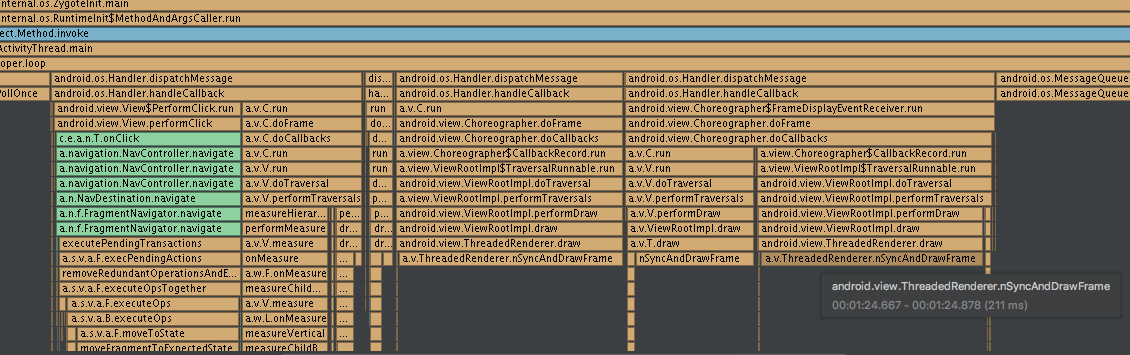
In addition, I found if you remove the avatar background android:background="@drawable/avatar_5_raster" from list_view_item.xml, the lags will relieve
 2dxgujun
on 7 Jun 2018
2dxgujun
on 7 Jun 2018
Related issues
 ShahakM
·
13Comments
ShahakM
·
13Comments
 iammert
·
14Comments
iammert
·
14Comments
 snehalgongle
·
15Comments
snehalgongle
·
15Comments
 fabioCollini
·
84Comments
fabioCollini
·
84Comments
 radzio
·
26Comments
radzio
·
26Comments
Most helpful comment
I got the same issue, the sample open

Leaderboardis lags a lot. And I have done a method trace and I found the most of its time is doingdrawoperation, check the call chart below.In addition, I found if you remove the avatar background
android:background="@drawable/avatar_5_raster"fromlist_view_item.xml, the lags will relieve