Archisteamfarm: FATAL errors on websocket hiccups
https://github.com/SteamRE/SteamKit/issues/426
2017-08-12 23:21:23|ArchiSteamFarm-9707|FATAL|ASF|OnUnobservedTaskException() System.AggregateException: A Task's exception(s) were not observed either by Waiting on the Task or accessing its Exception property. As a result, the unobserved exception was rethrown by the finalizer thread. (The remote party closed the WebSocket connection without completing the close handshake.) ---> System.Net.WebSockets.WebSocketException: The remote party closed the WebSocket connection without completing the close handshake. ---> System.IO.IOException: Unable to transfer data on the transport connection: Broken pipe. ---> System.Net.Sockets.SocketException: Broken pipe
   --- End of inner exception stack trace ---
   at System.Runtime.ExceptionServices.ExceptionDispatchInfo.Throw()
   at System.Runtime.CompilerServices.TaskAwaiter.HandleNonSuccessAndDebuggerNotification(Task task)
   at System.Net.Security.SslStreamInternal.StartWriting(Byte[] buffer, Int32 offset, Int32 count, AsyncProtocolRequest asyncRequest)
   at System.Net.Security.SslStreamInternal.ProcessWrite(Byte[] buffer, Int32 offset, Int32 count, LazyAsyncResult asyncResult)
   at System.Net.Security.SslStream.BeginWrite(Byte[] buffer, Int32 offset, Int32 count, AsyncCallback asyncCallback, Object asyncState)
   at System.Threading.Tasks.TaskFactory`1.FromAsyncTrim[TInstance,TArgs](TInstance thisRef, TArgs args, Func`5 beginMethod, Func`3 endMethod)
   at System.IO.Stream.BeginEndWriteAsync(Byte[] buffer, Int32 offset, Int32 count)
   at System.IO.Stream.WriteAsync(Byte[] buffer, Int32 offset, Int32 count, CancellationToken cancellationToken)
   at System.Net.WebSockets.ManagedWebSocket.SendFrameLockAcquiredNonCancelableAsync(MessageOpcode opcode, Boolean endOfMessage, ArraySegment`1 payloadBuffer)
   --- End of inner exception stack trace ---
   --- End of inner exception stack trace ---
---> (Inner Exception #0) System.Net.WebSockets.WebSocketException (0x80004005): The remote party closed the WebSocket connection without completing the close handshake. ---> System.IO.IOException: Unable to transfer data on the transport connection: Broken pipe. ---> System.Net.Sockets.SocketException: Broken pipe
   --- End of inner exception stack trace ---
   at System.Runtime.ExceptionServices.ExceptionDispatchInfo.Throw()
   at System.Runtime.CompilerServices.TaskAwaiter.HandleNonSuccessAndDebuggerNotification(Task task)
   at System.Net.Security.SslStreamInternal.StartWriting(Byte[] buffer, Int32 offset, Int32 count, AsyncProtocolRequest asyncRequest)
   at System.Net.Security.SslStreamInternal.ProcessWrite(Byte[] buffer, Int32 offset, Int32 count, LazyAsyncResult asyncResult)
   at System.Net.Security.SslStream.BeginWrite(Byte[] buffer, Int32 offset, Int32 count, AsyncCallback asyncCallback, Object asyncState)
   at System.Threading.Tasks.TaskFactory`1.FromAsyncTrim[TInstance,TArgs](TInstance thisRef, TArgs args, Func`5 beginMethod, Func`3 endMethod)
   at System.IO.Stream.BeginEndWriteAsync(Byte[] buffer, Int32 offset, Int32 count)
   at System.IO.Stream.WriteAsync(Byte[] buffer, Int32 offset, Int32 count, CancellationToken cancellationToken)
   at System.Net.WebSockets.ManagedWebSocket.SendFrameLockAcquiredNonCancelableAsync(MessageOpcode opcode, Boolean endOfMessage, ArraySegment`1 payloadBuffer)<---
 JustArchi
All 39 comments
This issue should be fixed since ASF V3.0.2.0 onwards (which implementes alpha7 version of SK2 2.0). If you want to help, please ensure that you're using ASF V3.0.2.0 and your SteamProtocols setting in ASF.json is set to 4 (websocket). If you spot any unhandled exceptions related to networking or websockets, especially similar to above, please let me know. Thanks!
JustArchi
on 28 Aug 2017
I've just got a bunch of those. I know today is maintenance day, but at the time I got those errors, Steam seemed to be operating fine, I made sure to keep an eye on https://steamstat.us/. Anyway, here's the log.txt:
My timezone is UTC-3, btw. And here's my ASF.json:
{
  "AutoRestart": false,
  "AutoUpdates": false,
  "Blacklist": [],
  "ConnectionTimeout": 60,
  "CurrentCulture": null,
  "Debug": false,
  "FarmingDelay": 15,
  "GiftsLimiterDelay": 1,
  "Headless": false,
  "IdleFarmingPeriod": 3,
  "InventoryLimiterDelay": 3,
  "IPCHost": "127.0.0.1",
  "IPCPort": 1242,
  "LoginLimiterDelay": 10,
  "MaxFarmingTime": 4,
  "MaxTradeHoldDuration": 15,
  "OptimizationMode": 0,
  "Statistics": false,
  "SteamOwnerID": <hidden>,
  "SteamProtocols": 4,
  "UpdateChannel": 2
}
 guihkx
on 30 Aug 2017
guihkx
on 30 Aug 2017
I have one more log file to share, thanks to my shitty internet. This one was generated on Windows, so that's why isn't in english... Maybe I've got a new error as well? (At least I couldn't find this message in the previous log I sent):
2017-08-30 22:59:06|dotnet-7144|FATAL|ASF|OnUnobservedTaskException() System.AggregateException: A Task's exception(s) were not observed either by Waiting on the Task or accessing its Exception property. As a result, the unobserved exception was rethrown by the finalizer thread. (There is already one outstanding 'ReceiveAsync' call for this WebSocket instance. ReceiveAsync and SendAsync can be called simultaneously, but at most one outstanding operation for each of them is allowed at the same time.) ---> System.InvalidOperationException: There is already one outstanding 'ReceiveAsync' call for this WebSocket instance. ReceiveAsync and SendAsync can be called simultaneously, but at most one outstanding operation for each of them is allowed at the same time.
   at System.Runtime.ExceptionServices.ExceptionDispatchInfo.Throw()
   at System.Runtime.CompilerServices.TaskAwaiter.HandleNonSuccessAndDebuggerNotification(Task task)
   at System.Runtime.CompilerServices.ConfiguredTaskAwaitable`1.ConfiguredTaskAwaiter.GetResult()
   at System.Net.WebSockets.WinHttpWebSocket.<ReceiveAsync>d__27.MoveNext()
--- End of stack trace from previous location where exception was thrown ---
   at System.Runtime.ExceptionServices.ExceptionDispatchInfo.Throw()
   at System.Runtime.CompilerServices.TaskAwaiter.HandleNonSuccessAndDebuggerNotification(Task task)
   at SteamKit2.WebSocketConnection.WebSocketContext.<ReadMessageAsync>d__14.MoveNext()
--- End of stack trace from previous location where exception was thrown ---
   at System.Runtime.ExceptionServices.ExceptionDispatchInfo.Throw()
   at System.Runtime.CompilerServices.TaskAwaiter.HandleNonSuccessAndDebuggerNotification(Task task)
   at SteamKit2.WebSocketConnection.WebSocketContext.<RunCore>d__11.MoveNext()
--- End of stack trace from previous location where exception was thrown ---
   at System.Runtime.ExceptionServices.ExceptionDispatchInfo.Throw()
   at System.Runtime.CompilerServices.TaskAwaiter.HandleNonSuccessAndDebuggerNotification(Task task)
   at SteamKit2.WebSocketConnection.WebSocketContext.Dispose()
   at SteamKit2.WebSocketConnection.DisconnectCore(Boolean userInitiated, WebSocketContext specificContext)
   at System.Threading.ExecutionContext.Run(ExecutionContext executionContext, ContextCallback callback, Object state)
   at System.Threading.Tasks.Task.ExecuteWithThreadLocal(Task& currentTaskSlot)
   --- End of inner exception stack trace ---
---> (Inner Exception #0) System.InvalidOperationException: There is already one outstanding 'ReceiveAsync' call for this WebSocket instance. ReceiveAsync and SendAsync can be called simultaneously, but at most one outstanding operation for each of them is allowed at the same time.
   at System.Runtime.ExceptionServices.ExceptionDispatchInfo.Throw()
   at System.Runtime.CompilerServices.TaskAwaiter.HandleNonSuccessAndDebuggerNotification(Task task)
   at System.Runtime.CompilerServices.ConfiguredTaskAwaitable`1.ConfiguredTaskAwaiter.GetResult()
   at System.Net.WebSockets.WinHttpWebSocket.<ReceiveAsync>d__27.MoveNext()
--- End of stack trace from previous location where exception was thrown ---
   at System.Runtime.ExceptionServices.ExceptionDispatchInfo.Throw()
   at System.Runtime.CompilerServices.TaskAwaiter.HandleNonSuccessAndDebuggerNotification(Task task)
   at SteamKit2.WebSocketConnection.WebSocketContext.<ReadMessageAsync>d__14.MoveNext()
--- End of stack trace from previous location where exception was thrown ---
   at System.Runtime.ExceptionServices.ExceptionDispatchInfo.Throw()
   at System.Runtime.CompilerServices.TaskAwaiter.HandleNonSuccessAndDebuggerNotification(Task task)
   at SteamKit2.WebSocketConnection.WebSocketContext.<RunCore>d__11.MoveNext()
--- End of stack trace from previous location where exception was thrown ---
   at System.Runtime.ExceptionServices.ExceptionDispatchInfo.Throw()
   at System.Runtime.CompilerServices.TaskAwaiter.HandleNonSuccessAndDebuggerNotification(Task task)
   at SteamKit2.WebSocketConnection.WebSocketContext.Dispose()
   at SteamKit2.WebSocketConnection.DisconnectCore(Boolean userInitiated, WebSocketContext specificContext)
   at System.Threading.ExecutionContext.Run(ExecutionContext executionContext, ContextCallback callback, Object state)
   at System.Threading.Tasks.Task.ExecuteWithThreadLocal(Task& currentTaskSlot)<---
Here's the complete log.txt:
Hope it helps.
guihkx
on 31 Aug 2017
Bug hunting continues with 3.0.2.3.
If you want to help, please ensure that you're using ASF V3.0.2.3 and your SteamProtocols setting in ASF.json is set to 4 (websocket). If you spot any unhandled exceptions related to networking or websockets, especially similar to above, please let me know. Thanks!
JustArchi
on 9 Sep 2017
It has happened again. I'm sorry for the huge 2MB file, but it took me too long to notice those errors. Anyway, here it is:
guihkx
on 13 Sep 2017
This only happens after Steam was offline eg. server unavailable, after that i also noticed that ASF don't notice that it isn't working and says 'still idling xyz' but in reality it isn't connected anymore and if i go into steam client no game is running anymore.
The only Solution then is to restart ASF.
This also started with the 3.x.x.x Versions and never happened with the last 2.x.x.x ones which was so small and smooth compared to the huge 3.x.x.x with tons of files.
 K4r0qtuYNE5G4qgZ
on 13 Sep 2017
K4r0qtuYNE5G4qgZ
on 13 Sep 2017
@K4r0qtuYNE5G4qgZ That bug was fixed long time ago, and existed initially in ASF V2 too. If you have something like that on latest stable then open new issue - websocket protocol is not default for ASF V3 and nobody is forcing you to use it, you should be glad we're trying to fix it and improve it rather than leave bugs around, not to mention that you can't run into this issue with default settings. If you're not happy with updates, then use V0.1 version.
@GUiHKX Can you tell me ASF variant and the OS you're using? Including OS version please. I see that you're running ASF in generic variant, so just copy paste output of dotnet --info. Thanks.
JustArchi
on 13 Sep 2017
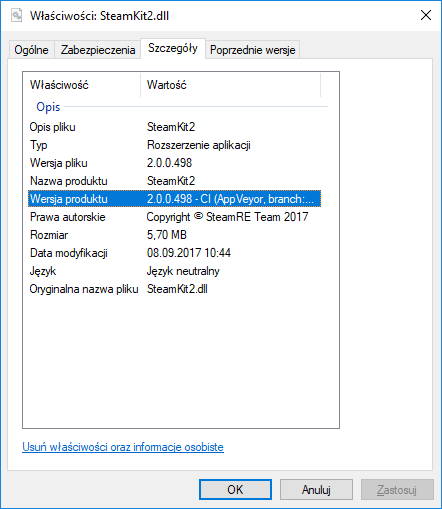
Also please confirm version of SteamKit2.dll library next to ArchiSteamFarm.dll. You can open properties of that file and switch to details tab.
JustArchi
on 13 Sep 2017
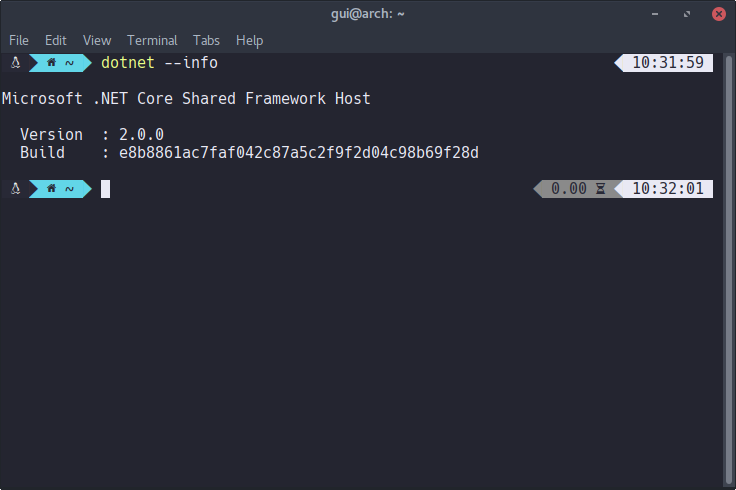
I share the ASF installation between Linux and Windows (I have them installed in dual boot). Last crash happened while I was using Arch Linux x64:
$ dotnet --info

Microsoft .NET Core Shared Framework Host

  Version  : 2.0.0
  Build    : e8b8861ac7faf042c87a5c2f9f2d04c98b69f28d
DLL version:
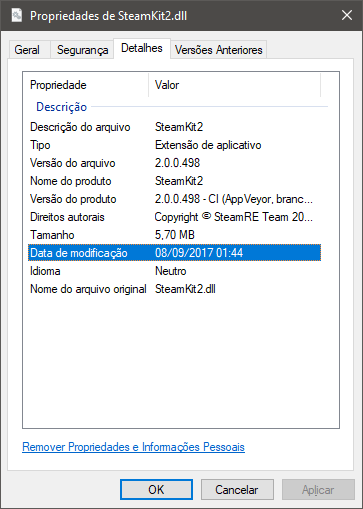
Now being more specific: I have Windows 10 Enterprise 64-bit and Arch Linux 64-bit, both partitioned in the same SSD disk, in dual boot. I use ASF-generic and it lies within the Windows partition, specifically in C:\Users\ME\Downloads\ASF\. So, when I'm using Linux, I mount the Windows partition to run ASF.
guihkx
on 13 Sep 2017
That dotnet --info is incomplete. It's missing OS information, as well as CLI version.
JustArchi
on 13 Sep 2017
I don't know what to say, I've installed it using this AUR package. And I'm not lying as well, that's all the output I get:
guihkx
on 13 Sep 2017
This is unsupported officially build which means I'm not sure if it's going to be accepted. I'd prefer not to bother dotnet devs with possible unsupported bugs.
Can you reproduce exactly the same issue on Windows or any officially supported OS? It's important that you do it on latest ASF with latest fixes, even if you were able to do it in the past.
JustArchi
on 13 Sep 2017
It doesn't necessarily have to be anything connected with custom build itself, as the issue seems generic enough to not look like a fuckup, but I prefer to fill missing details so we confirm that it's indeed corefx issue.
I'll report it to corefx guys, while you should still ensure that you can reproduce it on Windows, thanks.
JustArchi
on 13 Sep 2017
That very last crash I wasn't able to reproduce on Windows yet (I don't use Windows that often), but this one happened on Windows. But I could try to reproduce it on Windows next week (assuming it has something to do with Steam maintenance?)
guihkx
on 13 Sep 2017
That one is totally different one, on different ASF version. SK2 guys patched many of them, this is why I say that it's important to reproduce the crash on latest ASF and not basing on outdated data, so yeah I'd be happy if you could reproduce it on some official build.
Doesn't necessarily have to be Windows, you can pick Linux as well, but one of the official ones (Debian/Ubuntu for example).
JustArchi
on 13 Sep 2017
I'll set up a VM with one of the supported distros and hope to reproduce it next Tuesday. Thanks!
guihkx
on 13 Sep 2017
Looks like that won't be needed as Windows uses different implementation. Let's just wait for corefx devs response now.
JustArchi
on 13 Sep 2017
V3.0.2.4 Heartbeat() Connection lost to Steam Network, reconnecting.
After that it says still idling Dead Rising, but in Steam Client no game is running.
I use default settings, literally copied the default over, nothing changed.
Also it' strange but if that happens, sometimes even the Steam Client itself bugs out and
say can't connect anymore in some pages, but it is connected. This only happens if ASF
is running ans bugs out like that.
EDIT: I rolled back to ASF V2.3.2.0 now that did run for months without any issues before, to see if it happens there too eg. if something did change on steam or not.
K4r0qtuYNE5G4qgZ
on 13 Sep 2017
Your issue has nothing to do with this issue and is actually technical problem that is not even ASF bug in the first place to be discussed on GitHub. I'd appreciate if you didn't confuse everybody with unrelated stuff, thank you.
JustArchi
on 13 Sep 2017
I get the exact same error logs posted here so it is the same, i only did not post tons of logs that's all.
I also code apps myself and even test them for companies, so i assure you it's not non-sense and unrelated. But if you prefer me to post the same logs as the people above instead i will do that.
I also assure you that my Internet is flawless and decent, i have an 1Gbit fiber optics here and usually only have an hour overall per year or so where it isn't available, so it's certainly not an problem on my side.
And like i said, if you believe or not, if ASF has this hiccups it seems to affect the Steam Client too. That's why i will test that now with ASF V2.3.2.0 by let it run for a week or two to see if it still happens or if it only happens with the V3.x.x.x versions.
But if you aren't interested in the results and out of prejudice suppose i only waste your time and also only confuse then i will also not waste my time anymore too, it's not like i don't have more important things to do you know.
K4r0qtuYNE5G4qgZ
on 13 Sep 2017
Read what the issue is about.
FATAL errors on websocket hiccups
WebSocket protocol is enabled only when you set SteamProtocols to 4. Latest stable ASF V3, V3.0.1.9 has SteamProtocol set to 1, which uses only TCP protocol.
Can you explain to me how are you getting websocket crashes if you're not using websocket protocol?
Reporting issues without backing them up with mandatory log is automatically ignored, you're probably not realizing what you're talking about despite of "having a knowledge", by taking ASF log lines out of the context and incorrectly matching bug with technical issue. What you're doing right now is spamming without any constructive development feedback. Like I told you above, if you want to report an issue, then back it up with log, or don't waste your time and continue doing "more important things" if you can't follow this simple tip.
JustArchi
on 13 Sep 2017
It was set to 6 for V3.0.2.2 and now 4 for V3.0.2.4 and i got the same errors.
And no, i can't explain why it crashes the sockets, i only know it does if there are short steam disconnects like those maintenance periods or unplanned ones.
There also was an huge .net update that came yesterday, so i will also test if this one fix anything.
EDIT: Ok, i will post huge Logs in future if this makes you happy, but they are in german currently, so i will set it to english only for you then. Or well simply ignore it and not any longer waste my time here.
K4r0qtuYNE5G4qgZ
on 13 Sep 2017
It crashes the sockets because you're using experimental unsupported configuration, which is hitting exactly the issue we're resolving here. If you're expecting stable experience then don't use pre-releases and pre-release settings. If on the other hand you want to help the development, then don't complain and provide constructive feedback, like @GUiHKX is doing all the time, helping me greatly to solve all remaining ASF issues.
Pre-release is not "faster stable". Either you want to help the development, or you should not use it. And if you want to help, then you shouldn't make it harder for me. A simple "I've encountered the same issue on ASF V3.0.2.4" would be enough.
JustArchi
on 13 Sep 2017
Edited.
Gist below.
 Zuko
on 14 Sep 2017
Zuko
on 14 Sep 2017
If you could post full exceptions instead of half-cut then that would be great 🙂.
JustArchi
on 14 Sep 2017
Zuko
on 14 Sep 2017
Yep, looks like same already reported issue. What OS?
JustArchi
on 14 Sep 2017
CentOS 7 x64
Zuko
on 14 Sep 2017
Thanks, added that info to already opened ticket.
JustArchi
on 14 Sep 2017
Is this a new one? Dunno if it's related at all, and I wasn't sure if I should open a new issue...
2017-10-31 20:57:25|dotnet-2332|FATAL|ASF|OnUnobservedTaskException() System.AggregateException: A Task's exception(s) were not observed either by Waiting on the Task or accessing its Exception property. As a result, the unobserved exception was rethrown by the finalizer thread. (The operation was canceled.) ---> System.OperationCanceledException: The operation was canceled.
   --- End of inner exception stack trace ---
---> (Inner Exception #0) System.OperationCanceledException: The operation was canceled.<---
I just got that on Windows, a few minutes ago. I'm running the generic variant. Here's my ASF.json:
{
  "AutoRestart": false,
  "AutoUpdates": false,
  "BackgroundGCPeriod": 0,
  "Blacklist": [],
  "ConnectionTimeout": 60,
  "CurrentCulture": null,
  "Debug": false,
  "FarmingDelay": 15,
  "GiftsLimiterDelay": 1,
  "Headless": false,
  "IdleFarmingPeriod": 8,
  "InventoryLimiterDelay": 3,
  "IPCHost": "127.0.0.1",
  "IPCPort": 1242,
  "LoginLimiterDelay": 10,
  "MaxFarmingTime": 5,
  "MaxTradeHoldDuration": 15,
  "OptimizationMode": 0,
  "Statistics": false,
  "SteamOwnerID": <hidden>,
  "SteamProtocols": 4,
  "UpdateChannel": 0
}
There is not even a stacktrace, I'm not sure from where that one happened but if there is no extra info related to that then I can't guess anyway. Ignore.
JustArchi
on 2 Nov 2017
This issue should be completely fixed with next .NET Core release, which is 2.1. ASF will follow once it goes stable. Ref: https://github.com/dotnet/corefx/issues/24002
The issue remains open until it's fixed in ASF.
JustArchi
on 4 Dec 2017
"SteamProtocols": 1, but:
2018-02-05 08:40:16|ArchiSteamFarm-7725|FATAL|ASF|OnUnobservedTaskException() System.AggregateException: A Task's exception(s) were not observed either by Waiting on the Task or accessing its Exception property. As a result, the unobserved exception was rethrown by the finalizer thread. (The remote party closed the WebSocket connection without completing the close handshake.) ---> System.Net.WebSockets.WebSocketException: The remote party closed the WebSocket connection without completing the close handshake. ---> System.IO.IOException: Unable to write data to the transport connection: The lazily-initialized type does not have a public, parameterless constructor.. ---> System.MissingMemberException: The lazily-initialized type does not have a public, parameterless constructor.
   at System.Threading.LazyHelpers`1.ActivatorFactorySelector()
   at System.Threading.LazyInitializer.EnsureInitializedCore[T](T& target, Func`1 valueFactory)
   at System.Net.Sockets.Socket.RentSocketAsyncEventArgs(Boolean isReceive)
   at System.Net.Sockets.Socket.SendAsync(ArraySegment`1 buffer, SocketFlags socketFlags, Boolean fromNetworkStream)
   at System.Net.Sockets.NetworkStream.WriteAsync(Byte[] buffer, Int32 offset, Int32 size, CancellationToken cancellationToken)
   --- End of inner exception stack trace ---
   at System.Net.Sockets.NetworkStream.WriteAsync(Byte[] buffer, Int32 offset, Int32 size, CancellationToken cancellationToken)
   at System.Net.WebSockets.ManagedWebSocket.SendFrameLockAcquiredNonCancelableAsync(MessageOpcode opcode, Boolean endOfMessage, ArraySegment`1 payloadBuffer)
   --- End of inner exception stack trace ---
   --- End of inner exception stack trace ---
---> (Inner Exception #0) System.Net.WebSockets.WebSocketException (0x80004005): The remote party closed the WebSocket connection without completing the close handshake. ---> System.IO.IOException: Unable to write data to the transport connection: The lazily-initialized type does not have a public, parameterless constructor.. ---> System.MissingMemberException: The lazily-initialized type does not have a public, parameterless constructor.
   at System.Threading.LazyHelpers`1.ActivatorFactorySelector()
   at System.Threading.LazyInitializer.EnsureInitializedCore[T](T& target, Func`1 valueFactory)
   at System.Net.Sockets.Socket.RentSocketAsyncEventArgs(Boolean isReceive)
   at System.Net.Sockets.Socket.SendAsync(ArraySegment`1 buffer, SocketFlags socketFlags, Boolean fromNetworkStream)
   at System.Net.Sockets.NetworkStream.WriteAsync(Byte[] buffer, Int32 offset, Int32 size, CancellationToken cancellationToken)
   --- End of inner exception stack trace ---
   at System.Net.Sockets.NetworkStream.WriteAsync(Byte[] buffer, Int32 offset, Int32 size, CancellationToken cancellationToken)
   at System.Net.WebSockets.ManagedWebSocket.SendFrameLockAcquiredNonCancelableAsync(MessageOpcode opcode, Boolean endOfMessage, ArraySegment`1 payloadBuffer)<---
ASF Version 3.1.0.0, under Debian 8
 HeartOfSun
on 5 Feb 2018
HeartOfSun
on 5 Feb 2018
Websockets are also being used in IPC GUI now, and your issue was already been resolved by .NET Core team.
JustArchi
on 5 Feb 2018
the same problem @HeartOfSun centos7 dotnet-sdk2.1.4
 JadynWong
on 16 Feb 2018
JadynWong
on 16 Feb 2018
Websockets are also being used in IPC GUI now, and your issue was already been resolved by .NET Core team.
Which part of the above message you didn't understand @JadynWong?
JustArchi
on 16 Feb 2018
sorry.i understand. you mean is that I need to wait for the dotnet core team to update the runtime to fix this problem
JadynWong
on 16 Feb 2018
@w-victorique Stop spamming with stacktraces in entirely unrelated issues. You don't have even a single instance of websocket namespace. Ask in appropriate place for that (and GitHub is not appropriate place for technical issues).
JustArchi
on 4 Mar 2018
Fixed by #799
JustArchi
on 4 Jun 2018
Related issues
 ludo237
·
3Comments
ludo237
·
3Comments
 ttrl
·
3Comments
guihkx
·
3Comments
ttrl
·
3Comments
guihkx
·
3Comments
 MrBurrBurr
·
3Comments
MrBurrBurr
·
3Comments
 light444
·
3Comments
light444
·
3Comments
Most helpful comment
sorry.i understand. you mean is that I need to wait for the dotnet core team to update the runtime to fix this problem